

Closed (fixed)
Project:
Drupal core
Version:
7.x-dev
Component:
Bartik theme
Priority:
Normal
Category:
Bug report
Assigned:
Issue tags:
Reporter:
Created:
6 Sep 2010 at 13:05 UTC
Updated:
7 Nov 2010 at 10:01 UTC
Jump to comment: Most recent, Most recent file



Comments
Comment #1
Jeff Burnz commentedI have refactored the tabs to use a different technique for most browsers (floats) which works much better in standards compliant browsers and solves the IE8 and Opera RTL issues. For IE 6, 7 we take the floats off and use display:inline;.
I'm getting a lot of big horizontal scroll-bars under different conditions in different browsers although I do not think they're tied directly to this patch (needs testing).
Comment #2
Jeff Burnz commented#1: bartik-refactor-tabs-for-rtl.patch queued for re-testing.
Comment #4
Jeff Burnz commentedThe horizontal scroll bars were due to the skip link CSS, which has been fixed. I'm going to re-roll this shortly, it needs to go in because IE is the most popular browser in RTL speaking countries (I mean by miles, like 90% dominant), we really must support it properly.
Comment #5
Jeff Burnz commentedtagging
Comment #6
Jeff Burnz commentedUpdated patch, didn't have to as much this time around as some other patches have been committed.
It would be very good if this did not get committed until after #660614: Remove #block-system-main dependency, fix font sizes, remove crufty CSS, in which case this will need to be re-rolled.
Good for testing now and discussing the approach - this is how I normally build tabs - one of the main differences is that I do not rely on padding to set the height of the tab because this is fragile across browser (different browsers can render padding differently) so we get issues like #844456: Main menu is off by one pixel in Opera for Linux cropping up from time to time. What we do instead is rely on the font size and line-height which I have found to be much more robust - if you set line-height and font-size the same it will center align the text vertically.
Comment #7
munzirtaha commentedI applied your patch and my first notice is the opacity is removed and many lines are changed unnecessarily. So, I came up with a very small patch that fixed the problems without re-factoring the tabs. I don't have IE to test so I am waiting for your review.
Comment #8
munzirtaha commentedComment #9
Jeff Burnz commentedHmmm...
1) rgba is still in the patch
2) patch in #8 will not work correctly in IE6 or 7 in RTL mode
Citing "your patch changes many lines" is totally irrelevant. What is somewhat relevant is the amount of code - the patch in #8 simply adds more CSS, whereas the patch in #6 removes many lines.
Back to #6 please, if you have a review that would be good.
Comment #10
reglogge commentedIn #6 the margin between the tabs is now significantly smaller than before.
#main-menu ul.links lineedsmargin: 0 1px;Comment #11
Jeff Burnz commentedOK, I'll get to this, feel free to beat me to it :)
Comment #12
munzirtaha commentedMy review to your patch is:
1. The opacity is removed and I don't know why you removed the line background: rgba(240, 240, 240, 1.0);
2. The margins and paddings are not correct
3. The color of the tabs are changed to white background: #fff; unnecessarily
4. Some rules like: display: inline, zoom: 1 are added unnessarily.
5. You can fix the bug with much less code (16 compared with 65 changes roughly)
Please, note your patch encourage me to test and roll mine and without it, I might have thought it's a more esoteric problem, so I really appreciate your work and it's not a matter of my patch vs your patch. Compare the two and take your decision.
Here is my patch after fixing IE issue, too.
Comment #13
munzirtaha commentedComment #14
munzirtaha commentedRemoving a redundant new line
Comment #15
Jeff Burnz commentedHmmm, ok well I made a series of screenshots to show:
1) the patch from #14 and how it fails in RTL in IE and with text resizing.
2) comparisons for bartik-refactor-tabs-for-rtl_3.patch
You will see what I mean about your approach not working with IE and text resizing - there are several issues not accounted for. I would very much appreciated if you would work on the actual issue and stop spreading FUD about the patch in #6.
Please do not assign yourself to these issues - we want to keep them open to everyone, if you assign yourself others may not take up the challenge.
This new patch accounts for the 1px margin (#10) and takes account of the featured active tab which I forgot about in #6 (ops...).
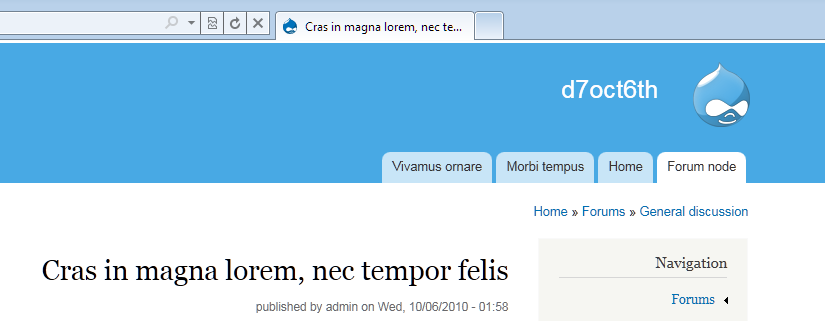
This screenshot shows the patch from #14 and how it fails badly in IE8 - the first two images are with bartik-refactor-tabs-for-rtl_3.patch, the 3rd and 4th shots are of the patch from #14
This is bartik-refactor-tabs-for-rtl_3.patch screenshot comparisons, IE6 looks the same as IE7 - note the small difference in the gap between the tabs in IE7 in RTL mode - this is pretty hard to solve and probably easier when #923928: theme_links adds a new line ('\n') after <li> - leads to space between horizontally aligned list elements lands
Comment #16
Jeff Burnz commented@munzirtaha - I would also like the point out that I am not playing some sort of "my patch is better than yours" game - that is actually pretty insulting, given the thousands of hours I have contributed to D7 over the past 18 months or so, and the thousands of lines of code I have written, and hundreds and hundreds of issues worked on with many many other contributors.
LET ME BE CLEAR: I only look at the techniques used - I know in one glance that the approach currently used in Bartik has some fundamental issues - its fine in LTR and if you don't intend to support text resizing - however it simply not robust enough for the harsh reality of a core theme. What you are criticizing as "unnecessary lines" are in fact a full-proof backstop to the kind of failures Bartik is currently experiencing.
You cannot make a silk purse from a sows ear - its as simple as that. You can dress up and make-over the current approach all you want, but at the end of the day the approach is flawed - that you cannot fix that without changing the approach.
Comment #17
munzirtaha commentedUmm! I haven't tried text resizing and sorry if you find my words insulting thought it's not meant to be, and definitely if you need all your changes to support resizing, I would recommend your patch but let me find IE 8 to test and understand the issue better.
Comment #18
munzirtaha commented@Jeff: Till I can find IE 8 to test, can you please fix the issues with opacity disappearing and hover not working. I applied your new patch and still can see those problems in firefox.
Comment #19
Jeff Burnz commentedWhat version of Firefox are you running - the patch is developed in Firefox 3.6.x - when you make a browser report its very handy to have screenshots to visually show the error, for example I have no understanding what you mean by "opacity disappearing". I can't fix an issue that I cannot see after testing this in every major browser on my system.
Comment #20
munzirtaha commentedIt's very strange that every major browser you tested doesn't display the problem whereas every browser I tested display the problem. I really suspect something wired from my side then but please have a look at the screenshot. I see this at least in
Firefox: 3.6 and 4.0b7pre
Chromium: 7.0.540.0 (61020)
Opera: 10.62.6438
The tabs color is just white, even when I hover over it with the mouse after applying your patch.
Comment #21
Jeff Burnz commentedWow, crazy - lets see if we can get some feedback from the others, what OS are you using?
Also - could you check the markup and see that they are not all getting the active classes for some reason? If each link is active they will be all white. Outside chance but worth checking.
Embedding the image from #20
Comment #22
munzirtaha commented@Jeff: my OS is maverick and I now took a look at your patch and found that if I removed a.active and leave a:active only it works properly. Here is a patch that fixed this problem and keeps all your other changes
Comment #23
munzirtaha commentedAha! the problems happen to me and not you because I am using the same path "" for all those testing links. However, do we really need a.active here?
Comment #25
Jeff Burnz commentedYes, we really must leave the design as faithful to Jens vision as possible, we should not be changing the design at this stage, just fixing bugs.
The patch in 15 needs a reroll since the big font sizing patch landed
Comment #26
Jeff Burnz commentedRe-roll chasing HEAD, also fixes a regression for IE6/7 tabs that stemmed from a typo in the Fix the Header patch that just got committed, my apologies for that.
Comment #27
Jeff Burnz commentedOK, getting tired...
This screeny is still relevant (its the same code): http://drupal.org/files/issues/bartik-tabs.png
Also did a quick test in IE9, attaching screenshot.
Comment #28
Jeff Burnz commentedRetitling to reflect the issue better - in short the tabs are not working correctly in IE6, IE7, or Opera RTL. The patch basically changes the how they are positioned, by using good old fashioned floats instead of display: inline. This is the only way I have found to reliable ensure RTL works accross browser, there are probably other good methods, but this is one I have used for years so I have big faith in it.
Comment #29
aspilicious commentedThis is good to go!
Comment #30
webchickCommitted to HEAD. Thanks!
Comment #32
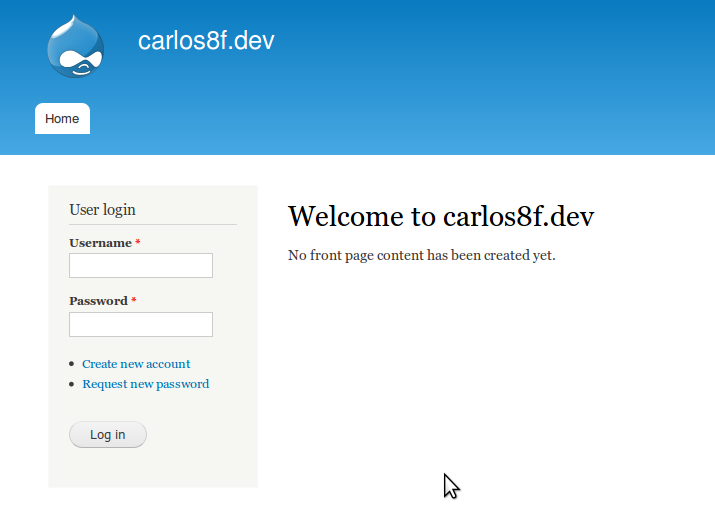
carlos8f commentedThe tabs are hovering too high in Firefox now. I have the latest CVS D7 HEAD, using Firefox 3.6.12 on Ubuntu Lucid. Standard profile install. The relevant CSS seems to be here:
When removing the new padding rule with Firebug, the tab snaps back in its normal place.
I tried reversing the committed patch and it also fixes the issue. I haven't tested in any other versions of Firefox; my other browser is Chrome and it renders it correctly.
Comment #33
webchickI noticed this on my Firefox too (4 beta, OSX Snow Leopard), but only after cvs upping after a week or so. Since this patch was committed about a month ago, I'm not sure why reversing it out works. Hm.
Anyway, I can't roll a beta/RC with Firefox looking so broken. :\
Comment #34
carlos8f commentedAlso confirmed on FF 3.6.10 Mac OS Snow Leopard.
Comment #35
damien tournoud commentedThe culprit is #960490: Regression: ul.links generated by theme_links() always appears as .inline.