

The Creating Communities Web site has been created for the Denver Public Library using Drupal and extended by the Zen theme engine, Apache Solr Search Integration and the eXtensible Catalog (XC) Drupal Toolkit.
Recently, Drupal has been strongly embraced at the Denver Public Library becoming the official CMS of choice. Other Colorado Libraries are also making serious commitments to Drupal because of its flexibility, support for XML, taxonomy, low cost of ownership and a great community that provides many modules that support library ambitions with actual working code.
The Western History & Genealogy Department, in partnership with the City of Denver, History Colorado, Auraria Library, and University of Denver Penrose Library has brought together a number of historic resources and digitized archival materials. The project is funded by a National Leadership Grant from the Institute of Museum and Library Services (IMLS).
We encourage you all to explore the site and learn more about the history of Denver.
Highlights
- Neighborhoods: We've digitized photographs, maps and documents from seven of Denver's historic neighborhoods including Auraria, Barnum, Capitol Hill, Five Points, Park Hill, University Park and West Colfax. Each neighborhood highlights the people, places and events that shaped each neighborhood's unique history.
- Building Histories: Digging through all of the historical resources available to compile your house or building history can be a daunting task. We've mapped a number of resources such as Assessor Records and National and State Historic Buildings on a Google map to make your house or building history research a breeze. There are also tips on how to search photographs, maps and building permits. Plus we have digitized Householder Directories, City Directories and Denver Municipal Facts.
- Collections: If you just feel like browsing around, we have a vast collection of digitized archival materials in the collections section.
- myDenver: A place for you to share your Denver history - upload photographs and favorite stories, and engage in conversations to enrich your Denver community.
- Creating Communities Mobile Application: The mobile version of the Creating Communities project will enable fans of Denver history to explore our 7 historic neighborhoods. More than just walking tours of Denver, the app features National and State Historic buildings from the Office of Archeology and Historic Preservation (OAHP) at History Colorado and historic photographs from the DPL Western History Digital Image Collection. Users of the Creating Communities app can contribute to the Creating Communities experience by adding comments, uploading photos and stories about the places and events featured in these neighborhoods. The app is available on iTunes and in the near future a mobile version of the Drupal site will become available.
Please stop by and explore the Web site and contribute to the myDenver section. We look forward to hearing your stories about Denver and sharing the history that has shaped this great city we call home!
Using Drupal as a Content Management System
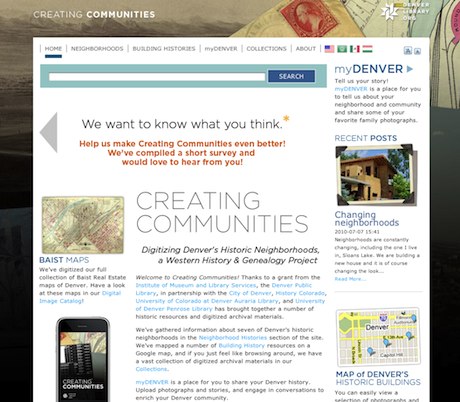
Drupal was a perfect fit for this project because of its low cost, ease of use, quality APIs, vast collection of modules, community support and many other reasons.
Drupal 6.x was used given that software development started in October 2009 and the maturity of desired contributed modules.
Important Contributed Modules
- eXtensible Catalog (XC) Drupal Toolkit *
- eXtensible Catalog OAI Harvester: The engine to harvest XML data
- GMap
- Apache Solr Search Integration
- Google Analytics
- Mollom
- reCaptcha
* The XC Drupal Toolkit is a collection of contributed modules that are focused on providing integration with existing library systems such as the eXtensible Catalog and ContentDM. For the Creating Communities project, the XML harvesting capabilities were used to aggregate data from multiple digital asset management systems to provide data for a Drupal Apache Solr driven faceted search interface.
Custom modules
This project called for functionality that had yet to be created and resulted in custom Drupal module development. The following four modules were written for this project:
- Dublin Core to CCK: This module maps harvested Dublin Core XML data into Drupal CCK fields which allows data to be fully accessible, ordered and accessible to Apache Solr, Views etc.
- DPL Dublin Core Schema: provides the Dublin Core XML schema for Drupal to use.
- Popup Survey: This module was developed to prompt site visitors to participate in a survey at various times throughout browsing. It uses Lightbox2 to produce the prompt and assorted hooks/logic to determine when the user will be prompted.
Platform and Hosting
Oracle Solaris 10, MySQL 5.x, PHP 5.2x, Apache 2.x, Lucene Solr (Java Application), Jetty or Tomcat Java with Java Runtime Environment 6 and the eXtensible Catalog Drupal Toolkit.
Languages Used
PHP, SQL, XHTML, AJAX, CSS, JSON, XML, JavaScript, Flash (video).
JavaScript and jQuery
- Lightbox2 jQuery plugin is used for the galleries and to display full size image.
- JQuery slider is being used for the image carousel on the front page.
- Drupal uses the jQuery library.
PHP
PHP resources include, PHP-CURL, Alternative PHP Cache with Upload Progress enabled and Drupal required resources.
XML
- OAI-PMH: The Open Archive Initiative Protocol for Metadata Harvesting specification is being used to harvest data from multiple digital asset managers.
- Dublin Core: The chosen XML schema for ADR and ContentDM. This Schema is being used by the OAI Harvester to collect data from the digital repositories. The data is stored in the Solr search index and data from these fields are stored in Drupal CCK fields. The development team authored a custom Drupal module that makes the field mapping from DC XML fields to CCK fields possible.
Development
Workflow
The iterative project management approach was transparently implemented by the developer and used exclusively for the web site. Subsequently, the project workflow meshed very well with the content managers and other library staff. Content managers were able to contribute content to the web site during the entire process without interruption because of the planned iterative cycles. Meaning, a release candidate version of the web site was kept available without interruption during the entire project. Each iteration would add features to the release candidate instance after development and testing was completed using local instances. After collecting feedback from the completed iteration, more features were scheduled and the development of the next release candidate would begin after associated tasks were scheduled. The importance of this system was to make sure that the release candidate was always available for content management.
Content managers and archivists were issued credentials and a streamlined interface was used to add content. Revision control was implemented from the beginning as a means to control page editing and organize content development.
Project Management
A project management system was used to plan development iterations, record development hours and structure communication between the development team, content team and library management.
The iterative project management technique was implemented by the developer and the library to provide closer collaboration with the content management team, other library personel and other libraries.
A list of iterations were scheduled using the project management system. Features were listed with the iterations and tasks were assigned to feature requests as the iterations became current. The PM system also was an effective communication tool providing a system of comments and e-mail notifications to form structured conversation for everyone involved in the project. Managers found it easy to log-in and follow the project's status in realtime which encouraged participation at all levels.
Subversion
Subversion (SVN) was used through the software building process by the developers to insure organization, quality control, self documentation and other reasons inherit in source control management systems.
Collocated server
A collocated server was provided by the developer and functioned efficiently throughout the project. The server was used to run the release candidate web site that included the Apache Solr search index, database and PHP.
Graphic Design
All images were provided by the library and all theme development including CSS, XHTML, JavaScript and PHP was provided by the developer.
Custom Zen Sub-Theme
The Denver Public Library has chosen Zen as the official base theme which is currently being used for main web site DenverLibrary.org. Creating Communities is also using Zen and created a similar Zen sub-theme in an effort to maintain consistance in usability and branding.
The Creating Communities theme was exclusively created by the developer as a Zen sub-theme. It is important to note that all code written for this project complies to Drupal coding standards.
The custom theme has been tested against multiple browsers including Safari, Mobile Safari, Webkit, Chrome, Internet Explorer versions 7 and 8, and Firefox 3.x.
This sub-theme was created to maintain branding and a similar look and feel to the parent Denver Public Library web site denverlibrary.org.
Custom Search Results
The search results have been customized in the theme layer to display thumbnails if available from the digital repositories and to provide an external link to the original content. Local Drupal content is mixed into the search results but may also link to external content as in the case of assessor record and OAHP search results.
Information Architecture
Assessor Records
All available assessor records have been imported into the Drupal database. Each assessor record is displayed as a pin on a google map that that is filtered by neighborhood. Each neighborhood has a link on the corresponding navigation. When the pin is clicked a popup bubble appears with the details of the record and a link to the original record that resides in ContentDM.
OAHP - Historic Buildings
All available records for the Office of Archeological and Historical Preservation historic buildings have been imported into the Drupal database. A map pin is generated per record on a google map. When the pin is clicked a map popup windows appears that contains record details and a link to the original record that contains more information.
Faceted Search Interface
The Drupal Apache Solr module is used to index all of the site content, provide filters based on content criteria by providing facets. The Solr index provides content inclusion or exclusion and weight and bias configuration bassed on content criteria. A Lucene Solr search index is utilized to provide a faster and more accurate search than Drupal's core search module and relieves expense on the database resulting in a performance increase.
Harvested Data
Data is collected from multiple digital asset managers such as the Denver University Peak Digital Library Alliance Digital Repository (ADR) and OCLC's ContentDM system and has the capability to harvest data from any OAI-PMH XML compliant systems. See the Open Archive Initiative for details.
Neighborhoods
The neighborhoods section contain informational pages about each neighborhood and a photo gallery. The lightbox2 jQuery image viewer is used to provide a timed slideshow that also offers manual advancement.
myDENVER
The myDENVER section is a collection of anonymous user generated content that consists of text and images. The purpose is to provide a means for neighborhood community members to provide stories, written histories and historical images that are significant for each neighborhood.
The users can flag content as inappropriate which notifies the content manager by e-mail and lists the post in a queue for review.
The Mollom module and service is used to protect against spam bot generated posts and offensive material based on content keywords and other heuristics.
The reCaptcha module also used to protect against script bot generated posts.
Find Out More
The Creating Communities project Web team is motivated to provide code, configuration details and other information about the project with other museum and library institutions interested in using similar technologies. Please contact the Western History and Genealogy Department at the Denver Public Library for more information.

Comments
Beautiful Design
Easy to navigate menus. Nice graphics.
Although "creating communities" is repeated in title tag. Domain was created on "23-Jul-2010" and PageRank is 0. There is no sitemap.xml, keyword tag, description tag.
But your site is @4th position in Google with search keyword “Creating Communities”. Great!
Simple, easy to navigate
Simple, easy to navigate menus and layout. I love the background image. How did you add the background image? Keep up the good work and thanks for your contribution to the community. I love the Popup Survey.
the pop-up survey is kinda intrucive...
...I mean, people visiting a website go there for the content. Forcing a servay dialog in the form of a full-screen lightbox to their face on first visit is a bit of a turn-off IMHO. It could be a stick-to-top/bottom popup that would still leave the content be displayed in full instead of grayed out in the background.
Other then that, I really liked what I saw after the 'leave-me-alone' initial click ;)
Popup
The survey will end this Monday. I apologize for the inconvenience. It was a requirement.
A niggle, but the footer
A niggle, but the footer could use a little work...sorry....
Other than that, this is an exceptional Drupal development. A perfect showcase of its power, brought together in a beautiful website.
Georgous work.
Bottom Footer
What could make the bottom footer better? Would you like to see more links or design? Is something broken that I missed?
Again, just a niggle - and of
Again, just a niggle - and of course my personal taste - but I don't quite like it for some reason.
Maybe its too high? Maybe the spacing between list items is too much? The font too big? Maybe using that nice light green colour from the search box instead of the bright blue?
I can't quite put my finger on it, but there's something about it i think detracts from the overall feel. But again, my personal taste, and certainly the rest of the site is stellar.
Great work.
When I view it in Safari and
When I view it in Safari and firefox, there is more padding or margin on the right then the left.
Beautiful from top to bottom.
Beautiful from top to bottom.
Outstanding!
This is a fine example of what makes Drupal so valuable to us all. The features exhibited here are the cream of the crop, long and deep. I just a few years ago it would have taken an army of developers forever to build such a useful site AND beautiful site.
It is refreshing to see so many different features so tastefully used, each one seems necessary, like the site would be missing out with out the mapping or being able to search?
A true Drupal Show Case, very impressive!
Enduring. . . .
That's an understatement, given all the assets this site will preserve. Thumbs up for that.
Question: How does the Library plan to deal with ownership/rights of user-submitted content (text, photos, etc.)?
Maybe I'm missing something, but all I see on the submission form is the Mollom policy, namely:
Is that it? Or is there another statement (or maybe a Creative Commons license) buried somewhere in there?
Thanks!
How did you do the content
How did you do the content translation? The url doesn't even change when you select a new language. How did you accomplish that?
They use Gtrans module
They use Gtrans module http://drupal.org/project/gtrans
Why is this module marked as
Why is this module marked as obsolete?
We had to patch the gtrans module
We had to patch the gtrans module for it to work.
Interesting. Are you going to
Interesting. Are you going to release the patch back to the community?
Nice graphics.
Nice graphics.
As a Colorado native
It makes me homesick. Great site and info. I have been gone for 15 years and living in China it is a great time waster for me. I could spend lots of time on your site. Ignore the nay sayers. Drupal is great and I am so happy to see DPL using drupal as the framework. Good job.
[SITE INTRO][2] Why Re-Create an Open Learning Resource @ TheCenterOfTheNet (Mission Statement) Part 2
spanish language flag
I think the spanish flag for spanish language translation is wrong.
It's the flag of mexico.
It's the flag of mexico.
It depends on what part of the world
It depends on what part of the world your are located. Are you closer to Spain or Mexico?
I think that Mexicans know
I think that Mexicans know the Spanish flag ;)
Great site
Really nice - congratulations.
Amazing website! Just one
Amazing website!
Just one question... Why the spanish translation has the mexican flag?
They are in America... :)
They are in America... :)