


This project is not covered by Drupal’s security advisory policy.
Provides fieldgroups for colorbox triggers and for colorbox popups. This is useful if you would like certain fields of an entity to appear in a popup, instead being displayed immediately on the entity's page.
Dependencies:
Installation
- Download and enable this module and its dependencies, as normal
- Check 'Enable colorbox inline' here: /admin/config/media/colorbox
Usage
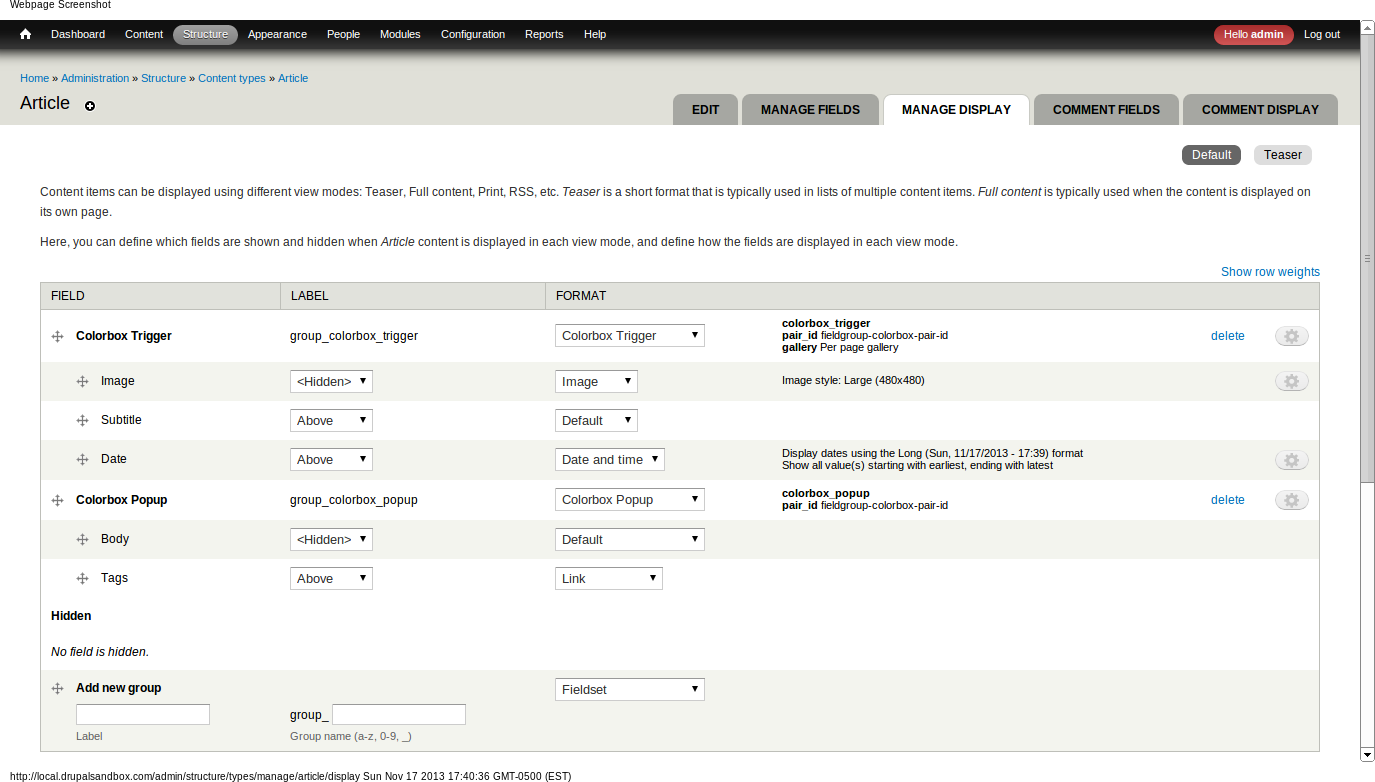
- Go to your entity type's 'Manage Display' screen
- Create a 'Colorbox trigger' field group
- Put fields in there that you want the user to click on
- Create a 'Colorbox popup' field group
- Put fields in there that you want in the popup itself
Notes
- Each trigger-popup pair needs to share an identical "pair ID", which you can change in the field group instance settings, right there on the Manage Display screen. This allows you to have more than one colorbox setup in the same view mode. (or even multiple triggers for the same popup)
- In the trigger field group you can set a "gallery" mode, similar to the Colorbox image field formatter.
Project information
- Project categories: Content display, Site structure
 112 sites report using this module
- Created by brockfanning on , updated
 This project is not covered by the security advisory policy.
Use at your own risk! It may have publicly disclosed vulnerabilities.

