



This project is not covered by Drupal’s security advisory policy.
There is an open security issue: Documents are stored in the public filesystem
Overview
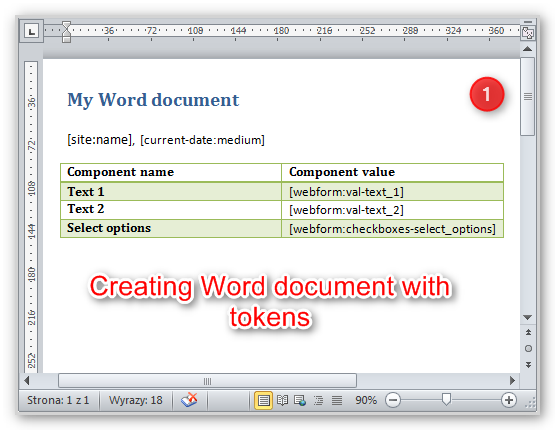
This module fills Word (docx) file with values from Webform components entered by user using tokens. Optionally can convert output file from docx to PDF using LibreOffice installed as CDE package. It's useful when you have to fill advanced docx file.
Features
- Fill docx file with Webform components values using tokens.
- Custom replacements.
- Output file as docx or PDF using LibreOffice.
- Provides additional tokens:
[submission:options:?] for options values with :inline and :radio modifiers.
Requirements
- Webform 4.x
- Token
- (Optional) Libraries - used to include LibreOffice files. Only if you need convert files from docx to PDF.
Installation and configuration
- Unpack and move directory "webform_document" to your modules directory.
- Enable it in the modules list of your site.
- For PDF output download LibreOffice in CDE package from (URL NEEDED - TODO) and move it to "libraries" folder.
- Create docx file with tokens inside.
- Add webform node and navigate to "Document template" tab.
- Choose output type and upload docx file.
- Fill webform and filled docx/PDF file will be automatically downloaded.
Credits
- This project has been sponsored by e-direct.
Similar projects
- FillPDF fills PDF from webform values using external tools.
- Webform2PDF generate PDF from scratch using webform results.
Supporting organizations:
Initial development and support.
Project information
 Seeking co-maintainer(s)
Maintainers are looking for help reviewing issues.- Project categories: Content display
 29 sites report using this module
- Created by rafalenden on , updated
 This project is not covered by the security advisory policy.
Use at your own risk! It may have publicly disclosed vulnerabilities.

