Field Groups allows you to group fields - both on an entity's edit form, and in the entity's view/display mode. These groupings are configured separately, so you can have fields grouped one way on the edit form and a different way when the entity is being viewed.
Background Info
Field groups, which enable you to display fields in groups on your edit pages, have a long history. Since field group functionality was included in the CCK for Drupal 6, the Field Group module is available for Drupal 7 and has a pre-release version for Drupal 8. As fields moved to core, some submodules of CCK were left out and we had to take on the challenge to make it a contributed module.
Purpose
The purpose of this module is to group fields with the intention of wrapping them in a container; not to handle logic on the fields. For example, to hide or show a field group depending on some condition you can use Conditional Fields. We chose to make this a display tool by design.
Features
- One of the biggest new features is the unlimited nesting. There are no restrictions to the nesting of field groups and fields in each other.
- API to create custom field group format types or alter existing ones.
Field group types
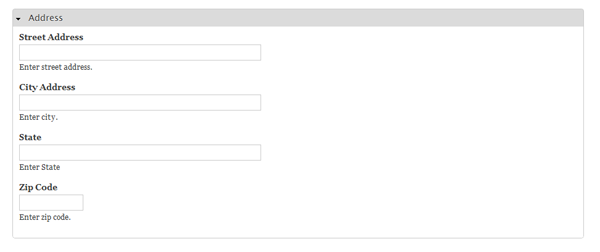
Field_group has four format types available when displaying the elements on a manage fields page. Refer to Using the "Field Group" to manage content display for the options when displaying the elements on a display fields page. The following is an illustration of the different options:

- Fieldset
- This is available on node details and node forms. You can configure them to be open (normal fieldset), collapsible or collapsed. You can also add classes to the wrapper to use in your CSS files.

- Accordion
- Accordion grouping involves a slightly different approach. First define the accordion wrapper (or "Accordion Group" element), then define the accordion items. Once those elements have been defined then place the field entries under the accordion items. This is required so you can create more than one accordion set on a page. It also eases the JavaScript controls and handling a lot.
- So you always create an accordion group and create a couple of accordion items in the group. Pay attention to the configuration of the defaults. You could in fact set them all to open or closed, however that would not give you the effect you desire.
- Vertical tabs
- This is used from drupal core as well, however some alterations were needed to obtain the vertical tabs on front-end nodes. They work in the same way as accordion in the sense that they also have a wrapper and nested sections. Here we have a vertical tab with tabs in it. You have default values as well to start with one open tab.
Remark Note that you could set tabs without a wrapper. Doing this will make them appear in the node forms default vertical tabs section.
- Horizontal tabs
- Field group provides a library very similar to vertical tabs in core. (In a later stadium I hope some other module or core will provide this.) Place a horizontal tabs wrapper where you can drop your horizontal tab sections containing the fields.
Note: Default configuration requires you to set one tab open just like with vertical tabs.
- Multipage
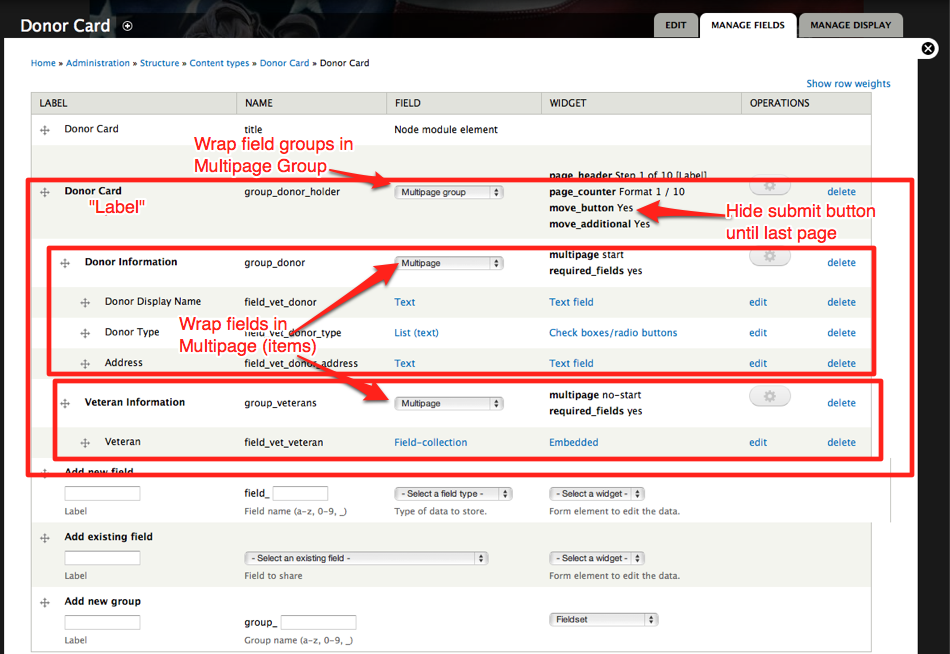
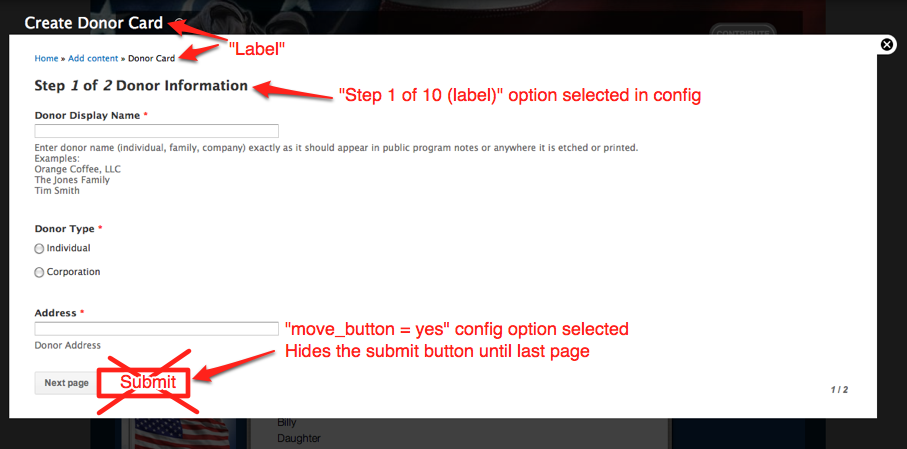
- YES! You can split your data entry (Create Content / Edit node) forms into multiple pages like a wizard with just the fieldgroup module! Wrap fields in multiple Multipage Items ("multipage" fieldgroup type), and nest these multipage items within Multipage Groups ("multipage group" fieldgroup type). Options on these allow for things like moving the Submit button to the very end of the wizard and changing the 1 of 10 steps labeling.
See attached screenshots for an example:
Multipage fieldgroup config UI
Multipage resultant form
Notes: Most format types have translatable labels, however, accordion, vertical tab wrapper, and horizontal tab wrapper don't have a label. Also "Field Group" added to the node "add/edit form" does not add the same Field Group to your display modes. A new Field Group must be added to each display (if needed on output).