

 The 2026 Drupal Business Survey is open. Your response will help shape the future of the Drupal business ecosystem.
I was really happy to see that it is now possible to pass on view/update/delete permissions depending on each type of permission on the referenced node. Yeah!
Unfortunately, it also seems that passing on edit permission as a view permission doesn't work the way it should. To reproduce:
* Install Content Access and disable general view access to story and page nodes. Allow editing own nodes for both types.
* Install Node access node reference
* Create a node reference from stories to pages, granting *view access* if the user has update access to a referenced node
* Rebuild access table if required
* Create a page with user 3 as author. Create a story with user 1 as author.
-> User 3 can't view the story, even though she can edit the page node.
I tried running Devel node access to find out what was wrong, but it says that view privilege should be present. :-/
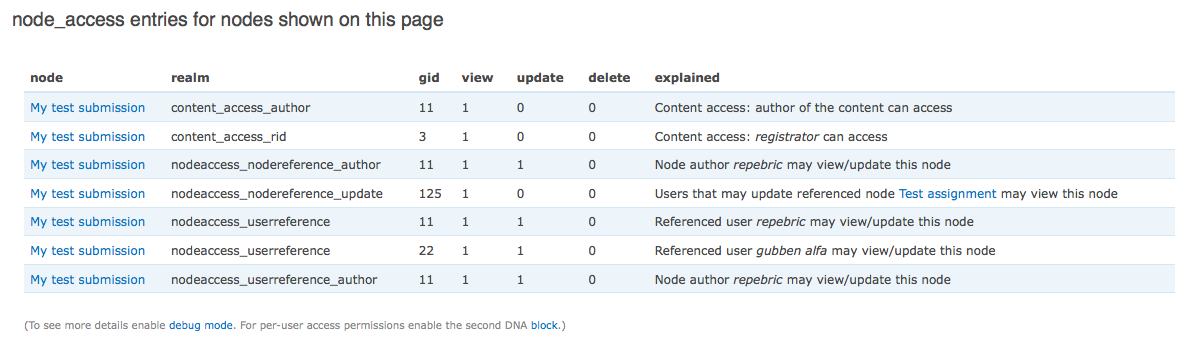
Screenshot attached for a case parallel to the one described above. The interesting row is the middle one, "Users that may update referenced node Test assignment may view this node". The acting user has indeed permission to edit that referenced node.
| Comment | File | Size | Author |
|---|---|---|---|
| #10 | Submission (admin).png | 157.65 KB | itangalo |
| #10 | Submission (teacher).png | 80.67 KB | itangalo |
| #10 | Assignment (teacher).png | 120.94 KB | itangalo |
| #6 | node_access_bug_report_setu.tar_.zip | 3.24 KB | itangalo |
| #4 | NodeA.png | 90.25 KB | miax |


Comments
Comment #1
danielb commentedMake sure that User 3's role has the permissions (under user admin section) to view the content type in question?
Usually if Devel shows the right grants, there is something else going on.
Comment #2
miax commentedI'm also very happy with this module!
But I find myself having exactly the same problem as Itangalo.
The solution by granting the user 3's role to view the content type would cause all users with that role to always be able to view that node.
I would like only users with update access to the referenced node to be able to view it.
I'm using node access user reference module to set permissions "view" and "edit" on the referenced node.
To pass on update access if the user has update access to a referenced node works fine but to only grant view access if the user has update access to a referenced node does not sadly.
Any thoughts on this? Maybe I'm missing something here?
Comment #3
danielb commentedIt seems my advice in #1 about view permissions on the content type was wrong - since there is no such thing as view permissions on most sites, only an 'access content' permission - which I assume is turned on for everyone.
Please try the "Devel node access by user" block and check if the user in question has the grants expected. If not we may have a bug.
Comment #4
miax commentedYes, 'access content' permission is turned on.
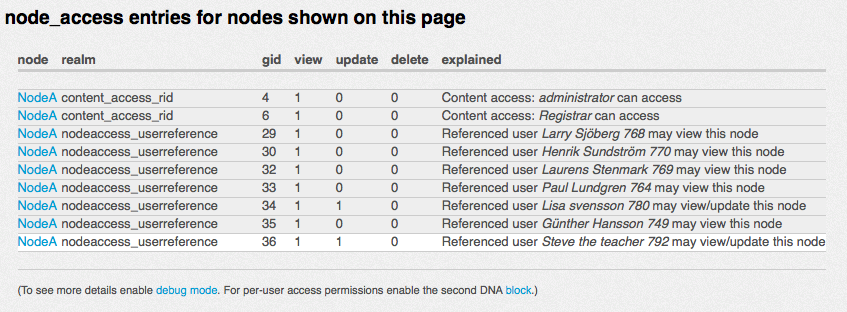
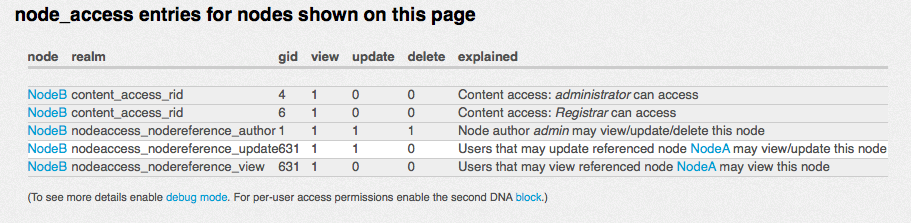
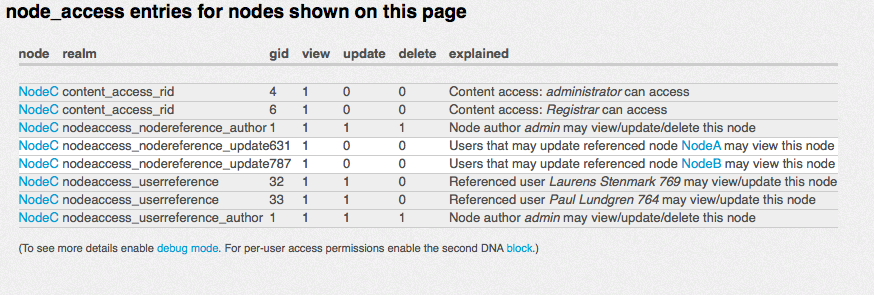
I tested this with "Devel node access by user" and have provided some screenshots of this.
The scenario is:
Node A: user gets view/update access by user reference. This works as expected.
Node B: Users that may update referenced node (Node A) may view/update node B. This actually also works as expected.
Node C: Users that may update referenced node NodeA may view node C. (This does not work).
I also have a scenario where users that may update referenced node NodeB may view node C.
None of these two access settings are working as expected. No view access is granted only update access works if I pass that permission on.
Comment #5
danielb commentedNo you haven't?
As far as I can tell by the screenshots, it's working as you intended?
Comment #6
itangalo commentedI've tried this on a clean install, and can confirm that while the Devel Node Access says that access is granted, Drupal behaves as if it is not.
Instead of writing a pretty long text about a setup to test this, I recorded a five minute screencast that shows the problem (and some perhaps related aspects), and I also exported a feature with a setup replicating the one in the screencast.
I hope this can help to understand the bug. In short: it seems that the cross access isn't working as intended.
Screencast can be found here: http://vimeo.com/23786718
Feature is attached below.
Comment #7
itangalo commentedHi again
I dug around in the code of the module, to try to find something to update/bugfix, but unfortunately I couldn't find anything.
I would like to applaud the clear code and well-written comments, though – your coding style is a good example for the whole community. Respect!
Also: I was trying to contact you with the contact tab on your d.o profile, to see if there is any chance of having you look at this issue during this week. But the contact tab was turned off, so I failed. :-/
If you think it is possible to look at this issue shortly I would be very happy for a ping (see my contact tab).
Thanks for a great module.
Comment #8
itangalo commentedI've dug some deeper into this issue, and MickeA discovered that Views can actually list nodes that you are (incorrectly) blocked from seeing. This tells me that it is actually not the view access that is bugging, but something in the menu access.
I don't know enough about node access to understand how the menu callback works – I tried in vain to find a hook_menu_alter in the module – but maybe this is useful information for someone with more knowledge and skills.
All the best,
//Johan Falk, NodeOne
Comment #9
danielb commentedCan you activate the "Devel node access by user" block please and try to view the node page in question (containing the block) using the Site Maintenance Account (user 1)?
Check error logs for clues too.
Comment #10
itangalo commentedAttaching the Devel node access by user block output for three cases:
* admin viewing the submission node
* teacher viewing the submission node
* teacher viewing the assignment node
(The nomenclature above is based on the teacher having view access to all submissions refering to assignments he/she can edit.)
The error log doesn't display anything unusual – it has logged an "access denied" event for the submission node, but that's it.
Thanks for getting back on this issue.
Comment #11
danielb commentedI have reproduced the problem on a simpler case, so that's a start, I will try to work out what's going on.
Comment #12
danielb commentedI got upset that this bug slipped through the initial testing of the cross-access feature, and I went through and tested it all (Drupal 6) one by one, and everything worked brilliant including the case that I managed to reproduce with the same problem you've brought up. So still working out what's happened here...
Comment #13
danielb commentedHmm I turned the following setting on in Node Access User Reference:
And now I get this interesting message in the DNA by user block:
wow wtf
Comment #14
danielb commentedLogging in as the user in question, the DNA block says I can access it, but I cannot.
Apparently what the DNA block does is tries to determine the access twice: Once as the current user querying another user's account, and once as impersonating the user. When it impersonates the user it does not get the right access, but querying another user's account as user 1 seems to work correctly.
Comment #15
danielb commentedFurther research suggests that when the user has both view and update access to the referenced node, passing on the update access as view access - doesn't quite work. DNA knows we're attempting to give access, but doesn't quite give it... pretty stumped as to why. As soon as you remove their view access to the referenced node, leaving only the update access, it works as expected.
Comment #16
danielb commentedI have done a debug of nodeaccess_nodereference_calculate_grants() and couldn't see anything inconsistent there, it knows the right access to the referenced node.
Comment #17
danielb commentedWell I've ruled out caching, both drupal cache and static cache in hook_node_grants(), makes no difference if you remove it completely.
Comment #18
danielb commentedOK this is weird...
if you explicitly call
node_access("view", node_load(x), user_load(y));(where x is the node that we're having problems accessing, and y is the uid of the user with the problems) on the page - the DNA block correctly shows the access.If you put that code in a hook_init() or some such, the user experiences everything correctly.
I guess the problem lies in when/how the access is first checked. NANR returns different information depending on the context it's called in (whether access checks are done on behalf of a parent loop). Finding a solution is a little mind-boggling though.
Comment #19
danielb commentedI added this code at the top of nodeaccess_nodereference.module and it seems to do the trick, but it doesn't fix reporting in the DNA by user block for other users.
or even simpler, so it can be triggered on every page:
Hardly a solution as it doesn't get at the root of the problem :/ Though maybe it is enough to make it work, I would still like to understand better why this is needed before chucking it in.
It could be fixed for the DNA block by determining if the block is active, and doing this function call for the last 10 users to access the site.
Any feedback on this would be appreciated.
Comment #20
danielb commentedslightly smarter version that will only check what ops it needs
Comment #21
itangalo commentedThanks a bunch for the analysis and its result! Really appreciated.
Comment #22
danielb commentedI've added the code in #20 to both 6.x-1.x and 7.x-1.x. I'm not 100% sure whether D7 needed it, but it is likely. It won't work perfectly with the DNA by user block but it should work for the user on the day - which in turn will cache the result for the DNA by user block afterwards.
Comment #23
itangalo commentedHappy day! Thanks for your work!
Comment #25
drupalmeister commentedHi,
I believe that the issue raised in this thread is the same as in this post: http://drupal.org/node/1302380
Is that so?
Comment #26
drupalmeister commentedHello,
I just noticed that this issue is marked as closed, but I'm still experiencing the exact same issue as described by the OP (the great Itangalo) although my version of the module contains the code in comment 20 (http://drupal.org/node/1116920#comment-4506586) by danielb, the wonderful creator of this superb module.
Content Types:
- Request
- Reply
Users:
- user1
- user2
The content type 'Reply' has a node reference to 'Request', set to pass 'view' access to anyone who can update the referenced node. (If the user has update access to a referenced node: Grant view access)
I also checked the option to allow the author of the 'Reply' to 'view' the node. (Grants for author: View)
I created a Request with 'user1'. There are no restrictions on the 'view' for any user including anonymous, but only 'user1' (and admins, of course) can update this node. Everything as expected.
Next, I created a 'Reply' with 'user2', with the nodereference field pointing to the above 'Request'. I expected 'user1' to be able to access this 'Reply' since he is the only one able to update the referenced 'Request'.
But, as said, this fails. I get the usual "Access denied. You are not authorized to access this page." error message.
Let me point out that I don't have Content Access enabled. The only node access modules enabled are this module and the 'node access user reference' which is not used in any of the content types involved.
Looking at the DNA, it says:
Users that may update referenced node request may view this node
But the Access permissions by user block, under the 'view' column for 'user1' it says:
NO: node access
Comment #27
drupalmeister commentedI'm glad to report that my issue has been resolved thanks to a patch provided by user Matthew Davidson.
Please read http://drupal.org/node/1302380#comment-5224908 if you experience this issue.
Please see http://drupal.org/node/1302380#comment-5221234 for the original patch by Matthew (applicable to version 7.x)
UPDATE:
According to the module author, the above has been committed to the newer versions, so there is no need to manually patch it. Just download the latest version.
Source: http://drupal.org/node/1302380#comment-5225702
Comment #28
danielb commentedThe hook_init() has been removed, see links in drupalmeister's posts.