

Closed (works as designed)
Project:
Smart Paging
Version:
7.x-1.1-alpha3
Component:
Code
Priority:
Normal
Category:
Bug report
Assigned:
Unassigned
Reporter:
Created:
7 Apr 2011 at 08:03 UTC
Updated:
16 Mar 2012 at 05:28 UTC
Jump to comment: Most recent file

Comments
Comment #1
andrewsuth commentedAnother note, I also added the Smart Pager to the text input filter.
I am guessing that Smart Pager really only works on CCK text fields? Not even a node Body? In that case, I think it would be a useful feature request.
Comment #2
arpeggio commentedYes, it only support CCK fields except for comment entity CCK fields. Body field is already CCK field in Drupal 7 and it should be working with Body fields.
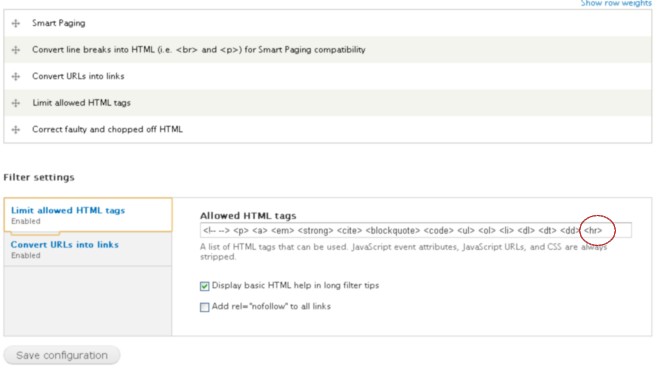
Please verify that the horizontal tag <hr> is included in "Limit allowed HTML tags" list if it is enabled in input filter Text formats settings, refer to this thread.
Comment #3
andrewsuth commentedChecked it, I ONLY have
Smart Pageractive for this input filter:Limit allowed HTML tagsis not active..Any other ideas?
Comment #4
andrewsuth commentedOK, I found the issue.
I had to go into the content type, select the
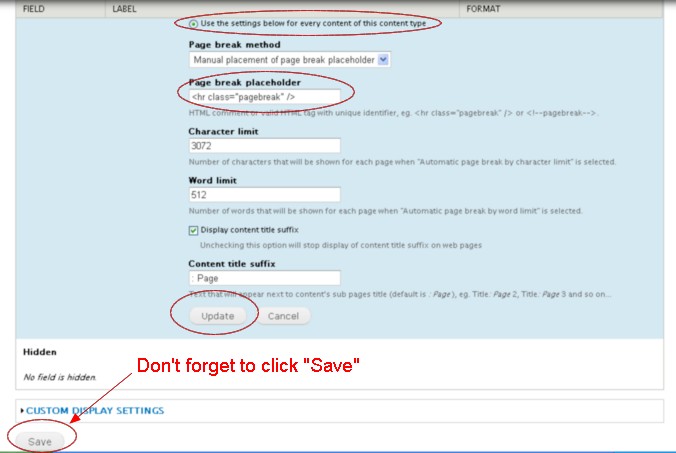
Manage displaytab and then manually change thePage break placeholderas it was set to the default, and not the new placeholder that I defined in theAdminister Smart Pagingpage.Is this by design? I would normally expect that by changing the default value on the Administration screen would then change the default value for content currently using it?
I have created a new issue regarding the infinite loop problem mentioned in my original comment.
Comment #5
arpeggio commentedHi andrewsuth, you've done the correct steps on changing from <!--pagebreak--> to <hr class="pagebreak" /> and please (and I think you have also forgot this) be sure that you have clicked the "SAVE" button (I always forgot this to Click. Refer to manage_display.jpg). Then at admin/config/content/formats/full_html under Filter settings select "Limit allowed HTML tags" and add <hr> at "Allowed HTML tags" field (refer to text_format_0.jpg). Doing this steps doesn't give me issue that you have encountered changing from <!--pagebreak--> to <hr class="pagebreak" />. Thanks.