

Closed (duplicate)
Project:
Drupal core
Version:
8.0.x-dev
Component:
other
Priority:
Normal
Category:
Feature request
Assigned:
Unassigned
Issue tags:
Reporter:
Created:
11 Apr 2011 at 16:09 UTC
Updated:
29 Jul 2014 at 19:29 UTC
Jump to comment: Most recent, Most recent file




Comments
Comment #1
pingers commentedOkay, but this terminology/workflow isn't going to change in D7... should it not be categorized as D8?
Comment #2
droplet commented+1 "Publish" (but if it show on COMMENT section, "Sumbit" is better)
we should also add a button: "Save Draft"
Comment #3
lisarex commentedFunniest line from a presentation at the IA Summit 2011 "What is a form communicating? Are you giving me contextual information? Don’t give me a submit button unless you want me on my knees."
Interested in exploring alternatives to Save or Submit.
Comment #4
nitvirus commentedSave shold be used as save to draft
and
submit/publish inorder to publish it
Comment #5
dcmistry commentedSorry, the above link does not work. Here is the updated one: http://blip.tv/file/5108672
Comment #6
yoroy commentedThanks for the report. Needs fixing for everybody of course, this is a core & essential workflow ux we'll want to iterate on quite a bit. Re-tagging for convention & Verity is our content editor persona.
Comment #8
dcmistry commentedRecently Drupal Gardens made changes to this and added "Publish/ Save as Draft / Preview" option instead of "Save / Preview". So, I tested this with 7 existing Drupal Gardens users and asked if they preferred one over the other.
Here is the summary of the findings:
How do participants feel about “Publish/Save as Draft/Preview” instead of “Save/Preview”?
All seven participants preferred “Publish/ Save as Draft/ Preview” as it allowed them the option to save their content as “Draft” explicitly. Skitch: https://skitch.com/dcmistry/fbf78/document2
"Good function to add" (P1)
"I like this! This is better" (P2)
“Pretty clear … [I] prefer this” (P3)
“This is more intuitive” (P6)
Two participants had suggestions about the order in which the options were displayed.
1. One participant (P3) wanted consistent options while using “Edit” or “Create” content. Currently, “Create” content lists as “Publish/ Save as Draft/ Preview”.Whereas, “Edit” content lists as “Save/ Publish/ Preview/ Delete”
2. Another participant (P4) wanted the options as “Save as Draft/ Preview/ Publish” as the participants are used to seeing “Save” and “Preview” at one particular place and according to him, it is not a good idea to change that. The additional “Publish” button could be at the end of the list.
Note: Although, I do understand that the Drupal convention is to go from positive to negative, I thought it was important (and interesting) to note what the users had to say.
Comment #9
effulgentsia commentedWe did this using the Save Draft module.
One way we can do some iteration is via that module, so that we can collect feedback from D7 users while D8 is still in development. Please feel free to open issues in that project with suggestions. We'll also monitor progress on this issue.
Comment #10
Crell commentedJust a reminder here that "web site with editors who want to make repeated drafts of a page node before putting it live" is only one specific workflow that Drupal needs to support. "Publish" makes little sense for a forum node, for instance, or for many other use cases where there is no curatorial process. This labeling is something that needs to be kept at least somewhat flexible to support different workflows rather than hard-coding one particular workflow.
Comment #11
timmillwoodThis is slightly related to the preview button issue http://drupal.org/node/1167242.
I worked with Dan Jukes on the Save Draft module, it was great to see Drupal Gardens use the module, and it would be great to see it in core.
Comment #12
dave reidSubscribe. I don't think the Publish/Save as Draft works in all use cases. Especially with custom content types.
Comment #13
dcmistry commentedDave: Could you please tell how it does not work for custom content types?
All: Valid points from all of you. Ideally, we do want to solve for all the use cases. But if we take the reality check, that rarely happens. The idea behind this implementation is to solve for 80% use case and work on the rest of the edge cases. The moot point is if we agree as to what is the big issue and what affects the experience more severely: the edge cases or the confusion if save publishes content. I feel it is latter because it is the most common and widely used use case.
To move forward, we could bifurcate our approach. Either solve for the 80% use case and ruminate about the rest OR keep exploring till we get a 100% solution (This is not only time consuming but not easy to come up with)
I would love to be proved wrong.
Comment #14
yoroy commentedThe larger perspective here is what the Drupal app (install profile) should do and what is in the Drupal framework.
I would love if we could find a way that lets us do this improvement for the 80% in a way that does not inhibit the other 20% on the framework level.
Aiming for the 100% solution will most likely result in the kind of compromise that annoys everyone equeally without improving things for *any* use case.
I'm putting this here, but this is likely to be just one of many issues where this app/framework discussion is part of what we want to do in 'fixing' things.
Comment #15
Crell commented"do this improvement for the 80% in a way that does not inhibit the other 20% on the framework level." That should be the goal. Aka, "easily configurable but with sane defaults." If we're going to move from the generically-useful "Save" (which is descriptive in all cases but insufficiently clear in some) to something more descriptive in one case, then we need to at the same time make it easy to switch to something more descriptive for other cases.
This goes back to that "use uncertainty as a driver" aphorism. :-)
It could be as simple as making the label of the Save button admin configurable per node type, with a default value of "Save and publish". Maybe we need more, but I'd be OK with something as simple as that.
Comment #16
David_Rothstein commentedI kind of see why "Save as Draft" doesn't always work, but what's wrong with "Publish"? Or more specifically, what new thing is wrong with "publish"? We already have a checkbox on the node form that says "Published", so the proposal here is basically to convert the checkbox into a button.
Also, while "publish" may not be perfect, what's an example of a use case where it's truly incorrect? In the case of forum nodes, I actually create unpublished content all the time myself (we have an "announcements" forum where official announcements get posted and need to be reviewed before publishing). In fact, forums are arguably the content type where I personally create unpublished content the most - I guess that just goes to show that there are many use cases out there :)
I think the problem with that is that "Save and publish" doesn't make sense once you've unchecked the "published" checkbox.
Comment #17
David_Rothstein commentedI think this may actually be a duplicate of #282122: D7UX: "Save draft" and "Publish" buttons on node forms. However, that issue went on for 200 comments and then wound up getting marked as a duplicate of another, more complicated issue, so it's kind of a disaster.
I'll go ahead and cross-link them, but it's probably a good idea that we're getting a fresh start here :) However, there is some discussion on that issue that is worth reading.
Comment #18
Crell commented"Publish" implies a sort of "push to production" mindset. For a forum or BBS, for the vast majority of people that is at best an edge case. It would have no meaning at all on, say, the Star Trek BBS I run with Drupal. No one has access to control publication status on that site but me. "Post" would actually be the most descriptive verb.
"Publish" implies that the person pushing the button knows, is aware of, and has control over a concept of "create" that does not also imply "publish". Anyone now that does not have "administer nodes" has no control over that distinction, so telling them "publish" (vs. not publish) leads to "wait, what else would I do with it?"
You may put unpublished content in forums all the time. You're also 1/1000th of a percent of the population of Drupal.org. The rest do not have access to control published status in the first place. :-)
Comment #19
David_Rothstein commentedOh, I see - I think you are assuming that the button would be relabeled to "Publish" for everyone.
That's not what the Save Draft module currently does, though. With that module, regular users still just see a "Save" button, and only people who have the right permissions actually get it renamed to "Publish". In other words, you only see the "publish + save as draft" terminology if you're a user with sufficient permissions to actually be able to meaningfully publish + unpublish content.
It sounds like that is worth discussing, because there are probably pros and cons to renaming the button conditionally like Save Draft does (vs giving the button the same label for all users).
Comment #20
Crell commentedAh, that's less problematic then, at least. I have not used that module before.
Still, though, just because we have an internal concept of "published state" doesn't mean that should be thrown in a user's face at all times. As a user as well as admin of my BBS, for instance, do I really want to see "Save and Publish" on every node save form, because I hypothetically could have access to leverage a more complex workflow even though one isn't even set up? I could deal with it, but it would be an ugly rough edge that would affect only our most important constituency: The people actually setting up and running the site. :-)
Comment #21
eaton commentedJust a heads up -- while having basic functionality like this is a big win on the feature list, it's also worth remembering that a lot of the enterprise sites that are now getting lots of attention in the Drupal world need more flexibility than just 'draft vs published.' This is where Larry's sane defaults with easy overrides principle comes in.
Comment #22
David_Rothstein commentedI think making the buttons configurable (as Larry suggested) might be good too, but on the other hand, it's easy for a contributed module to provide a UI for configuring that... so we should be sure "Publish" is really not good enough for the majority of simple use cases before adding that UI to core.
Regarding enterprise sites, if they need more complex workflows they need to install a module for that anyway (at least for now, but changing that in core is definitely a separate issue). Since that module can do whatever it wants with hook_form_alter(), I think that counts as an easy override already :)
Comment #23
Crell commentedLet's not confuse "you can always hack it" (which is what all alter hooks are) with actual support for certain functionality. Both are useful, but are very very different things.
Comment #24
eaton commentedYes, I'm just concerned by the growing trend towards baking a WordPress style workflow into core and pointing everyone towards hook_thing_alter(). It doesn't mean we SHOULDN'T, I just wanted to point it out for posterity.
Comment #25
Crell commentedI'll go on record as saying that we shouldn't, unless we are doing so by having an easily removable "WP layer" that is easily removable from a flexible framework core. That, in turn, implies we need to better have that layer separation so you can do that, and then easily rip off the WP layer and put an OpenAtrium layer on top, or some other custom layer.
aka, smallcore and Snowman. That's the way to do it. :-)
OK, slight tangent, but the point here is that if we wanted our workflow to be a WP clone, then we'd just use WP. If we want something that can be easily customized into a WP clone, we need something that can be easily customized. "hook_form_alter" does not qualify as "easily customized".
Comment #26
jstollerWith this renewed talk of "Save as draft" buttons, I feel compelled once more to get on my knees and beg for revisioning support in Core. I have not worked on a single website for which I did not want the ability to save draft revisions of a published node without un-publishing the node. The thought Drupal still can't do this out of the box brings tears to my eyes. See #218755: Support revisions in different states for more discussion of this topic.
Along these lines, a "Save as draft" button gives no indication that it will un-publish your existing content, as it would without said revisioning support. This seems very dangerous to me. What's to stop an editor from making a change on, say, the website's main page and pressing "Save as draft"?
Comment #27
sunTo answer the OP: It depends on your permissions.
Please do not file such issues as bugs - they're not. But of course, they are good discussions to have.
Comment #28
Bojhan commentedSo the solution here, is the same as offered in countless earlier topics? We should have an ability, primarly programmaticly to classify a new page as draft / pending review / ready to be published etc.. But from core out, allow content types to use the Save as draft and Publish workflow for just standard profile provided content types?
For the record, I dislike the idea of a "WP layer" - standard profile is here to leverage the tools given from core. Anything we design, should have the wider context in mind - especially in terms of API's, but should be opinionated when it comes to standard profile ui.
Comment #29
David_Rothstein commentedBased on the above discussion, perhaps we should do this: Make it configurable per content type, but not just the button labels - rather, let the entire experience we're talking about here be an on/off switch.
In other words, each content type gets a checkbox on its settings page that says something like "Provide 'Publish' and 'Save as Draft' buttons to privileged users". If that's checked, you get something similar to the Save Draft module workflow; if not, you get the old behavior (a single "Save" button with "published" as a checkbox).
***
@jstoller (#26):
Have you tried the Save Draft module? It already renames the button to "Unpublish" in that case.
Comment #30
Crell commentedIt is possible in Drupal 7 to have a new draft waiting while not unpublishing the current draft. The Workbench suite does so. There's probably stuff there that would make sense to move into core as well.
Comment #31
yeti22 commentedIn Drupal 5 this used to be called "Submit" - there was no confusion.
"Send" or "Submit" meant they are published/going to be published, and if not published immediately there will be some sort of a status message shown to the content-submitter that, that is pending.
For comments we had "Post Comment"
In case saving as draft, apart from manual, users are used to auto saving of draft out-of-box in their daily email like gmail or yahoo, in their daily blog like wordpress and in their desktop applications like Office suites, except in Drupal they are frustrated not to find it as an integral part. Auto saving can be done with Drupal modules but has bugs and not even half as neat as in the above mentioned stuffs.
Comment #32
jstoller@David_Rothstein: I had not tried the Save Draft module and I'm glad to hear it covers this. I just want to make sure that that same logic is a part of this conversation.
"Unpublish" by itself seems confusing. "Unpublish and save as draft" would be more accurate.
@Crell: I have not had a chance to play with Workbench thoroughly yet, but I did see the DrupalCon presentation and it is very promising. At the very least, the foundations of revision moderation and workflow support should move into core, even if some of the fancy implementations stay in contrib. No module should ever be able to assume that the most current revision of an entity is the published revision, in my opinion.
Comment #33
dcmistry commentedjstoller: Since people understand "Publish", I am fairly certain that people will also understand "Unpublish".
Comment #34
jstoller@dcmistry:
"Publish" implies that the content I am currently editing will be saved to the system and made live. "Unpublish" is far more confusing. It gives no indication that my changes to the content will be saved. That content isn't published yet, so what exactly is being unpublished and what will happen to my changes is not all together clear from the context.
Comment #35
timmillwoodMaybe these buttons should have multi-action-labels (or mal for short).
For example:
"Save and publish"
"Save and unpublish"
"Delete and unpublish"
Comment #36
dcmistry commentedjstoller: Hmmm ... not completely sold yet. May be usability testing is the way out. Would love to be proven wrong.
Timmillwood: No room for error but it gets lengthy. WDYT?
"Save and Publish" | "Save and Unpublish" | "Preview" | "Delete and Unpublish"
May be, if try to be concise:
"Save" | "Save and Unpublish" | "Preview" | "Delete"
( Slashing some real estate)
Comment #37
jstollerIf "Save and Publish" is too long, then "Publish" is a better option than "Save". I think "Publish" implies saving more than "Save" implies publishing.
I'd think its fairly clear that if you delete something it will not still be published, so "Delete" seems like it would be OK on its own. If you really want to clear things up though, then you should also throw in "Cancel". I know that's been a somewhat contentious issue in the past, but my own experience has indicated it would be a good thing.
Perhaps we should start by noting all the possible contexts which must be covered. As I see it, that includes:
1. Creating new content
2. Editing existing unpublished content
3. Editing existing published content
The corresponding button options might be something like:
1. Preview | Save as Draft | Publish | Cancel
2. Preview | Save as Draft | Publish | Delete | Cancel
3. Preview | Save and Unpublish | Publish | Delete | Cancel
Comment #38
dcmistry commentedGreat, jstoller! We are inching closer.
Two things though:
- For Cancel: I am being cautious of adding an extra button. Users can always click on the (X) on the overlay to cancel.
- We need to check the order of the buttons. As per my knowledge, in Drupal the action items are positive to negative (left to right) Not that I am thrilled about it. But, well!
So, it would look like:
1. Publish | Save as Draft | Preview
2. Publish | Save as Draft | Preview | Delete
3. Publish | Save and Unpublish | Preview | Delete
How do we move forward now?
Comment #39
Bojhan commentedThe implementation needs work, thats how we move forward. Then when we start implementing these labels, we can just test the labels and figure whether people understand it rather than assume :)
Comment #40
yeti22 commentedThe main problem with "Publish" is that, unless it is a self-admin-ed site or blog, "Publish" may not publish immediately. In that case "Publish" and any status message coming next implicating that it is pending, are conflicting. That is why previous versions of Drupal, like many other sites that an user visits, use the word "Submit".
Comment #41
droplet commentedSave / Submit = an action to save exist form Contents and Options.
Publish = Always publish the content to public or move to next state even it UNCHECKED Publishing options.
We need to remove "Publishing options" if there have 2 button like "Publish | Save as Draft"
Comment #42
timmillwoodWould it be possible to gather these ideas into patches for the save_draft module?
Then these could be tested on Drupal gardens users, who use the save_draft module?
Comment #43
dcmistry commenteddroplet: Yes, the check box will not be there with this implementation.
timmillwood: Good idea, I would LOVE LOVE to test :)
Comment #44
jstoller@yeti22:
If we're building a dynamic system that responds to context, then access needs to be taken into account. Perhaps we just need to expand my list of possible contexts to include moderated content vs content that the user has the right to publish directly.
Of course, in reality there are other variations to keep in mind. For instance, the delete button wouldn't show up if the user doesn't have the rights to delete content.
Comment #45
droplet commentedtoo much changes still confusing users. IMO, the big problem of this isn't the "WORD". Editing page hided all status inside vertical tabs, users never know what's the next states.
without design changes:
IMO, Keep either one of Publish / Submit
1. Creating new content
Publish
Save as Draft
Save as Pending / Other custom states
Preview
2. with moderation
(NO: Publish) | Submit as Pending / Other custom states
Save as Draft
Preview
Comment #46
jstoller"Publish" is very specific and makes no sense in cases where the content is being moderated and will not, in fact, be published immediately. In those cases "Submit" is far more meaningful, as in "I am submitting my content for consideration." However, "Submit" is far too general for cases where content will be published right away. Submit kind of implies the content will be saved, but neither "Submit" nor "Save" imply the content will be published.
If the content defaults to unpublished and the user does not have permission to change that (i.e. moderated content), then there should only be a "Submit" button. That way we in no way imply that the content will go live immediately, or that the user will necessarily have the ability to edit it further.
If the content defaults to published and the user does not have permission to change that (i.e. un-moderated content with no drafts), then there should only be a "Publish" button. That way we make it clear this content will be going live immediately, without any further chance to edit it.
If the user is creating new content, or editing unpublished content, and they have permission to change the publication setting, then both "Publish" and "Save as Draft" buttons should appear.
If the user is editing previously published content, and they have permission to change the publication setting, then both "Publish" and "Unpublish and Save" buttons should appear. I think it is very important to emphasize that the second button will unpublish your content.
Comment #47
dcmistry commentedjstoller,
I have concerns with "Submit". I understand your approach to it but having "Submit" as a button, I foresee the following problems:
1. Users may not understand the difference between "Submit" and "Publish". "Submit" is not clear enough. May be "Submit for approval" or "Publish (needs approval)" is a better solution: it is explicit. But that again takes too much of real estate.
2. We should try and work with the existing patterns and use the new ones, only if needed.
Comment #48
jstollerI'm fine with "Submit for approval", but as you say, that does take more real estate. If that is an issue, then I'm still OK with just "Submit". I just want to make sure we never use the word "Publish" unless we actually mean it.
Comment #49
dcmistry commentedAlright, lets go with "Submit for approval" then :(
Comment #50
Crell commented"Submit for approval" is a very specific, narrow use case that will be wrong and misleading in many cases.
At this point I don't see how this can be addressed without making the labeling configurable. (And hook_form_alter does not count as configurable.)
Comment #51
jstollerI'm inclined to agree with Crell. And "Submit" seems like a saner default than "Submit for approval".
Comment #52
David_Rothstein commentedSorry, I don't understand why we're talking about "Submit" all of a sudden.
What is wrong with:
Comment #53
David_Rothstein commentedNo patch here, and we are clearly still discussing :)
Resetting issue status.
Comment #54
jstollerI'm not entirely opposed to "Save". However, "Save" tends to imply that you will be able to come back and make changes to the content later, while "Submit" makes it clearer that you are passing the content off to the system to do with as it will. In many cases content cannot be edited after it is saved, so I wouldn't want to imply otherwise. In fact, I would rather have someone not think they will be able to edit content after submitting it and later find out that they can, then have them think they can come back and edit something only to find out they can't. In this sense, "Submit" seems the safer default to me.
Comment #55
dcmistry commentedThis is going round robin :P
Let's take a step back and think through the scenarios. I am not aware of all the use cases and you guys can lend me a hand with identifying the use cases to propose a solution.
Jstoller: #54 does not address my concerns in #47
Comment #56
jstoller@dcmistry: I guess I just don't think your concern in #47 is that big an issue. I think when you say "Publish" people will know exactly what you mean. That content is going live. Saying "Submit" is decidedly more vague, as you point out, but I don't see that as a big problem. I think "Submit" makes it clear that you are passing this content off to the CMS, where it may or may not be published at some point. The word submit means to "present (a proposal, application, or other document) to a person or body for consideration or judgment." It does not imply that you will have any further control over the content, nor does it imply that the content will be published immediately. Therefore, I find it a safe and perfectly adequate label for the action.
Lets look at a hypothetical site where the same user might have different permissions on different content. Maybe its a community news site where users can submit articles for publication, which are moderated by an editor, but they can also post un-moderated comments to existing articles. So when a user creates a new article, they will see a "Submit" button, but when they enter a comment they will see a "Publish" button. Personally I don't see this discrepancy as a source of confusion. I think each button would make perfect sense to the user in the context in which it is presented.
"Submit for approval" does imply that your content will be read and approved by another human being, but that isn't necessarily the case. What if your content is being processed by some automated system—which may alter it, or add it to a time delayed publication queue—and then published without human review? This does not qualify as "approval". And in the case of more elaborate workflows, approval wouldn't come until the end of the process. You don't want a button that says "Submit for approval" when they're really just submitting it for review by the legal department and approval is six steps away. "Submit", however, would still work in this case.
Comment #57
David_Rothstein commentedI think "Save" vs "Submit" should be a different issue, independent from this one.
Remember, the goal here was to solve the problem that administrators clicking on "Save" did not understand that it would result in their content being immediately published... So unless we really have reason to believe that "Submit" would have removed that particular confusion (which sounds highly unlikely), it should probably be a separate issue. (Note that the original issue which renamed "Submit" to "Save" in Drupal 6 seems to have been this one, by the way: #100641: String freeze: Change "Submit" to "Save")
Comment #58
yeti22 commentedButtons need to have a short, a very short name. The full action what it does can be shown by a status message after the button is clicked and a side-by-side UNDO option (since it is well past 2010)
"Submit" is universally understood as what possible things it may do.
Comment #59
joachim commented'Save' is the simplest and clearest.
Anything that has more descriptive verbs would need to react to the current state of the node and the current user's permissions. As pointed out above, buttons that change all the time could well produce just as much confusion.
Another thing is that the workflow system that's currently half-baked in core (the moderate flag) would need fixing up into something actually useful before this UI change really made sense.
Comment #60
David_Rothstein commentedDrupal core does not currently have any kind of moderate flag that I know of.
There used to be one in the {node} table but it was removed a long time ago. Is that what you're referring to?
Comment #61
joachim commentedAh I didn't know that was removed. It's there in D6, must have been removed for 7.
The point remains though -- what's the point of workflow buttons with no workflow functionality?
Comment #62
jstollerI completely disagree. To save something implies that you get to keep it. You save something for latter. However, in many cases, once a form is submitted on a Drupal site the user has no further access to edit that content. So, while it is true that they have saved their content to the database, they can no longer touch it, which goes against the implied contract offered by the term "save". The term "Save" indicates a workflow which, as you point out, sadly does not exist in Drupal.
"Submit", meanwhile, has no such implications. It rightly informs the user that they are giving up all control of their content and makes no promise of future access.
I would be fine with using "Save" on content that the user has permission to edit, but if they don't have such permission, or we don't know what access they have, then "Submit" is clearer by far.
Of course the biggest problem with both "Save" and "Submit" is that neither one indicates that your content will be published right away. As David_Rothstein pointed out, that is the primary problem this issue is attempting to solve. So, along those lines, does everyone agree that the current "Publish" check box should be replaced with two buttons: "Publish" and "Save as draft"/"Unpublish and save" (or something along those lines)? Perhaps once we agree on this we can get back to what we call the button when a user is not allowed to publish the content.
Comment #63
joachim commented> So, along those lines, does everyone agree that the current "Publish" check box should be replaced with two buttons: "Publish" and "Save as draft"/"Unpublish and save"
Most users are not given access to the Publish checkbox.
What should the button say on a node whose default state is to be saved unpublished?
If you really want to explain to users what is going to happen, then I would suggest changing the UI completely and instead of buttons floated side by side, put the buttons one on each row with some descriptive text beside them, eg:
[Save] Save this content. It will be publicly visible immediately
[Save as draft] Save this content. A site administrator will review it for publication.
But are concepts like 'publish' clear to users?
And still, my earlier point: there is no proper draft/publish workflow in core, so adding a UI for it is just going to expose that lack.
Comment #64
jstollerTrue. And with these changes the checkbox won't exist.
This does make me think we'll likely need more permissions to make this work. We need to be able to restrict, for a given user role and entity type, whether it can only be saved unpublished, only published, or both.
I think that's what much of this debate has been about. It'll probably either be "Save" or "Submit". I've given my opinion already, but for now I don't think it matters.
That seems a little extreme for a general use case.
Absolutely! I think even my Luddite users understand the concept of "publish".
Great! That's a lack which needs to be more exposed. However, there is still some utility to these changes, even without a real workflow. Again, this all goes back to letting people know that they are about to publish something live on the website.
Comment #65
dcmistry commentedTo my earlier point in #8, I agree and I am confident (through usability research) that "Save" DOES NOT MAKE SENSE.
@Jstoller, Yes! I agree that "Save" button and "Published" checkbox should go away and be replaced by "Publish" | "Save as Draft"
@joachim:
How do participants feel about “Publish/Save as Draft/Preview” instead of “Save/Preview”?
All seven participants preferred “Publish/ Save as Draft/ Preview” as it allowed them the option to save their content as “Draft” explicitly. Skitch: https://skitch.com/dcmistry/fbf78/document2
"Good function to add" (P1)
"I like this! This is better" (P2)
“Pretty clear … [I] prefer this” (P3)
“This is more intuitive” (P6)
Comment #66
joachim commented> All seven participants preferred “Publish/ Save as Draft/ Preview” as it allowed them the option to save their content as “Draft” explicitly.
Yes but they'll not like it so much when they want to edit their content and put it back into draft and find it doesn't work...
Also, we have to bear in mind the suitability of 'Publish' as Crell says above. On many content types, it's just going to look wrong.
Comment #67
jstollerThat's a problem no matter what. One I would very much like to fix, but so be it. And it doesn't change the fact that in that moment they are either publishing their content or saving a draft. If they save a draft and come back later then they'll have the same choice. If they publish it and come back later then the button will change to indicate that they would unpublish their content if they save it as a draft. That is also an important thing for them to understand. Remember, we are only talking about what happens with someone who has permission to save content as either published or unpublished as they see fit. This just streamlines that process and makes it more intuitive.
Do you have an example? Given that the "publish" button would only display when a user is actually publishing content, I don't see any use case where it would be inaccurate, or look wrong.
Comment #68
yeti22 commented@ #67 When the content is comment "Publish" somewhat sounds odd, particularly when many sites keep the comments pending till some mod does a quick review. In Drupal 7 "Save" is used universally, and thus "Save" is there for comments too. Many a times, for those who are not native English speakers, and as people has been used to Submit for long, many users have been confused by "save".
In Drupal 5 things were explicit, and there was no complaint from the ordinary end users (visible in the forums, and numerous actual sites (a crowd that is perhaps more appropriate than the artificial ones at test labs). "Submit" was used for nodes, and a very explicit "Post Comments" was used for comments.
Comment #69
yeti22 commentedThere are also use cases ( and not very edge ones) when a content is not draft, in the sense that it is a final one and no corrections/additions are to be made, but is not published till some date or till some trigger. This date or trigger will not publish it if its flagged as draft. That is why, Drupal has a check box to the effect "Published" [ not checked = Not published, it is actually published but is waiting for some trigger]
In the case of test users we are probably testing users who have been using some other cms-es, forums etc and comparing how that existing knowledge fares to Drupal usage. If the test users are all virgin new users and exposed to different cms then proably we would get idea which cms's UI is most user friendly. Thus in this test scenario, it may be good to stop a moment, and see what words ( for Submit/Publish/Save) the cms-es those test users were using actually use in majority and then use those words in Drupal.
Comment #70
jstoller@yeti22:
In the situations you are describing, the "Publish" button wouldn't show anyway. Unless I am horribly misunderstanding what we've been discussing here, the "Publish" button would display if—and only if—the user can actually directly publish content. So if you are submitting a comment which will be moderated prior to publication, or submitting a node that will go into some publication workflow, then you will never see a "Publish" button. You would just get a "Submit" button. However, if you have more advanced privileges and are able to directly publish your content to a live website, then the button should reflect the magnitude of that action.
Comment #71
yeti22 commentedOkay Jstoller thanks. I based my say on the opening post "it was found that participants were confused with save/publish. They did not know if save will publish their content." Things were not mentioned very explicitly in the text who the users (what access they had) were. The video is also not available (blip.tv says episode could not be located. It may have been removed. )
The other thing I wondered that unlike in Drupal 5, in Drupal 7 both new post and comment submission have "save" button instead of "Submit" and "Post Comment" button.
If this be the case as you say in #70, "Publish" is fine, and an observation : 700 million FB users use the "Publish" for their Notes (equivalent to FB blog, and they use "Share" for stuffs like photos, links etc), so it means users in general are fairly well acquainted with "Publish". Wordpress use the word "Post" probably followed by a screen message to say what the "Post" has done, published or pending etc.
Comment #72
yoroy commentedIt would be much more productive to start mapping out the workflow scenarios the core default install profile wants to support (see comments 14, 28, 52, 65) instead of arguing labels for as of yet non-existing workflows.
Lets stop with the wording discussion and scope out the workflows core wants to support, identify what needs work on a generic framework level for that and then add a more opiniated implementation of it to the core install profile.
Not saying that is easier, but so far we've been approaching this in a horse-behind-cart way.
Comment #73
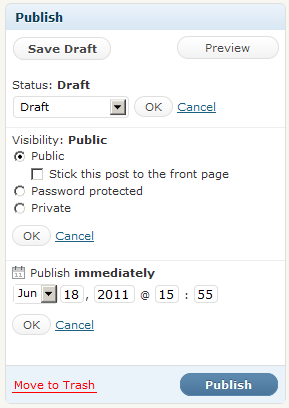
sunNope, Wordpress uses an entire giant widget, consuming roughly ~10-15% of screen estate, to precisely configure the publishing options:
However, initially, it's always "Publish" (regardless of options you choose), and for existing posts, it's always "Update".
(Note that the form elements per publishing option are initially collapsed and need to be expanded with an "edit" admin quick link.)
Wordpress' comment form uses "Post comment", even though comments are going into moderation afterwards.
Comment #74
yeti22 commentedYepp! Then that sort of makes the weight heavier on "Publish". However, for ordinary end users who form the bulk of wp org its "Post" for new post and comments. (see attch) In any case, Publish is a good option for node with something else for comment.
@Yoroy - Is this issue for mapping out the workflow scenarios? Or for finding suitablity of the word "save"?
Not sure. If its workflow the most important thing (that in 2011) Drupal needs to have in flow of work is automatic draft in core - examples : wordpress, gmail, yahoo mail etc.
Comment #75
jstoller@yoroy:
It is my understanding that this issue aims to improve the interface of the current (nearly non-existent) Drupal workflow, rather than map out a new workflow. We're just getting rid of the "Publish" checkbox and replacing it with some more intuitive buttons. It is meant to be a baby step. As has been pointed out, previous discussions along these lines have gotten caught up in workflow discussions and ended in nothing being done. It has been suggested that we should avoid such discussions as part of this issue and just talk about fixing the current interface, without making any big changes to how content is processed.
I see this as a fine first step, which I hope will ignite more interest in future workflow discussions. For my part, I am VERY interested in seeing comprehensive workflow support in Drupal. And for anyone else who feels that way, I will once again point you to #218755: Support revisions in different states, to continue the conversation.
Comment #76
yoroy commentedJstoller: you're right, lets focus on improving what we have now.
So, I had a look at what we have now:
Maybe this is not so much a labeling issue. We have the information available that would help people make more sense of this. But we're hiding this info in a couple of ways:
-'Published' checkbox is on a vertical tab that is by default not active/visible.
- When the vtab is active, the options are presented too far away from where the Save button is on the screen, which makes it harder to relate them.
- Funky wording for the promoted and sticky settings :)
Ignoring the vertical tabs pattern for now, wouldn't it already help a lot if it could look something like this?
The clip from the usability test doesn't show what the participant saw at the time of confusion. Likely on the saved content item itself. Thats where we currently show a message "Article has been saved." (or "updated.").
The message doesn't mention publish status. Not saying that it should be part of this message, but it would help to have this status info available on the screen somehow.
So yeah, lets work with what we have. Seems to me we have more options for improvement here than changing button labels.
Comment #77
yeti22 commented@yoroy https://img.skitch.com/20110620-t3xw617jd26jc3657gj73ius25.jpg
That is what it is in Drupal 6 ( and also Drupal 5) with even more easy and logical order
See attach
Comment #78
yoroy commentedyeti22: Yes, but we're supposed to work with what we have now, right?
crosslink: #542290: Make it easier to create draft revisions in core
Overall, I'd like to see some feedback on my comment in #76 and hear thoughts on wether people agree/disagree this is not only a question of the label of the button.
Comment #79
Crell commentedI agree that the question here is one of workflow, not simply the string on the button. "Save" is sub-optimal but at least work for any workflow. Anything else is going to be workflow-specific, and since the workflow is highly variable (even without additional code depending on your core configuration) the labeling needs to follow the workflow, not assume it.
Comment #80
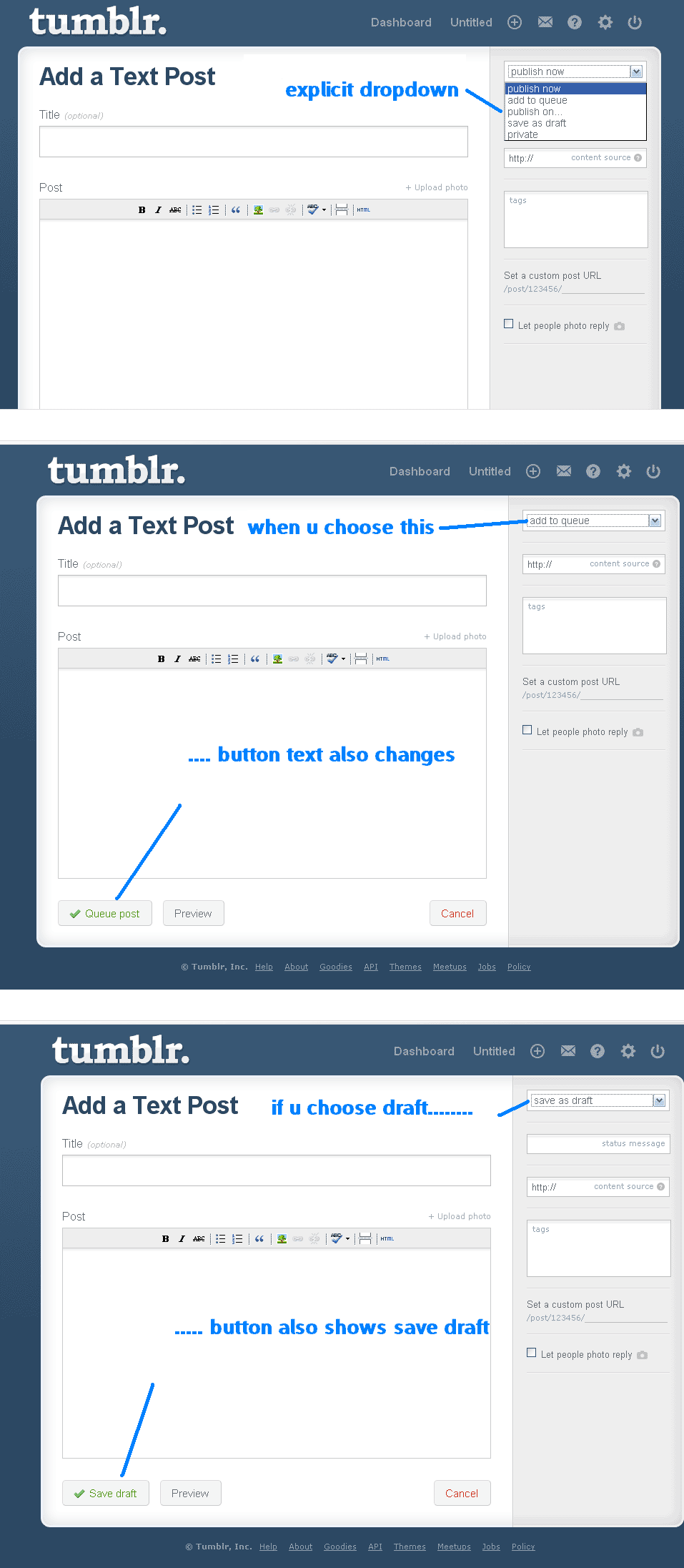
yeti22 commented@yoroy and crell, may be a fresh new thinking and making it super easy for the user are what are needed here. Please please have a look at tumblr http://www.tumblr.com/new/text and see how they do it. (This ease is getting them more than 400 million pageviews a day)
They have an easily visible publishing option on the right hand (like Wordpress) with clear cut options to be chosen from a dropdown
publish now
add to q
publish on ____
save as draft
private
Once you choose one option the text on the submit button changes simultaneously leaving no chance of confusion.
Comment #81
Crell commentedCan you post a screenshot? I don't use Tumblr, and I don't really follow your description.
Comment #82
yeti22 commentedYou can click http://www.tumblr.com/new/text - its really easy and fast to start and see, quicker than the attachment of screen shot will take to load but its there, the screen shots, in the attachment.
Comment #83
jstoller@yeti22: This still has huge proximity issues.
I think yoroy was onto a more elegant solution in #76, though I think the relationship should be made even more explicit. Something along these lines:
Comment #84
Crell commentedThat link gives me a login page. :-) Thanks for the screenshot.
If we were to implement something inspired by that, we would need to have some system for modules to make available a workflow action (based on various conditions), which would consist of both the action label and the button label, and then the action or actions to take when selected. And of course because we're Drupal, that list would need to be alterable. :-)
If only a single action were available, then like text formats we'd want to just cut to the chase and not offer a selector, just the corresponding button.
So what we would need for that is:
- Flexible list of workflow *actions* (save new revision, set active revision, set publication status on active revision, flag for moderation, etc.)
- Flexible list of workflow *commands*, which have a label, button label, and set of actions (save and publish, submit for moderation, etc.). These would be equivalent to the "transitions" in Workbench.
- A mechanism to determine which command is relevant at given point in time, based on context.
- Potentially a flexible list of workflow *states*, which get changed by workflow actions.
I would cite as a prerequisite of doing this right a move from CRUD to CRAP (Create Read Archive Purge), aka "only ever save a new revision". That's a cleaner model anyway, and would reduce the number of variables for assembling new actions. "Just save an update" becomes a workflow command for: save new revision, set active revision, purge old revision(s).
It's an open question for me whether these should be just for nodes, or if we should allow them to apply all entity types.
Am I missing anything? How crazy does that sound? :-)
Comment #85
jstoller@Crell: It doesn't sound crazy at all. I fully support anything that gets us closer to workflow support in Core. Moving from CRUD to CRAP sounds like an excellent step. I'd also support all entities being revisionable.
Of course, I'm not sure this all fits within the intended scope of this issue. Then again, my primary interest in this issue, with it's reduced scope, is its ability to draw further attention to the fact we are lacking moderation/workflow support in core. If we can jump straight into implementing this support, that's awesome! If people feel we need this intermediary step, then so be it. But if D8 is released without real "save as draft" functionality and the ability to moderate revisions to published content, then I will cry. A lot.
And here's another shameless plug... #218755: Support revisions in different states.
Comment #86
timmillwoodSomething I thought I would throw into the mix is the authored date.
If we have a save as draft button this will set the authored date when the draft is created, when the user goes back to edit and publish the content the authored date will still be set to when the original draft date. Maybe we need Authored date and published date.
Comment #87
Crell commentedYou know, improved core workflow (both this issue and the linked issue) sounds like an excellent Core Conversation. Does someone want to submit that? I'd attend!
http://london2011.drupal.org/conference/core-conversations
Comment #88
jstoller@Crell:
I submitted slides on this topic for the Core Developer's Summit at DrupalCon San Francisco, but nothing came of it. Unfortunately I can't make it to London, but I'd love to know people are talking about it.
@timmillwood:
Yes, this is something I struggle with as well, which could be much more elegantly handled in a multi-state workflow with timestamps for each state transition. Again, it's not really part of this issue, but should be part of the larger conversation.
Comment #89
dcmistry commentedOptions! Options! Drupal is great with flexibility. But what it is not good at - is that it exposes all of the options flatly. This is overwhelming especially for the beginners. A simple and widely used method is exposing the 80% use case and provide a way to get to the rest of the use cases. We should make sure we keep this in mind while carving a solution.
@Crell: Better workflows! Amen. I am all for it. Especially the site contributors workflows :)
Anyone interested in collaborating for core conversations?
Comment #90
dcmistry commentedAlso, during the course of usability testing, I have several times where participants expect to see the "Save" (or whatever we end up deciding) to be not just at the bottom of the page but also on the top of the page.
It would be also interesting to consider the middle approach like wordpress ... https://skitch.com/dcmistry/f83q7/add-new-post-dcmistry-wordpress
Comment #91
Clean commentedThis module may help action about this, Node and Comments Form Settings :
http://drupal.org/project/nodeformsettings
We can do prototype with wording with this module, and test it.
I admitted I can't live with "save" now:
http://drupal.org/node/1213852#comment-4713384
Also, I agreed with dcmistry on #89 #90. We even can take widely adopt products as example, and leap faster.
Comment #92
David_Rothstein commentedSeems like there are a lot of possible solutions being discussed here - maybe what we need is some more testing to specifically try some out and decide between them?
I guess the big question is whether or not a button renaming is needed. It was my impression that people have a mental model where "publishing" is an action (rather than a state), and that a button named "Publish" would therefore be necessary to really match what they are expecting. That's partially based on the fact that (as can actually be seen by @yoroy's screenshot in #76) we already have the word "published" extremely close to the "Save" button in Drupal 7, yet people still don't seem to notice or understand it. However, perhaps changing the layout a bit as suggested above could help them notice or understand it better; that would be interesting to test.
Comment #93
yoroy commentedDavid, which screenshot has 'published' close to 'Save' in D7? The first image in #76 is a mockup, not a currently existing layout. Currently, the published checkbox is very well hidden in the last vertical tab.
Comment #94
David_Rothstein commentedHm, the first image looked like a screenshot to me, and the second like a mockup.
In any case, here is an actual screenshot zoomed in on the area around the save button, showing what I mean... (The published checkbox is indeed hidden, but the summary text is not, and it says "published" too.)
Comment #95
yoroy commentedDoh, sorry, didn't scroll up far enough to see what actually is my first image there in 76. I think the test results indicate that the current display of this info is not enough to make people feel confident on what will happen.
Comment #96
franzThe little summary could be duplicated somehow. This is obviously not clear and often needs tweaking for most applications.
Comment #97
yoroy commentedSome tag housekeeping…
Comment #98
klonos...minor title edit.
Comment #99
jstollerA patch from #218755: Support revisions in different states has been committed, supporting content moderation in Core. Now a follow up issue has been created to implement related UX/UI changes: #1776796: Provide a better UX for creating, editing & managing draft revisions.. That issue should tackle the issue raised here and more. I suggest interested parties go there for further discussion.
Comment #100
klonosUnfortunately there seems to be no significant movement in this issue for some time now and I'm not that sure about #1776796: Provide a better UX for creating, editing & managing draft revisions. addressing this issue here as well.
What would be good IMO in order to visually distinguish the action of the save button and make things clear would be to "promote" the "Published" checkbox to a button. So, we'd have:
[ Save & Publish ] [ Save as Draft ] [ Preview ]
or simply:
[ Publish ] [ Save ] [ Preview ]
What do you people think?
Comment #101
klonos...and that will perhaps happen in #1751606: Move published status checkbox next to "Save"
Comment #102
tkoleary commentedSee also this issue http://drupal.org/node/1898946
Comment #103
tkoleary commentedThis is a duplicate of #1751606: Move published status checkbox next to "Save"
Comment #104
klonos+ the issue title made it look like a support request.
Comment #104.0
klonos...replacing the link to the video with the working one ;)
Comment #105
jsruzicka commentedWe're encountering a bit of a different situation.
We have published content in D7 that users would like to revise but not have the revisions show immediately when they save, i.e. keep the old version showing but have a new one for editors. Unfortunately, if they "Save" the content is published (true, they can immediately revert to an old version but that's kludgy). If they uncheck "Publish" the page disappears from the site entirely.
Another workaround is to have them do revisions on a DEV server that's a copy of prod and then push changes to prod on a set schedule, but that's kind of an all-or-nothing proposal. Anything more granular is a lot of administrative work.
Comment #106
jstoller@jsruzicka, this issue is a feature request for a specific new feature in Drupal 8 (and a closed one at that). As such, these comments are not intended to be used for general support questions, or observations, like yours. In the future, you should look for existing issues that relate more directly to your issue, or open a new one, if necessary.
That said, you've discovered a longstanding shortcoming of Drupal (and a personal pet peeve of mine). Drupal does not support content moderation out of the box. Thankfully, some changes in Drupal 8 will make this easier to implement in contrib, but still not active out of the box. Maybe D9... :-/
In the meantime, for a Drupal 7 site, there are a few contrib modules that you can use to implement this feature. The most popular is probably the Workbench suite of modules, with Workbench Moderation. There is also the Revisioning module, or, if you want more of a back-end API, the State Machine module. And if you're moderating content like this, then I suggest adding the Publication Date module as well (I'd recommend the dev version right now).
If you would like to support the quest to improve Drupal's content moderation and workflow capabilities, then I'd direct you to look at #1777388: Support arbitrary workflow states and #1776796: Provide a better UX for creating, editing & managing draft revisions..