Drupal 7 Core itself, doesn't allow to send Mails with the generated password for the User.
As @webchick told in the specific issue: http://drupal.org/node/660302#comment-2592510 it would be OK to have a contrib module, to provide this again.
So in the user.module, the $account->password is still set, but no token for it is generated.
I thought about a single module, for this functionality, but I think inside of loggintobogan it is a lot better.
Attached a patch, which adds the token, so that it can be used inside of the mail with "[user:password]"


Comments
Comment #1
jeffschulerWorked for me; thanks for providing a quick workaround to a nasty issue!
Needs more eyes before RTBC though, and patch should really be rolled from within module directory.
Comment #2
dave reidBecause this could be a sensitive token, I would suggest using the same method as _user_mail_text() and user_mail_tokens.
If you want to list this token in Token.module's token tree UI, I would also suggest adding a 'restricted' => TRUE to the token's definition array.
Comment #3
hunmonk commentedi have no interest in working on this, but if somebody wants to get this finished up and post a patch, i'll have a look at it.
Comment #4
KingOmnious commented@hunmonk, thank you so much for this. I was tearing my hair out because this broke my site.
Comment #5
shadowdknight commentedHi,
Any progress in this issue?
Thanks!
Comment #6
Anonymous (not verified) commentedI just tried this patch on the latest dev as well as 7.1.3 and I'm getting the following error:
Notice: Undefined property: stdClass::$password in logintoboggan_tokens() (line 46 of /Applications/MAMP/htdocs/vma/sites/all/modules/logintoboggan/logintoboggan.tokens.inc).
I'm using Drupal 7.10.
Comment #7
schnitzel commentedassigning to me, I will have a look at it
Comment #8
kalabroThere can be no
$user->password, so check needed. Important note is that you can see this token always and everywhere (Rules for example), but it will contain real password only on new user creation.New token
[user:password]can be useful in “Welcome” mail templates and that's all. In other ways in can mislead us.Comment #9
Anonymous (not verified) commentedThank you for the further work on this, the error message is gone.
I have the [user:name] and [user:password] tokens inserted into the "Account Activation" email however when I receive the email the password field doesn't populate:
username: test
password: [user:password]
Am I missing something?
Comment #10
kalabroAs I said before
Welcome messages are sent to user in the same time as user created. Activation can be done in any other time.
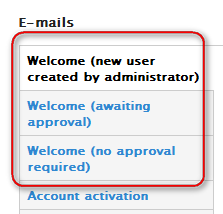
We see that this patch realy confuses users.
Comment #11
Anonymous (not verified) commentedThanks for clarifying that. My client's rather unusual workflow requires that the password be sent upon activation. I understand there are good reasons the password token isn't bandied around, but is anyone aware of any other solutions?
Comment #12
kalabroafestein, I think this question is not directly related to topic. You can solve your problem, of course. There are AES module (you still need create token yourself) or you can create your own module with the desired functionality.
Comment #13
Alex Andrascu commentedIt's not working for me i get same as afstein
username: test
password: [user:password]
on register_admin_created
So i guess it's not working after all
Comment #14
rickmanelius commentedWhat about about changing it from [user:password] to [user:new-account-password] to eliminate confusion and then (if the patch works as intended) it can then be RBTC?
I see #13 is having issues, but I have a client request for this so I'll check out as well.
Comment #15
rickmanelius commentedI can confirm the patch in #8 results in the correct behavior (password emailed out ONLY during welcome/activation IF you add the token to said emails).
I hope Alex in #13 (or anyone else) can confirm as well for one additional review.
Comment #16
makbul_khan8 commentedMay be this can help you.
Paste this code in you .module file with modulename replacement and it will work for you.
use [user:password] as token for user password
Thanks
Comment #17
roundbox commentedAny chance someone can put step-by-step instructions to implement this as I am just not getting it? I have logintoboggan implemented, tried to figure out the patch thing and then added the recent code to the user.module file and just can't make anything work.
Comment #18
rickmanelius commented@roundbox Are you adding the token into the email template in admin/config/people/accounts?
Comment #19
petu commented@makbul_khan8 Thanks a lot! Solution #16 helped.
Comment #20
gatman commentedUrgent neither #8 or #16 appear to work Drupal 7.12
This working / how?
Thanks
Comment #21
rickmanelius commentedMarking this RBTC because it works (I'm using on 2 websites) if you follow the instructions in #15. Anyone having issues, make sure to add the token into the introductory email...
So unless there is a change in the actual name of the token as suggested in #14, this is good to go.
Comment #22
sorensong commentedIS there a single module for this, though?
Comment #23
Anonymous (not verified) commentedthe password i received in the email is "Array". Not the correct password.
Comment #24
ben.bunk commentedThe code in #8 worked perfectly for my use case and the password worked.
The patch didn't apply cleanly but copy and paste solved it easily enough.
Comment #25
kalabro@ben.bunk, the patch #8 is quite old. And I think it's not about LoginToboggan functionality, it's just a token which can be provided in any custom module, so no need to patch LoginToboggan.
Comment #26
yashsharma01 commentedThanks..
This is very good post. It worked for me.
Thanks
Yash
Comment #27
henrikdelphin commentedThanks, I have almost gotten this to work the way I want.
I couldn't get the original patch to work on 7.14, but the patch from #8 worked as it said it would, and added the [user:password] token to the welcome email.
However, as in #13s case, I need to send the password on activation of my users. I have ported about 5800 users from our old dotnetnuke site to Drupal, but I haven't activated them yet. Most of our users are children, and I want to send them a non-expiring random password when I activate them, instead of the expiring one-time-login link Drupal uses as default.
I'm hoping it would be possible to use the patch provided here, but remove some kind of check so the token would be usable in all emails. If that is the case, what will I have to do to get this to work the way I want? I am new enough to PHP and Drupal that I don't think I will be able to figure this out on my own, but I think I can make it work with some help.
EDIT: I have tried the code posted in #16. I tried to insert in both user.module and logintoboggan.module, but in both cases it completely broke my admin/config/users/accounts-page. I don't know why this is, but I haven't been able to use that code although others said that it worked for them.
- Henrikdelphin
Comment #28
kalabro@henrikdelphin, no, this solution is limited by Drupal design (raw passwords are not stored in DB), not by this patch authors. As I think, your task requires PHP and Drupal skills from developer, but can be solved, of course. For example, you can provide a rule or an action, which will generate random password, set it to user and send an email.
Comment #29
henrikdelphin commentedI am aware that Drupal doesn't store raw passwords, which I think is a good idea. It is also something I plan to revert to when I have finished porting my users. When they register and know to expect a one-time-login link it will work as intended. However when they don't know about it, because they don't know about the new web site, I think it will be a major headache for me to deal with their problems with expiring login-links.
I am trying to setup this token together with the Generate Password module, so the random password thing is taken care of, I just need a way to send it to my users when I activate them, so they will have a non--expiring way to sign in to my web site.
- Henrikdelphin
EDIT: I ended up just using the module posted in code here, as it solves kind of the same problem. With this I am using Drupal as it is intended, with one-time-login-links, but I have extended their expiration to 4 months. I think this will solve most of my problems, while still allowing Drupal to work mostly as intended.
Comment #30
jami3z commentedPatch #8 worked for me, I get the password in my registration email. I do though have an issue which I don't know if its related, I had to also install the logintoboggan_prevent module so my users couldn't login without authorising their account first. But when testing, if I try and login before authorising it denies me (as it should per the logintoboggan_prevent module) but the welcome registration email is resent and the password token doesnt work, shows as [user:password]
Comment #31
n20 commentedPatch #8 also works for me.
But lets say we have following scenario:
Users can signup for but the admin have to activate them. We dont let the user create a password to avoid weak passwords.
I can use the password token in welcome mails but not in the activation mail as mentioned in #10.
Problem here may
- the account is not created by an admin (token works)
- we dont wont to send any passwords when pending admin approval (token would also work in this mail template)
- no administrator approval is required where the password token also works but this is not used in this case scince we like to approve every user
and in the activation mail, in this scenario the only place where the password would make sense, the token dont work.
is there any way to have the password displayed in activation mails?
Comment #32
parrot commentedhttp://drupal.org/project/rpt may be usefull
Comment #33
roblog@Kalabro, thanks for the patch .. it sorted me out in my hour of need :)
Comment #34
roblog.. although I wish I'd read #32 above before applying the patch, as this would have been more useful still :-0
Comment #35
kmlinantud commentedwe have this now, Registration Password Token
Comment #36
deggertsen commentedSo do we want to close this as fixed because there is now a separate module that provides this functionality, or do we still want to push for this to be committed to logintoboggan?
Comment #38
stevecowie commentedThis is now committed. The patch at #8 was used but in light of the discussion of its limitations, the README is updated to point out this only works at registration.
Comment #39
stevecowie commented