

Closed (fixed)
Project:
Views Slideshow
Version:
7.x-3.x-dev
Component:
Cycle
Priority:
Critical
Category:
Bug report
Assigned:
Unassigned
Reporter:
Created:
8 Jul 2011 at 02:40 UTC
Updated:
3 May 2015 at 01:37 UTC
Jump to comment: Most recent, Most recent file

Comments
Comment #1
Ciraxis commentedsubscribe
Comment #2
johnodonnell@mac.com commentedRan into the same issue. Found a minified version at http://code.google.com/p/vungtaufishingport/source/browse/trunk/modules/...
So far, so good.
Comment #3
smithkyle1992 commentedThat version that critical mash posted doesn't work for me - I just get all my images appear one after anouther down the page.
Comment #4
smithkyle1992 commenteddon't suppose anyone could upload the working version they are using on their site?
Comment #5
marktheshark commentedOne quick solution is to copy the plugin from the Drupal 6 version.
Comment #6
ParisLiakos commentedi have this one..downloaded about 10 days ago.
just rename it to jquery.cycle.all.min.js
Comment #7
asauterChicago commentedThe one posted by rootatwx doesn't work for me either. I still get the same error: " You need to install the jQuery cycle plugin. Create a directory in sites/all/libraries called jquery.cycle, and then copy jquery.cycle.all.min.js into it. Latest version tested: 2.99
You can find the plugin at http://malsup.com/jquery/cycle/download.html." Even though jquery.cycle.all.min.js is in sites/all/libraries. Is there a way to force it or direct it to the file location manually?
Comment #8
jantoine commentedSimply renaming the jquery.cycle.all.js file to jquery.cycle.all.min.js will do the trick. I do not believe a minified version is necessary with Drupal's 'Aggregate JavaScript files' performance option (someone please correct me if I am wrong).
@asauterChicago,
Sounds like you are skipping the step of creating the jquery.cycle folder. Could you please verify that you have in fact placed the jquery.cycle.all.min.js inside a jquery.cycle folder inside the libraries folder? Your path from the Drupal root should look like:
Cheers,
Antoine
Comment #9
ParisLiakos commentedActually drupal aggregation doesnt minify afaik..but still.
minified or not,its the same code to the machine ^^
Comment #10
khiminrm commentedSubscribe
Comment #11
kev52 commentedsubscribe
Comment #12
nicl commentedYeah, you can just rename the file and the warning notice disappears.
Perhaps just a small patch to the module to use the non-minified version (as looking at the project at github there is no default minified version anyway).
ps. I can't do this at the moment as am at work but will look later.
Comment #13
samhassell commentedsub
Comment #14
karilu_ec commentedYou can also use one of the packages to minimize the javascript code . I used the YUI compressor and for the outuput file give it the name of jquery.cycle.all.min.js
Comment #15
boabjohn commentedLooks like a great module: can't wait to get it rolling. BUT:
I have this path:
/var/aegir/platforms/d7smallsite-222/sites/all/libraries/jquery.cycle/jquery.cycle.min.js
All perms are 775
And I've tried:
- Running the full .js, but renamed to min.js (as at #8)
- Using the min.js from #2 and #8
And still get the warning message AND no slideshow.
Thanks to the responders so far: would appreciate any further guidance here!
Comment #16
tnightingale commentedIt would appear that the author of jQuery.cycle has stopped hosting the minified version of the plugin.
The real issue is that views slideshow can't guess what the filename the JS plugin will be. Unfortunately there is not much we can do about the 3rd party changing filenames or removing files from the server.
Here is a patch that will first attempt to load a file that goes by the name: jquery.cycle.all.min.js.
If it does not exist, it will try: jquery.cycle.all.js (the name of the un-minified version that currently exists on the server).
Note that the module doesn't actually care whether the javascript plugin has been minified or not, or even whether the minified version has "min" in its filename.
Comment #17
robin.puga commentedthegreat,
There was a syntax error on line 11 of your patch. Attached is the updated and fixed patch.
Thanks,
R.
Comment #18
tnightingale commentedrerolled robin's patch against views_slideshow-7.x-3.x
Comment #19
fureigh commentedSubscribing.
Comment #20
oueryemchi commentedHi guys,
I tried all the posted solutions and none of them works! I tried also the patchs (the 2 last posted ones) and I get an error in the line command :
as you can see it's prompting the file, it doesn't work even though I type the right path..
Please help!
Comment #21
fenstratThis is a duplicate of #1214290: jquery.cycle.all.min.js recommended, but not officially available (Fixed) where a work around for using the non minified version has already been committed.
Comment #22
fenstratMy bad, #1214290: jquery.cycle.all.min.js recommended, but not officially available (Fixed) was committed to Views Slideshow: Dynamic Display Block.
That issue took the same approach to fix this as the patch here in #18. However #18 was missing the warning message on the view edit form. So I've moved the logic to find the cycle path into its own function and used it on the view edit form and for the drupal_add_js() call in hook_init().
Comment #23
fenstratUpdated patch, only removed the empty() check as the _views_slideshow_cycle_library_path() function returns FLASE on failure.
Comment #24
David Stosik commentedAnd here is the patch for 7.x-3.x.
Regards,
David
Comment #25
David Stosik commentedComment #26
dc_marc commentedRenaming the file to add the .min worked for me. Thank you!
Comment #27
fenstrat@David Stosik thanks for the re-roll. If it's working for you can you mark this as RTBC?
Comment #28
mordonez commentedthanks @David Stosik and @fenstrat it works!
Comment #29
mordonez commentedComment #30
BenK commentedJust checked the jquery cycle site and there is a full version and a lite version now available. The files have the following names:
Full version:
jquery.cycle.all.js
Lite version:
jquery.cycle.lite.js
Which version is now recommended to use with this module?
Comment #31
BenK commentedThe patch in #25 works great if using the full jquery cycle plugin (https://raw.github.com/malsup/cycle/master/jquery.cycle.all.js).
The patch, however, doesn't yet detect the "lite" jquery cycle version (https://raw.github.com/malsup/cycle/master/jquery.cycle.lite.js). Should it support that as well?
Thanks,
Ben
Comment #32
drew29 commentedHej Hej,
I have try to patch the first time. I have create a folder (test) and paste the original file and the patch file. After that I opened my terminal (Ubuntu) and change to the folder test. Then I use this:
patch -p1 < 1212484-24-views_slideshow_cycle_library_path.patch
after I press Enter I become the following message:
can you help me to solve this? sorry for my bad english i hope it will be better :-)
kind regards
drew
Comment #33
David Stosik commentedLite version is not a minimized version. It has less features And may be, I guess, less compatible with Views Slideshow. :)
Comment #34
shaneonabike commentedThis also worked for me! And I made sure that the permissions were 755 too :)
Comment #35
fenstratYeah I'd agree with @David Stosik, there is no need to support the Lite version.
The patch in #23 is RTBC for 6.x as is the patch in #25 for 7.x
@drew29 the patch is made with Git and must be applied with Git. See the "Applying a patch" section of http://drupal.org/patch/apply
Comment #36
lsolesen commentedLooks good to me.
Comment #37
BenK commentedGIven that there is a consensus this patch is working as advertised, can we get a maintainer to commit this?
--Ben
Comment #38
redndahead commentedComment #39
redndahead commentedThis has been committed. Thank you everyone for your help!
Comment #40
fenstratThanks redndahead!
Comment #42
blogook commentedI am having this exact same problem
the module says, You need to install the jQuery cycle plugin ...
I have uploaded the file to the correct directory, /sites/libraries/jquery.cycle/jquery.cycle.all.js
CHMOD to 777, just to make sure .. and still having this error message. I have no idea how to apply the patch, if there is a patch necessary.
any ideas?
Comment #43
Ciraxis commentedyou have the newest dev version?
Comment #44
blogook commentedach so, nope
will try the dev version.
Comment #45
blogook commentedNot working.
I stopped the modules, uninstalled them, cleaned my cached. Deleted the views_slideshow folder from my modules directory. I then extracted the dev version of views slideshow, activated the modules .. and still same problem.
You need to install the jQuery cycle plugin. Create a directory in sites/all/libraries called jquery.cycle, and then copy jquery.cycle.all.min.js or jquery.cycle.all.js into it. You can find the plugin at http://malsup.com/jquery/cycle.
Comment #46
blogook commentedit's working now .. don't ask my why, as I have no clue.
Comment #47
binhaamin commentedhi, please tell me how. thanks
Comment #48
starbucksguy commentedHi,
I am really stuck. I'm encountering a similar problem as detailed in #32.
First off, I tried simply renaming jquery.cycle.all.js to jquery.cycle.all.min.js and placing it in ...libraries/jquery.cycle but I still received the error message.
I then located this tutorial (http://www.werockyourweb.com/patching-drupal-modules-in-windows) on how to apply a patch to a module, and I followed it accordingly using Cygwin.
I entered in the following command and it returned the accompanying error
I am really stuck. I really want to get this to work. I'm considering abandoning this module and using Views jQFX Nivo Slider instead. I would be grateful for any assistance. Thanks.
Comment #49
starbucksguy commentedComment #50
fenstrat@starbucksguy There is no need to apply this patch, it was committed here in #39 and is part of views_slideshow 7.x-3.0.
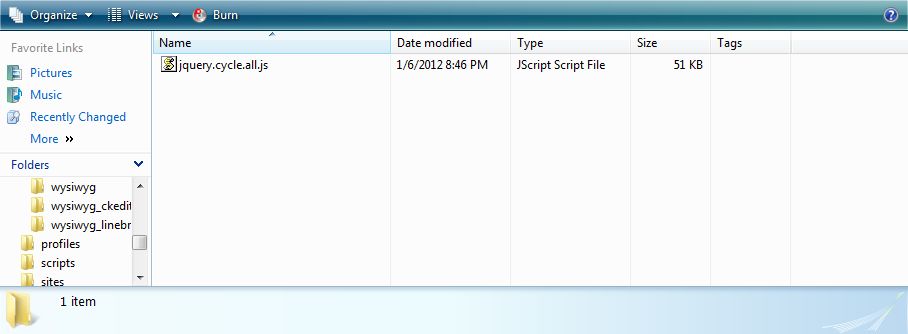
Make sure the plugin file is placed in sites/all/libraries/jquery.cycle/jquery.cycle.all.js
Comment #51
starbucksguy commentedfenstrat -- Thank you for your reply and the information about the patch. I am using views_slideshow 7.x-3.0 and I have confirmed that the plugin file is located in the appropriate location. I have tried both sites/all/libraries/jquery.cycle/jquery.cycle.all.js and sites/all/libraries/jquery.cycle/jquery.cycle.all.min.js but I receive the same error.
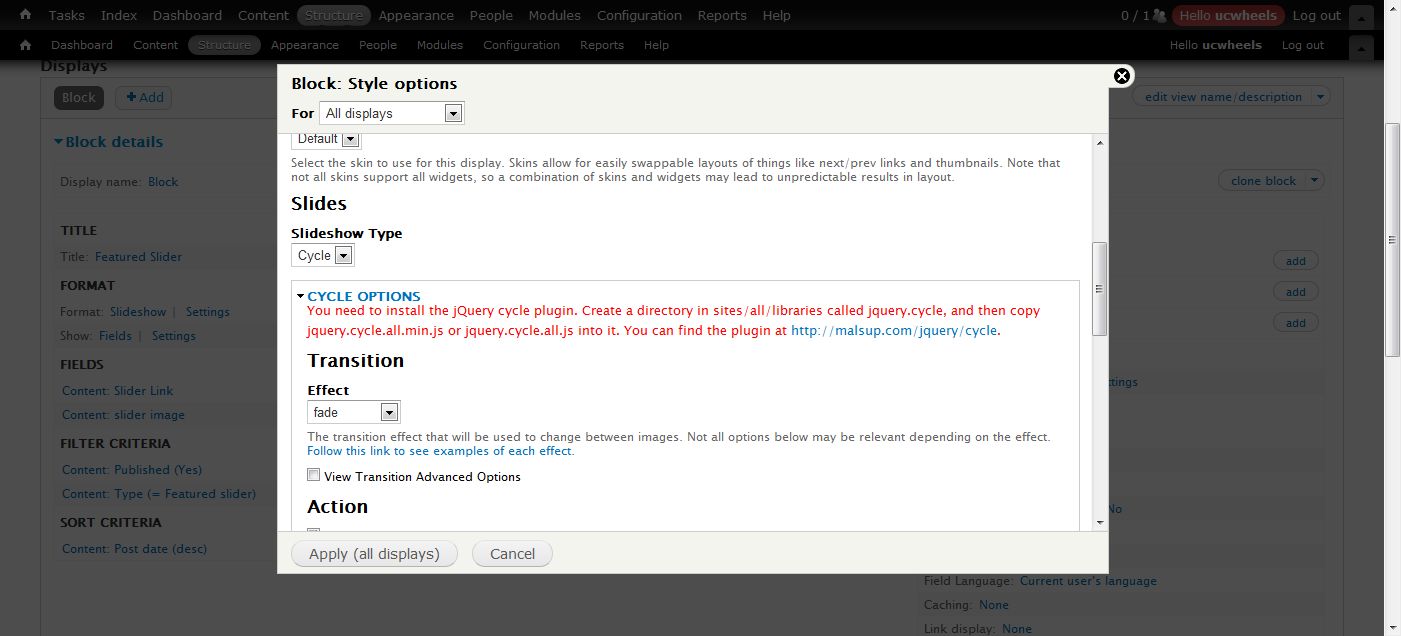
The error states: You need to install the jQuery cycle plugin. Create a directory in sites/all/libraries called jquery.cycle, and then copy jquery.cycle.all.min.js or jquery.cycle.all.js into it. You can find the plugin at http://malsup.com/jquery/cycle.
My slides are not advancing.
I have attached appropriate screen shots. I would be glad to provide any additional configuration information that might lead to a resolution of this problem. Thanks.
Comment #52
starbucksguy commentedI removed the error. I downloaded the file from https://github.com/malsup/cycle and not http://malsup.com/jquery/cycle -- the github file worked.
Comment #53
fcortez commentedI fixed it. It works now.
Comment #54
dhineshkumar commentedThank you..
Comment #55
sezysoyuz commentedHi!
You need to install the jQuery cycle plugin. Create a directory in sites/all/libraries called jquery.cycle, and then copy jquery.cycle.all.min.js or jquery.cycle.all.js into it. You can find the plugin at http://malsup.com/jquery/cycle.
I'm trying to implement slideshow on Drupal 7.17. But i'm facing this error and at the same time my slideshow is not working i had already created the directory as suggested by this error and also the file (jquery.cycle.all.js) but still things are not working. Can you guys help me out.
Thanks in advance.
Comment #56
lsolesen commented@sezysoyuz The answer is in #52.
Comment #57
nicodv commentedThanks, the github file works. I had the same problem as last one, but it was my fault: the libraries folder was not in all, but in sites. Typical duh!
Thanks for the plugin
Comment #58
sonicthoughts commentedcan't find jquery.cycle.all.min.js for 3.02 (latest all version) anywhere. Tried to minify myself and cycle does not work :(
Comment #59
fenstrat@sonicthoughts Please see #50
Comment #60
manfredleh commentedI am following the tutorial on creating a drupal 7 slideshow with views by yaworki1. As part of the installation I need to install the jquery cycle plugin module. I cannot find it under drupal.org/projects. Is it superseded by a newer module or where can I find it?
I found something under malsup.com and downloaded jquery.cycle.all.js. However when attempting to open it, I am getting a Windows Script Host Message Line 10, Char 2, Error: 'jquery' is undefined, Code 800A1391, Source: Microsoft JScript runtime error.
Many thanks, Manfred Lehmann
Comment #61
klonos@manfredleh: Hey Manfred, welcome to Drupal!
The jquery cycle plugin is not a drupal.org module. It's a 3rd party external library found here: http://jquery.malsup.com/cycle/download.html
You need to download the jquery.cycle.all.js file from that site and copy it under your drupal installation directory in /sites/all/libraries/jquery.cycle/jquery.cycle.all.js (if you don't have the Libraries API module installed, please do so - it is required).
Comment #62
manfredleh commentedHi klonos, thanks for your guidance. When downloading from the link which you provided, I get the script message as given in my original question. My PC is windows 7. Do you use windows 7 and do you also or not receive this script? Thanks, Manfred
Comment #63
klonosTry right-clicking then save as (do not directly click on the link as that would try to run the script). That should do it.
Comment #64
Manish Thakur commentedThe #6 post by ParisLiakos worked out perfectly thanks!.
Comment #65
tmcnamara98 commentedI've got a really strange situation where the slideshow works great for a while, then eventually breaks with a "Missing style plugin" message. The "break" typically happens over night. Strangely, it doesn't necessary happy when I run cron.
What I can do to fix it is disenable the views slideshow cycle module, then enable it and then it works! Kind of bizarre.
But I need to figure this out, because I don't want to turn the module off and back on every day.
Anyone have ideas of why this might be happening? I'd be much obliged for the assistance. -Tim
Comment #66
igorik commentedIs it possible that for 3 years the developer didn't fix this small change, which is missunderstunding so many people for 3 years?
Just stop to request the file jquery.cycle.all.min.js?
Hard to believe that, I am very afraid about quality of this module and it's developer.
Comment #67
igorik commentedComment #68
fenstrat@igorik please see #50.
Comment #69
Mintrax commentedI have worked through this thread twice and spent about 8 hours playing around without success. The advice here seems straight forward, but I just can't get a result. Always get "Jquery Cycle is not installed and is required by the rotating banner module". For the life of me I cannot fault what I'm doing wrong.
The modules I have installed that effect this are views_slideshow, rotating banner, jquery plugins, libraries, views. I don't believe I need the jquery plugins module for this to work though. Am I right?
The jquery.cycle.all.js or jquery.cycle.all.min.js files I have tried both multiple times. Currently have both files in the folder, but mostly just one or the other.
The file is located at wamp/www/yeacomau/sites/all/libraries/jquery.cycle/
I have created the file in windows by right clicking and "Save as"
I am a newbie at Drupal but not totally dumb (I don't think)
I keep thinking it must be path error but I just can't see it.
Any help would be most appreciated.