

Closed (fixed)
Project:
Twitter
Version:
7.x-3.x-dev
Component:
Twitter Actions
Priority:
Normal
Category:
Support request
Assigned:
Unassigned
Reporter:
Created:
5 Dec 2011 at 22:16 UTC
Updated:
13 Nov 2012 at 20:50 UTC
Jump to comment: Most recent file


Comments
Comment #1
steinmb commentedAnd you are trying this by using action/trigger in Drupal?
Comment #2
m4xjb commentedI have had the same problem for nearly 2 weeks now. Read every post on it and tried everything. No idea how to get it working... I'm guessing it's something to do with the OAuth module. I can't see what i need to configure there...
Comment #3
zeezack commentedIt could be the trigger action. Its basically when you create a new piece of content and a checkbox appears during this stage saying "Post to twitter" , when you submit it for publishing, it used to, in drupal 6 work like a charm and post the content to twitter. Now it claims it has successfuly posted to twitter, but does not post.
Tried permissions, tried looking into the auth. Whatever is wrong, its not greenlit for drupal 7. If it is, then a complete list of modules and versions that work for drupal 7 need to be made.
Comment #4
juampynr commentedCould you guys check the log at admin/reports/dblog right after trying to post something? I hope we can find something there.
Comment #5
steinmb commentedAnd @zeezack you say this used to work in D6, is this an upgraded D6-site?
Comment #6
m4xjb commentedChecked the log at admin/reports/dblog and there are no errors. Says the page was posted successfully...
Anyone have any other good ideas?
Comment #7
acrollet commentedI was having this trouble as well, and discovered that I needed to re-authorize my twitter account from my user page. The error I was seeing in watchdog was the following:
Make sure that when you authorize your account, it says that you your application has permission to post to your timeline. Downgrading the priority on this issue since it appears not to be a bug.
Comment #8
zeezack commentedPosted by steinmb on December 10, 2011 at 1:04am new
And @zeezack you say this used to work in D6, is this an upgraded D6-site?
Yes it was man. Does anyone have the drupal site posting to the wall with the required setup information? I may try and make a test site to see if I can get a barebones version of it working.
Comment #9
steinmb commented@zeezack how to setup Twitter: http://drupal.org/node/1346824
Do you remember what version of 6.x-3 you where running before you upgraded? I suspect that something got borked during the upgrade.
Comment #10
m4xjb commentedIs it possible to automatically post to your Twitter stream without Singing in with Twitter?
Comment #11
juampynr commentedm4xjb, you must have previously signed in and given write permission to a Twitter account before posting.
Comment #12
m4xjb commentedAfter carefully following all advice I have managed to get this working. It appears the order in which you install/authorise/activate things is very important. For the sake of helping others, here are the necessary steps I took to achieve auto posting to Twitter:
On Drupal 7.9
1) Download and install Twitter module (activating only main module, not sub modules)
2) Create Twitter App
3) Change App permissions to Read & Write
4) Reset Application keys to obtain new consumer key & secret
5) Add Twitter account in Drupal User admin (/user/[user_number]/edit/twitter)
6) Run cron and check that twitter statuses are shown in user area (/user/[user_number]/tweets)
7) Download and install OAuth module
8) Add Twitter App Consumer key & secret to Drupal > Configuration > Web Services > Twitter
9) Activate Signin with Twitter submodule
10) Log out of Drupal and Sign back in using Twitter account (it works)
11) Activate Twitter Post & Twitter Actions sub modules
12) Choose content types to automatically post in Drupal > Configuration > Twitter > Post
13) Add new content
14) Check twitter - it works!!
NB: It is not necessary to sign in to the Drupal admin with your Twitter account to have posts automatically post to Twitter.
Comment #13
kenheim commentedFollowing the steps in #12 worked for me! Thanks for sharing that m4xjb.
Comment #14
rafinskipg commentedPlease add #12 to documentation.
Comment #15
crosshairs commentedI'm still not able to get posting to Twitter working.
Using Drupal 7.14
Twitter 7.x-3.1 (also tried with 7.x-3.x-dev)
Oauth 7.x-3.0 (also treid with 7.x-3.1-beta1)
I have read all documentation & issues, followed directions in #12 above, and elsewhere, in various combinations and re-installations and re-tries, still no luck.
I think the issue has to do with not properly connecting to Twitter. When I initially add the Twitter account at (/user/[user_number]/edit/twitter), I enter the Twitter username and hit 'Add Account'. I'm not taken to Twitter to authorise or anything like that - the account is just listed, and I click 'Save changes'.
What is supposed to happen when you 'Add Account' ?
I'm able to get twitter posts to show in the user account after running cron. When I try post to Twitter, the message says successfully posted, but nothing is posted to Twitter. I have tried with and without action/triggers set up.
Once Oauth is enabled, if I try to delete and add the twitter account again, there is now no field available in which to add the Twitter username. Only the 'Add Account' button shows up. So perhaps the issue is with Oath rather than Twitter module, I'm not sure?
I am also not able to sign in with Twitter if the Twitter Signin module is enabled. (if I logout and try signin with Twitter I get a blank screen with url http://mysite.com/twitter/redirect
I've tried various combos with and without the following options, but clarification would be helpful:
- When creating the Twitter App, do you need to 'Create an Access Token'?
- When adding the Callback url to the application settings, should you include a trailing slash? ie http://mysite.com/twitter/oauth/
- Does the OAuth Provider UI module need to be enabled and configured?
- Does the Twitter Signin module need to be enabled to use Twitter Post?
- Do Twitter actions need to be configured to get Twitter Post working?
I have no errors reported.
If someone has been able to get this working please help again with clear directions, as this seems very temperamental!! Many thanks
Comment #16
juampynr commentedI have improved error reporting at #1383992: Error when adding an account: PDO Exception: Integrity constraint violation in twitter_account_save(). Please give it a try and let us know what error you are getting back from Twitter when attempting to post.
Comment #17
crosshairs commentedHi Juampy, thanks. Sorry if this is a silly question, but do you mean errors reported in the log (admin/reports/dblog)? If so, there are no reported errors.
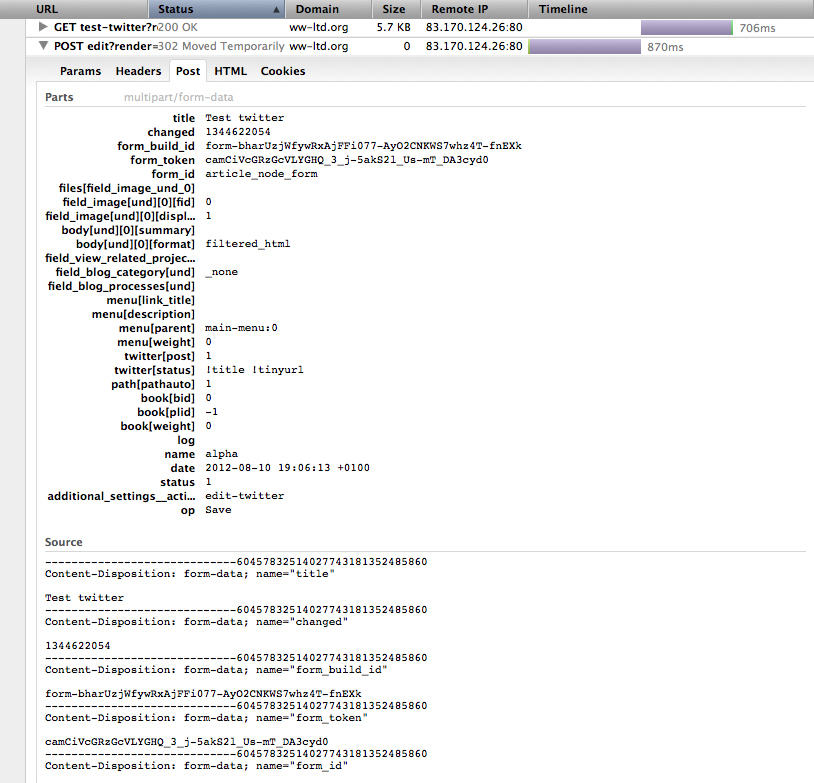
I've attached a screenshot of part of the output from the 'Net' tab in firebug, if that helps.
As I mentioned in previous post, when I initially add the Twitter account at (/user/[user_number]/edit/twitter), I enter the Twitter username and hit 'Add Account'. I'm not taken to Twitter to authorise or anything like that - the account is just listed, and I click 'Save changes'.
What is supposed to happen when you 'Add Account' ?
Once Oauth is enabled, if I try to delete and add the twitter account again, there is now no field available in which to add the Twitter username. Only the 'Add Account' button shows up.
Is this the correct behaviour?
Thanks
Comment #18
juampynr commented@crosshairs, you need OAuth enabled and your twitter app keys at the Twitter settings page. The Add Account form will only have a submit button because it will simply take you to twitter.com so you can authenticate there with an account and approve its use by the website. Once authenticated, you will be redirected back to the website. If your Twitter app has read/write permissions (configured at dev.twitter.com), then you will be able to Post to Twitter.
Comment #19
crosshairs commentedI do have OAuth enabled (not the UI) and I have the Twitter app keys input and saved. The app has read/write permissions.
That's exactly the problem - I am at no point taken to Twitter to authenticate! I don't know why this fails to happen.
- This is what my Twitter add accounts page (..user/1/edit/twitter) looks like before I add the Twitter account and before OAuth is enabled - ie at Step 5 of the instructions above. (See attached screenshot: 'Twitter Add Account').
When I enter the Twitter username here and click 'Add Account', The account is now listed. Then I click ' Save Changes'. Now if I run cron I can see the latest tweets.
- BUT Once Oauth is installed and enabled, and Twitter app keys saved, The field to enter a Twitter username disappears, so if I want to delete the twitter account and add it again (as is suggested in other step by step guides), you can't do so. (see screenshot: 'Twitter account added').
- If I click 'Add Account' button at this point, I just get a '500 internal server error'.
Comment #20
juampynr commented@crosshairs, in order to discuss over the same version I suggest you to upgrade to Twitter 7.x-3.x (which provides better error reporting when the Twitter API fails or returns an error) and then ensure the following (sorry if this may sound redundant but we better cover all possible problems):
* OAuth settings have the keys of an app that have read/write permissions.
* Twitter settings have its default values (for example, Twitter host has http://twitter.com and Twitter API has https://api.twitter.com).
Then, go to your user profile and click on Edit. If you had Twitter accounts which were added before enabling OAuth, you will have to delete them as currently there is no upgrade path to authenticate accounts that you added anonymously. Then, you should be able to add your Twitter accounts. When you click on Add Account and you get to Twitter.com, the message saying that you are giving permissions to your app must include 'post to Twitter'. Then, after authenticating you will be able to Post to Twitter.
Comment #21
coofercat commentedFWIW, I'm having a similar problem to crosshairs. All I want to achieve is that when I create content, a tweet goes onto twitter.com with a link to my new content. I have this working with a Drupal 6 site, but not with this Drupal 7 site. I've completely uninstalled the twitter module a couple of times before trying a different workflows, but so far, nothing works very well. I'm currently on:
Drupal 7.15
Twitter 7.x-3.2 (also tried 7.x-3.x-dev - same outcomes)
Oauth 7.x-3.0
Workflow 1:
- Install and enable twitter, twitter post and oauth modules
- Edit twitter/posts to enable a content type I want to use
- Go to my user profile, edit -> twitter accounts. I see a box asking for a username, so I enter my Twitter user name and I go off to Twitter to authorize my app (which says it's going to be able to post tweets for me). I do all that, and end up back on my Drupal site, and I can see my twitter username and profile picture.
- Create some content - it says "successfully posted to twitter", but nothing appears on Twitter.com
- I can find no errors (in Drupal or Apache's error.log), or even log info for what's taken place except in "latest log messages" I can see the content got created.
Workflow 2:
- Install and enable twitter, twitter post and oauth modules
- Edit twitter settings, add in oauth consumer key and consumer secret
- Edit twitter/posts to enable a content type I want to use
- Go to my user profile, edit -> twitter accounts. I don't see a box to enter my Twitter user name, but press "add account" anyway. I'm taken off to Twitter.com to authorize my application.
- On returning to my Drupal site, I end up at example.com/twitter/oauth?oauth_token=dhsakdhasi6d323hkjds8sdh7&oauth_verifier=dsahwq962ejhsada78h1392, which shows an error banner saying "Request failed: Sorry, that page does not exist."
- Looking in "recent log messages", I do now find a twitter module error, saying the same as above, with that URL.
- The "post to twitter.com" option on new content is not shown
Workflow 3:
- Do all of (1) above
- Add oath consumer key and consumer secret to twitter settings (like in (2) above)
- Try posting new content - says "successful" but posts nothing to Twitter (same outcome as (2) above.
I suspect workflow (1) isn't valid because it never gets the oath keys, but (2) doesn't look right to me either.
I wondered about the oauth module settings (/admin/config/services/oauth) - I have the box that says "Enable the oauth provider" checked and have 7200 for token lifetime. I've tried unticking the checkbox, but got no success from that either. What is the right settings to have in here?
Is there a way I can get more debug logging or maybe send a diagnostic tweet from inside Drupal without having to post new content? Failing that, can anyone see what I'm doing wrong with my settings?
Comment #22
Leeteq commentedComment #23
rongok commentedI am having similar problem to coofercat. Everything works except posting to twitter.com.
Comment #24
fizk commentedA critical fix has just been committed to 7.x-3.x-dev, please make sure to test using the latest dev release.
Comment #25
dromansab commentedHow can I upgrade the module without loosing the oauth tokens?
Thanks
Comment #26
Bricks and Clicks MarketingJust went through all the steps in http://drupal.org/node/1361938#comment-5411616 and the error is gone. It does say 'Successfully posted to Twitter' ater publishing the content type but it is *not* actually posted to the Twitter account. Suggestions?
Comment #27
xurizaemonAnyone having this issue - please confirm if are you using the version this issue is set to, 7.x-3.x? if not, please state your exact module version and report if upgrading to the latest dev release fixed your issue. Check your Drupal and apache error logs for any additional information.
@dromansab, upgrading the module should not lose your OAuth tokens. If it does, please report that as a separate issue :)
@m4xjb, @rafinskipg - please feel free to edit the Twitter module documentation on Drupal.org and/or add README patches to #1820128: Improve setup documentation for Twitter module. Configuring this module is a pain for many people and your input will be most welcome.
Comment #28
Bricks and Clicks MarketingI'm using 7.x-3.2. Will try dev release.
Comment #29
Bricks and Clicks MarketingSame thing w/ dev version - no error, says it's posting to Twitter but there is no new tweet.
Comment #30
Rob_Gnome commentedsame here - todays dev of both twitter and oauth
Comment #31
xurizaemon...
You might also want to try the patch in #1814642: Invalid handling of exceptions causes fatal errors on PHP5.2?
Comment #32
adshill commentedSame problem here. No errors in apache or drupal logs, twitter module says its posted but there is no post. No record of anything in truth.
Comment #33
Bricks and Clicks MarketingThere's nothing in the Drupal logs. Not sure how to check Apache logs.
Comment #34
bwoods commentedI'm with crosshairs on this one. Tried the latest dev for Twitter and OAuth, followed instructions posted in #12, but upon re-login with Twitter, I receive an error:
Fatal error: Wrong parameters for Exception([string $exception [, long $code ]]) in /sites/all/modules/twitter/twitter.lib.php on line 18
Will try again tomorrow and see if I can determine the problem in that file.
Comment #35
xurizaemon@bwoods, can you please check your twitter.lib.php contains commit f71e651 (from #1814642: Invalid handling of exceptions causes fatal errors on PHP5.2). You should see this at the top of twitter.lib.php -
If you do see the above (check for the
if (is_null($previous)) {line) and you still see this issue, then #1814642: Invalid handling of exceptions causes fatal errors on PHP5.2 is not fixed yet.If you do not see the line mentioned above, you haven't got the latest 7.x-3.x-dev.
Comment #36
xurizaemon@bwoods - the error message you've posted says line 18, which means you must have twitter.lib.php from ae7502, that's the last point where Exception::__construct() was called on that line.
Please update to the latest 7.x-3.x-dev (2012-10-24); if the error persists, report as such on #1814642: Invalid handling of exceptions causes fatal errors on PHP5.2. Thanks!
Comment #37
trimboot commentedThe same problem as in #21 Workflow 2
How to solve it? #7 is not working for me.
Thanks.
Comment #38
xurizaemonOK folks, in a desperate attempt to wring some useful debug information from the responses to this thread, I will donate 2H of direct support time this evening to the next few people who contact me via my Drupal.org contact form.
Terms:
You need to provide me with:
I'd prefer to work on a dev instance for obvious reasons, but if you want to give access to your live site to hack on, that's your call.
Do not post contacts regarding this to this issue queue; it will just generate noise for other subscribers. If you post your login to a public thread, I won't follow up; we will all assume some internet random has already hijacked your site.
I will report back on results, so those of you who do NOT accept this offer should be able to benefit indirectly from the information gathered also.
Comment #39
fizk commentedKudos grobot!
Comment #40
nicholasstuartwilson commentedI've managed to get this working with versions:
Drupal 7.12
oauth 7.x-3.0+18-dev
twitter 7.x-3.2+16-dev
(note that I did NOT have any post success with these versions:
oauth 7.x-3.0
twitter 7.x-3.2)
I followed the steps in point #12 above with a specific caveat....
1) Download and install Twitter module (activating only main module, not sub modules)
2) Create Twitter App
3) Change App permissions to Read & Write
4) Reset Application keys to obtain new consumer key & secret
In order for me to carry out the next step (5), I first had to carry out step (7)> This was because when trying to add a Twitter account, there was no box to enter the Twitter account name into. This appeared subsequent to installing and enabling OAuth.
5) Add Twitter account in Drupal User admin (/user/[user_number]/edit/twitter)
6) Run cron and check that twitter statuses are shown in user area (/user/[user_number]/tweets)
7) Download and install OAuth module
8) Add Twitter App Consumer key & secret to Drupal > Configuration > Web Services > Twitter
9) Activate Signin with Twitter submodule
10) Log out of Drupal and Sign back in using Twitter account (it works)
11) Activate Twitter Post & Twitter Actions sub modules
12) Choose content types to automatically post in Drupal > Configuration > Twitter > Post
13) Add new content
14) Check twitter - it works!!
Comment #41
trimboot commented7.x-3.2+16-dev works for me!
grobot, are you patched this? Thanks, man.
Comment #42
xxm commentedHow to fix this for 6.x-beta9? (even no posts to twitter)
Comment #43
coofercat commentedI've got this working with:
twiter-7.x-3.2+16dev (2012-Oct-24)
twiter-post-7.x-3.2+16dev
oauth-7.x-3.0
I did this with "workflow 2" from my comment #21, which now works as it should, so now is:
Workflow 2 (working):
- Uninstall twitter, twitter post, and oauth modules (actually uninstall, not just disable!)
- Install and enable twitter, twitter post and oauth modules
- Edit twitter settings, add in oauth consumer key and consumer secret
- Edit twitter/posts to enable a content type I want to use
- Go to my user profile, edit -> twitter accounts. I don't see a box to enter my Twitter user name, but press "add account" anyway. I'm taken off to Twitter.com to authorize my application.
- Go to "add content" and create something (or indeed edit something old, but check the "post to twitter" checkbox)
- On submit, it says "successfully posted to twitter"
- A moment or two later, the post appears on twitter.com
Thanks to everyone for their help!
Comment #44
xurizaemonI've just confirmed, again, that is all working with 6.x-3.x-dev as well. Took some notes (#1820128-3: Improve setup documentation for Twitter module) which may turn into a TROUBLESHOOTING.txt later.
Marking this support request fixed, and releasing 7.x-3.3 / 6.x-3.0.
Comment #45
cas.priyanka commentedHello coofercat,
I am facing same problem, post is not appearing on twitter.
I am using
twitter-7.x-3.1
twiter-post-7.x-3.1
oauth-7.x-3.0
But its not working can you please send me links on below modules
twiter-7.x-3.2+16dev (2012-Oct-24)
twiter-post-7.x-3.2+16dev
Thank you
Priyanka
Comment #46
bwoods commentedGreat work grobot! You were correct that I hadn't grabbed the latest dev version (I had it on staging but not prod, where I was doing my latest testing). Everything is working now, and I'm using the latest core (7.16) as well.