

Active
Project:
Fivestar
Version:
7.x-2.x-dev
Component:
Documentation
Priority:
Normal
Category:
Support request
Assigned:
Unassigned
Reporter:
Created:
2 Jan 2012 at 23:40 UTC
Updated:
15 May 2013 at 03:23 UTC
Jump to comment: Most recent file





Comments
Comment #1
ygcdzs commentedYou can change the stars under manage display tab.
content types > your content type > open "manage display" > Click the small icon on the right in the "Rating" row > open "star display options" > change the stars
Comment #2
ericduran commented@ygcdzs explains how to do this.
Comment #3
WriteCo commentedWhat you described sends me to the page, /admin/structure/types/manage/story/display. There is not a "Rating" row. I only see a "Rating" row in the fields display that I attached. As you can see in the image, there is no icon for changing the stars.
Here are the options I have on the Manage Display tab.
Comment #4
WriteCo commentedPerhaps someone could post a screen shot of what I am *supposed* to see. I used to be able to find these settings, but the cog icon is no longer available in the field options, which is where I thought it was. Does Fivestar depend on some module that I may have disabled to make this icon available?
Comment #5
WriteCo commentedI just saw this thread was marked as "fixed" when nothing was fixed. In fact, my issues were completely ignored. That's just rude.
Did you even look at the screenshot that I posted before you marked this issue as "fixed" that clearly shows there is *NO* icon on the right of the "Rating" row in "Manage Fields" tab? Did you even look at the screenshot that I posted later that shows the "Manage Display" tab does not provide any Fivestar options? Did you even look at my screenshots to see what I saw? There is *NO* icon. There are *NO* "star display options" anymore.
There must be an undocumented dependency somewhere, since Fivestar *used* to have options in my system, but it no longer does.
Anyone who can see options can post a screenshot of the icon I am supposed to see. Maybe I am missing something, but following all of the directions posted everywhere about Fivestar does not make the icon that used to be there come back. It is gone now.
I have the Fivestar and Voting API modules at their current versions and enabled. What other modules does Fivestar require? Since it is clear to me that this functionality changed when I changed something in my Drupal system. The icon is not available on any of my sites, so the fact that is missing must have something to do with modules, rather than themes. What am I missing?
Look at my screenshots and post a screenshot if you really think I cannot see something that is supposed to be there. The icon is no longer on my system. Where did it go?
Comment #6
ericduran commented@writeco sorry about that, but if you look at the thread you can tell I closed the issue before you explain your issue further and before you posted the screenshot.
I did not mean to be rude, just a lot of issues, this one seems closed as I also agree with @ygcdzs explainion.
I can't read through everything now, but I'll have a look at your explanation further and record a nice screencast.
Comment #7
WriteCo commentedThank you for understanding my frustration.
I was referring to the screenshot that I posted with my original issue. Isn't that the row that @ygcdzs was referring to? There are no rows or references to rows on the "Manage Display" tab.
When I saw the icon before, it was in the field row that I posted with my original issue. That is my issue. Something that used to be there is no longer there. Did I start looking in the wrong place? There is only one place to find a field row for Rating.
There is only one set of instructions for changing the stars in Drupal 7 Fivestar. Repeating those instructions does not serve any purpose since those are the same instructions I have been following to get to this issue. I did not have those issues in October when I upgraded to Drupal 7 and could I not find the Fivestar settings to change stars, http://drupal.org/node/1272220.
I will repeat my issue again. The icon that used to be available for changing the stars is no longer available. I used to be able to access that icon. Is there a direct path to the icon that I can use instead? Does Fivestar have some dependency, other than the Voting API that is active, that I may have removed or disabled?
Comment #8
ericduran commentedSo there's two places to change the star. Because the stars behave like field now the one place to change then is in the display option for the field. This is the case if you're using stars for user facing votes. As the display option is were all the settings are kept for any field.
The other option is the field start instance setting form. This is only the case when you're using fivestar stricly as a field and no user facing voting. Does this make sense?
The options should be there. Let me know if you're still having problems.
Thanks.
Comment #9
ericduran commentedCan someone please confirm that my previous comment does indeed solve this issue? Thanks.
Comment #10
darrell_ulm commentedYep, it looks solved
For instance:
admin/structure/types/manage/article/display
See something like: "Style: default, Exposed: yes, Stars display: average, Text display: average"
and a gear icon to the right of this.
Click that gear icon ->
Should see
Format settings: As Stars
SHOW STAR DISPLAY OPTIONS
Expand that hidden tab and all the options appear.
A link like:
admin/structure/types/manage/article/fields/field_rate2/widget-type
Looks like it should have the options but does not, which could be the confusion.
Clicking the gear to the right of: admin/structure/types/manage/article/display
worked fine.
Looks like the case is closed.
Comment #11
ericduran commentedThanks :)
Comment #12
WriteCo commentedAs you should see in the screenshot I posted in #3, the link to the display does *not* provide the page you are discussing. The screenshot you posted is of the stars which is not helpful, as I need to see where the cog icon went. There is NO cog icon anymore.
Comment #13
WriteCo commentedYou guys are just repeating the same instructions and expecting a different result. There is no cog to click. As I have said several times before, Fivestar must have some dependency somewhere that I must have disabled. I used to be able to change the stars. *None* of the links posted in this thread go to a stars page.
Anyone can post a picture of the cog icon so I can see where it is. I have posted pics of the settings I see that used to have the cog, but as you can see from the pics, the cog is not there.
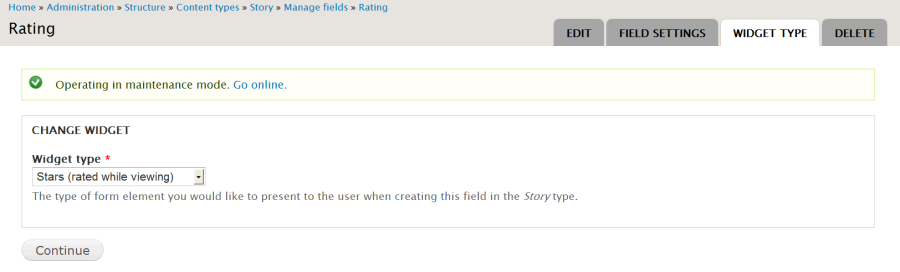
Here are the options to change the widget.
Comment #14
ericduran commentedYou are confused by what Drupal Field API calls "widget".
You have to treat the fivestar like any other field. If you want to change how a field looks in drupal to go the display settings for that content type.
Image coming soon.
Comment #15
ericduran commented1st screen show for the "Stars (While editing)" Widget
Comment #16
WriteCo commentedAnd you saw the screenshots that I provided that show the cog is not there, right?
Not really, since the options to change the stars have gone away.
Of course I'm still having problems. You are repeating the same instructions as have been repeated before. My question remains. What does Fivestar depend on to get the cog to display?
Remember, as I have stated many times, the cog used to work, but I have disabled features that I do not need and now there is no cog. Since I did not continually check for this functionality as I worked on my system, I did not know it quit working or when it quit, so I do not know the dependency that needs to be re-enabled or re-installed to get the cog icon back.
Please, please, please, a hundreds times, please, do not repeat the same instructions again and expect things to suddenly work. Just please look at my screenshots to see that there is no cog. Post a screenshot of the cog if the cog is on a different page from those I have posted.
A direct path to the stars would be great. The path to a page with a cog is not any of the following (posted in order of appearance).
Where else do I look if it this functionality is still available somewhere?
What are the Fivestar dependencies that are not mentioned in the documentation?
Please, tell me why the screenshots that I provided are not the screens you guys are discussing. These are the screens that come up when I follow the instructions that, I repeat, used to work.
Comment #17
ericduran commentedHere's for the "Stars (While editing)" view.
Comment #18
ericduran commentedAnd after that you get this.
Comment #19
WriteCo commentedI get to that screen just fine, but there are no stars.
Comment #20
ericduran commentedadmin/structure/types/manage/story/display should be it.
Every fivestar dependency is listed.
Also please note I am indeed trying to help. I get that you insist I'm repeating the same thing, I am only trying to explain it in a different way.
I am in no way trying to be mean or rude. But this isn't the 1st issue that came up about this.
Maybe is we lack documentation and I could love some help on that part :) but
Also it should be noted searching the issue queue would had found answers to the question. ;-)
Comment #21
ericduran commentedPlease see my last 2 screenshots.
The path should be admin/structure/types/manage/story/display
Comment #22
ericduran commentedAlso comment #10 also explains it.
Comment #23
ericduran commentedIf this still doesn't work, then is possible you have some kind of module that takes over this screen, Something like display suite.
I don't use it so I'm not entirely sure where it moves things too. But I'm sure it's something in admin/structure/types/manage/story/display.
Search every option in there. I'm sure it's somewhere in there.
Please let me know if you find it. Also if you still don't find it, let me know what modules you have turn on and I'll replicate the set up.
Comment #24
WriteCo commentedThis screenshot for #17 looks great, but I do not have that screen anymore. I have what I posted at #3. Adding a layout gives me rows of field names and the comment "no information" for each one.
Comment #25
WriteCo commentedAs I have mentioned in two threads, I have read every issue that came up about this and found no solution.
I finally found the stars, but now there is a problem. What was not mentioned was that the Star Display Options only appear for "Stars (rated while editing)" but not for "Stars (rated while viewing)" widget. I want to change the stars that users see. When I change the stars for the editing widget, the stars for the viewing widget stay at the default. There are no options for the viewing widget.
Look at my screenshot, that is what I have for the viewing widget, but I do get what you posted in #15 when I use the editing widget, as you have posted.
Can you change your widget to "Stars (rated while viewing)" and look at your pages that you posted, to see if this is just an issue on my system or if it is in Fivestar?
Comment #26
WriteCo commentedI disabled Display Suite and now I can edit fields on the display tab. Was that really the problem?
Was there a notice of conflicts between these two that I did not notice or remember reading?
I knew that Fivestar used to work without problems, but I did not know what broke the display functionality.
What I said in #25 is still true, but now the display tab is back, so this is fixed for that part of it.
And a huge thank you for your help and patience!
Comment #27
WriteCo commentedI will be available for documentation projects after March 1, since I am in the middle of bar review. After that I can look into this a bit. I like Fivestar and I do write stuff... go figure.
Comment #28
zip207 commentedI had the same problem, it was very frustrating. Thanks to this feed and this article http://www.drupaltky.org/en/faq/16 I aggregated my javascript files and was able to change the stars.
Thanks!
Comment #28.0
zip207 commentedChanging the image width to fit the viewport.