

Closed (fixed)
Project:
Drupal.org security advisory coverage applications
Component:
theme
Priority:
Normal
Category:
Task
Assigned:
Unassigned
Issue tags:
Reporter:
Created:
8 Jan 2012 at 12:28 UTC
Updated:
10 Sep 2018 at 09:47 UTC
Jump to comment: Most recent, Most recent file






Comments
Comment #1
lakshminp commentedComment #2
lakshminp commentedComment #3
rudiedirkx commentedFrom pareview: http://ventral.org/pareview/httpgitdrupalorgsandboxbadri1397702git
These are all very simple fixes.
I also recommend putting templates in a
templates/folder, to separate them from thetemplate.phpand.infofile, for readability.You can fix the "Inline control structures are not allowed" errors by putting the
if-else'logic' intemplate.phpand rendering the result with drupal_attributes.The functional 'problems' I have with the theme:
<pre>elements =(logo.pngin the theme folder. If you add one, it'll be displayed by default. Another option is overridinghtml.tpl.phpand not showing a logo. Another option is preprocessing for it in the theme to not show it.I like it though. I'm keeping it as base theme. Nice HTML5 + Aria.
Comment #4
lakshminp commentedMade most changes mentioned in the above review.
Comment #5
rudiedirkx commentedStill some imperfections: http://ventral.org/pareview/httpgitdrupalorgsandboxbadri1397702git
The missing file doc comments is the most important. You can take it from Drupal's default
page.tpl.phpif the variables are identical. I suggest you add which regions are available.There's also still the missing logo or empty logo html. It's not in
html.tpl.phplike I suggested before. It's in yourpage.tpl.php. If your theme shouldn't have a logo, remove the html frompage.tpl.php(okay) or preprocess it out (better).Comment #6
rudiedirkx commentedComment #7
lakshminp commentedfixed glitches: http://ventral.org/pareview/httpgitdrupalorgsandboxbadri1397702git.
Added a logo as well.
Comment #8
dudenhofer commentedHi lakshminp, I ran the code review again and it flagged the color codes, they mention that they prefer lowercase color codes here: http://drupal.org/node/302199
But I think the main issue I noticed is the lack of tabs. I installed your theme, and had no way to edit my content once I had created it other than going to the administration area. Your page.tpl.php should probably have a $tabs variable printed somewhere to allow users to edit the content.
Comment #9
lakshminp commentedFixed the CSS coding standards issues and added tabs.
Comment #10
iler commentedStill these things need to be fixed:
There are still files other than README.txt in the master branch, make sure to remove them. See also step 5 in http://drupal.org/node/1127732
Review of the 7.x-1.x branch:
Drupal Code Sniffer has found some code style issues (please check the Drupal coding standards).
Comment #11
lakshminp commentedFixed above issues. Still 3 warnings.
FILE: ...ites/all/modules/pareview_temp/test_candidate/templates/comment.tpl.php
--------------------------------------------------------------------------------
FOUND 0 ERROR(S) AND 3 WARNING(S) AFFECTING 3 LINE(S)
--------------------------------------------------------------------------------
9 | WARNING | Line exceeds 80 characters; contains 84 characters
30 | WARNING | Line exceeds 80 characters; contains 82 characters
36 | WARNING | Line exceeds 80 characters; contains 82 characters
--------------------------------------------------------------------------------
They seem to be from the standard file documentation of comments tpl file.
Comment #12
iler commentedHere are things that needs to be fixed:
Comment #13
lakshminp commentedfixed all the above comments and made some changes as well. Added a new region. Reorganized the CSS.
Comment #14
dudenhofer commentedI noticed a few things
- My install shows a search button, which I don't think was intended: https://skitch.com/dudenhofer/886xj/review-site
- Not sure that it was intended to hide all other search form submit buttons. If I add a search block, it looks like this: https://skitch.com/dudenhofer/886tb/review-site
- At first I didn't think the image header upload worked, but it looks like it adds the image to the rotation of images. So it works, but there might be some confusion there.
- There is no $messages variable in the page template, so I currently see no system messages.
Comment #15
lakshminp commented1. Search button issue is fixed.
2. Image rotation logic is modified to be either a fixed static image or random rotating masthead.
3. $messages has been added.
Comment #16
lakshminp commentedComment #17
israelshmueli commentedHi,
Great choice, and nice implementation. The images in the header out of the box are real joy.
TwentyEleven is wonderful WordPress theme. Actually, I believe it is the WP default theme for fresh installations.
If so, we may consider it as WordPress equivalent to our Drupal Bartik.
As such, I would treat it with extra care and would try to be as close as possible to the original. "With great power, comes great responsibility..." (:
I think that you should mention in the project page the fact that this is/was the official default WordPress theme.
I installed tour theme in a dev environment ad also installed fresh WordPress site to get some impression of the original.
I faced few "need fix" thing:
wide images in posts are too large for the content area and overfloaw to the sidebar and break the visual page layout.
Full nodes titles are clickable as links (they shouldn't) .
If you decided to remove titles from page.tpl.php and move them to node.tpl.php you should distinguish between full node titles and linked teaser titles.
That bring us to the question of missing page titles.
Pages that are not full node pages appears without title . (taxonomy pages for example).
Also are missing required variables like :
You can install Style Guide module to examine your theme with many common styles.
It would be nice if you will include in the theme some more little things that can be found in the original WP like the comment icon, with comments count and the "search" text inside the search box.
You have already implemented HOOK_form_search_block_form_alter() to attach ID attribute to the submit button.
You can find more at How to Customize the Block Search Form
You have done quite good job on main details, It will be lovely if you can also stick with these little tiny style details of the original (and so popular) TwentyEleven theme.
Comment #18
lakshminp commentedHi israelshmueli,
Thanks for your comments. I've fixed all of the issues except the large image breaking the sidebar. This happens in Bartik too(check attached image).
You have to set the image display style to "large" in the content type > manage display. This renders the image alright.
Thanks again for your review comments.
Comment #19
israelshmueli commentedHi lakshminp,
There few style adjustments can be made to get closer to the original. For example the use of icons for comments, borders for images in node content and font sizes in few places. See the WP twentyeleven demo
But there is also major issue with HTML5/XHTML.
I have just noticed your page.tpl.php contains HTML5 tags. The Original WP twentyeleven theme is indeed HTML5 theme.
But Drupal 7 core DOCTYPE is still XHTML by default.
In order to produce valid and meaningful HTML5 theme you should, at least, implement HTML5 DOCTYPE via your template.php.
You will also need to modify more template files like html.tpl.php, node.tpl.php etc.
See Examples for HTML5 template files in Boron theme.
You can find more Drupal HTML5 inspiration in Adaptivetheme and Sasson.
The Images width:
I believe this is the WP theme way of dealing with wide images, width in percentage (style.css, line 61):
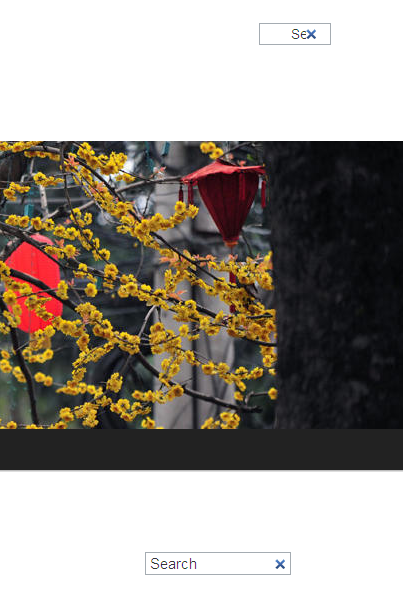
Another thing is the overflow of header images in narrower browser windows In not the case in original theme.
see attached screenshot images.
WP theme use percentage width for branding images( style.css line 530):
Comment #20
israelshmueli commentedComment #21
lakshminp commentedHi israelshmueli,
nice catch about the header image overflow bug. I've fixed it.
Also I've made the theme into a HTML5 one and also validated it. I've used icons for comments etc. Drupal is not just for blogs and themes can be majorly adopted for any context or content types. Hence, I've left the image border stuff to the preference of individual themers.
Thanks a lot for taking the time to review the theme.
Comment #22
israelshmueli commentedHi lakshminp,
Well done for the HTML5 implementation.
Few more things:
1.
You need to soleve IE html5 problem, maybe by adding html5shiv to get your HTML5 theme to work in IE8 and below. If you will check in ie8 you will see the problem.
(These older IE versions need some JS help to use CSS with HTML5 elements).
I brought my copy of Drupal Twentyeleven to function in IE by adding theses lines in html.tpl.php (placed immidietly after the $scripts ):
2.
At file comment.tpl.php you forgot to wrap strings in t() functions.
3.
The same with "Search" string inside the file twentyeleven.js - see Translating strings in JavaScript.
4.
In line 49 at field--taxonomy_term_reference.tpl.php
You print the $content_attributes in a way that seperate the the class attribute from its value.
Instead of
I belive it should be:
5.
I had some difficulties with managing the header images.
a. When I uploaded standard proportions image it displayed with its full height. (see attached screenshot).
b. You supplied mechanism to upload new photos to header but I have not seen any UI to remove certain photos from header.
6.
Layout on narrow screen width:
The original twentyeleven function very well in narrow viewports. It seems that the sidebar sinks below main content. The drupal implementation doesn't function this way and on narrow screen size and images from main content overlap/overflow into sidebar.
see attached images
7.
Strange thing: only in chrome - searchbox look strange. Work fine in IE(with html5shiv js) and Firefox - see sttached image.
7.5
The comments icon positioned, fixed, in top right corner of the screen (It hides behind toolbar, I have noticed only when no tool bar, as anonymous with add comments permissions )
8.
The theme is missing some typography styles for text in content.
No numbers on ordered lists,
No bullets on unordered lists
Html headers H's like H2, H3, etc. are lokk like ordinary text.
On comment #17 I recommended that you install and enable a wonderful tool for every themer, the Style Guide module. You can use it to see what I am saying.
Comment #23
israelshmueli commentedComment #24
lakshminp commentedHi israelshmueli,
I've fixed all the above review comments. Thanks for taking the time to review the theme.
Comment #25
lakshminp commentedComment #26
ANDiTKO commentedHi there mate!
Here is my manual review:
1) Your git clone code in this page's description is wrong. The correct is :
git clone --recursive --branch 7.x-1.x http://git.drupal.org/sandbox/badri/1397702.git twentyelevenWe need to clone the "7.x-1.x" branch, not the empty "master" ;)
2) Your theme is not finished. You must add more styling so your theme looks closer to the original theme (pagination, text boxes.. etc...). I suggest you to copy the exact same demo content from the Wordpress' Twenty Eleven demo site. Then make you drupal demo site look as close as possible to the original.
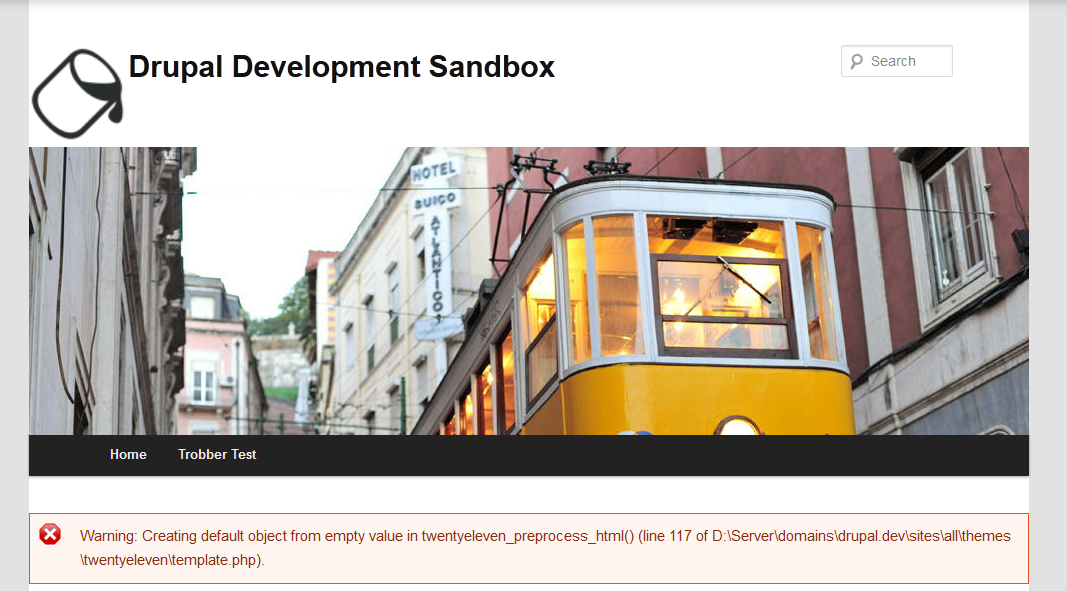
3) I get the following warning:
Note that im testing it on my localhost where i have enabled full error reporting. This wont be displayed on production servers. Here is a screenshot (i get this error on every single page).
4) In "style.css" line 492 you have declared "position: absolute;" followed by "top: 0.2em;" and "top: 0.2em;" which is not properly displayed in webkit browsers. The comment counter is stuck on the top right corner. Check the screenshot. I suggest you to use "display: inline-block", "float: left" or fix the html markup so you can properly display it.
5) In "style.css" line 34 you use percentage unit for the margin property. Avoid that. Try to use the same unit for all properties. Use "em" or "px" for margin and padding.
6) In "style.css" line 44 your gradient will work only on webkit and mozilla browsers. Have a look at Ultimate CSS Gradient Generator from ColorZilla for cross-browser compatible css gradients.
7) In "style.css" line 108 your gradient wont work because its overridden by the solid color on line 115. You must have the solid color in the first line, then add the gradients for backward comparability. Please read CSS coding standards and the paragraph about "CSS3 properties, vendor prefixes, progressive enhancement".
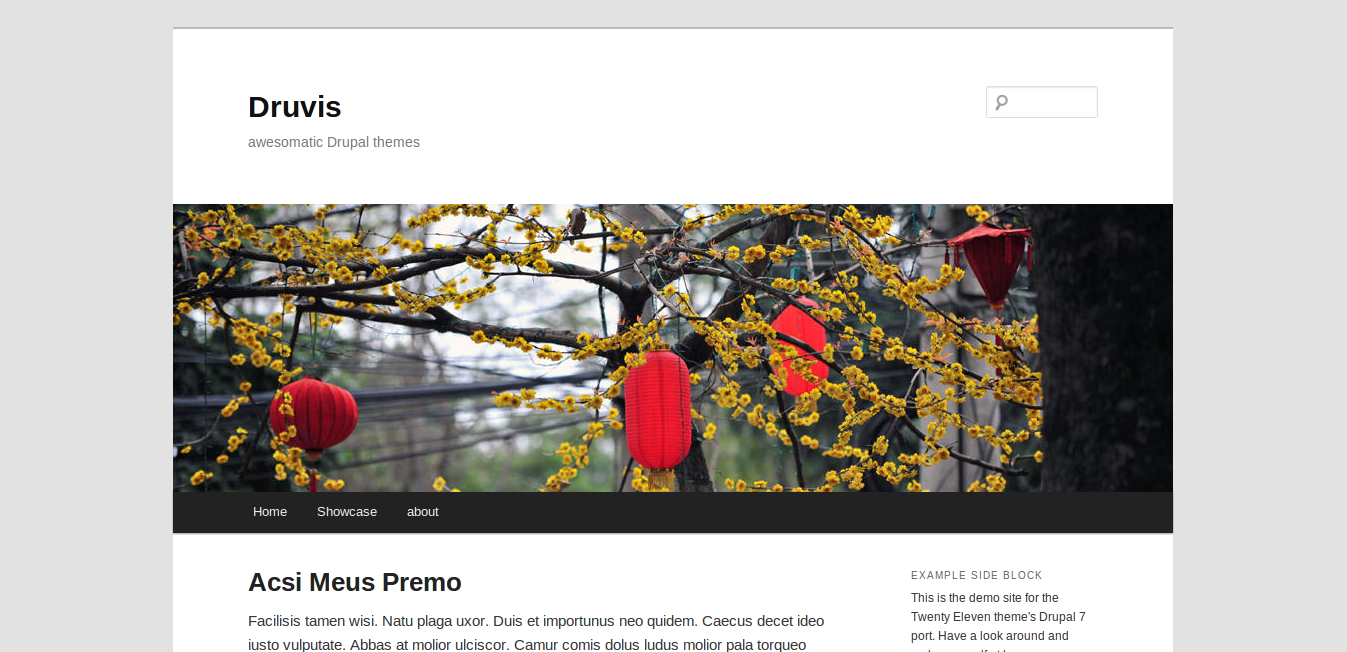
Currently your theme is not properly displayed on my site that i tested. I saw few screenshots from users that reviewed your theme before me, and what i have is different. I think its because you formatted your css with automated css formatter in your text editor and some properties moved or got their priority overridden. This is my homepage: Screenshot. As you can see the logo is misplaced, the titles doesn't have the same styling as the original theme, the pager is not styled correctly ... etc
I hope my review helps you improve your theme.
We all appreciate your work. Thanks!
- ANDiTKO
Comment #27
ketelagoreng commentedhi lakshminp,
here is manual review from me,
I think it's not a bad idea to give margin or padding from logo to site title, it's look so close.
and you should look the file I attached, I think that's need padding too, and the last I think this theme will looks better if the main content has margin the right side.
sorry for my bad english. :D
Comment #28
klausiLooks like the previous two comments indicate that this needs some work.
Comment #29
klausiClosing due to lack of activity. Feel free to reopen if you are still working on this application.
Comment #30
lakshminp commentedThanks for the review ketelagoreng. fixed the above comments.
Comment #31
joachim commentedThe git clone command is wrong, and your project defaults to the master branch which is empty. You should fix these if you want reviews!
Sanitization should be done in the preprocess. Though won't this already have been sanitized?
This should be done in preprocess.
I appreciate you're trying to do a straight port of the WP theme, but it still seems a bit weird to hardcode a block.
Again, you're trying to match what WP does. But there are modules that do that. It would be better to suggest that your users use https://drupal.org/project/textformatter on their term fields rather than duplicate its work.
Function docblock is wrong.
Comment #32
lakshminp commentedThanks for taking the time to review my theme joachim. Here are the list of changes I've done:
Comment #33
joachim commentedSounds good.
You should consider mentioning https://drupal.org/project/textformatter in the README, so users who want WP-style comma-separate terms can easily set them up.
Comment #34
gisleAutomatic review
The automatic review found some trivial problems, including one spelling error.
Please see: PAreview for details.
Manual review
This is said to be a port of Wordpress TwentyEleven,
which is licensed under GPL v2.
According to the license, any derivative must meet the following conditions:
The code for the Drupal version seems to be much modified from the WordPress version, however, I could not find any notice about what is changed, and how.
While it is OK to have third party code under GPL hosted on Drupal.org, the basic requirements that allows reuse of a project under GPL must be in place.
Documentation for seems to be lacking. For instance, a number of sample images is packaged with the theme, and the demo screenshot shows an image in some region. But just installing the module did not show an image anywhere and there was no obvious settings to activate it or change it.
Comment #35
joachim commented> The code for the Drupal version seems to be much modified from the WordPress version, however, I could not find any notice about what is changed, and how.
I imagine the underlying code is completely different. There is a matter of the *design* being licensed though maybe?
> No. Very little guidance about how to configure the module is offered.
I'm not sure that's needed. All themes are configured in the same way, in the same part of the UI.
> Documentation for seems to be lacking. For instance, a number of sample images is packaged with the theme, and the demo screenshot shows am image in some region. But just installing the module did not show an image anywhere and there was no obvious settings to activate it.
I get an image shown when I enable the module.
> '#upload_location' => path_to_theme() . "/images/headers",
That shouldn't work. If it does, then it's a security risk!
> Moved the hardcoded search form to a search region.
Several artefacts of that remain -- in template.php and page.tpl.php.
Comment #36
joachim commenteddiv.tabs stretches across the whole page, and so if I put the navigation menu block in the RH sidebar, the bottom border of the tabs appears to the right and it looks a bit odd.
When I enabled the theme, the blocks that were in the footer in my old theme got put into the search region. That was a bit weird. You might want to review the procedure that the theme system uses when figuring out which regions to copy blocks into when enabling a theme for the first time -- it might be that there are hints you can give it (or it might merely be the order in which you declare regions?).
You might want to consider adding a Help region -- the core themes all have that.
Comment #37
gisleIMHO, this theme is not documented well enough.
This is the markup produced by this theme on my site. In the URL to the image, the path is present, but the file name with the image is missing.
This is either a bug, or some setting is missing at my site (and I haven't a clue about what that setting is). Either way, this is a blocker.
Missing alt and title tags are also IMHO bad coding practice.
Comment #38
lakshminp commentedThanks for the detailed review guys.
'#upload_location' => path_to_theme() . "/images/headers",I got the idea from Nitobe which uses the same code.
Comment #39
joachim commented> '#upload_location' => path_to_theme() . "/images/headers",
You should never be able to upload files into your codebase! Files should go in the public:// directory.
Comment #40
lakshminp commentedGood find. Fixed it. I figured that it is not needed at all.
Comment #41
gisleAutomatic review
The automatic review found some trivial problems.
Please see: PAreview for details.
Manual review
The description following the
@filetah inhtml.tpl.phpspans two lines. It needs to be rewritten to fit on a single line. Suggestion:The Drupal version is based the WordPress version. The README.txt has the following notice:
The Wordpress' TwentyEleven theme is licensed under GPL v2.
According to the Drupal.org policy on 3rd party code, it is permitted if the code is made available under GPLv2 and the original has to be modified to work with Drupal. This is clearly the case with a port such as this one. The project also contains a number of images from the original library, including eight images in the
images/haeders/directory. Again, images available under GPLv2 is permitted (ibid.).However, according to the license, any derivative must meet the following conditions:
In the current distribution, I could not find any notice about what is changed, and how.
For this theme to satisfy the licensing requirement, the notice in README.txt saying that it is based upon the Wordpress' TwentyEleven must be expanded to explain that the files has been changed, and how, as well as the date of any change,
The documentation is improved, and there is now a useful README.txt. However, the lines are too long, and there is not enough whitespace to make it easy to read, and there are a number of minor inaccuracies (for instance,the "Search form" is referred to as the "Search block".
Below is a suggestion for how the README.txt can be improved.
Manual review summary
Comment #42
lakshminp commentedI didn't understand this part.
I just copied the images from the theme and attributed it. No other thing is adapted from the Wordpress library. Hence, I thought there is nothing to add.
currently this is how it looks in the system module's html.tpl.php. I copied the comments from there only. Should I still change this?
Comment #43
gisleThis sentence (from README.txt) makes it appear as the theme is derived from or is an adaption of the Wordpress' TwentyEleven theme:
The same with this sentence (from the project page):
If the actual PHP-code, HTML-markup, JavaScript and CSS is not based on the WordPress theme, and only the images are copied, you should instead say something like this:
When you're reusing works created by others, it is necessary to make it clear to users what is copied, and what is not copied, and that you have the necessary permissions to use the works that are copied,
Yup. The coding standard says one line. The system module's
html.tpl.phpbreaks the coding standard, but the system module is not under review here.Comment #44
lakshminp commentedmade the above changes.
Comment #45
gisleTo me, the theme now looks like it is ready for being promoted.
Comment #46
PA robot commentedProject 1: https://www.drupal.org/node/1397718
Project 2: https://www.drupal.org/node/1313026
As successful completion of the project application process results in the applicant being granted the 'Create Full Projects' permission, there is no need to take multiple applications through the process. Once the first application has been successfully approved, then the applicant can promote other projects without review. Because of this, posting multiple applications is not necessary, and results in additional workload for reviewers ... which in turn results in longer wait times for everyone in the queue. With this in mind, your secondary applications have been marked as 'closed(duplicate)', with only one application left open (chosen at random).
If you prefer that we proceed through this review process with a different application than the one which was left open, then feel free to close the 'open' application as a duplicate, and re-open one of the project applications which had been closed.
I'm a robot and this is an automated message from Project Applications Scraper.
Comment #47
gisleI've got two weeks more experience reviewing, so I am going back in my own tracks. I am afraid I have to withdraw my previous conclusion on this. Below is a revised review.
Automated Review
PAReview reported some issues. However, please note that these are not substantial and fixing all issues is not a requirement for getting through the application process.
Manual Review
The module reuses media content from the WordPress TwentyEleven theme (http://wordpress.org/themes/twentyeleven). All header images and icons that accompany this Drupal theme is copied from the WordPress theme without changes, and is used under GPLv2. Apart from the images and icons, everything else in the Drupal version is created from scratch. The use of the media content is acknowledged in README.txt, making reuse under GPLv2 permissible.
time(). UseREQUEST_TIMEinstead.drupal_basename(). PHP'sbasename()does not properly support streams or filenames beginning with a non-US-ASCII character.$vars['comment_string'] = t('!author on !permalink said:', array('!username' => $vars['author'], '!permalink' => $vars['permalink']));uses!usernameas placeholder for!author.@authoris more robust. For example:$vars['submitted'] = t('!username on', array('!username' => $vars['author']));should be$vars['submitted'] = t('@username on', array('@username' => $vars['author']));.The starred items (*) are fairly big issues and warrant going back to Needs Work. The rest of the comments in the code walkthrough are recommendations.
Please don't remove the
PAReview: securitysecurity tag, we keep that for statistics and to show examples of security problems.Comment #48
lakshminp commentedComment #49
gisleI'll get back to you ASAP with a full the review, but since this can take some time to get resolved, I just want to point out another stumbling block:
The way I now read the guidelines for 3rd party libraries and content on Drupal.org, two conditions have to be fulfilled for third party content to be included in the repo:
I've set status to Postponed. Please follow one of the routes below, and set back to "Needs review" when one of the routes has been completed.
Comment #50
lakshminp commentedAre creative commons licensed images allowed for the header image?
Comment #51
gisleThe policy says no third party content can be included unless explicit permission is granted by the webmasters. The way I understand the policy, it is the same whether it is CC or GPL V2 or MIT or BSD or OFL.
I am really sorry. I don't agree with this policy myself. But as a reviewer, I have to go by the book.
Comment #52
lakshminp commentedReplaced all images with my photos. No 3rd party content in the codebase now.
Comment #53
gisleAutomated Review
PAReview reported some issues. These are not substantial and fixing all issues is not a requirement for getting through the application process.
Manual Review
Since you've now replaced this with your own images, you need to remove the the following from README.txt:
Coding style & Drupal API usage
t(): Replace:with:
This does the same, defines the list in one place, and is case insensitive:
Please don't remove the
PAReview: securitysecurity tag, we keep that for statistics and to show examples of security problems.Comment #54
gisleChanging status back to RTBC.
Comment #55
lakshminp commentedfixed above mentioned comments.
Comment #56
heddnComment #57
heddnAutomated Review
A few issues have cropped up in the automated review again: http://pareview.sh/pareview/httpgitdrupalorgprojecttwentyelevengit
Manual Review
The starred items (*) are fairly big issues and warrant going back to Needs Work. Items marked with a plus sign (+) are important and should be addressed before a stable project release. The rest of the comments in the code walkthrough are recommendations.
If added, please don't remove the security tag, we keep that for statistics and to show examples of security problems.
Moving back to needs work to hear response on the reset.css. Otherwise, this has had several reviews at this point and is a fairly solid theme.
Comment #58
lakshminp commentedfixed above mentioned comments.
Comment #59
heddnI'm not sure what specifically was addressed from #1397718-57: [D7] twentyeleven but my question about reset.css was answered.
Here's what I saw in a quick glance that wasn't addressed. There might be other stuff as well.
$('input[name="search_block_form"]', context)However, none of these are blockers... and since this was already RTBCed previously and just waiting on an answer to reset.css...
Thanks for your contribution, lakshminp!
I updated your account so you can promote this to a full project and also create new projects as either a sandbox or a "full" project.
Here are some recommended readings to help with excellent maintainership:
You can find lots more contributors chatting on IRC in #drupal-contribute. So, come hang out and stay involved!
Thanks, also, for your patience with the review process. Anyone is welcome to participate in the review process. Please consider reviewing other projects that are pending review. I encourage you to learn more about that process and join the group of reviewers.
Thanks to the dedicated reviewer(s) as well.
Comment #61
avpaderno