

Closed (fixed)
Project:
Crumbs, the Breadcrumbs suite
Version:
7.x-1.0-alpha5
Component:
Code
Priority:
Normal
Category:
Support request
Assigned:
Unassigned
Reporter:
Created:
28 Feb 2012 at 00:52 UTC
Updated:
14 Jun 2012 at 18:32 UTC
Jump to comment: Most recent file


Comments
Comment #1
donquixote commentedHi!
Can you go to the crumbs debug page (admin/structure/crumbs/debug), and enter the path "Links/Google" to test with? What does it show?
Also, a few things to consider:
- what about the spelling, uppercase/lowercase? i don't remember if crumbs is picky about this, but might be something to check. usually it is recommended to use all-lowercase paths for whatever you do on the web..
- are these system paths or node aliases? If they are node aliases, do you have the "path" plugin enabled? (*)
- Are there other plugins that might have priority over the path plugin? (*)
(*) If you are not sure, can you copy+paste the textarea at admin/structure/crumbs?
(if you think that's too much, you could attach it as a txt file)
Comment #2
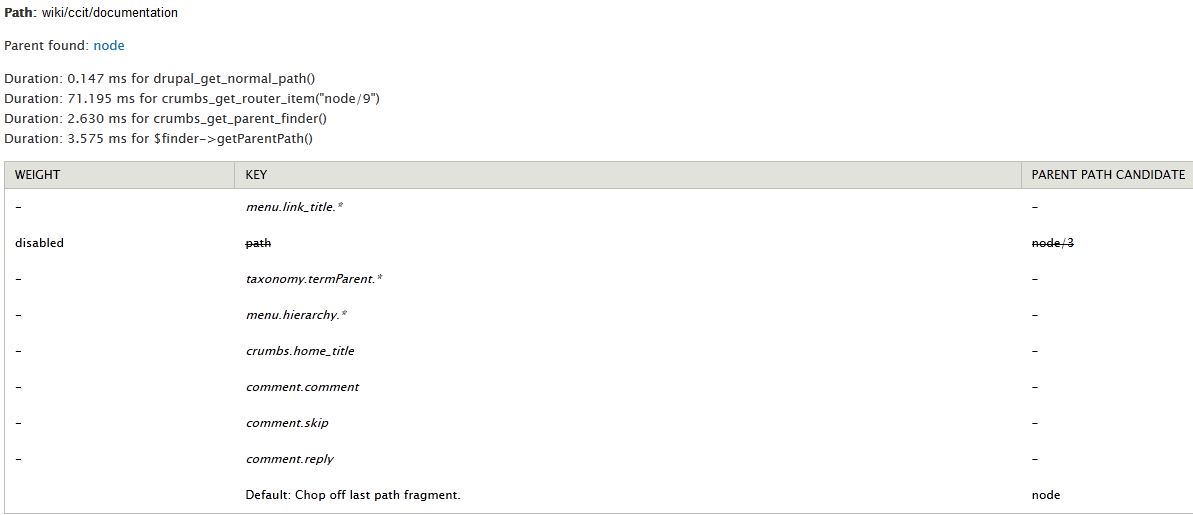
earwax commentedSee attached image. I tried it on a different link in my wiki content type
Comment #3
donquixote commentedYeah, that says it all :)
The "path" plugin would return the correct parent, but it is currently disabled (disabled by default).
To enable it, go to admin/structure/crumbs, and cut+paste the "path" line into the enabled section, that is, somewhere at the top.
(you can choose yourself how you want to order the enabled plugins)
Comment #4
earwax commentedNow it is working when I enabled the "path" to be on top. I did get some weird errors (see attached screen shot), but everything appears to be working. Should I be worried?
Is there any way to limit the breadcrumb to a specific content type?
Comment #5
earwax commentedWhoops! Here's the screen shot from my reply #3.
Comment #6
donquixote commentedDamn. I had a fix for this on the way, but did not commit, or did not tag the release..
going to do it now.
Comment #7
donquixote commentedExactly.
#1397942-15: D7 crumbs does not appear in administration menus has a proposed fix.
I am going to commit that.
Comment #8
earwax commentedThanks for submitting a fix for this. I am going to close my issue.
Comment #9
donquixote commentedTry with alpha5.
And thanks for the feedback!
From various previous issues and conversations, I get the idea that people have problems understanding what the configuration textarea means.
For now my answer is to throw a lot of documentation at the problem :)
Maybe some day I might invent a more intuitive interface than the textarea.
Comment #10
earwax commentedYes, I find that upon first using the module, the whole thing is overwhelming and does not come across as user friendly with the open text field. I admit that I did not thoroughly read the documentation for it, but that is a general user problem. In my defense, I did try reading the inline text where the open text field is, but I still do not understand it. What are all these "taxonomy.*" and inherits and such? Are those terms specific to Drupal? No need to answer these questions here, but just thought I would share my user experience of this module. It obviously can do what I need it to do, but I just don't know how.
Comment #11
nitrospectide commentedI am also having the same problem - my breadcrumbs are not being produced. I tried moving the line:
path - Chop off the last fragment of the path alias, consider the result as the parent path.
to the top of the config textfield. When I saved it, I got the errors shown in the screengrab on #5, but it did save.
The crumb I am producing is for a blog post, which pathauto generates a path for like so:
blog/[node:created:custom:Y]/[node:created:custom:m]/[node:created:custom:d]/[node:title]
The breadcrumb is get is simply:
Home
For the sake of complete clarity, my config textarea looks like this:
path - Chop off the last fragment of the path alias, consider the result as the parent path.
*
---- disabled ----
---- disabled by default ----
entityreference.*
taxonomy.termReference.*
---- inherit ----
comment.*
comment.comment - Make node/% the parent for comment/%
comment.reply - Make node/% the parent for comment/reply/%
comment.skip - Skip comment/% in the breadcrumb.
crumbs.*
crumbs.home_title - Set "Home" as the title for the root item.
entityreference.field_associated_node.*
entityreference.field_associated_node.node.*
entityreference.field_associated_node.node.associated_sidebar_content - associated_sidebar_content
menu.*
menu.hierarchy.*
menu.hierarchy.devel - Development
menu.hierarchy.features - Features
menu.hierarchy.main-menu - Main menu
menu.hierarchy.management - Management
menu.hierarchy.menu-contact-nav - Contact Nav
menu.hierarchy.navigation - Navigation
menu.hierarchy.user-menu - User menu
menu.link_title.*
menu.link_title.devel - Development
menu.link_title.features - Features
menu.link_title.main-menu - Main menu
menu.link_title.management - Management
menu.link_title.menu-contact-nav - Contact Nav
menu.link_title.navigation - Navigation
menu.link_title.user-menu - User menu
taxonomy.*
taxonomy.termParent.* - Set taxonomy/term/% as the parent for node/%, if the node is tagged with a term.
taxonomy.termParent.blog_categories - Vocabulary: Blog Categories
taxonomy.termParent.page_structure - Vocabulary: Site Structure
taxonomy.termParent.tags - Vocabulary: Tags
taxonomy.termReference.field_categories.*
taxonomy.termReference.field_categories.node.*
taxonomy.termReference.field_categories.node.blog_post - blog_post
taxonomy.termReference.field_tags.*
taxonomy.termReference.field_tags.node.*
taxonomy.termReference.field_tags.node.article - article
Comment #12
donquixote commentedThanks for the complete information!
blog/[node:created:custom:Y]/[node:created:custom:m]/[node:created:custom:d]/[node:title]
Assuming the path generated for the node is
blog/2012/03/15/nodetitle
- I suppose this is how they will look like.
Now Crumbs path plugin will chop off the last fragment, and see if
blog/2012/03/15 does resolve to a valid path.
When I programmed this, I thought I should also try
blog/2012/03
blog/2012
blog
However, I then decided this does get too much in the way of other plugins.
Maybe I should provide two separate path plugins - one that only chops off the last fragment, another that tries all of them. Then the latter can be given a very low priority, so other plugins have a chance to do their job.
So, the question is, is there a valid path (or alias) at blog/2012/03/15 ?
For instance, did you create a views page with that url? Or a custom path with hook_menu() ?
If not, or if you don't want that, we need to think of a different solution..
What is the breadcrumb you intend to get?
Comment #13
nitrospectide commentedNo problem. I was trying to make sure I characterized the issue as clearly as possible.
The whole blog system is a View, and the pieces for the date act as arguments for Contextual Filters. So there is a page for each of the paths as you progressively remove items. My desire is a get a corresponding breadcrumb:
blog/2012/03/15/nodetitle | Home > Blog > 2012 > 03 > 15
blog/2012/03/15 | Home > Blog > 2012 > 03
blog/2012/03 | Home > Blog > 2012
blog/2012 | Home > Blog
blog | Home
Ideally, I would like it to recursively check each element/in/the/path to see if it has a title. If it does, use it, if not, use the path fragment as the title.
Is there an option to include the title for the current page at the end, but with no link?
Comment #14
nitrospectide commentedOh, and I didn't look yet, but I assume that there is an overridable theme function where I can change the separator from > to : or | or whatever?
Comment #15
donquixote commentedCrumbs tries to use the theming that would otherwise kick in for the regular breadcrumb, because a lot of themes have their own idea about how breadcrumbs should look like.
It also has some specific theming, and alter hooks. I would need to look into the code once again - or you can :)
The whole blog system is a View, and the pieces for the date act as arguments for Contextual Filters. So there is a page for each of the paths as you progressively remove items. My desire is a get a corresponding breadcrumb:
Well, then it is surprising it doesn't work.
Is there really a views display with path blog/%/%/% ?
What you can always do is use the debug page (should find that in the admin menu)
Comment #16
nitrospectide commented[EDIT] I was going to post another follow up, but posted it too hastily. I need to test more before following up again.
Comment #17
donquixote commentedCould you debug the path plugin a little bit?
That's in plugins/crumbs.path.inc
Just doing some dpm() to see what it does..
(if you feel like it)
Comment #18
nitrospectide commentedUnfortunately, I'm not familiar with debugging modules. I have used dpm() in tpl files, but have no idea how to in a module.
I looked at the debug tab as well, and it doesn't show anything but:
This page allows to have a look "behind the scenes", so you can analyse which crumbs plugins and rules are responsible for the "crumbs parent" to a given system path.
Crumbs will "ask" different plugins, until one of them responds with a parent path candidate. The candidate with the highest weight wins.
Crumbs will stop invoking any more plugins, once it is clear that further candidates will only have smaller weights.
Path:
and that's it. nothing else.
Comment #19
donquixote commentedWell, that's the same as in template files.
You modify the file (plugins/crumbs.path.inc), and put some dpm() in there, to output the contents of the variables you are dealing with.
When you think you know enough, you turn everything back to as it was before. Either with your editor's undo, or with version control, or whatever else you come up with.
If you don't feel comfortable with that, I might have a look myself this night or some time this week or..
Comment #20
nitrospectide commentedI'm thinking my use of dpm() is much more rudimentary than you are talking about. I normally just drop the call (with no args) into a tpl to get the nice javascript expandable nest of arrays.
Comment #21
donquixote commentedI tested the path plugin on my own site, and it worked.
Setting the node path to user/1/pfannkuchen, resulted in a breadcrumb of
Home » User account » admin » Pfannkuchen
exactly as expected.
With your limited dpm() skills, can you put a dpm anywhere that says
dpm(menu_get_item('blog/2012/03/15'));And then look for the "path" and "href" or "link_path" kind of things - don't remember exactly.
Comment #22
donquixote commentedSo, here is what I suppose what happens:
- The router path of your view is just "blog/%" - this would let it accept a year argument.
- Additional arguments (month, day) are possible, but optional. There is no "official" router path of "blog/%/%/%", it all goes through the path "blog/%".
-> This is why crumbs does not find "blog/2012/03/15" to be a suitable parent for your node page.
This would be easily solved with a small custom plugin, but this requires some basic php..
(I would love to know another solution for this..)
Comment #23
nitrospectide commentedOK. I now have this (still a work in progress) up on a public server. Here are the pages in question:
http://blog.hexatrope.com/blog // Crumbs works correctly. This is a view, no args: /blog
http://blog.hexatrope.com/blog/category/strategy // Crumbs does not work correctly. This is a view, with one arg: /blog/category/%
http://blog.hexatrope.com/blog/2012/03/20/your-website-should-act-web-ri... // Crumbs does not work correctly. This is a node (not a view) with an aliased path (pathauto), but if you hack down the URL, the following ARE views, and DO NOT produce crumbs:
http://blog.hexatrope.com/blog/2012/03/20
http://blog.hexatrope.com/blog/2012/03
http://blog.hexatrope.com/blog/2012
Another:
http://blog.hexatrope.com/portfolio // Crumbs works correctly. This is a view, no args: /portfolio
http://blog.hexatrope.com/portfolio/category/branding // Crumbs does not work correctly. This is a view, with one arg: /portfolio/category/%
http://blog.hexatrope.com/portfolio/vineyard-missions // Crumbs does not work correctly. This is a view, with one arg: /portfolio/%
http://blog.hexatrope.com/portfolio/vineyard-missions/vineyard-missions-... // Crumbs works correctly. This is a node (not a view) with an aliased path (pathauto)
Is this what you were thinking? What sort of code would be needed to remedy this?
Comment #24
donquixote commentedThanks for the details!
I should probably work on a more powerful version of the path plugin, but I think the more transparent solution for you is a custom plugin, in a custom module.
Believe it or not, I am going to create one for you just now :)
Comment #25
donquixote commentedHere we go.
There is some "TODO" in there, because I do not know all your field names, node types and taxonomy vocabularies.
It is two separate plugins, "mycrumbs.blog" and "mycrumbs.portfolio" (and wildcard mycrumbs.* which means both of them).
Enable the module, fix the TODO stuff, and give the new plugins top priority.
Benefit of this custom module solution is, that you can easily go there and customize.
Comment #26
donquixote commentedBtw, the source of your misery is in crumbs_reduce_path().
(currently in crumbs.trail.inc)
The path plugin does call this with an alias and depth = 1.
The overall parent finding mechanic does call this as a fallback, if all other plugins fail, with the system path (node/123 etc), and unlimited depth.
Your example of blog/category/strategy indicates that there might be a bug or misbehavior in this logic, because the fallback mechanic should first check and discard "blog/category" and then find and return "blog" as the parent. Instead, it returns FALSE (which means, homepage).
However:
For the alias blog/2012/03/20/your-website-should-act-web-ritalin-pt-2,
the path plugin will only consider blog/2012/03/20 as a parent.
blog/2012/03/20 has router path blog/% (yes, this is all one and the same views display with path blog/%)
The path plugin will not accept this path, because the router path fragments do not reflect the full path.
If the router path was blog/%/%/%, it would accept.
Yes, the path plugin is very picky.
Btw,
portfolio/vineyard-missions
this does actually work :) and makes "portfolio" the parent path.
Comment #27
nitrospectide commentedACK! I posted something, then realized I had a functional glitch on my site that was part of the issue... please wait while I sort that out
Comment #28
nitrospectide commentedOK. This time, I've corrected my glitch.
Wow! That was incredibly helpful of you :) I seem to have it mostly sorted out now.
Just as a bit of reference before I continue,
my vocab machine names are:
blog_categories
portfolio_categories
client_names
the top of my config file looks like so:
mycrumbs.*
mycrumbs.blog - Special crumbs behavior for blogs on blog.hexatrope.com.
mycrumbs.portfolio - Special crumbs behavior for portfolio stuff on blog.hexatrope.com.
path - Chop off the last fragment of the path alias, consider the result as the parent path.
*
---- disabled ----
and I have attached the .module file with comments marked as //## (see previous comment)
Questions:
The following node/view URLs based on dates are still not functioning. Did I miss something in my setup?
http://blog.hexatrope.com/blog/2012/02/10/your-website-should-act-web-ri... // this actually produces the crumb: Home > Blog > Blog
http://blog.hexatrope.com/blog/2012/02/10
http://blog.hexatrope.com/blog/2012/02
http://blog.hexatrope.com/blog/2012
If I understand what you are saying in your last post correctly, adding a view that lists all my categories at /blog/category should activate that crumb in all breadcrumbs so the crumb on /blog/category/strategy will be: Home > Blog > Category ?
I looked through your docs, and forgive me if I missed it, but is there a simple way to have the current page (unlinked) show up at the end of the crumb?
Comment #29
donquixote commentedYou can omit the mycrumbs.blog and mycrumbs.portfolio. This is what wildcards are for :)
Comment #30
donquixote commentedCrumbs wants to be friends with themes, and some of these have their own idea about what should or should not be part of the breadcrumb.
What you can do is override theme_breadcrumb() in your theme.
In addition to the 'breadcrumb' array you usually find there in $vars, you will also find two new arrays: 'crumbs_breadcrumbs_items' and 'crumbs_trail'.
devel dpm() is your friend.
Comment #31
donquixote commentedFor the other questions, could you do a bit of debugging yourself? I had no chance to test the mycrumbs module on your site, and also don't have the time for this..
Your friends are:
- devel module dpm()
- admin/structure/crumbs/debug
Comment #32
nitrospectide commentedThanks for the great help! Yeah, *oops* on the wildcard. The breadcrumb override was easy to find some example code for, and I will have to dig into the debugging.
Comment #33
donquixote commentedOk.
Let me know about your progress.
I think Crumbs is a very much underrated module. With some feedback I hope I can get a better idea about the typical use cases.
Comment #34
donquixote commentedAlso, could you make a documentation page about your solution with theme_breadcrumb() ?
Comment #35
donquixote commentedRe #27:
I finally had a look at the attached file, and found that you had some questions.
Your observations are correct: Some of my code in this example module stinks :)
With a lack of access to your site + server (so I could do dpm() and stuff), I had no choice but to put some dummy code in there.
For instance, the portfolio/vineyard-missions, I didn't even know if that is an alias for taxonomy/term/3. (I thought it's a views page, where the "vineyard-missions" is an argument.)
The solution would be to look for the term tid in $node->field_port_category, and then return the path "taxonomy/term/$tid".
Btw, there should be an existing plugin in taxonomy.termReference.something, which should do exactly that. I don't find it in #11, maybe this specific term reference field has been added later.
(Btw, if you have a budget, I could really look into your site.. this would be a lot more productive use of my time than guessing on the issue queue.)
Comment #37
nitrospectide commentedSorry for the ridiculous delay. Life and work have had me running.
I added the documentation here: http://drupal.org/node/1004448
Comment #38
donquixote commentedI am not sure I agree with your edit :)
Please have a look at #1520044: Way to get path to not chop off last fragment.