2 different things seem to be going on with the Views upgrade to 7.x-3.4:
- This issue, Update to 7.x-3.4 un-sets the boolean operator in filters seems to be solved with manually re-setting the boolean operators, which can be done from the UI. This problem is based on updates implemented from this issue Why is there no "is all of" operator for select list filters?
- Several of us are experiencing the loss of Views with the 3.4 upgrade and our operators are remaining checked in the UI, however. We finally found out (reference comment #44 below) that the upgrade to 3.4 also made the time-based cache in Advanced options under Views break the views if it was activated. A new issue for that has been opened here: Upgrade from 7.x-3.3 to 3.4 makes time-based cache break Views. This can be helped manually in 3.4 by setting the cache to "none," although you will lose caching features and may slow down your site.
Views maintainer dawehner asked me (couturier) to write a warning message for the Views 7.x-3.4 release page to be posted until this bug is fixed, and this is what I submitted to him:
WARNING: Maintainers are working to fix a bug that was found after the 7.x-3.4 release that causes some Views pages, blocks, attachments and feeds to disappear after upgrading from 3.3 to 3.4. Stay informed of progress at the following link: 7.x-3.4 Upgrade is cancelling boolean operator settings. It is recommended to wait to upgrade until this bug has been fixed.
Here's the original message that initiated this issue:
Just updated to 7.3.4 and got this error message on a previously working views
Notice: Undefined index: in in views_handler_filter_in_operator->admin_summary() (line 307 of /home/engworld/public_html/bibleandwomen/sites/all/modules/views/handlers/views_handler_filter_in_operator.inc).
seems like an old bug comes back.




Comments
Comment #1
aaronschachter commentedsame here... plus my view suddenly has a pager where it is set to not use one (see: http://drupal.org/node/1744300)
when i try to save the view i get this error:
Notice: Undefined index: not in in views_handler_filter_in_operator->admin_summary() (line 307 of /sites/all/modules/views/handlers/views_handler_filter_in_operator.inc).
The operator is invalid on filter: Content: Status.
Where "Status" is a field i've created on a node type. When I try to remove the field by clicking "Remove", it doesn't actually get removed from the list of filters and i can't save the view, because the error keeps on keepin' on.
Comment #2
yurg commentedsame here..reverting back to previous version.
Comment #3
dagmar@kitling55 when do you see that message?
@aaron schachter seems two different issues, could you open a new bug describing the problem?
Comment #4
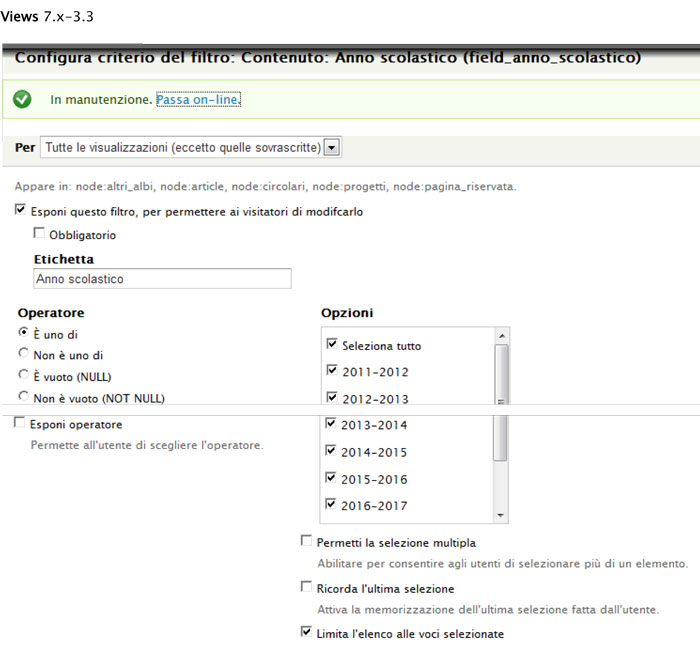
luisasasi commentedAfter upgrade from 3.3 to 3.4
Undefined index: field_anno_scolastico_value in views_handler_filter->accept_exposed_input() (linea 1260 di /web/htdocs/www.xxxxxxxx.com/home/sites/all/modules/views/handlers/views_handler_fil...).
If I return to 3.3 everything OK.
I put the image filter with views 3.3 and 3.4 views
Thank you for your attention
Comment #5
couturier commentedYou know what, I just filed a similar issue separately, but I think my problem might be the filters with the 7.x-3.4 upgrade, just like most of the previous comments. I have a lot of Views on my site that depend on filters. I'll work with this. For now, my pages preview just fine in the Views UI, but they disappear when you go to the pages. All was working fine with 3.3. I filed my issue here: http://drupal.org/node/1743424
Comment #6
couturier commentedOkay, I've done everything I know how to do. Some of the Views still work, but most don't. It doesn't matter whether they are blocks or pages. I have a few of both blocks and pages that are working, and most of both blocks and pages that aren't. I have learned my lesson to save a copy of the old version of a module before upgrading. My whole site is basically down now. Can anyone please post 7.x-3.3 somewhere so I can restore my site until we figure this out? I'm so sorry. Truly, I've learned my lesson to back up modules before an upgrade.
Comment #7
DevJoshLopez commentedim in the same boat right now. Once you have the 3.3 version how do you downgrade without loosing all your views?
Comment #8
couturier commentedHadn't thought of that. I don't think it will be a problem, will it? I don't even have 3.3 to try. To repeat the request, can someone please post 3.3 for those of us whose sites are now down with the 3.4 upgrade? We promise to back up our code base in the future. Thanks.
Comment #9
PedroMiguel commentedPlease check your filters like this: http://drupal.org/node/1743064#comment-6375620
Works for me (need to resave almost 80 views, but now works...)
For the people wanting the 7.x.3.3: http://drupal.org/node/1451068
Comment #10
DevJoshLopez commentedheres 3.3 http://drupal.org/node/1451068
Comment #11
couturier commentedThank you so much for the link, PedroMiguel and 15handsmedia. My site is back up now with 3.3. I'll wait to hear what support says on this upgrade before trying again.
Comment #12
PedroMiguel commentedI think the problem is here: http://drupal.org/node/1494884 with this patch: http://drupal.org/files/1494884_0.patch
As the "in_operator" was "gone".
Comment #13
couturier commented4 things are going on with the upgrade to 7.x-3.4 during the first few hours post-release:
Comment #13.0
couturier commentedSummarizing issue.
Comment #14
damiankloip commentedCan someone please attach an export of a view that is breaking? It might be better to do this when testing a fix.
Comment #15
dawehnerSo the actual problem is that the value didn't got updated, so let's do that.
I would be really happy if people would actually test the patch
Comment #16
PedroMiguel commentedHi dawehner, thanks for the patch but that didn't work for me.
What I did:
- Drush up views
- Appy patch
(- update.php)
(- Clear all caches)
All views continues with the mention problems
Comment #17
couturier commentedThis patch did not fix my problem. I manually applied the patch. dawehner, I am replying to your email here. You said,
I do not program much, and I do not understand what it means, "test the in-operator issue." I did try to change operator values in the Views UI, but that did not work.
Also, you said at Upgrade to Views 7.x-3.4 makes some pages disappear:
In the future, I will test a module before upgrading my production site. Thanks for your help. I appreciate all your work on Views. I have attached the files you wanted.
Comment #18
couturier commentedComment #19
-Mania- commentedUh oh, next time I'll be sure to wait a while before upgrading to new version. :/
Comment #20
dawehner@ -Mania-
The right approach would be to test before update.
Comment #21
dagmar@dawenher could you link the issue that you think caused this problem?
Comment #22
-Mania- commented@dawehner: The right approach is to check the forums first. ;) It's only my dev site though.
Comment #23
dawehnerThe issue is #1494884: Why is there no "is all of" operator for select list filters?
Comment #24
PedroMiguel commentedJust a quick update about #13 statement, I'm not working on a fix. (due de lack of my knowledge about views code, and this will need some time before check and learning the code).
I think a fair warning about this issue on project page should be made (the need to resave views containing the missing operators) as this affect several site builders.
Comment #25
luisasasi commentedI tried but #15 1742942-filter_list-in-operator.patch doesn't work for me.
I still read:
•Notice: Undefined index: field_mese_value in views_handler_filter->accept_exposed_input() (linea 1260 di /web/htdocs/www.xxxxxxx.it/home/xxxxx_xxxxxx.inc)/sites/all/modules/views/handlers/views_handler_filter.inc).
and the school year and month there are not
Comment #26
kitling55 commentedWhen I opened the views that no longer works.
The site is in Chinese so I just describe the problem. Some more message when I clicked on update preview. "The operator is invalid on filter: 内容: 菜单类." The filter is a field. All the views that have problem rely on using a field as filter.
Comment #27
dawehnerWe would really like to have a copy of a database/code which would allow us to reproduce the problem.
Someone gave us some admin rights, so we saw the problem live but playing with the code at the same time could also improve the situation.
This patch reverts the other patch, so maybe applying that will help you.
Comment #27.0
dawehnerCorrected wording.
Comment #28
couturier commenteddawehner, I am happy to give you FTP access. I'll personally email you the access.
Okay, I just sent you the FTP access. I installed Views 7.x-3.4 fresh so you have a new start.
Comment #29
couturier commenteddawehner, I just realized you wanted database access also. I cannot access my database directly, but you can get access through my hosts, [update: content deleted when it was no longer needed because it refers to a specific site].
Comment #30
couturier commenteddawehner, I applied the patch in #27 manually, and it did not work.
So, I put everything on my BIZ site back to original 3.4 release. You can work with my test site using the info I sent you by email if you want.
This is an interesting comment from someone who said his problem was the same as this issue. He explains it like this:
Comment #31
couturier commentedI just received a personal email from dawehner who is actively working to resolve this bug. He wrote:
I think the better/good release is a great idea. Also, dawehner asked me to write a warning message about this bug to be posted on the Views 7.x-3.4 release page, which I have done and emailed to him for posting, recommending that people wait to upgrade until this bug has been fixed.
Comment #31.0
couturier commentedUpdating information to match progress on the issue.
Comment #32
dawehnerThanks to people i was able to reproduce the problem on a local system
and i figured out that #15 was somehow right but not 100 percent.
Here is a patch which fixes the issue for me.
Comment #33
PedroMiguel commentedI Test the patch on 7 production sites and all working ok.
Thanks a lot for the patch.
Comment #34
dawehnerOkay here is a test which should fail without the patch.
Comment #36
tim.plunkettHere's a combined patch of the test and fix.
I also cleaned up some code style.
Wait for green, then commit!
dawehner++
Comment #38
couturier commentedOkay, I double-checked that I'd applied the above patch from tim.plunkett manually, and it's still not working. Here's what I wrote earlier and it still applies:
dawehner, I just looked at my test site that you had access to, http://fashionbelle.biz, and it appeared that the patch had not been applied because the Views were still disappearing, so I applied it myself manually, and it did not fix the problem. I'm not a programmer, so you are welcome to check my work of applying the patch, but because the upper test failed, I thought you would like to know I'm still having problems, also.
Comment #39
PedroMiguel commentedcouturier sorry for my question, but you are applying against 3.3 or 3.4? I'm asking because i made that mistake, on 3.4 was applied clean.
Comment #40
couturier commentedIt failed applying against 3.4. Did I do that right? I'm not a programmer, just trying to help as much as I can.
Comment #41
PedroMiguel commentedYou should try with https://drupal.org/node/1742942#comment-6383470 (32) patch.
Edited:
Looking at your view export seems your problem is not related with this issue... but if someone could recheck...
Comment #42
couturier commentedYes, I've wondered that myself, if my problems are related to this. My Views crashed instantly upon upgrade from 3.3 to 3.4, though, and this is the closest issue that seems to relate.
The comment #36 patch from tim.plunkett includes those changes from the comment #32 patch. I just checked. The problem still exists. Some Views pages and blocks are disappearing, but others are still there. I have checked to see if changing the operator settings in the UI helps after applying the patch. It does not. Again, having applied the patch manually myself, there is room for possible error in the way I applied the patch. dawehner has access to my test site if he still wants to work on it, and it's fine with me if he passes on the access to tim.plunkett if they want it. My site is definitely a case study in this problem since I have so many Views dependent on filters.
Comment #43
PedroMiguel commentedAfter review the #42 site appears we have a new problem, time based cache is not working on that site... if someone who have some installation who use that and could test, we can confirm and open a new issue.
Comment #44
couturier commentedLike PedroMiguel said, it was the time-based cache that caused problems in the 7.x-3.3 to 3.4 upgrade. (Thanks so much for helping me find this!) I've attached a screenshot of the option under "Advanced" where the time-based cache needs to be set to "none." This allows all the Views to re-appear.
Just to make sure, I tested whether this would fix the problem both with and without the latest patch from tim.plunkett installed, and does. The boolean operator patch had nothing to do with my problem. I've opened a new issue here: Upgrade from 7.x-3.3 to 3.4 makes time-based cache break Views.
If anyone else has a site with a problem with boolean operators that can be replicated for tim.plunkett and dawehner as they work on this issue, please let them know, since we see now that my site had nothing to do with this.
Comment #44.0
couturier commentedUpdated information regarding warning message on Views release page.
Comment #44.1
couturier commentedUpdated the status, adding new information.
Comment #45
couturier commentedAttachment above didn't work. Here it is again. Most people should know how to set time-based cache to "none" under "Advanced."
Comment #46
dawehnerPlease don't post the caching issue here, because it is separated.
Regarding the operator issue, is this actually fixed by the previous patch?
Comment #47
couturier commenteddawehner, this is weird, but my boolean operators became unset for one View when I re-set my time-based cache after applying the patch at http://drupal.org/node/1748526
I manually re-set the operator and the View worked again. So, I don't know if they are related since the operator was working before I adjusted the cache. I tried to duplicate the error on other Views, but I could not. It only happened one time. Maybe it is nothing, but I thought I should report it.
Comment #48
luisasasi commentedI have tried the patch # 32 1742942.patch in 25 sites and now exposed filters work well in all views.Thanks for the help
Comment #49
dawehnerCommitted the fix without the test. This patch needs backport to 8.x-3.x
Comment #50
hansfn commentedI can confirm that all my troubles with exposed filter in Views 7.x-3.4 is gone in 7.x-3.5. Thanks for committing the fix (and making a quick new release).
Comment #51
dawehnerJust adding a tag
Comment #52
tim.plunkettUpdating tags
Comment #53
hass commentedIs #1781744: Draft and Needs review pages are broken also an effect of these bugs? The views debug message is shown since the upgrade from 3.3.
Comment #54
couturier commentedPlease correct if I am wrong, but this issue is obsolete since the release of 7.x-3.5, right?
Comment #54.0
couturier commentedPunctuation correction.