Disclaimer: No code review at this stage. This patch is a mess, unfinished and also includes code from http://drupal.org/node/183714. This is a mock-up, but in code.
What I've done:
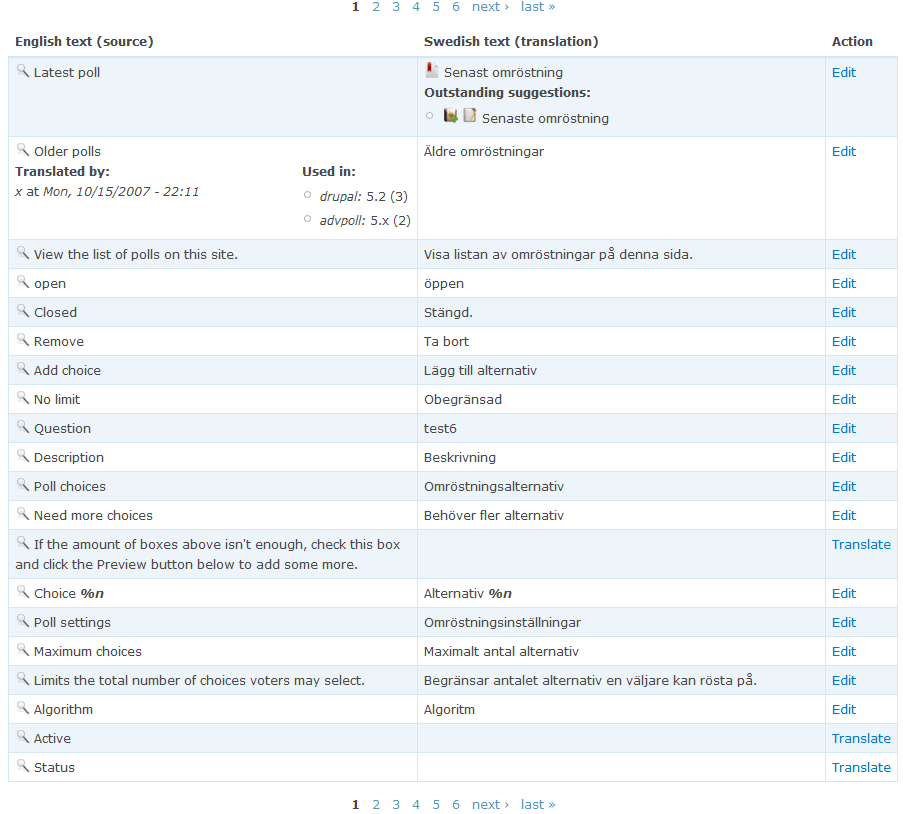
* The translations page now lists the strings in a table.
* Detailed info does not include suggestions and are rendered in the left column.
* Suggestion info is rendered in the right column and invoked by clicking on the has-suggestion icon.
* Todo/ideas:
* The Translate/Edit links should point to a single translation form. There is currently no way to enter translations :)
* Approve suggestion should work on "filter" page as well (I've broken it).
* It might be an idea to have Flickr-like inline translation/editing on the filter page, e.g. add back the translation functionality I've removed in this patch, but with a slightly different UI. Functionality wise it's not needed (you can always use the single translation form), but might be a good way to quickly add/correct translations.
* ...
What do you think of the new UI for listing strings?


Comments
Comment #1
anders.fajerson commentedHere is another screenshot :)
Comment #2
gábor hojtsyI did not have the time to look into the code, but here are my impression form looking at the screenshot:
- looks good generally
- "English text (source)" should be "English source" (we know it is text :) or "Source text" (we also know it is English)
- similarly for the translation header, it can be simplified
- what happens with longer text? there are very long help texts which might look really ugly in this table
- are edit and translate links JS-enabled? I don't see this (yet?) in the patch... if not, it becomes very tedious to translate multiple strings or edit translations (one of the advantages of the big form item ocean was that you can search for common strings (eg. "Failed to...") and then copy-paste translations to have them similarly worded).
Comment #3
anders.fajerson commentedDON'T look at the code :)
* Longer text is just wrapped. It might be an idea to add a more/less JS toggle for those long strings since they will take much screen space (it will *look* ok though).
* Edit and translate are not JS enabled, and I don't plan to. They link to a powerful and user friendly single translation page. My idea is that if an untranslated string is clicked, the user is taken to the single translate page, and when saving a new untranslated string is loaded (AJAX or not), this makes it easy to quickly translate untranslated strings, which we want most users to do I think. If clicking an already translated sting the user is just taken back to the previous page when saving on the single translation page.
BUT:
As I mentioned in the first post "It might be an idea to have Flickr-like inline translation/editing on the filter page". This means that if a user click on a translation or an empty cell it cell turns into a textarea where the user directly can change and save the string. Inline editing, popularized by Flickr...
Comment #4
gábor hojtsyIndeed, inline editing will be *much more* desirable for me then a separate editing page, which drives me out of context from the carefully filtered list of translations helping me craft my new translation. Think about how you translate stuff... Most of the time you are not starting from scratch, but you follow some pattern (both for saving time and to have a consistent translation), so driving you out of the list of patterns you have on the screen is not a good idea IMHO.
But the existing translation is also a pattern, so that would also be useful, when you start over with the translation or something, so a separate editing field. So displaying a textarea below the existing translation when a button is clicked IMHO better first the workflow I imagine.
Comment #5
psicomante commentedGabor's UI is not perfect, but he has done a great work. I agree with him about JS/Ajax inline editing. I'm testing L10n_server and inline forms are very useful.
I think that it should be a way to delete suggestions (i don't find it) and making the UI a bit more user-friendly. But the work is excellent.
Comment #6
psicomante commentedHowever it seems the table view is more user-friendly. If it was js enabled would be better.
...sorry for my horrible english...
Comment #13
gábor hojtsyI unpublished unrelated comments. Also retitling the issue.
Comment #14
sutharsan commentedThe table layout of fajerstarter is a good step forward. This table layout provides a more compact way of displaying source and translation. Separation of "Used in" and Suggestions details is good. Both pieces of information are used in different situations and can therefore successfully be separated.
Editing/translating UI can be a l10n-client like translation editor.
Comment #15
gábor hojtsySutharsan: I agree that there is a certain value is unifying interfaces, so guys moving from one system to the other can adapt quickly. I wonder whether in practice the short preview of strings as displayed in l10n_client on the left is a good way to present a choice field here. Also, how would that scale with paging or any other UI tool to handle large string sets (ie. thousands of strings translatable in Drupal).
Comment #16
gábor hojtsyMarking a duplicate of http://drupal.org/node/215286 since work is going on there.