Project Page:
http://drupal.org/sandbox/srutheesh/1876988

Repository:
git clone --recursive --branch master srutheesh@git.drupal.org:sandbox/srutheesh/1876988.git google_data_visualization
git clone --recursive --branch 7.x-1.x srutheesh@git.drupal.org:sandbox/srutheesh/1876988.git google_data_visualization
Core:
7.x
Reviews of other projects:
http://drupal.org/node/1806866#comment-6923214
http://drupal.org/node/1879066#comment-6918992
http://drupal.org/node/1236914#comment-6919430
http://drupal.org/node/1860736#comment-6918978
http://drupal.org/node/1775964#comment-6919016
http://drupal.org/node/1822068#comment-6927816
http://drupal.org/node/1721378#comment-6977890

Description:
Provides a View style that displays rows as a Google charts. This is an API depends on google charts.
It includes a developer API that other modules can use, as well as Views integration in the module so that you can turn any list of rows into a google charts.

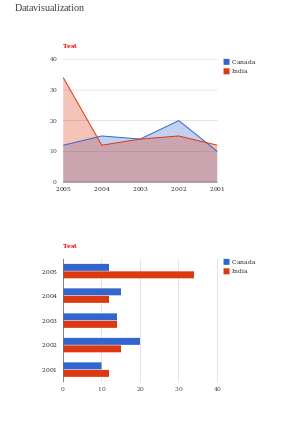
Google Data Visualization
Views Output
View Settings Configure
View Settings

Introduction to Using Chart Tools

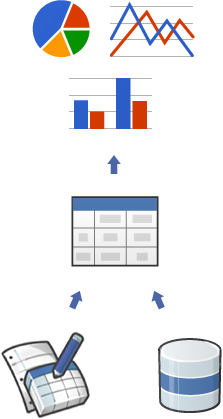
Google Chart Tools provide a perfect way to visualize data on your website. From simple line charts to complex hierarchical tree maps, the chart galley provides a large number of well-designed chart types. Populating your data is easy using the provided client- and server-side tools.

A chart depends on the following building blocks:


Chart Library

Charts are exposed as JavaScript classes. Google Chart Tools provides many chart types for you to use. Although the default appearance is best for most situations, you can easily customize a chart to fit the look and feel of your website. Charts are highly interactive and expose events that enable you to connect them to create complex dashboards or other experiences integrated with your webpage. Charts are rendered using HTML5/SVG technology to provide cross-browser compatibility (including VML for older IE versions) and cross platform portability to iPhones, iPads and Android. No plugins are needed.


DataTables

All charts are populated with data using a common JavaScript DataTable class. Having a common data structure makes it easy to switch between chart types. This class exposes methods for sorting, modifying, and filtering data. You can populate a DataTable programmatically from data that you retrieve from your own database, or you can request data from a data provider that supports the Chart Tools Datasource Protocol.


Datasources

You can query websites that implement

the Chart Tools Datasource protocol. The Datasource protocol includes a SQL-like query

language, and is implemented by Google Spreadsheets and Google Fusion Tables, as well as third party data providers such as SalesForce. You can even implement the protocol on your own website and become a data provider.

Thanks, hope you like it.
Srutheesh

Comments

jooplaan’s picture

Status: Needs review » Needs work

Cool initiative and good intergration with views. Looking through the code it seems well documented. Also clear instructions on how to use the module.

There code style issues found, that are easy to fix:

http://ventral.org/pareview/httpgitdrupalorgsandboxsrutheesh1876988git

ahlofan’s picture

It seems to be a very cool tools!

So far no errors blocking my testing... a few things I'd like to mention.

- In the Views UI, I think it would be better to display Google Data Visualization instead of google_data_visualization.
- I know the display is done through JS, but could it be possible to display in the preview section?
- Played around, not too sure how to set fields in the X/Y axis, can you provide more document?

klausi’s picture

Status: Needs work » Postponed (maintainer needs more info)

http://drupal.org/project/visualization
http://drupal.org/project/chart

This sounds like a feature that should live in the existing projects. Module duplication and fragmentation is a huge problem on drupal.org and we prefer collaboration over competition. Please open an issue in the appropriate issue queue to discuss what you need. You should also get in contact with the maintainer(s) to offer your help to move the project forward. If you cannot reach the maintainer(s) please follow the abandoned project process.

If that fails for whatever reason please get back to us and set this back to "needs review".

srutheesh’s picture

Hello klausi,

This is enterly different project from the mentioned projects, it is very user friendly and usable. I have faced lots of difficulty to build such a module so please coperate and the reason for the same is i have faced difficuly to implement google charts by using availiable modules.

srutheesh’s picture

Hello ahlofan,

Thanks for your valuable feedback. I have fixed your following comments
- In the Views UI, I think it would be better to display Google Data Visualization instead of google_data_visualization. Fixed
- I know the display is done through JS, but could it be possible to display in the preview section? - Fixed

Thanks
Srutheesh

srutheesh’s picture

How this module differ fom other modules Module.

  • There are 10 different graph type options - (Area Chart,Bar Chart,Bubble Chart,Column Chart,Combo Chart,Gauge,ImageAreaChart,Image Chart,Line Chart,Pie Chart, Scatter Chart,Gauge,ImageAreaChart,Stepped Area Chart,Table Chart)
  • Provide View style options and by using this user can simply create multiple graphs and can set option variables like title,fonts,color ..etc.
  • Customization of view by using hook and tpl are more user friendly.

Related Module.

  • visualization By using this we can create only three graph types and also we can set the chart options.
  • Data Visualization API uses an entity approach where each chart is unique entity.
  • Google chart API is similar to the Visualization API, but only offers support for the deprecated Google Chart API.
  • Charts and Graphs is also a similar project for Drupal 6; there seems to be little progress on a Drupal 7 version.
srutheesh’s picture

Status: Postponed (maintainer needs more info) » Needs review
vladimir-m’s picture

Status: Needs review » Needs work

Hello,
Thank you for great module!

Manual review:

1. In File google_data_visualization.info you have declared twice dependencies[] = views, at Line: 3 and Line: 4
2. Then I enabled the module my local environment crashed.
Here is a snippet from apache error.log

[Thu Jan 10 10:47:45 2013] [error] [client 127.0.0.1] PHP Parse error:  syntax error, unexpected '=' in /var/www/drupal-7.18/sites/all/modules/google_data_visualization/includes/google_data_visualization.views.inc on line 85
srutheesh’s picture

Issue summary: View changes

Review bonus updated.

srutheesh’s picture

hi vladimir-m ,

Thank you for your valuable comment, There was an error after fixing the coding standered in that mentioned line. now it is fixed and the module is working fine please check it.

Thank you,
srutheesh

klausi’s picture

Status: Needs work » Needs review

Don't forget to add the "PAReview: review bonus" tag as indicated in #1410826: [META] Review bonus, otherwise you won't show up on my high priority list.

klausi’s picture

Issue summary: View changes

Reviewed module comment link updated.

srutheesh’s picture

Issue summary: View changes

PAReview link updated.

srutheesh’s picture

Hi klausi,

I have added the reviews of other projects links here with the summary.

Thank you
Srutheesh

klausi’s picture

Still, you forgot to add the "PAReview: review bonus" tag?

Removing the other strange tag.

srutheesh’s picture

Hello klausi,

I couldn't find the "PAReview: review bonus" tag. I can see only two tags like "PAReview.sh" and "PAReview.sh online service" tags, How can i add the metioned tags tag, please help me.

Thank you,
Srutheesh

klausi’s picture

Issue tags: -Drupal.org Project Application
StatusFileSize
new24.75 KB

See this screenshot where to add issue tags:
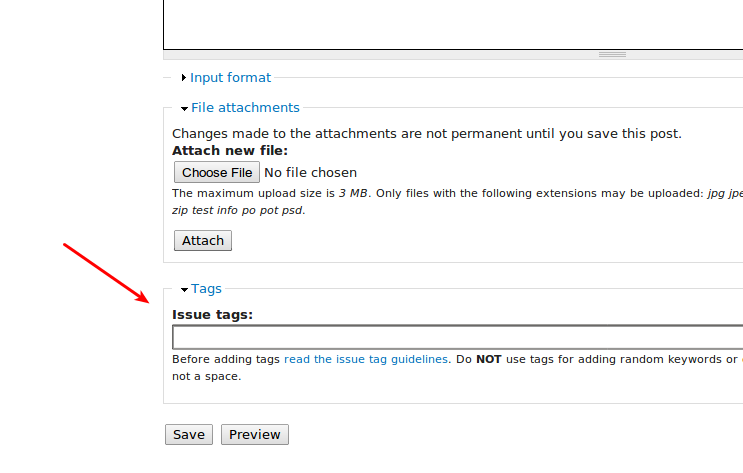
tags screenshot

srutheesh’s picture

Issue tags: +PAreview: review bonus
StatusFileSize
new8.99 KB

Thank you for your guide klausi.

I have added the "PAReview: review bonus".

Thank you,
Srutheesh

klausi’s picture

Status: Needs review » Needs work
Issue tags: -PAreview: review bonus

Please make sure to do more comprehensive manual reviews for your next review bonus, not just posting output of automated review tools.

It appears you are working in the "master" branch in git. You should really be working in a version specific branch. The most direct documentation on this is Moving from a master branch to a version branch. For additional resources please see the documentation about release naming conventions and creating a branch in git.
Review of the master branch:

  • Coder Sniffer has found some issues with your code (please check the Drupal coding standards).
    FILE: /home/klausi/pareview_temp/google_data_visualization.info
    --------------------------------------------------------------------------------
    FOUND 2 ERROR(S) AFFECTING 2 LINE(S)
    --------------------------------------------------------------------------------
     7 | ERROR | It's only necessary to declare files[] if they declare a class or
       |       | interface.
     8 | ERROR | It's only necessary to declare files[] if they declare a class or
       |       | interface.
    --------------------------------------------------------------------------------
    

This automated report was generated with PAReview.sh, your friendly project application review script. You can also use the online version to check your project. You have to get a review bonus to get a review from me.

manual review:

  1. google_data_visualization_help(): all user facing text must run through t() for translation.
  2. google_data_visualization_init(): why do you need hook_init()? You should only add your JS to pages where you actually display charts?
  3. google_data_visualization_views_api(): "'api' => 2.0,": Vies 2 does not exist in Drupal 7?
  4. hook_google_data_visualization_skin_info(): Hooks that are provided by a module should be documented in MODULENAME.api.php, see http://drupal.org/node/161085#api_php
  5. google_data_visualization_google_data_visualization_skin_info(): empty function, so remove it.
  6. theme_google_data_visualization(): use theme('item_list', ...) or similar instead of creating your own list markup.
  7. google_data_visualization_views_add(): Views 2 support in Drupal 7 does not make sense?
  8. Fatal error: Call to undefined method views_handler_field_node::is_value_empty() in includes/google_data_visualization.views.inc on line 314
  9. README.txt: how do I setup my data structures? Where do I specify which fields of my entity should be used for the chart? Please add an example.

Removing review bonus tag, you can add it again if you have done another 3 reviews of other projects.

srutheesh’s picture

Status: Needs work » Needs review
srutheesh’s picture

Issue summary: View changes

Description updated.

srutheesh’s picture

Issue tags: +PAreview: review bonus
srutheesh’s picture

Issue summary: View changes

Reviewed comment link added.

klausi’s picture

Status: Needs review » Needs work

There is still a master branch, make sure to set the correct default branch: http://drupal.org/node/1659588 . Then remove the master branch, see also step 6 and 7 in http://drupal.org/node/1127732

I'm confused - which branch should I review, master or 7.x-1.x? Because the most recent commits seem to be on master?

srutheesh’s picture

Hello klausi,

I have removed all the updated files to 7.x-1.x branch and i have removed the master branch. I have incorperated all the mentioned changes to 7.x-1.x branch.

Thank you,
Srutheesh

srutheesh’s picture

Issue summary: View changes

removed wrong link

srutheesh’s picture

Status: Needs work » Needs review
klausi’s picture

Status: Needs review » Needs work

Master branch is still there - did you forget to push your changes?

http://drupalcode.org/sandbox/srutheesh/1876988.git

klausi’s picture

I have removed all the updated files to 7.x-1.x branch and i have removed the master branch. I have incorperated all the mentioned changes to 7.x-1.x branch.

srutheesh’s picture

Hello klausi,

I have removed all the master branch.

Thank you,
Srutheesh

srutheesh’s picture

Status: Needs work » Needs review

Hello klausi,

I have removed all the master branch.

Thank you,
Srutheesh

klausi’s picture

Status: Needs review » Needs work

Master branch is still there - did you forget to push your changes? See http://drupal.org/node/1127732

http://drupalcode.org/sandbox/srutheesh/1876988.git

srutheesh’s picture

Status: Needs work » Needs review

I apologize for the mistakes.

I have removed the master branch and updted all the files are moved to 7.x-1.x branch. Please take the 7.x-1.x branch as mater module review.

Thank you,
Srutheesh

aendra’s picture

This is rad -- I'm working on a visualization distribution and this seems to fill a need I have. Will review it over the next hour.

Also and unrelated: I invite you to join my burgeoning Drupal Visualization group which discusses all things viz-y. We'd love to have you with us!

aendra’s picture

Status: Needs review » Needs work

If you haven't yet, fix everything mentioned by Klausi in his earlier review! Please don't mark issues as "Ready for Review" again until you've done everything requested in previous reviews -- thanks!

✗ Automated Review

Review of the 7.x-1.x branch:

This automated report was generated with PAReview.sh, your friendly project application review script. You can also use the online version to check your project.


FILE: ...eview/pareview_temp/includes/google_data_visualization_style_plugin.inc
--------------------------------------------------------------------------------
FOUND 7 ERROR(S) AFFECTING 4 LINE(S)
--------------------------------------------------------------------------------
  13 | ERROR | Class name must begin with a capital letter
  13 | ERROR | Class name must use UpperCamel naming without underscores
  17 | ERROR | Method name
     |       | "google_data_visualization_style_plugin::option_definition" is
     |       | not in lowerCamel format, it must not contain underscores
  17 | ERROR | No scope modifier specified for function "option_definition"
  41 | ERROR | Method name
     |       | "google_data_visualization_style_plugin::options_form" is not in
     |       | lowerCamel format, it must not contain underscores
  41 | ERROR | No scope modifier specified for function "options_form"
 159 | ERROR | No scope modifier specified for function "validate"
--------------------------------------------------------------------------------

Source: http://ventral.org/pareview - PAReview.sh online service

✗ Manual Review

  • ✓ README.txt -- Good README. Some minor proofreading things that shouldn't stop RTBC:
    • ⓘ ln. 12, col. 25 -- "data" is the plural of "datum"; not "datas".
    • ⓘ ln. 12, col. 32 -- "Google" is spelled wrong.
    • ⓘ ln. 14, col. 63 -- You probably don't need to reiterate "on your Drupal site"; it's somewhat self-explanatory to just say "Install the Views module (url) if you haven't already."
    • ⓘ ln. 23, col. 14 -- Remove two extra spaces before "Continue".
    • ⓘ ln. 26, col. 30 -- Remove "the".
    • ⓘ ln. 27, col. 7 -- Should be "setting".
  • ✓ google_data_visualization.info -- Good! Proofreading on description: "Provides a View style that displays rows as a Google chart. This API depends on Google Charts." -- Note, that the word "depends" in documentation generally means it requires another module to work! You can probably just cut the second sentence in that line.
  • ✗ google_data_visualization.module -- In depth:
  • ✓ js/google_data_visualization.js -- Just sets some values. Minor.
  • ✗ includes/google-data-visualization-view.tpl.php -- You shouldn't have raw JavaScript here. You should use drupal_add_js() to add the JavaScript, and then use Drupal.settings to supply values to it. See: http://drupal.org/node/756722
  • ⓘ includes/google_data_visualization.views.inc -- I can't help but feel assigning all of that stuff via $_REQUEST is unnecessary and is supplied elsewhere, somehow -- there might be some way of passing the $view object directly, though I'm pretty unfamiliar with Views programming and am not certain. Hopefully somebody else more knowledgeable can comment. Looks fine otherwise -- though I echo Klausi's point that you probably don't need Views 2 support!
  • ⓘ includes/google_data_visualization_style_plugin.inc --
    • ⓘ ln. 24, did you mean "tahoma" and not "thahoma"?
    • ⓘ ln. 56 -- You probably shouldn't use markup in #value. Add "
      " and its closing tag to "#prefix" and "#suffix" respectively.
    • ⓘ ln. 64 -- This might have the same issue as ln. 56; granted, you're using #prefix a bit differently in this case.
    • ⓘ lns. 89, 98, 107, 116, 124, 130, 145, 153 -- Proofreading: remove spaces before and after the period.
    • Note that anything marked as "proofreading" (Or otherwise has a "ⓘ" icon) is offered as a suggestion to improve readability and should not be seen as a blocking issue.

      Runthrough

      I created a new view of type Google Charts Visualization, added two fields to it (Differing date fields I had displaying as simply unixtime), turned pager off, visited view page: everything seems to be working.

      Earlier, I had a non-numeric field ("Title") as my first field and got the following notice:

      Notice: Undefined index: exclude in template_preprocess_google_data_visualization_view() (line 282 of /sites/all/modules/google_data_visualization/includes/google_data_visualization.views.inc).

      Again as per Klausi, having a more detailed walkthrough would help users a lot.

      Conclusion

      Looking good! Fix the various coding style issues and fix the JavaScript adding issue -- and you'll be on your way! But again, you should really look at Klausi's earlier review if you haven't yet (Some things like having support for Views 2 kind of suggests this...).

klausi’s picture

Multiple Applications
It appears that there have been multiple project applications opened under your username:

Project 1: #1879654: Google Data Visualization
Project 2: #1879690: Google Data Visualization

As successful completion of the project application process results in the applicant being granted the 'Create Full Projects' permission, there is no need to take multiple applications through the process. Once the first application has been successfully approved, then the applicant can promote other projects without review. Because of this, posting multiple applications is not necessary, and results in additional workload for reviewers ... which in turn results in longer wait times for everyone in the queue. With this in mind, your secondary applications have been marked as 'closed(duplicate)', with only one application left open (chosen at random).

If you prefer that we proceed through this review process with a different application than the one which was left open, then feel free to close the 'open' application as a duplicate, and re-open one of the project applications which had been closed.

PA robot’s picture

Status: Needs work » Closed (won't fix)

Closing due to lack of activity. Feel free to reopen if you are still working on this application.

I'm a robot and this is an automated message from Project Applications Scraper.

PA robot’s picture

Issue summary: View changes

Git directory changed.