

Closed (fixed)
Project:
Leaflet
Version:
7.x-1.x-dev
Component:
Code
Priority:
Normal
Category:
Feature request
Assigned:
Unassigned
Reporter:
Created:
8 Jan 2013 at 04:43 UTC
Updated:
26 Aug 2014 at 08:37 UTC
Jump to comment: Most recent, Most recent file

Comments
Comment #1
milesw commentedHere's a first shot at the Views support. If this is a desirable feature I'll work on it more.
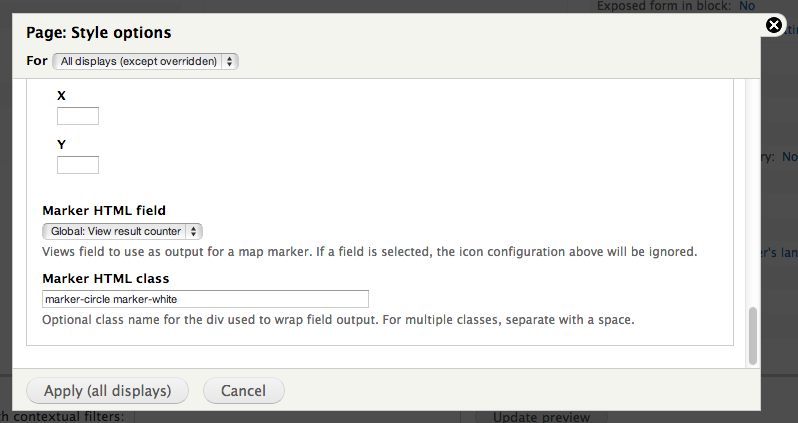
Views config, under the "Map Icon" fieldset:
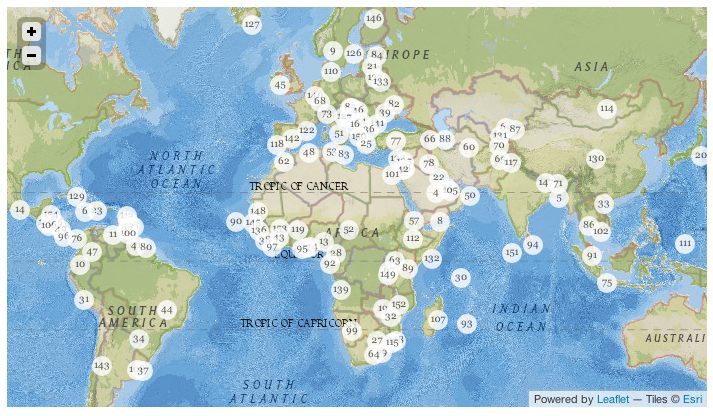
Map markers using result counter from Views, with minimal CSS styles:
Comment #2
afeijoThis is great, I was just looking for a way to change the default blue marker :)
I will test your patch asap, thanks!
Comment #3
t_hall commentedExactly what I'm looking for, really opens up the scenarios the module can be used for.
One issue though, are there any plans to apply the patch to work with leaflet ip_geoloc ?
Thanks for this!
Comment #4
milesw commented@travishall: I'm not familiar with that module. Does it just use the default Leaflet markers?
Comment #5
t_hall commentedhttp://drupal.org/project/ip_geoloc
Yep it uses the leaflet marker by default, you can also select image markers to differentiate by a field in the view, the use of Divicon would really open up the possibilities of the module and expand the current mapping use cases.
My current use case is a Ip_geoloc leaflet map of rental houses centered on the current users location that shows nearby properties and their rental prices on the marker. It would be great to be able to use this patch it with the geolocation functionality of ip_geoloc. Great work!
Comment #6
milesw commentedHmm, looks like that would definitely need to happen in the ip_geoloc module. It includes a Views plugin specifically for Leaflet. You should add a feature request in that module's issue queue.
Comment #7
rdeboerWhat a coincidence!
Only just came across this thread. Looks like we have a case of "great minds think alike"!
Have been having a similar discussion over at http://drupal.org/node/1933600#comment-7155002, which looks very much like @travishall's use-case.
The IP Geoloc Views and Maps feature (available in the dev snapshot) in that issue still uses the image, but adds the Views field as tag.
I can easily extend that functionality to incorporate what is shown above in this thread by suppressing the image (or better: rendering it as a DivIcon as shown here) and just render the content of the Views tag with the CSS class provided.
Rik -- maintainer of IP Geoloc Views and Maps
EDIT: I've done this; so in IP Geoloc V & M you can now have numbered/tagged markers as well as numbers/tags by themselves (without marker icons)
Comment #8
gcbGood stuff. Added to the latest Dev with some interface tweaks. Look for a new point release soon.
Comment #9
gcbComment #10
yannickooOh, why did you not camelCase the
html_codekey?Comment #11
yannickooComment #13
ultimikeHmm - I don't understand. @gcb indicates in comment 8 that this was committed in November, 2013, but I don't see this functionality in the latest version (released Januray, 2014).
-mike
Comment #14
yannickooHere you can see the commit.
Comment #15
ultimike@yannickoo,
Thanks for the quick reply - I agree that it was committed. Looking back through the commit log, it appears that the relevant code was refactored several times, but I think the original intent of this case was lost somewhere along the way.
As far as I can tell, there is no way, when creating a view that uses the Leaflet Map format, to customize the HTML or CSS class of markers, as is outlined in comment 1 above.
-mike
Comment #16
milesw commentedI created a new issue with a fix for the views support.
#2327711: Fix views support for DivIcon (HTML) markers
Closing this issue out.