The 2026 Drupal Business Survey is open. Your response will help shape the future of the Drupal business ecosystem.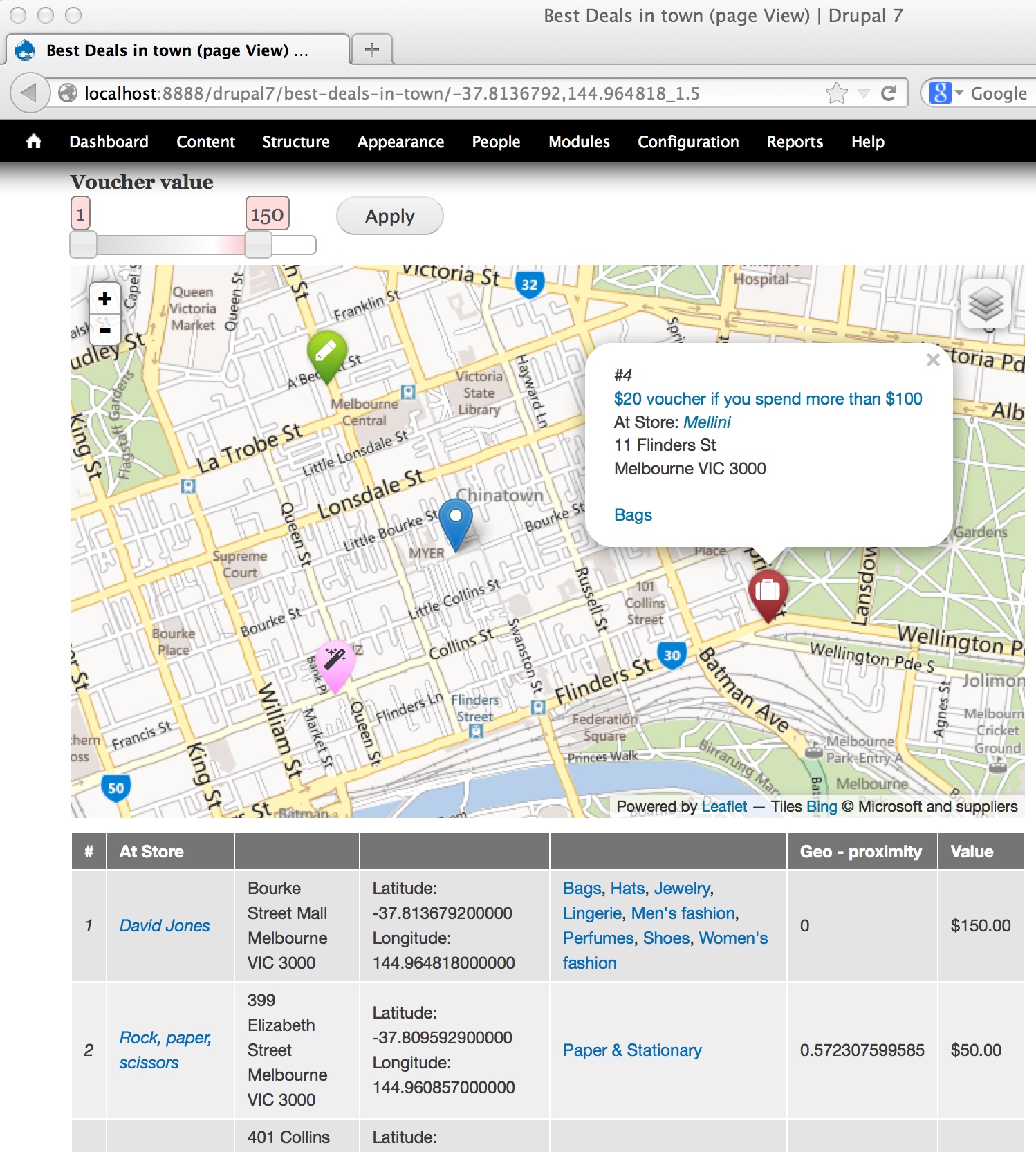
Despite what the name may suggest, IP Geolocation Views & Maps (IPGV&M) is first and foremost a mapping engine.
The module makes it very easy to create Views-based mapping solutions using the map renderer of your choice (Google, OpenLayers2 or Leaflet) with any location storage module of your choice, e.g. Get Locations, Geofield, Geolocation Field or Location.
This allows you to bring together modules and feature sets that without IPGV&M you would not be able to combine.
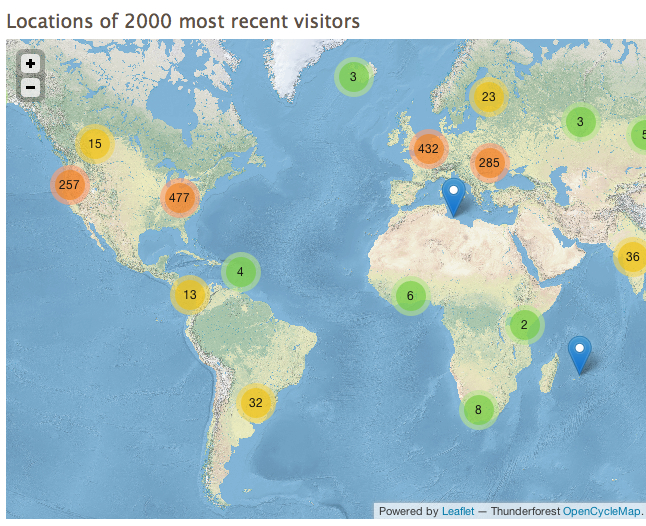
Like beautiful animated marker clustering on Google or Bing or Mapbox .. any of various map providers.
But more importantly IPGV&M adds some features you won't find as conveniently packaged elsewhere.
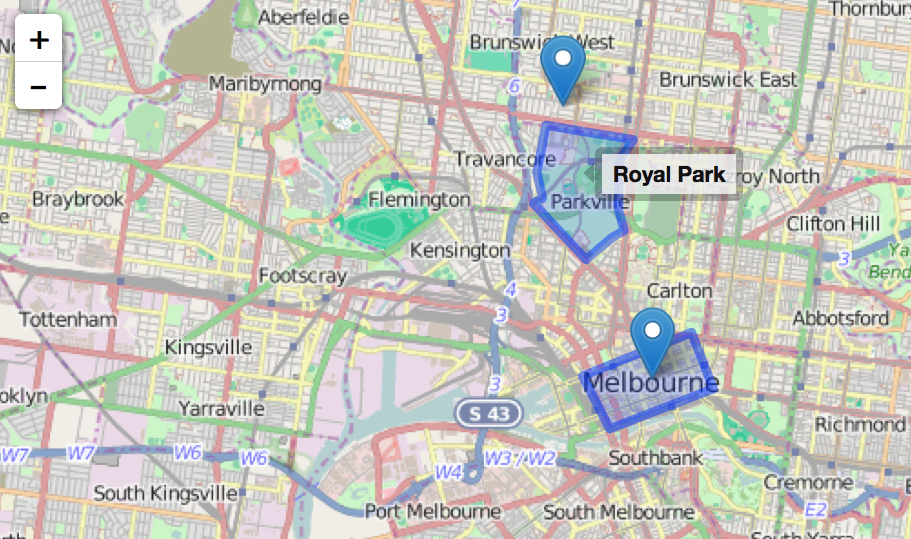
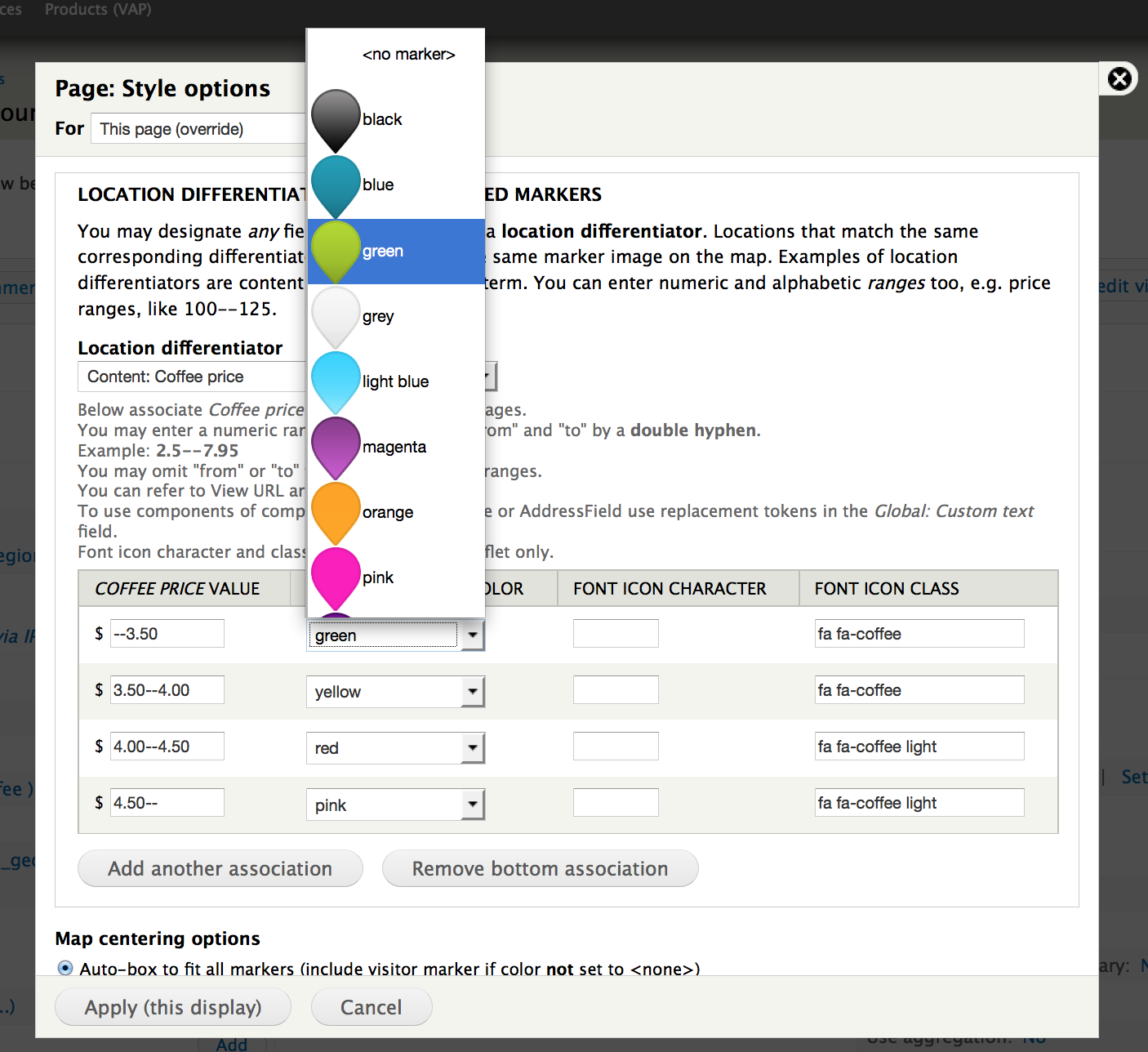
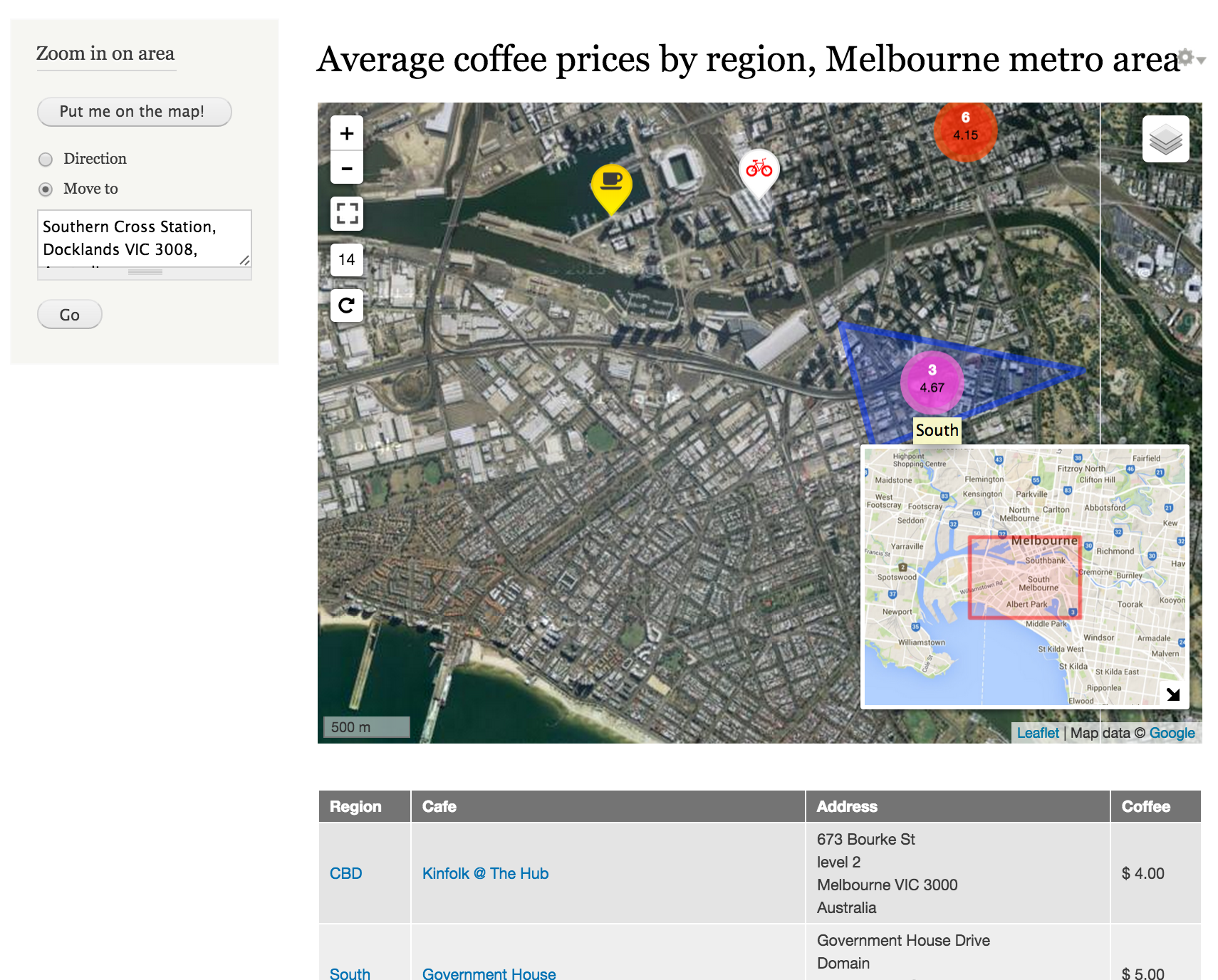
These include marker differentiation based on field values or ranges (2nd screenshot) with or without font icons, various centering options, super-imposing the current visitor's location, allowing multiple content types to be displayed on the same map, full screen button and mini-map inset (bottom screenshot), polygon support (Geofield), marker tags and tool tips and cross-highlighting of associated content on the page when markers are hovered (and vice versa).
And the Set my location block allows your visitors to locate themselves on the map, either automagically --via the Wifi/GPS device on their mobile-- or by typing an address or landmark, like "Eiffel tower" (bottom screenshot, upper left corner, click to enlarge).
Follow this step-by-step tutorial to create a handy store locator with proximity search, from a list of addresses in a spreadsheet. You'll learn about the Feeds and Display suite modules too!
Finally IPGV&M provides a set of visitor location retrieval technologies, both IP and HTML5-based, so that you can track where past visits came from and where current visitors are located, superimposing their moving positions as markers on your maps.
IPGV&M displays your maps via any of the three main Javascript mapping APIs. Just pick the one you like best for your solution. Our choice for most use-cases is Leaflet, but Google and OpenLayers2 are great too:
o Google API v3 (included, no further modules required)
o Openlayers2 API (requires OpenLayers module)
o Leaflet API (requires Leaflet module.
In driving any of the above three map renderers IPGV&M accepts for location storage any of the following well-established methods. Pick your favourite, or favourites, as IPGV&M can handle more than one on the same map:
o Get Locations module
o Geofield module
o Geolocation Field module
o Location module
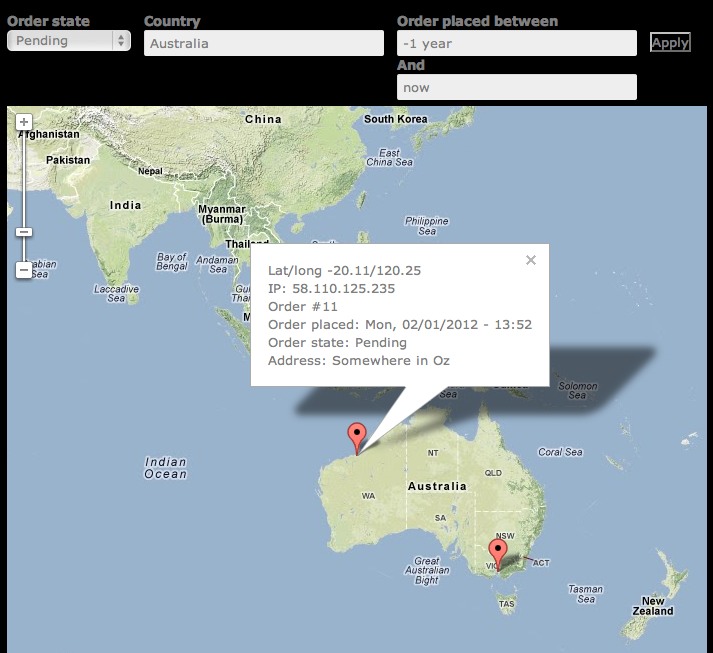
o Commerce module (3rd screenshot)
o latitude and longitude as simple text fields on your node or user content types
1) View and maps
- You can display almost any view as a map. In the Views UI, under Format you will find that in addition to Table, Grid etc, there are new options: Map (Google, via IP Geolocation), Map (Leaflet, via IP Geolocation) (requires the Leaflet module) and Map (OpenLayers, via IP Geolocation) (requires OpenLayers2). Tick one of those and your page, block or attachment display renders as a map! Works with the Search API (plus, say Apache Solr integration), too!
- Your View may output one or more than one location per row -- all of these will be displayed as markers on the map
- If in addition to latitude and longitude your view also outputs some other fields, then these will pop up in each marker balloon when the marker is clicked.
- When configuring the map view you'll be invited to optionally select a differentiator (2nd screenshot). Pick any field you wish to color-code the location markers by their corresponding field values. This way you can have restaurants in red, museums in blue etc... Or hotels color-coded by their price ranges. Or a store locator where markers are red or green depending on whether the shop is open or closed at the time of viewing... [Thank you Talking Drupal for the suggestion].
- You can add your own fancy markers too! Download from, say Map Icons Collection or Map icon designer, and drop them in your nominated directory and they'll be available for selection. In addition, when using Lealet, you can use font icons like the Font Awesome collection or the packs from flaticon.
OpenLayers features more mapping options than Google Maps or Leaflet. So OpenLayers is a bit more laborious to configure than the other two. However, OpenLayers is easy to use when you've configured it once. See the "OpenLayers Tips" section of the README included with the IPGV&M package download.
Our personal pick of the crop is Leaflet, especially when used with its light-weight companion modules Leaflet MarkerCluster (4th screenshot) and Leaflet More Maps. The latter adds 20+ map canvases, including Esri, Mapbox, Stamen, Bing (first screenshot), OpenCycleMap (4th) and Google (bottom, also showing IPGV&M's "Set my location" block and mini-map inset feature).
2) Location retrieval and storage of visitors past and present
See the README.
Features
So what's in the box? You get ready-to-use-blocks, canned Views and some programming goodies.
- Token support -- everywhere where you see regular tokens on offer, the IPGV&M visitor location tokens should appear as well, as seen in this Webform screenshot
- Context support -- you can set conditions on, say, a path and mobile device and then react with Locate user via GPS/Wifi, a reaction supplied by IPGV&M.
- View fields that do not have their Excluded box ticked will go in the marker balloons (when clicked), formatted just as they would have been in a standard view.
- For those using the Commerce module a ready-to-use Order Locations map is provided (3rd screenshot). For each order placed at your store it outputs a marker on the map with its location details retrieved by IPGV&M. The view comes with filters to zoom in on country, time frame and order status. Each order location marker, when clicked, reveals in a text balloon details of the order, e.g number, date placed and order status as well as street address.
- Use the "Set my location block to display the visitor's current reverse-geocoded address and allow them to enter an alternative location to focus the map on. Requires Geocoder.
- For sorting, reporting and exporting purposes: a couple of configurable views, Visitor Log and Visitor Log (lite), displaying time-ordered lists of locations from which your site was visited; each location has address information, a small map (if desired), page visit counts and first and last visits; naturally, these being views you may add, remove and rearrange columns as you wish. The Visitor Log report requires Views PHP.
Installation and configuration
See the README included in the package download.
Works well with
- RegionBound for superior marker clustering through region-awareness and in-situ analytics
- Session Cache API
- Views Accelerator
- Leaflet Mapbox: create your own MapBox "canvas". Enter your MapBox map id and then use IPGV&M as before.
- Search API and some backend integration like Apache Solr
- EntityFieldQuery Views backend
- Leaflet Label: tooltips for polygons and line strings too
Further reading and viewing
- Maps to the Max, slides from DrupalSouth presentation, 2015
- Gorgeous Google maps canvasses for your Drupal site: just Copy & Paste
- DrupalCon Sydney presentation (YouTube), formerly available here -- contact author for slides
- Introduction to Geocoder
- Basic Dealer Locator, User Locator, Store Locator proximity search
- Comparison of mapping modules
- Done in 60 seconds: LBS example using IP Geolocation: map of buyer locations
- Done in 60 seconds: LBS example using IP Geolocation: traveller's blog
Geolocation technologies used
IPGV&M uses the W3C Geolocation API. Available on desktops, laptops and mobile devices the W3C API works on all major browsers, except IE before version 9. For IE6/7/8 read this. Where the browser does not offer the API IPGV&M will still be able to obtain an address, as it falls back on Smart IP or GeoIP API, but the information returned is likely to be less detailed.
If retrieval of the lat/long coordinates via one of the above methods was successful IPGV&M then employs the client-side version of the Google Maps geocoding library v3 to reverse-geocode the lat/long into address information. The Google reverse-geocoding function returns more details than most. For example it usually includes street (route) and street number, postal code, locality (suburb) and administrative area level 1 (often corresponding to state). Should the Google API for whatever reason return an error, then IPGV&M employs Smart IP or GeoIP to execute an alternative, less detailed, postal address lookup based on IP address.
FAQs
Q: Which modules do you recommend to store street addresses that have their lat/long automatically geocoded for use in maps?
The trio of Address Field, Geofield and Geocoder is easy to configure and works well. It also allows multiple addresses and their automatically generated lat/long pairs being attached to the same node or user. To map them, make sure that in the View, the AddressField field has "Display all values in the same row" unticked, while the Geofield (and all other fields) have that box ticked.
The Location module also supports multiple locations per node.
Q: Can I display the distance to the visitor's current location and sort and filter by this distance?
A: Yes. Include a distance/proximity field/filter/sort in your View. This is straightforward when using Geofield, especially when combined with IPGV&M's "Set my location" block. If using Geolocation Field module, rather than Geofield, also enable Geolocation Proximity.
If your view is based on the Location module, then add to the view the field "Location: Distance/Proximity". In its Settings panel, under Origin select "Use PHP code to determine latitude/longitude" and enter the following code: return ip_geoloc_get_visitor_location();
Q: Why are my visitors prompted to confirm sharing of their location?
A: The prompt comes not from the module but from the browser via its W3C Geolocation interface. W3C states that every manufacturer implementing the interface MUST prompt the user and request permission whether they are ok with their lat,long location being sent to the server.
You can stop the IPGV&M module from asking the browser to use its accurate WiFi-based or GPS-based (i.e mobile phone) locater algorithms by unticking the box Employ a free Google service to periodically auto reverse-geocode visitor locations to street addresses, which is on the page Configuration >> IP Geolocation Views and Maps. With the box unticked, IPGV&M will no longer ask for lat/long to determine the browser location and instead use the far less accurate position location method based on IP address. This IP lookup will employ either the Smart IP or GeoIP API modules, depending on which one you have installed.
Q: Can I display a map of the locations of authenticated users that recently logged on, updating their map positions as they move about? Can the map be centered on the user that last logged in?
A: Yes.
Q: So how is the visitor map mentioned above different from Google Analytics?
A: You can't seamlessly integrate GA into a Drupal web page. You can't use GA in Views or blocks. You'd also have to expose the login box and share the password in order for other users to view GA's location map. GA locates your visitors only down to city accuracy, while IPGV&M goes down to street address. GA updates come once every 24 hours whereas IPGV&M refreshes instantly. GA doesn't make the current visitor's location details available for you via ip_geoloc_get_visitor_location(). So you cannot use the visitor's location in code snippets.
Q: Should I reuse the same lat/lon field on different content-types?
A: Yes, as much as you can. While IPGV&M perfectly copes with lat/lon fields from different content types and/or different field names being brought together on the same map, it is best to re-use existing fields as much as possible, as filtering and sorting will be so much simpler. If you've inherited a poor data design, and it is too late to make this choice, this module may help: View Merge-Sort.
Q: Where can I find out more about the location retrieval calls initiated from my server, the time they took to execute and any errors that may have occurred?
A: Check the Reports >> Recent log messages page for details or tick the box Detail execution progress with status messages at the bottom of the Configuration >> IP Geolocation Views and Maps page, under "Advanced options". Your browser console will also display how long it took to retrieve your position using Wifi/GPS and reverse-geocode it to a street address.
For programmers
You may use code snippets to slip a user's HTML5 location to other modules to create targeted ads and announcements, local weather forecast, country-dependent pricing or to map nearby fellow visitors. In fact, IPGV&M contains the tools you need to enhance your website with location based services, as employed by mobile apps like foursquare, Blendr and Yelp.
By taking advantage of existing API's or by writing simple plugins for modules like Rules, Context (and potentially Context PHP) you should be able to add location-based conditions and (re)actions to your site. These would allow you to do things like:
- If the visitor is from the UK then alter price fields to show pounds rather than euros.
- If the visitor is located within 5 km of some reference location (as entered on a node or block), then show this ad, or pop up this message etc.
- Show a map centred around the visitor's current location showing other visitors in the area
More info in the README. Contact the maintainer if you wish to pursue any of the above and are happy to share the code with the community.
Google quota considerations
Restrictions apply for the Google Geocoder API per (server) IP address. This will not be an issue for present or future visitors to your site, as reverse-geocoding calls are made via the client, each of which will have a different IP address. It may be something to be aware of when batch-converting historic IP addresses to postal addresses. Use batches smaller than 2500 per day.
See also this Geocoder issue.
Development sponsored in part by flink, the Drupal experts collective.
D8 alpha realease is now available for testing!!
Supporting organizations:
all code and documentation
Project information
 1,897 sites report using this module
- Created by rdeboer on , updated
 Stable releases for this project are covered by the security advisory policy.
There are currently no supported stable releases.