I'm trying to inject default location data from the Smart IP module into a geofield proximity views exposed filter using "Geocoded Location" as the origin. An exposed filter with the geocoded location > google geocoder source provides an awesome way to let end users search based on an arbitrary location. The icing on the cake would be to use $_SESSION data from Smart IP to provide sensible defaults based on the user's current location.
Here's what I've got so far:
If the Smart IP module is loaded and there is no geocoded data available, use Smart IP's detected lat/lon data as the origin point. Starting at line 48 in geofield/views/proximity_plugins/geofieldProximityGeocoder.inc:
  public function getSourceValue($views_plugin) {
    $geocoder_engine = $views_plugin->options['geofield_proximity_geocoder_engine'];
    $location = (isset($views_plugin->value)) ? $views_plugin->value['origin'] : $views_plugin->options['geofield_proximity_geocoder'];

    $geocoded_data_raw = geocoder($geocoder_engine, $location);
    if ($geocoded_data_raw) {
      return array(
        'latitude' => $geocoded_data_raw->getY(),
        'longitude' => $geocoded_data_raw->getX(),
      );
    } else {
      // Use Smart IP location if module loaded.
      if (module_exists('smart_ip')) {
        return array(
          'latitude' => $_SESSION['smart_ip']['location']['latitude'],
          'longitude' => $_SESSION['smart_ip']['location']['longitude']
        );
      } else {
        return FALSE;
      }
    }
  }
Then populate the value of the origin field on the exposed filter form with Smart IP's detected city, country data. Starting at line 163 in geofield/views/handlers/geofield_handler_filter.inc:
  function value_form(&$form, &$form_state) {

    // If Smart IP module is loaded and data exists, populate origin field with visitors detected city, country.
    if (module_exists('smart_ip') && !empty($_SESSION['smart_ip']['location']['city'])) {
      $smartip_city = $_SESSION['smart_ip']['location']['city'];
      $smartip_country = $_SESSION['smart_ip']['location']['country'];
      $form['value'] = array(
        '#type' => 'geofield_proximity',
        '#title' => t('Proximity Search'),
        '#default_value' => array(
          'distance' => $this->value['distance'],
          'unit' => $this->value['unit'],
          'origin' => $smartip_city . t(', ') . $smartip_country,
        ),
        '#origin_options' => array(
          '#attributes' => array(
            'class' => array('geofield-proximity-origin'),
          ),
        ),
      );
    } else {
      $form['value'] = array(
        '#type' => 'geofield_proximity',
        '#title' => t('Proximity Search'),
        '#default_value' => array(
          'distance' => $this->value['distance'],
          'unit' => $this->value['unit'],
          'origin' => (is_string($this->value['origin'])) ? trim($this->value['origin']) : $this->value['origin'],
        ),
        '#origin_options' => array(
          '#attributes' => array(
            'class' => array('geofield-proximity-origin'),
          ),
        ),
      );
    }
I'm pasting the code here instead of rolling a patch to invite some feedback first. While the above code works with the current 2.x-dev, it's not a very elegant way to interface with the maintainers' mini-plugin system for Views proximity handlers.
So what you get is a view with default filter values relevant to the user's detected location, while providing a way to refine/modify the results based on a user-entered location. That's awesome, but does anyone have some advice on a cleaner way to implement?


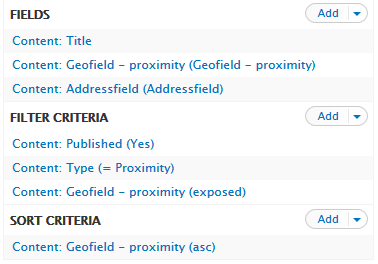
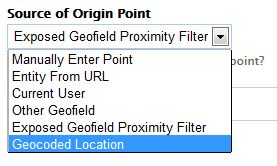
Comments
Comment #1
mattew commentedI use your code to build my own one.
I'm not sure if it's the good way to implement it, but it works great for me.
To make it works
Edit the views/geofield.views.inc, and add just before return :
and put the joined file in the views/proximity_plugins directory (name it correctly as geofieldProximitySmartIpSession.inc).
You have to add it in the geofield.info file :
files[] = views/proximity_plugins/geofieldProximitySmartIpSession.incThen configure your filter :
For my filter, I choose to provide just a simple checkbox to allow user to search around his location, or not.
So I provide two parameters for the plugin :
The implementation is very simple, i just fill the default distance value of the field provided by Geofield.
I hide the Geofield Proximity filters.
Then I give the Smart IP session coord to process filtering around the visitor if we check the box.
Feedbacks are welcome, but i think they will be more usefull for maintainers.
Happy filtering !
Comment #2
smurferboy commentedI tried the instructions above but keep running into errors.
If I paste
right before "return $handlers..."
I get the following error as I want to add a proximity filter:
An AJAX HTTP error occurred.
HTTP Result Code: 200
Debugging information follows.
Path: http://a-d-a.be/floozr/admin/structure/views/ajax/add-item/grid2/page/fi...
StatusText: OK
ResponseText:
Fatal error: Class 'geofieldProximitySmartIpSession' not found in /home/ideasonc/public_html/a-d-a.be/floozr/sites/all/modules/geofield/views/handlers/geofield_handler_filter.inc on line 110
I tried pasting the whole geofieldProximitySmartIpSession.inc file into the geofield_handler_filter.inc but that didn't work either...
Comment #3
duntuk commentedHere are the patched files for pasada's version, which work fine.
I couldn't get mattew's version to work either --same error.
Comment #4
algazaras commentedI think this is awesome!
I just have a question. Would it be posible to show the nodes (buildings in my case) that are close to the visitor, not close to the city? In large cities, and if you have hundreds or thousands of nodes that may be sensible.
Thanks for your help
Comment #5
kingfisher64 commentededit: will post instructions on the exact setup
Comment #6
rdeboerSee #2011340: Geofield plugin to extend proximity filtering based on postal address with option to use HTML5 location for a similar (and simpler) patch based on IP Geolocation Views and Maps.
This patch implements @algazaras request in #4. Plus you can use it to filter Views tables as well as maps.
Comment #7
duntuk commented@RdeBoer that's cool. However, having smart_ip first and HTML5 as fallback is the less intrusive method. HTML5 will nag user, smart_ip won't.
Comment #8
joeymcgraw commentedThis is almost exactly what I've been looking for. I was wondering if anybody has implemented this with the value being filled on button click rather than auto-fill.
Comment #9
mgifford@duntuk - the geofield_handler_filter.inc file you uploaded in #3 on April Fools is substantially different than the git version of Geofield from today.
It's always easier to compare patches. Since this is written against the 2.0 branch I've just rolled a patch against that branch.
Ultimately this should be re-rolled against
git clone --branch 7.x-2.x http://git.drupal.org/project/geofield.git
Comment #10
mgiffordOk, I think this will bring these changes forward so they will be easy to integrate into the latest git repo.
Comment #11
GotYourGuy commentedThanks pasada for the initital writing and mgifford for patching it to the latest git repo. I changed country to region to display "City, State" which was a little more applicable for my use case. The patch in #10 still applied cleanly and seems to work.
One question:
I'm looking to do away with the filter on certain pages (landing page) and just display an image closest to the user. How could I get this code working for sort criteria as well as filter? I'm fairly new to drupal and php but I'd be glad to help however I can. I'll try taking a look at it when I have a little more time if no one else is interested/knows how.
Thanks Again!
Comment #12
cmonnow commentedHi,
Just thought I'd mention that the current mods would break some functionality in Geofield exposed proximity filters. Namely, if anyone chooses to allow manual entry of co-ordinates into an exposed form (there many be other scenarios, too).
Firstly, you can also modify geofieldProximityManual.inc to automatically default to Smart IP latitude and longitude if available.
Importantly, we have to allow for the smart IP array in geofield_handler_filter.inc for those that chose a manually exposed filter
Something like this (untested):
I haven't checked to see what values Smart IP returns in different scenarios (I believe it provides the entire array key with empty '' values but I guess it would be good to check.
Comment #13
chris.jichen commentedI have extended #10's work with the latest dev code as today.
Also I have changed the usage of "$_SESSION['smart_ip']" to "smart_ip_session_get('smart_ip')" as the latter is recommended.
In the file: "views/handlers/geofield_handler_filter.inc", instead of using the 'city, country', i change to 'latitude, longitude' for better accuracy. Hope this can help someone.
The patched has been tested locally.
Comment #14
joelpittet@chris.jichen #13 doesn't seem to be close to #10 Is it supposed to be applied on top of #10?
Comment #15
joelpittetAn interdiff would help a bit here I believe. @see https://drupal.org/documentation/git/interdiff
Comment #16
joelpittet@mgifford did you mean to do this remove the module invoke?
And would it be better to use this function from smart_ip, maybe?
smart_ip_get_current_visitor_location_data()