

 The 2026 Drupal Business Survey is open. Your response will help shape the future of the Drupal business ecosystem.
This module creates a Simple TOC (Table of Contents) for node text areas.
Simple TOC for Drupal 7.x, sandbox at: http://drupal.org/sandbox/neRok/1912730
git clone --recursive --branch 7.x-1.x http://git.drupal.org/sandbox/neRok/1912730.git simple_toc
* Module has been run through the Coder module and ventral.org/pareview, all errors fixed.
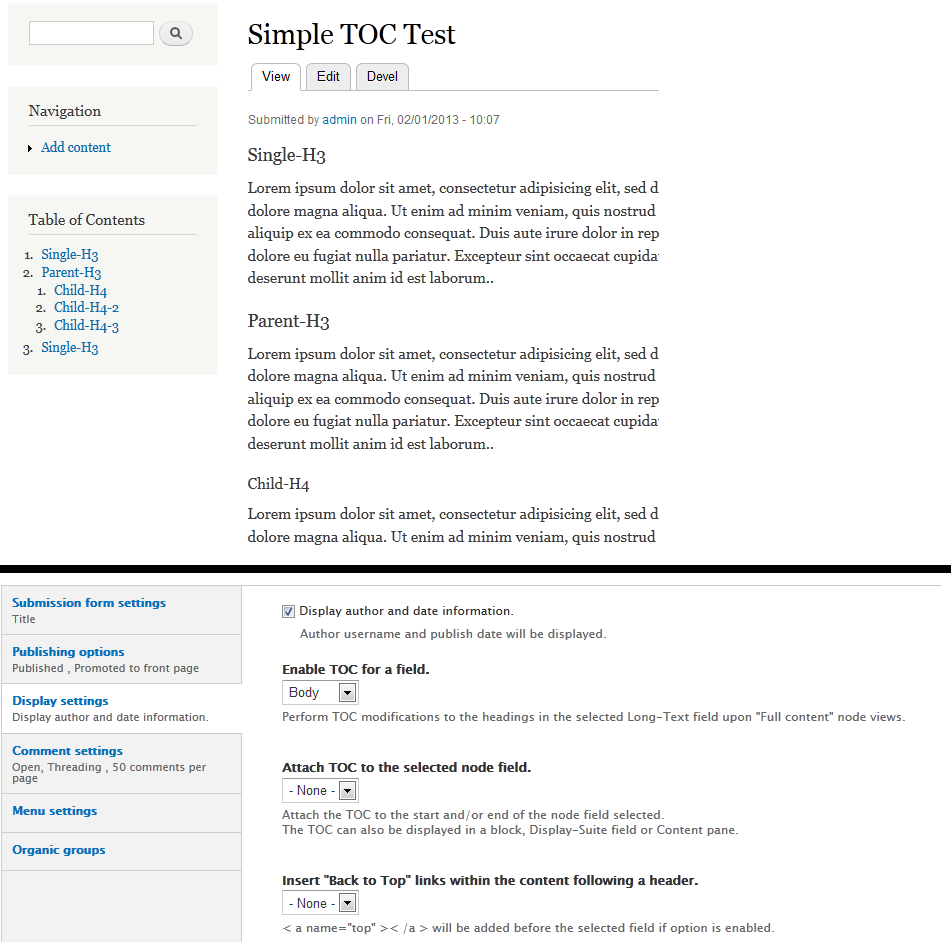
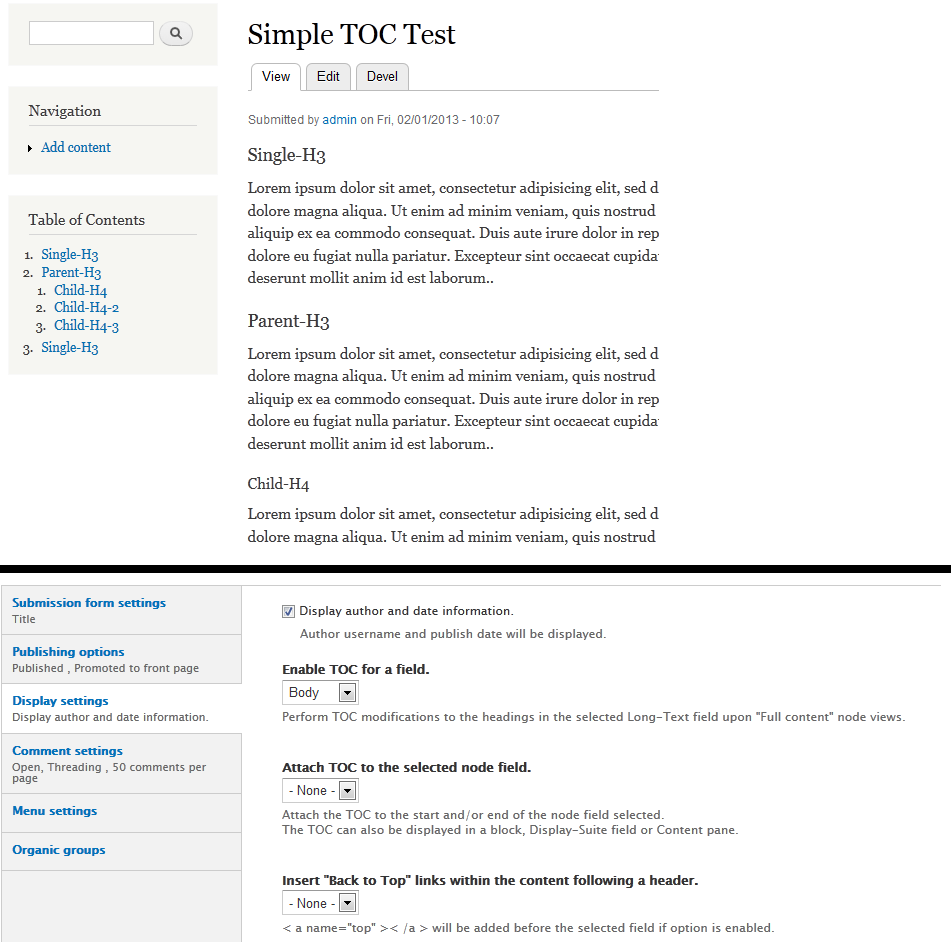
Setup is per content type and is enabled by selecting a long text field to apply the TOC modifications to. Upon node views, the module will parse the selected field using the PHP5 DOMDocument feature and modify any HTML headers with organised ID numbers. A TOC 'field' is also added to the nodes content array, enabling the TOC to be displayed anywhere (ie used by other modules).
Other options are limited by design (KISS principle), but include;
- Adding a TOC before and/or after the selected field.
- Adding "Back to Top" links before and/or after the content following a HTML heading.
The simplicity is the main difference to the existing Table of Contents module, plus the DOMDocument parsing.
In addition to inserting the TOC into the nodes content, a Block, Display Suite field and Panel Pane are provided, which make use of the afforementioned TOC 'field' that is created in the hook_node_view. This gives site admins a lot of options for when, where and how to display the TOC. This is why the Simple TOC module has few settings, as there a lot of other modules that can provide required features.
| Comment | File | Size | Author |
|---|---|---|---|
| #14 | coder-results.txt | 3.73 KB | klausi |
| #9 | screen001.png | 21.05 KB | aw030 |
| #6 | Simple-TOC.png | 72.6 KB | neRok |
| #5 | Simple-TOC.png | 72.6 KB | neRok |

Comments
Comment #1
drupaldrop commentedHello neRok,
Found no coding errors, Great!!
Manual review
Expected Result - Block will be visible showing the toc links
Actual result - No block is displaying
Also, please elaborate more why this module is different than existing table of contents other than simplicity.
Comment #2
neRok commentedDid you put some content with headings in the selected node fields? If it doesnt find headings in the processed field (< h3 > etc), it does not produce any output, block or otherwise.
You also need to enable TOC for a field, and this is set per node type. You do this at admin/structure/types/manage/*your_type* under the Display Settings tab. The block etc only show a TOC if it has been enabled for the currently viewed nodes content type.
Comment #3
aw030 commentedReview:
*Automated review run through without errors or warnings.
*Manual review:
- Install a fresh drupal 7
- Move the module folder to sites/all/modules
- Install module
- Add a new "test"-field to the "Article" content type
- Assign TOC options in display settings of the content type
- Fill in some text in 2 Test-Articles (with headings/ in the new configured "test"-field-type)
- Placing the block in a region (under structure/blocks) / region: Sidebar first
Result: no block appearing in the first sidebar
-> Try to overwrite the Title via block-configuration:
Result: nothing to see of the TOC-block
-> Try assigning the TOC-options to the Body-field of the "Article"-content-type:
Result: I see the TOC in the first sidebar as expected!!!
Issue found: After installing the module the admin/structure/types/add form throws a fatal error:
Fatal error: Unsupported operand types in ...\includes\form.inc on line 2623Can someone reproduce that?
Comment #4
klausiWe are currently quite busy with all the project applications and I can only review projects with a review bonus. Please help me reviewing and I'll take a look at your project right away :-)
Comment #5
neRok commented@#3, yes I have that error too. Good catch! I will investigate.
Did you have other problems, or it worked as expected? It is a bit hard to work out if you were saying it did nothing as expected, or it did nothing when you thought it would.
Image attached to clarify the options and output.
Comment #6
neRok commentedThis was a double post...
Problem from #3 solved, except I cannot push to git here at work. The problem is line 129 of simple_toc.module needs changing from
$options = '';to$options = array();Comment #7
aw030 commentedNo there were no other problems in my test. all ok.
When all was configured well and the headings are
added to the text of the assigned field, the TOC-block
became visible with a correct table of content of this text.
Nice module!
Comment #8
neRok commentedCool, and thanks.
I have updated the code on Git now.
Comment #9
aw030 commentedAutomated review:
PAreview.sh on ventral.org: OK, no errors/warnings
Coder module: OK, no errors/warnings
Manual review #2:
Issues:
Tested on Drupal 7.19
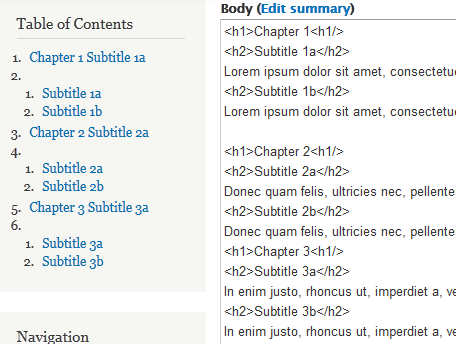
1. On the second run i made one article with "more complex" structure of headings with h1 and h2 tags for chapters and subtitles of that chapter.
There seems to be a problem with detecting the headings: a empty list-element is rendered, see the attached screenshot (screen001.png with the html and the result of the block view, but its also happening in node view).
I filled in these html structures intuitively, and i think it's a common structure for chapters (i tried it with/without p-tags around the blindtext paragraphs / and other combinations), that should be parsed well? Or it should be provided as description somewhere which html-structure is expected to get a correct result?
2. On line 47 in simple_toc.module there is a variable $curr that not have been initialized, but it's only a visual problem (php-function sscanf() will handle it well).
Successfully re-tested:
1. Added a new field (Long text/Full HTML) to the content-type "Article", and assigned this field by the Simple TOC display settings: TOC appearing in block as expected.
2. Issue from #3 in admin/structure/types/add fixed as mentioned by neRok in comment #6 and successfully tested.
Other:
1. With DOMDocument you are using saveHTML() at the end and then removing the doctype, opening/closing head and body.
I not tested it, but if you call saveXML() these html-wrappers should not be added and you don't need to remove them, but perhaps saveXML() will add some document-type-declaration too, then it's not better.
I will change it to "needs work" (because of issue 1.)
Comment #10
neRok commentedYou have unearthed something here! The problem is NOT caused by Simple-TOC, but is due to your use of
<h*/>instead of</h*>.I ran a few tests...
If this is the body
<h1>HEADER<h1/>...With 'correct faulty and chopped off html' enabled in the input filter, the output is
<h1>HEADER</h1><h1></h1>...With 'correct faulty and chopped off html' disabled in the input filter, the output is
<h1>HEADER</h1><h1>... THE WHOLE NEXT PARAGRAPH BECOMES H1</h1>So Simple-TOC is handling what is passed to it correctly, it is just being passed garbage.
I searched google quickly and could not find anything relating to the use of
<h*/>. I can raise this error in the core issue queue, but I dont think it is a problem for this module to correct. In your screen shot, even though the output appears broken to the end user, all the links probably still work, and the rendered body should be visually un-altered.Please comment and bump up the status if you agree.
Comment #11
aw030 commentedArrgghh! You are right, that's why every test before was successfull, but this one failed: h1/ was a typing error, and i only copied it for the 3 other chapters and don't saw this mistake. Sorry for that. I now made some more other sturcture tests even more complex (down to h6 which is provided in code) and all were rendered correctly.
I will set up the status to "review by the community", because i really can't find issues here anymore.
Nice module, i will surely use it someday...
Comment #12
jthorson commentedneRok:
One comment ... You define a ctools plugin, but do not list ctools as a dependency. Is the plugin code optional?
Feel free to mark this directly back to RTBC after responding.
Comment #13
neRok commentedI'm not sure what the norm is, but the way I see it is the ctools plugin is a hook and will only appear when ctools is enabled, otherwise the hook is never called (so it is optional). The display suite field and even the block work in the same manor. I disabled ctools and there were no errors, so I believe it is fine.
Comment #14
klausiSorry for the delay, but you have not listed any reviews of other project applications in your issue summary as strongly recommended in the application documentation.
Review of the 7.x-1.x branch:
This automated report was generated with PAReview.sh, your friendly project application review script. You can also use the online version to check your project. You have to get a review bonus to get a review from me.
manual review:
Although you should definitively fix those issues I don't think they are critical application blockers, so ...
Thanks for your contribution, neRok!
I updated your account to let you promote this to a full project and also create new projects as either a sandbox or a "full" project.
Here are some recommended readings to help with excellent maintainership:
You can find lots more contributors chatting on IRC in #drupal-contribute. So, come hang out and get involved!
Thanks, also, for your patience with the review process. Anyone is welcome to participate in the review process. Please consider reviewing other projects that are pending review. I encourage you to learn more about that process and join the group of reviewers.
Thanks to the dedicated reviewer(s) as well.
Comment #15.0
(not verified) commentedAdded note that module has been through Coder checks.