The Hierarchy field on the vocabulary edit page is confusing. First of all the field is named Hierarchy but the options, Disabled, Single and Multiple describe term parenting strategies and thus data structures. Every bit of this is wrong. Hierarchy is wrong because we're really chosing a data structure. I thus propose changing Hierarchy -> Term structure. This clears the way for improving the radios. I propose the following: Disabled -> List, Single -> Single parent, Multiple -> Multiple parent.
The attached patch does this. I also propose updating the help text for the field (because the old help text was worse than not helpful), and updating the help text in taxonomy_help. I'm recruiting helpers to work on the help page text and will post a separate patch.








Comments
Comment #1
robertdouglass commentedHere are before and after screenshots:
Before:
After:
Comment #2
keith.smith commentedAn issue for improving the help text in taxonomy exists at http://drupal.org/node/190497
Comment #3
robertdouglass commentedGreat! I've organized a wiki for it as well: http://groups.drupal.org/node/7132
The patch attached is separate, though, so please consider this issue on its own merits.
Comment #4
RobRoy commentedI like this. This current text is confusing. What about changing "List" to "Flat list"? I'm fine either way, but the latter may be a bit more explicit.
Comment #5
gábor hojtsyLooking at the "after" shot, I still ask "single parent or multiple parent what"? Maybe use "single parent tree" and "multiple parent tree" or "tree" and "graph" to be technically correct. Although I am sure "tree" and "graph" would not be understood properly by most users.
Comment #6
catchApplies cleanly, works great. I think "list" is fine. Lists can be nested, but they're usually flat ;)
Since help text is in a different issue, let's get this in and sort the rest out over there.
Comment #7
gábor hojtsyI don't think this is as clear as it could be. Let's discuss this some more, I posted my concerns already.
Comment #8
codepoet commentedI don't think of "list" hierarchies, I think of "flat" hierarchies.
I'd suggest:
Comment #9
catchGabor, although I can see the reasoning behind using tree, "multiple parent tree" won't work - trees, even coppiced ones, have one trunk.
Maybe:
List
Single hierarchy
Multiple hierarchy
~(back to needs review).
Comment #10
robertdouglass commented"One level" and "Many levels" doesn't describe what actually happens. It is inaccurate. What is being determined is the difference between flat list, tree and graph. The levels in the tree and graph are unlimited (arbitrary). This type of explanation belongs in the text on the help page. What we're looking for here are keywords that trigger the right thoughts in people.
Gábor, I agree that we need to address the technical differences but I feel we should do that on the help text page.
I could go with "Flat list" but don't think it's necessary. The patch I posted makes the most sense to me.
Comment #11
RobRoy commentedI'm not a fan of #8 or #9. The distinction here is that in single hierarchies each term may only have one parent, for multiple hierarchies each term may have more than one parent. The original suggestion really makes the most sense to me.
Comment #12
robertdouglass commentedI don't like Single hierarchy and Multiple hierarchy as much as Single parent and Multiple parents because it is more confusing. I might be led to think that this applies to the depth (the levels) instead of the parenting relationship.
Comment #13
codepoet commentedOkay, then this needs to get broken out as we're doing two things with one option.
One option: Hierarchy: On/Off
Other option: Allow terms to have multiple parents in hierarchy: Yes/No.
Comment #14
keith.smith commentedI'm completely with you that the current "Hierarchy" and related options are confusing.
But, I'm not sold on the change. Most of the problem is that "Term structure" is confusing to me, for some reason less so that "Hierarchy". I'm not sure I have a better suggestion for that, though, right this moment.
On "List", "Single parent" and "Multiple parent", though, could we not do something like (not exactly like this, but something *like* this):
- All terms are in a simple list
- A term may have a parent term
- A term may have multiple parent terms
It's a shame we couldn't have examples here:
- Dogs, Cats
- Dogs and Cats have Pets as a parent.
- Dogs and Cats have both Pets and Mammals as parents.
Comment #15
keith.smith commentedI cross-posted, reverting status.
Comment #16
catchFollowing on from code poet's comment. How about this:
radios:
list
hierarchy
checkbox: Advanced: allow terms to have multiple parents. ( ideally with a small ajax callback so it only shows up when you select hierarchy).
Comment #17
gábor hojtsyI think Keith's suggestions explain the options better. We also use more descriptive explanatory options at other places, where we cannot express the meaning in one or two simple words. Unfortunately we cannot do descriptions per radio button, but the help page will help us out with this. I think Keith's suggestions explains the options much better and IMHO they even fit with the "Term structure" title, as they explain what happens to terms in each option.
Comment #18
chx commentedI was always very very confused by this multiple parent until I understood it being a simple directed acyclic graph. Why not call it Advanced: directed acyclic graph and link to http://en.wikipedia.org/wiki/Directed_acyclic_graph ?
Also, what's with "we can't have descriptions per radio button" ? Design it so if you want to and then summon me if you can't figure it out how. FAPI can encode every form.
Comment #19
catchOne issue with parents is that people often reverse the meaning of "child" and "parent" - are the parents upwards or downwards in a hierarchy?
Discussing this with chx in irc, this came up as one possibility:
List
Tree
Network
Comment #20
chx commentedAlso, we could draw. I did a quick ASCII art at http://drupal.pastebin.com/d415b06a6
Comment #21
BrightLoudNoise@drupal.org commentedAssisting chx and catch on the diagrams, attached are transparent .png diagrams for flat, single parent, multiple parent. I have them as .svg well, but it seems you can't attach that filetype to an issue.
Comment #22
webchickThe icons for Multiple and Single parents look a bit too similar. I had to stare at the multi parent for awhile until I finally found the one at the bottom with two parents.
I'd make the icon more like:
Although I'm not sure how these icons will fit in the box? Can we mock that up?
+1 for Keith's wording suggestion.
Comment #23
BrightLoudNoise@drupal.org commentedAttached is a sample which includes Webchick's suggestion for multiple parents.
Comment #24
robertdouglass commentedOk. So we're converging around a more verbose set of radio descriptors from Kietch:
That seems wise. Catch's idea from comment #16 also sounds interesting. It splits the main structural decision in to flat vs hierarchical and then uses the multiple parenting checkbox to refine the hierarchical. This wouldn't be too hard to implement, but is certainly more work than a wording change =)
This leaves the field name undecided. Keith didn't like Term structure. How about Term hierarchy? Do people find one better than the other?
As for the graphical helpers, I love them! The last iteration is pretty clear. I would put these on the help text page, though, so we might want to move that bit of the discussion to the wiki page.
Comment #25
catchI don't think we should use "term hierarchy" if one of the options is a flat list with no hierarchy - hence the radios + checkbox selection.
+1 to the new multiple parents suggestion, that's a lot clearer I think.
(Kietch, hehe.)
Comment #26
Rowanw commentedTerm hierarchy:
o None
o Single parent
o Multiple parents
For more information about term hierarchy visit the taxonomy help page.
I just don't like the word "list" in this context.
Comment #27
catchWe could take this a step further by moving a few items around and adding a new fieldset, tell me to open a new issue if this is going too far for this one:
Comment #28
gábor hojtsyAlthough we actually choose two things here: whether there is any parenting allowed and then how many parents are allowed, I think this is better covered in one option set with three possibilities, then a JS adapting option set. The graphics helpers look good, although they give the impression that the single parent hierarchy requires one root, but actually it does not. Technically it is "forest", not a "tree".
Comment #29
catchGabor, I'm not sure what you mean by "one option set with three possibilities, then a JS adapting option set.", could you explain further?
I just realised a big issue with:
If you have more than one level of hierarchy, a term at the bottom can have four or five "parents" - going upwards towards the top, although semantically they'd be grandparents and great-grandparents it's still confusing. So I'd like to change "single parent" to "one or more children" and "multiple parent" to "network" - or a more accurate word that escapes the family/tree references.
Also thought about the form itself some more, and really we could remove "flat" as an option for added simplification, and just have:
Comment #30
gábor hojtsycatch: I basically explained that I don't like the suggestion in http://drupal.org/node/192242#comment-630129 from codepoet.
Comment #31
Rowanw commentedAnyone who doesn't know what a term hierarchy/structure is in the first place probably won't intend "use" one, which is why I made "none" one of the options in my suggestion. The user shouldn't have to think too hard if it's not something they're going to bother with.
> If you have more than one level of hierarchy, a term at the bottom can have four or five "parents"
I think people would still understand the difference between single and multiple parents, even if the terminology wasn't 100% correct. "One or more children" and "Network" just makes me feel more confused.
Comment #32
codepoet commentedGabor: Why don't you like the idea? I think it's the best solution for this since this is altering two features with one control, and that's why it's getting harder and harder to get people to agree on wording. If it's broken out into two controls, the choices become very obvious. Two settings, two controls.
Comment #33
gábor hojtsycodepoet: Such dependent settings perform very bad if someone has no JS (I know, I know in this ideal world where everything is web 2.0, people should have JS).
Comment #34
codepoet commentedGabor: That's an understandable concern. So how about we do two checkboxes and they behave like the modules page if the user doesn't have JS on? That is, the checkbox for hierarchies is available and the dependent box is dimmed when adding a vocabulary but when the user goes back to edit the vocabulary afterwards, the checkbox is then enabled if it was created/edited with hierarchies on. For everyone else, the option enables itself instantly.
Comment #35
catchOK here's a start.
I've put everything in fieldsets, and i've got the two checkboxes, but not the dependency working - admin/build/modules style disabling would be great for this though. Leaving as needs review for how this looks although it could use some help. Most things seem to work alright. Wording isn't quite there yet but this allows us to see it in context.
Comment #36
catchComment #37
keith.smith commentedThanks for the patch, catch. (Hey, that rhymes. Sorta.)
It does help to see it in context, and while I'm not completely sold yet, we have to move forward here:
I've got some general comments (many addressing items on this page that have only now come into scope with your expanded issue title):
Thanks for doing this! I mean, really: thanks. This is a tough page to tackle.
Comment #38
catchInstructions would be good. Since we're limited by the fapi description, we should probably just put examples in italics to differentiate them. Also consider all these strings beta -I just tried to clean up the worst examples.
I thought about settings/advanced settings, but couldn't find any examples of nested fieldsets in core, so I have a feeling that's frowned on. We could of course have two fieldsets without the nesting - maybe "settings" and "structure" - structure would deal only with hierarchy + related terms and could be collapsed. I'll probably re-roll a bit later to see how that looks.
Exactly! Unfortunately I don't know how to do this yet, but I tried to explain above. We should definitely go for the same presentation as admin/modules does for disabling checkboxes.
I'm not aware of a single implementation of "Related terms" in either core or contrib so just left this alone. I imagine it'd be useful to display a block of related terms on a taxonomy/term page. If anyone knows of an implementation that'd help to improve this wording.
Excellent.
Comment #39
catchOK here's another patch - it splits the settings into two fieldsets this time. Still to do - disabling of the "multiple parents" checkbox and probably one or two more string improvements, but setting back to 'needs review' to get some more eyes on the general idea.
edit: added a couple of screenshots. Airbrushed in the disabled checkbox ;)
Comment #40
keith.smith commentedWarning: Completely pie-in-the-sky I-wish-I-had-a-pony* dreaming follows.
I've been thinking all day about how one might use a "wizard" style (multi-step) form for some of this. This has the advantage of
One tentative path through an "Add vocabulary" wizard, executed in ASCII art. Use your imagination. (And no, I haven't considered how all these paths would work -- or really, even this one, in any great detail. Is this out of scope for this issue? Probably.)
Which would result in a vocabulary titled "My-topics", with a help text of "My topics", enabled for blogs entries and book pages, and set Required, no Free tagging, no Multiple select, Hierarchy disabled, with a list of terms pre-entered.
*I really would like a pony.
Comment #41
dries commentedThe proper solution is probably to _remove_ the setting all together. I mean, why do I need to choose up front how I want to organize my terms?
Remove the setting, make it always support 'multiple parents' (graphs), and move the intelligence to the backend so that the backend can automatically select the best input form.
Comment #42
catchDries, that sounds like a good plan. In that case we could perhaps consider removing the option for "related terms" as well, and move the complexity onto the more rarely used add term form (which would be easy to handle with some fieldsets). Freetagging users can ignore these settings completely, and although I'll need to check, I don't think it makes any difference in storage at all whether they're enabled or not.
Comment #43
webchickDries: heyyyy.. that makes A LOT of sense! I'll see if I can whip up some mocks today.
keith.smith: The other night in #drupal a few of us were talking about some sort of wizard functionality. The problem is, for those who know what they're doing this presents a really frustrating user interface (and even for users who don't initially know what they're doing, and later figure it out). But not a bad idea for a contributed module.
Comment #44
dries commentedcatch: "removing" the related terms features sounds like a good idea.
webchick: I'd postpone wizard functionality to D7.
Comment #45
catchOK, this patch removes the hierarchy and related terms option from the vocabulary add form completely. Makes it much, much simpler :)
It also puts everything apart from title and description in the term add form into a collapsed fieldset.
What it doesn't do is change the way any of these variables are set meaning the form doesn't actually work properly now, I just hacked them out to see what it looks like :)
I think we have two options with the removed form elements:
1, keep the various removed options as hidden values set to "1" in the vocabulary add form - so an advanced taxonomy ui module (like taxonomy_manager) could form_alter them back in if it wanted.
2. Remove those vocabulary settings completely in the database.
Option 1 is more flexible, no API change etc., so personally I'd go that way.
Comment #46
catchHere's a patch with the hierarchy and related terms as #type' => 'value'. I think having the values still set in the form rather than removed completely is our best option, since it allows contrib to change this behaviour if necessary.
Comment #47
quicksketchWhile talking with webchick and catch in IRC we came up with what I think could be the ideal solution. This system retains all the current behavior, while moving more obscure options to locations where users won't be worried with their presence.
Here's the break down and screen captures to follow.
1. Vocab add form:
- Remove hierarchy and related options entirely from the add vocab form as in #46.
- Set hierarchy to 'none' by default, but never expose this value to the user.
- Related will always be disabled in the database, but the field will still appear on the term edit form.
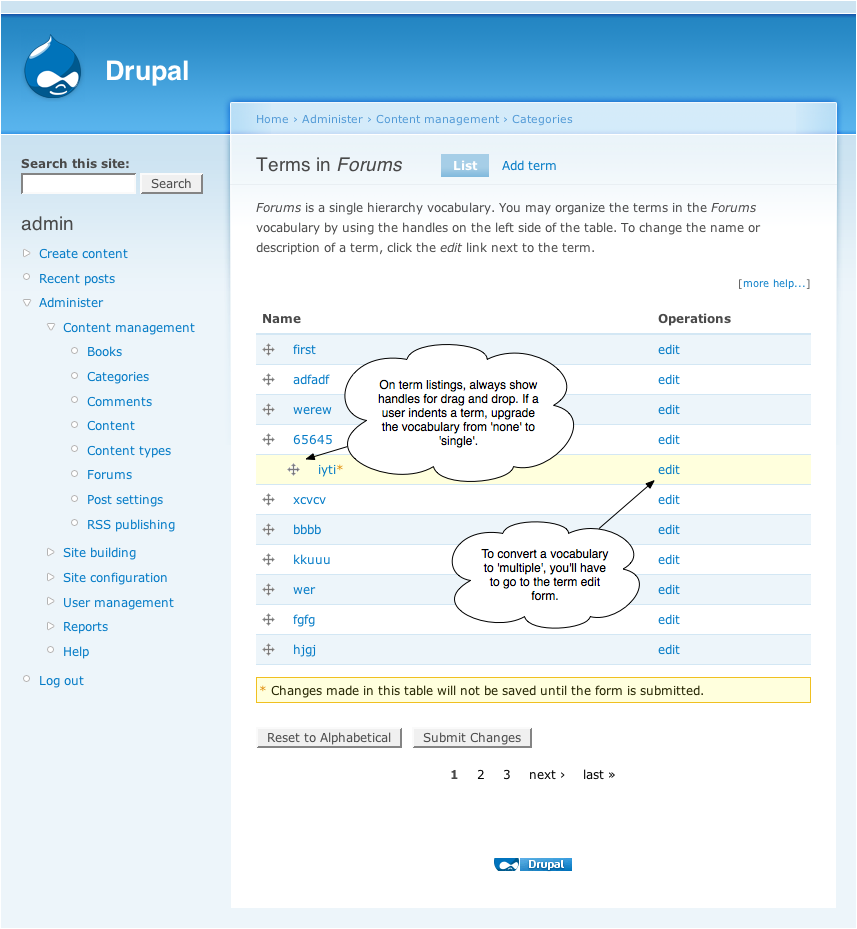
2. Vocab term list (see http://drupal.org/node/193333):
- Terms are arranged by drag and drop. Because of an easy way to arrange terms, the user will be unlikely to ever go to the term edit form.
- The user is always allowed to move an item to the child of another item. If the user creates a parent relationship in this vocabulary, automatically upgrade the vocabulary from a flat vocabulary to single hierarchy. If removing the last child in the entire form, convert the vocabulary back to flat for efficiency.
- The user is NOT allowed to create multiple vocabulary because the list interface does not allow for it. For that the must visit the term edit form.
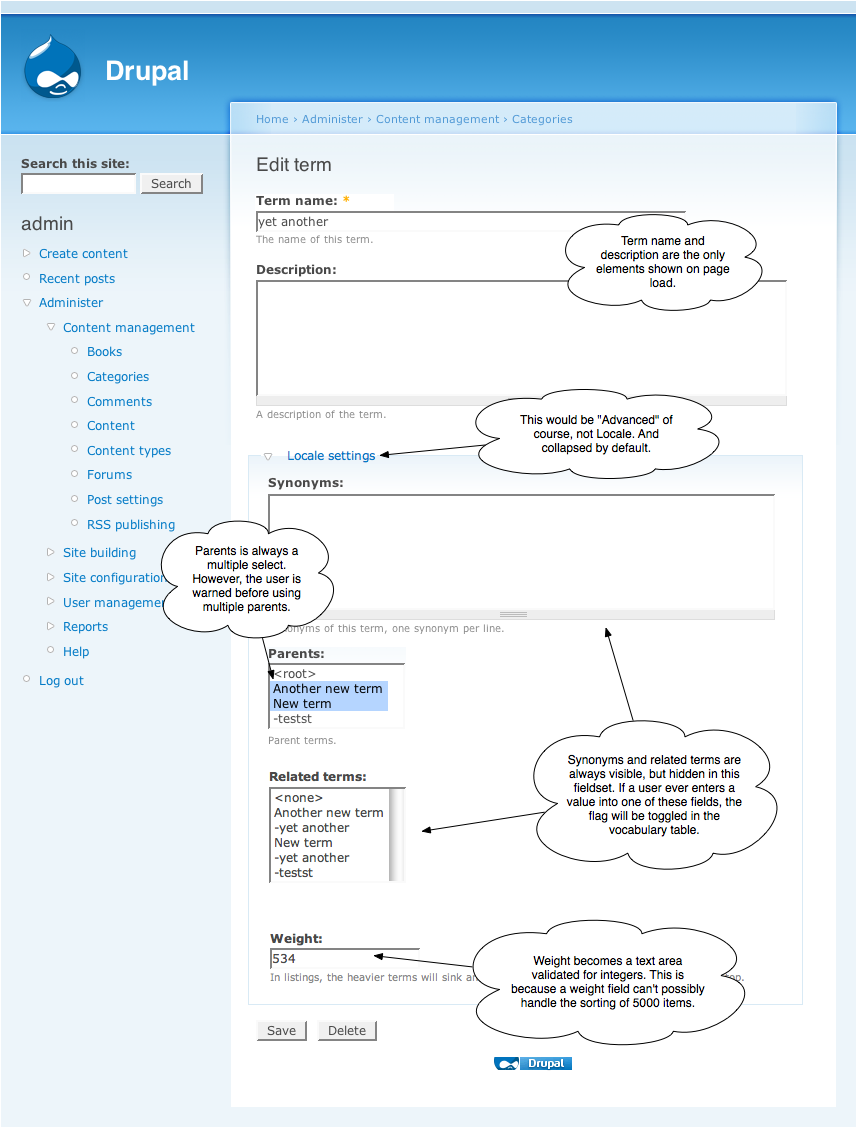
3. Term edit form:
- The term edit form always includes the option for related terms. If a related term is entered, automatically toggle the 'relations' flag in the vocabulary table. If the last related term in the entire vocab is deleted, disable the 'relations' flag in the vocabulary table for efficiency.
- The parents field is always a multiple select. If a user selects multiple parents, allow the vocabulary to become a multiple hierarchy, but present a warning first.
4. Term multiple parent warning:
- Give the user a warning that enabling a multiple parent relationship will cause the list interface to no longer be sortable using the drag and drop interface.
- If the user okays, upgrade the taxonomy to a multiple hierarchy.
Basically what we're doing here is removing the burden from the end user about what kind of relationships and parenting behaviors are available. Drupal can figure these relationships out for us just by doing a check every time a new term is saved (via the admin interface). Because adding terms through the admin interface is a relatively occasional task, the small amount of additional processing shouldn't trouble us at all.
Comment #48
robertdouglass commented#47 is nothing less than brilliant. Looks like you've got code at some stage of readiness? Give us a pastebin or a patch and we'll help out.
Comment #49
quicksketchNo sorry Robert, that's pure Photoshopiness. #46 is the most we've got at this point when it comes to the forms.
I do have code I'm working on for drag and drop of the term pages, which I'll post in this separate issue when it's ready: http://drupal.org/node/193333.
Comment #50
gábor hojtsyThese ideas are just beautiful :) Although:
- We should explain what is exactly lost with assigning multiple parents. 'Reduced functionality' is a bit scary. What is exactly lost.
- Sorting terms on the UI will obviously not work when you have multiple of pages of terms. I don't think this is solvable in the Drupal 6 timeframe though.
Awaiting patches :)
Comment #51
catch- Agree that losing drag and drop should be mentioned explicitly in the warning, this was in IRC but not the screenshots.
- We still have weight/parent settings in the add term form when there's a pager, same as menu, but yes, one for D7 that.
Patch for the #46/#47 vocabulary and term add forms attached, drag and drop is on the other issue. This patch tidies some of the logic up in term add since we'll always allow parents to be selected etc.
This doesn't deal with the vocabulary settings changes when saving the drag and drop or term forms. It should be straightforward to find if we've gone to single or multiple hierarchy, but I don't know how to do this on submit yet. Probably it should save the hierarchy first, then query to change the flag in the vocabulary table once that's done (see below for why).
For single hierarchy, if parent != 0 in {term_hierarchy} - we don't need to tell the users about this because they can see it in the interface anyway and they won't lose anything.
multiple hierarchy needs a COUNT on term_hierarchy where tid = $tid; then return true if > 1 to set the flag.
If we change the parents form into autocomplete, then a js validation message if more than one term is entered in 'parents' might be enough. "You have selected more than one parent for this term, this will disable drag and drop functionality in this vocabulary once you save the form". Then we could lose the confirmation screen in #47, since if you don't have js enabled, you don't have drag and drop to lose anyway.
Querying against the one term will be enough to enable multiple hierarchy, but to switch it off again when the last multiple parent is removed, we'd need to query against every tid in the vocabulary to see if it's got more than one entry in term_hierarchy (again just on submit probably). Don't know how to do that cheaply but I'm sure there's a way.
Comment #52
catchJust to make it clear; with one small change (attached) this is ready for review in its own right, just to improve usability of the vocabulary and term forms. Drag and drop will only modify the new versions of the forms very, very slightly, so with or without d&d they should be pretty much ready.
I'm going to bump this to critical (given the usability feedback from Chris Messina on these forms, which is 95% dealt with by the patch), and if we could get reviews on it, that'd be great. Then further improvements can move to the d&d and docs issues respectively if this one goes in.
Comment #53
gábor hojtsyCode review on the patch:
- do not abbreviate key names 'vocab_*' could probably be renamed to '*' (ie. why do we need the 'vocab' prefix?)
- document the two value types, why do we have those there
- $form['identification'] = array( has an identation issue
- lots of
hadbad whitespace changes slipped in in taxonomy.module- this code seem to be a UI prototype but it does not set the flags yet
Comment #54
catchThanks for the review.
1. Yes, removed.
2. Added comments, although not sure if it's enough.
3. fixed
4. Odd, but anyway have left taxonomy.module change out of this patch in favour fixing it together with the rest of the docs.
5. This is my suggested interface changes regardless of drag and drop - i.e. allow related terms and multiple parents in all vocabularies - see #41 - #46. Drag and drop will at most have to change a line or two to the sections affected by this patch. The flags will only affect the interface if d&d is enabled, otherwise it's unaffected and should just be on by default as we're trying to simplify the more commonly used vocabulary form.
Unless I've missed something, there's not much more can be done within the scope of this issue, it might be valid to merge these changes into d&d since they're somewhat related, but here goes anyway.
Comment #55
gábor hojtsyDo not merge the issues!
There was some talk above about detecting the relations and hierarchy state of the vocabularies based on user input. Although if you would not be able to assign multiple parents and related terms anytime, you would not be able to detect this anyway :) So before any detection, it would need to be in the form, once detection found it is required, it would be kept in the form. Doh.
Anyway, this patch moves a vocabulary setup annoyance to a term input annoyance. Considering that vocabulary setups are rare and term setups are much more common, is this an improvement?
Comment #56
keith.smith commentedWith this patch applied, forum.module, which attempts an unset of several items on this page for the "Forums" taxonomy, no longer removes the "Multiple select" option, and possibly a few other things. (It apparently tries to remove "relations", "tags", "multiple" and the delete button.)
Comment #57
catchGabor: Setting the options programmatically only works if we have some notion of hierarchy on the list terms page (drag and drop) - otherwise we have no need to toggle the options since we'd get into the endless back and forth you pointed out. Without drag and drop, forum, and contrib, the flags would be redundant since they don't actually force term relationships in any way, just change input.
For drag and drop we have to set the flag only because multiple hierarchy breaks it - see #47. So explicitly setting it to multiple seemed like the best option so it can be overridden elsewhere until programmatic setting gets in. I may well have got that bit wrong, but can't think of an alternative at the moment. Hopefully that explains the reasoning for doing it like this though :)
keithsmith - well spotted. There's an issue here for the forum module hook_form_alter not working currently: http://drupal.org/node/176282 - I'm not sure if this patch just makes that one harder to fix or messes it up completely though.
The vocabulary setup form is confusing now - we're asking people to choose options before they have any idea what they mean.
By enabling these options by default and moving them to a collapsed fieldset in the term input (instead of at the top of the form as it is now), 95% of users can happily ignore then=m without having to take any decision at all. If someone just sets up a free-tagging vocabulary, they may never see that form, ever.
So yes it shifts the complexity rather than eliminating it, but it moves it somewhere more appropriate, and leaves the flexibility there whilst not confronting users when they try to set up the basics. All the arguments for doing this are earlier in the issue.
Comment #58
catchOK forum alter fixes were trivial in the end. Here's a new patch for review.
Comment #59
dries commentedOk, this is pretty much exactly what I had in mind -- only articulated much better and more verbosely. This is exciting, and I'd love to see this land.
Comment #60
catchHow about a patch.
Comment #61
gábor hojtsyPatch is missing.
Comment #62
gábor hojtsyHeh, crossposted.
Comment #63
catchToo quick for me. #60 should be fine I think.
Comment #64
Rowanw commentedI was able to create a vocab and add terms with multiple parents without a problem.
I think #60 squashes this issue out of existence. Even though there are constantly extra options on the term/add/edit page, I can't see it causing any confusion to users.
Comment #65
dries commentedI think this looks great. My only comment is that the form descriptions could use some love but we can worry about that later.
I've committed this to CVS HEAD. Thanks all!
Comment #66
catchThanks!
I'll move back over to the help text issue and we can perhaps sort some of the descriptions out in there. Also I'd repeat webchick's question from the devel list as to whether we have two days or two weeks before string freeze?
Comment #67
catchMissed an unset for multiple parents when editing forum terms from the admin/content/taxonomy/edit/term form. The forum admin interface is fine, drag and drop should be fine, so we just need to hide this as we do with the rest of forum_form_alter.
Comment #68
gábor hojtsyThanks, committed.
Comment #69
Bevan commentedI got a shock when I saw no 'parents' in the add vocab form. It's great to see usability finally getting some real attention in drupal! :)
Comment #70
(not verified) commentedAutomatically closed -- issue fixed for two weeks with no activity.
Comment #71
davej commentedI spotted what seems like an oddity in the way the "hierarchy" field in the "vocabulary" table behaves: see http://drupal.org/node/383926#comment-2026102:
Testing on a nearly-vanilla Drupal 6.13 sandbox:
(1) Create vocab: not tagging; not multiple; required => hierarchy field = 0.
(2) Add a parent term then a child term => hierarchy field = 1.
(3) Edit & save vocab with no changes => hierarchy field = 0.
(4) Add another child term => hierarchy field = 1.
Does (3) represent a bug in taxonomy.module? Or is the hierarchy field no longer used in any consistent way in D6?
Dave
Comment #72
Rowanw commented@davej, please start a new issue for that.
Comment #73
davej commented@Rowanw: issue created: http://drupal.org/node/580040