crontab -e as aegir shows no configured cron entries.

CommentFileSizeAuthor
#14 hostmaster_loced.jpg18.95 KBjimsmith
#10 boa-log.txt221.34 KBrealityloop

Comments

omega8cc’s picture

Status: Active » Postponed (maintainer needs more info)

Please follow guidelines.

realityloop’s picture

Status: Postponed (maintainer needs more info) » Active
cat /var/aegir/config/includes/barracuda_log.txt
Mon Oct  1 12:51:54 EST 2012 / Debian.squeeze x86_64 XEN / Aegir BOA-2.0.3 / Barracuda BOA-2.0.3 / Nginx 1.3.0 / PHP 5.2.17 and 5.3.13 / MODERN-YES / FPM 5.3 / CLI 5.3 / MariaDB-5.5.27 localhost / Wildcard YES
Wed Nov 14 15:31:14 EST 2012 / Debian.squeeze x86_64 XEN / Aegir BOA-2.0.4 / Barracuda BOA-2.0.4 / Nginx 1.3.8 / PHP 5.2.17 and 5.3.18 / MODERN-YES / FPM 5.3 / CLI 5.3 / MariaDB-5.5.28 localhost / Wildcard YES
Fri Nov 30 12:42:11 EST 2012 / Debian.squeeze x86_64 XEN / Aegir BOA-2.0.4 / Barracuda BOA-2.0.4 / Nginx 1.3.8 / PHP 5.2.17 and 5.3.18 / MODERN-YES / FPM 5.3 / CLI 5.3 / MariaDB-5.5.28a localhost / Wildcard YES
Wed Feb 27 07:55:01 EST 2013 / Debian.squeeze x86_64 XEN / Aegir BOA-2.0.5 / Barracuda BOA-2.0.5 / Nginx 1.3.9 / PHP 5.2.17 and 5.3.20 / MODERN-YES / FPM 5.3 / CLI 5.3 / MariaDB-5.5.29 localhost / Wildcard YES
Fri Apr  5 17:13:54 EST 2013 / Debian.squeeze x86_64 XEN / Aegir BOA-2.0.7 / Barracuda BOA-2.0.7 / Nginx 1.3.15 / PHP 5.2.17 and 5.3.23 / MODERN-YES / FPM 5.3 / CLI 5.3 / MariaDB-5.5.30 localhost / Wildcard YES
cat /var/aegir/install.log
==> MySQL is listening on redacted for security.
==> This script makes the following assumptions: 
 * you have read INSTALL.txt and prepared the platform accordingly
 * you are running as your "aegir" user
==> Aegir will now generate a mysql super user password for you: 
  Username : aegir_root
  Password : redacted for security
  Hostname : redacted for security
==> Installing drush in /var/aegir
==> Drush seems to be functioning properly
==> Installing provision backend in /var/aegir/.drush
==> Installing the frontend
Aegir BOA-2.0.3 automated install script
==============================================================================
Some settings have not been provided and will now be prompted.
Don't worry: you will get to review those settings after the final install

This script will operate the following changes in your system:

1. Create server-level configuration directories
2. Download drush_make
3. Create the Hostmaster frontend platform
4. Install the frontend site
5. Setup the dispatcher (a user cron job)

We are making the following assumptions:
 * you have read and are following the install instructions at:
    http://community.aegirproject.org/installing
 * the FQDN of this machine is valid and resolves
 * you are executing this script as your "aegir" user

The following settings will be used:
 Aegir frontend URL: a01redacted for security
 Master server FQDN: h01redacted for security
 Aegir root: /var/aegir
 Aegir user: aegir
 Web group: www-data
 Web server: nginx
 Aegir DB host: localhost
 Aegir DB user: aegir_root
 Aegir DB password: <previously set>
 Drush make version: 6.x-2.3
 Aegir version: BOA-2.0.3
 Aegir platform path: /var/aegir/hostmaster-BOA-2.0.3
 Aegir makefile: /var/aegir/.drush/provision/aegir.make
 Admin email: redacted for security

Do you really want to proceed with the install (y/n): y
Project drush_make (6.x-2.3) downloaded to /var/aegir/.drush/drush_make.                                                                             [success]
Project drush_make contains 0 modules: .
pressflow downloaded from http://files.aegir.cc/dev/pressflow-6.26.2.tar.gz.                                                                         [ok]
hostmaster downloaded from http://files.aegir.cc/versions/hostmaster-BOA-2.0.3.tar.gz.                                                               [ok]
Found makefile: hostmaster.make                                                                                                                      [ok]
Project information for admin_menu retrieved.                                                                                                        [ok]
Project information for openidadmin retrieved.                                                                                                       [ok]
Project information for install_profile_api retrieved.                                                                                               [ok]
Project information for jquery_ui retrieved.                                                                                                         [ok]
Project information for modalframe retrieved.                                                                                                        [ok]
Project information for hosting_platform_pathauto retrieved.                                                                                         [ok]
admin_menu downloaded from http://ftp.drupal.org/files/projects/admin_menu-6.x-1.8.tar.gz.                                                           [ok]
openidadmin downloaded from http://ftp.drupal.org/files/projects/openidadmin-6.x-1.2.tar.gz.                                                         [ok]
install_profile_api downloaded from http://ftp.drupal.org/files/projects/install_profile_api-6.x-2.1.tar.gz.                                         [ok]
jquery_ui downloaded from http://ftp.drupal.org/files/projects/jquery_ui-6.x-1.4.tar.gz.                                                             [ok]
modalframe downloaded from http://ftp.drupal.org/files/projects/modalframe-6.x-1.6.tar.gz.                                                           [ok]
hosting_platform_pathauto downloaded from http://ftp.drupal.org/files/projects/hosting_platform_pathauto-6.x-2.0-beta1.tar.gz.                       [ok]
jquery_ui downloaded from http://files.aegir.cc/dev/jquery.ui-1.6.zip.                                                                               [ok]
Created redacted for security database                                                                                                                    [success]
Creating master server node                                                                                                                          [status]
Task verify was added to the queue. Next queue run is 02:51:00+0000, server time is 02:50:18+0000.                                                   [status]
Creating db server node                                                                                                                              [status]
Task verify was added to the queue. Next queue run is 02:51:00+0000, server time is 02:50:18+0000.                                                   [status]
Task import was added to the queue. Next queue run is 02:51:00+0000, server time is 02:50:18+0000.                                                   [status]
Configuring menu items                                                                                                                               [status]
Configuring Eldir theme                                                                                                                              [status]
Configuring default blocks                                                                                                                           [status]
Configuring roles                                                                                                                                    [status]
Content permissions have been rebuilt.                                                                                                               [status]
Initializing the hosting system
Dispatch command was run successfully                                                                                                                [success]
Installed hosting-dispatch cron entry to run every minute                                                                                            [success]
This command will replace your crontab for this user. continue? (y/n): y
/var/aegir/drush/drush.php '@hostmaster' hosting-dispatch 

==============================================================================


Congratulations, Aegir has now been installed.

You should now log in to the Aegir frontend by opening the following link in your web browser:

http://redacted for security


==============================================================================
cat /root/.barracuda.cnf
###
### Configuration created on 121001-1228
### with Barracuda version BOA-2.0.3
###
### NOTE: the group of settings displayed bellow will *not* be overriden
### on upgrade by the Barracuda script nor by this configuration file.
### They can be defined only on initial Barracuda install.
###
_HTTP_WILDCARD=YES
_MY_OWNIP="redacted for security"
_MY_HOSTN="redacted for security"
_MY_FRONT="redacted for security
_THIS_DB_HOST=localhost
_SMTP_RELAY_TEST=YES
_SMTP_RELAY_HOST=""
_LOCAL_NETWORK_IP=""
_LOCAL_NETWORK_HN=""
###
### NOTE: the group of settings displayed bellow
### will *override* all listed settings in the Barracuda script,
### both on initial install and upgrade.
###
_MY_EMAIL="redacted for security"
_XTRAS_LIST="CSF SR3"
_AUTOPILOT=NO
_DEBUG_MODE=NO
_DB_SERVER=MariaDB
_SSH_PORT=22
_LOCAL_DEBIAN_MIRROR="ftp.debian.org"
_LOCAL_UBUNTU_MIRROR="archive.ubuntu.com"
_FORCE_GIT_MIRROR=""
_DNS_SETUP_TEST=YES
_NGINX_EXTRA_CONF=""
_NGINX_WORKERS=AUTO
_PHP_FPM_WORKERS=AUTO
_BUILD_FROM_SRC=NO
_PHP_MODERN_ONLY=YES
_PHP_FPM_VERSION=5.3
_PHP_CLI_VERSION=5.3
_LOAD_LIMIT_ONE=1444
_LOAD_LIMIT_TWO=888
_CUSTOM_CONFIG_CSF=NO
_CUSTOM_CONFIG_SQL=NO
_CUSTOM_CONFIG_REDIS=NO
_CUSTOM_CONFIG_PHP_5_2=NO
_CUSTOM_CONFIG_PHP_5_3=NO
_SPEED_VALID_MAX=3600
_NGINX_DOS_LIMIT=300
_SYSTEM_UPGRADE_ONLY=NO
_USE_MEMCACHED=NO
###
### Configuration created on 121001-1228
### with Barracuda version BOA-2.0.3
###
_USE_STOCK=NO
_EXTRA_PACKAGES=
_PHP_EXTRA_CONF=""
_STRONG_PASSWORDS=NO
_DB_BINARY_LOG=NO
_DB_ENGINE=InnoDB
_NGINX_LDAP=NO
_PHP_GEOS=NO
_PHP_MONGODB=NO
omega8cc’s picture

Category: bug » support
Status: Active » Postponed (maintainer needs more info)

I can't reproduce that. Please enable debugging as explained in the guidelines and attach full console output on upgrade - or use the silent/logged mode, like barracuda up-stable log and attach the log written in the /var/backups/reports/up/barracuda/DATE/ directory.

realityloop’s picture

re-running boa up-stable appears to have resolved the issue

realityloop’s picture

Status: Postponed (maintainer needs more info) » Closed (fixed)
omega8cc’s picture

By the way, always check if there is no pid file left for some weird reason and remove it, if it exists once the upgrade is complete:

ls -la /var/run/boa_wait.pid
ls -ls /var/run/boa_run.pid

realityloop’s picture

Title: Tasks in queue aren't running after update to BOA 2.0.7 » Tasks in queue aren't running after update to BOA 2.0.8
Status: Closed (fixed) » Active

This has happened again after updating to BOA 2.0.8 on the same server

contents of /var/run:

drwxr-xr-x  7 root       root       4096 Apr 10 07:11 .
drwxr-xr-x 16 root       root       4096 Apr  9 07:54 ..
-rw-r--r--  1 root       root          5 Apr  9 11:39 acpid.pid
srw-rw-rw-  1 root       root          0 Apr  9 11:39 acpid.socket
-rw-r--r--  1 root       root          5 Apr  9 11:39 atd.pid
srw-r-----  1 root       root          0 Apr  9 11:39 audispd_events
-rw-r--r--  1 root       root          4 Apr  9 11:39 auditd.pid
-rw-r--r--  1 root       root          0 Apr  9 11:39 clean-boa-env.pid
-rw-r--r--  1 root       root          5 Apr  9 11:39 crond.pid
----------  1 root       root          0 Apr  9 11:39 crond.reboot
drwxr-xr-x  2 messagebus messagebus 4096 Apr  9 11:39 dbus
-rw-r--r--  1 root       root          6 Apr 10 00:19 jetty8.pid
-rw-r--r--  1 root       root          5 Apr  9 11:39 lfd.pid
-rw-r--r--  1 root       root        159 Apr  9 11:39 motd
drwxr-xr-x  2 mysql      root       4096 Apr  9 11:39 mysqld
-rw-r--r--  1 root       root          5 Apr  9 11:39 nginx.pid
-rw-r--r--  1 root       root          4 Apr 10 07:11 php53-fpm.pid
drwxr-xr-x  2 redis      redis      4096 Nov 19 17:30 redis
-rw-r--r--  1 redis      redis         6 Apr 10 01:18 redis.pid
-rw-r--r--  1 root       root          5 Apr  9 11:39 rsyslogd.pid
drwxrwxr-x  2 root       utmp       4096 Oct  1  2012 screen
drwxr-xr-x  2 root       root       4096 Sep 14  2012 sshd
-rw-r--r--  1 root       root          5 Apr  9 11:39 sshd.pid
-rw-rw-r--  1 root       utmp       4608 Apr 10 07:41 utmp
-rw-r--r--  1 root       root          4 Apr  9 11:39 vnstat.pid
-rw-r--r--  1 root       root          4 Apr  9 11:39 xe-daemon.pid

I tried using the log directive but it didn't seem to work.

I can trigger the queue manually by using:

php /var/aegir/drush/drush.php @hostmaster hosting-tasks --debug
omega8cc’s picture

Status: Active » Closed (cannot reproduce)

Please read and follow #3 before re-opening this ticket again. Thanks.

realityloop’s picture

Status: Closed (cannot reproduce) » Active

So it seems I've found a problem with the silent log mode, none of the prompts get displayed to the user.

I assume there are flags so that the prompts get filled in automatically, could you please point them out?

Anyway after running the update this time it's working again, which is weird as I'd tried re-running it 3 times already.

realityloop’s picture

StatusFileSize
new221.34 KB

attached log due to it containing <code> tags

obrienmd’s picture

I'm running into something similar - quick Q: Should the aegir user (barracuda) have a crontab running hosting-dispatch? Mine is empty as well.

omega8cc’s picture

Status: Active » Closed (cannot reproduce)

Thanks.

No, the non-interactive mode doesn't cause any problems here, because we are running hostmaster-migrate with flag -y, so it answers YES for you:

This command will replace your crontab for this user. continue? (y/n): y
/var/aegir/drush/drush.php '@hostmaster' hosting-dispatch
Running: /var/aegir/drush/drush.php  --force @hostmaster hosting-task 'server_master' 'verify' --backend  2>&1 [108.64 sec, 13.75 MB]                                                                    [command]

It should of course and it does have the standard aegir cron set up in all servers we manage, mostly Debian Squeeze but also some Ubuntu with at least three versions and it never happened to us to have this cron entry missing:

v19a:~# cat /var/spool/cron/crontabs/aegir
# DO NOT EDIT THIS FILE - edit the master and reinstall.
# (- installed on Mon Apr  8 05:47:27 2013)
# (Cron version -- $Id: crontab.c,v 2.13 1994/01/17 03:20:37 vixie Exp $)
SHELL=/bin/bash
PATH=/opt/local/bin:/sbin:/bin:/usr/sbin:/usr/bin
*/1 * * * * /var/aegir/drush/drush.php '@hostmaster' hosting-dispatch

Something must be non-standard on your server(s), if this happened to you, because normally Aegir will replace the crontab on upgrade, also in the non-interactive mode, as shown in your log.

Note that BOA never touched this cron entry in any way, it is Aegir what manages it, and there were no changes in the way it is managed.

I'm sorry, but I have to close this as 'cannot reproduce', because it always just 'works for me' (tm) :/

If you will find anything related to your systems which could cause such a weird issue, feel free to re-open, but there is nothing BOA specific here, since BOA simply uses Aegir own hostmaster-migrate task to proceed with upgrades and never modifies the cron entry for the master instance.

obrienmd’s picture

No problem, thanks for the context :)

jimsmith’s picture

Status: Closed (cannot reproduce) » Active
StatusFileSize
new18.95 KB

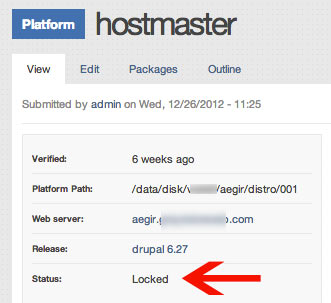
I'm having the same problem. I updated and now cannot run any tasks. Some tasks ran, but verification of Hostmaster did not, nor did anything after that.

I notice that Hostmaster shows it is locked. Could this be the reason why tasks in the queue after it are not running?

hostmaster_loced.jpg

My log files: https://gist.github.com/startinggravity/5728904/96e192166258338084506b01...

jimsmith’s picture

A follow up question: can I safely delete the tasks that have not run and then run an unlock task on Hostmaster?

jimsmith’s picture

A follow up question: can I safely delete the tasks that have not run and then run an unlock task on Hostmaster?

omega8cc’s picture

Status: Active » Closed (cannot reproduce)

There can be some "running" task which blocks your queue, so you should find it and delete. Or enable drush debugging, run upgrade and provide all details in a separate issue for review.

This has nothing to do with locked by design hostmaster platforms. See #1306430: Platforms show a warning but seem to work?

That said, please open a separate ticket with all required details and provide more information if you still experience issues.