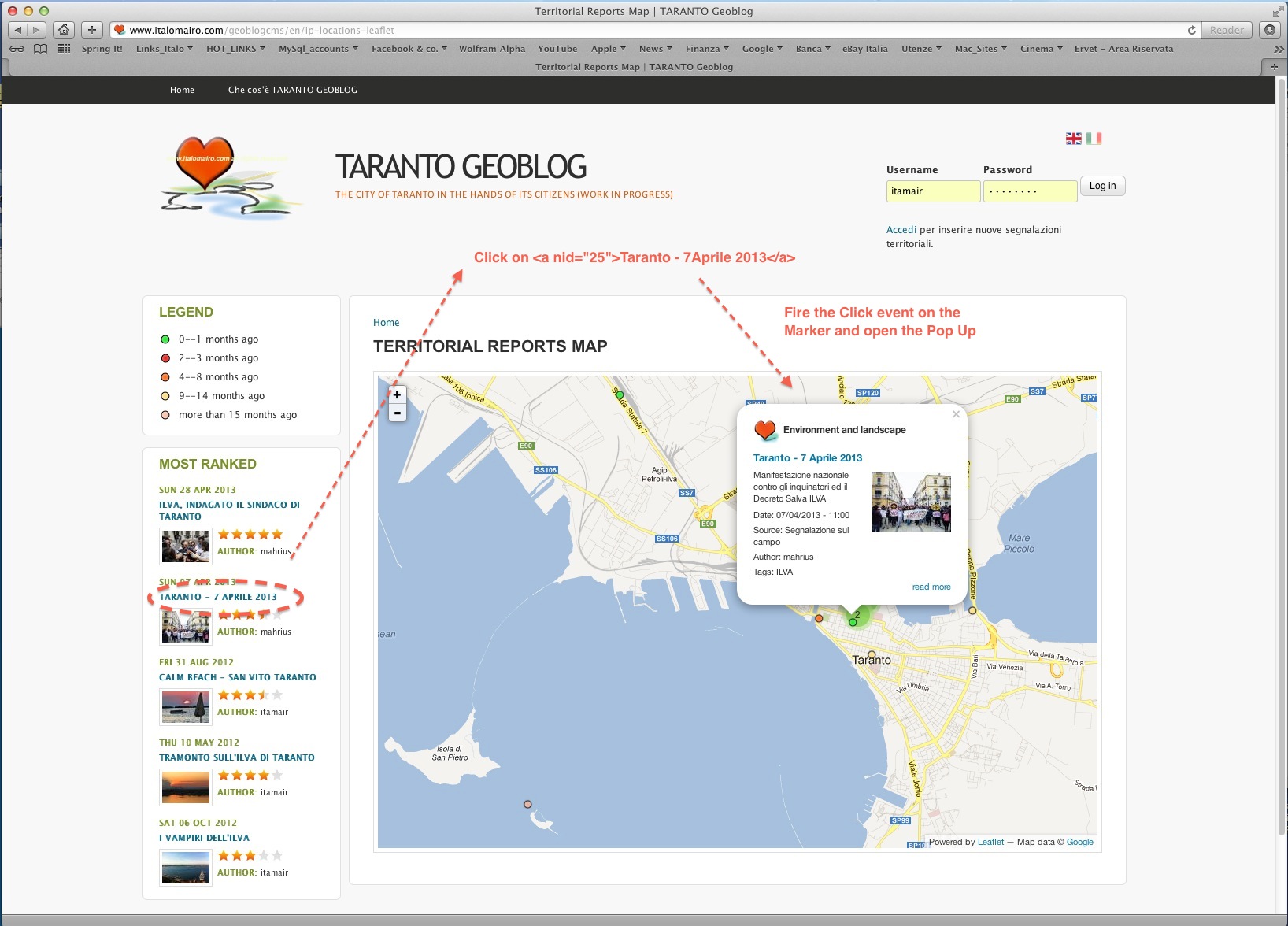
Beside the map (see the attached screenshot … from http://www.italomairo.com/geoblogcms/en/ip-locations-leaflet),
I'd have a list of locations, with $node->nid in the anchor tag. I'd like to be able to mouseonover the location's name (anchor tag) and have it activate the corresponding marker's popup, that holds the corresponding feature.leaflet_id (= $node->bid).
I have seen the trigger function has been added to the leaflet.feature:
// Allow others to do something with the feature that was just added to the map
          $(document).trigger('leaflet.feature', [lFeature, feature]);
        }
but really I cannot figure out how I can bind the fire popupOpen leaflet event to the anchor tag in my personal js/jQuery code added to the view.tpl …
How to call the feature jQuery selector on the map and fire the event?
I have seen this feature is partially covered here: http://drupal.org/node/1893660, but any guide on how to implement it.
Noway to find anywhere some repeatable examples on how to implement this in the Leaflet Drupal way.
Any suggestion or even code example and typical solution would be really welcome !!!
Grazie 1000 (thanks 1000)


Comments
Comment #1
itamair commentedOk .. waiting for any response, I tried by my self and did it!
It's a matter of binding the triggered event in your js code … although the leaflet module is missing some code to reference to generated features to the $node->nid.
(some code adds are needed, that I will soon post based on this experience of mine …)
Can enjoy the result from here: http://www.italomairo.com/geoblogcms/en/ip-locations-leaflet
mouse overing the "zoom in map" highlighted in the left list …
cheers
Comment #2
tko commentedCurious how you managed to pull this off. Mind sharing your code?
Comment #3
itamair commentedIn case of nodes, first of all it is a matter of understanding how to pass the $node->nid to a specific new property of the each leaflet feature object:
I used feature.feature_id value …
and this should be done by the leaflet_views_api.php (I guess). In my case I used the ip_geoloc module module (http://drupal.org/project/ip_geoloc), little altering its view plugin (and leaflet) style files.
Note: I tried to assign the $node->nid to the feature.leaflet_id property included in the leaflet api (and that the leaflet drupal module associate with the lFeature._leaflet_id) but this caused weird behavior (and continuous errors throwing in the browser console.log : TypeError: 'undefined' is not an object (evaluating 'this._map._panes'), especially with the marker clustering and the map.setView() method. Probably the lFeature._leaflet_id is something that should be left to the Leaflet apis management, without overriding it
Every feature in the Leaflet Map should have a feature.feature_id property equal to the $node->nid (or $term->did …): this is the first necessary condition to create a logical match between the features (and lFeatures) hold in the Leaflet map, and your nodes (or taxonomy terms) "Viewed" in the Map Page.
Once created this logic, your module's (or theme's) javascript/jquery code needs "$(document).bind(…)" the 'leaflet.feature' and 'leaflet.map' custom events that the Leaflet Module (now) triggers once the features and the map itself is created … but this binding should be done before the page (and the map) is created, as they should be available before the trigger events … So it means don't put this bindings in the $(document).ready(function () { .. } but outside/before it …
This binds might (should in my case) be like this:
It's quite tricky … but it works well, as you might see here: http://www.italomairo.com/geoblogcms/en/ip-locations-leaflet
Hope all this might help
Comment #4
proweb.ua commentedFor several days now I can not find how to do it.
Could you tell us more how to implement it?
What files are changed, and what code has been added.
http://www.italomairo.com/geoblogcms/en/ip-locations-leaflet not open
Comment #5
itamair commentedHi proweb.ua …
it opens …
This issue has got a glob update by this one: #2056551: (my) Improvements for multiple Leaflet maps (fit bounds), interactions from outside of the map & View AJAX calls
By that now it is quite easy to access directly to the global Drupal.settings.leaflet.lMap and to its features/markers … thus being able to interact with them through out the Leaflet API.
I didn't find the time yet to write a specific blog post/tutorial on this, but really I did put you on the proper track …
Comment #5.0
itamair commentedsyntax
Comment #6
sorensong commentedSo... basically, if you're not a developer this functionality really isn't an option, correct? Classic Drupal.
Comment #7
rdeboerThis functionality has been available for a while through IPGV&M, http://drupal.org/project/ip_geoloc.
I'm suggesting to avoid duplication of functions in Leaflet itself. "Bells and whistles" are probably best placed in auxiliary modules?
Comment #8
antims commentedWho sloved it,pls?
Comment #9
rdeboer@antims
See #7.
Use that module in combination with Leaflet.
It is called cross-highlighting. See IPGV&M project page.
Rik
Comment #10
antims commented@RdeBoer
Thanks for your reply.Sorry for my poor english.
1. IPGV&M only support mouseover,but mobile device only support click.
2. IPGV&M support leaflet markercluster not very well, ,markers sometimes disappear.
Comment #11
antims commentedComment #12
rdeboer@antims
I disagree with both statements in #10.
Do you have the right combination of Leaflet JS and LeafletMarkerCluster JS. Check the project page: https://www.drupal.org/project/leaflet_markercluster
Rik