Problem/Motivation
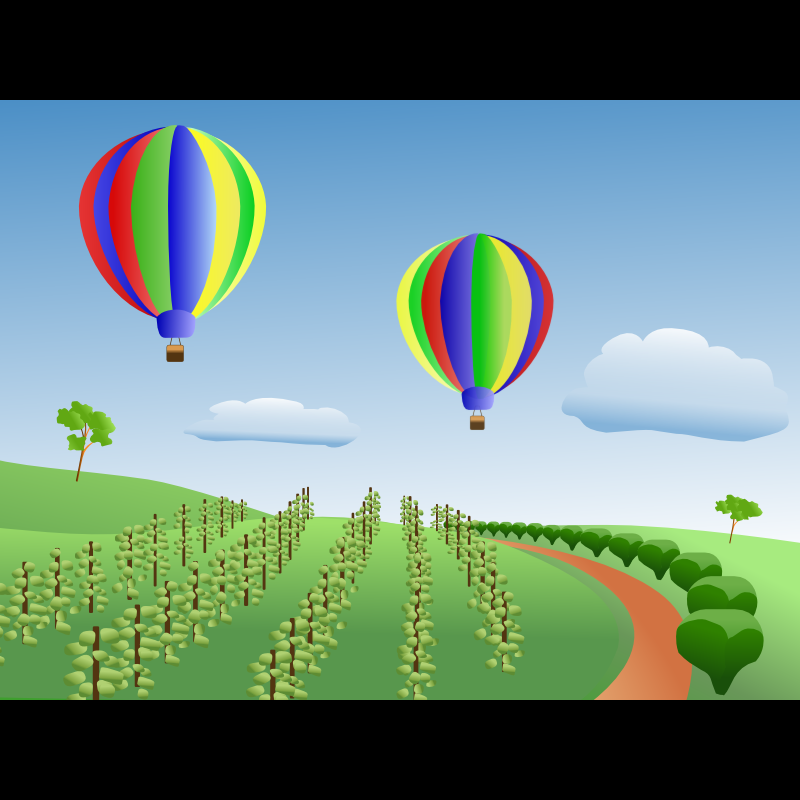
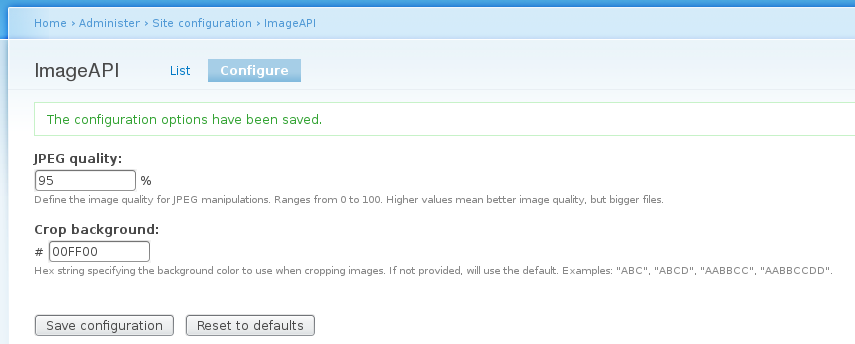
If you have a 'crop' image style and the image is not large enough to fill the cropped area, the resulting image has a black background in the empty space. It would be useful if the default background colour were configurable.
Note that the Image Effects module provides this functionality.
Proposed resolution
Adding a background color to the options for the 'Crop' effect when creating an image style.
Remaining tasks
N/A
User interface changes
When configuring a Crop (image_crop) effect at admin/config/media/image-styles/manage/{image_style}/add/image_rotate or admin/config/media/image-styles/manage/{image_style}/effects/{image_effect} admins should be able to provide a color, in hex string format, for the additional area created by upscaling crops.
API changes
Note: These API changes assure full backward compatibility.
Original report by FiReaNG3L
ImageAPI.module sounds very interesting; I recently had problems with imagecache / image.inc putting a black background on images when scaling / cropping to a definite size (say 150x150 pixels) when the image is too wide or tall to fit the square.
Is there a way to customize the background to another color (say, white) with image API?
I tried to modify image.inc myself but the best I could achieve is a background change that worked, but bleeded in the image if black was present.
Thanks for all the awesome work on imagecache / imageAPI!


 Show commands
 compare




Comments
Comment #1
FiReaNGeL commentedSmall followup: a search on d.o. reveals that many users have the same problem; maybe ImageAPI.module would be a nice place to fix this since they are mostly related to imagecache.module and the new version isnt using image.inc anymore!
Non-extensive list:
Imagecache Scale Problem (Black background) : http://drupal.org/node/201163
Background in cropped images : http://drupal.org/node/123270
Changing Background Color of Thumbnails Re: CCK/VIews Image Gallery : http://drupal.org/node/190235
All the workarounds thus far involve doing some other action to avoid the crop, but if thats the result you want and nothing else, you're stuck with a black background, which is ugly if your theme is white based.
Also image_exact.module (http://drupal.org/project/image_exact) states in its description : The only limitation of this implementation is that imagecache doesn't check the image size before cropping, so if someone uploads a very small image, it will "crop" to the size specified, adding a black background to fill in the dimensions. I will submit a patch to imagecache that will make this configurable.
And here's a possible fix:
Here is a Patch to avoid black backgrounds on cropped images : http://drupal.org/node/199957
Comment #2
dopry commentedI'd really prefer you test the module rather than post feature requests right now. I would also be nice if you contributed this image.inc fix you attempted as a possible patch instead of just mentioning it. Code is gold and all..
Comment #3
FiReaNGeL commentedAs I said, there's a potential fix in the last issue I linked to - image.inc should be patched, but imageAPI too because its the future of imagecache, which is the main resource using image manipulation. I will test the patch as soon as I get back home (christmas vacation and all). This issue is just to document the problem as a feature request against the dev version, so its not like the house is on fire or something :)
Comment #4
murzI have successfully change background color when cropping with easy hack of Drupal core file
includes/image.inc:In function
add string:
When I try to add imageFill function before imageCopy, i see black backgrond. But when I add it after imageCopy, all works good.
Numbers
255,255,255you can change to any RGB color values as you want.Comment #5
murzThis issue doesn't solve problem with black backgrounds, it's avoid clipping if size of clip area large than image.
Comment #6
murzAnother (better) method to fill background with some color:
In function
add string:
Comment #7
joeboris commentedI've tried this, and not been able to make it work... Nothing at all happens... Any idea as to what I could be doing wrong? I'm using Imagecache 1.3 on Drupal 5.6.
I tried the other hack you posted, and that worked like a charm - that is, until I uploaded an image consisting mainly of black... Apparently, imageFill doesn't handle alpha-colors too well...
Nevertheless; if you (or anyone else for that matter) have any more ideas on how to make this work, it would be greatly appreciated! It's such a bummer going back to the black background images after having it "working" sweetly for a while ;)
Thanks
joeboris
Comment #8
idflorin commented#4 works partially (see attachment)
#6 no change.
Now I'll try both.
--------------------------
Velvet Cushion
Comment #9
murzadresaklumea, I create another method for filling background when cropping, it should be work good with half -transparent png's too. Try my new patch and feedback please about it works.
You must set background color as HTML color in string
$bg_color = variable_get('image_crop_background', '#FF0000');or set a Drupal variable 'image_crop_background' to HTML color you need.
This patch is for Drupal 5.7 core, not for ImageAPI module.
Comment #10
idflorin commentedBeautiful, works like a charm
10*e99 thanks
Comment #11
idflorin commentedHow to patch the ImageAPI ?
Comment #12
reed.richards commentedI tried the patch in #9 but my whole site goes down and I get the following error messages:
Warning: require_once(./includes/image.inc) [function.require-once]: failed to open stream: Permission denied in drupal\includes\common.inc on line 1850
Fatal error: require_once() [function.require]: Failed opening required './includes/image.inc' (include_path='.;C:\php5\pear') in drupal\includes\common.inc on line 1850
Which is really strange I don't know where this comes from? I am using the 5.7 Drupal.
Comment #13
murzThis is a patch for imageapi to set the background color for cropping.
At now you can set the color manually in source code by modifying this string:
$color=array('red'=>255,'green'=>255,'blue'=>255,'alpha'=>0);And this patch have a workaround with wrong image size for function
imagecopyresampled()when cropping.Comment #14
idflorin commentedThank you again.
you rock!
Comment #15
dopry commentedThis still isn't quite the right solution... I'm tempted to split canvas resize and crop into seperate functions and not allow oversized crops.... and have an explicit set background for canvas resizing that inherits from the image->res if unset.
regardless this breaks background transparency preservation in it current state.
.darrel.
Comment #16
drew reece commentedSubscribing,
The patch in #9 works for me, using Imagecache 5.x-1.6 and Drupal 5.9. FWIW I use scaling to outside dimensions followed by cropping slightly smaller. The background now blends nicely.
I assume the plan is to make the string value assignable in the image toolkit admin page?
Something along the lines of
A couple of random thoughts…
The default should be probably white, since it would sit well with default theme(s).
The # should be removed from the field and only the 6 characters are saved for the color variable, eg ff00ff I think we can use a field prefix to display the # at the start of the field.
@ dopry, I didn't realize there was transparency, my images seem to end up with a black background when cropping oversize. Is there anything I can do, this strikes me as a nice feature to get into core, I'd easily use it on all my sites.
Drew
Comment #17
murzI have edited the patch for support imageapi-5.x-1.2 and add an option in imageapi_gd settings to set background color manually. It's worked for me and, I hope, help others.
Comment #18
drewish commentedthis would really need to go into HEAD (6.x-1.x) and be backported.
Comment #19
dman commentedLooking at #7, It's wrong to use variable_set/get for this which should be a per-preset setting.
Anyway...
I've tweaked imageapi to :
- Properly support transparent inputs - it just wasn't doing it before. Now if you crop a PNG or GIF the background will remain transparent - even if cropped to a larger size. There was code there to support this but it seems to have rotted away at some point and stopped doing it properly.
- Allow crop to larger dimensions : behave like "set canvas size" - without creating huge black chunks. Jpegs still create white chunks, but that's less ugly usually.
It involved moving jpeg handling over next to png handling (truecolor), as the previous index transparency only works on GIFs AFAIK.
In the future, setting the preferred bg color via the UI is still a TODO
Patch is against todays HEAD/6-dev
Comment #20
claudiu.cristeaInput on patch #19...
If you set the X offset to right than a black background is added to the left and the image is cropped.
Steps to reproduce:
The image should be surround at left & bottom by a white background. At bottom is OK but on X axis it adds white background to right and black background to left. Also it reduces the X dimension by cropping the image.
Comment #21
claudiu.cristeaBut... it works fine with X offset set to left
Comment #22
tylor commentedInput for #19 and #20, I had the same problem but found I could make everything work (left, right, and center) by changing:
to
Attached is a new patch with this change.
Comment #23
vvvi commentedFor CENTRING I have applied patch from #22 and change one row in function imageapi_gd_image_crop from
to
and all work fine for me)
I use drupal 6
Comment #24
robloachHow's this? Moving this to critical since it's been an issue for so long. Here's a patch as well as a screenshot.
The patch was created from HEAD.
Comment #25
drewish commentedI'd like some extra comments so it's clear what's happening there. why are/were we passing the $width, $height parameters if we're using $image->info['height'], $image->info['width']?
Comment #26
robloachHere we go. This patch says why we're using the source width and height instead of the destination width and height. Think we should remind people that we're cropping here and not scaling? Or is that good? I thought it made sense.....
Comment #27
drewish commentedthe comments look better... but looking at the docs for imagecopyresampled() it references them as the src and dest sizes so wouldn't the first set be $height and $width and the second be $image['height'] and $image['width']?
this has me really wishing we had some unit tests to validate some of these type of changes.
and if we're adding a feature we need to add it to the imagemagick api or at least determine that it's unsupported by IM...
Comment #28
dman commentedI've been wishing for unit tests for my image processes also ... but I just cannot imagine how to validate that the produced image is what I expected :-)
Comment #29
FiReaNGeL commenteddman: maybe check the output / md5 with http://ca.php.net/function.file-get-contents compared to an 'expected' image from a source image
Comment #30
dman commentedByte/hash matching won't really help for JPEG algorithms against different builds, libraries, image toolkits, compression preferences, OS etc.
:-(
Comment #31
robloachAndrew: We're using the same width and height for both the source and destination because we are cropping, not scaling. If we were scaling, we'd use different source/destination widths and heights.
Comment #32
drewish commentedthat makes sense. okay this looks pretty good to me. committed to HEAD. thanks!
Comment #33
robloachYeah, should've included that as part of the patch with the added documentation. Thanks a lot, Drewish.
Comment #35
edmund.kwok commentedThis patch is not in the latest 1.x-dev? Updated patch for this.
Comment #36
Anonymous (not verified) commentedAbove patch works for png and jpg, but not for gif images. Im scaling images to fit e.g. 100x100, and then cropping to 100x100. See attached gif images problem: only the top part gets the #FFF background I set in the ImageAPI config page. The bottom part is still black. Why doesnt it apply the set background color for the entire image, why only the top part?
Comment #37
robloachUpdated to latest in DRUPAL-6--1.
Comment #38
R.Muilwijk commentedSubsc
Comment #39
moritzz commentedThe #37 patch works for me. Thanks a lot.
Comment #40
p.brouwers commentedSubscribing
PS. Is this related to #422836: ImageAPI GD2 6.x-1.5 ignores crop background color setting ?
Comment #41
Bobuido commentedSubscribing
Comment #42
jsenich commentedsubscribing
Comment #43
arnieswap commentedDid not work for me.
Comment #44
blueblade commentedsubscribing
Comment #45
arski commentedwouldn't it be nice to check image dimensions rather than filling it with whatever background on crop?
Thanks
Comment #46
john.kenney commented#37 patch worked for me in 1.8.
very nice! thank you.
it probably says this on the thread somewhere, but you can modify color background by editing line #116 in the patched file. for example:
$background = variable_get('imageapi_crop_background', '#cccccc');Comment #47
Wappie08 commentedHello, I can confirm that the patch in #37 is working!
Will this be committed, what's the status on this issue?
Greetings Wappie
Comment #48
smyleeface commentedI can also confirm that patch #37 works perfectly with ImageAPI 6.x-1.8 and ImageCache 6.x-2.0-beta10.
@#46 instead of coding the color into the code you can go into the ImageAPI configuration screen and set the color in there.
And don't forget to flush the cache to see the changes. :)
...
marked rtbc
Comment #49
john.kenney commented@#49 oh, yes. that's much easier. thanks.
Comment #50
arski commented#49 john_kenney - June 22, 2010 - 20:35
@#49 oh, yes. that's much easier. thanks.
:))) Umm, talking to yourself there? ;)
Comment #51
john.kenney commentedright. i meant #48.
been a long day... :)
Comment #52
arnieswap commentedConfirm...the patch works fine...thanks a lot...
Comment #53
firnas commented#37 worked for me also on 1.6
Comment #54
ac#37 works as expected. Please commit this ASAP
Comment #55
agogo commented#37 works very good for me as well and I agree - please commit this ASAP!
Comment #56
brenda003Works great here. @#43, if it's not working for you please explain how.
Comment #57
zdean commentedsubscribing
Comment #58
acCould this please be commited to HEAD (If it has been committed could the maintainer close this issue)? There seem to be enough positive community reviews here.
Comment #59
Leglaw commentedI second the motion to commit crop background color patch added to HEAD.
Comment #60
ayalon commentedworks..
please commit this longstainding functionality.
Comment #61
robloachHerp derp? Should we push this to 7.x at this point? Might need an update to DRUPAL-6--1?
Comment #62
perandre commentedPatch in #37 works for setting bg color. Not sure about the transparent bg part.
Comment #63
drew reece commentedAre there outstanding issues with this patch? Or are we now abandoned because our sites are on Drupal 6?
This has been fixed since October 2009 (post 37), and it still isn't showing up in the dev or the 6.x-1.9 releases.
Comment #64
uno commentedWhat about ImageCache actions, Define Canvas action does this pretty good out of the box.
Comment #65
mattcasey commentedI manually patched dev and it worked great, thanks
Comment #66
hansrossel commented#37 works as expected. Please commit.
Comment #67
drewish commentedCommitted to 6.x-1.x
Comment #68
ymeiner commentedI converted the change for drupal 7, do not know if there is another issue for it so please delete or move if needed. Here are some notes:
There is no validation, i added a validation to check if the number entered is hexadecimal.
my code:
link to the imageapi_hex2rgba function
Comment #69
Wappie08 commentedHi ymeiner, thanks very much for this code, I can confirm that this works!
one thing: your link to imageapi_hex2rgba isn't working, this should be: http://drupalcontrib.org/api/drupal/contributions--imageapi--imageapi.mo...
I moved this issue to drupal core as this is now in core, maybe someone can comment on the need for this to be in d7, I personally think that this should be an option one should be able to set!
Greetings Wappie
Comment #71
robloachInto Drupal 8.x before hitting Drupal 7.x.
Comment #72
dale386 commentedThis is a great, simple, and useful feature. Is there a formal request in to have this included in the next build of D7?
Comment #73
robloachNeed in D8 first, then can backport to Drupal 7.
Comment #74
sunRe-rolled against D8.
Comment #75
jantoine commentedsubscribe
Comment #76
katherinecory commentedsubscribe for 7.x
Comment #77
oxydia commented#26: 204497.patch queued for re-testing.
Comment #78
bendiy commentedI just applied this to Drupal 7.8. It works great.
Only issue is see is that the "Crop background color " hex string value you enter in the form at admin/config/media/image-toolkit is not displayed after saving. That hex string you enter should be displayed when you return to admin/config/media/image-toolkit in the future.
Comment #79
bforchhammer commentedFor anyone looking for a quick solution (D7) to this problem: the Imagecache Actions project provides a "Define canvas" action which essentially works the same way as a "crop", but also allows to define a background color.
Comment #80
raulmuroc commented#37: imageapibackground.patch queued for re-testing.
Comment #81
xjmNote that the Drupal 8.x patch will need to be rerolled, because the core directory structure for Drupal 8 has now changed. (For more information, see #22336: Move all core Drupal files under a /core folder to improve usability and upgrades). When the patch has been rerolled, please set the issue back to "Needs Review."
Tagging as novice for the task of rerolling the Drupal 8.x patch.
If you need help rerolling this patch, you can come to core office hours or ask in #drupal-gitsupport on IRC.
Comment #82
claudiu.cristeaWith all respect to the work that has been done here, my believe is that this is NOT the right approach. This patch let site admins setting a global background color which is not correct. You may have styles/presets that are integrated on a layout with white background - there you want a white background for cropped image. Other style/preset may be placed on a dark page - there you want other background color. Et cetera...
The point is that background image when cropping must be a per-style setting and NOT a global setting.
EDIT: Just like when rotating.
Comment #83
claudiu.cristeaHere's patch made in the idea of #82.
Just a note related to #74. That patch uses a function
imageapi_hex2rgba()that is not part of the core. I wonder how the patch passed the automated tests :)In the proposed patch I added that function to core (
image.inc) because I saw that we can reuse that code, for example inimage_gd_rotate()where is something similar.Comment #84
xjmThe approach in #83 is interesting. Thanks for the patch.
If it passed automated tests with a function that does not exist, that indicates to me that we are missing test coverage for it. Also, let's get some manual testing with #83. Screenshots and an issue summary would be helpful too. :)
Comment #85
xjmOops, let's leave at NR now for more patch reviews and testing.
Comment #86
claudiu.cristeaI already worked on tests :) Added Issue summary and automatic tests.
Comment #86.0
claudiu.cristeaUpdated issue summary.
Comment #87
xjmThanks @claudiu.cristea! I read through the patch again and I have a few small suggestions.
Let's try to shorten this slightly so it fits on one 80-character line. How about, "Converts a hex string to RGBA (Red, Green, Blue, Alpha) integer values."
Let's use associative keys for these similar to those used elsewhere ('red', etc.)
Let's change this to something like "Tests image cropping functionality." (That way it's a good container for additional tests that could use this setup.) In general, function/class/method summaries should be a single line, 80 chars or less, and begin with a verb in the 3rd person present (e.g. "Tests"). (Reference: http://drupal.org/node/1354#functions)
For this one, how about: "Tests that image cropping uses the correct background color."
Comment #88
claudiu.cristeaOK. Attached together with other small changes.
Comment #90
xjmAh, looks like the test needs a little adjustment:
Comment #91
claudiu.cristeaBypassing local tests it's a bad behavior :-)
Comment #92
claudiu.cristeaSome comments and typo fixes.
Comment #93
xjmCode in #92 looks great to me.
Now let's get a couple different people doing that manual testing:
Comment #94
jantoine commentedWow... I have got to say, great work!!!
Rather than providing screen shots, I have attached the actual images that were generated. My only questions is should this be added to the "Scale and Crop" effect as well?
Attached are images that were generated using the following background color values:
#000000
#FF0000
#00FF00
#0000FF
#FFFFFF
Comment #95
claudiu.cristea@AntoineSolutions, "Scale and Crop" doesn't need it while every time is cropping to a smaller area. "Scale and Crop" never creates additional new area. At least this is my understanding.
Comment #96
jantoine commented@claudiu.cristea, You are correct. Not sure what I was thinking. In light of that, I would like to confirm that the patch is working as expected. Not sure how many tests are needed before RTBC, so I'll hold off on updating the status.
Comment #97
raulmuroc commentedBut with "Scale & Smart Crop" + Canvas the problem exists. For instance, I have defined to Scale & Crop to 540x340 and added Canvas background #969696 center,center to it and it returns a black background where it should be gray.
I tried to solve it without success.
Thx.
Comment #98
claudiu.cristea@RaulMuroc, we are not dealing here with "Canvas" effect.
Comment #99
tanitani commented#82 Claudiu -- Absolutely. Second that!
Gábor
P:S: thank you all for the work.
BTW subscribe for D7
Comment #100
Kvart commentedLooks awesome! Subscribe for D7
Comment #101
xjmYou don't need to "subscribe" anymore. There's a green "Follow" button in the upper-right corner of the issue. :)
Comment #102
Niklas Fiekas commentedThe form element isn't properly validated. Maybe we could even make it show the color, like the color widgets do, when modifying a theme?
Comment #103
claudiu.cristeaThat is not in the scope. It may be an improvement, subject of a new ticket. Right now the rotate effect is collecting the background in the same way. If works for rotate than must work also for crop.
Comment #104
Niklas Fiekas commentedWhile "Maybe we could even make it show the color, like the color widgets do, when modifying a theme?" is optional, the other point isn't: "The form element isn't properly validated."
We need to check that. (And the rotate effect checks it, too.) Try, for example
#zzzzzzas the color code.Comment #105
claudiu.cristea@Niklas Fiekas, you're right. But we need to unify the way how rotate and crop are validating colors. Right now, rotate is not accepting colors like
#RGBbut only#RRGGBB.Comment #106
claudiu.cristeaHere's the patch with color validation. Note that now crop & rotate background colors use the same validation mechanism and storage.
Comment #108
Niklas Fiekas commented@claudia.cristea: Yes, I'd really like a unified color widget in core. But you're right. Probably we shouldn't block this issue on that. We can clean up that later.
Tests failing now?
Comment #109
claudiu.cristeaTests failed because were not adapted after rotation color validation changes. Fixed now.
Comment #110
claudiu.cristeaComment #112
claudiu.cristeaFixed tests...
Comment #113
dman commentedI can confirm that patch #112 applies well and fixes the (original) described problem.
The UI for color selection works fine (though is not fancy). Includes Alpha, seems OK.
Validation seems to work.
I find it *not perfect* that is allows either '#ffffff' or 'ffffff' as values.
I think it SHOULD *allow* either input, so that's good. But I'd prefer it for consistency if it either always prepended or always truncated the # when saving. It leaves the "what is the correct syntax" question open to interpretation.
For example, someones screenshot may differ from someone elses settings (one with #, one without) and that can look like a source of error. When it's not really.
I suggest that the validation hook should correct and rewrite the input early on. Also probably putting the hex to uppercase ... to reduce inconsistencies in the UI. I don't want this to be getting into the color widget feature request question again, but I think we can do this right here and now. To me this is a validation issue for UX.
I wanted to flag this 'reviewed' ... but now I'm wondering if in light of this UI inconsistency, perhaps I've gotta 'needs work' on it. Almost there. I'll try a re-roll with my suggestion
Comment #114
dman commentedI'm just putting this here as a suggestion. If nobody likes the idea, then call #112 'reviewed'
This patch (a tiny adjustment to #112) means that the color values will be tidied consistently if you enter :
"#123456" => "123456"
"#abcdef" => "ABCDEF"
"abcdef" => "ABCDEF"
Personally, I'd prefer to ALWAYS have # in the value, but the UI currently places a # outside the form element. And that looked odd.
If we were to make this improvement, I'd maybe think about instead running
image_rgba2hex(image_hex2rgba($value));as that sort of approach always has the side effect of fixing inconsistent formats like this.
But for now, it's just string fixes.
Comment #115
claudiu.cristeaWhile this patch will be backported to Drupal 7, my suggestion is to keep the existing color storage format used now for rotate effect. In this way existing sites will not need any upgrade path - no
hook_update_N(). So, you're right, we need store the value prefixed with '#'.Comment #116
claudiu.cristeaThis patch is fixing the input and backend for the color hex string as follows:
#field_prefixhas been removed.image_hex2rgba(&$hex)is passed now by reference and the function is tidying up the$hexstring resulting a consolidated value, prefixed by '#' and with uppercase chars. Examples:#fa89aE=>#FA89AEFA89AE=>#FA89AEfa89aE=>#FA89AEimage_rotatecolor storage format and will make no need for an update path on backport.Comment #117
Niklas Fiekas commentedOk. Since we're down to nitpicking:
One might argue, that RGB isn't really an "example".
"Examples".
Capitalize the colors?
Do we have some formats twice here? Maybe RGBA instead of ABCD?
Missing spaces after commas:
,.Document
FALSE, too?Remove the empty line.
Maybe loop through the patterns and actually capture something in the regexes?
Maybe(!):
"Examples".
While we're touching it: Don't translate assertion messages.
Again, no t(), when we touch it anyway.
No t().
No t() just for test cases.
t().
<br />in the message?t().
"Examples".
Trailing space.
What are the arguments for using strings to store color values instead of integers like 0x11223300?
Comment #118
claudiu.cristeaIt's not really an example except the place and number of chars for each format. I would let it in that form.
Don't understand. You suggest to remove the colon (:)? Or?
OK. Changed to lowercase.
OK. Changed to "RGB" format and correct the missing spaces.
OK.
OK.
I thought also to validate and extract all colors in a single regexp step. Do you know some magic regexp snippet?
OK.
Why? I see translations in all assertion in the .test file. There's no explanation in docs http://api.drupal.org/api/drupal/core!modules!simpletest!drupal_web_test.... I saw http://drupal.org/node/500866 but as per http://drupal.org/node/500866#comment-5564970 it's not very clear what and why should not be translated. If we go without
t()we should consider cleaning up all the.testfile.OK.
Read past comments. In Drupal 7, for
image_rotate, colors are stored in hex string formatt (#RRGGBB). While this patch will be backported to D7 we don't want to add an upgrade path (hook_update_N()to convert existing stored colors from string to integers.Comment #119
Niklas Fiekas commentedThank you.
No, I guess that's fine. Just arguing against the word "Example" there, too. But - why not - leave it as it is.
One more:
We shouldn't use !name but either @name or %name here.
Yep, that's the plan. (Obviously not in this issue). I encountered the t() thing, too. "But it's all around here!". sun and xjm clarified it in IRC: Yes, don't translate stuff just for test cases.
Comment #120
claudiu.cristeaCompacted the
image_hex2rgba()function but still cannot process in a single regexp step.Comment #121
claudiu.cristeaForgot to test locally.
Comment #122
claudiu.cristeaFixed test errors.
Comment #123
claudiu.cristeaThis should be "An hexadecimal string", not integer. Fixing...
18 days to next Drupal core point release.
Comment #124
claudiu.cristeaFinal patch...
Comment #124.0
claudiu.cristeaUpdated issue summary.
Comment #125
Niklas Fiekas commentedConverts and tidies?
tidied up color string?
Or
'\1\1'having a single quoted string.Btw. I like this step of normalizing. It's probably clearer than any magic long regex doing everything at once.
Do we need to have this $hex variable? Couldn't we just do form_set_value() regardless of what happened?
I notice we have
$data['bgcolor']here and$data['background_color']above.Maybe use
protected $profile = 'testing';andparent:setUp(array('required module 1', ...));just the required modules?Superflous empty line and comment.
I'd go with and.
two, maybe.
Image Style?
Edit: Some more:
Comment #126
claudiu.cristeaOK.
OK.
OK.
Well. It is faster when the color is correct entered. I suggest to leave it in this way... it gives a good message that
$hexwas tidied up.Yes. I saw that but I decided to left it as
'bcolor'. That was there atimage_rotate. What you think, is a change (to'background_color') that can impact other modules?I don't get it :) Please explain.
OK.
OK.
OK.
Yes. If "Style" creation failed in
setUp()it cannot be loaded. So we check if was successfully loaded and ready to be applied.Well this needs a discussion. If user enters
#F00he will expect to get the same. So, i would not normalize that in storage. It's his choice.That I was checking after submitting the patch. Alpha is in range 0 => 127 (7F). So I will limit to 7F.
Thanks.
Comment #127
Niklas Fiekas commentedRight, I think we shouldn't change that here. Maybe the other way around, background_color to bgcolor, to have it consistent? Or we just leave that as it is in the patch.
Admittedly that was too much for too few words :D
So ... DrupalWebTestCase is going to do a Drupal installation. The default installation profile has lot's of stuff we aren't going to need, which makes tests runs longer. So the suggestion is to select the
testingprofile by settingat the top of the class. That also means some of the modules we do need are not going to be enabled. Those will have to be passed as an array to
parent::setUp().Agreed.
Ok ... the bold first letters we're a little hard to see. I wanted to know why the first letters of "Image Style" were capital.
Ok. I don't feel it should be one way or another - just to bring it up. Well ... one could indeed argue it should stay as it is.
Comment #128
claudiu.cristeaAbout...
'bgcolor'. We need to keep it for D7 backport in order to avoid an update path. That array key is seralized and stored in backlend. I would keep also the new'background_color'as it's a better spelling. Maybe we will unify it in the future...Comment #129
Niklas Fiekas commentedI see. Fair enough.
testing profile will have none but the absolutely required core modules enabled by default.
Comment #130
claudiu.cristeaLatest updates...
Comment #131
claudiu.cristeaImageMagick toolkit implemented in ImageAPI needs a patch after backporting this to D7. Opened e placeholder issue there: #1437036: API change for image_crop effect.
Comment #132
Niklas Fiekas commentedYay, works now :) The only remaining problem now is this: Imagine a user enters #F0FE. The error message is: Background color must be a hexadecimal color value. Examples: "#RGB", "#RGBA", "#RRGGBB", "#RRGGBBAA". How can I guess what's wrong, from that?
Other places in core seam to use @name instead of %name. (For example width and height of the crop effect.)
an uppercase version.
I think this states the obvious.
Now some stuff you could ignore, as well:
When you're rerolling it anyway maybe standardize on single quotes as below?
(For reference: Single quotes used here.)
Single quotes?
Single quotes?
Single quotes?
Comment #133
gabrielu commentedI fixed my problem using Canvas from http://drupal.org/project/imagecache_actions
There are several ways to approach this issue, and this seamed the simplest at the moment.
Gabriel
Comment #134
claudiu.cristeaThat I wouldn't change the validation function because it mean to explain how a hex color string must be composed.
#HF0may be another error that must be explained, no? In prefer to enrich a little bit the error message - maybe with a link to some Wikipedia definition.What you think?
Comment #135
claudiu.cristeaError message proposal:
Crop background color must be a hexadecimal string color value taking one of the next possible formats: '#RRGGBB', '#RRGGBBAA', '#RGB', '#RGBA', where:
Comment #136
xjmI really don't think we should support so many options for validation. It actually makes for worse UX. I'd suggest only supporting what the HTML 5 color element does (since we will want to convert the D8 patch here once #1445224: Add new HTML5 FAPI element: color is in). That is, only support longhand values--and make alpha a separate field. The hex range for alpha is just weird. We can standardize case name, etc. silently.
Comment #137
dinis1 commentedCan you atach all you changed file, or send file to email modestas@irankiubaze.com
Thank you
Comment #138
claudiu.cristeaWhat's new:
image_rotateeffect was changed too in order to provide an unified way to pass the "new areas" color.Didn't provide an interdiff.txt as is not relevant due to the big number of changes.
Comment #140
claudiu.cristeaRemoved trailing spaces.
Comment #141
claudiu.cristeaReworked on top of last changes to image.
Comment #141.0
claudiu.cristeaUpdated issue summary.
Comment #142
claudiu.cristeaUpdated issue summary.
Comment #142.0
claudiu.cristeaSummary changed.
Comment #143
tim.plunkettI don't understand why this is a bug, sounds like a feature request.
Also this should wait on #2033669: Image file objects should be classed
Comment #144
claudiu.cristeaThis issue hangs from the good times of Image Cache module and was moved to core starting with D6. It's a bug because it renders in black the new areas but you don't expect that. Rotate and crop are the only core effects that may generate new areas. On crop there's no way to control the color or transparency (when applicable) of the new areas and you'll get unexpected black new areas. Rotate it's not buggy from this point of view. Basically all we want to do here is a simple fix to crop that is always present in rotate (but in other way).
I agree that this should go after #2033669: Image file objects should be classed. I'm following that issue as I'm following all related to image & stuff.
Comment #145
fietserwin#141: drupal-image-crop-204497-141.patch queued for re-testing.
Looking at the timestamps, the last test took place just before #2033669: Image file objects should be classed was committed.
Comment #147
claudiu.cristeaHey @fietserwin, the patch doesn't apply. I'm already working on reroll but also on much more better approach.
Comment #148
claudiu.cristea@fietserwin, #2063373: Cannot save image created from scratch is blocking this. Can you help reviewing that? Thanks!
Comment #148.0
claudiu.cristeaUpdated issue summary.
Comment #149
anybodyThe problem still exists in D6 and D7. How can we proceed here?
Comment #150
thirdender commented@Anybody, see the ImageCache Actions module. Install and enable the "Imagecache Canvas Actions" module. It provides a "Define canvas" image style action which will let you set the background color and image dimensions.
Comment #151
mgiffordThis still a concern in D8? Unassigned issue too.
Comment #154
tregismoreira commentedThere's a contrib module for that: https://www.drupal.org/project/image_effects
Comment #155
awasson commented+1 for image effects. It seems to provide the ability on a per image style basis.
Comment #165
pameeela commentedTempted to close since this functionality is provided in contrib by Image Effects module. But I'm updating to a feature request since it is something that could be added to core.
I don't feel strongly that it should be added to core, so will let others decide. I don't think I ever use the crop-only effect, but if I did I probably would try to set a minimum size for the image to avoid having empty space anyway.
Edit: I also updated the issue summary to remove the outdated code references and simplified the description. It definitely still happens in D9.
Comment #166
anybodyThank you, @pameeela, well I think the functionality simply isn't complete without that option as filling with black (current / default behavior) is not an option for most real world scenarios. I'd still tend to say it can be rated as bug, but let's see what the others say. So the whole functionality doesn't really make sense if this is missing. It shouldn't need an extra module for that.
My 2 cent ;)