Closed (fixed)
Project:
Slideshow Creator
Version:
6.x-1.32
Component:
Code
Priority:
Critical
Category:
Bug report
Assigned:
Reporter:
Created:
4 Apr 2008 at 16:59 UTC
Updated:
5 Aug 2010 at 12:26 UTC
Jump to comment: Most recent file


In IE the slideshow image gets cut into half and its look very weird. Its alright in Firefox.
| Comment | File | Size | Author |
|---|---|---|---|
| #21 | 1.jpeg | 12.82 KB | tomaszx |
| #19 | SsC_IE.gif | 15.26 KB | ionuts71 |
| #19 | SsC_FF.gif | 17.69 KB | ionuts71 |
| #18 | my.jpeg | 44.24 KB | tomaszx |
| #18 | penguins.jpeg | 76.73 KB | tomaszx |




Comments
Comment #1
ionuts71 commentedSame to me: http://www.hvac.ro/slideshow01 .
Also, the image is not resized, not even in Firefox.
Comment #2
brmassa commentedGuys,
im going to check it. Once again, IE problems face me...
ionuts71,
i changed the standard behavior about image size. It WILL NOT resize them anymore. It will only determine the size of the slideshow box.
regards,
massa
Comment #3
ionuts71 commentedTried to find why it has this behavior in IE but without success...
Did you check it?
Also, In Opera browser appear a huge space between title and pictures and slide show looks very very strange... it appear on two lines.
In Netscape Browser looks OK.
Another bug is the following: if you specify in the slide show width and height (like [slideshow:2, rotate=1, blend=1, layout=top, name=First_slideshow, height=300, width=500, img=...]), these values have effect only in IE. In Firefox, Opera and Netscape don't have any effects, the size of slideshow remaining the same (the values declared in Site Configuration -> Slideshow Creator).
Comment #4
brmassa commentedionuts71,
i think i have fixed this bug. thanks for using and reporting.
regards,
massa
Comment #5
ionuts71 commentedbrmssa,
Thank you for your modules and debugging. :-)
Regards,
Ionut
Comment #6
ionuts71 commentedI tested the new version... but quite the same behavior in IE...
Now width and height works also in IE, but the image remain cut into half.
Also, after upgrade to 1.27, in Available updates appear:
Comment #7
chanman commentedWhat I've found out is that the bug is in IE 6/7. In IE 8, it works just fine.
Comment #8
ogi commentedThis bug makes the module unusable in production site.
subscribe to follow progress
Comment #9
brmassa commentedGuys,
since i dont have Windows (and IE) on my computer, i will need some extra help on this. IE 6&7 have serious problems with JS scripts, thats why.
anyone can take a look on the internet to see a work around? it might be useful to contact the Cycle jQuery plugin author too.
best regards,
massa
Comment #10
tomaszx commentedWhen we start slideshow with images 1024x768px and set to 400x400 then images are cutting (not show all picture only fragment) :/ why? attribute width and height not work properly with img tag? or you not add this to img but to hidden span ... check this.
Comment #11
Valued Customer commentedI've got similar results as well.
Good Firefox example:
Bad IE7 example:
Version: slideshow_creator-6.x-1.27
Seems like numerous jQuery users are having difficultly with IE (regardless of the CMS framework).
Here is the code I used to build my block:
When I view the page source in IE7 of I see:
Comment #12
frabas commentedI have the same issue on my Internet Explorer 7
Comment #13
tomaszx commentedoh... use width and height to IMG not to SPAN
Comment #14
brmassa commentedGuys,
i think i resolved this problem, but before i commit a patch, please, try this:
on slideshow_creator.css, add a
if its not enough, on slideshow_creator.inc, on line 254, there are two
<span>tags. changed BOTH of them to<div>tag.if you guys say that its patch fixed on IE, i will commit it.
regards,
massa
Comment #15
tomaszx commentedFor me still not work :( pictures are cutting.
I use pictures with 800x600 px but i set to slideshow 400x400px and still is cutting :(
How you can set width to div when img is big and not be full viewed?
I changed span to div (both) and nothing, i add align to left and still nothing.
You mark my issue as duplicate but i think that you write here about other problem....
Comment #16
tomaszx commentedother think: Maybe you check with standard slideshow and I use to generate from dir not standard defined like: #11
my code:
[slideshow: 2, rotate=3, blend=3,fx=scrollRight,width=400, height=400, dir=|sites/default/files/slajd/|yes|Generic Photos|Arent they great?|]
my pictures have 800x600 and are viewed cutting not scaled.
Comment #17
brmassa commentedTomasz,
1* the images will NOT be scaled. i deprecated this feature. if your images are larger that the slideshow, it will be cut. if you need this, your should overwrite the theme function and put the height an width values into the img tag too.
2* the problem mentioned are demonstrated on comment #11, which i believe will be fixed using the patch. im sorry if i marked as duplicated wrongly.
regards,
massa
Comment #18
tomaszx commentedno still we not understand.
Not scaled in this means. I think "scaled" about cutting but cutting not cut.
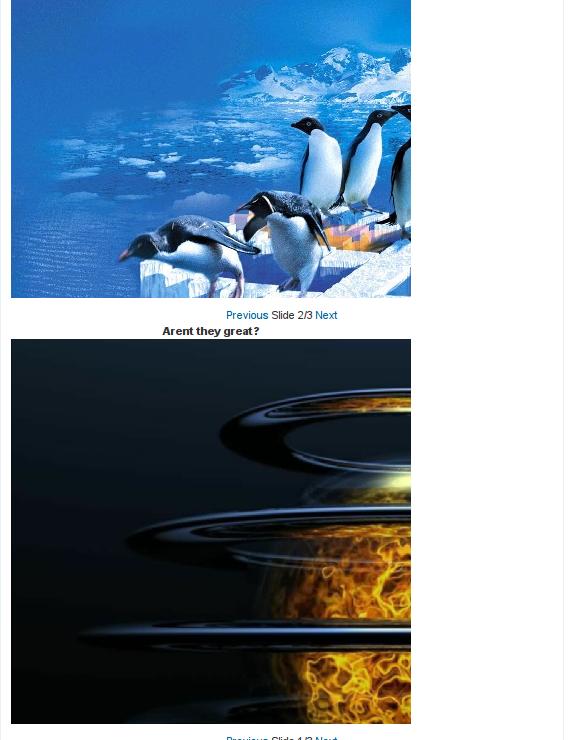
if you see a tree as wallpaper and you add this to slideshow but you set slideshow to 400x400 (wallpaper is 1024x768) you still should see a tree but i not see is cutting. Understand now?
i show you - look on attachment.
Comment #19
ionuts71 commentedbrmassa,
Cutting into half problem is solved by changing slideshow_creator.css.
Well done. Thanks!
The only problem now is the following: in IE, slideshow and <Previous> Picture 1/2 <next> navigation bar are centered, but in FF aren't (slideshow is on the left, and navigation bar is centered). See attached files or the link here.
Comment #20
tomaszx commentedoh... no , no , no and other one no.
I agree with you that adding:
fix problem with hard right align image (my FF-2.0.0.14 and IE6 works great) but this is still not visible full.
I use FF 2.0.0.14 and images are with size what i declare on slideshow (example: 400x400) but if my pictures in folder are 800x600 they are still not visible full (tree is not tree but only leaf)
I dont know why - i think that problem is with attr .. i suggest add attr to img tag not to div span or other.
This is very strange... this module should have -dev not full release.
I respect your work but still is not possible to use this module.
:(
Comment #21
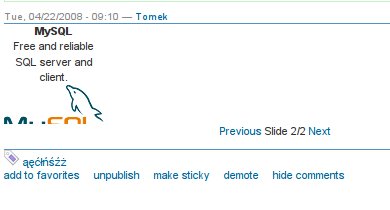
tomaszx commentedsee screenshot, this should be behaviour with attr width and height but doesn't
Comment #22
ionuts71 commentedtomaszx,
As brmassa said, SlideShow Creator WILL NOT resize pictures anymore. So, If you make a 400x400 slideshow, the pictures must have MAXIMUM size 400x400. If you put an 800x600 picture, you will see only 400x400 from it (about half of it). That's why you don't see the full picture.
Comment #23
brmassa commentedguys,
in fact, the width and height is not only the picture size. It will also include Title and Description of each picture, so if your images have 400x400, try to use a SsC size of 400x430 (taller to include both texts).
@ionuts71,
did you tested my patch? i want to make sure that people get rid of this bug before i commit it.
regards,
massa
Comment #24
tomaszx commentedthen i ask: why you not support resize? why not add attr to img tag with '-10' or more px ?
tell me, i only ask.
regards.
Comment #25
ionuts71 commentedbrmassa,
I've tested your patch. Please read #19.
Regards,
Ionut
Comment #26
brmassa commentedionuts71,
fixed. Once i implement the CCK integration, i will release the new version.
tomasz,
you can achieve this effect overwriting the theme function on your theme.
regards,
massa
Comment #27
ogi commentedI confirm that
text-align: leftfixes IE rendering of the site I work on.Comment #28
Valued Customer commentedbrmassa, It looks like that took care of the IE alignment. I had to adjust my dimensions a little to get the images to center again, but everything looks good in IE now. I didn't need to change the tags.
Thanks for the fix!
Comment #29
Anonymous (not verified) commentedAutomatically closed -- issue fixed for two weeks with no activity.
Comment #30
ogi commentedFixing this issue is worth new release.
Comment #31
joethoron commentedI was having the problem with the images showing only in the right half of the slideshow viewer, and was able to fix it problem another way.
First I tried the addition to the slideshow_creator.css file, but that didn't work.
The theme I use already has specific conditional css calls (I found this out by viewing the source of my site), so I was able to edit those CSS files in my theme. I wrapped the entire slideshow in a div and then told IE to use a negative left margin for any images:
div.slideshow img {margin-left: -125px;}
(in my case I'm using a 250px wide viewer window.)
Worked great and didn't change the display in real browsers.
Joe
Comment #32
simakas commentedIE8 (and probably IE7) problem solved, just tags are located around 291-301 lines. there are 2 opening and 2 closing tags i had to change to
thanks
s
Comment #33
snoopz1 commenteduse version 1.32 will fix problem
with version 1.32, if you have problem with hugh space/gap above image then try this http://drupal.org/node/341620
looking in file "slideshow_creator.inc"
line number : 342.
'#main' => "<div class='ssc-main'>$main</div>\n",change it to
'#main' => "<span class='ssc-main'>$main</span>\n",take a look on my website ซ่อมคอมพิวเตอร์ วัชรพล computer