I hacked together a working piece of code for the CodePress editor using a stub found here. It's major features are HMTL, PHP, CSS, and JS syntax highlighting, autocomplete, line numbering, and code snippets.
I would like to integrate this with Wysiwyg and since this is new code I was wondering what the best approach would be. Should I create a new project or would you be open to having it reside within this project?
I've attached my working code for people to take a look. Basically install, enable, discover a text area (eg. go to node/add/page), then set the syntax at admin/settings/codepress. Code snippets are triggered by typing something like 'img' and hitting tab.
Hopefully this can find a good home as I think it is a great editor for savvy users.


Comments
Comment #1
tylor commentedWhoops, forgot to paste in URL for stub: http://drupal.org/cvs?file=/sandbox/jjeff/codepress/codepress.module
Comment #2
sunWysiwyg Editor module still needs some abstraction to support multiple editors. However, when that is implemented, supporting CodePress would be interesting.
Additionally, I want you to point to the first paragraph in http://cvs.drupal.org/viewvc.py/drupal/contributions/sandbox/jjeff/codep... -- the code of CodePress itself is LGPL and thus, incompatible with d.o's CVS policies. It cannot be committed to drupal.org. (however, the editor integration code can)
Comment #3
tylor commentedThanks for the quick response sun, I will be on the lookout for updates to Wysiwyg Editor. I noticed the LGPL license as well and will consider it carefully.
Comment #4
sunComment #5
tylor commentedTook some time tonight and put together integration for CodePress — everything seems to be working great. Both integration files wrapped up in a zip: /editors/codepress.inc and /editors/js/codepress_editor.js
Hoping it all works well!
Comment #6
sunI'd like to test it, but http://codepress.org/ seems to be down (at least for me)...
Comment #7
tylor commentedYa I noticed that too, maybe not a good sign for the Codepress project...
The code is still hosted at SourceForge (I linked to this in the module for the download): http://sourceforge.net/project/platformdownload.php?group_id=186981
Comment #8
tylor commentedWas also looking at some other syntax highlighted editors that seem more active:
Comment #9
tylor commentedComment #10
sunOh well. This editor is pretty lame. Anyway, rewrote it from scratch.
However, one needs to comment out the following two lines at the bottom of codepress.js:
Comment #11
sunAnd yes, there are also other options (to be dealt with in separate issues)...
http://marijn.haverbeke.nl/codemirror/
http://los.php5.cz/simple-codearea/
http://www.cdolivet.net/index.php?page=editArea
Comment #12
sunTo get this feature in, someone needs to convince the authors/maintainers of CodePress to remove the offending lines I mentioned in #10. This means, someone has to step up and create an issue in their tracker or communicate with them in other ways.
Marking as postponed until that happened.
Comment #13
sunComment #14
TimmerCA commentedHi,
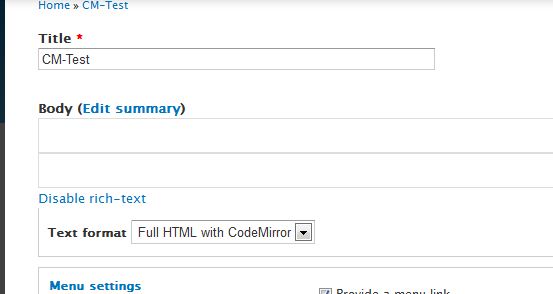
It looks like codepress.org is dead, but the source code for the library is still available from SourceForge. I've got the module installed and connected up, but I'm getting the following error message when I try to activate it on a PHP node:
Error: self.editor.setCode is not a function
Source File: /sites/all/libraries/codepress/codepress.js?n
Line: 28
I've tried:
- Disabling the last two lines of codepress.js
- Changing 'self.editor = self.contentWindow.CodePress;' to:
- self.editor = parent.CodePress;
- self.editor = CodePress;
But I can't seem to get past this JavaScript error.
It seems that this would be an immensely useful editor to have in place and it would be really great if someone could help me get past this error. Has anyone gotten this editor to work? If so, could that person share their modifications?
Comment #15
TimmerCA commentedGiven the situation with CodePress being a seemingly dead project, I've decided to write my own plug-in to use in place of CodePress. My module does not currently support syntax highlighting (I intend to add syntax highlighting in the future), but it does add what I think is a very important feature: line numbers and column numbers for the textarea field of a node. Since this is a new module, I'll post a new thread about it.
Comment #16
sunRe-purposing.
http://marijn.haverbeke.nl/codemirror - I want. :)
Backed by major organizations actively contributing to its code. Awesome.
Comment #17
twodOMG, sound the alarm! Sun called an editor awesome! ;P
/me looks at the examples.
Ok, I admit that is pretty awesome!
Comment #18
giorgio79 commentedsubs
Comment #19
frobAny progress on this?
subscrible.
Comment #20
twodNo, not that I'm aware of. I'm currently much too busy to do this myself (and this is a feature requesr so it is pretty far down on my todo list), but anyone is of course welcome to implement the editor and provide a patch. I've posted some documentation on how this is done elsewhere in the issue queue not long ago, and there's also some similar info on how to provide editor implementations via other modules so hacking Wysiwyg is not required. I can'r look for the issues now but I think they're among the open feature requestss and/or documentation tasks.
Comment #21
frobI think the issue you are referring to is http://drupal.org/node/900220 I will check that out and see if I can find the time to roll out a patch.
Comment #22
nick_helps commentedCan I use Codemirror with my drupal install?
Any help would be appreciated.
Comment #23
twod@nick_helps, Wysiwyg module doesn't support this editor (yet), nor the other one you commented on. These issues are about adding support for these editors to Wysiwyg module. Since they are still open, nobody has gotten around to writing the code needed for this yet... You're welcome to help figure it out if you'd like to.
Answering your question with a yes or no would normally be pretty much impossible since we know nothing about your site, but if you want to use the editor with Wysiwyg module today, the answer would be no. I don't know if another module implements CodeMirror for Drupal, but in that case the question is better at home in their issue queue.
Comment #24
nick_helps commentedI am interested in getting only syntax highlighting in drupal.
I was under the impression that its possible through colorer or codemirror. Is it not?
Comment #25
frobIf you want to try and enable it manually with your theme or something then you can. Codemirror does do syntax highlighting, but currently there is nothing built in. I have not gotten around to writing a patch that will make it work with the wysiwyg module and, as far as I know, no one else has either.
Comment #26
philbar commentedSubscribe
Comment #27
robloachhttp://codemirror.net
Comment #28
mpaler commentedIs it unsavory for me to put up a $300 bounty for anyone willing to create a Codemirror Wysiwyg plugin for D6 in the issue queue?
Comment #29
john franklin commented@mpaler - I'll take that bounty.
This patch add support for the CodeMirror UI package, which is a lightweight wrapper around CodeMirror that adds a toolbar. The CodeMirror UI includes a copy of CodeMirror in it, so you only need to download and unpack one package. I've tested this on a couple of my own D6 systems using CodeMirror UI 0.0.14 with the included CodeMirror 2.0.
Only the boolean options can be set via WYSIWYG's admin interface. If you need to set the other CodeMirror options, look around line 100 of codemirror_ui.inc.
Enjoy.
Comment #30
john franklin commentedThis patch is similar to the one in #29, except it is for the plain CodeMirror, not CodeMirror UI. These two patches can co-exist on the same system.
Comment #31
john franklin commentedComment #32
btopro commentedsub
Comment #33
mail@victorquinn.com commentedsubcribing
Comment #34
danny_joris commentedsubscribing
Comment #35
mac2000 commentedSubscribing
Posted duplicate: CodeMirror implementation.
I can not understand why there is codepress - this issue is for codemirror that is stable and can be used already, instead I see many reports about codepress - this way we will never commit codemirror.
Comment #36
sun@mac2000: Can you compare your patches with the ones from @John Franklin in here, and possibly try to add or fix anything that wasn't accounted for yet?
Actually, now that I skimmed both patches, the one from @John Franklin looks superior. However, it has plenty of coding style issues (TABs instead of 2 spaces, trailing white-space, etc), which need to be corrected; see http://drupal.org/node/172169 for JavaScript coding standards.
Also, the codemirror.js support file should follow the other editor library support files in terms of structure and coding style. We're aware that the current structure is sub-optimal, but by keeping the files in comparable structures, others can understand them more easily, and we're able to upgrade/port/migrate them to a new and better architecture more easily at some point.
Comment #37
mac2000 commentedfixed and merged files from me and @John Franklin, please review them.
What has been done:
Comment #38
sirtet"Multiple Editors"?
does that mean what we have now, or multiple per Textformat?
I ask, because my hope is for a way to switch between Wysiwyg and CodeMirror while editing.
The solution worked on here seems not to achieve that, as i see it.
This will add CM only as anothe Editor besides CKEditor etc. right?
My wish would need an integration with another Editor.
OR, and this is why i ask, if Wysiwyg would let me configure eg. CK and CM for textformat X at the same time, there could be a select that says editor: CK, CM, None instead of the link "disable Rich Text".
This would give maximum freedom for anyone to choose a favorite Wysiwyg- and Source editor.
Comment #39
sun@sirtet: That's a separate issue and not to be discussed here. See #748980: Allow multiple editor profiles for the same format
Comment #40
btopro commentedWell I think you could make 2 input formats that have the exact same formatting except 1 uses CK and the other uses CM. Then you remove the 'disable editor' link, use something like String Overrides to change the "input filters" language and train your people to click between those radio bubble if they want wyziwig or code edit mode. Would that work cause that's what I'm thinking of doing.
I take it the patch was upgraded to 7.x as the original John Franklin one seems to be 6.x. Still on 6.x so I'll take a look at that one unless you'res is actually supposed to be marked 6.x
Comment #41
sirtet@btopro
ah yes, this sounds like a quick easy way to do it.
i applied the patch in #37 on Wysiwyg module 7.x-2.x-dev - 2011-Jun-23.
I could configure CM, but is shows up only as a box with the linenumbers and a hor. scrollbar, no text visible inside. not really working yet for me.
(my first time to use the "patch <" command, but it seemed to work, so don't know where the problem lies...)
@sun
thanks. I've been asking about "source-editors" on a more general level here:
http://drupal.org/node/1196592
maybe yet another place is needed to discuss everybody's needs and ideas?
Comment #42
mac2000 commentedCan you please look at javascript console (firebug or something) to see is there is any javascript error?
Also provide way to reproduce problem.
In my case all is ok, i go to /admin/build/block/add, fill some text in tinymce, then switch to phpfilter (which is powered by codemirror) and all is ok, i see all text with markup entered in tiny.
Also notice - if you see codemirror - all is ok with wysiwyg and this patch.
When you switch input format - drupal calls detach method of current editor (it must save all data to textarea), and the call attach method of selected input format (it must read all data from textarea and put it into editor), so if you see codemirror but not see your content - probably there is no data in textarea, use firebug (or something like it) to see is there is something in textarea.
Comment #43
sirtetok, did some testing, till i got really confused...
first, clarifying my first post (#41): the CM-Editor-box showed the correct amount of line-numbers, so it worked to some extent already, just the actual content was invisible.
I see no JS-errors, and then i found out, that disabling line numbers, CM highlighting works, but an invisible cursor renders it quite unusable, but still, it is one step further...
I assume it might have to do with my template's CSS...
next i installed a new D7.7, wysiwyg-dev, applied patch, configured wysiwyg-profiles, but here, less works, guess i did sth. wrong somewhere.
On node-edit:
Switching to the textformat with CM:
i see only an empty box instead of the textarea.
clicking "Disable rich-text" i get a JS-Err:
the "Disable rich-text"-link does not change, but re-clicking it throws more JS-Errors,
while the empty box is duplicated (see attached image).
every 2nd click creates another duplicate.
Saving the node
i get the drupal-error-message
and JS-errors
Comment #44
btopro commented#37 worked for me in 6.x-2.4 using Chrome 13.0.782.99 beta
Pushed everything onto 1 line but that's probably because of the remove spaces formatter I had running previously
Comment #45
btopro commentedAdded a quick screencast showing it working -- http://screencast.com/t/RpSpHvbe7
Anyone know of an option in other editors to NOT destroy the line spacing? Solution proposed in #40 using the patch from #37 would be perfect if there was a way to block white space from being dumped when using CKeditor (might be true of all other editors and I'm missing a setting or something)
Comment #46
sirteti am confused about 6.x and 7.x, the version has been moved forth and back here...
i was trying with D7, the original work was for D6 as i read it.
Should this work with D7 too, or only D6?
Comment #47
btopro commentedI think it'll work with both, I can confirm it at least works with 6.x
Comment #48
sirtetstill not working under D7, but i got to write a module that adds CodeMirror to the TinyMCE Editor:
http://drupal.org/node/1242044
My solution is directly in the Editor, which has maybe better integration, but less flexibility and no Option to go without Wysiwyg but Rich Source Editing only.
Comment #49
proindustries commentedJust reporting in - patch in #37 worked for me with Drupal 6.20, wysiwyg 6.x-2.4, and codemirror 2.12. . Tried it out with Aquia Prosper and a custom Garland-based theme. No JS or Drupal errors seen.
One note - at first it looked like it wasn't working when i switched over to php input format while creating a new page - the editor window shrunk to 1 line in height, with no menubar. When I pasted in some JS, though, the window expanded to display the 5 lines or so of JS, and the code was highlighted.
Beautiful - I've wanted this on so many sites I've worked on! :)
Comment #50
traviscarden commentedHere's an updated patch. It mainly cleans up some coding standards issues, but it applies cleanly via git, and I wanted to make it easier for people to test it to help move this issue forward. Here are the outstanding issues from my perspective:
Comment #51
shenzhuxi commentedI updated #50 patch to the latest codes.
Fixed issues:
Remain issues:
Comment #52
fizk commentedAll this work should be happening in an external module, eg. wysiwyg_codemagic:
http://drupal.org/project/wysiwyg_codemagic
As long as we can avoid it, this functionality should not be added to WYSIWYG itself and cause bloat.
Comment #53
philbar commentedLooks good, fizk.
Marking as fixed since Wysiwyg CodeMagic has a stable release.
Comment #54
Hopiu commentedIn reply to #51:
The patch worked well for me as long as I used the "old" codemirror 2.38
I tried to extend it to work with codemirror 3.01 which lead into some problems as the (codemirror) api and the downloadable package didn't match. I had to download the master branch from github and add the version number on the first line of '/lib/codemirror.js'. A semi-clean patch is attached. (I have to wait until there is an updated codemirror package).
@#52:
You're right, maybe this should go to an external module, but I'm not sure about wysiwyg_codemagic, as this adds two more dependencies. (TinyMCE & CodeMagic)
Comment #55
fizk commented@Hopiu, I think as long as this code can live in a separate module, this issue should be left as closed - won't fix. ("Won't fix" instead of "Fixed" because the feature request is to add CodeMirror directly to Wysiwyg module)
Please correct me if I made a wrong assumption and that this functionality cannot be added via an external module.
According to TwoD in #20:
I'll try to incorporate it into Wysiwyg CodeMagic or a new sandbox module.
Comment #56
philbar commented@fizk - I agree.
@Hopiu - Can you develop a patch for wysiwyg_codemagic to reduce the number of dependencies?
Comment #57
sirtetPointing to a solution for CodeMirror with CKeditor Module, plus some other thoughts:
If you use a WYSIWYG editor, and want to replace/enhance it's built in html-editing mode with codemirror, then wysiwyg_codemagic is a great solution, but currently only for tinyMCE.
If you use CKeditor through the CKeditor Module, there's a similar solution described in this issue about CodeMirror with CKeditor, which works for me (i use it with the CKeditor module, but it should work with the WYSIWYG Module too).
The codemagic-module is more advanced eg. in the way that it integrates jsbeautifyer too, which adds code formatting, and it adds some UI elements for search, disabling autocomplete etc.
If the patches up here are about codemirror as a supported editor in WYSIWYG, then i don't see why it should be done in some other module. Ok, it is not a wyiswyg-editor, but still a rich text editor.
If codemirror was a supported editor in the wysiwyg-module, then it could be readily combined with all the supported wysiwyg editors, without custom coding, as done by the codemagic module.
plus, some people might not need wysiwyg at all, but still want rich source editing.
To use such an implementation of codemirror together with a wysiwyg-editor, you'd need to set up a second text-format, as proposed in #40.
So another idea could be, that disabling the rich-text brings up codemirror instead of the naked textarea. that would be easyer to use. But more code maybe...
Comment #58
superjerms commentedHopefully I'm not being too bold by reopening this.
The wysiwyg_codemagic module is only a plugin for TinyMCE. My read on http://drupal.org/node/1869446 is that it's not a library solution, so it wouldn't actually work on WYSIWYG. I'm sure that there is a way to make codemirror work for other editors, but really, I think that's chasing the wrong solution.
HTML plugins are basically added to standalone editors as a hack to temporarily disable the editor and access the code. You're handcuffed to a narfed version of a secondary editor, tunneled through a plugin function of the first editor, because there's usually not a more elegant solution.
That makes zero sense in Drupal, because text inputs can already switch to a more appropriate secondary editor using the format picker. It makes even less sense in the WYSIWYG module, where the whole point is to offer an elegant way to configure input fields and parsers.
The basic problem here is that there isn't a good formatter/editor for working with code. Making CodeMirror standalone editor in WYSIWYG would solve that problem pretty well. As a bonus, it'd make life better for those using better_formats to enable CodeMirror on specific code fields (views rewrites, automatic labels, display suite code fields, php filter, etc.).
How far along does Hopiu's patch get us to having CodeMirror as a working solution?
Comment #59
superjerms commented@#54 - patch unexpectedly ends in middle of line. Rerolled (changed the download link target 2.38, per Hopiu's comment.
Threw an Notice: Undefined index: buttons in wysiwyg_codemirror_settings() (line 137 of /Users/me/Sites/drupal_test/sites/all/modules/wysiwyg/editors/codemirror.inc).
Other than that, and needing to get it going on more recent versions, seems to work well.
Comment #60
fizk commented@superjerms Please only mark this active if you can show that the only way to do what you want is to modify the WYSIWYG module, as oppose to creating a contrib module.
I can see your point about having CodeMirror as an editor instead of a plugin for TinyMCE/CKeditor/etc, but you should still be able to do this via a contrib module. If you definitely cannot do this via a contrib module, please let us know. Otherwise, a sandbox project should be created for this new effort, and discussion should continue in that sandbox's issue queue.
To help get the ball rolling, I've created a new sandbox here: http://drupal.org/sandbox/fizk/1916430
Comment #61
superjerms commented@fizk - That's fine if that's how you'd like to proceed.
Just out of curiosity, and to avoid questions like this down the road...is there a statement somewhere in the WYGIWYG manual or documentation to give that guidance of when an editor makes sense to include in the project? I imagine that CKeditor could be done as a module, but it isn't. And, judging from a quick issue queue search for "add editor," a bunch of people are unclear on this point (from the couple I looked at, most were creating patches to add the editor, without any mention of modules).
Has there been a discussion of this somewhere? The handbook page lists "drupal plugins" and "native plugins," but none of them seem to be editors (unless you consider IMCE_bridge an editor). No mention of patch vs. module in the question in the FAQ or editor requirements.
Is there a list of contrib modules that create editors that work with WYSIWYG? Would it make sense to clarify this policy on the WYSIWYG handbook "editors" page?
Comment #62
fizk commented@sun, @TwoD, has this been discussed?
@superjerms That's a good question, but I'm not sure if there's been a discussion on when an editor makes sense to include in WYSIWYG.
Comment #63
fizk commentedI've ported the patch from #54 to the sandbox:
http://drupalcode.org/sandbox/fizk/1916430.git/commit/0b203cfcbd197a301a...
This should be enough to start testing and submitting patches in the sandbox's issue queue.
Comment #64
sunI'm not sure I understand why this cannot be added to Wysiwyg module like any other editor integration code?
So far, the patch looks relatively simple - or, not any more complex than the other existing editor integrations? I briefly scanned the comments in this issue, but there does not seem to be a reason for that change in direction. Can someone clarify?
Comment #65
frobHi Sun, I seems that in comment 52 it was suggested by Fizk that adding an editor will just cause bloat to the module. In comment he asks when it would be appropriate to add an editor to the WYSISYG module instead of just writing a plugin that added the editor to WYSIWYG in an external module.
It would be nice to have something like codemirror in WYSIWYG. IMHO <-- this is the criteria I use on my modules.
Comment #66
sunSo far, I think our unwritten/undocumented policy is that we're including editor integration support code for all libraries directly in Wysiwyg module — as long as the library does not need tons of custom integration handling (e.g., custom/independent settings pages, special permissions, additional integration code, etc.pp).
AFAICS, that does not seem to be the case here. The editor plugin code seems to be less complex than other editor plugins, actually.
Comment #67
frobI for one would love to see this in wysiwyg.
Queuing for re-test.
Comment #68
fizk commented@sun Can you confirm that CodeMirror will be added into WYSIWYG? If so, I'll delete my sandbox.
Comment #69
twodI would agree with putting the editor inside Wysiwyg if the patch stays relatively simple and doesn't have to hack around the existing API. (If that's the case, it'd be better to create a separate feature request for expanding/altering the API to allow for a new type of editor requiring the same features first, and make that issue a blocker for this one.)
I have no experience with CodeMirror and I haven't had time to test much of it, so I'm sorry if some of these pointers aren't that well thought through.
Use the editor title rather than the internal name.
The css files appear to be identical, let's rename it to just 'codemirror.css' and reuse it for both versions.
A comment with an example of an actual version string as it appears in the file would be nice.
Whitespaces on empty lines.
Does it really need all the files listed here? If I understand the docs correctly, most of these are used only when the editor is to be used for certain "modes" and contain lexers for the corresponding language. Could we lazy-load them as needed instead of always loading them all?
This needs an update, see below.
These are actually settings, not buttons. The new GUI in the sort_buttons branch would turn these into sortable buttons for use in a toolbar designer, which makes no sense at all.
There's a settings form callback we can use for this instead. The submit handler on the profile form serializes pretty much the whole list of form values and stores that with the profile so there's no need to explicitly save the state of the settings anywhere once added to the form.
Trailing spaces.
What do these lines do?
@TODO vs @todo?
The function signature has recently changed to
function (context, params, trigger)where trigger varies depending on how the editor is supposed to detach. A 'serialize' value will mean that the editor does not need to (should not) remove itself from the document, but still update the textarea, to avoid flashes/scrolling when the form is submitted and during AJAX operations.This function also needs to be able to remove all instances found inside context if
paramsis undefined.Btw, all functions should have a space before the opening parenthesis.
More whitespaces.
Is the API in CodeMirror 3 really that different from CodeMirror 2 that we need the extra file? I haven't looked into that yet, just asking...
Comment #70
candelas commentedany work on this? it would be great to have codemirror in this module to be able to use with the php text format :)
thanks for your work!