Closed (fixed)
Project:
Publish Content
Version:
5.x-1.0
Component:
Code
Priority:
Normal
Category:
Bug report
Assigned:
Reporter:
Created:
28 Jun 2008 at 05:58 UTC
Updated:
21 Jan 2009 at 20:20 UTC
Jump to comment: Most recent file


i have downloaded the module and extracted it to my modules folder but for some wired reason it will not show up on the admin/modules page, i have try this on several Drupal 5.1 sites i manage and have the same problem on all of them.
Ami Aronzon
| Comment | File | Size | Author |
|---|---|---|---|
| #21 | publishit-6.x.zip | 10.93 KB | malaussene |
| #18 | view_all_access_denied.patch | 493 bytes | malaussene |
| #17 | publishit_v4.zip | 13.28 KB | malaussene |
| #16 | publishcontent.install.zip | 780 bytes | malaussene |
| #13 | publishcontent.tar_.gz | 1.08 KB | jacobroufa |

Comments
Comment #1
yavan commentedlooks like publishcontent.module is missing !!!
Comment #2
martinleidl commentedsame problem here; tried it out with several versions (including 5.3 and 5.7) - nothing new in the modules list in admin view. Maybe there is a dependency-issue?
EDIT: Ah, the "publishcontent.module"-file is not included in the downloadable package. I copied it by hand from the CVS repository, but it still didn't show up in the admin view anyway ...
Comment #3
will kirchheimeryou'll still need the .info file to have it show in the modules list... although that would be much of a bother to make... as least a psuedo one.
If you manage to put together the pieces, please upload them to this bug list, I would like to have a look.
thanks
Comment #4
alex72rm commentedup
Comment #5
malaussene commentedHi all,
I was not able to make it work either but was looking for the behavior of publishcontent module.
so I implemented it and it works fine for me.
the only thing my module does is adding a publish or unpublish button in the node page and make sure that even if the node is unpublished, you can still view it.
hope it helps
Comment #6
alex72rm commentedHi,
I attempted to use your module. I found only "unpublish" menu that runs well. Where's "publish" option for unpublished ones? You say into node page, but node page is, as default, the home page. So if I write down /node I come back to HP.
Comment #7
malaussene commentedHi,
I mean on the node detail page (node/1 or node/1/edit for instance) you should see a button
- Publish if the node is unpublished
- Unpublish if the node is publish.
you need also add the permission 'un/publish [content type] content'
Comment #8
alex72rm commentedUhm, ok.
But I should know where to search (i.e., the id of a story). I hoped it could be more similar to content menu (that is visible with admin node grants) with a built-in node search function.
Comment #9
malaussene commentedyou should look into the 'Views' module to create your own customized listing.
I updated the module so that you there is a Un/Publish link in views.
a simple view to see all the nodes with edit, delete and publish buttons would be like that:
Comment #10
alex72rm commentedGreat work!!!
Now my authenticated users can publish/unpublish content without admin nodes grant.
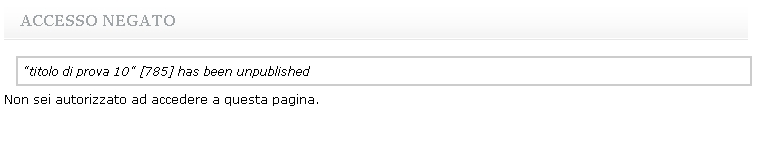
Only a question: if my auth user unpublishes a story, it runs well, but an error is displayed regarding a kind of "access denied" (as you can see in attachment's image).
If I do the same thing as administrator, it runs well in the same way, but the access is granted to... the preview version of the story (it seems that, 'cause the background of story is in a different color).
Comment #11
malaussene commentedok,
it looks like that it unpublishes the node, but then give you an access denied when you try to view the unpublished node.
Here is a new version that should fix that.
you will need to uninstall the previous version and reinstall this one.
concerning the preview version, the change of background color is normal. It is a visual clue that indicates the node is unpublished.
In the node.tpl.php, a CSS class 'node-unpublished' is added
Comment #12
alex72rm commentedThanks for your continuous help.
I've installed last version, but the same error appears (as stated in last attachment image).
I've controlled access control list for roles defined into my site;
I think they are correct:
- for node module: "access content site" for all users. "node administer" only for administrators.
"create, edit (all/own) stories" for administrators and editors (this last role sees the error).
for publishit module: un/publish story content for administrators and editors.
Comment #13
jacobroufa commentedHi All,
Sorry I've been slacking on my duties lately. I've had problems uploading to drupal.org CVS for some reason and though the module is completed by me it is not available in CVS as a working version. Please use the attached file instead as it contains the working Publish Content module. To unpack, take out the underscore in tar_.gz.
Cheers!
Jake
Comment #14
alex72rm commentedHi,
I tried this version of publish content, set up roles grants (publish content, view unpublished content,...) but how does it work? I expect that a new menu appears (or something other) to view unpublished content (as content menu for admin).
Can you write down some words as user manual?
Thanks a lot!
Comment #15
alex72rm commentedup
Comment #16
malaussene commentedthanks for the great work :)
It seems that view [content type] unpublished content does not work when the current user is different from the node author ($user->uid != $node->nid).
In drupal 5, you cannot alter menu, so you have to make sure that the path you register is loaded first.
i the case of 'node/nid', the node module register it before your module.
an easy fix is to update the system table by putting the weight of your module smaller than the node module weight.
UPDATE system SET weight='-1' WHERE name = 'publishcontent' and type='module';should do.
attached is also an install file that should do the trick on any fresh installation.
hope it helps
Comment #17
malaussene commentedIn response to #11,
Same as stated in #16,
the publishit module MUST BE loaded before the node module.
you can ensure that by running the SQL:
UPDATE system SET weight='-1' WHERE name = 'publishit' AND type='module';you should not need that on a fresh installation as long as there is no entry for publish
I also find a bug in my install file so here is what should be my last version, since jacobroufa is back :)
thank you Alex72RM for your feedback and take care
Comment #18
malaussene commentedanother issue is when setting permission view all content does not give you access t content that you do not own.
patch attached should fix that
Comment #19
alex72rm commentedWOW!!!!
With #17 I solved my last problem (access denied to content after unpublish it).
I think that malaussene's module has achieved a great goal, 'cause it's complete and without bug. I hope it can become a real module in classical download section.
Thank you for your great work.
Alessandro
Comment #20
mike_r1977 commentedIs any version for Drupal 6 available? I really need this.
Comment #21
malaussene commentedhere is a version for Drupal 6
Comment #22
alex72rm commentedI think this thread can be closed.
Comment #23
patcher commentedhi malaussene, hi all,
i am from germany and i like your publishit modul, why isnt it "official"?
is there a way to translate the unpublish/publish tabs/buttons in the module?
i dont have great knowledge of php, so maybe you can give me a hint
thanks
martin
Comment #24
patcher commentedand second question:
is there a way to grant un/publish-right only to OWN nodes???
Thanks
Patcher
Comment #25
Najd commentedHi,
Thank you malaussene, that's exactly what I'm looking for :-)
Najd
Comment #26
bassplaya commentedI tried the publishit module by downloading from the link provided on http://drupal.org/node/275994#comment-953114.
For a user (not Admin) with the permissions granted on the admin/user/access page for that specific content type I encounter:
- for an unpublished node from the content type, the user can see the content type while the "unplished" wordings appear in light grey above the content type.
- for an unpublished node from the content type, the user can see the content type while there is a tab to click on that says "publish"(should be better a check box like in the "publishcontent.module" IMHO coz this is confusing)
- once clicked on that "publish" tab the user (who is the author of the node) and the anonymous user CANNOT access this node anymore !!
When I tried the Publishcontent.module I encountered that there was a warning every time a module got unpublished that said:
"warning: Invalid argument supplied for foreach() in /Users/MyName/Sites/MySite/sites/all/modules/cck/fieldgroup.module on line 394."
When publish the node I'm directed to the front-page and I don't have access to view it..
What module should be downloaded here?
Why doesn't the module show "Beta"?
Why have something online if there is no .module file in the package?
I appreciate the hard work you guys put in this but shouldn't it be released when it is tested?
Or is it impossible to modify content on this page http://drupal.org/project/publishcontent ?
Really hope this module or an alternative will work good soon.
Comment #27
malaussene commentedHi BassPlaya,
thanks for your remarks:
I will respond for the 'publishit' code:
it is normal drupal behavior it just show you the page and give you a visual clue that it is unpublished.
While I understand it might be confusing, it is much faster to publish/unpublish that way
because you do not have to click on the edit button, wait for the page to be loaded,
scroll down click on 'Authoring information' and select Publish and hit submit.
It was also a breeze to add the publish/unpublish to the views module which make it VERY easy to publish/unpublish nodes from a list of nodes.
I am not sure to know what you are referring to, the tab you mentioned can have 2 meaning:
It works great on my websites using it.
Concerning the beta status, I try to contact jacobroufa to offer my help but have not receive any feedback.
But I did not try very hard, so if you are reading this, jacobroufa, and are interested please contact me
or reply here :)
Comment #28
malaussene commentedHi patcher,
concerning #23,
you can find information at http://drupal.org/node/11396
concerning #24,
there is no way right now, but it is an interesting feature :)
I might work on it if/after an official release happened
Comment #29
jacobroufa commentedHey All,
I want to thank Kenan (malaussene) so much for his contributions to the project and everyone else for the input. Pending Drupal.org maintainers say-so on a CVS account, I'd like to make Kenan a maintainer on this project. Hopefully together, he and I can get good working versions for d5 and d6, as well as a handbook page or two, on the main page.
Cheers,
Jake
Comment #30
AjK commentedCVS account approved and project transferred.
Comment #31
malaussene commentedthanks, and first dev release up and running on the project detail page.
Note that the new release is based on the publishit code, We strongly recommend that you upgrade to the
publishcontent-5.x-2.x-dev version, since it is now an official contributed module.
Upgrading is easy:
for those who are using the original code of publishcontent-5.x-1.x, I am looking into integrating
the 'Publishing options' form again in the new publishcontent-5.x-2.x but will ONLY do so if
enough people are interested.
Kenan
Comment #32
malaussene commentedfixed.