I have a view with an exposed filter. In this exposed filter i use a date field set as "Is between" with the relative values "now -3 months" and "now". this filter is set to remember the value.
when I remove my session data from the session table in the database all works fine. but as soon as i open the same view again (and thus views will retrieve the remembered settings from my session) I get two messages saying (one for each date field as it is set as between):
Opinions & Trends
* An illegal choice has been detected. Please contact the site administrator.
* An illegal choice has been detected. Please contact the site administrator.
In the watchdog logs I get:
Illegal choice 3 in date_filter element.
If i look in the sessions table i see the following:
views|a:1:{s:13:"taxonomy_term";a:1:{s:7:"default";a:1:{s:11:"date_filter";a:4:{s:3:"min";s:19:"3008-08-26 11:36:37";s:3:"max";s:19:"3008-11-26 11:36:37";s:12:"default_date";s:13:"now -3 months";s:15:"default_to_date";s:3:"now";}}}}
So this 3008 is obviously wrong. My first thought would be that it saves the month as year or something but the 08-26 and 11-26 are correct so this can't be it.
I have the following settings in my Date and Time settings:
short: 2008-11-26 12:18
medium: Wed, 2008-11-26 12:18
long: Wednesday, November 26, 2008 - 12:18
i'm using php 5.1.6 (with the date php 4 module) on one server and 5.2.6 (without the date php 4 module) on another but both have the same problem


Comments
Comment #1
karens commentedThe date filter was broken and is now fixed in -dev. The fix will be in the next release.
Comment #2
Johnny vd Laar commentedthe newest RC6 version doesn't fix it for me
i've ran update.php, cleared the sessions table and after opening the view I still get the "illegal choice has been detected"
and the database says this:
views|a:1:{s:13:"taxonomy_term";a:1:{s:7:"default";a:1:{s:11:"date_filter";a:4:{s:3:"min";s:19:"5008-09-08 09:52:51";s:3:"max";s:19:"5008-12-08 09:52:51";s:12:"default_date";s:13:"now -3 months";s:15:"default_to_date";s:3:"now";}}}}
so again 5008
Comment #3
karens commentedI have no idea what database you're looking at and you obviously have a taxonomy term identified, too and the 'illegal choice' message is probably coming from that.
You need to edit your filter and be sure you have the right values selected, and then save the view again. You should either leave the date fields empty or the default values empty.
The see what happens, the filters appear to be working fine for me and for others, so if you still have problems I need to see an export of your view.
Comment #4
Johnny vd Laar commentedthe database table that i mentioned is the sessions table, where the date of the exposed view will be stored.
this is a view, showing nodes and only having one exposed filter, which is the date field:
$view = new view;
$view->name = 'test';
$view->description = '';
$view->tag = '';
$view->view_php = '';
$view->base_table = 'node';
$view->is_cacheable = FALSE;
$view->api_version = 2;
$view->disabled = FALSE; /* Edit this to true to make a default view disabled initially */
$handler = $view->new_display('default', 'Defaults', 'default');
$handler->override_option('filters', array(
'date_filter' => array(
'operator' => 'between',
'value' => array(
'value' => NULL,
'min' => NULL,
'max' => NULL,
'default_date' => '',
'default_to_date' => '',
),
'group' => '0',
'exposed' => TRUE,
'expose' => array(
'use_operator' => 0,
'operator' => 'date_filter_op',
'identifier' => 'date_filter',
'label' => 'Date: Date',
'optional' => 1,
'remember' => 1,
),
'date_fields' => array(
'node.created' => 'node.created',
),
'date_method' => 'AND',
'granularity' => 'day',
'form_type' => 'date_select',
'default_date' => '',
'default_to_date' => '',
'year_range' => '-3:+3',
'id' => 'date_filter',
'table' => 'node',
'field' => 'date_filter',
'relationship' => 'none',
),
));
$handler->override_option('access', array(
'type' => 'none',
));
$handler->override_option('row_plugin', 'node');
$handler->override_option('row_options', array(
'teaser' => 1,
'links' => 1,
'comments' => 0,
));
$handler = $view->new_display('page', 'Page', 'page_1');
$handler->override_option('path', 'test');
$handler->override_option('menu', array(
'type' => 'none',
'title' => '',
'weight' => 0,
'name' => 'navigation',
));
$handler->override_option('tab_options', array(
'type' => 'none',
'title' => '',
'weight' => 0,
));
if i use this view then the first attempt will work fine and show me the correct result. if i reopen the view, so again navigate to /test such that the remembered date is loaded, then i get the "illegal choice has been detected" errors.
Comment #5
karens commentedI just committed a number of fixes to the date filter that I assume will get this working. They are in the -dev version, so you can try that and see. If there are still problems with the latest code, you can reopen.
Comment #6
Johnny vd Laar commentedthe date field now doesn't filter at all anymore. after submitting the form no matter what date i enter, all nodes are shown
Comment #7
Johnny vd Laar commentedComment #8
netbear commentedThe same error - content is not filtered by date. Last dev version used.
Comment #9
petey318 commentedas with comment #6 - I am getting the exact same error. When I use the January 15 dev snapshot, I no longer get the "illegal choice" error, but the filter does not appear to be working - all nodes are displayed.
Comment #10
petey318 commentedTesting with the January 24 dev snapshot: Now, no matter what date I select in the filter, it defaults to '2009'. I cannot select any other years with the exposed filter.
EDIT: hmmm.... I am getting inconsistent results. I just rebuilt the view, and now I can select the date, although I cannot get rid of the "absolute value" label that appears above the year selector. I'll investigate this further...
Comment #11
netbear commentedAlso tested January 24 dev version of the module and resubmitted my view with exposed filter with date field. Nothing changed - everytime result is the same. All the nodes are displayed, nothing is filtered.
Comment #12
Johnny vd Laar commentedyes i have the same issue. nothing is filtered and i just see all nodes
Comment #13
petey318 commentedNot sure whether I'm allowed to update this bug to critical, but after testing again on the Jan27 dev shapshot, I'm still getting the same results: no matter what value I select in the exposed filter, the resulting list contains ALL of the nodes.
I wish I could help to debug this, but I am not an experienced coder (certainly not PHP5), and this is a very complex module.
Are any D6 sites **successfully** running this module with an exposed date filter?
Comment #14
petey318 commentedNot sure whether this is helpful information or not, but going back to the 6.x-2.0-rc6 version, I am getting this error only the first time that I call this view. I defined a path in my view, and was calling that with no arguments.
The path I defined was called "eventlist", and so I was calling (as an example) mysite.com/eventlist and this was giving me the "illegal choice" error. Once I resubmit the form, the view gets called again with a VERY long arg list (presumably built by the form), and it works. It's just the first time that the view gets called that we get this illegal choice error.
Every time I go to mysite/eventlist with no argument, I get the error, but if I specify an argument (mysite.com/eventlist?date='now') on the initial call, it seems to work. So I suspect that the problem is related to the case when the view is FIRST called; something doesn't seem to be initialised. I was fairly certain that I had set up a default date ('now') when I was setting up the exposed date filter.
Hope that helps.
thanks!
Pete
Comment #15
infojunkie+1
Exposing a 'between' date filter on a view with Date 6.x-2.0-rc6 doesn't filter out the dates. However, setting the filter comparison to 'is equal to' works correctly.
Comment #16
infojunkieI might have found a clue as to what's going wrong: when I went into the date filter's extra settings (via the gears icon) and chose the method to be 'AND' instead of 'OR', the range filtering worked out correctly.
However, this seems to me to be logically wrong: this method option (AND or OR) is supposed to apply to the case where *more than one* date fields are chosen, but not to a range for one date. Because now, it is impossible to say: filter on DATE_1 between d1 and d2 OR DATE_2 between d3 and d4. Furthermore, the range condition itself should always AND, it makes no sense to use OR for it.
PS. I found this out by using the Devel module, enabling "Collect query information" and "Display query log" in Devel settings, and finding the relevant SQL query at the bottom of the view page. Executing it in phpMyAdmin showed the wrong results and from there finding the bug in the SQL query was easy.
Comment #17
greggdickson commentedI discovered the same thing: using AND rather than OR in the Date Filter settings (gear icon) resolves the problem. When you examine the SQL query on the preview pane, it is clear why. The query uses where..."item date" >= "from date" AND <= "to date". If you use OR in that comparison, it will include every row because EVERY date will pass that test.
Comment #18
petey318 commentedI've just tested the 6.x-2.x-dev release dated 04 Feb, and alas, still not working as I am expecting. (I am willing to believe that maybe I am setting things up incorrectly, but I think not at this point.)
The problem is with an EXPOSED date filter - I am filtering on a CCK date field in a content type. I am only filtering on a year granularity.
When I run the view (ie go to the URL that I created for the view), no matter what year I select in the dropdown list, I am getting all of the nodes. It's as if the filter isn't working at all now, once it is exposed.
Hope this helps.
(btw the "illegal choice" error seems to have gone away, so should I start a new thread, with this particular issue?? there seems to be a lot of open issues already on this module however.)
Comment #19
fa7c0n commentedI am having the same problem. I think this is a critical issue.
Edit, like some people noticed before, the development version does not display the illigal choice error. But it doesn't filter the result set.
Comment #20
agentrickardConfirmed. Investigating.
Comment #21
agentrickardIt looks like date_make_date($complete_date) -- inside of date_filter() is not passing the granularity arguments correctly.
Comment #22
choster commentedSince the original issue regarding the warning seems to have been resolved, why don't we close this issue and use #367970: Exposed filter with Date field doesn't work for the general problem of exposed date filters not filtering.
Comment #23
agentrickardAttached is an SVN patch that needs testing. I am in a hurry and only using a 'year' granularity.
This is working for me.
Comment #24
fa7c0n commentedThat patch is not solving the problem. After aplying it does filter the data BUT the "illigal choice" error is back. I applied the patch on the latest dev version. Please check on other version.
Comment #25
agentrickardThat is a patch against -dev. Not getting any errors.
But I am not using 'is between' either and don't have time to fix your problem. Why don't you use the patch as a starting point for debugging.
The patch probably needs to account for date_make_date() in the following chunk of code as well, from
date_filterComment #26
petey318 commented@choster: I was wondering the same thing, but I would like to see a -rc7 release come out first, and then this issue could be closed. Otherwise it may reappear during the next few "dev" spins.
I guess there is some sort of accepted convention for closing isues etc - I'm still learning the ropes.
Also, the developer has gone very quiet - I realise that all of this is voluntary, so things get done as and when time is available, but it would be nice to have some indication of the roadmap for the rc7 release. There are a lot of issues open against this module, so perhaps the developer is a bit overloaded. (?)
Comment #27
fa7c0n commentedComment #28
fa7c0n commentedGood news & bad news. This bug only seems to bother logged in users. Anonymous users don't get the illigal choice error (Installed last dev 8/2)This information was incorrect
Comment #29
petey318 commentedThe 6.x-2.x-dev release dated 2009-Feb-10 still exhibits the same behaviour I reported in #18: all nodes are displayed, no filtering is working with an exposed date filter.
Comment #30
karens commentedI'm going to mark this a duplicate since we have several issues about this now. The reason why one person posts something that seems to fix it which does not work for others is that some of you are using date_select widgets (which return arrays of date part values) and others are using the date_popup (which uses a textfield). They work differently and any fix has to be tested on both. Doing things like forcing the results into an array will break the textfield values. I'm working on this in #367970: Exposed filter with Date field doesn't work.
Comment #31
yakker commentedI'm having the same issue:
1. The initial page view generates the "illegal choice" error
2. The exposed filter select boxes show incorrect values to represent the default setting 'now'. They show "-Year" and "Feb" (It's April 2009 right now).
However, the content itself is filtering correctly! And once I use the expose filter, everything works like a charm.
Here's the funny thing - I wasn't having this problem to start. The date field I was filtering was only being used by one content type. When I added that same field to a different content type, the errors began. I removed the field from the second content type, but the errors persist.
I have 2 filters: node-type and date:date.
The content-type definitely contains the appropriate field, and my filter in Views is selecting that field.
The date:date filter settings are as follows:
operator: "is equal to"
default: 'now' (default "to" field is blank - though I've tried it set to 'now' as well and it makes no difference)
granularity: 'Month'
date/year range: -3:+0
Method: "OR" (though I don't think that matters in my case, since it's not a range I'm working with).
Something else I'm not sure about: the list of filters in Views admin provides exactly three "date:date" filters - the help text below them is identical. I only have 2 date fields defined in CCK, so I'm not sure why there's three choices here.
Apologies if this is not thorough enough!
ADDENDUM: I logged in, and logged back out, and the error disappeared. Tested this on a non-admin account, and the errors also disappeared. But THEN I used the exposed filter while logged in to that account, navigated away from the page, and then clicked the link corresponding to the View's Path to come back to a new load of its default state (so I hoped), and bam - errors again. Same thing with admin.
Reproduce:
1. Log out of drupal.
2. Log back in.
3. Execute the path of the problematic View (type it into the address bar or use the appropriate link).
4. Check to ensure that the select boxes for the exposed filter are displaying the correct default value, the content is correctly filtered, and there are no "illegal choice" errors. If this checks out, proceed to the next step.
5. Use the exposed date filter - filter the content and check to make sure it works perfectly (with respect to the content filtering). If it works, proceed to the next step.
6. Navigate away from the page (but within the Drupal site). Go to a few different pages for good measure, but stay away from the one you're testing.
7. Execute the path of the View one more time (go back there, but not using the back button).
I get these reproducible errors:
1. "illegal choice" error (in the Views admin "preview" screens)
2. incorrect values for the select boxes corresponding to the exposed date filter (specifically "-Year" and "Feb" for what should be currently 2009, April).
Comment #32
yakker commentedDev version for Apr2 2009 seems to have it fixed - cheers!
Comment #33
dadderley commentedI was having some issues with this as well.
Using Date 6.x-2.x-dev and Views 6.x-2.6 I have had the very same problem as those outlined above.
The "illegal choice has been detected" warning was persistent. It seemed to work though despite the warning.
I just installed views-6.x-3.x-dev and the warning message is gone and it seems to work.
I do have another problem with the exposed date filter though.
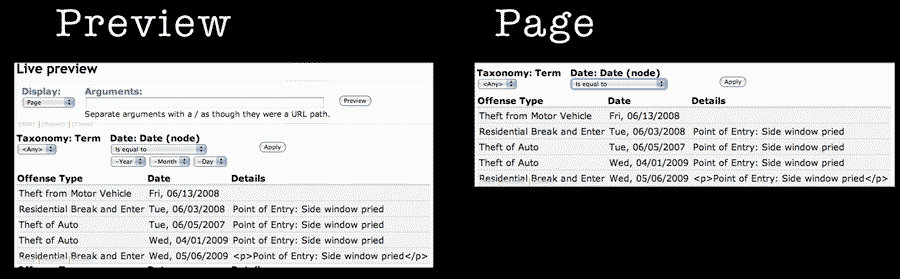
In preview it is completely fine. In the actual page display, the part of the exposed date filter where you actually set the dates is hidden.
(see attached .png) This is pretty wacky. I just looked at the html output for it. This is what I see:
Removing the inline style makes it display as it should.
I assumed that somehow this non display of the date selector was somehow related to the this particular issue, but it is not. This problem exists with the date created fields as well not just the cck date field.
I am going to track this down over in the views issue queue as this is a views issue and not a date module one.
All may not be perfect now, but it is getting better.
cheers
I just created this as an issue over in the views issue queue
http://drupal.org/node/493266