

Closed (won't fix)
Project:
Date
Version:
6.x-2.x-dev
Component:
Miscellaneous
Priority:
Normal
Category:
Bug report
Assigned:
Unassigned
Reporter:
Created:
16 Jun 2009 at 16:04 UTC
Updated:
8 Jul 2011 at 13:26 UTC
Jump to comment: Most recent file


Comments
Comment #1
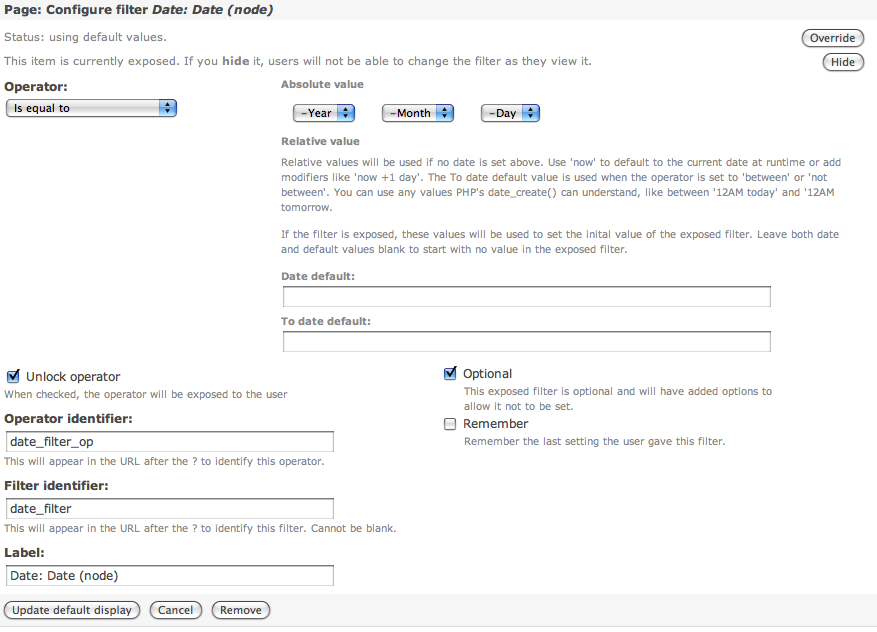
merlinofchaos commentedThe image you used is for a CCK date, and that would be an issue for the date.module. Its dates and internal dates are completely separate pieces of code.
I would start with some HTML source inspection. Are the fields there and hidden? If htey're hidden, what's hiding them? It could easily be another module or your theme incorrectly hiding the fields.
Comment #2
dadderley commentedThanks merlin, you are correct, the image is for the cck date field.
As a test I set up an exposed filter for the date created field. The page display had the same problem as the one I described above.
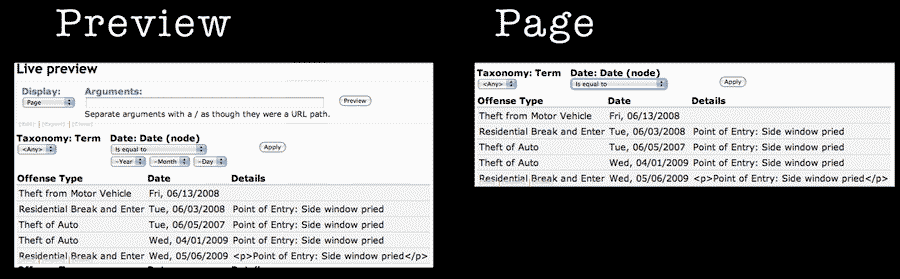
I will go back into test mode and create another screen shot of the problem using the node date field.
I originally thought the problem was related to a date module problem.
See this thread:
Date CCK Field as exposed filter gives an "illegal choice has been detected" warning
(http://drupal.org/node/339348#comment-1708144
But it is not. The good news though is that views-6.x-3.x-dev has seemingly cured this particular issue.
I have done no custom theming. The problem is the same with Garland and Pushbutton.
The actual hiding happens because there is an inline style (written by the views module) that hides the date choices.
Here is the culprit:
<div style="display: none;" class="form-item" id="edit-date-filter-value-wrapper">Comment #3
dadderley commentedHere is the new screen shot.
Thanks for your attention and thanks for all of your hard work on views.
Comment #4
merlinofchaos commentedThe Views module does not do any display: none as an inline. It does it all either with CSS or with javascript. If it's javascript it's possible that the dependency code is wrong, but I haven't seen that actually happen.
Comment #5
dadderley commentedhmmm, interesting
On closer examination I see that there are 3 elements in the widget.
#edit-date-filter-value-wrapper,
#edit-date-filter-min-wrapper,
#edit-date-filter-max-wrapper
All of them have inline css style="display: hidden;"
Each should show only when it needs to.
Writing this into the style sheet.
Makes them all show which is not a good thing.
There is something in the logic of the javascript that is a wee bit off.
If you would like, I could put the up on a server somewhere if you wanted use it to test.
Here is a screen shot of my set up.
Comment #6
math0ne commentedI'm experiencing this issue as well, using the css fix for now.
Comment #7
merlinofchaos commentedAs per #1, moving to date.module
Comment #8
Letharion commentedI stumbled across this issue while looking for something else. Since it's very old, I'm taking the liberty of closing it.