

Closed (works as designed)
Project:
Internationalization Views
Version:
7.x-3.x-dev
Component:
Miscellaneous
Priority:
Normal
Category:
Task
Assigned:
Unassigned
Issue tags:
Reporter:
Created:
12 Dec 2008 at 01:48 UTC
Updated:
18 Mar 2013 at 10:01 UTC
Jump to comment: Most recent, Most recent file

Comments
Comment #1
mediameriquat commentedSorry this behavior is not in the default taxonomy/term/* list, rather in the preset taxonomy_term View that comes with Drupal core, when activated.
Comment #2
nedjoMarking feature request since the i18nviews module is incomplete--most things are still to add.
A potential fix is in comment #42 in #1125854: Self referential block title link.
Comment #3
mani.atico commentedExtending views handler (as noted in the link posted on #2) is a good option, yet here is another way to implement fields localization: through the views_pre_render hook.
The code below was added to the i18ntaxonomy.module:
The code it's kinda of dirty, but it's a working draft.
Make you're opinions/correction about the two methods pros and cons to see how fields translations in views should be handle.
Comment #4
marc angles commentedI tried the "patch" above in the version 6.x-1.0 of the i18ntaxonomy.module.
This code is not working in this context.
Comment #5
tbannister commentedCode block above in comment #3 seems to work for me.
You need to translate the terms before the translated terms will show up (as expected). However, the code is currently incapable of handling taxonomy terms on relationships.
Comment #6
tbannister commentedAs a marginal improvement:
The changes allow you to specify the relationships you want translated in the i18ntaxonomy_get_relationships() function. That should be automated, but I'm not sure how to automatically determine what relationships (if any) exist.
Comment #7
artscoop commentedHi,
Thanks for the code.
However, I have a little request :
Do you know how to translate terms in a view, when the taxonomy field is the "All terms" ?
The code given above only works when you display one term for a node.
Comment #8
jonodunnett commentedsame problem here (I think).
With the code from #6 views that are of type "Node view" translate the terms just fine. But views that are of the type "Term view" do not translate terms.
Comment #9
kla2t commentedThanks mani.atico and tbannister, the code is working flawlessly for my Views + i18n install and solved a huge problem!
Comment #10
sgabe commentedI had the same problem, taxonomy terms in views appeared in the original language only, but tbannister's code above in #6 works just fine! This should be applied in the module's next version. Thanks!
Comment #11
PePiToO commenteddoesnt work for me, the view title is still displayed only in english using the default taxonomy_term view
What could be wrong ?
Comment #12
tomsm commentedI use taxonomy menu together with views.
I added the code of #6 to i18ntaxonomy.module.
The views title and breadcrumb is not translated.
The patch is "taxonomy/products/%".
I use as argument termID with depth and as title %1.
I have set a depth of 3.
I cleared the cache and also views cache.
Any ideas why this does not work?
Comment #13
kla2t commentedFor a while I was satisfied with tbannister's improved code since I only used "Taxonony: Term". Now I also need a field "Taxonomy: All terms", and like in #7, the translations disappeared.
Has anybody found a solution by now?
Comment #14
dergachev commentedThe following code (implemented by my general purpose ew module) builds on #3's idea of using hook_views_pre_render to ensure that the title of the default taxonomy view is passed through i18n's translation function.
Comment #15
tomsm commentedCan the code presented in this topic solve my translation problem? Please also see #12.
I have added the code of #6 to i18ntaxononomy.module but it does not work.
Does anyone have a solution?
Comment #16
jlballes commentedIn this code:
function i18ntaxonomy_get_fields_term() {
return array(
'term_data_name' => 'taxonomy:term:!tid:name',
'term_data_description' => 'taxonomy:term:!tid:description',
);
}
I have to change some sentence??? or to add more sentences??? because don't work.
Comment #17
sgabe commentedI ran into this just now like jonowindsurf...I tried something like below.
Little dirty but seems to work. In taxonomy term views the terms translated correctly. Give it a shot.
Comment #18
tomsm commentedI have added your code to i18ntaxonomy.module, but the terms are not translated.
How did you apply this patch? Do I need to change something else?
I use taxonomy menu together with views. Please also read my previous posts for more info.
Thank you.
Comment #19
sender commentedIf you extend the build in taxonomy_term view with (for example) some filters, the code in #14 fails. This is because not only arguments will end up in
$view->build_info['query_args'], but also filters.Obtaining the tid can better be done by using
$view->args[0]in this case.Comment #20
tomsm commentedI have added this code to i18ntaxonomy.module.
The title is not translated.
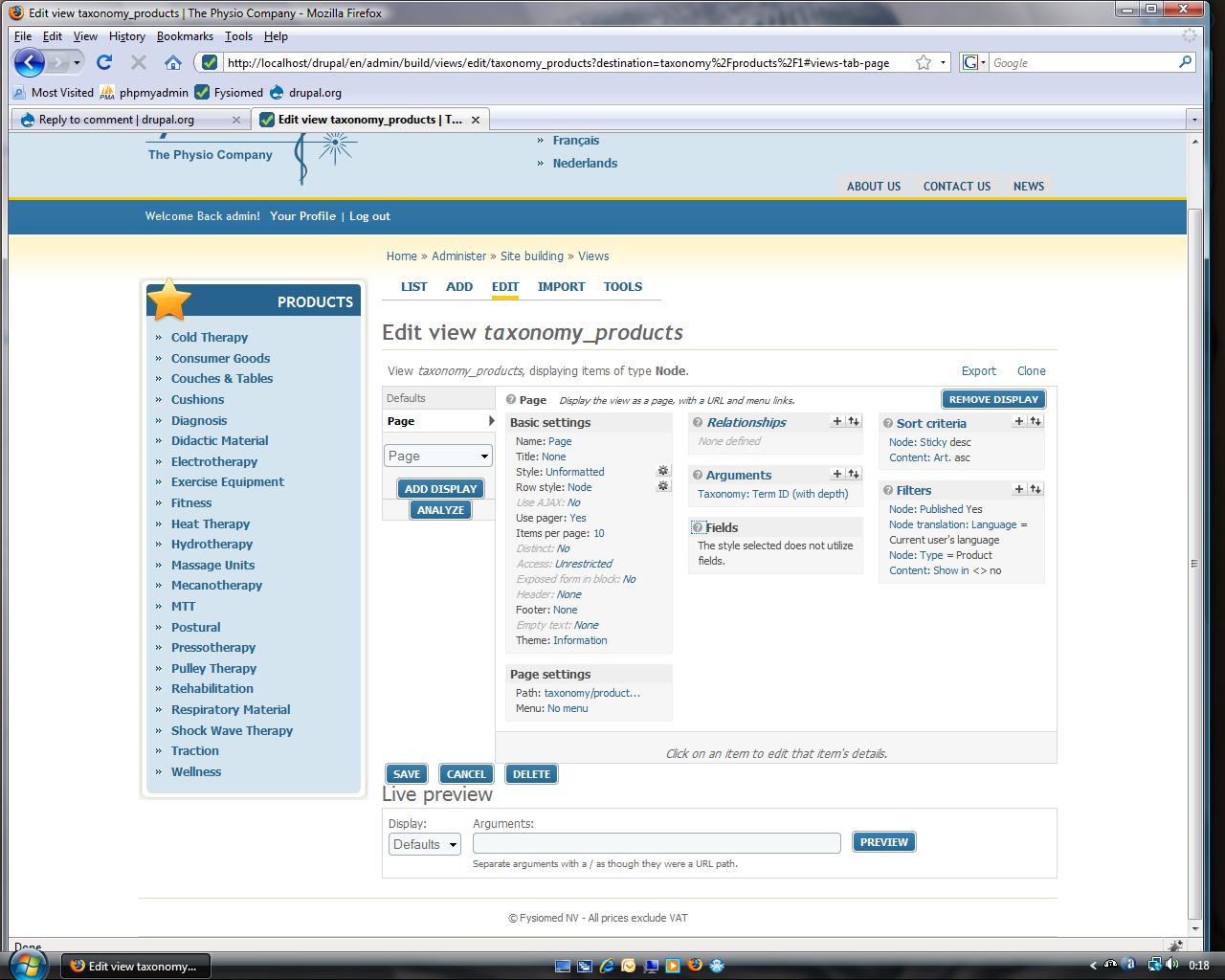
My view settings are:
1. Arguments: Taxonomy: Term ID (with depth)
Title: %1
Validator options: Taxonomy term
Argument type: Term ID's separated by , or +
Allow multiple terms per argument is selected
Set the breadcrumb for the terms parents is selected
Filters:
1. Node published: Yes
2. Node translation language = Current user's language
3. Node type= product
4. Content: Show in <> no
Sort criteria:
1. Sticky desc
2. Content: Art. asc
Are these settings correct?
Comment #21
dboulet commentedI liked the solution in http://drupal.org/node/64004#comment-1125854, so I extended it to also translate the Taxonomy: All terms field. I've attached my entire custom module, in case anyone wants to try it out.
Comment #22
dergachev commentedThe module in #21 seems to be exactly what we needed. Sure beats hacking views.. thanks dboulet!
Comment #23
jonodunnett commented#21 = awesome. thanks so much for this.
Comment #24
dboulet commentedHere's a patch that adds the code from #21 to the i18ntaxonomy module, please review. Thanks again to greenSkin for getting this started.
Comment #25
tomsm commentedI have tried the module of #21.
The terms are not translated.
Do I need to change something else to other modules?
I have following module versions installed:
- Internationalization 6.x-1.x-dev (2009-May-21)
- Views 6.x-2.5
- Taxonomy Menu 6.x-2.x-dev (2009-May-31)
Thank you.
Comment #26
dboulet commentedHi tomsm, try this one instead, and remember to clear your cache. I've also attached a patch to replace the last one.
Comment #27
pertheusual commentedWe are using the module from #21 and I just wanted to point out one issue we had.
It seems that in i18ntaxonomyviews_handler_field_taxonomy pre_render, the array being passed did not have a term_data_tid property. It only had a tid property. It was a quick patch, but fixed our issues.
This was causing the context to get confused and it didn't return the translations, and caused "preg_match" errors when viewing the page.
Comment #28
tomsm commentedI have tried the module and also the patch. I cleared the cache of views and drupal.
But the terms are still not translated.
It is the first time that I applied a patch using Eclipse for Windows.
I had to use "Guess" once for the i18ntaxonomy.module file.
Comment #29
dboulet commented@tomsm, How are the terms being displayed, which fields are you using?
Comment #30
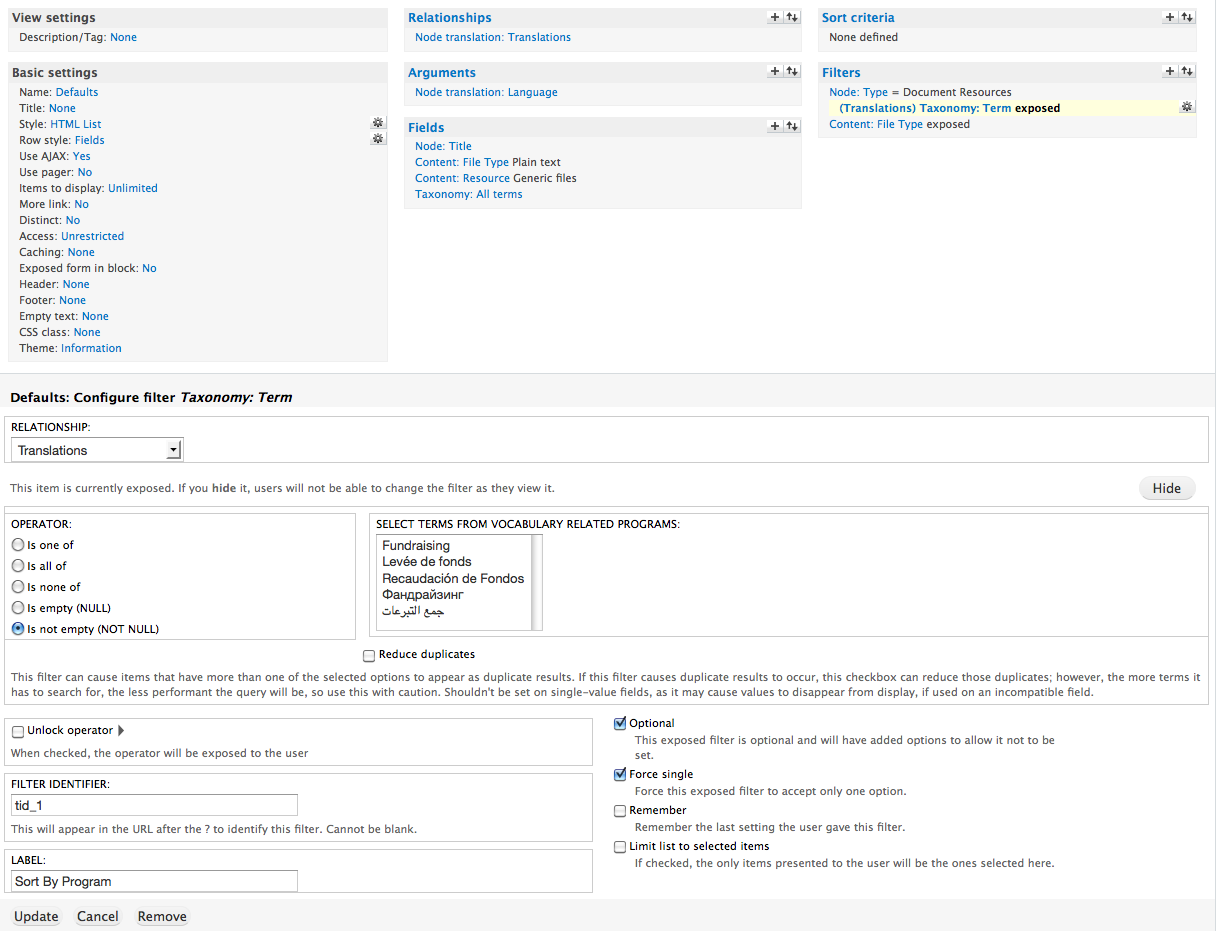
tomsm commentedI do not use fields, because I use the page display. (please also see the attached screenshot)
I use a modified taxonomy_term default view together with the taxonomy menu module.
Taxonomy Menu passes the arguments to this view.
Please read my previous post #20 for more information.
Thanks for your help.
Comment #31
otinanism commentedSame module versions as tomsm, it does not work for me either using the custom module.
Comment #32
dboulet commented@tomsm, otinanism, The module/patch that I provided only translates terms names that are displayed as fields. If I understand correctly, you are wanting to translate the page title on taxonomy term pages? This is a feature that would have to be added.
Comment #33
sgabe commented@tomsm, otinanism: the view title can be translated in the i18n-6.x-1.x-dev release which have an i18nviews module for this, give it a try!
Comment #34
shadysamir commentedThis is awesome! Thank you guys for the module and the patch in 27 as well. You saved me hours. Works as advertised :)
Comment #35
tomsm commentedThanks for the tip. I have already i18n-6.x-1.x.dev (2009-May-21) installed.
The taxonomy term (title of the view= %1 = first argument) is not translated.
If I type a word as title, for example "Products", it is translated, but taxonomy terms as title are not.
I have installed views 3.x-dev, this does not help.
Also the breadcrumbs (= taxonomy terms) are not translated.
Comment #36
drupalnesia commentedUsing 6.x-1.x-dev (2009-Jun-13) :
---------------------------------------------
1. Views Title is translated
2. Views Term is not translated
Comment #37
castawaybcn commentedusing 6.x-1.1
the module from #26 with the patch from #27 works partially for me (as it did using 6.x-1.0). In the same view:
Taxonomy: All Terms Vocabulary, fields and title in table view are translated
Taxonomy: Term, as exposed filter not translated
All terms displayed in both cases belong to the same vocabulary, strangely enough they are not always translated.
Comment #38
drupalnesia commentedSince I have a very tight schedule to finish my client website order ASAP then I take over Taxonomy Block module (http://drupal.org/project/taxonomy_block). IMHO, this is the easy way because i18n and View are very2 complex module to understand!
Now, Taxonomy Block supports multi-languages! This module also support parent-child style for html-list.
Taxonomy Block 6.x version is a new re-coding. Currently only support 1 block but I will expand to support several block, support page (this is important if you have very2 long term list) and order by term weight. Hope I have more spare time for coding next week.
Try it and give your suggestion and bug reporting :)
Comment #39
toemaz commentedI installed the i18ntaxonomyviews module from #26 and it worked as advertised for translating taxonomy in (table) views and exposed filters. Thanks!
Comment #40
toemaz commentedApparently, I was too hasty with my comment yesterday, because exposed filters based on taxonomy are not translated yet. Sorry for the confusion.
Comment #41
drupalnesia commentedtoemaz: Try Taxonomy Block 6.x, (http://drupal.org/project/taxonomy_block) hope this module will solve your problem until i18n and Views work fine.
Comment #42
dasjothe patch from #26 by dboulet seems very good!
http://drupal.org/node/346028#comment-1664274
it patches on HEAD, while from my understanding i18n currently is developed against the DRUPAL-6--1 branch.
http://cvs.drupal.org/viewvc.py/drupal/contributions/modules/i18n/?pathr...
vs
http://cvs.drupal.org/viewvc.py/drupal/contributions/modules/i18n/?pathr...
so i just ported the patch. hope this helps, for me it works, please review it. josef
Comment #43
Martin Möhwald commentedSame issue with 6.x-1.1 as tomsm stated in #12 and #30. The argument taxonomy id/term is not translated when put as the page title %1.
Help would be appreciated.
Comment #44
dboulet commented@dasjo, Looks like you're right, thanks for the patch.
@Martin Möhwald, I'm experiencing this issue as well, I'll try working on a fix.
Comment #45
tomsm commentedAlso "the breadcrumbs" and "the taxonomy term under each teaser" are not translated.
@dboulet: Good luck and thank you!
Comment #46
thommyboy commented@dboulet
thanks for your i18ntaxonomyviews module! it works pretty well for me- displaying multilingual taxonomy terms n a view.
just one thing that seems not to work- when using "taxonomy:all terms" it works fine. when using "taxonomy:term" (we
have a 1:1 relation between a node type and a vocabulary) the taxonomy term is NOT displayed. A warning results
warning: htmlspecialchars() expects parameter 1 to be string, array given in /var/www/.../bootstrap.inc on line 735.
This only happens when being in another language than the default language...
And one question for my understanding- does i18ntaxonomyviews do the same as the patch you provided for u18ntaxonomy?
Comment #47
mrwhizkid commentedAlso looking for a quick fix on this issue. The argument term is not translated when put as the page title %1 in views. Been working for hours trying to find a workaround.
Thanks for your help.
Comment #48
dboulet commentedHere's a new version of the i18ntaxonomyviews module, it should now translate term names inserted from arguments, as well as terms in exposed filters forms.
@thommyboy, try this new version of the module to see if it fixes your issue. To answer your question, yes the patches that I had submitted provided the exact same functionality as the module, but added the code to the i18ntaxonomy module instead of in a separate module. I'm not going to bother posting any more patches though, I'm pretty sure that a better solution with a different approach is being worked on at the moment.
Comment #49
tomsm commentedI hope that there will be a solution soon because many modules use views, such as taxonomy menu, flag, etc.
Without proper i18n support in views it is very difficult to create an advanced multilingual site.
@dboulet: #48 module does not fix my problem with taxonomy menu and flag module (default bookmarks view). Thanks for your help, anyway!
Comment #50
mrwhizkid commentedRegarding #48 fix:
Term view argument titles are still not getting translated after I uploaded this. Do I need to 'turn it on' somehow or should it work immediately after I upload it?
Thanks for your help!
Comment #51
dboulet commented@mrwhizkid, you might have to clear your cache for views to pick up the new handlers.
Comment #52
thommyboy commented@dboulet
THANKS a lot! this solved my problem- term is displayed now!
so you think in a while the view-support will be included in the i18ntaxonomy module
and i18ntaxonomyviews won't be needed any more?
greetz from germany TOM
Comment #53
tomsm commentedI have cleared the views cache, but still no translation of the title. I use views 6.x-3.x-dev, could this be a problem?
Comment #54
mrwhizkid commented@thommyboy
Could you tell me what version of Views and I18N you are using?
@dboulet,
I have cleared the Views cache as well as my browser cache and I am still getting the term view title showing up only in English. The terms are translated in the translate interface...
I am using Views 6.x-2.6 and I18N 6.x-1.x-dev
Thanks again for your help.
Comment #55
thommyboy commentedI use
Views:6.x-2.6
i18n: 6.x-1.1
But i don't use the term as view-title, I just use it as a field for page/block output...
Comment #56
mrwhizkid commented@Thommyboy,
Thanks for the info.
I am using the taxonomy_term view and for some reason the title on top of every term page (after I click a term) refuses to translate into the language I am using.
I was hoping that this module would sove that problem but so far no luck...
Comment #57
tomsm commentedI also use a taxononmy_term view. This view has no fields so this patch/module will not work.
Comment #58
dboulet commentedAbout the module from #48:
Comment #59
mrwhizkid commented@Tomsm,
There is a workaround for this problem that I just found. It's probably not the optimal solution because it means that you will have to translate all of your taxonomy terms twice. But here it is...
http://drupal.org/node/301020
I just made the changes described there and it works. Please note though that the file is now called "views_handler_argument.inc" which is a little different than what they have there.
Hope this helps...
But I also hope that this problem can be fixed so that it will only be necessary to translate the terms ONCE.
Comment #60
tomsm commented@ mrwhizkid:
Thanks a lot for the tip! The title in my taxonomy-term view is now translated.
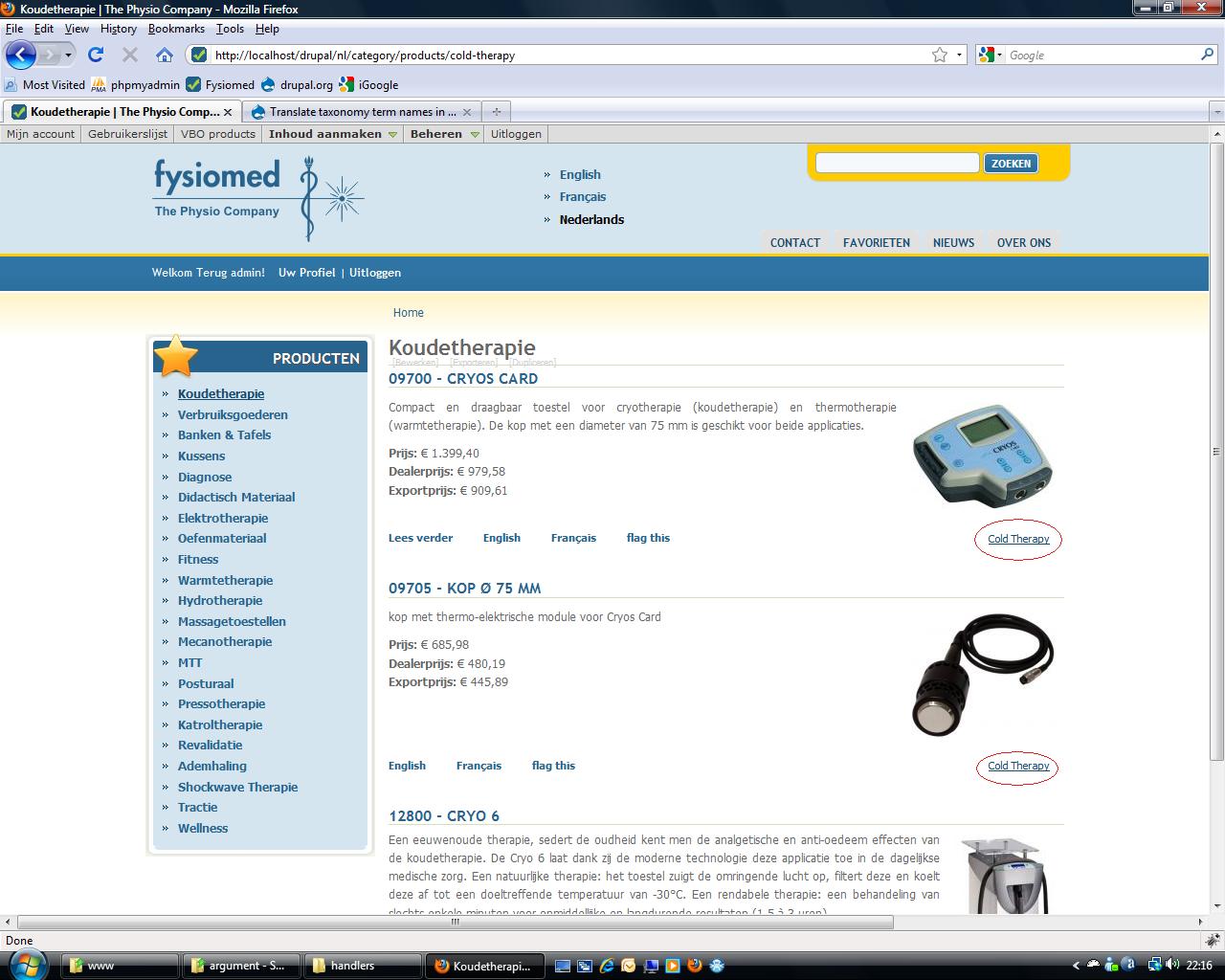
There's is only one thing that needs to be translated: the taxonomy term link under each node teaser. Please see the attached image. I have indicated the taxonomy term link with a red circle. Do you also have this problem?
Also the breadcrumbs are not translated.
Comment #61
toemaz commented@dboulet
Your new module attached to #48 works like a charm using views 6.x-2.6 and i18n 6.x-1.1. Great work! After clearing the views cache, the exposed filter is being translated. One little side note: in the exposed filter, the translated terms are not put in alphabethical order.
As indicated by others, the term title in the taxononmy_term view is not translated. I will try the solution proposed by mrwhizkid in #59.
Comment #62
dboulet commented@toemaz, I could be wrong, but I think that the terms in the exposed filter form are ordered by term weight.
Comment #63
mrwhizkid commented@tomsm,
I don't use breadcrumbs so I'm not sure. It seems like you should be able to pass that through I18N using a t() in your theme template but I don't know how well that would work.
I have my view set up a little differently than yours. Since viewers can already clearly see that they are in a certain category, I chose NOT to include the taxonomy term AGAIN in the teaser so I avoided that problem altogether.
With that said, I don't see why it's not translated. I do have taxonomy terms displayed in other views around my website and I have no problem with translations.
Just to be clear, are you using the module in #48? After I activated that, the terms were translated everywhere except for the argument title.
Comment #64
giorgosk#24 worked against the latest development version of i18n
but had to include this part manually in i18ntaxonomy.module since it was failing
#42 gives warnings and did not seem to work
Comment #65
j0nathan commentedsubscribing...
Comment #66
cdetdi commentedAdditional working implementation of #48 on 6x-2.5, used for drop down filters on an attached view.
Can't express enough thanks for this.
Comment #67
vaartio commentedi18ntaxonomyviews module saved my day as well. Thanks to dboulet!
Comment #68
juan m commentedI'm using a term view, with a terms list grouped by vocabularies.
To me, i18ntaxonomyviews module ir working well for terms, but... vocabularies are not displayed correctly.
Are this happening to all?
Thanks!
Comment #69
juan_manuel commentedjuan m, your are right.
You must edit "i18ntaxonomyviews_handler_field_taxonomy.inc" in this way:
Comment #70
feuillet commentedHi,
#48 works here fine so far that fields in the list contain translated taxonomy terms.
The only thing making it perfect would be that pulldowns of exposed filters would contain translated values too...
Thanks for your efforts!
Best regards
Sandro
Comment #71
mairav commented@dboulet I applyed the zip you gave in #48 and now my taxonomies are translated!!! Thank you very much for this solution. My brain was burning trying to fix this until I found this post. Thanks again.
Comment #72
alienzed commentedI get an operand error when I turn that module on...
latest drupal and latest views
Comment #73
alienzed commentedSOLUTION:
create a template file in your theme directory and simply put a t() around the output...
template should be something like views-view-field--tid-1.tpl.php and end up like this...
print t($output);then go translate the terms in the interface... very quick and very easy.
Comment #74
feuillet commentedHi, thanks for the hint, but this is not working for me inside the pulldowns of exposed filters.
could you explain me a little more how the filename has to be put together? Is tid taxonomy id?
Comment #75
alienzed commentedI don't think select form items can be themed in the same way.
Comment #76
Miteto commentedHello guys. I use taxonomy_term view, Bulgarian and English languages enabled and Bulgarian set as default language. The module @dboulet posted at #48 provided translation strings for taxonomy menu but Views title remains untranslated. I tried everything including the t() solution but is doesn't help - instead it provides translation to Bulgarian but the title is in Bulgarian?! Thanks!
Comment #77
mairav commented@miteto, I have spanish as default language, and sometimes Drupal doesn't understand that, so I had to create some things in english (as titles, taxonomies, form labels) so then I can translate them in spanish. I'm still changing spanish terms to english to translate them.
Comment #78
boobaasubscribe
Comment #79
vnb commentedsubscribe
Comment #80
jackalope commentedThanks for the module in #48. It works fine when language negotiation by path prefix is enabled, but I'm currently working on a site that does not use language negotiation. Is there any way to get terms translated in views on such a site? I've tried using t() to get this done, both as suggested in #73 and as follows, but neither approach is working:
Both attempts just display the term name in English (and yup, I've checked to make sure that the terms are actually translated into Spanish!)
Also, just to double check, even on a site using language negotiation this module won't work to translate the vocabulary names themselves, will it (wasn't working for me but want to make sure that's not just me doing something wrong.)
Comment #81
dboulet commentedThough it was suggested above, taxonomy terms should never be translated using the
t()function, instead usett().Usage:
Also, translating term names should not be done in theme templates, but if the 18ntaxonomyviews module posted here doesn't work, then I unfortunately don't have a good alternative to recommend.
Comment #82
jackalope commentedThanks for the tips, dboulet! I was able to successfully translate taxonomy term fields into Spanish in my view by using the following code in my theme template:
This actually works without the i18ntaxonomyviews module, which works great when using language negotiation on the site but doesn't work without language negotiation since then there's no way to set the language for a particular view. Or am I missing something? Is there some other way to set the language for an entire view (not just the nodes it displays) without using sitewide language negotiation?
Comment #83
rokrWhile #48 works fine for term names it fails for translating term description. I have a view of terms where "Taxonomy: Terms" and "Taxonomy: Term descriptions" are fields. "Taxonomy: Terms" are translated, "Taxonomy: Term descriptions" aren't. Any suggestions?
Thanks for the work in this issue!
cheers, Ronald
Comment #84
luco commentedum. what about path alias?
if you have a term, say, "ethics" its alias might be example.com/blog/ethics. but in Portuguese - "ética" - the path alias won't get tanslated to example.com/blog/etica. you have to go to admin/build/path and do it very manually.
is there a way to set path aliases according to term languages? I mean, in a more streamlined fashion ;D
Comment #85
giorgosk@luco
your comment/issue is unrelated to this issue
most probably what you want can be done using http://drupal.org/project/pathauto
Comment #86
luco commented@dboulet, I used the module from #48. worked like a charm. many thanks :D
Comment #87
Anonymous (not verified) commentedWow, @dboulet this module works a charm! I have a question though, how can I extend this to include term descriptions? At the moment, my only solution is to do use Language Sections on the description field, but it seems like a dirty way to do it.
Comment #88
baykush commentednice module addition, congrats
Comment #89
oceanos commented@dboulet: #21 module did an excellent job in translating my taxonomy terms in view... until I upgraded to views 6.x-2.7.
Now displaying a view with i18ntaxonomyviews activated results in a fatal error: Unsupported operand types in ...\sites\all\modules\views\handlers\views_handler_field.inc on line 460
see http://drupal.org/node/621782
Comment #90
oceanos commentedSolved - I adapted the i18taxonomyviews module from #48 so that it works for Views 2.7 now (function pre_render() in views_handler_field_term_node_tid.inc).
Comment #91
Proct0t commentedworks for me so far, thanks!
Comment #92
tomsm commentedThe module translates taxonomy terms correctly within views, for example in filters.
But the page title, breadcrumbs and node terms are not translated on the page display of the "taxonomy term" view.
The title translation is ok by entering PHP code in de views header:
see http://drupal.org/node/301020 #5
I am still looking for a solution to translate the node terms and the breadcrumbs.
Does anyone have an idea how I can do that?
Thanks.
Comment #93
marcushenningsen commentedI've tried the module in #90 and it works when using the "Term ID" as an argument, i.e. the page title changes appropriately. Thank you for this.
The next thing for me is to have the summary plugin (The option for arguments: Action to take if argument is not present: Summary) use the localized term names. Any idea on how to do this?
Marcus
Comment #94
mattiasj commentedI tried #90 and it worked very well, thanks!
Comment #95
castawaybcn commented#90 seems to be working for me as well, thanks!
Comment #96
jose reyero commentedSince the i18nviews module requires i18ntaxonomy now,
can we refactor this one as a patch for i18nviews?
Btw, we are targetting now views 6.x-3.x for next i18n release. Related #360024: Write views localization plugin
Comment #97
danoguru commentedapplied patch #90 and works great! pls include this module with views by default..
Comment #98
jose reyero commentedTagging. As said above this needs to be a patch for i18nviews so still needs work.
Comment #99
Bilmar commentedsubscribing
Comment #100
sfyn commentedsub
Comment #101
domosapiens commentedSubscribing
Comment #102
castawaybcn commentedI just realized in my case it does not work for exposed taxonomy filters..., using 6.x-1.2 though, perhaps this is fixed in the dev version. Can anyone please confirm?
Comment #103
sfyn commentedI notice this does not translate term descriptions.
Comment #104
Manonline commented+1 :)
Comment #105
japanitrat commentedhm .. i wonder why this doesn't make it into the actual release. This issue started a year ago. Using Views 2.8 and i18n 1.2
As I read, the next i18n release is targetting views 3.x, which is still alpha. So I guess, the mentioned i18n-dev version is also not working with views 2.x ?
How about that thing in #90? It's actually a new module which will be abandoned when the actual patch happens to be in, right? I desperately need a solution for a production site and the taxonomy block won't help me there :(
Comment #106
d.sibaud commentedthe #90 version with Views 2.8 dosn't translate terms in fields..... there's somebody can help? please
Comment #107
robby.smith commentedhello, is there an updated patch for Views 6.x-3.x-dev and i18n 6.x-1.x-dev? I look forward to helping with testing.
Comment #108
k3vin commented+1
Comment #109
baines commentedFor translating taxonomy term description, just create theme file views-view-field--description.tpl.php in theme folder and put this code in ti
Comment #110
pieterdcYou can also use this workaround for taxonomy term names.
Just replace 'description' with 'name' in #109
But it's still a workaround. A good module patch would be fantastic!
As you can see at http://drupalcontrib.org/api/function/i18nviews_views_pre_view/6 .. there is some code but it's commented as "@todo I don think this works at all."
Comment #111
tomsm commented@PieterDC
I am building a site with 3 languages, English, Dutch and French.
I use a modified taxonomy_term view, but I am unable to translate the term that appears in the teaser and in the full node at the bottom.
I tried your solution in #110 but my view has no fields, it is unformatted.
How can I solve this?
You can see my site at http://fysiomed.itbull.org
Thanks!
Comment #112
robby.smith commentedI tried #110 to translate taxonomy terms in a view but for some reason the field content isn't showing up at all. I created a new template file for my field and put the code from #109 and replaced 'description' with 'name'. The style of my output is unformatted. Could someone point out something I may be doing wrong? Appreciate it!
Comment #113
pieterdcI don't wanna go off-topic, but just the answer the questions above (#111 and #112):
@tomsm
The template file mentioned in #109 doesn't affect node or teaser displays, only fields.
If taxonomy terms within nodes or teasers don't get displayed in the language you want; I'd guess they're either not translated yet or the vocabulary multilingual settings aren't optimal.
@robby.smith
You're right. To format the output, as configured within your view, you need to replace
print tt('taxonomy:term:'.$row->{tid}.':description', $row->{term_data_description});with
Comment #114
tomsm commented@PieterDC
I have found the reason. When I use the Acquia Marina theme, the terms are not translated. When I use Garland they are. I have submitted an issue to the Acquia Marina project about this: http://drupal.org/node/702354
thanks for your help.
Comment #115
ximo commentedJust a quick note to say that the module in #90 works well for me with Views 2.8 and I18n 1.2. The view I've tested it on has terms as exposed filters, fields and grouping – and they were all translated as expected. Thanks a lot, oceanos!
Would be great to see the code in that module included in I18n 1.x for Views 2.x, as the majority of sites will be on these branches for a long time to come. Hope someone has the ability and time, unfortunately I don't know Views or I18n well enough to make a decent patch for this.
Comment #116
jhedstromHere's the code from the module in #90 in the form of a patch against the i18nviews module. It seemed to work for the purposes of the sites I'm currently working on.
Comment #117
jhedstromThis patch is the same as the above, except it adds support for the term description field.
Comment #118
jhedstromOops. That last patch didn't have the new handler in it for term description. Here is the correct patch.
Comment #119
jhedstromThe previous patch had caused the content negotiation handler to not be found. This patch fixes that.
Comment #120
ak commentedsubscribing …
Comment #121
robby.smith commentedtried patching #119 against most recent dev 6.x-1.x-dev (2010-Jan-03)
below is result:
patching file i18nviews/includes/i18nviews_handler_field_term_description.inc
patching file i18nviews/includes/i18nviews_handler_argument_term_node_tid.inc
patching file i18nviews/includes/i18nviews.views.inc
Hunk #1 FAILED at 17.
1 out of 1 hunk FAILED -- saving rejects to file i18nviews/includes/i18nviews.views.inc.rej
patching file i18nviews/includes/i18nviews_handler_field_term_node_tid.inc
patching file i18nviews/includes/i18nviews_handler_field_taxonomy.inc
patching file i18nviews/includes/i18nviews_handler_filter_term_node_tid.inc
Comment #122
giorgosklatest patch from #119 worked for me
applied against latest 6.x-1.2 version of i18n
(it probably applies on the dev version as well)
and taxonomy terms get translated on exposed filters (which was my problem)
but what about sorting those exposed taxonomy names in drop down lists ? any solution to that ?
Comment #123
giorgoskWorkaround for sorting translated select boxes of exposed filters
EDIT: fixed type mentioned on #124 comment
Comment #124
robby.smith commentedyea, the patch applied fine against 6.x.-1.2 but against 6.x.-1.x-dev resulted in the error shown in #121. Thanks for everyone's hard work!
Regards
Comment #125
rcombes commentedI tried patching #119 against version 6.x-1.2 of i18n and got strange results.
One of the pages with an exposed taxonomy filter is showing up in the correct language (in this case Spanish) and another is showing an exposed taxonomy filter in the default language (English) when it should be in Spanish. The two pages almost identical views and use similarly structured vocabularies. The two vocabularies have their translation mode set to Localize terms.
The workaround offered in #123 for sorting the translated select boxes of exposed filters worked as claimed although it required removing the extra "]"s after FILTERID on line 5 and 7. At first I tried getting the FILTERID from the resulting HTML code of my view page but that wasn't very clever. I managed to determine FILTERID and FILTERWIDGETID by examining the contents of the $vars['form'] array.
Comment #126
loominade commentedsubscribe
Comment #127
heyyo commentedCould we apply the patch in #119 on last i18n 6.x-1.3 ?
Comment #128
jody lynnI rerolled the patch, someone could test to see if this one applies.
Comment #129
miro_dietikerThe last patch in #128 misses the lines to notify views about the views include folder.
Added new patch against current head which works overhere.
Comment #130
naopachque commented#90 works for me fine, but I also had an issue with summary; maybe it's too late for your problem now but if anyone stumbles upon the same problem the fastest workaround is to change the views-view-summary-unformatted.tpl.php file in views>theme folder
instead of
<a href="<?php print $row->url; ?>"><?php print $row->link; ?></a>write
<a href="<?php print $row->url; ?>"><?php print tt('taxonomy:term:' . $row->term_node_tid . ':name', $row->term_data_name); ?></a>and don't forget to add an if clause like
if (!empty($row->term_data_name))
so the tt() function is used only with term summary
Comment #131
arski commentedsubscribing
Comment #132
Gabriel R. commentedDoes int8views need to be patched? Or is this rather an i18ntaxonomy issue?
Comment #133
arski commentedI actually tried to apply the patch to the latest -dev version, but it seems to fail :/
Comment #134
giorgoskNeither #128 #129 applies cleanly
thus I applied by hand and I am attaching the results
All created and patched files are included in zip file
all files should go in
i18n\i18nviews\includes\used with i18n 6.x 1.3 and works as expected
NOTE: the patch is only attached if you want to see the changes applied in
i18nviews.views.incPlease someone include in the latest DEV so we can easily test ...
Comment #135
imiksuThis patch worked with dev snapshot released on 2010-Mar-05
Comment #136
szantog commentedYou are my God! dev: 2010-Apr-01 worked well!
Comment #137
alisonI'm sorry, I've become very confused reading through everything here; could someone please clarify for me...
-- What patch (or patches) should I use when running i18n 6.x-1.3 + views 6.x-2.8? (can I just use #134, or...?)
-- and/or, do I need to move to views 6.x-3.x no matter what?
Thank you thank you!
Comment #138
alisonOkay, following up on my previous comment (#137), I ended up updating to views 6.x-3.0-alpha2 (and I'm running i18n 6.x-1.3), and I did the patches from #134, but the "content negotiation" filter is not working for me -- I'm getting a "broken/missing handler" error message. Where did I go wrong?? (I already tried disabling/enabling Views Translation, clearing the main and views caches, and I ran update.php of course.)
Thank you!
Comment #139
j0nathan commentedHi alisonjo2786,
Regarding your comment #138, I suggest you read #650552: Error: handler for node > content_negotiation doesn't exist
Comment #140
infojunkieI am trying to use the zip file in #134 to show translated terms in an exposed filter. The terms are created in a localizable taxonomy for which I've supplied translations to the current (non-English) language.
My problem is that the terms still appear in their original form in the filter admin form, as well as the exposed form. After tracing the code down to function
i18nstrings()in i18nstrings.module, it appears that translation will not occur if the language passed to tt() is NULL, which is the case ini18nviews_handler_filter_term_node_tid::value_form.Here's the code of i18nstrings() where translation is not done when langcode == NULL (and thus gets the default language value):
So my question is: given that my current (default) language is non-English, how can I show the terms in that language?
Comment #141
miro_dietikerinfojunkie - this is how i18n works.
it disables translation for default language. you have to enter the terms in default language.
Your problem is not related to this issue. As i've suggested to i18n guys, it should be possible to optionally enable translation into (current) default language. It simply needs a few changes and the default language problem finally disappears. See:
http://drupal.org/node/676002
And vote for this feature to make maintainers understand the issue.
Comment #142
alisonHi J0nathan -- Thank you for your response. I did what was suggested at the link you pointed to, and there's no longer an error message -- and it looks like the nodes are being filtered by language as expected when I look at the view's results.
(And just
BUT... my exposed filters (two taxonomy: term filters) are listing both language's terms (AND, even though I made translations for the view footer's string (via Translate interface), the view footer is not displaying in Spanish when I view the Spanish version of this view's page display). ALTHOUGH... the exposed filter labels (and my "Apply" button text strings) are displaying in Spanish according to the translations I entered for those strings...
So, is it probably my vocabularies? Or...
Both vocabularies are set to "Per language terms" and all terms are translated.
Also, a sidenote, I can't seem to find a string for the "Reset" button for my exposed filters; anyone know where that could be?
Thank you!!
Comment #143
infojunkie@miro_dietiker: thanks for your explanation. Indeed, setting up the language negotiation to path prefix and then reverting to English as default language did solve the problem. I will follow up on that other issue you pointed to.
Comment #144
alison(@me) Also, I can't seem to figure out how to translate the "" in my exposed filter lists (because the filters are optional). I will post a new issue asking about this and the Reset button momentarily, but I thought I'd ask just in case anyone here has already figured it out. Thank you!
Comment #145
infojunkie@alisonjo2786: Go to Site building > Views > Tools > Basic and change the "Label for "Any" value on optional single-select exposed filters:" setting to "- Any -". That should get translated readily.
Comment #146
alison@infojunkie -- great idea, thank you, but unfortunately it didn't work, yet anyway. What's the best way to refresh strings to be available for translation, since the "views" text group isn't available for "refreshing" via admin/build/translate/refresh? (I've tried clearing the Views cache, but that's about it so far.)
Update on my efforts to translate the "Reset" button -- very interesting; when I change it to something other than Reset (the default value), it becomes available to me to translate at admin/build/translate/search. Who should I report this "bug" to -- Views or Internationalization?
Comment #147
alisonI finally created that new issue I said I would, so I'll stop bothering y'all about the stuff that clearly has nothing to do with this issue. Thank you for your help and patience! (And I hope we can keep working on the things I outlined in #142.)
(New issue: http://drupal.org/node/766114)
Comment #148
surgeonbor commentedI tried the patches in #90 and #134, and neither works for me. I'm using Views 6.x-2.10 and i18n 6.x-1.4.
I have an exposed filter that lists the terms of a vocabulary in a dropdown. The vocabulary itself is set to "Per language terms" and each term is associated with a language. However, all of the terms are listed in the exposed filter, whereas it should only be showing the ones in the current language. I'm using a "Node translation: Translations" relationship, which uses "Current Language" as the translation option.
The patch seems to fix everyone's issue but mine. Is my issue somehow different? Thanks.
Comment #149
miro_dietikerYou're right surgeonbor, this won't fix your issue as of my understanding.
This patch is to enable views exposed filters for "localizeable" terms - not "translated" ones.
So it uses the tt() function to get translations of terms - and it doesn't support if you have separate terms per language.
This feature is still completely missing.
Comment #150
kunago commentedNo, miro_dietiker, I cannot agree with you. I was using i18n in version 6.x-1.3 and there the patch worked fine for translatable taxonomy terms in Views. I upgraded to 6.x-1.4 and it no longer works. Will see if I can come up with an updated version for the 6.x-1.4.
EDIT: I applied the patch to 6.x-1.4 and it worked after the cache was cleared. So now it seems to work with i18n 6.x-1.4 and Views 6.x-2.10.
Comment #151
surgeonbor commentedThanks for the reply. I'll test it out tomorrow, but just to be clear, you're using the patch in #134, right?
Comment #152
kunago commentedYes, I am using the patch in #134 and all seems to be working fine with no issues so far.
Comment #153
Wolfgang Reszel commentedGreat, it should be included in i18n.
Comment #154
surgeonbor commentedHm, the patch is not fixing my issue. I copied the files in #134 into i18n/i18nviews/includes and cleared all caches, but my exposed filter is still listing all the terms in the vocabulary, regardless of which language they're in.
I'm fairly sure that my view is set up correctly. It lists all the correct nodes -- it works fine aside from the exposed filter. I attached a screenshot showing how my Taxonomy:Term filter is configured. Does anything look incorrect to you? Would an export of my view help? I hope I'm not doing something dumb here. Thanks again.
Comment #155
surgeonbor commentedI changed my vocabulary to use "Localize terms" rather than "Per language terms" and now it works, although I'm not sure why. Is this a different bug?
Comment #156
alisonI've gotten confused with a couple of things that I think are probably pretty key to being able to correctly use the Content Negotiation filter and/or the patch from #134.
(1) Do we need to create a relationship in our View to use the patch at #134 (and/or to get our exposed TID filters to only list terms from the current user's language)?
(2) Do we need to select "Localize terms" or "Per language terms" for the taxonomies (associated with our View's exposed filter(s)), if we want to use patch #134 and/or if we want our exposed TID filter(s) to only list terms from the current user's language?
» @miro_dietiker and @kunago -- Could you please clarify what exactly you mean by "localizable" and "translatable", and/or which fits with which option for configuring vocabularies (i.e. Localize terms vs. Per language terms)?
(3) Depending on responses to the previous two questions, where does the Node translation: Content negotiation filter fit in to all of this? Is it irrelevant, does it have to do with how/what View results are displayed (I thought it did, but like I said, I've become confused), and does it conflict with/compliment having a "translations" relationship in a View?
Thank you so much for the help!
Comment #157
kunago commented@alisonjo2786: I am using "Localize terms" option for all the purposes. Sadly, I have no experience with other settings.
Comment #158
miro_dietikerAgain checked the patch from #134. It looks fine for localizeable vocabularies.
However it doesn't check for the vocabulary mode and always applies translation. This is not correct regarding i18ntaxonomy since in case of TRANSLATION (per language term) mode, no tt() call should occur.
In case of per language term - it should instead load the corresponding translated term.
So the tt() case is for localizable case only.
You might be able to add term translations using localization system (for per language germs) this way but this is generally wrong and those translated terms don't match the correct tid.
ATM - this patch is better than having no views support. So i vote for a first step commit.
(BTW: i18n doesn't support all kind of chosen cases on multiple code locations by itself. there's a lot of work remaining)
Comment #159
Wolfgang Reszel commentedPatch #134 works great except of some issues with the panels module.
When using a view in a pane and linking its title to the view it will show the html code instead of linking it.
Edit: And again I've issues with non-translated breadcrumbs.
Comment #160
sagannotcarl commentedThe includes in #134 look like they are working for me.
Just in case anyone else missed this the first time around you need to clear the Views cache.
I'm happy to test when there is more to test.
Comment #161
miro_dietikerSetting this to rtbc. please reactivate after commit to extend this code to give TRANSLATEable (per-language terms) taxonomies a second chance.
Comment #162
klavs commentedThe patch worked for me, but unfortunately I need to do have the outputted title link to a custom view, and tvi seemed buggy - so I just used the "output field as link" feature of views - but now the contents of [name] is the result of the original run through translation :(
I figure the best solution (if possible) is to add [name_orig] or something - so you have the translated and the original string to use in your view.
Any ideas if/how this could be solved?
I worked around it, by linking to the tid - but links to the name looks prettier :) - only a taxonomy lookup on a translated name isn't really hitting anything - that would be nice if it could do that.
Comment #163
tito.brasolin commentedIt works perfectly for me too, after applying a mini-patch suggested by marcus_petrux: http://drupal.org/node/650552#comment-2360920 (there is a bug in 6.x-1.3 about Views content negotiation filter)
Comment #164
rburgundy commentedcould someone please kindly re-reroll one patch to be applied to latest i18n 6.x-1.x-dev?
thank you very much
Comment #165
boogsbobo commentedpatched w/ #134 and everything is working OTHER THAN:
exposed filters Taxonomy: term id (with depth)
terms only appear in original language. I can use the same vocabulary with an exposed taxonomy term WITHOUT depth and it translates normally.
Anyone else having this problem? Thanks!
Comment #166
stewart.adam commented(subscribing)
Great to see that this issue is being worked on. I'm looking forward to the next release!
Comment #167
jose reyero commentedMoved to new project. See #788290: Fix views compatibility issues (2.x, 3.x), spin off i18nviews module?
Comment #168
intyms commentedsubscribing...
Comment #169
boogsbobo commentedpatch from #134 not working with new (june 10) i18n 6.1.5. Nor is module from http://drupal.org/project/i18nviews
Where is this module to be installed? in the /modules/ directory or in the modules/i18n/ director
Comment #170
intyms commented@boogsbobo
download the module i18nviews.
Extract it to "sites/all/modules" directory.
download "i18n.i18nviews.includes.includes.zip" from #134.
Exctract all "inc" files to "sites/all/modules/i18nviews/includes" directory.
clear cache.
Comment #171
intyms commentedI confirm that the inc files from #134 work fine for me. My goal was to output the translated Taxonomy Terms using views.
If possible, please commit #134 to dev. Thanks
My config
Drupal 6.17
Internationalization 6.x-1.5
Internationalization Views 6.x-2.0
Views 6.x-2.10
* The "content selection mode" is "All content. No language conditions apply."
* The "Translation mode" for Taxonomy Vocabulary is set to "Localize terms. Terms are common for all languages, but their name and description may be localized."
* I translate the taxonomy terms using "Translate interface".
Comment #172
miro_dietikerCommitted to -dev. Tiny cleanup, additional docs.
Note that the #134 would have reverted a change in i18nviews.views.inc.
Going to migrate this version live immediately on our public systems.
Comment #173
mathieuhelie commentedJust installed the latest -dev, my view translates the terms in "all terms" but my attached view with an argument set to "summary (ascending)" does not translate the term.
Can someone verify that taxonomy summaries are being translated?
Comment #174
alduya commentedI adjusted the files of #134 because it re-introduced a bug found in Error: handler for node > content_negotiation doesn't exist.
This should solve surgeonbor's problem in #155.
Comment #175
alduya commentedComment #176
dboulet commented@alduya, please use the official release of this module, instead of any code that's been attached in this issue. If any bugs exist, open new issues for them and post patches.
Comment #177
miro_dietikerYes... Please note that:
1. This has been committed to -dev as i wrote:
http://drupalcode.org/viewvc/drupal/contributions/modules/i18nviews/incl...
However - setting it to "to be ported" since i've missed to add it to 6--3 branch also.
Additionally i've checked the repository: There's no other patch missing in the 6--3 branch.
Comment #178
miro_dietikerExtracted the diff and applied it to latest 6--3.
So everything should now be up-to-date.
Comment #179
raphael apard commentedUsing module PHP Custom code, you can translate terms name.
I add a PHP custom code with php code :
Comment #180
raphael apard commentedModule is : http://drupal.org/project/views_customfield
Comment #182
hip commentedSame issue here:
views + localize + taxonomy term: not translating taxonomy.
If the solution is showed within this thread, an 'official patch' should be announced before correcting the module.
Comment #183
dboulet commented@hip, please open a new issue with more details about the issue that you are having.
Comment #184
giorgoskThe H1 title of the taxonomy page (overriden with views) is still not getting translated (mentioned in the original issue as well)
Related issue that gives possible temporary work around #301020: Views internationalization : translation of views title
include in the header of your taxonomy_term view (input format: php )
this does not seem to work either
EDIT actually it works but you have to translate the term ONE MORE TIME (as built in interface)
not sure if I should reopen this since I am testing this with i18nviews 2.x dev
is this fixed in 3.x ?
Comment #185
danny_joris commentedSorry to add to this long tread, but for me this is still not working. I tried with 2.0 and 2.x-dev, but no results. My taxonomy terms don't get translated in views, but they do get translated correctly in a full node for example. I have this issue before and after installing Internationalization Views.
#887720: Term translation not working
Comment #186
Gabriel R. commentedGuys, make sure you get the DEV version of http://drupal.org/project/i18nviews it works. I tried it, it's the real deal, as of now.
Comment #187
czigor commentedThe dev package works for me too! Big thanks to the developper guy(s)!
Comment #188
davemybes commentedThis is not working in 2.x-dev, dated July 20, 2010. I have had to patch the Views module to get this to work:
Its just a matter of wrapping the term name in t(). I realize this is a probably a terrible solution, from a security standpoint, but in my situation its only one guy creating nodes, so its not a problem. Also, it works, so I'm sticking with it until a better solution presents itself.
Comment #189
alberto56 commentedHi,
I'm getting the operand error as well: "Unsupported operand types in .../modules/views/handlers/views_handler_field.inc on line 464"
Seems that views is trying to add some html (taxonomy name) to the Array
Lines 28 and 31 of the module at comment 42, above, seem to be at fault. Commenting them out removes the error.
As was mentioned by comment 89, this problem seems to be documented in http://drupal.org/node/621782.
Cheers,
Albert.
Comment #190
benklocek commentedSubscribe
Comment #191
ayalsule commentedSubscribe
Comment #192
opensense commentedpatch from #134 works.. confirmed..
Comment #193
Rhicreate commentedpatch #134 perfect. I need this for a soon-to-be-released production site, would you advise using the recommended release with patch or dev release?
Thanks
Comment #194
bartezz commentedsubscribe
Comment #195
micheleannj commentedsubscribing
Comment #196
arski commentedwhy on earth are people subscribing to an issue that was closed half a year ago? o_O
Comment #197
dasjoi would suggest following #183 which says "please open a new issue with more details about the issue that you are having"
Comment #198
yavor commented#48
This modul works great! Thank you very much my friend!
Comment #199
planctus commentedHow difficult is going through an issue like this...
I got that something was committed on the dev version some time ago, so i installed it.
But my problem seems to be a different one, i'm not in trouble having the term name translated, on the opposite i would like to see only the term name that is consistent with the current language in an exposed filter while i get both ( in a bilingual website...).
Is this issue addressed by someone else? I there any chance to filter options in an exposed filter not selecting them form the views ui but simply basing on the term language?
My vocabulary is multilanguage so i have different terms for each language connected by a "translation".
Thanks,
Da.
Comment #200
planctus commentedJust in case someone looks for an answer to my question...
i removed the unwanted options for a term exposed filter using the preprocess function:
theme_preprocess_views_exposed_form(&$vars) { }Inside that function i wrote this:
after the lines:
Basically this loads the term object for each term as an option of the exposed filter, checks its language and sees if it matches the current language before building $options array.
It checks also if there's an "any" option and if it is prints it altough it is not localized.
Thanks,
Da.
Comment #201
marko b commentedDev version of i18n views works only for taxonomy: all terms, doesnt work for arguments (summary view) and guessing filters also.
Comment #202
drifter commentedHere's the Drupal 7 version of the one given in comment #19, it will translate taxonomy terms in views titles.
Comment #203
miro_dietikerIt seems this is missing in D7.
At least check needed.
Comment #204
Jerome F commentedsubscribing
Comment #205
calculus commentedsubscribing
Comment #206
summit commentedHi, set this back to D6 and needs work, because I think with the views using arguments the taxonomy terms are not yet correctly translated in the latest .dev version.
I can set my usecase if you want it.
If I am wrong in setting the status and version back, I apologize.
greetings, Martijn
Comment #207
miro_dietikerSummit,
If you want to provide a patch for D6 first, i'm fine. Set it back to D6 when you provide a fix.
However new development from our side will happen in D7 context since this is our current focus of work.
Comment #208
juves commentedLocalized terms are shown in original language in exposed filters, am I right here?
Comment #209
Jerome F commentedThis seems to be fixed for fields in views
For Content: taxonomy term fields, choose a formatter like plain text(localised) or link (localised)
As for exposed filters, yes I didn't find any way to display those translated. (I even tried to use a relationship: Content translation: Translations)
Comment #210
Toktik commentedSubscribing.
Exposed filter taxonomy terms are not localizing when I translate terms.
Comment #211
juves commenteddeleted
Comment #212
tko commentedYikes, still no movement on this issue.
Exposed filter terms and labels not translating.
Comment #213
elgandoz commentedThis is a real shit! i had to deal with this stuff trough months, beacuse updates in views (and probably in i18n too) breaks the previous fix. By the way i used http://drupal.org/node/301020#comment-4245248 trick... it's not a solution but it works at least (for desperates as I were...)
Comment #214
miro_dietikerelgandoz, time to calm down.
You're absolutely free to provide a fix for this topic and i'll commit it as soon as it is reviewed.
If you need this, you can also hire a dev to implement this and provide the fixes to us. The topic will then be solved. No shit!
Comment #215
Palios commentedOk, just a hint. i use views 7.x-3.0-beta3, i18nviews 7.x-3.x-dev (29 May) and i18n 7.x-1.0-beta7.
I apply the filter Content: Has taxonomy term (translated). Maybe this does what you want.
I hope for a solution for content types filter and selective fields.
Comment #216
elgandoz commented@Palios @miro_dietiker Thanks for relaxing, but i was not angry :). I just was really frustrated about this issue, very old, and still changing trough versions (my site is drupal 6.22, this issue was open in 2008 and changed dozens of i18n/views versions)... and with 215 comments and many patch/fix (deprecated) it's very difficult to find a solution.
The issue appears when you use terms inside a view and the term has to be the page title... the fix I posted is actually working!
Thanks indeed for helping me, but everything (now) works for me, and my post was for sharing the trick.
I was just complaining a little for this very long issue.
Comment #217
gnindl commentedPatch #174 worked for me.
Comment #218
miro_dietikerduplicated by
#1228002: Taxonomy term description not displayed in the current's user language.
The issue addressed term tokens to be not working in specific.
Comment #219
skolesnyk commentedWell, for me when term name ID is passed as a page argument, the term name translation is not displayed, only original version.
Comment #220
mathieu commentedSubscribe.
Comment #221
asiby commentedIt seams that this is still an open issue.
Until it is fixed, this is what I have done (assuming that French is the base language and that you are translating into Spanish).
Cheers
Comment #222
kccmcck commented@Palios, in reference to #215, using "Content: has taxonomy term (translated)" as a filter fixes the translation issues for me, but creates a new problem:
Each taxonomy term is now selected by default. If I deselect the terms and run the filter, the default selections override the results and reset all inputs as having an input field of checked = true. I cannot stop the inputs from all being checked.
I've tested against the regular "Content: has taxonomy term" filter and the issue only occurs with the translated variable. Any ideas?
Comment #223
kccmcck commentedIn the views configuration, do not select any of the options under "Select terms from vocabulary . . ." In my case, by doing so, each term that's selected will be checked by default.
Comment #224
dark_kz commentedThank you! Works for me, but partly. I wanted to use translated taxonomy terms in my views argument, but I have to use only term id.
Comment #225
Kohnock commentedIn order to translate the taxonomy terms in views exposed filters i had to make a manual translation by adding the following code to views_handler_filter.inc (453) :
Comment #226
miro_dietikerKohnock, only translate via i18n_string as long as the vocabulary is in LOCALIZE mode.
Could you add this check and provide a patch?
Comment #227
hnln commentedsub
Comment #228
simon_s commentedIs there a solution for this problem yet?
Comment #229
nico.knaepen commentedFix #225 isn't a good way to fix the problem because then you make the internationalization module required by the views module. The problem should be fixed in the internationalization module.
This fix works but it's a dirty solution because it isn't possible anymore to upgrade your views module, the modification needs to be done in i18n_views.
Comment #230
phai commentedI followed #73 to make a quick and dirty (but not so much dirty, like other I read in this page) solution.
Because in my site I meet the problem is in some block views with a little quantity of terms (and Drupal caches them) the performance in not a real issue.
My solution, like #73, is to create a views templete file (views-view-field--name.tpl.php) in wich I put the following code:
The instruction to use i18n_string_translate() is located here: http://drupal.org/node/1114010
Comment #231
kwongkkt commentedsubscribe
Comment #232
nco71 commentedI used both
i18n_string('taxonomy:term'.$row->tid.':name',$row->taxonomy_term_data_name)); and
i18n_string_translate('taxonomy:term'.$row->tid.':name',$row->taxonomy_term_data_name));
both works but always return the original taxonomy term whatever the language the website is in.
Comment #233
nco71 commentedFinally , i18n_string is working fine , it s the block view that does not get the current language.
I had to force the translation and language in the view template using that function :
str_replace($row->taxonomy_term_data_name, i18n_string_translate('taxonomy:term:'. $row->tid .':name', $row->taxonomy_term_data_name, array('langcode' => i18n_langcode())),$output);
Comment #234
webflo commentedFixed in current dev version.
Comment #235
agileadam#174 worked great for me! Thank you!Switched to dev branch, works great!
Comment #236
druplr commentedI had the same issue with Views 7.x-3.0-rc1. Thanks to drifter's post above (#202) and after a little modification the issue was resolved. But when I updated Views to 7.x-3.0-rc3 or 7.x-3.0 the remedy didn't work anymore. It took me some time to fix it. Here is the final code:
When I was checking issues of Views module, I saw this:
http://drupal.org/node/1316932#comment-5175634
It suggests that drupal_set_title() no longer works (commented line above). Actually, I used debugger to see if that's true. drupal_set_title() set the title as expected, but after that, somewhere in View's code, title was set back to the initial value (in default language)!!! So I tried $view->build_info['title'] instead, as you can see in the last line, which resolved the issue.
You have two options to implement this code: in a module, or, in the template.php file of your theme.
You may also need to empty the cache to see the change.
Hope it helps.
Comment #237
constantinejohny commented#236: This only works for me for the translated content, not for the original language.
Little example:
i have:
TERM1
-node1
-node2
TERM2
-node3
-node4
In my translation I see the headers TERM1 or TERM2, but in my original language it displays node1, node2, node3, node4... I want to see the parrent term name, which works perfectly only in the translated language, not the default one.
EDIT: I found out that when I change the 'name' in:
$view->build_info['title'] = i18n_string('taxonomy:term:' . $tid . ':name', drupal_get_title());to
$view->build_info['title'] = i18n_string('taxonomy:term:' . $tid . ':something', drupal_get_title());it stops working in the translated as well. So is it possible that s´the ':name' is translated somehow in my native language and I have to use some other code? I am sorry but I'm not skilled in Drupal programming, just trying to uderstand this and fix it.
Comment #238
rafinskipg commentedI am using views 7.x-3.1, and a exposed filter for taxonomy terms isn't being translated.
The terms are localized. (Terms are common for all languages, but their name and description may be localized. )
Subscribing
Comment #239
rafinskipg commentedComment #240
robin monks commentedYeah, titles of the included taxonomy/term/%/% replacements don't obey localization in 3.2.
Comment #241
alexbk66- commentedI tried hook_views_pre_render from #236, it does work, but only for single tid and default view argument title (%1)
In two cases it doesn't work:
1. If url specifies multiple tids, i.e. .../tid1,tid2 (AND) or .../tid1+tid2 (OR)
2. If view default argument title is changed, i.e. "Title: %1" as this function completely ignores the set title.
I created a better workaround, but still not the best (Note: I'm still D6). I added the term translation inside sites\all\modules\views\modules\taxonomy\views_plugin_argument_validate_taxonomy_term.inc function convert_options(&$options) marked by //ABK:
and
As I said, it's still not a proper solution, because it should really be handled by i18nviews, that's why I didn't want to create a patch. But it works for now. I will keep trying to find a better solution.
That's really annoying that Drupal assumes that everybody speaks American, event still in D7...
Comment #242
Gessle commentedI just met this problem today and no - it does not work.
When I create a taxonomy view (not node) and list terms in taxonomy, they only come in English. Other languages do not work.
Comment #243
dawehnerThis is actually an issue of i18nviews.
Comment #244
adshill commentedThis (#236 in template.php) seems to translate the items for me which is great, but for some reason, in the original language it just prints "Taxonomy term" instead of the actual term. Can't work out why this is because it translates it perfectly!
Comment #245
adshill commentedI managed to get the item in #236 to work by only allowing the function for the language I needed it for (in this case Arabic) which is by no means a fix to the issue, but if you're only using one term then I assume it will work for multiple languages too and therefore I wanted to share:
Comment #246
arski commentedWould really need to have this work for taxonomy terms in exposed filters as well.
Just wondering for now though - is there some pre-render hook for exposed filters as well so that I could maybe apply an ugly patch until its fixed in i18nviews..
Thanks
Comment #247
dimitriseng commentedJust checking if there is any progress with this issue...?
Comment #248
ali_b commentedit would be great to fix it
Comment #249
creatile commentedHello
#245 is also working for me but it would be better to get a solution for multiple language
Comment #250
webflo commentedI close this issue.
Taxonomy term translation is working for Fields, Arguments and Exposed Filter. After installing i18nviews, you have to add the '... (translated)' Handlers to your view.
There is a wiki page with some Configuration examples. Please read these examples. I hope you will get the idea how this works ...
Feel free to open a new issue with a particular question or bug report.
Comment #251
marcoka commentedi tested this a week ago. webflo is right. you need to delete your old term field and replace it by term(translated). works nicely.
Comment #252
stolzenhain commented#245 did the trick for me in Drupal 6 / Views 2 by exchanging "i18n_string" to "tt" and using
drupal_set_title()instead of the view override.I also added a check for the i18n module.
edit: I see, this was already kind of resolved in #19, sorry.
Comment #253
merilainen commentedThis is weird. I can see only the "delta" thing of my vocabulary with the (translated) at the end. If I want to add a filter, I have the option to add the (translated) version, but not as a regular field.
Comment #254
pipicom commentedKudos to @adshill.. Been looking for hours for this.. Thanks!
Comment #255
alensaqe commentedThanks to @webflo Comment number #250 works. After you install i18nviews or Views Translation module new filters appear with the (translated) option/handler. Witch grab the translated taxonomy term from the vocabulary instead of the base term.