Using Drupal 6.8, IMCE-6.x-1.1, and Wysiwyg API 6.x-0.5
Tryed the http://drupal.org/node/241753#comment-792305
My template.php file looks like this:
<?php

function phptemplate_feed_icon($url, $title) {
  if ($image = theme('image', path_to_theme() . '/images/rss.png', t('Syndicate content'), $title)) {
    return '<a href="'. check_url($url) .'" class="feed-icon">'. $image .'</a>';
  }
}


function phptemplate_tinymce_theme($init, $textarea_name, $theme_name, $is_running) {
  static $access, $integrated;

  if (!isset($access)) {
    $access = function_exists('imce_access') && imce_access();
  }

  $init = theme_tinymce_theme($init, $textarea_name, $theme_name, $is_running);

  if ($init && $access) {
    $init['file_browser_callback'] = 'imceImageBrowser';
    if (!isset($integrated)) {
      $integrated = TRUE;
      drupal_add_js("function imceImageBrowser(fid, url, type, win) {win.open(Drupal.settings.basePath +'?q=imce&app=TinyMCE|url@'+ fid, '', 'width=760,height=560,resizable=1');}", 'inline');
    }
  }

  return $init;
}
Still no browser button please help! Thank you!


Comments
Comment #1
rdeboerSame here (same versions of IMCE and Wysiwig).
Used Wysiwyg with both TinyMCE 3.2.1.1 and FCKeditor 2.6.3.
Used Mac with Firefox 3.0.4 as well as Safari 3.2.1 -- same erratic behaviour.
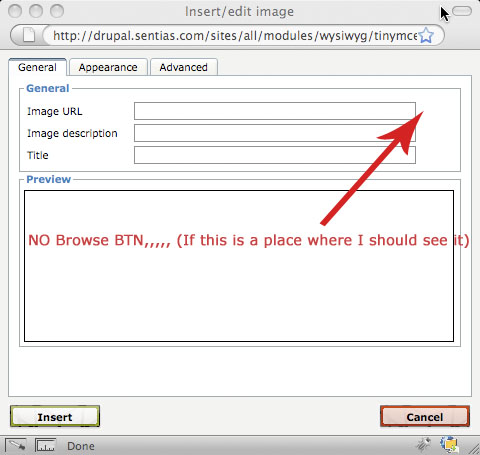
With TinyMCE as the Wysiwyg editor, clicking the image icon (the little tree) results in an IMCE dialog but the browse icon that is supposed to show next to the Image URL text box is missing.
With FCKeditor when clicking the Insert Image icon something much worse happens: some sort of light-box with two scroll bars pops up and the page dies as there are no other controls/buttons on it.
Comment #2
rdeboerWorth mentioning that after uninstalling Wysiwyg module and installing TinyTinyMCE (6.x-1.10) with IMCE 6.x1.1 everything is fine under Firefox (3.0) with the browser icon showing.
However on the same machine using Safari (3.2.1) none of the rich editor buttons appear; see #348924: TinyTinyMCE again not working in Safari (3.2.1)
Comment #3
smacphail commentedMight want to uninstall your hacks, use the latest IMCE and WYSIWYG API and then use this module, IMCE WYSIWYG API Bridge: http://drupal.org/project/imce_wysiwyg That module basically ties IMCE into TinyMCE's inline image insertion button. Works with TinyMCE and FCKEditor.
That module came out of this thread: http://drupal.org/node/287025
Cheers!
Comment #4
mitemite commentedHi,
I have been struggling with this issue for long. (browse button not showing) I have same install as you, except I have TinyMCE (3.2.2), I first installed IMCE 6.x-1.2 and now I have IMCE 6.x-1.1 because someone suggested. I also tried the http://drupal.org/node/241753#comment-792305
Should I install TinyTinyMCE and uninstall TinyMCE ? I don't want to switch wysiwyg editor unless I really have to.
Please help.
Comment #5
Thomasr976 commentedSubscribing
Comment #6
smacphail commentedSorry, I'm not using TinyTinyMCE, so I can't help you with that. :/ I'm using the WYSIWYG API (http://drupal.org/project/wysiwyg), which *replaced* the normal TinyMCE module (http://drupal.org/project/tinymce). The WYSIWYG API works with a bunch of editors, including TinyMCE.
I'm using WYSIWYG API 1.0 (1.1 just came out, haven't tried it), IMCE 1.2 and IMCE WYSIWYG Bridge 1.0 and they work fine together. Sorry I couldn't be of more help. :/
Comment #7
mitemite commentedHi Thank you for reply to my post.
Here is my situation, I just installed my first drupal site a week ago and immediately run into this problem.(so, treat me as beginner) Today, after reading your reply, I check my installation again. I have wysiwyg API (just updated to 1.1), TinyMCE, and IMCE 1.2. I installed IMCE WYSIWYG Bridge 1.0. All my modules are configure as far as I know, but I still not seeing my "BROWSE" icon when I click *IMAGE* icon on my wysiwyg editor. Does anybody know what I have done wrong ?
Comment #8
Thomasr976 commentedI just got this to work on a 6.9 site and I can see the browse icon and view files. You need to have the following modules installed.
Wysiwyg API 6.x-1.1
IMCE 6.x-1.2
IMCE Wysiwyg API bridge 6.x-1.0
Inline 6.x-1.0
The last module Inline is mentioned in the docs at http://drupal.org/node/358296. Scroll down and you will see it. I used version 6.x-1.0 even though it's not mentioned for passive users.
Once you get these installed make sure that you configure each one properly. On the Wysiwyg module for a given role select edit and go into the tinymce (see picture 3). You will find a checkbox specifically for IMCE (see picture 1). Click on it and also click on the Image check box. Save and you should be good to go. You'll have to play with the IMCE mod settings to select where your images will be found I usually pull things off my desktop.
At the Rich Media session at Drupalcon Washington DC, the panel said that Wysiwyg plays very well with Image Assist. I use IMCE on another site that is running Drupal 5 so that is why I want to use it here. As a noob you may want to check out Image Assist. It may be more to your liking. There is also a button on the tinymce screen for Image assist also. Don't forget to install the Image and Image Assist mods if you go that route.
Hope this helps. Don't sweat being a noob. We all were and some like me still are.
Comment #9
mitemite commentedThank you very much. It worked !! It has been a long journey coming up to this. Appreciate everybody's help.
Comment #10
maki3000 commentedThank you! After 2 hours of installing different modules and stuff, I stumbled upon this discussion. For me the..
IMCE WYSIWYG API Bridge: http://drupal.org/project/imce_wysiwyg
..was the solution. In association with WYSIWYG API (of course), IMCE (of course again) and TinyMCE.
Don't forget to activate the special IMCE-BUTTON in "Buttons and Plugins" of the Wysiwyg profile!
So much THX from me volks!
Comment #12
francewhoaConfirming that #3 works. Thanks smacphail
I posted screenshots at http://drupal.org/node/570378#comment-2054346
Comment #13
imroz055 commentedHelp me