

Closed (works as designed)
Project:
Webform
Version:
7.x-3.18
Component:
Code
Priority:
Normal
Category:
Support request
Assigned:
Issue tags:
Reporter:
Created:
26 Jan 2009 at 22:37 UTC
Updated:
29 Oct 2019 at 17:15 UTC
Jump to comment: Most recent, Most recent file


Comments
Comment #1
quicksketchThe first thing you should check is that Drupal can send e-mail at all. You can try using the Contact module (part of core) or you can request a password reset by logging out and clicking the "Request new password" link in the login block.
Comment #2
ontoligent commentedI have the same problem ... Drupal can send email otherwise, but the webform module produces this error:
mail() [function.mail]: SMTP server response: 501 5.1.7 Invalid address in D:\Websites\liscommons\includes\common.inc on line 2091.
I'm running the following:
Drupal 5.15
MySQL database 5.0.27
PHP 5.2.0
Web server Microsoft-IIS/6.0
Comment #3
ontoligent commentedI was able to resolve this by leaving the "From name" field blank in the global config page. The problem is apparently in how "webform.module" formats the "From:" field for our email sending program. The debug page showed this:
Maybe a comma missing somewhere in "webform.module".
Comment #4
quicksketchThis is correct e-mail formatting, the problem is more likely that your webserver isn't sending e-mails with this format properly. You'll probably have to leave the "From" name blank on all Webforms, which will make Webform send in the short "user@domain.edu" format.
EDIT: This answer was for the 2.x version of Webform. In the more recent 3.x, you can change the global setting for Webform under admin/settings/webform that will send all e-mails in the short format no matter what.
Comment #5
bchoc commentedWebform is also not sending emails, here. Other emails from Drupal go out: e.g. passwords, simplenews, civicrm, OG, etc. No errors are showing in the logs.
Oddly, webform used to email successfully ... as of the end of January we were receiving the emails; for the last few weeks we've not been.
Adjusting the "From name" as not done anything. At present, I'm trying this using Webform 2.6, but I've tried reverting as far back as 2.2 with no luck.
Comment #6
qpal commentedThe same problem here. Webform used to sent confirmation email fine. However, it stoped senting emails even though it does keep the submission in the database.
Comment #7
acdavenport commentedHaving the same problem here. I manage several drupal sites. I have Webform on two of them. On either site, when the form is submitted, regardless of whether I specify a confirmation/redirection for the form or not, the form goes to a blank white page. If I reload, I get a message asking if I want to resend the form. After getting past the blank page, one of my sites returns the "Unable to send E-mail...." error message. I used the other site as test-bed to see if its happening there too. No, it works, I get the form submission email, even though I get the blank-white screen . Both sites are configured nearly the same.
What is causing webform to not send out an email?
Drupal 6.10
Webform 6.x-2.6
MySQL 4.1.22
PHP 5.8.5
Apache 1.3.41
Comment #8
pixmo commentedIt was working as of 3/1, but submittals stopped. Put blank value in "from name" with no success either (?).
Comment #9
Boffy31 commentedStill getting the same problem using drupal 6. Any suggestions?
Comment #10
Boffy31 commentedSolved my problem here. Turns out the e-mail was being marked as spam. Presumably because it was trying to claim it was coming from a different from address to the server.
Comment #11
sircosue commentedI have a similar problem. Webform does not send out mails to recipients in the form made, but I get the confirmation mail that it has been sent and it shows up normal in the results of the submission log. The Drupal contact form sends mail which I receive normally. Both to recipient as well as the confirmation mail which I have activated. Conclusion, the mail is not treated as spam.
I have left the "From" in blank and also tried to install the SMTP module as recommended in the troubleshooting but couldn´t get it to work. No luck!
Anyone has an idea where to look next?
Comment #12
robbertnl commentedI am using the email component as the from address. I think webform is unable to send mail with an empty from mail address.
Comment #13
szadok commentedI also have the same issue on one of the websites I am developing.
I also checked the mail logs and it appears that it is not even trying to send.
It has to be a configuration issue, as when I send from another website on the server (also Drupal), it sends the form.
Comment #14
agssan commentedI am having the same problem. Webform doesnt seem to want to send email for every message submitted. It just submits to database, and then nothing.
Registration, password, and user contact form send email just fine.
Thanks,
agssan
Comment #15
djalloway commentedComment #16
wolv3rin3 commentedYep, same here. Couldn't figure this one out.
New site. Installed 6.x-2.7. Nothing. Did all my checking to confirm it was webform. Never had this problem with webform before.
Comment #17
robbertnl commentedWhat are you using as the from-adres?
Comment #18
agssan commentedI just assumed you ask me ..... I use the admin's address....
Comment #19
Heleen commentedI'm experiencing the same problem. I'm running Drupal on my own Mac. I am able to send e-mails from 'Forgotten password' and the normal Contact form (system wide contact form), but when I try to submit a webform form it does log the result, but doesn't send me an e-mail. I am new to this module, but I've checked everything a million times and it should work. Because it's just a simple contact form, the from address is the e-mail address the user enters in the form and the to address is my own e-mail address. I've also tried using the Default from name, from address and subject. The log files (Recent Log Entries) don't even log any e-mails being sent. However it does log an email being sent when I send it from the system wide contact form.
I'm running PHP 5.2.8, Apache 2.2.11 and MySQL 5.0.67 on Mac OS X 10.5.7 using Drupal 6.12.
Solved
Edit 21-jun-2009 13:58(GMT+1): It appeared that for some reason the emails did not arrive at the 'to' email address. When I changed this address they did arrive. I don't know why, but my problem is solved, unfortunately I can't delete this comment.
Comment #20
Lios commentedI can't send the form to an email address. It gives the error "warning: mail() [function.mail]: SMTP server response: 553 Requested action not taken: mailbox name not allowed in D:\apache\www\includes\common.inc on line 1970.". I can send mail from other parts of Drupal (contactform, user contact, retrieve password). The spam firewall is set to allow all mail from the domain.
It used to work, a few weeks ago, but somehow it doesn't anymore. To my knowledge, nothing has changed in the configuration since then. Any idea what is going on?
edit: I solved my problem. In the php.ini file is a [mail function]. I had to enter the 'sendmail_from' adres at '; For Win32 only' to make the webform work. Obviously the other mail modules in Drupal work without having this specified, as they use the address specified within Drupal as a 'from' address, but Webform requires this to be set. I find that strange, as it should just use the address you specify in the settings, but it doesn't. Well, anyway, this solution worked for me, maybe it can help others too.
Comment #21
katetwu commentedWebforms were working up until July 27, 2009. After that they just stopped sending. It is quite a mystery. Even the E-mail to address: is missing and won't Save and it reverted back to the defaults for E-mail from name: , E-mail from address: .
Unfortunately we relied on these forms and I have had to resort to creating forms with old cgi scripts.
The following is the error message I found in the logs:
Unknown column 'email' in 'field list' query: INSERT INTO webform (nid, confirmation, teaser, submit_text, submit_limit, submit_interval, email, email_from_name, email_from_address, email_subject, additional_validate, additional_submit) VALUES (253, '', 0, '', -1, -1, 'kate.wood@twu-stt.ca, twu@twu-stt.ca', 'default', 'default', 'default', '', '') in /www/sites/all/modules/webform/webform.module on line 484.
Drupal 6.13
Webform 6.x-2.7
MySQL 4.1.22
PHP 5.8.5
Apache 1.3.41
Comment #22
OldAccount commentedAdding an email address to the "sendmail_from" section of the php.ini file (line 755 for me) fixed the problem for me too. This happened to me both on my localhost install and the production one.
I wasn't getting webform submissions or update status/cron emails either, so I think the problem extends beyond the Webform module.
Comment #23
zoonix commentedHave the same problem. I found that if I change the from address on the form itself to a custom address it works.
Comment #24
chadcross commentedJust wanted to say that I am having same issue on two sites. It was working fine for many months and then all of a sudden it stopped. Not sure when it stopped though. Tried switching addresses and from names and it would work on a test but then stop again.
Comment #25
gcarzino commentedWebform did not send any email and issues no error (Drupal mail configuration is OK, as "lost password email" are actually sent, etc) until I customized Email from name AND Email from address:
I leaved blank "Email from name" (as indicated by rca2t, but I did it in the single webform and not in the general webform configuration, as I have only one form), and put the default address in "Email from address" (don't know if this is necessary, but I tried different configurations for two days, and now that it works...).
Update:
I can confirm that customizing as blank "From name" field is sufficient to make webform module really send the emails.
Comment #26
quicksketchThe problem most users are describing is http://drupal.org/handbook/modules/webform/faq#webform-email
It's not a bug in Webform, but a limitation in IIS servers that prevent it from sending e-mails with a "Name" included.
Comment #27
agileware commentedMarked #299758: Not receiving emails as a duplicate of this issue.
Comment #28
mhedstrom commentedHaving the same problem posted here, however I'm on a Linux server, not a Windows server, so none of the "workaround" solutions pertain, and setting the "from" field as blank doesn't do anything either. The server sends out emails fine normally, other emails from Drupal send out fine, it's just Webforms. The Drupal logs only say "error sending email" which doesn't help at all.
EDIT: Actually nm, idiot husband changed something between the time I tested the regular drupal stuff and when I tested the webform stuff, and didn't bother to tell me, so I made it change it back so now it works. False alarm!
Comment #29
paulybarnes commented@mhedstrom
What did he change exactly? I am having the same issue.
Comment #30
skesslerSame problem herew with no error generated. I am running 6.x-2.8.
No error is generated but no email is sent. I will also try and upgrade the module.
Thanks,
Steve
Comment #31
skesslerI have two sits not sending email at this point both with 6,x-2.9
Thanks,
Steve
Comment #32
tommyent commentedWebform is sending emails to my personal gmail account but not to admin@mysite.com or any other name@mysite.com
Anyone have any idea why this would be happening?
Comment #33
tommyent commentedWhen I moved the site mail accounts were set on for the server. I turned it off and the problem is gone.
I checked this when I recieved a bounced email a day later stating that the account no longer exists. I uses google apps so I am assuming the server was trying to send it to a mail box on the server that did not exist instead of google servers.
Didn't know if this would help anyone.
Comment #34
realgar commentedsame problem. using drupal 6.15 and upgraded to webform 2.9.
no error messages, but email not sent out when form submitted.
Comment #35
realgar commentedi have checked with my webhost. the issue is that webform sends out emails as user 'nobody'. to prevent spam, the webhost discards emails from 'nobody'. i was advised that the only way to get the mails sent out is to authenticate the mail, and to contact the developer to make changes to the code to send authenticated mails. is this possible? thanks lots.
Comment #36
quicksketchWebform is not responsible for the who the "owner" of the e-mail is. It uses Drupal core's e-mail system. This probably means you can't get any e-mails from Drupal at all (welcome e-mail, lost password, contact.module, etc.) You might look into Drupal's other e-mail related modules that might help you, such as the SMTP module.
Comment #37
realgar commentedoh will try to smtp authentication support module. thanks for info =)
Comment #38
smeyer56 commentedI installed webform in January, We are now live and trying to enter a send to email address and getting this error.
Unknown column 'email' in 'field list' query: INSERT INTO webform (nid, confirmation, teaser, submit_text, submit_limit, submit_interval, email, email_from_name, email_from_address, email_subject, additional_validate, additional_submit) VALUES (253, '', 0, '', -1, -1, 'xxxxx@xxxx.com, xxxxx@xxxx.com', 'default', 'default', 'default', '', '') in /www/sites/all/modules/webform/webform.module on line 484.
Drupal 6.14
Webform 6.x-2.9
When I check the database. The fields email, email_from_name, email_from_address, email_subject do not even exist. I have tried update a dozen times.
Any ideas?
Comment #39
quicksketchSounds like you may have installed the 3.x version at some point, which doesn't use these columns (it moved them to a new table). You can't downgrade from 3.x to 2.x, the only fix will likely be to completely uninstall Webform and reinstall it.
Comment #40
smeyer56 commentedI don't recall having 3.x on there and reverting to 2.9. But it is possible. Since 3.x seems to be the problem, can I just update to that. Also what are the steps to remove webform completely and reinstall 2.9 if I choose to go that route.
Thanks
Comment #41
quicksketchFor downgrading: #721662: Downgrading Webform causes "warning: Invalid argument ..." in Form components
Comment #42
chrisd53 commented"Webform is sending emails to my personal gmail account but not to admin@mysite.com or any other name@mysite.com"
My company's website is having the same issue. Our web developers keep saying that it must be on the email host side - in this case Network Solutions and Hotmail are the two that won't receive email - but that just doesn't make sense to me. What changes could I make to my personal hotmail account that would prevent the email from coming in.
So here is our situation exactly:
Webform sends emails to gmail, yahoo/swbell/att and the email is received. Webform sends emails to hotmail and NetSol emails, but the emails never get to the mailbox. I have tried removing the Send From Name, but that didn't work.
Any ideas? I just need to point the developers in the right direction. Maybe it is a hotmail based issue.
Comment #43
imlol commentedI had this problem and changed the 'from address' as it was suggested in this thread and worked.
Comment #44
didlix commentedSame problem, using SMTP module.
Fixed by removing From part of the webform.
Comment #45
paresh.kintu commentedWhere is the From part of webform , I am using Drupal 6.16 , i can't understand the which From part of webform should be configured to sent mail. I found following option for from attribute of mail in webform
E-mail from address:
Default: paresh.kintu@localhost.com
Custom: [ textbox here ]
Component: [ combobox containing signle value ] : Email
I tried with All but i yet not ger the problem solved,
Anybody can guide ?
Comment #46
designwebfx commentedI had similar problems. The system throws an error because the email fields are not check on both places (Configuration section "conditional e-mail recipients" and Form Components-"E-mail a submission copy")
What I did to fix it:
1) Go to Form components and click on the email field of type email. That is another error most people make, they don't choose the correct type. In this case it should be "email".
2) The system will then take you to a second configuration page which has the following title: Edit component: Your email Title.
At the lower part of the page, you will find a check box label "Email a submission copy" . Check if you wish for the email recipient to receive a submission copy of your form. Do not check if you do not want the recipient to not receive a submission form. Click submit. It will then take you back to the Form component section which you will then Click submit, found at the bottom (this saves the form changes). Remember which fields you checked "Email a submission copy" check box.
3) Click on "Configuration" link within the webform, found at the top section.
4) Scroll more or less on the middle of the page and you will see "conditional email recipients" which you will notice all the possible email recipients. Check ONLY THOSE WHO you've checked to receive "Email a submission copy" . What happens is the the system will throw an error when the boxes are not paired enable in both places (Form components section ("E-mail a submission copy") and Configuration Section ("conditional email recipients").
If you do not want the recipient to receive a copy form submission then make sure that they are uncheck in both places.
Comment #47
Flow_TnT commentedI am getting the same problem, but no error message anywhere.
I am using webform as part of a hotel reservation system.
No emails are going out to the receiving address I specify.
I tried checking what Laxontheweb stated above, but it did not help.
Any recent ideas?
I am using Drupal 5.16 and Weborm 5.x-2.6.
Comment #48
j0k3z commentedI have this same issue.
All forms were working great until today when I just updated an email address on one of the forms. Since then no emails are being sent. Changing the email address back does not solve the issue (nor do any of the suggestions in this thread)
really annoying as we rely on webforms quite a bit.
Comment #49
ashedryden commentedThis worked for me!
Comment #50
flopag commentedNot sure if this could help for people who don't get any error message: verify if one of the form components is named "Subject". If yes, rename it something else like "Subject of message".
See bug http://drupal.org/node/952482.
Comment #51
dwhutton commentedI'm experiencing a similar problem.
If Webform is configured to send emails, when the user hits the 'submit' button a white screen is returned with one word on it -- 'webform' -- and nothing else. There is no error recorded in my Apache log nor in the Drupal error log.
When the option to send an email is removed, everything works perfectly.
I've looked at the fixes suggested here and tried most of them with no luck.
My question is: how does one go about gathering diagnostic information on this problem, when the error logs show nothing. Is there some kind of trace that could be set up or a patch to the Webform module to force it to log what it is doing?
Comment #52
petu commentedI had the same problem. Webform did not send mail with no error message. I've solved this problem for me.
Solution:
Go to webform settings (/admin/settings/webform) and set "From name: " to from e-mail. In my case "From address:" and "From name" have the same value: robot@example.com.
After this settings were done all the webforms work and confirmation messages also work after form sending.
Comment #53
quicksketchIf you're having this particular problem, you can probably set Webform to use the "short" e-mail format under admin/settings/webform. This will remove the "From name" field entirely and use the short e-mail format for all sent e-mails.
Comment #54
vaccinemedia commentedHere's something to think about..... I've had the same problem recently on a pretty important website so it was critical that I got the issue sorted. Webforms were storing the submitted data, but the emails were not being received. I upgraded from 2.8 to version 3.x of the webform module and tried again. Same thing, forms were being stored but not sent / received to my email address. I tried several combinations of sender email address, name, subject etc and several email addresses to send to. All this with webforms being stored but not sent / received. Also all along the way no error messages, no errors in the server logs, nothing.
Then just this morning I made a dump of the database, zipped up the website and transferred the lot over one of my Cloud servers under a test domain name and guess what? I submitted the webform and received it instantly...
So as far as my situation has been, it appears to be a server issue so I urge you all to check out your server configs instead of tearing your hair out :) I don't know how to fix the live server yet, but a blank dev one works just fine. I'm tempted to fix the issue by updating the A Record of the website just to have an easy option.
Comment #55
dwhutton commentedThank you fortina for this valuable information.
Please let us know how you fix the live server, especially if you can identify the cause of the problem. Since I am using shared hosting I cannot get this problem fixed unless I can tell my service provider exactly what they need to do.
Comment #56
vaccinemedia commentedHere's the result of what happened this week. We managed to get the live server working again. I guess I should have tried using other email sending scripts first rather than blindly trying solely to get the webforms working. The response from tech support was:
=============================================
Looking at the yum install log, it seems that Plesk installed both Qmail and Postfix MTA (mail transfer agents) when being set up for the first time. This has meant that for general purposes, the running MTA (which is Postfix, probably simply as it is started first in the boot order) works fine, but when sending mail via Apache, it tries to use Qmail's handlers. As Qmail isn't running it's simply drops in and out of the queue without actually being delivered, or that's what I suspect anyway.
I'll see if I can find out what has happened, and if we can safely remove Postfix without breaking any of your existing mail delivery settings. Can I confirm whether you use this server for any incoming mail on the manchestersportandleisure.org domain that is running on it?
--
Kind Regards,
Chris Merrett - Senior Linux Engineer
and then...........
Could you please let me know if the changes I have just made have worked? I've reinstalled Qmail and disabled Postfix, which I suspect should solve the problem.
=============================================
At that point every webform submission arrived all at once, including messages from Plesk about resource usage etc.. I didn't try the other ways of sending mail in Drupal because the tech support guy had tested the ability of the server to send email using the command line to me with success.
Comment #57
quicksketchComment #58
aidanlis commentedThis was my specific problem and solution:
- Using the SMTP module
- Sending an email via the SMTP test page works
- No email from webform
The problem was the mimeemail module was configured incorrectly.
- Select "SMTP" on this page: admin/settings/mimemail
Solved!
Comment #59
plato1123 commented#58 worked for me
Comment #60
mcfilms commentedI just wanted to add a quick note to anyone that stumbles across this issue like I did.
In my case the forms would send to any off-site e-mail address, but not to any address associated with the domain. This was for an aerospace company's site and the way the domain was configured is that a host was handling the web serving, but the mail servers were handled at another ip.
So to fix this, I had to go into cPanel and change the MX Entry settings from "Local Mail Exchanger" to "Remote Mail Exchanger" and then point to the right destination (mx.domain.com).
Hope this helps someone.
Comment #61
kartagisHi,
I downloaded the 6.x-3.9 today, and the e-mail sending problem persists. I've confirmed that the e-mail server works by using the core contact module.
Regards,
Comment #62
kartagisMy bad, it seems I had to set the e-mail address again.
Comment #63
quicksketchI intentionally leave this issue open for end-user reference, please do not change it to a bug report or mark it closed.
Comment #64
kartagisSorry...
Comment #65
Julie Henn commentedAfter trying EVERYTHING else, #58 finally worked for us. Thank you!
Comment #66
mcctnt2000 commentedSOLVED: For those of you who seemingly configured everything properly, have no errors when submitting the form, but do not receive the e-mail (assuming that you do however have drupal's default contact module working) I have a possible resolution.
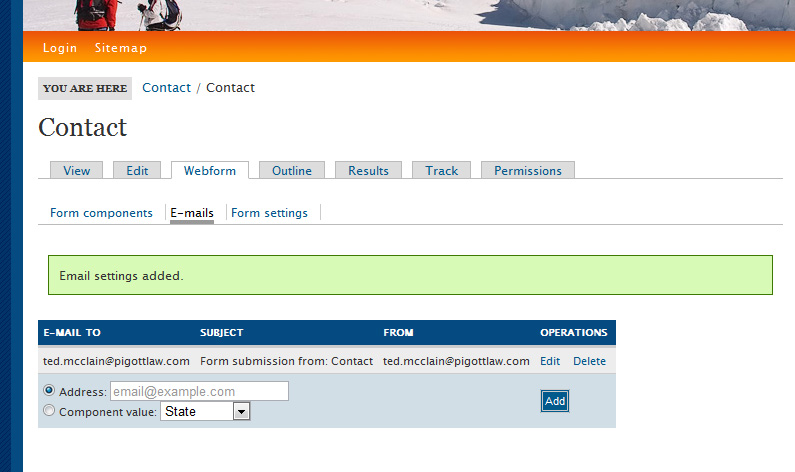
It is more of a theming issue than anything else. What is wrong is that you have a custom theme that is not enabling you to see the setting tabs to configure WHERE THE EMAILS ARE TO BE SENT. What you should do is change your theme in sitebuilding>>themes to Marinelli theme. If you are afraid of breaking drupal by changing the theme just create a new user and assign that user the Marinelli theme, then log in under that user's name.
After you have changed to the Marinelli theme navigate to: content management>> content>> and click on whatever you named your webform. Now, at the top of the page you should see the "Webform" tab, click on it. Now right below the "Webform" tab you should see three other links: 1)Form Components, 2)E-mails, and 3) Form Settings. Click on the "E-mails" link. Now you should see an option to assign an e-mail address for the form to be sent to. Enter your desired email address and then click add.
Now you can switch back to your normal theme and try resending the form. The form may work at this point. Let me know if this works for anyone else. I have attached a screenshot to show what you should be looking at.
Comment #67
P33B commentedHi, I don't want to get flamed for posting up the same errors but I have spent ages reading pages of fixes and trying them out to no avail. Here's some of the server information I have got:
Drupal 7 - 7.2
Webform - 7.x-3.11
Operating system - linux
Apache version -2.2.16
PHP version - 5.2.9
I have a webform that sends to an email set up with my domain - test@domain.com - When submitted its is logged but never gets to the email. I also have a gmail account that I told it to send to for a test and it works fine.
When I tell drupal to request a password or set up a new account it does send these emails to the recipient address fine (only tried sending to gmail accounts). I didn't have any luck with the SMTP module (which confused me a lot) and I can see/access all the configuration pages fine.
Feel like I'm hitting my head against a brick wall here with everyone saying fixes worked for them but not for me. Please can anyone help or tell me exactly what they did to fix it. For my own sanity's sake, help!
Thank you
Jason
Comment #68
Matt G commentedI wanted to share my solution:
I'm running Webform 3.11 on Drupal 6.22.
Site emails worked fine, except, Webform emails simply would not send. Nothing even turned up in the system logs.
My server is linux/apache, so the Microsoft ISS "email from name glitch" couldn't have been the culprit.
I fixed it by disabling Mimemail (6.x-1.0-beta1). After that, everything worked fine.
Comment #69
alejandrovk commentedHi there, just wanted to share how I solved it:
After reading #67, I have a very similar scenario, read #60, went to my cPanel, and changed to Remote Delivery as mentioned by Kartagis and now is working!!!! Finally!
Gmail was working, but domain based accounts not, due to the reason explained in #60.
Thanks again Kartagis for pointing me in the right direction!
Regards,
Alex
Comment #70
mcfilms commentedYeah good job Kartagis. :/
:)
Comment #71
Road Kill commentedSame problem here not receiving confirmation emails every time a webform is submitted.
What worked for me was worked for me was post #68 :)
Comment #72
omar alahmed#58 Good job aidanlis it works for me, it was from the mime mail module configure I forgot to choose SMTP as mail engine.
Comment #73
cabplan commentedOk I am having the same issue and I have tried multiple things from the above thread but still not receiving emails. First I had the same issue as #67, same versions of modules/drupal/servers/etc .
After submitting my webform (anonymously) my recent log would show it not getting delivered with three new lines, The first line was type "smtp" with message "Sending mail to: my@gmail.com". The second new line was type "smtp" with message "Error sending e-mail from info@mydomain.com to my@gmail.com", and the third line was type "mail" with message "Error sending e-mail (from info@mydomain.com to my@gmail.com). I would also receive an error on the actual form, saying it could not be sent.
I proceeded to download and install the SMTP module and I am able to send test emails with no problems. The system also sends emails for new accounts created so I know it can send emails.
I then downloaded and installed Mail System and Mime Mail per #58 and now the form submits with no errors but no email gets submitted and the recent log does not indicate any acticity. Does anyone know if I even need the Mail System and Mime Mail modules running. All I want is for this form to submit an email. Please help!!!
Comment #74
cabplan commentedActually I just disable both the Mail System and Mime Mail. Now my Recent log list does not even recording when I do a test in the SMTP module so I have no idea what is going on anymore.
Comment #75
cabplan commentedActually the weirdest thing just happened, it is working now. I did not do anything and it just starting working. My log is still no recording the emails being sent but it is working. No idea why, sorry I cannot be more of help, I am so surprised.
Comment #76
Brabo commentedThanks mcctnt2000 for your tip #66 was the solution for me!
you saved many hours for me (after trying all previous solutions)
Comment #77
shariharan commentedSame problem for me !
The email setting itself is not getting saved in my case. I have configured SMTP properly as Cron is sending emails regularly.
I tried #66 - no luck
Comment #78
arkiii commentedAfter trying most of the options listed, #60 worked for me.
Initially, i was able to get emails if sent to a Gmail account but not if they were from the actual domain.
Comment #79
mcfilms commentedAlways nice to hear that a tip you float out there helps someone.
Comment #80
grip media commentedAftre months of pulling out hair our... we finally got it solved...
mcfilms post #60 finally solved the most vexing drupal problem we have ever had...
THANK YOU!
Comment #81
peteranthonywynn commentedTotally worked, we knew it was a theme issue as we could not see the menu items we needed, it took 12 hours to finally come across this, thank you and the community so much for taking the time post feedback... it makes everyone stronger.
Just for Clarity we did not switch to Marinelli as it was not installed, we were using a custom theme around "Blue Masters" which took out the email fields of the module when creating the Webform, so in essence we could not "turn it on" because the switch was hidden under our theme. We tested on another Blue Masters them we built and the same issue. The Same fix worked on both sites. This was not an issue on a custom theme site we created NOT using Blue Masters.
We also just changed the admin theme using Minelli and Chameleon, the full "webform Settings" came up on both that were hidden prior.
Thanks again...
Comment #82
quicksketchResetting tags and titles. There are multiple solutions in this thread, don't change the title to reflect just one of them. As all the above solutions are related to either server configuration or other modules, this isn't a "task" for the Webform project, it's support.
Comment #83
jrmoser commentedI've been looking for a couple days now for the answer to this problem, so forgive me if I just missed it somewhere. I'm trying to send a number of emails when a user completes a webform I've created. I have a confirmation of submission emailing to a custom email. That sends just fine. Then I try to send an email to the user themselves. That doesn't send. Also I'm trying to send a customized email to another component value of the webform. That doesn't send either.
I'm running the site on a MAMP localhost. Any ideas why it won't send those emails?
Comment #84
jrmoser commentedbump
Comment #85
quicksketch@jrmoser: Please don't do that.
Comment #86
ceege111 commented#58 worked for me too, thanks!
Comment #87
boran commentedStuck...
Using 6.x-3.15
Normal contact form can send emails fine, as does user/password emails and rules.
Webform silently fails, no watchdog entries.
Being in a hosted environment, I've no access to the mail server log.
Tried:
- Disabling mimemail (see #68), it did not have an smtp option either.
- Dont have the smtp module
Why cannot webform use the same functions to send email as drupal core (user/password emails, contact form..)?
Or each check that delivery works and report to watchdog if there is a problem?
Or has anyone tried to write a custom hook_webform_component_insert() or so to delivery more reliably?
Comment #88
jgreidy commentedGot webform emails working on Drupal 6.22 with MIME Mail 6.x-1.0:
I have 2 recipients to the same form, and the one with the blank Custom E-mail from name gets the email, the one with this set to Default does not get the email.
Comment #89
quicksketch@JGReidy: This issue is for discussing problems that are caused by other modules or server configuration (which sounds like it would include the problem you described). Things are categorized as "bugs" if they can actually be fixed by the Webform project.
If your server is not capable of sending "long" e-mail addresses (with a name included), you should change Webform's setting for this also, located under admin/settings/webform.
Comment #90
Anonymous (not verified) commentedCheck your incoming e-mail SPAM/Trash folder. Our Webform test e-mails were flagged as SPAM, and - as they did not go to our inboxes - led us to believe that they were never sent out.
Comment #91
funkwarrior commented#60 works for me too!
Comment #92
boran commented@JGReidy/#88: leaving fields blank does not seemed to be allowed for me.
However, experimenting with the from and reply to fields on /node/nnn/webform/emails/nnn has proved fruitful.
Comment #93
cr.design1 commented#66 works for me too!
Comment #94
Alessandro Siletto commentedmy problem was due to smtp auth module + mimemail module. maybe this one http://drupal.org/node/838614
i think it can be solved disabling module mimemail
i solved hacking function webform_email_html_capable in webform.module
Comment #95
doomed commentedPost #60 from "mcfilms" was right on.
My scenario:
Website on one webserver. Mail on a different mailserver.
My problem:
Emails from Drupal AND Webform were not being sent correctly to email addresses associated with the web domain.
But emails would be sent just fine to any off-site address.
Solution:
On the server currently hosting the website go to:
1) Cpanel / MX Entry
2) Change from Local Mail Exchanger to Remote Mail Exchanger
3) Add the correct mailserver with priority 0
4) If needed, change other mailservers to priority 1 (anything above 0).
Why does this happen?
Because the webserver might send mail to itself if it "thinks" he's the one responsible to get that mail. When this happens, you will never receive anything at the "real" destination.
Now by changing the above settings, we're instructing the webserver that mail must be delivered at another place.
Comment #96
doomed commentedPost #4 by quicksketch was also valid for my case.
Changing from Long format to Short format also helped solving the problem.
Using Webform 6.x-3.4, there's a global setting at drupal/admin/settings/webform .
Comment #97
mcfilms commented@doomed I'm glad that helped. Your explanation is very clear and specific.
Comment #98
dbourrion commentedHi
Same problem here (mails coming out sometimes, and sometimes not).
I've take a closer look, and find that the mails goes out with any account that IS NOT a CAS one (our D6 is connected with our CAS server).
Big problem, cause many backoffice user are logging via the CAS...
Oh, forgot to say that we're using Webform Rules (the mail goes out sended by a rules)
(And it looks like if webformrules is not able to catch [data:your_e_mail-value] when the backoffice user is identified by CAS)
Comment #99
mcfilms commented@dbourrion -- See if my post #60 above applies to you.
Comment #100
dbourrion commentedHi
Can't see any cPanels on my Drupal
And the problem look's not to be linked with the fact that the mail goes to somebody inside (or not inside) some domains.
In fact, I've the problem only when the backoffice user (the librarian) has a CAS/drupal account.
Any backoffice user wich has only a Drupal account is able to send correctly the outgoing mails.
Comment #101
dbourrion commentedHi
Finally found what was going on (and so, solved it).
Some of the people in the Librarian rôle didn't complete their mail into their user description...
And has we do not use something like CAS attributes, that field was staying empty.
Rules doesn't like empty mail fields...
After having completed that field, everything goes smooth.
Thx
Regards
D.
Comment #102
adry803 commented#58 Thank you!!!
Comment #103
halthCheck if your theme doesn't use any webform hook (usually in your template.php file).
In my case the developer before me implemented hook_webform_mail_headers();
And this was the source of all the trouble.
Once I commented this hook, eveything started working again!
Give it a try!
Comment #104
escoles commentedRegarding Webform 2.x (which we have to use for some legacy functionality that's been regressed in 3.x), I've found repeated problems sending email that I have been able to establish conclusively are not caused by server problems, and which leave no trace in any error log.
With some (but not all) websites, where there's no noteworthy difference in server configuration (all in shared hosting on the same web host), a particular webform will cease to be able to send email. There are basically two profiles that I've observed:
Webform XYZ ceases to be able to send any emails at all
The following workarounds have been successful in different cases:
One or more defined Emails will not send when Webform XYZ is submitted
In some cases, it appears that any change to the 'To:' field of a defined email will block it from sending thereafter. In that case, the only remedy I've found so far is to delete the defined email and redefine it.
Comment #105
yetihunter1000 commentedHi, I am having the same problem with the webform suddenly no longer sending to certain addresses but its not only not reaching hosted email addresses on the same server but any external domain.com addresses apart from gmail which works fine.
I have tested the standard core mailing system by requesting a new password and that works fine it's just the webform which was fine but no longer works.
Is this something that has changed on the hosting server end as it seems not to be a drupal issue unless there is something i haven't tried.
Any help you can give me would be great as I have been going round in circles.
I am using Drupal 7 with the latest webform
Comment #106
ampoliros commentedI am moving my issue to this thread from a closed thread as this thread seems to be a catch-all for failed email from Webform.
Using Drupal 7.14, Webform 7.x-3.18.
My issue is Webform will not send any email to our host domain, voomtech.com. Both forms on our website have always been able to send emails to our private gmail accounts, but if we want webform to send email to _any_user_@voomtech.com, that email simply vanishes into the void with no log or anything (but the form Results are in the database).
I've tried the tips from #104, I've tried the tip in the other thread:
Both tips did not fix anything. I've even tried different formats for the "From" field, i.e. short or long address, real or imaginary address, etc...
There was a tip somewhere to try padding the "To" field with a fake email address, that didn't work either.
Yes, I've checked the spam filters at our email provider as well.
We shouldn't have to forward email from a dummy gmail account. There must be some way to get Webform to behave.
Comment #107
scott m. sanders commentedTip: Install this handy Drupal Mail Logger module: http://drupal.org/project/mail_logger
Comment #108
flock commentedHi.
Issue: Webform not sending confirmation emails to form submitters.
It does register the submission in the submissions tab.
I solved this issue by going into the webform-->emails-->edit the form component that represents the submitters email, copied my from email in the Default are to the Custom, saved, tested = it worked as some of the posts above described.
I think it's a server issue. I'm on Godaddy Linux.
Comment #109
ardnet commentedAha!! I managed to get it work finally!
I've kinda inspired from http://drupal.org/node/364673#comment-4113476
And in Webforms email setting in "E-mail header details", I used all "Custom" instead of "Default".
I installed MailSystem module as this is required by MimeMail module, and here's what I did:
1). Go to: /admin/config/system/mailsystem
2). Under New Setting, choose "Webform >> Webform module" in Module drodown field, just leave Key empty.
3). Click Save afterward, and look up, there's "Webform module class" being added there. Make sure it selected to "SmtpMailSystem".
Hopefully that helps with everyone that having the same problem as I did.
Cheers
Comment #110
Adesco commentedI am having a similar problem with my forms. They are not submitting to the email I specified. They are giving this error message: "Warning: mail() [function.mail]: SMTP server response: 550 Requested action not taken: mailbox unavailable or not local in DefaultMailSystem->mail() (line 77 of C:\inetpub\vhosts\uniontrusteeslimited.com\httpdocs\newsite\modules\system\system.mail.inc).
Unable to send e-mail. Contact the site administrator if the problem persists."
I have made the From name field blank, but still no luck.
Can anyone help with the solution to this problem?
Comment #111
varkenshand commentedWebform does an awesome job but it does not send emails on my installation (D7.22, Wf 7-3.18). I am amazed this apparently is such a persistent problem. Is there a simple way to troubleshoot this issue without having to plough through a hundred comments? Surely it can't be that difficult.
Comment #112
halthGive a try to the SMTP module.
If properly configured, should work fine!
Comment #113
varkenshand commentedYou are right, the module is called SMTP Authentication Support and I am getting emails now. Thanx!
Comment #114
eljefejb commentedFollowing these instructions fixed my issue when setting up a new production server:
http://www.simplemachines.org/community/index.php?topic=446074.0
Apache wasn't being allowed to send emails. Darned SELinux gets in the way, sometimes. :)
Comment #115
vasanthns commented#109 exactly fixed my issue by adding a Setting for WebForm module on MailSystem configuration.
Thank you ardnet :)
regards,
Vasanth.
Comment #116
joshuautley commentedInstalling and configuring SMTP Authentication worked for me.
Client has email through Yahoo and I have his site on Rackspace Cloud Sites. Note that I had to configure STMP Authentication to use my email server because I could not get it to authenticate for Yahoo.
- Cheers
Comment #117
pratip.ghosh commented#109 worked for me
Comment #118
danchadwick commentedClosing because I don't think there's an open issue here. Feel free to re-open you disagree.
Comment #119
pankaj01 commentedI think I did all the things that worked for others above yet I have the error "Unable to send email. Contact the ..."

1) SMTP is configured
In the Logs (admin/reports/dblog), I could see that my Drupal installation has SMTP configured and is working fine. This SMTP log of succesfully sending email, is when I test SMTP configuration.
2) The same logs also suggests that Webform is using "mail" not SMTP
3) But I have configured the Mail System Settings ( by selecting New Settings->modules and selectting Webform modules) in "admin/config/system/mailsystem"

I have tried clearing Caches. What is that I could be missing?
Comment #120
pankaj01 commentedComment #121
pankaj01 commentedI have found that the issue is with version 4 of webform, which is at this point of time 7.x-4.0-rc3
It works in current release verison 7.x-3.20. Reopen?
Comment #122
danchadwick commentedFirst, I wouldn't reopen a 5 year old issue about what is almost certainly a different problem.
I believe that mail handling changed between 3.x and 4.x. However just because it doesn't work in 4.x doesn't mean that there is a bug in 4.x. It could well be a configuration or module compatibility issue.
I use PHPMailer instead of SMTP. I also use MimeMail to send HTML e-mails. I suggest you try one or both of these.
Comment #123
pankaj01 commentedI used PHPMailer instead of SMTP. and MimeMail. and it worked.
Thank you DanChadwick .
Comment #124
leonano commented#109 work perfectly for me! You are great! All of YOU!!
Comment #125
Kuldip Gohil commented#109 worked for me! Thanks!
Comment #126
DaroniousMaximus commented#60 worked for me. I was using Google's MX records for email.
Comment #127
borwickja commentedThe following worked for me. Install is Drupal 7.39, Webform 7.x-4.10
In Administration menu click on the Modules link.
On the Modules page scroll to the entry for the Webform module.
Beside the Webform module entry there should be a link titled Configure.
Click the Configure link.
This brings you to the Webform Settings page, where you can fill in values for your Webform settings.
One section of the Webform Settings page is titled Default Email Values.
The first form element under Default Email Values is a text box with a header that says From address
Remove the value in that text box so that the text box is empty.
Scroll to the bottom of the page
Click the Save configuration button
Clear the site cache
Test
Comment #128
jseco commentedI had problems with webform sending emails, while drupal core emails (request password, etc) were working propertly.
My config is with Drupal 7, PHPmailer and MIME.
This is what it works for me after trying so many changes in webform, mime and pahpmailer configuration.
as soon as I create "Webform module class" in the MAIL SYSTEM SETTINGS module everything works smoothly
look also @pankaj01 #119 solution on this issue.
Good Luck
Comment #129
Anonymous (not verified) commentedThanks, borwickja!
No 127 worked for me...finally!
Comment #130
manoloka commentedI was having trouble with sendind emails to own domain (after installing Mime email) and #127 sorted it for me
Thanks
Comment #131
pdelsignore commented#127 WORKED!!!
Comment #132
hockey2112 commented#127 worked for me as well. Thank you!
Comment #133
nellngun commentedI have a strange problem. I can resend some of the sumbissons and some of them not! All are from anonymous users.
Please help! The solutions above didnt work.
Ok! I found the solution. It took me half a day... But finally
For me was that some of the attachment submitted in the webform were too big to send by email.
Needed to disable an option: Include files as attachments, in each email provided for the webform.
Webform/e-mail/edit email/ disable: Include files as attachments
Works fine for me! Files are attach as urls (its enough in my situation).
Maybe it will helps somebody else!
Cheers
Comment #134
beatnikdude commented#127 fixed this issue for me.
Comment #135
sassafrass commented#127 fixed this issue for me.
Comment #136
omkarms commentedWas facing same problem.
Solved after making some changes,
Under Webform > Email Setting > E-MAIL HEADER DETAILS > E-mail from name
Instead of Default just tick the Custom option and it works.
Comment #137
Basiel commentedHi,
I tried several things, but my webform still does not arrive at destination. Only on my own default mail address.
I would like to have my webform results arriving @ a gmail address and my default address.
Test mails are send correctly. What else could I check.
my settings in the webform :
To: xxxxx@gmail.com
CC: xxxxx@gmail.com
From: [site:name] <[site:mail]>
Subject: Webform submission from: [source-entity]
Settings: HTML
Sent when: Completed
Thank you for your help
Basiel