Closed (fixed)
Project:
Date
Version:
6.x-2.0
Component:
Code
Priority:
Normal
Category:
Bug report
Assigned:
Unassigned
Reporter:
Created:
2 Feb 2009 at 14:23 UTC
Updated:
13 May 2009 at 15:50 UTC
Jump to comment: Most recent file


I tried the last dev version of date module (from January 27) and created view with the exposed filter by date(CCK field) >=. And discovered that when I populate the filter(I use popup calendar for my field) and submit it returns me on the same page without query string including something like my_field_name=02-02-2009 . All other filters create such peaces of query string. So I've returned to my view settings and discovered that in preview of the view looking my filter by date is working correctly.
I tried to find the mistake in date_api_filter_handler.inc but couldn't, may be my description will help to somebody else to find.
| Comment | File | Size | Author |
|---|---|---|---|
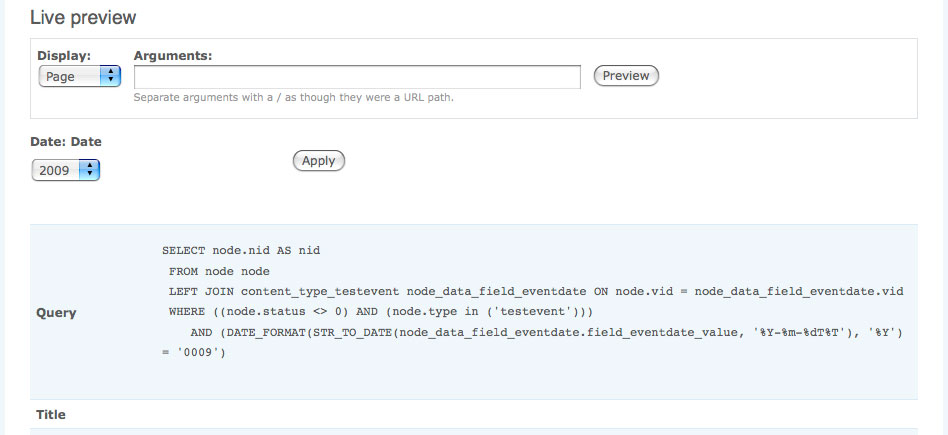
| #49 | date_query.jpg | 42.6 KB | petey318 |
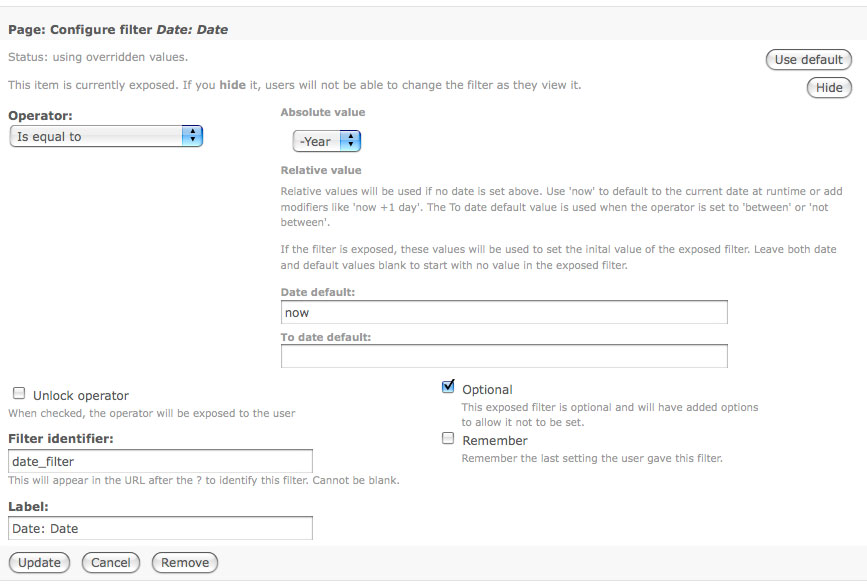
| #44 | datefilter.jpg | 63.22 KB | petey318 |
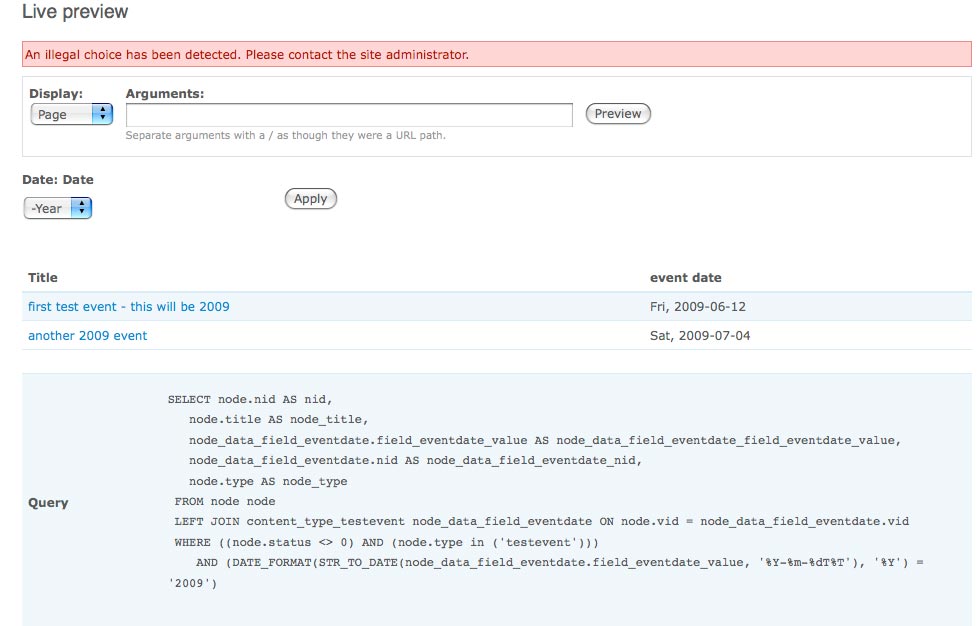
| #28 | live-preview-illegal.jpg | 59.67 KB | petey318 |
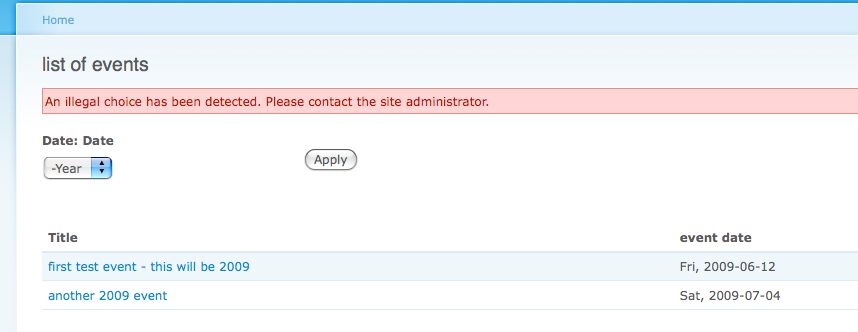
| #28 | first-call.jpg | 81.88 KB | petey318 |
| #13 | date-339348_1.patch | 1.84 KB | agentrickard |

Comments
Comment #1
freakalis commentedI got the same error. If I use a exposed date filter in a view, all other exposed filters stops working and no values is sent in the querystring.
Comment #2
freakalis commentedI managed to solve the problem by commenting out
in function form_value() in file includes/date_api_filter_handler.inc
I seems to work fine without it. But I guess it's there for a reason.
Comment #3
petey318 commentedNot sure if this is related, but I have been doing some investigating in order to throw light on this issue.
If I edit my view (with an exposed date filter), I am finding that the "live preview" in views behaves differently to when I call the view normally via it's path URL. I am filtering on "year" only (not month or day).
1. Using a "Select" field as the exposed date filter:
a) In view's live preview: the resulting SQL query is always set to '2009', regardless of the year selected in the dropdown. The dropdown list does reflect the desired year, and it is remembered in the form.
b) When called via the path URL, The filter does not appear to work at all: all nodes are listed, and the dropdown field setting is not remembered.
2. Using a "text: field as the exposed date filter:
a) In live preview, it all seems to work correctly! The SQL is correct, and the query returns the data that we wanted. The year is remembered in the form.
b) When called via the URL, the result is exactly as per 1 (b) above - all notes are listed, and the field does not remember the year.
This is a huge concern on several levels:
Why is there a difference between views' "live preview" and calling via the path URL? Is the problem with the Views module, or with Date? And why does the Date module appear to be so flaky at present? (just look at the activity in the issue queue...)
I am happy to test this further, but I am not a coder, so I can't really make much sense of what's under the hood.
Comment #4
matt_c commentedI have the same issue.
Subscribing.
Comment #5
fa7c0n commentedSubscribing
Comment #6
agentrickardSee also #339348: Date CCK Field as exposed filter gives an "illegal choice has been detected" warning
Comment #7
agentrickardLet's put the patch here as well. Only tested with 'year' granularity and value '='.
The patch probably needs to account for date_make_date() in the following chunk of code as well, from
date_filterComment #8
netbear commentedThanks, agentrickard.
I've tried to apply your patch, but got error "Illegal choice have been detected..." and exposed filter form disappeared at all.
Comment #9
fa7c0n commentedIndeed; the patch does not work. I'm new to drupal so I CAN'T FIX IT myself. Some of the more important functions of my (production) website are relying on date exposed forms (views). Can anyone fix this issue?
Comment #10
fa7c0n commentedGood news & bad news. This bug only seems to bother logged in users. Anonymous users don't get the illigal choice error (Installed last dev 8/2).This info was incorrect.
Comment #11
petey318 commentedThe behaviour documented in #3 comment is still present in 6.x-2.x-dev release dated 2009-Feb-10.
Comment #12
agentrickardCNW is still the appropriate status. Oddly, the patch works fine for me, as anon and logged in.
Comments like "patch doesn't work" will not get this issue solved. The "illegal choice" needs more information to track down.
Testing can only continue if people would attach exports of their specific Views and CCK definitions to this issue, as I am only testing against 'year' granularity right now.
Comment #13
agentrickardPatch still seems to work -- tested against CCK fields of type 'date'. There can be an 'illegal choice' error if one changes the granularity of the Views filters and then goes to load the page view. I believe this is a bug in Views itself, which is pulling filter data from the user session. That bug is out of scope here.
Attached is a revised patch, which treats $granularity as appropriate, plus a sample View and CCK definition that should work (Views 6.x.2.3 and Date 6.x.2 from CVS).
The patch is against DRUPAL--6-2 branch.
To be clear, without the patch, two things happen:
1) The submitted value of the exposed filters is ignored, likely due to the overriding of the method = GET in value_form().
2) The filtered dates return incorrectly, defaulting to the current year, because date_make_date() is passed incomplete arguments inside of date_filter().
Cries of "patch doesn't work" will be ignored, with prejudice. Please provide actual details.
Comment #14
karens commentedSo here's the background on that bit of code. Views uses the 'get' method for its form, since it's retrieving it's values from the URL. For some reason I don't understand, it does something funky when an exposed filter is used for the first time (before any value has been submitted) and it feeds the exposed form widget an empty $form['post'] value, as though it had been submitted even though it hasn't. If you create a filter that uses a text field (like the date popup) and give it a default value and expose that filter, the default value won't show up in the exposed filter when you first see it because instead of getting the default value stored in the view it is getting an empty post value. The *query* will be correct and will use the default value, but the exposed filter won't match the query. If you give it a value and submit it it will work right, it is just broken when you first view it. I posted this as an issue on the Views queue but wasn't convincing enough or there is some problem caused by changing this that breaks too many other things.
So I was trying to find a way to trick my form element into display the default value. And at the time I made this change in the code it worked right. If I pretended this was a 'post' element Views left it alone so the default value would be displayed. And the query, at that time, was right, so all was well.
But things have changed and now the *query* is wrong too. So my 'fix' has been busted.
That's the goal though, not just to have the exposed filter working, but to have it correctly display a default value and use that default value in the initial query.
I'll have to play around with this some more...
Comment #15
karens commentedAnd if you use a date_select as the exposed filter it behaves differently. That's why agentrichard found that simply turning it off worked fine, the date_select doesn't have the same problem. You have to use a date_popup to see the missing default values problem.
Comment #16
petey318 commentedThanks KarenS - I will try and help as much as I can with testing, although I am not an experienced coder. In my comment #3 above, I am using a select widget (not the popup).
One puzzling thing for me is seeing the difference in output between the views "live preview" and the behaviour in "real life"... I am seeing the same behaviour under Views 2.3 release also btw.
Comment #17
karens commentedI think that difference is because of the way that Views handles the exposed filter on a 'real' page. The preview isn't passing information around the same way.
Comment #18
agentrickard@KarenS --
I think I get it -- I will try testing against a textfield entry filter (which never occurred to me). I suspect that making the IF statement that I commented out just a wee bit smarter will solve that.
What about the date_make_date() bit down in
date_filter()?I do know that Views stores some filter data in the $_SESSION, which can be problematic (and can cause 'Illegal choice' errors because Views is passing dead filter data from the session to the form. (This only seems to happen if you edit the exposed filter values, though, and only for the user doing the editing.) It also uses it's own form_builder function, which is where things get very strange.
Comment #19
TimG1 commentedsubscribing. =)
Comment #20
karens commentedI've committed a fix for these problems. Hopefully I caught all of them, I'm sure I fixed most of them. There were several issues:
1) Views changed the way it handles the exposed form and I had to change my processing to adapt to that.
2) The Date Popup widget in particular was getting the default value wrong and I needed to add a special flag so it could set '#value' instead of '#default_value' in that situation.
3) The problem with partial dates (year only or month and year only) was a missing step to convert the incomplete date into a complete date using date_fuzzydatetime(). I saw where you were trying to go with granularity, but it was just that we needed that missing step.
Comment #21
agentrickardCool. Any chance you rolled a patch?
Comment #22
karens commentedSee http://drupal.org/project/cvs/70963.
Comment #23
agentrickardI did. I think I will just wait for the next -dev package tomorrow, unless you want to roll a new RC.
My patched version 'works,' so I will upgrade to the next 'better' version rather than deciphering a patch file from the logs.
Thanks!
Comment #24
petey318 commentedI installed the 6.x dev version dated 2009-Feb-12 and there is great progress in some areas, but I am still getting an "illegal choice" error when the view is first called.
My exposed date filter is only using a year's granularity, and I am setting a default (I think...) of "now" but when the view is first called, the exposed filter shows "-year" in the drop-down selector instead of the current year. Even if I set a default as a specific year, this seems to be ignored when the view is first called, and I get the dreaded "illegal choice" error the first time around. After that, if I select a different year in the selector and click on "apply", then the view works as expected.
It's just on the first call to the view that I have an error. Not sure if this means anything, but for this particular site, I am not using clean URLs.
But good progress - thanks KarenS.
Comment #25
agentrickardI think that illegal choice may be a Views bug. If you can, look in the $_SESSION to see if Views is carrying around any data from the 'preview' View.
I had to do something in a form_alter to kill this problem:
That $form_state['input'] is populated by Views from its $_SESSION data, and may contain values not actually present in your filter form.
Comment #26
petey318 commented@KarenS - I was a little premature, in looking at the 12 dev release; with the 13 Feb dev, I see the same results that you report, ie the query itself appears to be working when it is called, although the filter is not showing the correct information.
Importantly, I am still getting the "illegal choice" error when the view is first called.
Comment #27
karens commented@petey318 I can't replicate that in the latest code, I need more details about the specific field and view that creates that behavior, like an export of each.
Comment #28
petey318 commentedHere's what I did to produce the error:
1. Start off with clean D6 installation (d6.9).
2. Install CCK, views, date. (install and enable the modules)
3. Create a new content type, called "testevent", which has a single CCK field, called eventdate. This field is a "date" field (not a datetime etc).
4. Create a number of sample content entries, with various dates for testing.
5. Build a view, with a page display, at a path called "eventview". The page view is formatted as a table, and includes only the node title, and the eventdate field that we created in step 3.
Here is an export of the view:
and here is an export of the CCK type that I created (remember, I only added one CCK field, the date):
Finally, I have attached screenshots showing the view from within views Live Preview, as well as the screnshot of when the view is first called (via the URL).
Bottom line: I can reproduce this bug off of a fresh D6.9 install, and I don't really know where to look further. If it helps, I could post a link to a screencast where you could see what I was doing step-by-step. (At this stage I'll do pretty well anything to help out with this bug!)
Cheers & thanks
Pete
Comment #29
agentrickard@petey318 -
I tested this with your View and CCK and did not receive any errors -- until, and this is critical, I changed the name of the exposed filter 'filter_identifier' in Views.
Does logging out, logging back in, and then loading the View (in either mode) make the error go away?
If so, this is the $_SESSION problem mentioned in #25, and should be tracked as a Views bug.
Comment #30
petey318 commented@agentrickard - I have been testing this whilst logged in as admin (user #1).
I added an entry to the view in my primary links.
Here's what happened next:
1. I went back to the site homepage.
2. I logged out. (so now I am an anonymous user)
3. I selected the menu link, and the page loads, but it looks like the view didn't actually run - the year selector says "2009" but there are no records listed below. If I click "apply", then the view works.
4. I then hit the menu item again. This time I get the "illegal choice has been detected" error. When this happens, the date selector still shows "-year", but when I select it, the drop down year list starts at 9 (as in 0009 but without the leading zeros) and then runs all the way to 2010. (ie ~2000 lines in the dropdown!)
5. I then go back to the homepage, and log out.
6. I log in as admin (as before).
7. When I select the menu link, I get the "illegal choice" error as before, with "-year" displayed in the dropdown field.
The behavior is not totally consistent/repeatable either. When I am an anonymous user, I always get the year list starting from 9 (ie 0009) but when logged in as admin, even though I am always getting the illegal choice error, only occasionally do I get a year dropdown list which starts at 9.
If this was a views $SESSION error, I would have thought that this would mess up just about any exposed filter - but I have created a second content type, this time using a textfield drop down, (no date fields at all), and this behaves perfectly when I create a new view and expose the filter.
How do you change the name of the exposed filter 'filter_identifier' in Views? I'm not sure what you mean here.
Hope this info is useful.
Comment #31
petey318 commentedIn my comment #30, where I have assigned the "eventlist" path (with no args) to a primary link menu:
If I modify this primary link menu entry by adding an explicit (though bogus) argument to the path, specifically "eventlist?date_filter", then I don't get the "illegal choice" error.
The view doesn't run until I click on the "apply" button, but this certainly points to problems with either
(a) views not passing the correct args to the filter when the view is first called, or
(b) the date module is mis-interpreting the data that views is passing to it on that first call.
EDIT: you can call the view with ANY additional argument preceded by the "?" and it behaves the same way - I can call it using the path "eventlist?blah" and the behaviour is the same - no "illegal choice" but the view doesn't run until you press "apply".
In the case of (a) I would expect that this would have caused problems for many other views with exposed filters. I am using other views on other content types with exposed filters on drop-down fields (text selectors) with no problems at all - they all work as expected.
Hmmmm. Confused!
Comment #32
agentrickardWow. I don't see that behavior at all. PHP version?
Comment #33
petey318 commentedIt's 5.2.6.
I have a couple of different places where I can test this too, so I'll do some more tests this evening (or tomorrow - Tuesday, Australian Time) and I'll post back here...
Comment #34
petey318 commentedcan't test with 17 Feb dev... getting WSOD with the following error message in error_log:
PHP Fatal error: Call to undefined function month_names_untranslated() in /var/www/html/sites/all/modules/date/date_api.module on line 194, referer: http://192.168.1.10/node/addThis occurred when I was trying to create a new CCK node with the date field.
I'll wait till the next dev spin.
Comment #35
karens commentedI fixed #34 this morning, you need to either use yesterday's code or get the latest -dev.
Comment #36
netbear commentedFatal error: Call to undefined function month_names_untranslated() in C:\apache\www\danceschool\sites\all\modules\date\date_api.module on line 177
in latest dev(17/feb).
Comment #37
karens commentedPlease read #35. I fixed it this morning in -dev so the fix is not in the tarball yet. It is in cvs now and will be in tomorrow's tarball.
Comment #38
petey318 commentedI've uploaded my code to a test site, http://date.sneesby.com.au
If you go to this site, you will see a standard home page.
Please do this test:
1. Go to http://date.sneesby.com.au
2. Click on the "eventlist" primary menu link (top right hand side).
The resulting page is the view - the title is "list of events". Don't click anything further yet, but notice that the date dropdown list shows 2009, but there are no records displayed under the view.
3. Click on the "eventlist" menu link a second time.
Now you should see the error box saying "an illegal choice has been detected..."
If you now click on the date selector (drop down box), you will see that it starts at 9 (that is, year 0009) and contains over 2000 entries!
For further testing, I have included a test user: username = "date", password = "date"
NB I will leave this site up until we have resolved this issue, and then I will delete it.
Hope this helps!
Cheers
Pete.
Comment #39
netbear commentedI've tested last dev version (18 feb) with calendar popup filter type and it works as expected, shows choosed before date and filters materials fine, thanks KarenS!
Comment #40
petey318 commentedIn the Drupal6.9 codebase, the "illegal choice" is being output by the code on line 704 of
includes/form.incThe watchdog error message (from /admin/reports) is: "Illegal choice 0 in date_filter element."
Comment #41
petey318 commentedcould the issue reported in #378534: Views argument validators don't fire when the argument is 0 due to PHP == insanity be a clue to the behaviour in this case?
Comment #42
petey318 commentedUnfortunately, the behaviour documented in my comment #38 is still present with the latest dev version (Feb 23).
Is there any other data that I can provide to help solve this problem?
Comment #43
agentrickardDid you apply that Views patch as well?
Comment #44
petey318 commented@agentrickard - no... good point... so I went back and did more tests, this time with the latest Views dev module, but I think I may have located the source of the problem.
At this point, my conclusion is that there is a problem with the way that the exposed filter settings are configured/exported/cookied/interpreted by the date module.
All the time previously, I have been ticking the "remember" (remember the last setting the user gave this filter) checkbox that appears when you are setting up the exposed filter from within Views.
I did another test, but this time, I left the "remember" box UNCHECKED (see attached screenshot). The results were that I did not get the illegal choice error, no matter how many times I reloaded the page or went to the view URL. But the exposed filter is now behaving as though the "remember" box has actually been ticked... I can select a different year, click on the "apply" button, and the view works just fine, and the selected year stays in the filter's date selector.
When I went back, edited the view, and ticked the "remember" box, I now get the "illegal choice" error (with the year starting from 9) as before. Once this happens, even if I go back in again and edit the view, and uncheck the "remember" box, the problem persists - it only goes away when I clear cookies in my browser(Firefox 3, mac).
For completeness, I have also done the following tests:
Test 1: Date module 24 Feb dev version, Views module 24 Feb dev version.
Test 2: Date module 24 Feb dev version, Views module production version (6.x-2.3)
For both these scenarios I get the same result: I have to leave the "remember" box unchecked, but the view filter behaves as though it IS checked, because the filter appears to remember the setting in both cases.
In addition, in all my testing in this comment block, the view doesn't actually "run" when you first go to the URL - you need to manually click the "apply" button.
I have modified the view in my http://date.sneesby.com.au test site, so you can see for yourself - and this site is running on an earlier date dev version.
Hope this helps.
??
Comment #45
agentrickardThat behavior is consistent with the SESSION error I reported last week (back in #25). It's a quirk in Views and needs to be reported there.
Comment #46
petey318 commentedThanks @agentrickard. Having never used exposed filters before, I am still learning the terminology.
Today I did further tests, and I realise that I should have left the "remember" button unchecked all along.
At least, that way I don't get the illegal error message any more.
(I understand now that the remember button essentially means: remember the filter setting if you navigate away from this URL, and restore that setting when you navigate back to this URL. I was thinking that this button was used for keeping the form loaded with data whilst you were still sitting on the URL. My incorrect interpretation there.)
So I still have the question of why the view isn't "firing" when the page is first loaded. I am setting a default of "now" in the view, however when I go to the path, there is no output shown until I actually click on the "apply" button.
Is this the correct mode of operation for this exposed filter? Or should the view actually execute when you go to the path?
Comment #47
petey318 commentedGreat news in getting the 2.0 release out. here has been a huge amount of work gone into this module - thank you!
From my perspective, the original "illegal choice" error is still there, but it only occurs when I have the "remember" box checked. If this was a views $_SESSION bug, wouldn't that affect just about every exposed filter in views? (ie not just the date filter)? I can work around this by leaving the "remember" box unchecked.
The second problem that I have is that the view comes up empty the first time when you go to the path URL - you need to click the "apply" button to actually get data displayed. I can work around this by providing an argument to the view, but is this normal behaviour for an exposed filter?
(I've also dropped the priority to "normal" and changed the release details from dev to 2.0)
Comment #48
karens commentedIf I understand this right, the main problem is the 'Remember' button? I may just have to remove that option for this filter.
The problem with the view coming up empty is because there are problems getting Views to populate certain filters with the right default values the first time and I have been trying various work-arounds to get them to default correctly. I need to know if the filter had the wrong value but the query was right, or the filter was right but the query was wrong, or both were wrong. Plus I need an export of the view so I can see how you had the filter set up.
Comment #49
petey318 commented@KarenS - sorry its been a while since I added anything to this thread; I got distracted by stuff going on elsewhere.
I have been using the "remember" button incorrectly - see my comment in #46 - and it turns out that I don't actually need it. The "remember" functionality is definitely broken however, and someone else may need it. (?)
My biggest issue now is the fact that the filter does not seem to run at all the first time when the view is called. Rather than extend this thread (because I think that the original issue as reported by this thread is actually fixed now), should I raise this as a new issue?
Here's an export of the CCK type that I am using:
And here is an export of the view that I am currently using:
This was tested on a D6.10 install, with the latest dev versions:
CCK: 6.x-2.x-dev 2009-Mar-07
Views: 6.x-2.x-dev 2009-Feb-26
Date: 6.x-2.x-dev 2009-Mar-09
You asked whether one of these was correct:
A. the filter had the wrong value but the query was right, or
B. the filter was right but the query was wrong, or
C. both were wrong
Looking at views' preview, it looks like the date query is wrong - attached is a screen grab showing the live preview. It looks as though the default 'now' date has been translated as '0009' instead of '2009'. The filter works fine (when you press the "apply" button), so I guess that points to option B.
I hope this helps.
Comment #50
karens commentedI cannot replicate any problems in the latest -dev version and there are several duplicates of various flavors of problems with date filters. If there are still problems in the latest -dev version start a new issue.
Comment #51
petey318 commentedThe issue reported in #49 is still there; I'll raise it as a new issue as requested.
NB it's definitely a problem with the query itself,not the exposed filter.
Cheers
Pete
Comment #52
russbollesjr commentedsubscribed
Comment #53
gpk commentedFor reference, the issue opened per #51 was #411496: Exposed filter date query is '0009' not '2009' when using 'select' widget, fixed prior to 2.1 release.
Comment #54
kenorb commentedThanks, it's almost working now.
But I've got other problem with Content Date list: #448572: After upgrade to dev, CCK Date fields dissappeared
And still it doesn't work as it should.