

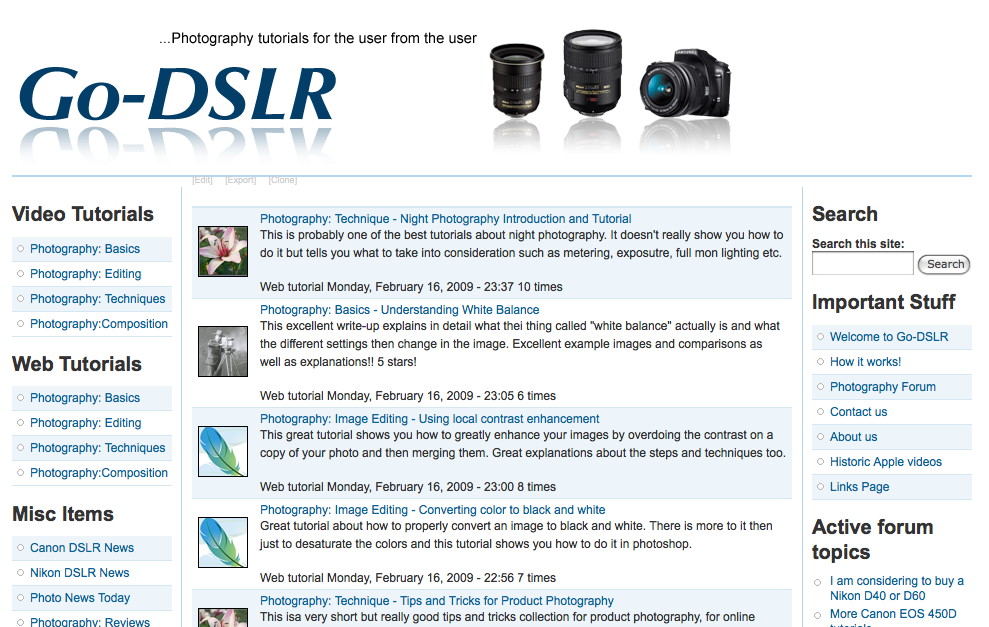
Go-DSLR.com was launched in January after doing extensive market research for the viability of a website linking quality tutorials, web or video based, from all over the internet. It is user based which means registered users can create and add content and are encouraged to do so. While anything user based nowadays is called social networking and Go-DSLR provides a user forum, the primary goal is purely providing content links and quality tutorials.
In its first month after launch more than 400 pages have been indexed by Google, several search terms pushed the site to the top 5 results and the average daily visitor number was at 80 with a maximum sustained at just under 200. These numbers however are increasing rapidly.
Interest has already been shown by professional Photographers with at least one Interview already done and in the editing process as well as 4 "tips and tricks from the Pros" pages.
Why Drupal?
A lengthy comparison and several demo implementations were made using Drupal and, amongst others, Joomla. Joomla proved to be the biggest competitor against Drupal, however it did not offer the flexibility of the many add-on modules that Drupal offered.
The choice had to be made to use either Drupal 5 or Drupal 6 and in the end Drupal 6 was chosen even with many required modules still being in Beta. The development implementation of the site was extensively tested with various stress testing tools (MySQL and Apache/PHP Benchmarks) as well as real life usage by having people visit the site from different countries and write reports regarding functionality and speed.
The last factor that sealed the deal for Drupal was the fact that the entire site design could be achieved without writing a single line of code or modifying any kind of template file. Some of the site maintainers are non-technical and for disaster recovery purposes the site needs to be able to be rebuilt by non-technical people within an hour, not including database import.
The latest test showed just under 45 minutes for a complete re-install and another 45 minutes for database import and ensuring that all the views and settings are correct.
Modules and Themes
Go-DSLR.com is based on a large selection of modules, though mostly only parts of them are actually in use. These modules were essential to the success of the project and have made this even possible.
Essential/Required Modules
Views - Used extensively throughout the site. Actually about 70% of all the menus are Views based.
CCK - only 3 CCK fields are in use in two different content types, Web and Video tutorial, but they were essential for grouping and building of the content.
CCK: Teaser - This module allowed us to specify a CCK field as the default teaser in order to really separate teaser and body.
Taxonomy Image - This is used quite heavily, though not in the original plan, in order to associate tutorials with the overall taxonomy classification (category if you will)
Pathauto - Essential for SEO (Search Engine Optimization) purposes.
Tagadelic - Used to create a "tag cloud" based on a taxonomy vocabulary
Adsense - essential to provide Revenue Sharing for the users that contribute tutorials.
Lowername - for improved site searches which are a crucial for this type of site.
Taxonomy Autotagger - This is used in the feed-to-node process to assign nodes from a specific feed tags by which then views are generated.
FeedAPI - One of the features, take a RSS feed and generate nodes out of it, requires FeedAPI and the SimplePie parser.
VideoFilter - While CCK provides the same functionality, Video Filter was chosen for the embedded video tutorials for performance reasons.
UniqueField - Allows the specification of a field that has to be unique, which is used for the Video and Web link fields to ensure that tutorials are not duplicated.
FiveStar - provides the voting part of tutorials with a Javascript based star scale.¨
SimpleNews - Provides the newsletter feature.
Misc (non-essential) Modules
Google Analytics - in order to collect Google statistics. These are compared to AWStats that are run on the actual web server logs.
ADD This - provides a single point to add specific nodes and pages to Social Bookmarking sites.
XML SiteMap - builds Sitemaps for Google and other Search Engines.
Themes and Styles
Framework is used as the main theme for the site and Advanced Forum for the forum theming and styling.
Workflow and user Experience
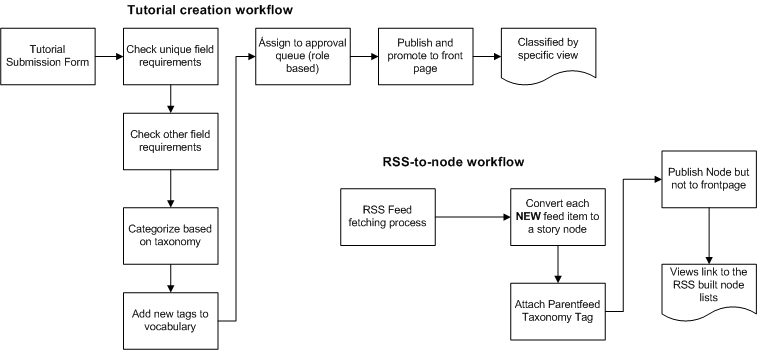
On the site only a few node types are allowed to be promoted to the front page; Video Tutorials, Web tutorials, hosted tutorials and specific Camera tutorials. All other content types are not allowed and will not be allowed to reach the main front page. They are accessed though their menu links that opens them in views. This allows us to separate news announcements that come via RSS feeds and site news from the main content that we focus on. Also of mention is that users can only create tutorials which have to conform to certain rules (Tags have to be inserted, a category has to be selected, URLS have to be unique...) and only then will they be accepted.
What follows is a small flowchart of the tutorial work flow in parallel with the RSS work flow.
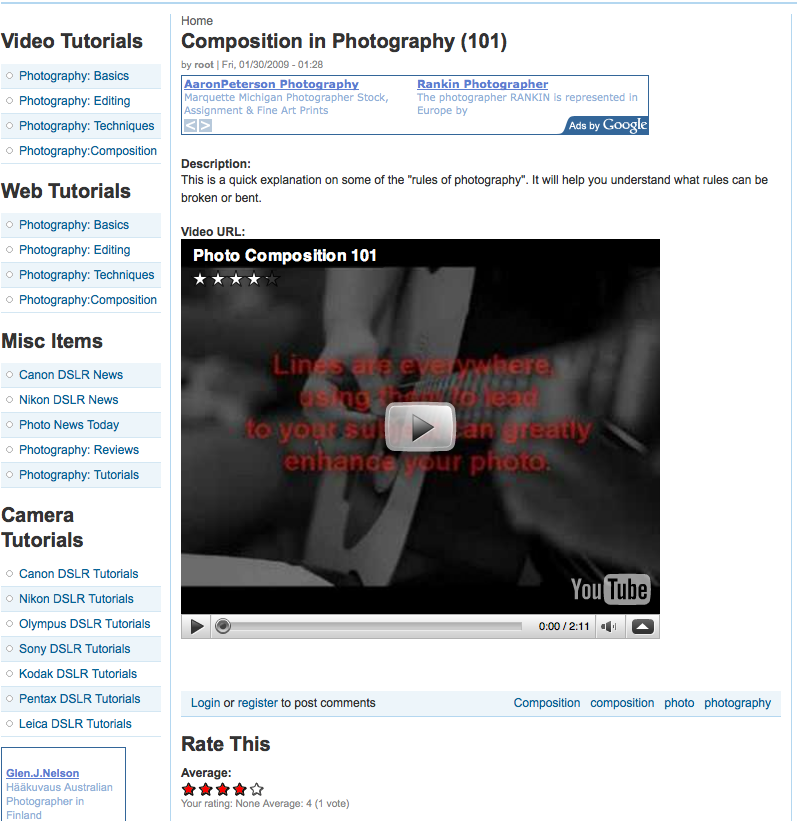
Lastly this is a screenshot of the resulting node with an embedded video.
Views usage
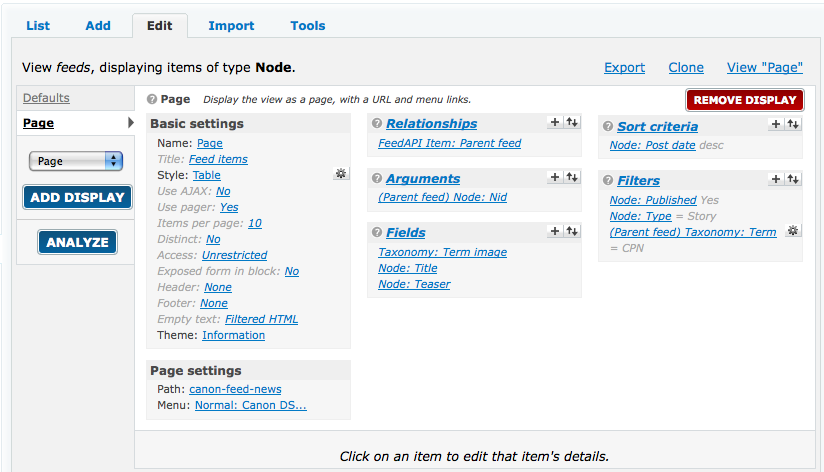
Views for Drupal 6 was the most essential component and is used extensively throughout the site. Almost any menu point targets to a view. Since taxonomy and vocabularies were used for categorization of nodes and pages, complex views were used to create menus and categories. The use of views allowed the arrangement and implementation of Taxonomy Images to make the lists more visually pleasing and to hard sort the nodes with a very granular selection method. When used in conjunction with the RSS-to-node feature, views allowed the clear separation of RSS created nodes by adding the FeedAPI parent relationship and arguments. For future additions and features this gave much more flexibility than anything else that was evaluated.
Caching issues
Because of the Google Adsense module, caching had to be disabled, though there has been only minor impact on performance and well within acceptable range.
CSS caching/compression and Page compression was enabled but Page compression took too much overhead so currently only JavaScript and CSS are cached/compressed.
Challenges and Time line
The site was built and developed over a period of three months and, while only one person did the actual grunt work of the setup and writing the documentation, there were a total of 3 people constantly working with it and more than 20 testing it in different ways.
The goal launch was the 31.1.2009 and the site was launched the 29.1.2009 which meant way ahead of schedule.
The site was tested with various versions of different browsers in order to ensure a consistent user experience but IE 8 has some problems to align the footer in some cases. Since the Browser is still in beta, this was considered an acceptable issue.
