

 Come together with the global Drupal community in Rotterdam, 28 Sept – 1 Oct 2026. Sessions, contribution, connection, and Early Bird savings until 8 June.
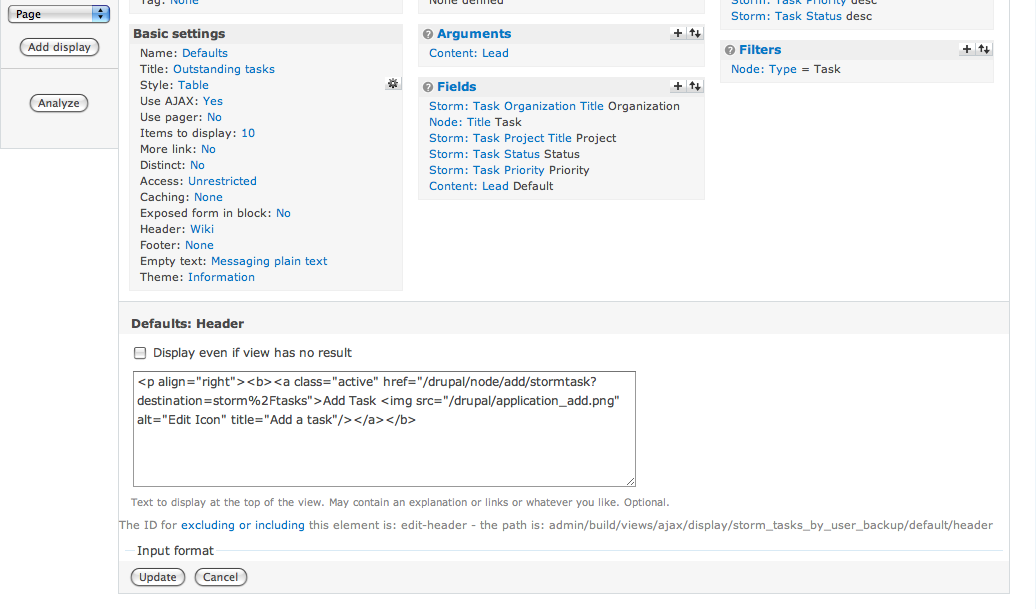
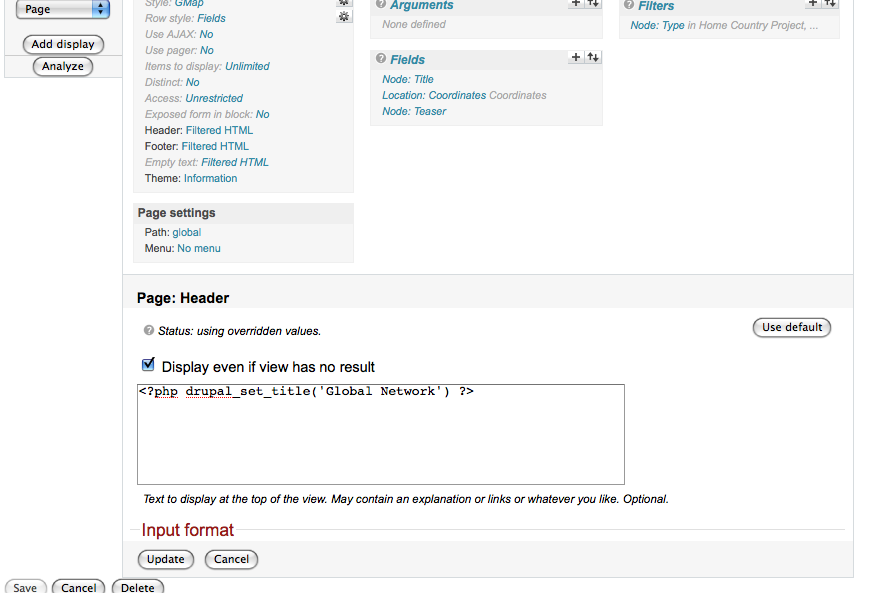
I have put some code into the header, but below the input box it just says the words input formet.. there's no way to switch it from 'filtered html' to 'full html'... am I missing something. I've made sure that my user has access to full html in admin-site config-input formats
it might be something simple
| Comment | File | Size | Author |
|---|---|---|---|
| #6 | Picture 1.png | 103.87 KB | tiyberius |
| #3 | not_expanding.png | 71.96 KB | wintervanilla |

Comments
Comment #1
mr.baileysThe "input format" is a collapsible fieldset. Clicking it should open it and show you all the possible filters to choose from. Note that this question is not specific to Views, so you might have more luck if you post this to the forums instead.
Comment #3
wintervanilla commentedI'm pretty certain this is a Views specific issue.
I have the same problem -- for views, and only for views, I am unable to expand the collapsible fieldsets. I'm not sure if this is a theme specific issue, but I'm guessing it is because it doesnt seem to be an often cited problem. Im a JS baby, but could this be due to the collapsible fieldset being inside something already generated by JS:the views UI?
Thanks,
Andrew
Comment #4
dawehnercan you provide more informations, which version of views, do you have installed jquery ui, perhaps jquery update etc.
Comment #5
onelittleant commentedI have the same problem. This appears to be an issue with the Views 2 Ajax interface and the Drupal collapsible fieldsets. It appears that Drupal initializes the collapsible fieldsets on page load. Because there is no page load when views loads input fields via ajax, the collapsible fieldsets in the Ajax content are not rendered as links (collapsible logic is not applied).
As a side note, it appears that WYSIWYG editors are not initialized on the header and footer entry fields either. I am using TinyMCE with the WYSIWYG module. The default input format uses WYSIWYG, but the editor is not available on the views header or footer field.
Comment #6
tiyberius commentedI'm having the exact same problem. I'm using the Garland theme (as seen in the screenshot) ... hopefully somebody can fix it!
Comment #7
justinchev commentedThere are a couple of other threads about this problem. Seems to also affect 'Panels'.
http://drupal.org/node/418438
http://drupal.org/node/459568
The work around is to 'Disable javascript with Views'. This can be done in the Views > Tools area.
Comment #8
merlinofchaos commentedIf you see this, can you check your javascript error log or firebug and see if javascript crashes?
Comment #9
tryitonce commented... same here ....
I am using Views 6.x-2.6 and had the same problem that the "Input Format" would not show highlighted - (bold) thus there was no link to open the window to define the input format.
The advice from #7 worked in my case -
The work around is to 'Disable javascript with Views'. This can be done in the Views > Tools area.After turning off Java Script FCKeditor also showed up.
I have the following modules in use amongst others - (just reporting Ajax and jquery here as they have been referred to above):
- jQuery Impromptu
- jQuery plugins
- jQuery UI
- Ajax - 6.x-1.14
- Ajax ui
I hope this helps.....
Comment #10
twod@#5, Views does call
Drupal.attachBehaviors(ajax_area);on line 80 in views/js/ajax.js which re-runs all the routines Drupal runs once the page is done loading.If you have Image Assist enabled, try making sure that it does not try to attach itself to the Views pages. Some kind of collision there which prevents Views from including collapse.js and some other JavaScript files.
If you set Image Assist to only appear on say node/* and comment/* you should be fine.
But there's still a problem with features in JavaScript files which are not loaded "manually" by Views, like all the scripts used by Wysiwyg module. Since there's no input format enabled textarea visible in the Views UI by default, those scripts will never be loaded. The same goes for any feature initiated via a JavaScript file that would only be needed in parts of the Views UI. What views needs to do is to pass all the scripts added via drupal_add_js() to the client in the JSON response, like I describe here: #552392: Views UI support. But maybe that should go in a separate issue?
(Btw, there's still a second problem preventing Wysiwyg module to run, also mentioned in the issue above.)
Comment #11
canesWin commentedJust to add my two cents, I had the same issue and ImgAssist was to blame. Disabling that module fixed it.
Comment #12
twod@canesWin, you probably don't need to completely disable Image Assist, just change its settings not to appear on the Views edit pages.
Comment #13
petarb commentedTwoD is correct.
Hit Image Assist on the admin page
Click: [x] not on specific paths
And add:
admin/build/views/*
in the text field underneath.
As for the WYSIWIG editor issue, I use FCKEditor, and it is not appearing either, in the Header or Footer areas.
Comment #14
canesWin commentedDidn't need the module anyway. Thanks.
Comment #15
karljohann commented@canesWin
Yeah, that did it for me. Cheers!
Comment #16
shark commentedI had the same issue, apparently it is due to Image Assist. Following instructions in #13 fixed it.
Comment #17
cwebster commentedWorked for me. Thanks!
Comment #18
sasconsul commentedWorks for me on the Footer field.
Comment #19
danny englanderDisabling Image Assist fixed this issue for me and I didn't need that module anyway. Thanks!
Comment #20
Romejoe commentedSame issue here! Can we fix this? Or is it already fixed in the dev version?
Comment #21
petarb commentedSee post #13 for now.
Comment #22
Letharion commentedThe way I read this, the problem is caused by Image Assist, so I'm closing this one.
If this remains a problem for someone, please file this against Image Assist, in accordance with the Views Issue guidelines.
Comment #23
salientknight commented#10 fixed this for me. After I set the following, the drop expand option returned.