

 Come together with the global Drupal community in Rotterdam, 28 Sept – 1 Oct 2026. Sessions, contribution, connection, and Early Bird savings until 8 June.
Hi,
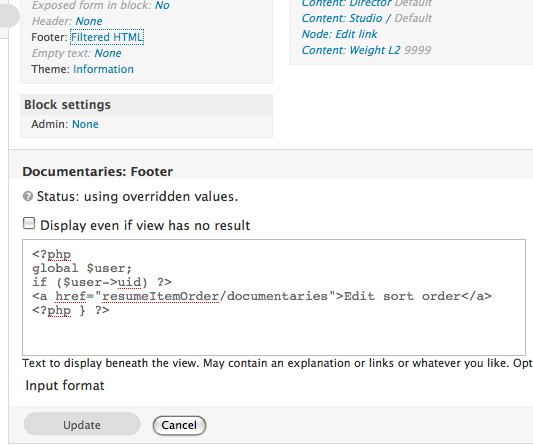
raising this here as this seems to be the module common to both views and panels. The Input format options on Views (e.g. for "empty text" settings) are not working - you cannot select an input format from a list (works fine elsewhere on the site). As a result, PHP functions cannot be entered (e.g. for selecting a default image to display).
This affects both Views (6.2.5, using Views Content Panes 6.x-1.0-beta2) and Panels (6.x-3.0-beta1), so I'm guessing it is likely to be a Ctools issue (but could be wrong)
I am able to work around the issue for now (hard coding a path to the default image) but it is an embuggerance and doesn't make for an easy port over to production site.
The issue was raised here as well http://drupal.org/node/418438 . I've disabled all jquery-related modules I could find (apart from Views and Panels) without any change, so the root cause suggested there isn't helpful. The screenshot posted there (http://drupal.org/files/issues/noinputformat.jpg) illustrates exactly the problem I'm having.

Comments
Comment #1
merlinofchaos commentedThis only happens on the Views UI? CTools is unlikely to be involved there.
Comment #2
DaraghOB commentedIt also occurs when I am creating a Custom Panel pane in Panels - I can't select to use PHP input formats and the input format is fixed at "Filtered HMTL".
If CTools not the cause, any suggestions which tree I should shake as this is an irritating issue?
Comment #3
chrism2671 commentedI have the same problem with Panels. I found that disabling Views allows the input format on Panels to be set, but it's a hack and a half.
Comment #4
jboeger commentedSubscribing... I'm not able to change the Input Format in Views-6.x-2.6
Tried changing themes, browser, etc.
Comment #5
chrism2671 commentedDisabling Views-UI seemed to fix the selector on Panels!
Comment #6
merlinofchaos commentedJust an FYI, I run with Views & Panels together all the time. For some strange reason. I've *never* seen them compete for airtime. There has to be a 3rd party involved here. Usually when this happens there should be an error in the javascript console, that might help too.
Comment #7
chrism2671 commentedGot it I think. The module that disrupts input format for panels appears to be img_assist. When disabling this module, all is well. I am disabling it in order to edit panels, and the re-enabling it afterwards. Appears to be the culprit.
Disabling views will also fix this problem as img_assist is dependent upon views.
Comment #8
Swift Arrow commentedHi I can confirm this problem using Views. I cannot select the input format for any of the Views Static text fields (Header text, Footer text, or Empty Text). The problem comes when I want to use HTML. It uses filtered HTML format, and won't let me choose any other.
The "Input Format" option is there, but it is not a hyperlink - just plain text. Not clickable, nothin.
I'm changing the project to Views UI, since it seems more appropriate.
I hope we can get this fixed... I'm sorry I'm no programmer!
Comment #9
Swift Arrow commentedsorry, wrong status!
Comment #10
Swift Arrow commentedOk, narrowed this down. It is indeed a problem with Image Assist.
Disabling Image Assist brings back the input format selector in the Views Header / footer / empty text.
Re-enabling it keeps our settings made while it was off, but the options are again gone.
It seems to only interfere with Views and Panels. I suspect that some code in this module could be altered to fix the problem.
All the best!
Comment #11
tapinos commentedYou can solve problem with Views this way: in the admin of Image Assist, just make Image Assist not displayed for the Views textareas.
In my case, I use Image Assit only for edit-body and edit-comments...therefore I set it to be displayed only for these two textareas.
I hope this helps.
Fabrizio
Comment #12
chrism2671 commentedI tried the work around suggested in #11 but this does not fix it for Panels. As this disrupts at least 2 other modules, both of which are pencilled in for core in future releases, it makes it unsuitable for production sites, so ->critical.
Comment #13
chrism2671 commentedComment #14
lazly commentedThis bug is represented in to site of my reference. Please try fix it. Thx!
Comment #15
chrism2671 commentedDuplicate of #445594: Image Assist and Panels
Comment #16
david.mccandless commentedI followed the suggestion in #11 successfully, so thanks for the tip. FYI, I specified "edit-header" and selected "Show on every textarea except the listed textareas."