

Closed (fixed)
Project:
Menu Block
Version:
6.x-2.x-dev
Component:
Code
Priority:
Normal
Category:
Bug report
Assigned:
Unassigned
Issue tags:
Reporter:
Created:
11 Mar 2009 at 20:31 UTC
Updated:
10 Feb 2011 at 20:19 UTC
Jump to comment: Most recent, Most recent file

Comments
Comment #1
johnalbinI need to better understand what you want before I can tell you how to do it. :-)
So, what happens when you click on the "Sub level 1 nav1"? Do you want the children to appear at that point? Or do you want it to remain hidden like it is to start?
Comment #2
rameshrr commentedThanks for the reply,
Yes when I click "Sub level 1 nav1" then the children should appear otherwise it should remain collapsed.
Thanks,
Ramesh
Comment #3
rameshrr commentedComment #4
johnalbinOk, so menu_block has the "expand all" checkbox, but you can't "expand only down to the 2nd level".
But…
To get around that, you could edit your menu under admin/build/menu and click the "expand" checkbox for all of the item on the first level that you want expanded. And then just menu_block work normally without its "expand all" feature enabled.
Does that work for you?
Comment #5
rameshrr commentedThat is how I have set it up, but it does not work. In the menu block I have the expand all unchecked, and in the admin/build/menu I have set it to expand the 2nd level but not the third level. But the menu block overrides the setting and only allows to either expand all or collapse all.
Comment #6
rameshrr commentedComment #7
johnalbinI just tested this and it works exactly as I describe. So something is misconfigured on your site.
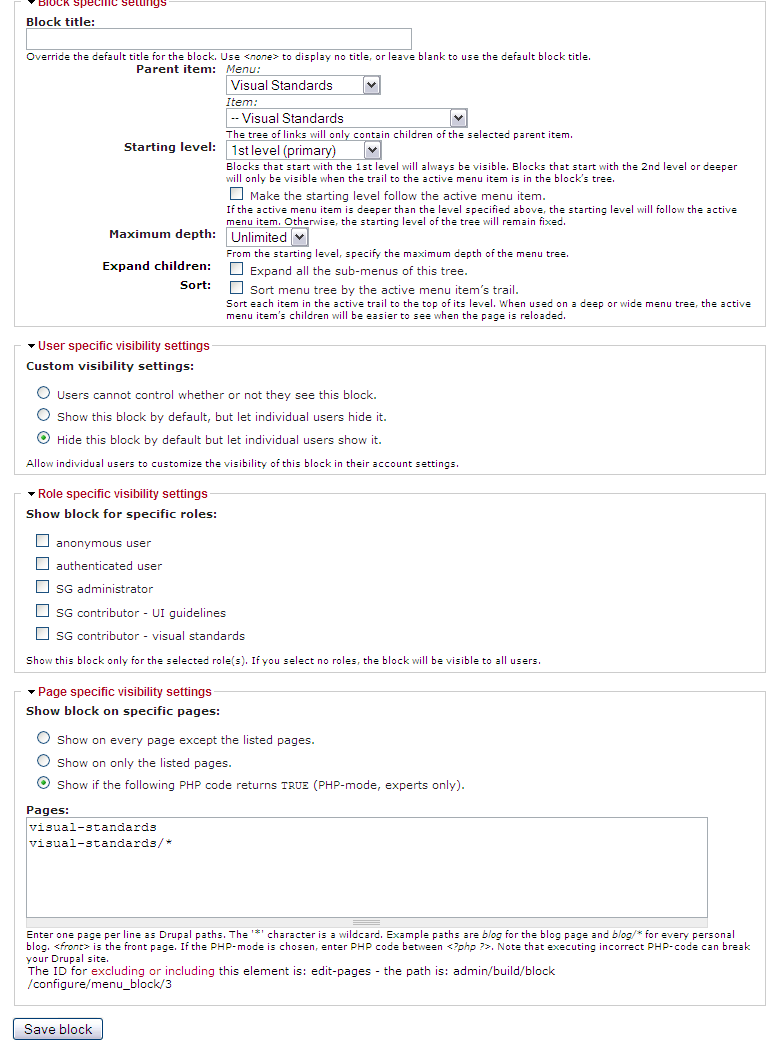
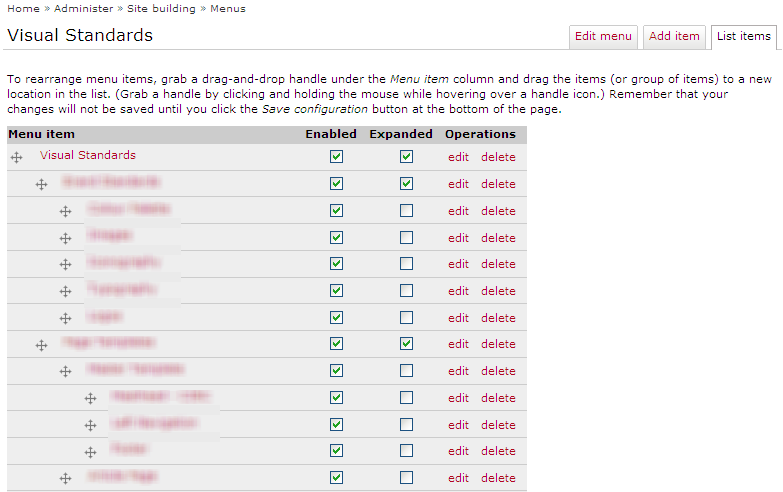
If you'd like me to help, please provide screenshots of the block config and the menu config pages.
Comment #8
rameshrr commentedhere is the screen shots, Thanks for your help
Comment #9
johnalbinOk. I just confirmed this.
I hadn't set the root of my menu block to a specific menu item. If I just use the menu root, things work as expected.
So, this is definitely a bug.
Comment #10
rameshrr commentedIs this something that can be fixed easily, when can I expect a fix for this issue.
Comment #11
justmagicmaria commentedHaving the same issue and would love a fix.
Comment #12
rameshrr commentedI needed this fix but was not able to find a solution, therefore I decide to hack it myself here is the hack if anyone wants to use it make sure you make a backup of your site as this has not been tested, I currently use it and it works fine:
1. Open menu_block.module in a text editor
2. Replace the function called "function menu_tree_depth_trim(&$tree, $depth_limit)" with the following:
function menu_tree_depth_trim(&$tree, $depth_limit) {
// Prevent invalid input from returning a trimmed tree.
if ($depth_limit < 1) { return; }
// Examine each element at this level to find any possible children.
foreach (array_keys($tree) AS $key) {
if ($tree[$key]['below']) {
if ($depth_limit > 1) {
menu_tree_depth_trim($tree[$key]['below'], $depth_limit-1);
}
else {
//This is the hack that I have put in, It checks for active link if so it will expand otherwise it will not
//Hack start
if ($tree[$key]['link']['in_active_trail'] && $tree[$key]['below']) {
// Continue in the subtree, if it exists.
$next_level = $key;
}
else{
// Remove the children items.
$tree[$key]['below'] = FALSE;
}
//hack end
}
}
if ($depth_limit == 1 && $tree[$key]['link']['has_children']) {
// Turn off the menu styling that shows there were children.
$tree[$key]['link']['has_children'] = FALSE;
$tree[$key]['link']['leaf_has_children'] = TRUE;
}
}
}
3. Once that is done go into the admin blocks and in the configure option of your menu block change the "Maximum depth" to the depth that you want expanded and check expand all children. This hack use the "Maximum depth" as the level that should be expanded up to. and if you have levels higher then the maximum depth all it will do is hide the links until the parent is clicked at this point the links are revealed. I am using the menu_block 6.x-2.2, and everything is working as I want it too as described in my initial post.
-Ramesh
Comment #13
cedric commentedAttached is a very simple patcht that simply adds an additional check before trimming a menu tree.
If a menu item has the 'expanded' field ticked in the menu configuration, it will not be trimmed anymore.
I believe this is the proper fix for this issue, but I have only done limited testing.
Comment #14
toodlepip commentedTried the patch and the code suggestions above. Neither of them seem to work for my menu tree.
I'm wondering if I'm doing something silly. I'm using a primary links menu with all the menus in trees, for example:
Section 1
Section 2
+ Page 1
+ Page 2
+ Page 3 (expanded)
++ Page 1a
++ Page 2a (expanded)
Section 3
...
So when viewing Page 3, I'd like the sub-menu showing Page 2a to be displayed in another block. I can't figure out a way of making this work, so I'm resorting to adding in menu blocks manually.
Also, I've noticed that if more than one section has 'Expanded' selected then the expanded items further down the menu list inherit all the previously expanded items in the breadcrumb. (sorry tricky to explain).
Comment #15
mlncn commentedIn our testing, the failure to expand for the active trail (distinct from what cedric fixes in #13) appears to be the same bug as Menu Block does not work with menu items pointing to the same destination.
We have a fairly simple structure, a set of top-level menu links. Everything below one top-level item is for one section and is put there with a menu block:
  - sub-menu item
     - sub-menu item's features
     - sub-menu item's what's new
     - sub-menu item's other stuff
The parent sub-menu item link and "features" go to the same page. The menu is expanded and active link highlighted fine for "what's new" and "other stuff" but that these sub-item links disappear entirely when going to "sub-menu item" or its identical child "features" is of course the problem.
Comment #16
mlncn commentedThis patch is against the 2.x-dev branch.
It is admittedly a crazy work-aroundish fix for menu_block menus not expanding when parent path the same as a child path (or perhaps my specific problem was that Submenu Item and Submenu Item's features link to the same internal product/196/features, which is also equivalent to simply product/196).
The problem was that Drupal core's menu_tree_page_data() was not returning any active trail information for that sort of menu item (parent or child).
This patch provides a modified version of that function that really only does one thing differently: if the href can be constructed from the menu item's map instead of the truncated version saved in $item['href'], the map-derived value is used instead. This fixes it. (The reason is that product/196 and its ilk have no parents in menu_links, and so no active trail; searching for product/196/features turns up two records, of course, and only one is used but it is expanding and highlighting correctly the active trail correctly for me.)
The ugliness of duplicating a core function is worsened by the need to opt out of menu's caching system for this to work. Might this be a bug that needs fixing in core?
More eyes and advice needed, but the change in the attached patch is going into service on a production site very shortly. It works, it is not likely the best way- and I am not sure it will fix the other cases reported here.
benjamin, agaric
Comment #17
mlncn commentedTweaked this a little more– ensuring that the menu item with the most parents, rather than the least, gets loaded makes menus appear properly expanded on our site.
benjamin, agaric
Comment #18
finex commentedDoes this patch fix http://drupal.org/node/618700 too?
Comment #19
finex commentedI've applied patch http://drupal.org/files/issues/menu_block-fix-failure-to-expand-when-sam... (#17) to the -dev version of the module, but the problem on http://drupal.org/node/618700 has not been solved :-(
Comment #20
finex commentedPatch #12 and #13 doesn't work for me either :-(
P.S: I've well summarized my problem at http://drupal.org/node/618700#comment-2530916
Comment #21
shambler commentedAnyone else come up with anything on this one?
Comment #22
shambler commentedI'll have to look at an alternative module because this is a showstopper for me.
Comment #23
johnalbinOk. How about this patch? I've converted menu_tree_trim_active_path() into a simpler recursive function that follows the active path or expanded menu items.
I've committed this, but please test. This bug should be fixed, but if I've missed anything, please re-open.
Thanks, guys!
Comment #24
shambler commentedthat works for me, many thanks! that's a great start to Monday morning!
Comment #25
alanburke commentedPatch Worked for me.
Comment #26
kv.af commentedHi,
when i start my block configuration the only field i can find in the section "block specific settings" is the block-title.
Any ideas what i'm doing wrong?
Thanks.
Comment #27
johnalbinHi Andreas,
Please open a new issue and describe more fully what you did. This is a closed issue about a bug that has already been fixed. And you have not provided enough information for anyone to help you.
Comment #29
datarazor commentedHello, I tried using 2.3 and 2.2-dev and I am not able to have the expanded settings from the menu be reflected in the menu_block. Essentially I need to start displaying level 2 and expand level 2 and 3 but hide level 4 until a level 3 item is clicked. This works fine if I don't use menu-block and use a normal menu, but I then miss all the features of your module...
I checked my menu_block.module and it indeed has the above patch from #23 applied to it already. Am I missing a setting somewhere? How can I get menu_block to show the expanded/collapsed menu's in accordance with how I have them expanded/collapsed in my menu settings?
At the moment I am hoping this is me just not knowing how to configure it, so I have set the status to "support request" instead of "bug".
Thank you,
Sebastian.
Comment #30
johnalbinPlease do not open closed bug reports to submit support requests.