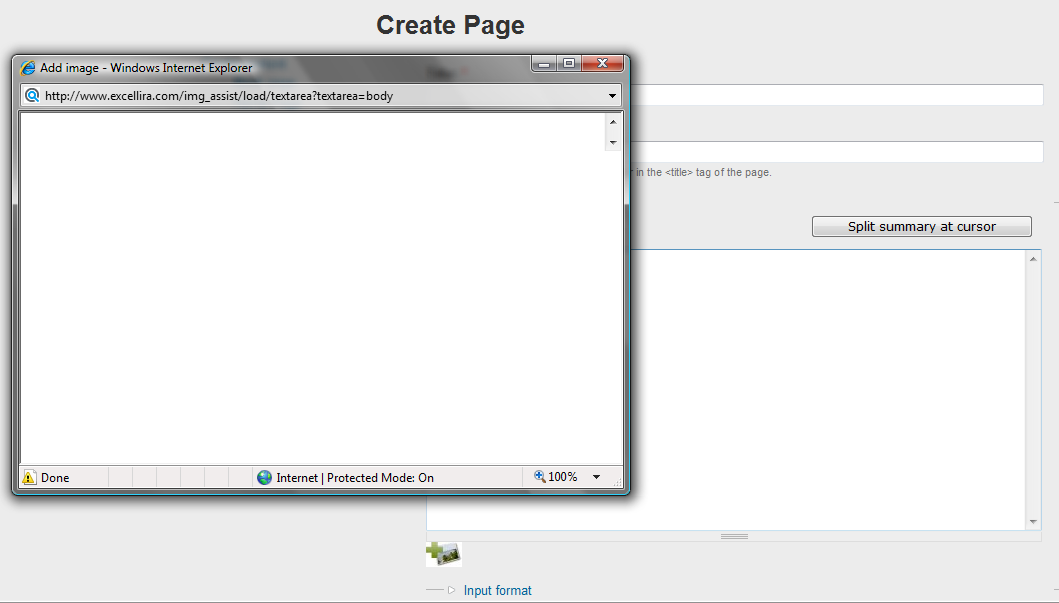
Blank popup window when clicking image assist icon when editing or creating node. Absolutely nothing within the popup. No upper section nor lower section. Screenshot attached.
Searched through http://drupal.org/node/203621 and other threads but this doesn't seem to be related:
not using WYSYWIG editor
not using thickbox
same condition regardless of lightbox2 enabled or disabled.
memory set in php.ini, htaccess and settings.php to 99M
Other sites (including the dev version of this site) on same hosting account (MT) are working fine.
D 6.12
IA 6.2x-2.0-alpha4
Image 6.x-1.0-alpha5
Condition exists multi browser: Chrome, FF 3.0.11 and 3.0.12, IE 7 and 8
****************
Observed the following error in IE 8:
Webpage error details
User Agent: Mozilla/4.0 (compatible; MSIE 8.0; Windows NT 6.0; Trident/4.0; GTB6; SLCC1; .NET CLR 2.0.50727; Media Center PC 5.0; InfoPath.2; .NET CLR 1.1.4322; .NET CLR 3.5.30729; .NET CLR 3.0.30618)
Timestamp: Wed, 5 Aug 2009 21:59:01 UTC
Message: Access is denied.
Line: 1354
Char: 3
Code: 0
URI: http://www.example.com/sites/default/files/js/b607f9474984452d1fd2e8fa96...
********************
Receive the following error in IE 7:
Problems with this Web page may prevent it from being displayed properly or functioning properly.
Line: 2481
Char: 3
Error: Access is denied.
Code: 0
URL: http://www.example.com/img_assist/load/textarea?textarea=body
*********************
Thoughts?


Comments
Comment #1
TrinitySEM commentedAnyone have a line on this?
Thanks.
Comment #2
TrinitySEM commentedOpera is turning this error in dragonfly if it helps:
ecmascript
http://www.example.com/img_assist/load/textarea?textarea=body
Event thread: load
Error:
name: ReferenceError
message: Security error: attempted to read protected variable
stacktrace: n/a; see 'opera:config#UserPrefs|Exceptions Have Stacktrace'
Comment #3
TrinitySEM commentedAnyone out there...
Comment #4
TrinitySEM commentedSince I'm talking to myself ;-) I'll add that the above errors are no longer displayed but a new one has appeared (IE 8):
Webpage error details
User Agent: Mozilla/4.0 (compatible; MSIE 8.0; Windows NT 6.0; Trident/4.0; GTB6; SLCC1; .NET CLR 2.0.50727; Media Center PC 5.0; InfoPath.2; .NET CLR 1.1.4322; .NET CLR 3.5.30729; .NET CLR 3.0.30618)
Timestamp: Wed, 26 Aug 2009 18:47:27 UTC
Message: Access is denied.
Line: 18
Char: 3
Code: 0
URI: http://www.mysite.com/sites/all/modules/img_assist/img_assist_textarea.js?B
File was chmod 777 and issue persisted.
Comment #5
onyxnz commentedSame issue. using Chromium 6 on linux. If I close the window and try again, it might work...or might not, and I try again. Eventually it operates.
Seems to be caching issue?
When it fails, this is the Chromium JS error: "Uncaught TypeError: Cannot read property 'window' of undefined"
Happens in this code block:
So perhaps the object frames['img_assist_main'] is not being created in time?
Comment #6
onyxnz commentedFixed by changing the order of loading by waiting until Document Ready. Patch to the module attached.
Comment #7
onyxnz commentedChange to bug report, because I am sure that's what this is...:D
Comment #8
sunThanks for reporting, reviewing, and testing! Committed attached patch to 3.x.
A new development snapshot will be available within the next 12 hours. This improvement will be available in the next official release.
Comment #10
dkinzer commentedI'm seeing this same error. I just installed the latest version of 6.x-3.x-dev
I get this error:
Webpage error details
User Agent: Mozilla/4.0 (compatible; MSIE 8.0; Windows NT 5.1; Trident/4.0; .NET CLR 1.1.4322; .NET CLR 2.0.50727; .NET CLR 3.0.4506.2152; .NET CLR 3.5.30729)
Timestamp: Wed, 26 Jan 2011 16:33:27 UTC
Message: Access is denied.
Line: 18
Char: 3
Code: 0
URI: http://jll-testx.jenkinslaw.org/sites/all/modules/contrib/img_assist/img...
I have private downloads turned on on my site.
I also have secure pages turned on node edit pages.
Comment #11
dkinzer commentedOK I've verified that the problem is that when secure pages are turned on the pop up window fails. The fix should be for the URI to not be http but https when secure pages are turned on on specified path.
Comment #12
dkinzer commentedComment #13
dkinzer commentedOK the work around I found is to add the 'img_assist/*' to either one of the configuration for "pages that will be secure:" or "ignore pages:" @ admin/build/securepages
Comment #14
dkinzer commented