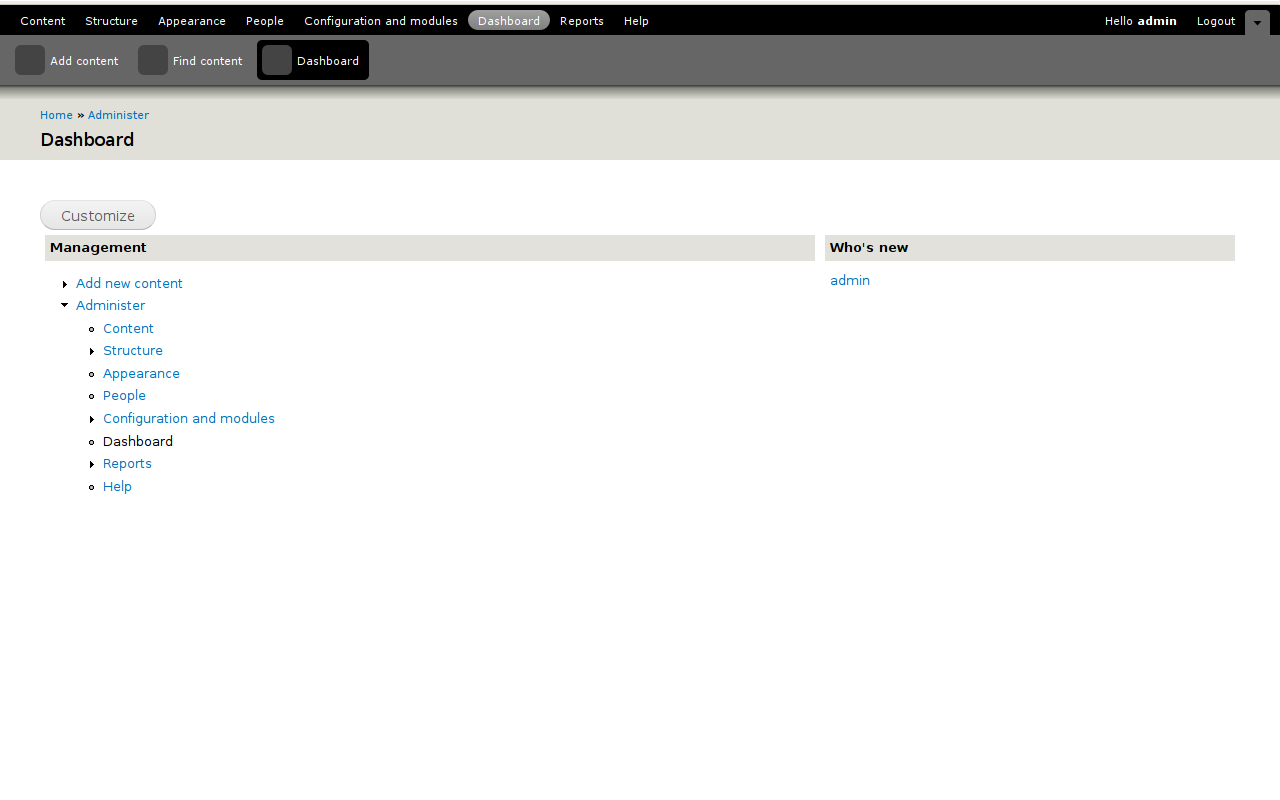
So the existing dashboard just goes to /admin but that doesn't really conform with the mockups:
http://www.d7ux.org/category/projectframework/dashboard/
This patch provides a new tiny module called dashboard, it's basically a menu hook and a function callback that returns an empty string. This menu hook provides us the ability to build up a page-admin-dashboard.tpl.php file in the seven theme that provides the proper layout for the dashboard module. Everything else is basically just css to make it look the same as the mockups.
A couple things worth mentioning at this point.
1.) You'll need to drop the database and reinstall because of the way the dashboard menu items are handled. Since this is currently in the .install file, and there's no schema to uninstall, you can't actually "uninstall" toolbar module, just disable it, so the menu items for it won't be rebuilt, thus you need to drop the database to get at this properly.
2.) I think the page-admin-dashboard.tpl.php is currently misplaced, probably needs to be in the actual dashboard module, but for the moment I took the quick answer to get some feedback on this.
3.) what's the general consensus on returning a blank string?
Eclipse


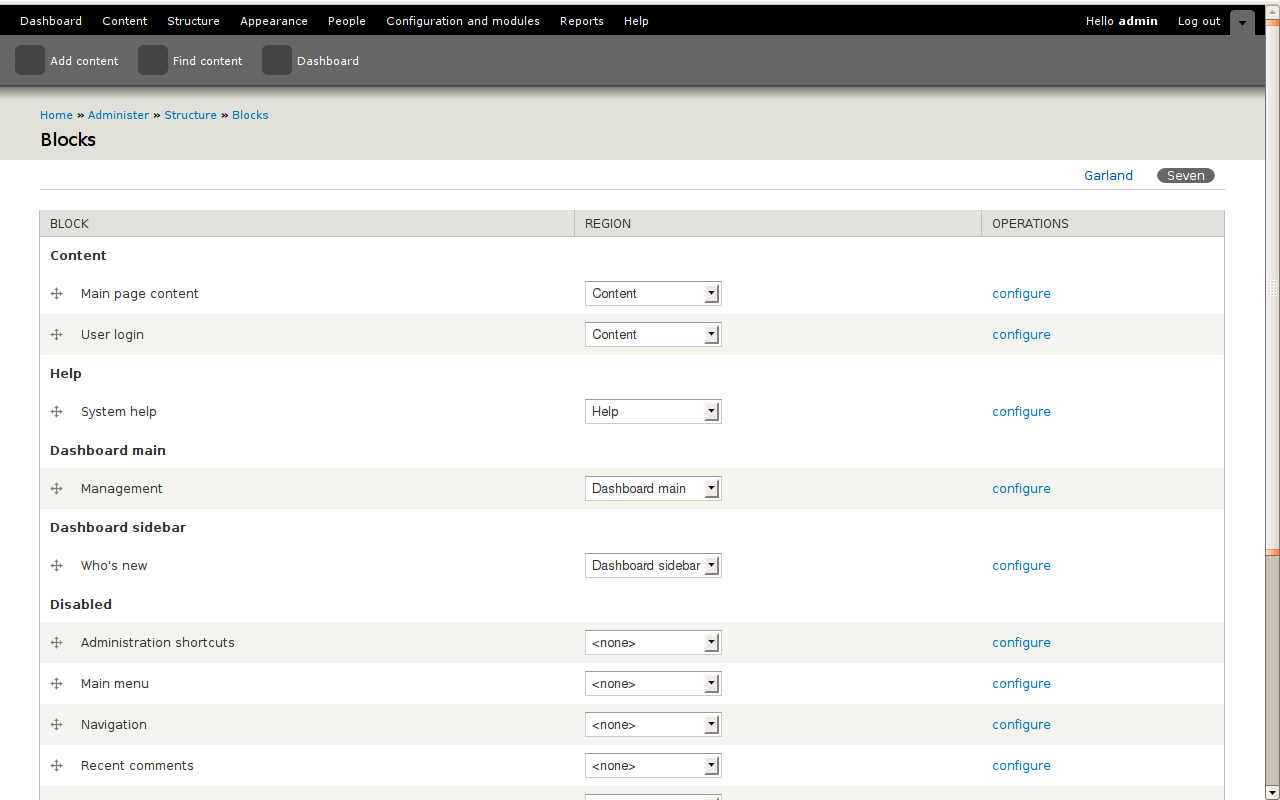
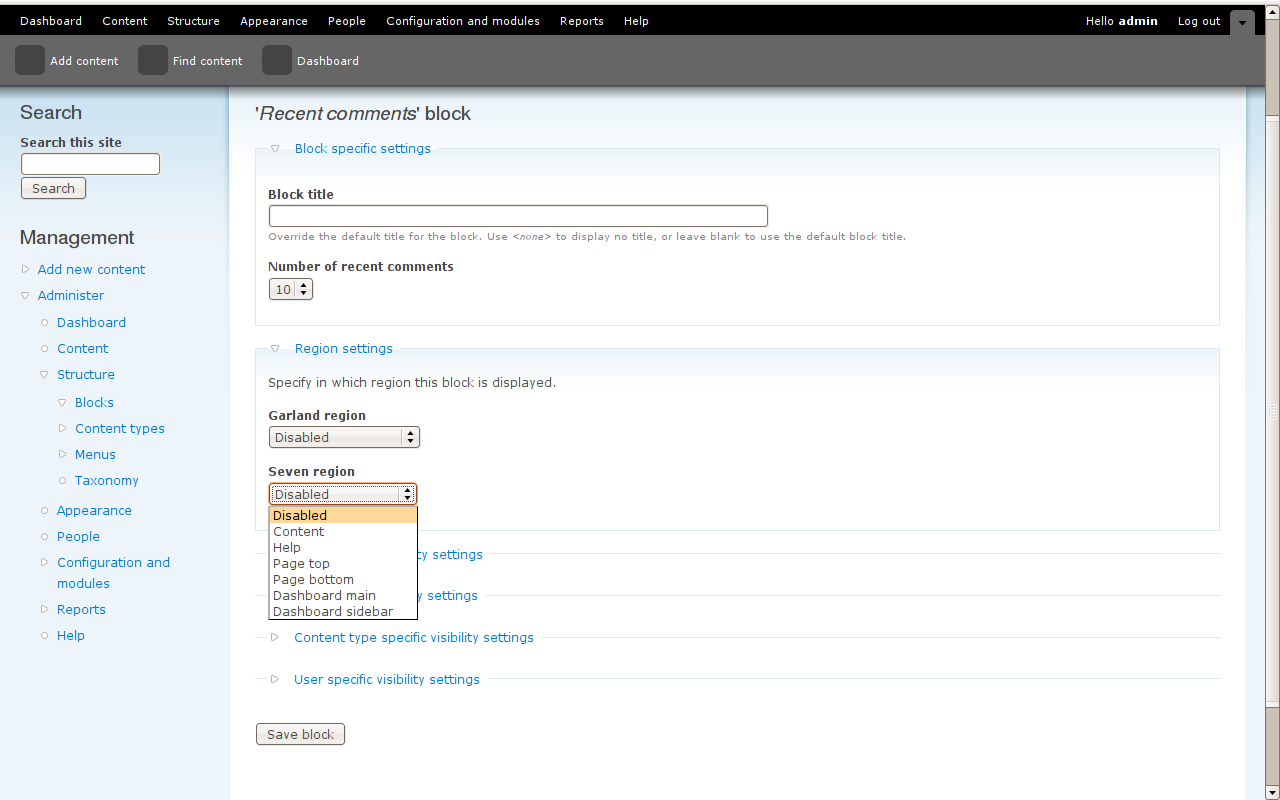

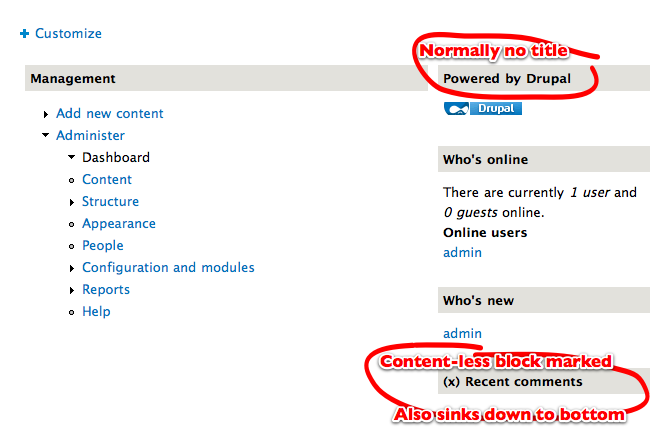
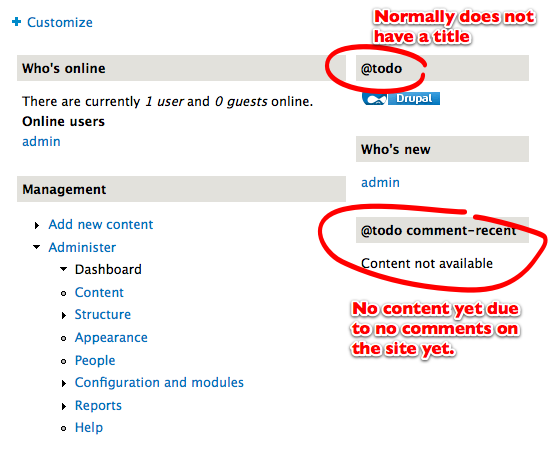








Comments
Comment #1
yoroy commentedWe're working towards something like this (click for larger):
EclipseGc: as I read it you're mainly providing a blank slate code wise, or is there a screenshot to be made? Thanks for starting this. For now, I don't have a very explicit opinion on wether to return a blank string ;-)
Comment #2
yoroy commentedAnd the rest we will discuss in #376103: Make /admin into a REAL dashboard. ! :-)
Comment #3
gábor hojtsyI'm not entirely sure #376103: Make /admin into a REAL dashboard. has a better approach, duplicating all the blocks logic might not be the right way to build this dashboard. If we were to go with blocks, I'd add dashboard specific regions (think Dashboard left and Dashboard right). There are some issues with blocks however:
- they will show up as stuff to place into the site theme - possibly not our goal
- Drupal's block system still generates all blocks for all regions on all pages, and does not know that a region would not be displayed on a page, so dashboard blocks will be generated for all admin pages => major waste of energy
So neither is the ideal world ;) Maybe making blocks more intelligent and finally implementing block regions in some kind of pull method instead of the current push one.
Comment #4
gábor hojtsyWell, let's try this one :) Here is a quick reroll of EclipseGc's patch. It keeps the dashboard module. The roal of the module can be manyfold:
- include a hook_block_list_alter() to overcome the two regions generated for other pages, where these regions are not displayed - fixing the performance problem
- add JS helpers to add a close icon to blocks to disable them, etc.
- add a bit more weighty JS helpers to let drop and drop blocks here (which would also require a listing of disabled blocks to be displayed in a graggable way) -- I did this in multiple projects before and it is not hard at all with jQuery UI in core now -- in that case we should hide these regions on the blocks admin UI
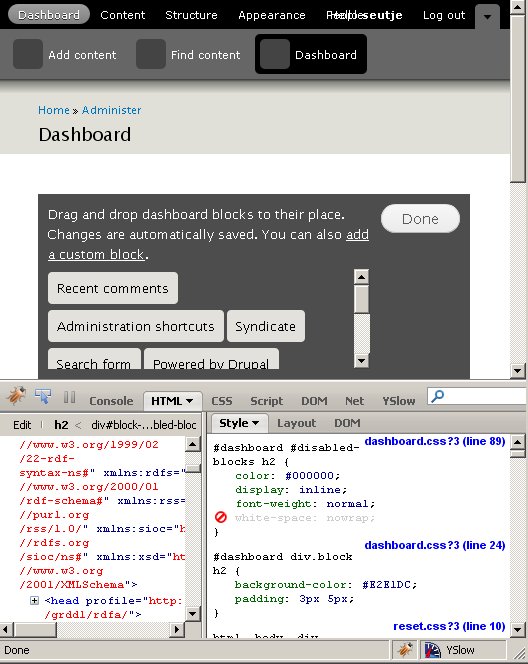
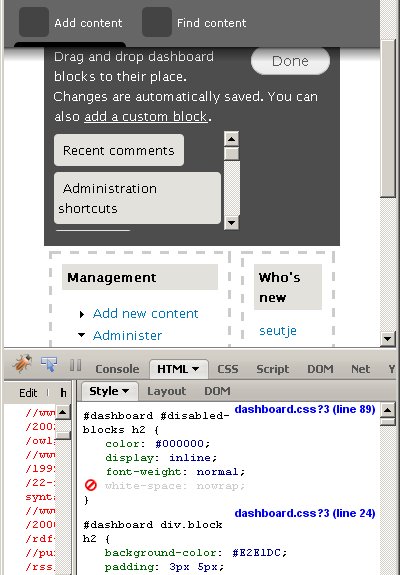
This is how it looks now, blocks can be managed on the normal blocks UI ATM by dragging items into the "Dashboard thick" and "Dashboard thin" regions. Blocks just show up as designed on the above mockup. The rest of the content depends on the blocks.
This is how it looks:
Comment #5
gábor hojtsyTagging up. The reason this dashboard would be highly useful is that it provides a way to set up your own overview and quick jump screen, saving you lots of clicks deep inside the Drupal interface to get a good overview. Core itself can ship with a few useful blocks and other modules can add more. Site builders could add more with Views easily.
Comment #6
seutje commentedafter applying the patch, clicking the link took me to admin/dashboard which showed me a 404
huh? o.O
Comment #7
gábor hojtsy@seutje: rebuild your menu?
Comment #8
gábor hojtsyHere is a quick update, and this is probably the extent I can devote to this patch today (given more important priorities).
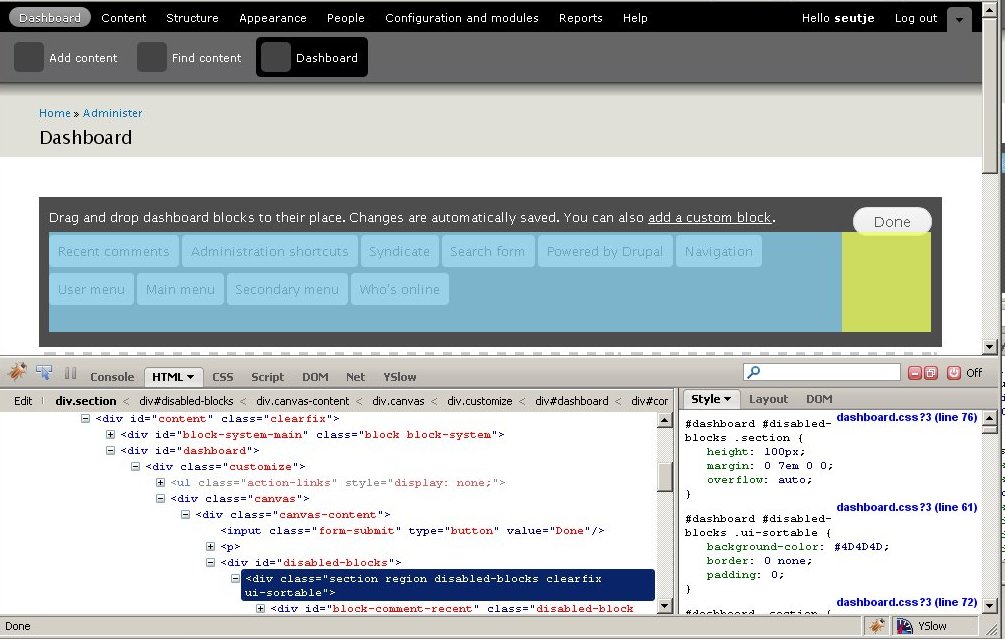
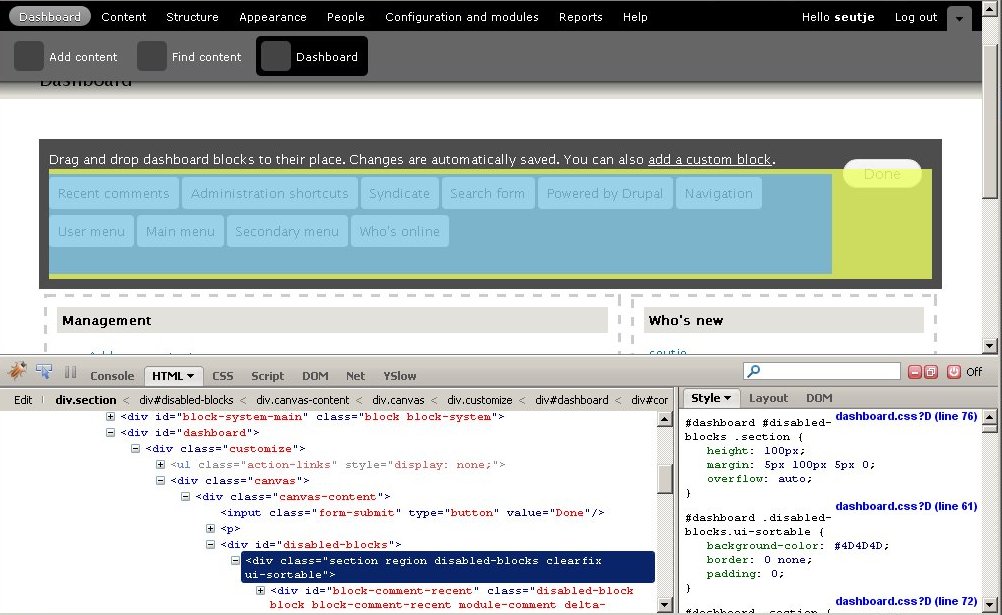
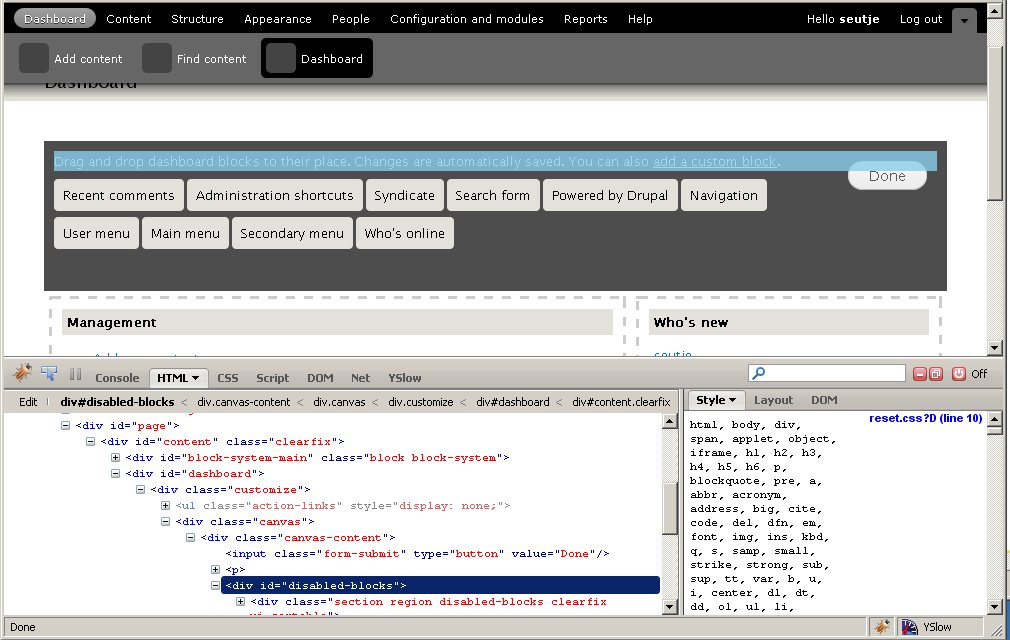
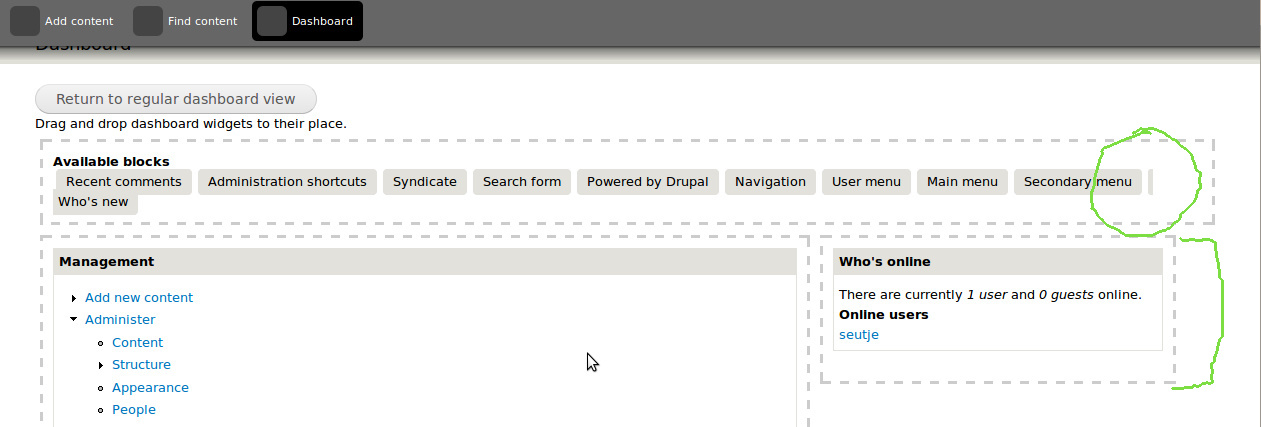
This one adds a JS file which adds a Customize button on top of the dashboard. That displays a list of disabled blocks (which I'd suppose would be draggable to the block regions). It also sets up the block regions for drag and drop, so blocks among the two regions can already be dragged and dropped. Thanks to jQuery UI, this only takes about 10 lines of code :)
This is obviously a proof of concept.
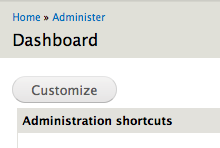
The customize button:
Moving dashboard items:
Comment #9
gábor hojtsyOh, and this previous patch also fixes performance concerns by unsetting dashboard blocks on non-dashboard pages.
Comment #10
seutje commentedhmm, turns out I have to enable the module, but the dashboard link shows up regardless
also, my dashboard page is entirely empty, aside from the customize button and when I click that, I get another empty page with just "Drag and drop blocks to their place"
it isn't untill the blocks page form for seven (/admin/structure/block/list/seven) is submitted that this query will have results:
simply because upon installing drupal, there's only 6 blocks or so in that table, and they're all status = 1
so after submitting that form, the admin/dashboard is still empty, but when I click on customize, I can see some disabled-block divs, but these are not draggable/sortable
I tried throwing some blocks in dashboard-thin and dashboard-thick, but these did not show up on the dashboard, and after checking it looks like the conditional in dashboard_block_list_alter is not what's causing it, it looks like the regions are just not getting printed
I added a
print_r(block_get_blocks_by_region('dashboard_thin'));in seven's page.tpl.php just to check and after removing the stuff from dashboard_block_list_alter it actually did print the blocks that I put in there, but only on pages other than admin/dashboardalso this kinda has me worried:
wouldn't that remove anything that is already inside the main content div? (not sure maybe this is desired, but atm it doesn't make that much sense to me)
for instance, if I add a block to the help region and one to the content region, they will show up at the dashboard page, but once I click customize, they will disappear
so maybe prepend/append would be more desirable here, I dunno
Comment #11
gábor hojtsyOh, yes, I forgot to add the page-admin-dashboard.tpl.php file to the patch :) It to be under Seven's theme dir currently.
Comment #12
seutje commentedo wow, and I was thinking it was something I was screwing up... bah :P
but yea after adding that, I do see blocks on the dashboard page and they don't disappear as they aren't in
$('#content')I take it that dragging from one region to the other doesn't work yet, and neither does dragging an inactive block into a region?
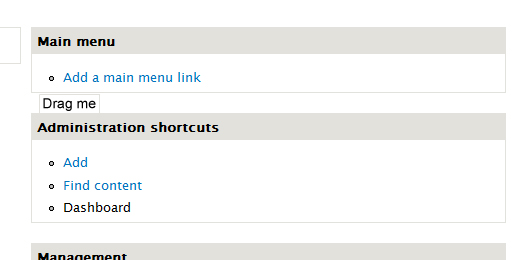
also, I find it a bit weird acting... I expected the title to be the grabbing point for the drag, but I guess since not all blocks have a title, we can't rly do that...
perhaps we should add something that's obviously for dragging the block? or at least make the cursor change when hovering over it because it's rly confusing right now
attaching screenshot of possible hover state where the "drag me" label would be the thing u grab, instead of the block content

Comment #13
gábor hojtsyDragging from thick to thin and backwards as well as reordering in the regions should work (but not saving that reordering yet). Dragging from the list of disabled modules will not yet work.
Comment #14
David_Rothstein commentedHere's a rerolled version of the patch that "works" out of the box: (a) the missing file is included, (b) the Dashboard module is preinstalled, and (c) the blocks are automatically loaded so that you don't have to submit the admin/structure/block/list/seven form before seeing the disabled blocks on the dashboard configuration page.
I tried to find a way to do (c) cleanly, but failed - or perhaps it was the block module's code that failed me, so for now, we're doing it in kind of an ugly way.
Anyway, this looks pretty good in general. In the long run we obviously don't want to tie it to the Seven theme, and it would be really nice to have a per-user dashboard rather than a single administrative one, but if it's all we can do at this point, it's still a good start.
Note that because Drupal does not support having the same block in multiple regions in the same theme, I think that means that this feature would be less useful (and a bit more confusing) if it's used on a site that does not have a separate admin theme enabled. Because then, any block that you put on your admin dashboard cannot appear anywhere else on your site.
Comment #15
dries commentedI think the dashboard has great potential for power-users that want faster navigation.
It is also something that can evolve a lot of time to become something really compelling.
Last but not least, it would be great for use on Drupal.org, so it feels like we'd be able to leverage some of this work.
Comment #16
int commentedI really liked..
Not only good por power-users but for all users.
To, in one page can have all stats information about the site. Is great..
Comment #17
catchSubscribing.
Comment #18
mcrittenden commentedSubscribe.
Comment #20
ksenzeeI am actively working on this and hope to have a patch I can post sometime tonight.
Comment #21
ksenzeeproject.module seems to think I have that patch already...
Comment #22
yoroy commentedGo ksenzee! :-)
Comment #23
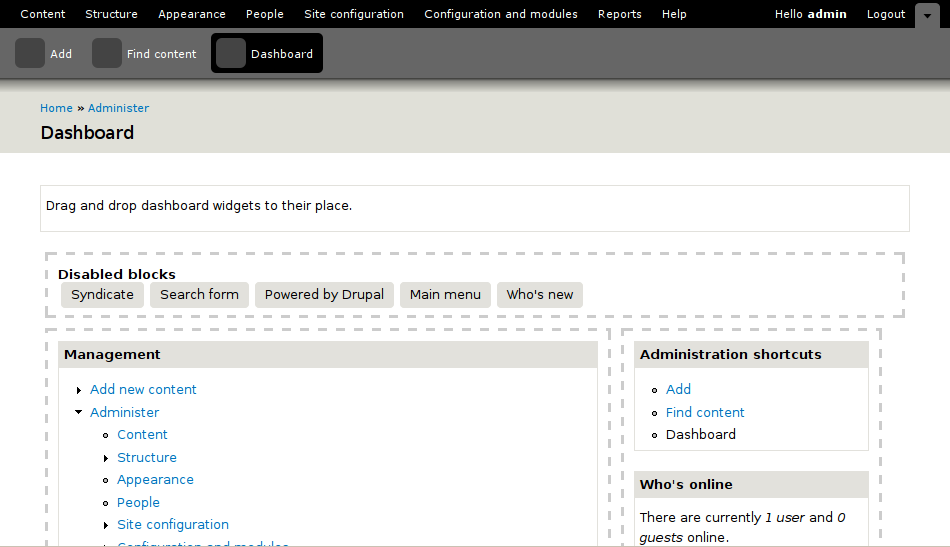
ksenzeeOk, that took 24 hours longer than I thought. :) I'm marking this to needs review, because it does, but it's still missing what I consider to be an important piece. When you drag a block from the "disabled" section into the dashboard, it should expand to show the block content. That's not there because I can't figure out how to render a block in D7. I would love to be enlightened.
Even without that piece, though, this is a functional patch. Drag and drop is fully working, and it saves the dashboard state to the server. I'd very much like people's opinion on whether this is worth pursuing over the next couple of days, or if we should step back and make the dashboard into a contrib module.
Remaining TODOs:
* Expand disabled block content on drag, as I mentioned above.
* Better design for the customize mode.
* Some way to get out of customize mode and back to normal dashboard view. (Whatever UI control we use for that can just trigger a page refresh.)
* Quit assuming we're in the Seven theme.
Screenshot:
Comment #25
jeffschulerDashboard customizations aren't being saved for me.
ksenzee mentioned on IRC that they should be auto-saved, but on refresh or clicking Dashboard again the blocks and regions are no longer visible -- only the Customize button.
I'd also like it to be more apparent that they are [supposedly] being auto-saved. I was looking all over for a Save button.
Maybe "Some way to get out of customize mode and back to normal dashboard view" (your TODO) could be to leave the Customize button in place, but toggle it into an On state when customizing... clicked again it would go back to normal mode. Or... use the old Edit / View buttons like on nodes.
I wonder if a "Save Dashboard" button would make more sense than Autosave, though, as that's how most other admin screens work.
Also, I'd probably call the unused blocks "Available blocks" instead of "Disabled blocks". "Disabled" made me think, at first, that they were the blocks not being used on the main Blocks admin page.
Comment #26
jeffschulerstarted editing my last comment before testbot changed status...
Comment #27
ksenzeeChanged "disabled blocks" to "available blocks," and moved the help text out of hook_help() for testbot's benefit. It didn't like the fact that we were providing help on admin/dashboard, but then hiding it until the customize button was clicked. I think it was actually cleaner the other way, but this will do.
I can't reproduce the problem jeffschuler reported where blocks aren't being saved. It would be helpful to get some more reviews.
Comment #28
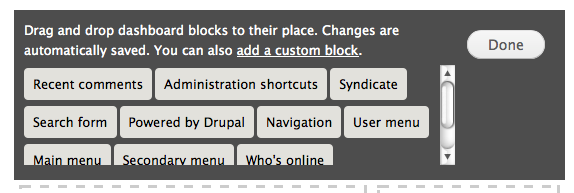
ronald_istos commentedTried this - looks good to start with.
Should say for anyone wanting to try it quickly - you need to:
a. activate module (btw, where did the go to module list link go to in Seven)
b. visit admin/dashboard (the dashboard link from the toolbar does not take you to the dashboard this patch creates)
As for the actual functionality:
1. This is something cool to have in Drupal - it scores lots of easy points straight away and can provide a launchpad/motivation for building lots of dashboard services
2. Regarding the actual interface the Customize page is clear enough but there does need to be some visual indication that once you move block around they are actually saved in that position as #25 above. Customize could change to Save once you are in customize mode.
3. Changes were saved for me (against latest head)
4. This from #14 is a bit of an issue: "Because then, any block that you put on your admin dashboard cannot appear anywhere else on your site.". I can think of blocks I want in my dashboard but also on the site and it would just be confusing as my mental model of a dashboard is as something adminy and separate from how I setup the rest of the website
Still worth exploring further and hope to pick this up again. I should also add that given the "wow" appeal it would be good to have this with the standard Drupal profile (i.e. activated by default) rather than a contrib module.
Comment #29
seutje commentedso should we support multiple instances of the same block in core (contrib already does) or should we go at this some other way?
Comment #30
catchWe should, but there's no way we can do block instances in one day. Also this will only be an issue when not using an admin theme separate from the main site theme, so I don't think it's enough of an issue to hold this up.
Comment #31
David_Rothstein commentedI reviewed this patch and have the following feedback (in no particular order):
Removing it fixes the problem :)
You don't need that one, I believe.
Not positive... but isn't it possible to use removeClass() here?
I think this module should have its own permissions. Also, for customizing the dashboard (as opposed to just seeing it), I'd tend to think "administer blocks" might be appropriate, given the power it gives you over the whole blocks system.
Similarly, it would be nice if this were a regular menu item (so that it did not have to rely on the toolbar to show links to it).
On the other hand, the "admin/dashboard" URL means that it would automatically be promoted to the top of the toolbar if you made this a visible menu item. This is exactly the kind of thing I was worried about during my various complaints at #508458: Config and modules page a while ago. But, I think we're going to have to discuss that whole issue again after code freeze anyway, so we can deal with it later, I guess... a workaround for now might be to make the URLs admin/config/dashboard or something, but I'd personally rather highlight the problem than work around it :)
Don't we need "%/%" at the end of the URL in order for the page arguments to work correctly? (I guess it might work without it, but seems like we probably should unless there's something I'm missing.)
Ugh :) On the other hand, I can't think of anything a whole lot better. I think it would be slightly preferred to use menu_get_item() and then check the "page callback" to see if it matches the function you want.
In or out of the patch? :) I think "out" is correct.
Overall feedback (on the big question of what should happen with this patch): I think it should be in core, although the question is whether one day is enough to do something with it or get a code freeze exception, or what.... I like it because although it has some limitations, putting it in core encourages module authors to build for it. For example, maybe some would start providing two versions of their blocks, with one geared mainly towards site admins on a dashboard page, etc. It's a really powerful tool.
The one thing I feel like might really make it super-core-worthy is if the drag and drop block placement code is reusable by other modules that want to make their own dashboards (with different regions, etc). I think to a large extent this patch is reusable; although it only provides two dashboard regions of its own, there's an interesting line of code:
which at first I thought was kind of ugly, but then realized might actually be neat because it applies to any "dashboard-like" region regardless of who defines it.
So I wonder a bit, what would it take to make the Javascript (especially) and HTML-generating-code (maybe) reusable for more than the two specific dashboard regions defined by this module? Is that realistic, or too hard?
Comment #32
catchThis should go at admin rather than admin/dashboard, so we can remove http://api.drupal.org/api/function/system_main_admin_page/7 - which is currently duplicated by system_admin_config_page() - there's no need for that page to exist any more. Modules which might want to replace this in contrib can do so by adding themselves at /admin too.
Comment #33
gábor hojtsy@David: on those regions, the patch only seems to mention them a little in the JS and then in the theme .info file. The JS just generates these two known regions if they are not there. I'd say the PHP of the template should be "fixed" to always generate the markup for the regions, which then make the JS part superfluous. Then theoretically, the dashboard code could support any number of regions named "dashboard...." given the generic code elsewhere.
@catch: I'm not so sure about that page going away. I've seen many people in the issues queues like Moshe vouching for it to stay, even if under a different URL. If its bugs are fixed, it provides a good glance of the admin screen, which might not have been testing well, but works for many people. It does not need to be in the face obviously.
Comment #34
David_Rothstein commentedHere is a version of the patch that fixes the auto-saving problem mentioned above, and also removes some of the dependency on the Seven theme (the dashboard module now takes care of defining the dashboard regions itself, via hook_system_info_alter). This required fixing a bug or two in order to actually get working.
Next up will be to try removing all dependency on the Seven theme (i.e., the page template).
Note: If you're testing out this patch, the first block you typically see in the list of "disabled blocks" on the dashboard page is the Recent Comments block, so instinctively that is likely to be the one you start testing the patch with. However, if you drag that block into a dashboard region, the auto-save will appear to be broken. Actually, it isn't -- everything is working fine, but it's just that the block doesn't actually display on the page, due to #565642: "Recent comments" block is completely hidden when no comments are available. I don't even think I want to admit how much time I wasted trying to debug that "bug" in the Dashboard module before I realized what was actually causing it :)
Comment #35
David_Rothstein commentedNew version:
Comment #36
David_Rothstein commentedSome more issues to fix later that I noticed:
Comment #37
ksenzeeMore fixes:
- When you drag a block in from the disabled area, its content loads.
- You can now exit "customize mode" by clicking a button.
- We're now using menu_get_item() to avoid checking $_GET['q'] directly, per David's suggestion in #31.
- Changed the dashboard region names to dashboard_main and dashboard_sidebar.
- Made sure there are docblocks for everything.
- The dashboard module exposes its own permissions, and requires 'administer blocks' permission to customize (again per #31).
- The first bullet point under #36 is fixed.
- I think all the non-t() text is now properly t()'d (second bullet point under #36).
The third bullet point under #36 is either a bug or a feature. If we decide it's a bug, we can fix it later. As David said, it may be a feature. I'm not sure. But certainly it's a core attribute of blocks in Drupal that block placements are theme-specific.
I think all the showstoppers are now eliminated. And hey, we've still got an hour and a half left before code freeze. Anybody? :)
Comment #38
mikeytown2 commented+1 looks good on XAMMP/XP
Comment #39
seutje commentedThe functionality seems to work like it should on FF3.5 (aside from all blocks disappearing when any empty block is moved, even if it's just reordering the available blocks, not even dragging it into an active region)
but this thing is going to need a lot of theming love, for instance:
also had some weird experiences with the line wrapping where one of my available blocks was pushing all the following ones to the next line, but I couldn't recreate the weirdness the second try and I don't really know what triggered it
EDIT: FF3.0 not 3.5 sry (updating right now :P)
Comment #40
David_Rothstein commentedNew version:
Still not done:
Comment #41
David_Rothstein commentedHm, I also just noticed that the dashboard blocks are showing up on the "access denied" page (when you view admin/dashboard without proper permissions).
Ideally, that's not what we want to happen :)
Comment #42
mcrittenden commentedJust a nitpick: can we rename "Return to regular dashboard view" to something shorter which has to do with saving changes? Something like "Save and Close" or just "Save Changes"? "Return to regular dashboard view" is too long and could be (mis)construed to mean that changes are discarded.
Comment #43
int commentedadd tag
Comment #44
seutje commentedchanged the CSS a bit to put the margin on the inner container and set the width for the sidebar to 35% to the total ends up at 100% and the top and the regions are the same width
EDIT: o dear, ignore this patch, it's pretty borked
Comment #46
seutje commentedI really can't seem to figure out how to add a new folder trough a patch with read-only rights, so I'll just add the modified dashboard.css file
Comment #47
ksenzeeChanges:
- Added seutje's new lovely dashboard.css.
- Removed the chunk of CSS David called out. We're not outputting anything that it would apply to, so it shouldn't be there.
- Added a no-js fallback link to the blocks admin page.
@mcrittenden: Agreed the button text is not great. I'm not sure saying "Save" makes any sense, though, since we're autosaving changes. It would imply you can cancel without saving. I've changed it to "Close," which I don't particularly like either. Other suggestions welcome.
I'm currently struggling with how to provide contextual help -- whether it should be through the help system or outside it. The help system would make the most sense, but I don't think it's currently flexible enough to handle contextual help on a heavily ajaxified page, in a situation where the help only applies to people with certain permissions. Again, suggestions welcome.
Comment #48
mcrittenden commentedksenzee: "Close" is definitely better than the previous. I went for "Save and Close" since it seemed to work for Google Docs which also autosaves, but I agree that it implies that it's possible to close without saving, which is definitely a problem.
Comment #49
attiks commentedI had a quick look, I like the functionality, but is there a reason why the dashboard isn't shared amongst themes? I think it's better to not tie it to a theme.
Comment #50
Bojhan commented#569190: D7UX: Dashboard contents To discuss the actual contents of this dashboard.
Comment #51
jenlamptonKeeping in mind that I've never seen this dashboard before, here are my first reactions.
1. There is already an item in the gray navigation called "dashboard" which goes to /admin. By enabling the dashboard module, there's now a second link in the black navigation, called "dashboard". This is confusing. Why is /admin called dashboard? (maybe that's a separate issue...)
2. customize button makes sense, but can we move it somewhere other than the top-left of the page? especially once we have already configured the page. It doesn't need to be the first thing you see anymore. how about top right? or inside #branding? or closer to the page-title?
3. the list of available blocks is too wide for the space provided. we need to account for different screen sizes with wrap where necessary. Can we display inline?
4. I also don't think "close" is the right language for that button, it implies no saving. what about "Done" ?
Comment #52
jenlamptonRe # 49
I think it would be better to have some way for modules to provide information that will be available on the dashboard that can circumvent the usual block system. Maybe an API change to block that lets us pass a parameter to specify a block type? Maybe a hook_dash?
Here's why I feel that the dashboard doesn't fit the block model...
- block system is theme specific, but dashboard shouldn't be.
- block system is designed to be site-wide, not just for one page with a custom layout
- putting dashboard-only regions on the admin/structure/block page seems greedy, but...
- we don't need these blocks on the admin/structure/block page if our dashboard has it's own configuration!
What do others think?
Jen
Comment #53
seutje commentedgave it some more theming love
display:inlinewhich cause the weird wrapping behavior, changed those to float left@jenlampton: we do need these blocks on the admin/structure/block page coz how else will non-js users configure it? And the dashboard needs to be user specific, which the block system allows
made a tarball of the entire folder this time (sry, but I really need some1 to take some time to explain me how to make a proper patch for core, coz adding files and folders isn't that straight-forward)
Comment #54
seutje commentedsome more theming love
the placeholder will now have the proper height in the active regions
Comment #55
alexanderpas commentedsubscribe (will review later)
Comment #56
sunsubscribing
Comment #57
ksenzeeReroll including seutje's changes and jenlampton's "Done" button text suggestion.
@seutje - Adding files and folders to a patch is a lot easier if you use git (or I presume bzr, although I've never used it). Catch me in #drupal and I'll show you how in three easy steps! :)
@jenlampton, re #51/2 - The customize button is just a placeholder really, until we have this working with the overlay. Take a look at the mockup in #1. I think the overlay is almost RTBC, so I should probably check this with the overlay patch.
Next up on my list is making sure blocks in customize mode always have a title.
Comment #58
ksenzeeOh, and we need to add the little configuration icons in the top right-hand corner of each block, which I assume should lead to the block config page.
Another thing from the mockup that we should be looking at is how to add the text to the right of the block titles. I had written that off as not achievable before the original code freeze, but now that we have an extension we can maybe do it.
Comment #59
David_Rothstein commentedNo reason to do that here, I think; it should hopefully come automatically from #473268: D7UX: Put edit links on everything?
Comment #60
gábor hojtsyAgreed with David on the config icons. Same was also echoed by Dries before.
Comment #61
eigentor commentedCan whe have a screenshot of what this is looks like - if the changes are visible?
Comment #62
seutje commented@ksenzee thx a lot for rolling this back in a proper patch, I didn't know I could use git for this, I'll check it out myself before bugging you on IRC
The block title/content problem is pretty high on my list as well, we should use the block description instead of the title, like we do on the block config page, but only in the edit-mode
the config buttons should come automatically with the other patch indeed, as it's done in the theming (isn't it?)
also, I'm still experiencing some weirdness concerning the attaching point, like the point in the dragging element that snaps to a region. When dragging a big active block the snap-point seems to be the very middle of the original size of the dragged element. It seems more desirable to make this snap-point be the location of the mouse, but I'm not that familiar with UI sortable and how to override default behavior
@eigentor I'll try to get around making a lil movie of the current state later tonight
also, a lil question for whoever knows the answer: why are we using underscores in ID's? (
#dashboard_sidebarfor instance) I've been looking for other occurrences of this in core for a couple days now and I can't find any (not a grep hero, so doing it manually) and personally, I don't think this is best html/css practiseit's also been annoying me coz all the other ID's and classes use dashes (
.dashboard-regionfor instance) so I keep wondering why$('#dashboard-sidebar')isn't returning anythingI have however seen reports of older browsers (and I really mean OLD, we're talking CSS1 here) to have difficulties with underscores in selectors -> http://devedge-temp.mozilla.org/viewsource/2001/css-underscores/
I would also like to get rid of all element specific selectors, none of them are necessary and they only make the selector stronger, making it harder to override, and a
div#dashboard_mainselector is rather silly, coz they tend to be less performant than just#dashboard_mainand since you're using an ID, it's pointless to specify the element... if an ID can occur on several elements, even if not at the same time, you are doing something wrongComment #63
yoroy commentedafter enabling the module, find it at /admin/dashboard:
- The empty state is quite, ehm, empty. We might want to look into enabling some block here from the start. One of the d7ux objectives is to provide sensible defaults. Even if what we enable by default does *not* match what a user might want, it would still be (more?) clear that this can be changed. Make it do *something* from scratch, a blank canvas is harder to start with for users that changing some predefined settings.
- Haven't read the full thread here yet. Is the top level link an intermediate measure?
Ok, let's click that button then (click image for full pic):
- Need to distinguish between the 'drawer' and the 2 columns that actually make up the page (no dashes around the drawer but a bg color?)
- Give the empty regions a bit more height by default, make it easier and clearer that this is where you drop stuff into
- I expected the drawer to be on the bottom, dragging things *up* into the regions, but that might just be personal preference
- Move the 'Done' button to bottom of page.
Clicking 'Done':
Not sure if the button should be a button. If it should, then position it under the dashboard itself. If it's an action link, then it can stay at the top. Not sure yet which one it should be, but leaning towards action link.
Overall: looking really nice already! Main points ux wise would be:
- enable some blocks by default
- visually seperate the box with available blocks from the actual regions
Comment #64
yoroy commentedstatus
Comment #65
David_Rothstein commented@yoroy: I think you may need to apply the patch before installing Drupal? The default install profile should be automatically installing the module and populating the Dashboard with a couple initial blocks. See the attached screenshot for what it looks like to me after installation.
I think we could probably use better defaults though. I think the search box might look decent in the left hand column, for example (although that would prevent you from using it anywhere else in your admin theme)...?
Regarding the double Dashboard link in the toolbar, see point 5 of comment #31 - I'd consider it a separate bug. Although Gábor at http://drupal.org/node/508458#comment-1992928 points out that maybe the Dashboard belongs in the upper menu after all anyway...
Comment #66
seutje commentedquality is a bit choppy, audio is horrible and out of sync, but I added a few annotations with the important stuff
the part at the end isn't rly "current state" but more like an option to utilize this on every page to get a on-page block editing everywhere
http://www.youtube.com/watch?v=BqKU2OCX_FA
Comment #67
yoroy commented#65: thanks David, I indeed did not re-install, just applied the patch. Other comments still stand though :-)
Comment #68
eigentor commented@seutje:
Wow, crazy! This is even getting near what blocks admin page might look like in D8 (dream...)
Comment #69
seutje commented@eigentor:
I was actually thinking we could implement this on every page so we have a proper in-page block editing functionality where one can edit blocks right on the very page they want it on, but considering how much work there is left towards that goal, I agree on the D8 dream ;)
Comment #70
gábor hojtsy@seutje/eigentor: let's keep focused on the dashboard and not come up with major changes for the blocks UI itself.
Tested with the overlay and none of the dashboard blocks show up in the overlay. This is probably due to how the overlay whitelists certain regions. This needs to be fixed in some way. Otherwise it works well in my testing.
Comment #71
seutje commented@ksenzee: thx for the GIT 101
@Gábor: pft, fine :P
is it just me or is
$block['title']always empty?I was trying to reuse
function dashboard_show_block_content($module, $delta)to grab only the info at the momententerCustomizeModefor the active blocks that don't have a title, and in that way force those blocks to have some sort of title label so even empty blocks with no content or title would be somewhat visible but I noticed that the following query (fromdashboard_show_block_content($module, $delta)) didn't provide me with anything usefull for thisas this is what it returned for the powered-by
$block_object:so is there a way to load a single block's info better than this?
or should we just fall back on delta in cases like this (I imagine this can be very unpretty in some cases)
Comment #72
ksenzeeso is there a way to load a single block's info better than this?
No, I'm not aware of a way other than invoking hook_block_info(). The only other option I can think of is to change the database schema to store a copy of the description, which would be pointless IMO.
I'm unassigning myself so no one else will hesitate to work on this. I think we're close, in terms of a minimally committable feature. Obviously it would be nice to have a per-user or per-role dashboard, but that seems like a separate feature.
Comment #73
ksenzeeOh yeah -- I forgot. Yes, Gábor, the overlay incompatibility is because the overlay patch blows everything away but its own happy little regions, obliterating the poor dashboard regions entirely. <sob> The simplest fix is to whitelist dashboard_* regions as well. That introduces what seems like unnecessary coupling, but without some kind of region tagging scheme, I can't think of a better approach.
Comment #74
seutje commentedso should I expose another path and make a callback that does the block_info stuff, or should I add a parameter like
function dashboard_show_block_content($module, $delta, $info = FALSE)?and then
after the DB query
imo that would introduce a big WTF :(
Comment #75
gábor hojtsyRerolled the latest patch with latest HEAD, since there were some significant (and numerous) deltas when applied. Also, added three lines to make the dashboard play nice with the overlay. The latest overlay patch includes an overlay_regions[] info file key possibility, where themes could define what regions should be displayed in the overlay. This is altered by the overlay module and here too to add the required regions to make our code work. Now works well with the overlay. Tested customization, saving, etc. It all resizes and everything, so looks to be a nice combo.
@yoroy: on the top level dashboard link, it might stay there but move to the left end. People repeatedly expected something on the left end to "go home", and the dashboard is supposed to be a king of home page for the admins.
Comment #76
gábor hojtsyWorked on solving yoroy's concerns:
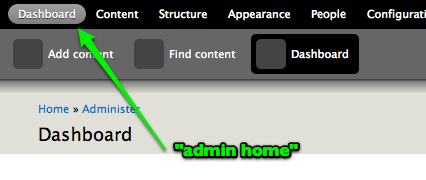
- moved dashboard to the start of the top level IA (it became the "admin home" as discussed above):
- made the customize button an action link instead (not so sure about this, since it does not behave at all like other action links)
- used taller placeholders for the disabled blocks, removed the useless header on the drawer now that we have help text too and used a different background instead of the same dashed borders; also moved in the Done button (and kept it a button) to the top right of the drawer
Note that the current layout is slightly odd/faulty when you have more placeholders then the width of the screen. We can solve this by more margin below the Done button or some other way. Before working that in, I'd look for more feedback on this improved drawer though.
Also note that due to how the drawer is now a whole, the mechanics with the Done button were moved into the finish callback of the Ajax load(), so it was renamed to setupDrawer().
Finally, not sure why the testbox missed the previous patch, but lets hope it will pick this one up.
Feedback as always is welcome.
Comment #77
yoroy commentedbot?
Comment #78
jolos commentedJust a minor remark: when you change the administration theme, your blocks seem to disappear. ( When you change back to seven, they appear again ).
This is unexpected to me. I know this is due to the way blocks work, when not used on the dashboard you do want blocks to depend on the theme.
I don't think this is solvable in an easy way. Luckily It's not annoying, just unexpected, but still I thought it would be worth mentioning.
Comment #79
te-brian commentedFirst of all, this is looking great. I've installed with the latest patch and played around with it and I'm really excited about what this could mean for my clients. I haven't had a chance to dig in a see how it works yet, but I have a quick question.
What is the mechanism, if any, for filtering which blocks are available as dashboard blocks?
Comment #80
SeanBannister commentedsub
Comment #81
dries commentedI tried this patch and it looks great. It works well, and looks great.
It would obviously be great to have some useful blocks installed by default but we can do that in follow-up patches.
I'm marking this RTBC, and will proceed to commit this. Once committed, I suspect we'll have people follow-up with refinements.
Comment #82
yoroy commentedThis works quite well indeed. One thing that is not good enough imo is removing blocks from the dashboard. You have to find a small hotspot to the right of the list of available blocks in the dark bar (tray) above to be able to remove a block from the dashboard. Can it be made to remove blocks by just drag-releasing outside of the two regions or does it have to be dropped back into the tray?
I agree other refinements can be handled in followups.
Comment #83
Bojhan commentedHow can this be committed? I am sorry for beign late here but I thought we where just getting started. We said follow ups on shortcuts, we said it on the admin theme and we said it on cck ui. Its not happening to a sufficient UX quality and the most critical part of this page - is not the technical ability to make a dashboard. Its the actual widgets themself.
Even if you take somewhat of a objective look, you can see this is far from something we can present to our users.
1. No widgets are designed.
2. You drag a block into place, I still have to click done? Do people get that? In the context of block administration its meaning something completely diffrent.
3. What do these dotty lines mean? I can´t drag blocks in my blocks administration.
4. The interaction does not scale? I can easily have 15/20 blocks here.
5. Customize? Is it that important? Probally is now, but wouldn´t be for a normal users.
6. What user problem are we solving? What is the user goal?
7. How do we create consistency among widgets?
I think personalisation is the worst thing we can do if its not thought trough enough. You can see it clearly with wordpress, where they worked inmensly on their dashboard - the ammount of custimzation real users do is minimal. Right now, we are basicly forcing every user to customize his dashboard? That is not what I want to be confronted with the fist time I turn my head into the administer area. This is diffrent from the toolbar or the theme, this is adding actual new functionality that is critical to a given workflow.
I am really making a stand here, because I think this is ridiclious. Its untested, its far from done, and the UX is wonky at all places.
Comment #84
ksenzeeI agree that the dashboard itself could still use some work, but I thought #569190: D7UX: Dashboard contents was for hashing out the actual widgets. We can't come up with smart defaults until we have smart widgets to default to. And having the dashboard structure committed might help motivate people to work on the widgets.
I'm not sure I agree that the interaction needs to scale better. The more widgets you add, the more difficult the customization gets, but to me that's a feature, not a bug. Nobody should have 40 dashboard widgets anyway. Maybe I'm not seeing your point though.
Re the dotty lines: those were "designed" by developers. Suggestions very much welcome. :)
Comment #85
dries commented@Bojhan, not all of these issues need to be tackled before this patch can be committed. I tried the patch, it provided real value to me and it was intuitive to me. I think you're exaggerating.
Comment #86
Bojhan commentedWhy would I be exaggerating? This is the first time, I call something out - I didn´t do it on CCK UI or anything that has gone in so far - UI wise half broken. I spend 6 months last year working on Dashboards, finding the good KPI´s and other material - comming up with good widgets is not an easy job, saying thats follow up stuff, not to important to fix now? Then your missing the whole point of having a dashboard.
I fundamentally disagree that a Dashboard that requires customization to work for you, is a good direction. I understand power users love this, but normal users will not care.
@Dries Sorry, but that it is intuitive for you - is not my worry. Whether it is intuitive for normal users is - thats why I am involved in Drupal right? I do not think this will be intuitive for users, and I do not think - that turning the actual contents of this page into a followup will be a worthwhile strategy.
@ksenzee I hope so, we said that for CCK UI and it didn´t happen. This is I believe even a thougher job then the CCK UI. I think you are seeing my point, you should not have 40 widgets. But sure as hell many modules, will add a widget to that list. But since we don´t know the actual contents fo this page, its a hard case to make. There have only been 5 comments on the actual widgets, I dont think its really living.
Comment #87
yoroy commentedTypical example of framework vs. product. Should core only (wait to) commit changes to the framework that have a good enough implementation in the default CMS product? (I can't tell if the code is framework-worthy of course).
I would agree with Bojhan that the current implementation is far from ready, especially to take it's place at /admin.
The widgets that could live on this should have been part of this discussion earlier and more foccussed on, but making them part of this actual patch is an even less feasible approach. It's not like we've had much succes with monster UI patches so far. I'm thinking about how to move forward a bit more.
Comment #88
SeanBannister commentedI noticed on the dashboard page it says "Drag and drop dashboard widgets to their place", from a consistency perspective I feel this should read ""Drag and drop dashboard blocks to their place". Otherwise we're introducing a new concept called "Widgets" which will further confuse the end user when they actually learn about blocks. The reason I bring this up is the last few posts all refer to the blocks as widgets.
Comment #89
robloachIn the past, I've used Panels to create an administration dashboards for my users. Could we get this up and running on the Dashboard project page so that we could branch off a bunch of this issue queue into separate discussion threads? It might make the workflow a bit easier considering all that this patch is adding.
Comment #90
Bojhan commented@yoroy I agree, its not neccairly a way to move forward - maybe thats the whole point. We are ignoring the big ass elephant in the room - just putting the problem to tomorrow. It is indeed just not ready for /admin yet, if we should fix that in this issue or in the other it doesn´t matter - but the user problem/goal should be adressed, not a piece of functionality. I think we have learned enough from last years, that introducing untested, not worked out features late in the process - creates an inconsistent and unusable interface (and remember, this is one of the first thing a user will see - it is that first impression)
Comment #91
catchI agree with sean on blocks vs. widgets - let's not repeat 'categories' here.
I haven't seen any issues about which blocks will be put into this interface at all - or at least not apart from a couple of d7ux microproject ones with no recent activity. So I fully agree with Bojhan that committing an empty interface with absolutely no idea what should go in it is a bad idea. However it's not going to be practical to create any new blocks here either - each one will take some discussion in and of itself.
So if it doesn't exist already somewhere, let's open a meta issue for dashboard blocks (which could probably handle patches adding certain ones by default too), and then open sub-issues for any blocks which don't exist yet - just re-opened #337947: Correct whitespace issue for 'recent content block' in dashboard since the block itself would be a useful one to have available. Note I haven't tested the patch here yet though or reviewed the code recently, but while I think followup issues are OK still, we're definitely at a point where they need to be mapped out very, very clearly. As far as I'm concerned this issue itself is a 'followup issue' since it's a massive gaping hole in the current toolbar and admin/config IA. Also changing category and priority, since this is the only current proposal we have to replace the horrible and confusing mess of /admin vs. /admin/config at the moment
Comment #92
yoroy commented#569190: D7UX: Dashboard contents
Comment #93
yoroy commentedtag
Comment #94
gábor hojtsy@Rob Loach:
Erm, I have not seen a simple user focused interface for panels which would be applicable. If you consider power users then it might work for them, but probably still not easy for a simple thing like a dashboard.
That dashboard project is a *user customized* dashboard with *custom widgets*, while this patch is a *globally/site customized* dashboard with *blocks as widgets*. Not much to do with each other.
@yoroy/@Bojhan/@catch: I share concerns about the list of blocks possibly being too long and creating usability problems. Ideas would be welcome to limit the blocks shown for dashboard placement.
@Bojhan: one of the reasons that the dashboard is being worked on is to augment the new IA and provide a clear solution for people who consider that having a plain summary/"menu" of items they care about is better then going into deep areas of the IA one by one. Mark called the dashboard a "big shortcut bar" previously, analogous to the toolbar's shortcut bar in that it would help cherry pick items from the complex maze of a Drupal administration tree.
Comment #95
amc commentedI don't know the intricacies of the dashboard, but if the contents (blocks/widgets) are interchangeable, that is, if dashboard widgets can be used as blocks for the main site and blocks can be put as-is on the dashboard, then I see no reason to introduce another concept like "widget". If, however, they can only be used in one place or the other, then perhaps having a different name for each might make the distinction clearer.
Comment #96
gábor hojtsyUpdated patch attached:
- removed system.module and system.api.php hunks which did not apply anymore due to the same fix being applied via some other patch (yay)
- renamed widget to block (there was only that one single mention of the widget word in the whole patch)
Comment #97
SeanBannister commentedIt's interesting that it only took one mention of "Widgets" in the UI to influence our terminology.
I was just thinking about how we could limit the suggested blocks the user sees when clicking "customize". What would happen if it was a region called dashboard_suggestions. Then effectively the user is dragging a block from dashboard_suggestions and dropping it in either dashboard_main or dashboard_sidebar. We can then place suggested Dashboard Blocks in dashboard_suggestions and Contrib Modules can also do the same.
Comment #98
gábor hojtsy@SeanBannister: that would require some thinking as to how a custom block is added to the available dashboard blocks. Let's say you'd like to embed a google analytics stat or a map or just add plain instructions. What is the user workflow of adding a custom block to the dashboard then? Currently, you create the block and it is available. (You still need to know that just creating a block makes it available, but clearing up the terminology probably helps there).
Comment #99
SeanBannister commented@Gábor: Good point, I original forgot about the end user who might want to create a new block or add an additional block (such as a View) to the Dashboard.
So I'm thinking, once the user clicks "Customize" and dashboard_suggestions is displaying lets display a "More" link in the bottom right hand corner. When clicked it would display all Disabled blocks, this makes it easy to add any block to the Dashboard (such as a View) but keeps them out the way so it's not to confusing for the end user.
If a user wanted to create their own block the simplest workflow is:
Or the less likely workflow (but one you might follow if setting up a list of suggested blocks for a client):
Comment #100
seutje commentedreplaced this line (in dashboard.js), which doesn't do anything (filing a patch to jquery UI docs as well)
cursorAt: 'left',to thiscursorAt: {top:0},, which causes the item being dragged to snap to the cursornot sure if this is the proper way to do this, as the jquery ui docs could use a polish
Comment #101
dries commentedIs the dashboard useless without good blocks? Yes.
The current patch does not come with blocks, which is on purpose. This is a chicken and egg problem. We need to have a starting point before we can effectively start to define useful blocks. This patch provides an initial framework. Hopefully we can have a couple of solid blocks in core, but better yet, hopefully we see a whole slew of contributed modules that introduce dashboard blocks.
When I put on my short term thinking hat, I agree that this patch isn't ready because it doesn't provide you a true dashboard experience.
When I put my long term thinking hat on, I think this patch could already be an enabler because it will lead to a dashboard experience. It might take several months, or even several years, but eventually it will.
For now, the Dashboard could only be accessible from the toolbar or somewhere else. It shouldn't be the default ?q=admin yet. Would that make you feel more comfortable?
Comment #102
Bojhan commented@Dries So if its not good, we pull it out? Who defines "not good" ? In my long-term thinking hat, this patch provides a initial framework - but nothing more. The whole user experience is again, less important then bringing a new feature in for possibilities sake. We are here to guard the user experience, by saying - the good UX will come out over a few years, sounds very visionary but you can probably understand that kills a little bit of me every time. Because as soon as it goes in any improvement we can make to its UX will take years as well (because everyone grown accustom to it's broken UX).
I don't know why I am fighting so much for keeping this out, but if this was a Database restructuring, a scheme change - anything, it would be far more thought trough. Why is it always, for UX we try to fix it after - even while we never did fix it after?
Anyways, lets see if we can adress the issues raised.
Comment #103
dries commentedBohjan, I'm open for alternatives but I don't see any emerge or anyone stepping up to do the work. Not having the feature seems worse to me.
As for the database restructuring, fields API, filter system rewrite, etc -- all of these came together in a series of patches. Not a single one of them was accomplished in 'big bang'-style. In all cases, there was a significant initial commit, but it always took x more patches to get it right.
Comment #104
sun1) I agree with Bojhan's reasoning. This patch, as is, is like adding DBTNG without adding it.
2) I agree with Dries' reasoning. It's ready when it's ready.
3) I expect this patch along with some other UX patches to be committed slightly before or directly on Oct 15. The entire Drupal core development will mainly focus on usability and performance afterwards. And I expect that we will see quite a couple of further "usability exceptions" in that phase.
Mind you, core is basically *locked* for usability and performance patches then. That makes a difference.
Comment #105
catchMaybe we don't make this the default for /admin in the initial patch, but we need something there fast, otherwise we're left with reverting admin/config.
Comment #106
dries commentedWe have so much proof that the old ?q=admin is bad usability, that they only path, is a path forward.
I'll continue to listen to people's input but soon, I'll have to make a decision. Right now, I think that the "header + shortcut bar + configurable dashboard" is better than ?q=admin, and will continue to become a lot better over time. The old ?q=admin is a death end so we need to backtrack and start with a new foundation.
The current best path forward is this patch (in combination with some of the other UX work). There might be a much better path forward, but that hasn't emerged yet. We can only wait for that to emerge so long. In absence of a better path forward, we'll go with what we have and iterate on it.
Hopefully, together, we can make some decent progress on this the next couple of weeks.
Comment #107
gábor hojtsy@SeanBannister: simply displaying a "More..." link which would load the rest of the disable blocks came to my mind as well. The problem is that it can be very possible that the block you just added will not show up there in the first items. Ideally we'd also have a link to add a block to the dashboard directly on the dashboard, so the user could jump to add a block and then back to position it on the dashboard, to short circuit the customization possibilities. That might be as simple as a link in the description on how the customization is done.
Any other architecture issues found besides missing more useful default blocks?
Comment #108
yoroy commentedtalked a bit more in IRC with Gabor about two things:
1. Do we want to limit the blocks that are available for dashboard placement? Seems like we do. I understand there's acces control issues there, but the high-level stupid easy answer would be to have a checkbox somewhere on a block's config page that says 'make available for dashboard'.
2. How to set up the UI to handle a possible very long list of available blocks.
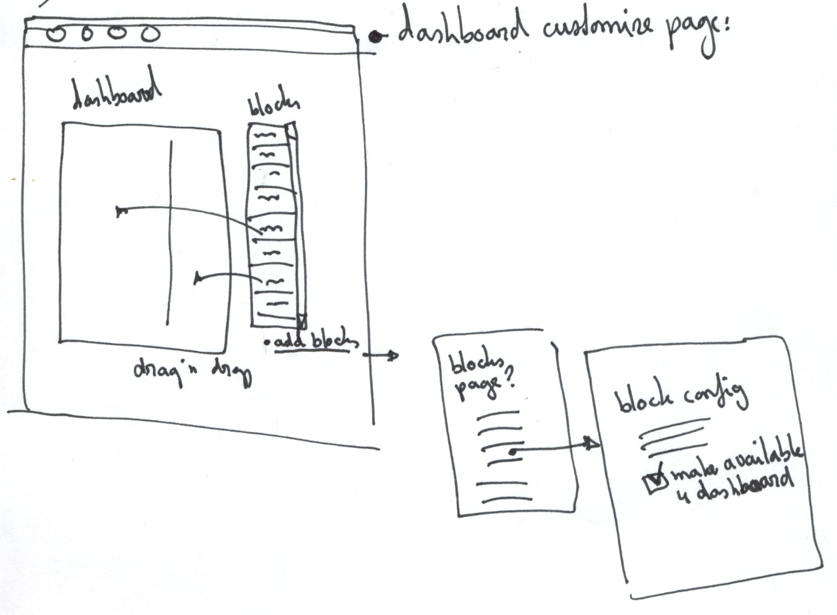
Attached sketch considers a 1 column, scrollable box with draggable blocklets to the right side. Has a 'Add blocks' link underneath that takes you to the blocks page, where you could configure a block to become available (or be removed from) the dashboard through a checkbox.
(what would be really nice is that you could make the 'add to dashboard' selection on the block listing page itself. What if the blocks page knew it was requested by the dashboard config screen and show checkboxes next to each block in the list? Bulk operation style…)
Ask if you have questions or suggestions about the sketch!
Comment #109
gábor hojtsyIn reference to @yoroy, worked off of @seutje's patch to try and make up a scrolling list of available blocks first. I did not move it to the right side, as it would make the dashboard width jump from actual use to editing. Let's discuss that.
Also, added a 100px margin on the right end, so the list of available blocks do not go into the Done button.
Comfortable block listing with enough space:
Do not have enough space, so it goes scrolling:
Let's discuss whether it is a good idea to make it scrolling this way. Should it be a high palette instead?
BTW I've also added an add new block link. That unfortunately points to a Garland themed page (which is related to the fun of theme switching on the blocks page, which is discussed to be removed at #581118: Blocks admin user interface should not do theme switching).
Comment #110
yoroy commentedRelated note: I propose a minimal list of must-have blocks for a useful default dashboard here: http://drupal.org/node/569190#comment-2103146
Comment #111
gábor hojtsyAlso noticed that no-content blocks cause some problems. I dragged in the recent comments block, but I have no comments. Now when I click Done and/or go back to customize the dashboard, this block is not anymore visible in any of the UI. We should display a "closed state" for these blocks I guess.
Comment #112
amc commentedWhat about a carousel (like at http://sorgalla.com/projects/jcarousel/examples/static_simple.html) for the block list?
Comment #113
seutje commentedCSS tweaks:
<p>, I'm affraid it'll still look offset, as the text "Done" is a lot lower than the text inside the<p>#dashboard #disabled-blocks .sectionand put it on#dashboard #disabled-blocksas padding, because#dashboard #disabled-blocks .sectionhas a fixed height, which will bork with some browser's (non-existent) box-model#dashboard #disabled-blocks .sectionto an em value to account for text-only zooming#dashboard .disabled-blocks.ui-sortableto#dashboard #disabled-blocks .ui-sortableas not all browsers support double class selectors!importantfrom#dashboard div.draggingas it kills kittens and makes themers go baldalso, what's the reason for this?
this will lead to a horizontal scrollbar if the content of a disabled block is too wide, if we remove that, it won't cause a horizontal scrollbar, but the "block" will be a lot bigger in height, not sure which would be the best way to handle this, if we were to trim the length of the block title, the nowrap would make a lot more sense to me (or is there already a limit on that?)
I know I suck at explaining stuff in plaintext like this, so I'll try to add some screenshots later tonight
Comment #114
gábor hojtsy@seutje: the reason for the no-wrap is exactly to get the blocks to display the same regardless of their length. Otherwise when the block appears on end of line in the drawer, it would wrap into two lines, so you'd drag a two-part block. Not nice. It did not seem to be an issue given that the block titles will not be as wide to not fit to the screen width (at least not in my mind :).
Comment #115
seutje commentedscreenshots
@Gábor: see nowrap screenshots, but that's outside the scope of this issue
-> #570780: Curtail Seven widths ?
Comment #116
seutje commentedwrong withoutnowrap1, but the point is that in that case it doesn't wrap, it only wraps without nowrap when there isn't enough room for the entire block
Comment #117
SeanBannister commented@yoroy #108: I like the idea of having a checkbox that says "make available on dashboard" on the block configuration page. But the reason I prefer a region that contains the suggested blocks is it makes it so much easier to add and remove multiple blocks from the suggested Dashboard blocks. This would be the case if you've just created a site for a client and you want to customize the suggested list you could be moving a lot of blocks. I do however realise it seems a little less intuitive.
Comment #118
dries commentedI recommend that we start with the MV (minimum viable) and that we add extra bells and whistles (e.g. a checkbox on the configuration page) as follow-up patches.
Comment #119
amc commentedCheckbox is a good idea. Hopefully modules will be able to specify dashboard availability (or not) when they set up blocks. Minor point: I recommend we use "Make available for dashboard" because using "on" makes it unclear whether checking the box adds it to displayed blocks or simply adds it to the dashboard pool.
Comment #120
David_Rothstein commentedHaving worked on this patch earlier, I've been following this issue silently for a while, but here are some thoughts:
I also think we are solving the wrong problem here. It isn't the number of blocks available on the dashboard that is the problem (we have to design for the possibility of a large number either way), but rather the ordering. When I do a search on Google, I can get 18 million results, but that isn't a problem because the most relevant ones are presented first. Same thing here. I think we should look at using block weights (which are already user configurable) or other simple forms of ordering/grouping to provide a sensible order for the disabled blocks that puts the most potentially interesting ones for the dashboard at the top of the list, where the user will see them first.
I also agree with Dries that it doesn't seem critical to solve all of this right now.
Comment #121
gábor hojtsy@seutje: Yes, maybe the markup for the disabled blocks changed enough that it does not wrap into two lines when on the end of line. It used to wrap like this without nowrap:
Where "Administration links" was one disabled blocks. So you could drag it from the end of the first line or the beginning of the second. Not nice. Looks like this does not happen anymore with the current markup.
@David_Rothstein: On (1), blocks can only have one weight per theme, which is initialized by the weight set in the block info hook as far as I know / remember. Are you sure that weight as in relation to the dashboard is then fine as default weight as in relation to the live site? On 2, 3 and 4, we agree :)
Comment #122
gábor hojtsyThe blocks page theme switching WTF which caused problems with the "add new block" link on the dashboard now has a patch at http://drupal.org/node/581118#comment-2106588
Comment #123
dries commentedI haven't verified this yet, but David's comment in #120 suggest that if a block is already on a theme region, it can no longer be on the dashboard -- and vice versa. That sounds like a bug to me and suggests to me that the dashboard regions shouldn't be regular theme regions.
Comment #124
David_Rothstein commentedDries: See discussions above starting at #14, also #28-#30. If it's not a theme region, I'm not sure we'd have an accessible fallback for configuring these without drag-and-drop?
Gábor: My thought on that was that weights for disabled blocks don't mean a whole lot now anyway. We'd be forcing the order of available/disabled blocks to be the same on the dashboard page as on the main block configuration page, but if a block is really cool and useful for the dashboard, it's also likely really cool and useful for other places too, right? If not, then something like @SeanBannister's idea of a separate "dashboard disabled" region whose blocks appear first in the list would be the natural extension, but only if we really feel like it's needed.
Comment #125
seutje commented@Dries http://drupal.org/project/usage/multiblock ?
Comment #126
attiks commentedI'm with Dries (and others) on this one, please make sure we can re-use blocks on the dashboard, I like the proposal of Seutje, but does this mean multiblock should go into core?
Comment #127
catchAllowing blocks to appear in multiple regions is the target of #257032: Split block $ops into separate functions and is notably somewhat enabled by #430886: Make all blocks fieldable entities which introduces a {block_instance} table. Let's fix that problem properly in one or the other of those issues (or via multiblock) rather than adding cruft here.
Comment #128
dries commentedOk, let's proceed with this patch, and worry about the blocks system refactoring later in #257032: Split block $ops into separate functions.
Comment #129
dries commentedReading up on the issue again, it sounds like none of the issues raised by David in #120 are blocking. I think we all agree that we need to look into them, but the general consensus seems to be that they add cruft to the issue at this stage.
Comment #130
bensnyder commentedsubscribe.
Comment #131
gábor hojtsyTwo things were broken in the previous patch due to latest changes in how regions are themed:
- region theming; the dashed lines appeared two times around the regions (there was an intermediate region wrapper)
- saving any dashboard changes; again, due to that intermediate region wrapper, the id we placed on our region parent was not found, so the right region names were not passed on
I worked to fix these and worked on two issues with missing information on the dashboard:
- blocks with missing titles (such as the powered by Drupal block); I've added code to find these and add a @todo title there; as discussed above, we are not sure yet what kind of title we should display there; we could obviously gather the admin block descriptions from the block info hook, if we have no better idea
- missing blocks due to missing content (such as recent comments block on a fresh site); I've added code to print "Content not available" in these blocks and again given them a @todo title. For the title, we can display the description again (see above). For the content, we might not actually need that, but in that case, we'd need some kind of alternate title theming for empty blocks - suggestions welcome;
This is how it looks ATM with the "titleless" and "contentless" blocks added:
Also note here that we cannot effectively/easily place our placeholder equivalents for missing blocks into the order where they are supposed to be placed due to how weights are recalculated for blocks in block rendering. We could alternatively support rendering empty blocks via some other switch in block module, but I am at loss of idea on how could we make it do that without knowing about dashboard, which would then be a cross-dependency.
Comment #132
David_Rothstein commentedAs per discussion above, we certainly need to deal with point 2 of #120.
Since it's not totally clear that we'll wind up having block instances, it seems most flexible to make the standard be that modules are encouraged to create new blocks rather than trying to add lots of complicated configuration options to existing blocks to make them more dashboard-friendly. I'd suggest we go with that.
I'm adding a similar comment to #569190: D7UX: Dashboard contents so that core can hopefully start setting a good example here.
Comment #133
catchFully agreed with #132. I'm always surprised when I see actual configuration options for a block, and usually wish the configuration form was the views UI when I do.
Comment #134
gábor hojtsyUpdated patch attached:
- uses a local $block_info[] cache to cache hook_block_info calls per module
- this is then used to fill in titles for blocks which lack a title normally and which are not even displayed normally
- the no-content block display was made more compact (now precedes title with "(x)" and has no displayed content, but a div to let themers put in some kind of special styling there)
- in practice it turns out that sinking down empty blocks to the bottom works in that they go out of your way and let you concentrate on the more useful stuff, while still knowing this was there but had nothing to display
Still looking for feedback obviously.
Comment #135
seutje commentedyay, block_info awesomeness!
I don't know about the sinking to the bottom, this could potentially cause some really odd things
if a user drops a block in a certain position, I think he assumes it'll appear at this position, even when it's empty
what about the more dynamic blocks, who can be empty at one point, and then ajax in some new content as it is getting produced
not sure if that last example would ever occur in the wild, and if it would be a big inconvenience or not, but I just think ur making a big assumption here (not saying it's a bad assumption per sé, I'm just a bit iffy about assumptions in general)
Comment #136
gábor hojtsy@seutje: such blocks should not exist, since Drupal would not normally render any of their wrapper/content markup anyway, so they'd have no place to inject Ajax :) We need to do some special hoops here to get something displayed of those blocks even :)
Comment #137
gábor hojtsyJacob Singh tested the patch and found a bug with disabling blocks. Attached patch fixes that.
Comment #138
JacobSingh commentedSeems that when I add one block, it works, when I add the second one, all of the content in all the blocks disappears and I get a jquery error:
"Node cannot be inserted at the specified point in the hierarchy" code: "3"
I think I also figured out why it is happening. If I drag a block in very slowly and wait for it to show me where it will be dropped, it will always work, if I drag it in really quick and just drop it, it will work sometimes.
Also, as a UX note, it takes awhile to get it to show where it will drop it.
Hope that helps debugging it, I don't know where the problem is exactly.
Sexy interface :)
Block Creation issue:
When I click the "add a custom block" link and fill it out, when I submit, I get this:
The block has been created.
Warning message
The block Blah was assigned to the invalid region -1 and has been disabled.
I'm guessing this has something to do with admin_theme / non-admin_theme?
Also, I end up on the admin/structure/blocks page, when it would make more sense to end up back at the dashboard with my new block available to me.
Comment #139
gábor hojtsyJacob: agreed on the block creation redirection, working on that. However, your block creation warning comes from a different patch that was committed, so I propagated your feedback there: http://drupal.org/node/503782#comment-2127414
Comment #140
gábor hojtsyJacob: worked on the new block adding workflow:
- renamed the Ajax callback to be admin/dashboard/drawer and made this naming standard in the JS (which was already a mismash of drawer and customize :) - now the mode is called "customize" mode and the disabled blocks palette is called the "drawer"
- so this freed up admin/dashboard/customize to point to the same dashboard but enable the customization by default (vs. admin/dashboard)
- then added a destination to the link we have to the blocks page, so you get back to the instant-on-customize version of the dashboard, when adding a dashboard block via this interaction
- you also get feedback of your block here on this screen as a result of how redirection works
Thanks for the tip. I believe this interaction is much better for adding dashboard blocks now.
Leaving needs work for the drag and drop issue, for which I'm currently at a loss of ideas unfortunately.
Comment #141
JacobSingh commentedOkay, this was a brutal debugging session, and I didn't quite find the problem, nonetheless, I think this solves the problem.
This should at least gag the error when you try to drag too fast. It seems that this only happens when you drag to an incorrect area with a block that contains no content.
I've thrown in a conditional to abort regenerating the content if that is the case. We may want to get to the root of the issue.
Also, there was an error where you could drag the blocks to any .region, but really we only want them to drag to #dashboard .region. I fixed this as well.
Apologies if the patch is a little screwed up, I got thrown a few times while re-rolling for #572618: All theme functions should take a single argument to make preprocess sane and meaningful.
Comment #142
paul.lovvik commentedFound a problem.
Click on the "Customize" link, and within the dashboard editor if you click the "add a custom block" link, and add the block you are returned to the url 'admin/dashboard/customize', which is necessary to return to the same place, but results in the "Done" button not exiting the editor because the done button simply causes a reload.
Comment #143
paul.lovvik commentedThe patch looks good other than the issue I raised earlier. I have created a fix for that and fixed a minor spelling mistake as well.
Comment #144
webchickTaking this for a spin...
Also escalating to needs review so that testing bot can have a crack at it.
Comment #145
webchickHere's my initial review, UI-only, not code. Note that I have tried to remain as ignorant as possible as to what's been going on in this issue, so that I can give it a totally fresh set of eyes. Apologies if any of this was already mentioned above; I'll read the issue once I'm done here.
First of all, after enabling the module on an existing install, I get this, which is not at all user-friendly:
It initially looked like an error until I noticed the tiny link within the sea of white. It looks like the install profile adds a couple of blocks here, so this page isn't glaringly empty, but that doesn't help anyone upgrading from Drupal 6 who is installing this for the first time.
I know the UX team in general is against horribly verbose help text, but if we had some logic like:
...that would've helped me out quite a bit.
The next thing I tried to do was a test of how this feature would work when a typical site with 30+ contributed modules was used. I added the following to a hook_block_info():
This results in the following:
I think this is reasonable. It would probably ideally be better if the available blocks were categorized somehow, but then you get into Yet Another Way For Contrib To Make A God-Awful Mess Of Your Site With Its Own Hap-Hazardly Made-Up Categories. The div scrolls, so it looks like it can handle the 50-100 blocks it's going to need to on a typical site.
However, the fact is that block blocks and dashboard blocks are in the vast majority of cases not the same thing. At all. I defy someone to think of a reason why "Syndicate" ever belongs in the admin dashboard. Not to mention my dummy blocks. :P
IMO, a block in hook_block_info() should have to explicitly opt-in in order to be seen here, and core should provide as few of these as possible, and only when they make sense, in order to establish a good pattern for contrib. Contrib will obviously add more dashboard blocks to choose from, and there is always hook_block_info_alter() for switching on the Syndicate block if you really want it for some reason. :P We'll need to do this opt-in switch in a generic way that does not assume the presence of Dashboard module. Some sort of flag like 'admin task' => TRUE or something, maybe? This could then perhaps be used in additional contexts apart from merely the dashboard, although I'm not quite thinking of any off-hand.
Also, there really ought to be some kind of ordering here. Why is Recent comments before Administration shortcuts?
Moving on...
Dragging/dropping these blocks doesn't seem to actually do anything, and furthermore there are no outlines or anything to tell me where I'm allowed to put them. This is leading me to believe either the patch is currently broken, or else my environment is, although I've cleared my browser cache and the Drupal cache to no effect. Hrm.
So I'll obviously need to give this another go once I figure that out. :P
Hmmm. I notice though that I can drag "Dummy 1" in front of "Dummy 0" in the list. However, once I click "Done" it does not retain my settings. Sad panda.
"Add a custom block" shoots me over to Garland. WHAT HAPPENED TO MY WORLD?!!??! :P However, this is something I happen to know is being handled in another issue, to remove the "preview blocks page in the current theme" setting (or I think so anyway). This would be good, since this time-warp behaviour is incredibly jarring. Also, we just got done teaching a theming workshop where this came up again as something that confuses the living hell out of people. But anyway, that's not for this issue. ;)
That's about all I can test at the moment, unfortunately. A natural question to come up would be "How far does this have to go until it's considered commit-worthy?" My gut feeling at the moment is:
Comment #146
webchickOk. From a fresh install, this looks a heck of a lot better. :P~ It'd be nice to figure out why it fails so badly when you enable the module from an existing site, and stop it from doing that. :D
This looks like a bug (and a scope creep feature request while I'm thinking about it ;)):
Apart from that, this seems to work quite well! Tested in both Firefox and Safari.
One other thing I noticed is that lots of these have no content. It'd be nice to label them as such as so it doesn't look like a bug:
One last thing to consider I guess is that this "Customize" link paradigm is "yet another way to edit stuff on a page." Assuming we get #473268: D7UX: Put edit links on everything in, it'd be nice for everything to go through the same standard mechanism, methinks.
Comment #147
webchick(Sorry, just posting stuff as I find it)
Also, I appear to lose the ability to drag in a block to the dashboard if it's already assigned to a region in the current theme. I put "Who's online" in the content region and it no longer appeared in the list.
I guess this patch doesn't solve the issue of multiple block instances.
EDIT: but this one does! #430886: Make all blocks fieldable entities
Comment #148
webchickThis is what I'm getting when I try and test this with Garland as my admin theme:
Same behaviour as my initial experience having not gone through default.profile.
Futzing more, I discovered that if I go into admin/structure/blocks and drag in a block to the dashboard thin region (or whatever it was called), NOW suddenly it appears and I can put stuff in it.
The fact that these regions vanish when there isn't any 'starter' content in them seems like a bug to me. I think it would lock people out of this feature if they removed all blocks to "start over", with no obvious way to un-break it.
Comment #149
JacobSingh commentedOkay, so @webchick and I talked on IRC about all of these. Here is the list (AFAICT of outstanding issues):
Stuff we have to fix before committing
1. We need to make sure that there is something in empty dashboard regions so that they can be dragged into.
2. Bug Dragging the "Management" block up to the drawrer. You have to take it way up to the top left, debug and fix this.
3. Upgrade experience: New proposal - In the case of an empty dashboard, show some help text (see above) and open customize by default. So we don't make assumptions with default data on upgrade, and we provide a clean way to educate users how to start.
4. Show (no content) in the body of empty blocks instead of the (x) in the title.
Stuff we absolutely must fix before release
1. Garland is broken in terms of JS and CSS.
Stuff which would be good to do
1. An opt-in setting for blocks, we know this has been discussed above ad naseum - but the block weight alone will not suffice when you start introducing a ton of contrib modules to the mix.
2. Actually fix the real problem of #257032: Split block $ops into separate functions
-- This post has been approved by the webchick and is sponsored by Lavazza Coffee, an introverted attitude, The Day Saturday, and Issac Hayes - You damn right - can you dig it?
Comment #150
webchickLOL @ Jacob. The only thing I'd adjust from that is "would be good to do" is really "we really need to do, but not in this patch."
Whew! caught up on the issue now. :) What a whirlwind. ;)
Some random things that caught my eye as I was going through:
Yet, at the same time, there is no way to argue against the point Dries makes about incremental improvements being the backbone of how Drupal core work gets done. For example, the only way we were able to finish the D7UX work done so far is by incremental changes (heck, the IA was moved over one. menu link. at. a. time. ;P). Even something as simple as a patch that renames a couple of functions often results in several follow-up issues to fix bugs, or pick slightly more optimized names, or what have you.
It is a chicken/egg problem, to some extent. Ideally, we would want to design this feature with prototypes, put it in front of real users/clients, acquire some feedback on what the most frequently accessed administration tasks are, etc. Yet, until the interface is actually there in core for people to poke at, we're in "theory land" and will never reach the critical mass of people we need participating in how to smooth these rough edges, and I think we'd all do better if this responsibility did not fall entirely on the D7UX team's shoulders.
Can I guarantee that we won't see a repeat of "yeah, yeah, we'll fix that later" and then we don't? No, unfortunately, I can't. But I would like to echo sun's statement that there is a BIG difference between coming out of code freeze into a 6-week window for developers to push in additional API changes (which is what happened 9/1) and coming out of code freeze into an /actual/ code freeze, with an entire month dedicated solely to UX/documentation/etc. polish, which is what we're planning on for 10/15.
In summary, I'm pro-committing this sooner than later, and taking the risk. I think the potential benefits are huge, and I'm hopeful that the focus time for UX we've designed into the release schedule can help get some hands on this stuff once the API-changing parts are in.
Here are the critical bugs, UX-wise, at least from my view. I agree with Dries though that these can happen in follow-up patches, if required, though my preference would be to get at least a general rough plan of attack for solving them before this gets committed. I'll be back in here on Sunday night, if not earlier.
Comment #151
seutje commented@149
2. -> I think this is due to the center of the snapping point being in the center of the size of the block you are dragging, prior to dragging. I haven't been able to find a way to change the position of this snapping point in a proper jQuery UI sorta way, and simply making the block position:absolute and moved with it's center snapping point onto the cursor just prior to dragging seems extremely hackish and dirty.
Comment #152
dries commentedA-w-e-s-o-m-e review, webchick.
Comment #153
David_Rothstein commentedAgreed, awesome review :)
Although you'd have to be a mind-reader to know it, I intended to suggest weighting as a solution only when combined with a design that showed content for disabled blocks in addition to the block titles - which is what I thought was intended by the design in #108, but looking again, probably isn't :) In that case, the focus would be on browsing through the available block content, not on the alphabetical order.
Either way, it's probably true that that is trying to overload a bit too much information onto the disabled block weights, and a sharper distinction is necessary.
I'm still not sure how that would work. Doesn't that setting only have any meaning if the block is disabled? If the block is already assigned to a dashboard region, then it doesn't need a checkbox, whereas if it's already in some other region, then it isn't available for the dashboard at all (unless the block instance thing happens).
I'm worried that this checkbox would cause confusion with the "region settings" selector that is now on the block configuration page and which is itself a gigantic usability improvement (or will be once it isn't hidden in a collapse fieldset where no one can see it...)
So, I still think we should consider something like @SeanBannister's idea instead. In short, the dashboard module would just add a "Disabled (dashboard)" block region and leave it at that. We'd still use hook_block_info() to provide defaults, but might not need any special storage for this information -- the dashboard module could probably just collect it and use it whenever a new module is enabled, to assign the correct blocks to "Dashboard (disabled)"...
Comment #154
Bojhan commentedTo adress some of webchick's concerns on the UX.
1. Limiting this list of blocks
I believe we introduced a lot of blocks just to test how the Dashboard would work, I think we can sufficiently say that there is one major issue which is the amount of blocks. To continue with these blocks is obviously not a good strategy since it sets the expectation that they will stay. So I think best thing to do is, pull a number of them out of the list already - and only leave a couple for testing purposes. Let's use #569190: D7UX: Dashboard contents for the discussion on which one to introduce, and pull most of the others out here already.
So removing :
They are unlikely to consist links that are helpfull on the Dashboard, some of them are already in the toolbar.
Seems somewhat much, for just one RSS feed url?
Highly unlikely you want this as a widget on your Dashboard
Part of this is fixing the interaction that allows blocks to show up in the Dashboard blocks pane. I strongly disagree with David_Rothstein his perception that users will understand to drag a block into Dashboard on the blocks page. The whole concept of the block page breaks down, if we add this. We should not mix the two, whereas yoroy his suggestion of adding a checkbox seems far more valid.
Adding we need to create a better interaction in the pallete, it does not scale - and I think having a larger number of dashboard blocks available will be an viable use case. However I think its best to split that part up into a followup issue.
2. Guidelines for blocks
I will work on the guidelines for blocks on the Dashboard, as webchick explained this is critical to the experience we want to offer these users. #569190: D7UX: Dashboard contents - This is best served not as a follow up.
3. Editing, removing blocks
We need to add a Configure and Remove icon/link to every single block when you are in customize mode. This will be in line with expectation, so I would like us to follow that. This can be a follow up.
4. Loading when block is dropped
When I drop a block in a region, I have a short waiting time as AJAX puts it in? I am kind of left guessing what happends in that mean time. Again can be a follow up.
I hope someone can write a patch, there are almost 10-15 small changes that have a very strong impact on UX - and only require little code. As of now, the state of this patch in terms of UX is still pretty bad.
Comment #155
David_Rothstein commentedWhen did I ever suggest that they would need to do that???
Comment #156
Bojhan commentedSorry I understood from "In short, the dashboard module would just add a "Disabled (dashboard)" block region and leave it at that." that you suggested that interaction. Can you clarify - because the blocks page would have a new region, but that wouldn't be used? I am not sure I am following.
Comment #157
David_Rothstein commentedSure, no problem :)
The attached screenshots show the blocks administration page and individual block configuration page with the latest patch applied (the only addition due to the patch being the two "dashboard" regions).
For the individual block configuration page, my concern is about how a "show on dashboard" checkbox would interact or conflict with the dropdown selector? If someone makes it to this page with the intention of putting a block on the dashboard, their quickest route is just to use the dropdown selector directly anyway - they can put it right on the dashboard without having to go through an intermediary step. That's true in either approach. So the checkbox doesn't add much but rather gets in the way and conflicts with what the reality might be. The approach I'm advocating would add something like "Dashboard (disabled)" to the dropdown list - which also gets a bit in the way, but much less so.
Similar thing for the block administration page - there, "Dashboard (disabled)" would appear, but you wouldn't usually want to use it directly.
Conclusion: There are problems with both approaches, because in both cases, we're adding something to the blocks UI that - by the time people find their way to the blocks administration pages - they rarely will ever want to use. So some fresh thinking might be good here :) But if we have to go with one of the two approaches, I'd prefer the one that fits in better with the way the UI currently works.
Comment #158
dries commentedI think the approach suggested by David in #157 is Good Enough For Now. As suggested in a number of comments above, the real solution requires more work: see #257032: Split block $ops into separate functions and #430886: Make all blocks fieldable entities.
Comment #159
catchI've opened #601932: Allow dashboard to limit available blocks to discuss this further, and added another possible solution for tackling this.
Comment #160
Bojhan commentedI believe that the approach of #157 will confuse the user, since we are mixing Dashboard with actual site design. Which are two completely diffrent concepts. From Dries his comment, I understand that we will change this but not now?
Comment #161
JacobSingh commented@Bohjan: Yes and no. We may or may not change the fact that the dashboard sections are regions, but we will change notion that a block can belong to one and only one region.
This allows for UI changes to make the distinction you are talking about.
Comment #162
JacobSingh commentedOkay, I'd like to try to keep this on the critical path to a commit. So I'm only stating the issues here which I understand from @webchick and @Dries to be commit blockers (not release blockers):
from #149 and #150
Stuff we have to fix before committing
1. We need to make sure that there is something in empty dashboard regions so that they can be dragged into.
2. Bug Dragging the "Management" block up to the drawrer. You have to take it way up to the top left, debug and fix this.
http://drupal.org/node/544360#comment-2134902 might be the cause
3. Upgrade experience: After an upgrade, there are no blocks in the dashboard.
New proposal - In the case of an empty dashboard, show some help text (see above) and open customize by default. So we don't make assumptions with default data on upgrade, and we provide a clean way to educate users how to start.
4. Show (no content) in the body of empty blocks instead of the (x) in the title.
in addition, there are some non-blockers which are important
These are outlined at the end of #150, but the main ones are:
A. The dashboard vanishes when you switch themes.
B. Limit the list of blocks. #601932: Allow dashboard to limit available blocks
C. We need to come up with a strategy for what dashboard blocks core ships with. #569190: D7UX: Dashboard contents
I suggest we just focus on 1-4 until we get this committed and iteratively improve the experience in the specified follow-ups. I'll be posting a patch today that should address 1-4.
Best,
J
Comment #163
JacobSingh commentedOkay, screens and/or video to follow.
This fixes #1, 3 and 4 AFAICT
2. Bug Dragging the "Management" block up to the drawrer.
Is still in play.
This does need some love perhaps in terms of making the (empty) messages customizable by overrides, but it is a start. Try it!
Empty out both regions and go to the page Before: Broken, cannot add blocks to regions and you don't know what is going on because you can't see them.
Now: Each region shows "This dashboard region is empty, click customize to add blocks to it." and it goes to customize mode automatically. I just realized this is retarded, when in customize mode it should say "DRAG HERE"...
Add an empty block like "Navigation"
Before: (x) in the title, looked weird.
Now: (empty) in the body.
Drag it back out
Now: The region shows the "I am empty message as I mentioned above.
Comment #164
JacobSingh commentedOkay, I found a couple problems in my approach, please lay off this one unless someone can fix #2. I'll post another patch soon.
Comment #165
v8powerage commentedWhy not simply use this module - it has everything, is customizable, doesn't take the whole page to display the stuff, and is sexy http://drupal.org/project/admin_dashboard
Comment #166
gábor hojtsy@-Shaman-: you'll be able to use that on your own sites, but we are aiming at a less power-user centric dashboard here. Also, we already have the shortcuts implemented by that module as a separate feature in the Drupal 7 toolbar.
Comment #167
JacobSingh commentedOkay, should be a much better approach to the placeholders.
I didn't pay attention to language here. Needs recommendations. Here is a video:
http://www.vimeo.com/7023967
Comment #168
int commentedComment #169
JacobSingh commentedVimeo screwed the pooch. I don't know why. Here is the .mov.
Comment #170
webchickI'm headed to bed here pretty quick, but #169 looks great, and looks like it addresses all of my feedback related to those parts. I actually don't even mind "DRAG HERE" that much, and the exact wording here could be something we tweak in a follow-up.
This looks like it might be commit-worthy now, given the follow-up issues are created, but I'm up way past my bedtime so will need to look tomorrow (or most likely Wednesday since I'm actually going outside tomorrow night). Dries, if you want to do the honours first, feel free.
Comment #172
dries commentedI agree that it is ready enough for the initial commit, and that we best break this up in several follow-up issues.
Committed to CVS HEAD! Wo-hoot.
Please create new issues for follow-ups. Thank you.
Still needs a CHANGELOG.txt issue!
Comment #173
David_Rothstein commentedOops, as per the testbot, that kind of broke Drupal...
Here is the fix that gets installations working again. I have no idea if all tests still pass, of course.
Comment #175
ksenzeeFix patch was committed before testbot got a crack at it. Fixing status. See you folks in the followups.
Comment #176
Bojhan commentedThis is not "fixed" common, actually use it - before you mark it. I will put all my follow ups in here :
#257032: Split block $ops into separate functions
#601932: Allow dashboard to limit available blocks
#430886: Make all blocks fieldable entities
#569190: D7UX: Dashboard contents
Comment #177
chx commentedDid we just rush in a dashboard module that has a very useful drag-and-drop stuff and is totally unreuseable? What happened to building a reusable framework and putting a product on top of it?
Comment #178
agentrickardI'm with chx on that, especially since we already spec'd a reusable Dashboard module for contrib, including a pluggable hook_dashboard() to define new instances. And that module hasn't gotten any community love since DCDC.
Comment #179
seutje commentedit's actually rather reusable as an in-page block region editor, but I take it that wasn't really what you meant
Comment #180
gábor hojtsy@Dries' spec called for a specific implementation, while we have all of jQuery UI for the use of developers with all kinds of fun drag and drop, on top of which dashboard module is a very thin wrapper.
Comment #181
merlinofchaos commentedFYI, this patch has stolen the namespace of an existing module that it is not related to.
This was a bad idea. Very bad idea. I don't see that there was any discussion, at all, of the namespace. Please stop treating contrib like it doesn't exist. Drupal would not exist without contrib.
Comment #182
cweagansIn this particular instance, I think that having -a- Dashboard for the Drupal site is alright. While it kind of sucks that it's not super reusable like everything else in Drupal, I think that having only one dashboard is going to simplify things a lot. And besides, if you need another 'dashboard', why not just install Panels?
Comment #183
dries commentedThe namespace issue is unfortunate -- nobody cared to check for it, including myself. The people working on the "contributed dashboard" module didn't chime in either, which is odd given all the attention core's dashboard module has received. It's an oversight of everyone involved, including the non-core developers.
Fortunately, http://drupal.org/project/dashboard has no releases yet, and is specifically designed for drupal.org as part of the Drupal.org Redesign process. The contributed dashboard module has been under development for 12+ months too. Either way, we can work out the namespace issue -- that is not a problem.
Either way, we should expect core's dashboard module in core to evolve. Like anything else in Drupal, it is not set in stone, and like many other things in Drupal, it could take various iterations to get right. That has been true for almost every system in Drupal core. So think of it this way: we gave birth to a dashboard module in core, but it certainly will have some growing up to do. That doesn't mean it isn't already useful to a lot of people. I also expect a new 'ecosystem' of dashboard module blocks to emerge in contrib, which could be really great but it will most certainly take a while before we'll be able to get real value from the dashboard. Bootstrapping ...
Comment #184
agentrickardSo my question would be: Is it too late to make this implementation extensible?
Comment #185
webchickIMO, what we're after with this patch is a paradigm shift for module developers to start thinking of how they can expose their modules' data in ways that are more immediately useful to site administrators. This paradigm shift will have ripple effects throughout all of contrib, and I'm quite sure that contributed modules such as Panels, Super Dashboard, etc. will put this into good use.
It's true that core's default implementation is very simple, and not nearly as flexible as something like Panels or the contributed Dashboard module, but this is true of most core features. Our core Forum module has nothing on Advanced Forum either, in terms of functionality. Yet, it works for people with modest needs, and serves as an example implementation for others to build from, and something we can work to improve upon in later releases.
CCK in core was once just the ability to add content types, which is arguably not very useful at all by itself, especially when compared to its potential. But it provided the baseline we needed to expand this out to the concept of things like fieldable entities, making several core concepts such as Taxonomy into fields, etc.
Comment #186
agentrickard@webchick
So, then, your proposal is to rename the contrib module and develop it separately as a 'better' version?
Otherwise, here's a quick list of the features that we would need to merge the two approaches:
[Note: on current HEAD, I am unable to add blocks to the dashboard at all, OS X FF 3]
Comment #187
webchickMaking widgets a separate concept from blocks was already discussed earlier in the issue and the approach was turned down. Instead, we have a follow-up issue for #601932: Allow dashboard to limit available blocks. Most of the other items in your list are rendered moot because we re-use the existing access/visibility controls given to us already by the blocks system.
A pluggable layout system would've been absolutely nifty, but unfortunately wasn't completed by anyone. I think that'd be a great example of a way to expand on this in Drupal 8, though.
Comment #188
gábor hojtsy@merlinofchaos, @Dries: I've discussed the dashboard namespace conflict with the maintainer of the contributed dashboard module, Niel Drumm in Paris and he had no problems whatsoever. The fact that this was not documented on the issue above does not mean it did not happen.
Comment #189
David_Rothstein commentedFirst, this:
It was always intended to become something like hook_dashboard_regions() rather than a variable - not sure why it didn't :).... Making that a hook would allow modules to define their own dashboard regions (and the patch already has a facility for automatically finding theme functions for those regions), so the dashboard itself can be made to look however you want it. That should be pretty simple to change.
Also, this:
Seems like it should become hook_page_build(), which would further allow modules to change things via hook_page_alter(). Also easy to change.
Now obviously, this implementation of the dashboard relies heavily on blocks, so it does not support displaying or dragging arbitrary objects on the page. Given that blocks are core's way of managing page regions and implemented by tons of modules, it doesn't seem outlandish to limit it to that - and that's the direction the issue has been going in for a couple months now. Whether it could be made more flexible via some last minute work (assuming there are people willing to do that) seems hard to say, but the module is pretty small and really only has a couple places where things happen:
There's a couple other things in the code that look like they need some cleanup, but that can wait until later.
Comment #190
agentrickardhook_dashboard() is hardly moot. If it's out of scope, fine, we'll (try to) solve it in contrib.
The problem with using the block system is as follows.
If you have an extensible system that allows, say, a configurable dashboard element for every user, how do you store that in the blocks system without overwhelming both the block and the dashboard UI?
Let's take d.o. as an example. Let's say we want a dashboard widget to track recent posts by user. (There are what, 250,000+ users?) How does the block system handle that? Pass a hidden argument to the block render?
The problem is that the sheer number of widgets (one per RSS feed, one per term, one per user) can quickly overwhelm the Block UI. So I am arguing that you _must_ use a separate storage engine. Otherwise, this module in core will not be extensible in any useful way.
[Update: block placement is working for me now, I think I had a brain fart.]
Comment #191
gábor hojtsy@agentrickard: again, this issue is not everything for all; the goal here was not to have per-user dashboards, so that was not how it is implemented. Of course if we'd have per user dashboards, why wouldn't we have "per-page dashboards" (AKA Panels)? You see, we need to draw a line to get something reasonable implemented, and it was not drawn at the place you'd have expected because the goals were different. The extensibility goals of this dashboard is not to be a generic front end dashboard to scale to hundreds of thousands of users but to be extensible and extended with useful **site monitoring and administration** tools. We could have set all kinds of different goals up to getting Panels into core, but we did not.
Comment #192
David_Rothstein commentedI wonder if it would help to rename this from dashboard.module to admin_dashboard.module?
Like Gábor said, that is all this was ever intended to be. A generic user dashboard is great but (as can be seen from the discussion above) quite complicated, and not necessarily something that makes sense for Drupal core.
***
EDIT: Of course, if I had the read the comments above more carefully, I would have realized that http://drupal.org/project/admin_dashboard already exists also :)
Comment #193
agentrickard@gabor
Right, I get that. But I am opposed to single-use modules in core. Core should be extensible. As implemented, this will never be.
I think the whole concept is better left to contrib.
@David_Rothstein
All the good names are taken. So I have no better options for you. Though the namespace is used in CVS, so a rename might be better. Maybe 'Admin Panel', which is available?
@webchick
In general, I'm just frustrated by the lack of time I personally have to pay attention to these things. This is an issue I have already architected _twice_, and simply haven't had time to get written for D6. To see a feature crippled version in D7 just makes me sad. But I'll get over it ;-p.
Comment #194
gábor hojtsy@David: not sure, the toolbar is not named admin_toolbar.module either.
@agentrickard: I think @sun nicely summarized on other d7ux issues that we should build on what core has instead of reinventing our own ways of doing stuff. Core could have two parallel concepts of block-like things which can be placed in region-like things, but instead of making up our own ways, we went with blocks, given that their limitations fit the model. Another good point @sun makes is that (in core), instead of building up parallel systems, one would extend and fix what is there and this is happening in issues cross-linked above. Issues like permissions, visibility, translations, fieldable blocks, block instances to reuse a block in multiple regions on possibly multiple pages, etc. are all solved or being actively worked on for Drupal 7. We could build up a parallel system and then need to solve the same problems or build on what we have (especially since it fit our model very well) and let contrib use the existing and rich extension mechanisms. Yes, it is not infinitely extensible, and many aspects of its extensibility might not be solved in this issue.
Comment #195
Crell commentedThe problem with simple, single-use, not-reusable modules in core is that: 1) They make doing a properly extensible version in contrib harder a lot of the time, due to namespace conflicts in code, conceptual overlap that confuses people, etc. 2) They encourage more single-use, not-reusable modules on the grounds that "well core does it, so it's OK!". No, it's not OK, it's a bad model to encourage and to follow. Always design for extensibility. To do otherwise, especially in a highly dynamic environment like Drupal and web development, is to waste time in the long run because you have to hack stuff to pieces to extend it or just start over.
Comment #196
webchick#189 looks like some decent implementation clean-ups that could probably be done relatively quickly. Would one of you folks have some space to work on this over the next couple of days?
Also, restoring title and status.
Comment #197
David_Rothstein commentedHere's a patch that gets started implementing the basic cleanups from #189, but it isn't working right now... the JS customization of the dashboard no longer works correctly, and I'm not sure why - no time to debug further at the moment.
***
It's strange, in general I completely agree with the idea that Drupal should be an extensible framework (and that some of the D7UX stuff isn't appropriate for core for that reason) - but here, I totally disagree. Complaining about things like the toolbar or overlay or shortcuts being in core I would certainly get, but this? I don't think so.
Like @webchick said, it's pretty simple. We want contrib modules to define administrative widgets for Drupal and to do so in a consistent way. They aren't going to do that if those widgets don't actually get displayed anywhere. So, the solution is to put a dashboard in core.
And just because it's in core doesn't mean it has to be a hyper-extensible thing. I really don't think we want some kind of "Dashboard API" module in core - that wouldn't make sense. A dashboard is a user interface, and user interfaces aren't supposed to be frameworks, they're supposed to use them. Drupal core already has a framework for managing the content of page regions, and we're using that in this patch. If you're saying that that framework needs improvement or replacement so that it is more extensible, no one would disagree, but that's way out of scope for this issue. Someday, if the core blocks system ever manages to support per-user blocks (for example), then right behind that, this dashboard module will easily support per-user dashboards also, but not before then. It was absolutely the right way to build it.
Comment #198
seutje commentedLooks like we somehow lost the inner-wrapper which has the margins on it and which was being checked for content by the following:
this caused the dashboard to always think it was empty, and thus always triggered the launchCustomize
so I added an inner wrapper with classes "region" and "clearfix" to the theme function, which makes it look rather silly:
the way this theme function was originally, didn't make any sense to me, as it only added a .region div when there were no elements, yet it tried to add them anyway...
main reason it wasn't working anymore was because it was looking for .region, which only existed in the #disabled-blocks div, as the other .dashboard-regions had lost their inner .region wrapper (which we might want to rename to "inner-dashboard-region" or something, just to avoid clashes with certain themes)
Comment #199
gábor hojtsyLooked through the patch and the only thing that did not make sense for me is why we duplicate access checking in the menu item and the dashboard_admin() build callback.
On @seutje's concern about regions, I'd say that reusing the region classes would let people theme this admin page similarly to other admin pages, so that does not sound like a bad thing. Also, it lets us not reinvent markup on top of regions and blocks, but reuse the existing core pattern instead.
Comment #200
seutje commentedchanged
to
and added some comments to the js, and moved one comment around as a bit of unrelated code got in between this comment and it's related code
and it seems like my geany cleaned up some whitespace
prolly won't be working on this for the next few hours
Comment #201
int commentedComment #202
int commentedduplicated
Comment #203
rickvug commentedI found two dashboard bugs in testing today. Thought that I'd paste links here as there is not yet a dashboard.module component.:
#607324: Empty dashboard blocks unexpectedly sink to the bottom without a notice
#607474: Dashboard - block area spacing is off when moving item to bottom
Comment #204
seutje commented#607474: Dashboard - block area spacing is off when moving item to bottom -> fixed in #198 -> .region wrapper was missing, so there was nothing applying a clearfix
#607324: Empty dashboard blocks unexpectedly sink to the bottom without a notice -> was introduced in #134 and was intentional, but considering this is surprising users already, maybe we should add a notification about it, although I can't think of a way that wouldn't annoy me :P
Comment #205
dries commentedCommitted the clean-ups to CVS HEAD. Thanks!
Comment #206
seutje commentedmarked #607474: Dashboard - block area spacing is off when moving item to bottom as fixed and corrected my previous post as I switched around both issues
Comment #207
gábor hojtsyAdded dashboard.module component.