

Closed (won't fix)
Project:
Fivestar
Version:
6.x-1.19
Component:
Code
Priority:
Normal
Category:
Bug report
Assigned:
Unassigned
Reporter:
Created:
9 Sep 2009 at 15:59 UTC
Updated:
4 Mar 2014 at 07:54 UTC
Jump to comment: Most recent, Most recent file

Comments
Comment #1
jazzdrive3 commentedAny ideas? This seems like a major bug.
Comment #2
ezra-g commentedBumping an issue to critical several hours after filing it will not get it fixed sooner.
A) Are you using a custom theme?
B) If you clear the site cache does the comment widget return to the admin/content/node-type/[type] screen?
C) The error message you're reporting sounds like a duplicate of #531200: warning: Division by zero in sites\all\modules\fivestar\fivestar_field.inc on line 297.. Please apply the patch in that issue and review it there.
Comment #3
jazzdrive3 commentedNot the same issue. The error is reporting a completely different file and line number.
Applied that patch anyway to see, but it didn't make a different.
Just using the default garland theme. Clearing cache did nothing.
Comment #4
jazzdrive3 commentedAny ideas? Things to check/troubleshoot?
Comment #5
Anonymous (not verified) commentedI have the same problem, I put this Bug Report, and a Support Request because I don't see before.
http://drupal.org/node/595424
http://drupal.org/node/608248
I change the status to duplicate.
I use the Division By Zero patch.
And I have this configuration on my computer:
Apache/2.2.8 (Xubuntu) PHP/5.2.4-2ubuntu5.7 with Suhosin-Patch Server and PostgreSQL 8.3.8
I have installed Drupal 6.14, Amazon 6.x-1.0-beta7, Fivestar 6.x-1.18, Voting API 6.x-2.3, Nitobe 6.x-1.6
I create a content type named product review with fivestar rating (like in Using Drupal book from O'Reilly) and when I go to edit (/admin/content/node-type/review) in the Fivestar Ratings section I only see Direct rating widget, the comment widget settings isn't showing.
Also I have this two warnings:
warning: Division by zero in /var/www/drupal/sites/all/modules/fivestar/fivestar.module on line 1587.
warning: Division by zero in /var/www/drupal/sites/all/modules/fivestar/fivestar.module on line 1588.
Thanks.
Comment #6
quicksketchMake sure you've enabled the Fivestar Comments module (it comes with Fivestar) to see the comment widget settings.
Comment #7
Anonymous (not verified) commentedAbout the questions that ezra-g made to jazzdrive3
A) No, isn't custom, is Nitobe 6.x-4.1 standard
B) I do it and the problem continues.
C) I use a division by zero patch, i don't know if is the same that is write there.
I update some modules: Amazon from 6.x-1.0-beta7 to 6.x-1.0-beta10, and Fivestar from 6.x-1.18 to 6.x-1.19 and the problem continues. I have to change the version subject to 6.x-1.19?
About your question: I have enabled Fivestar Comments, I always have.
What more can I do, any idea is welcome.
Thanks.
Comment #8
osopolarThe critical part is:
I don't have to much time to understand what the calculation is for (missing documentation?), but I guess it is to calculate the average. So you just need to solve the question "What do we expect in case of $element['#stars'] is equal 0?" ... maybe something like:
$this_value and $next_value will be 0 if $element['#stars'] is 0 ... but I'm not sure what the calculated values are for, therefore the concept needs a review and somebody to create a patch (if the logic is reviewed I could create the patch too).
Comment #9
Anonymous (not verified) commentedThanks ositoblanco,
Do you think that this will make that the comment widget settings show up? Or that is only for the warnings?
Comment #10
osopolarI just saw these little errors and I don't like them (I don't know exactly where it is for) ... so I was diving a little (a very little) bit into the code to find the cause and had a spontaneous idea how it could be fixed ... the question is easy for someone who knows whats going on, its just defining the exceptions for $element['#stars'] == 0 to avoid the division by zero.
Comment #11
acidrob commentedI have the same problem with the Fivestar comments not showing up, and also same divide by zero errors.
I have replaced the line identified with:
for ($i = 0; $i <= $element['#stars']; $i++) {
$this_value = ($element['#stars'] < 1) ? 0 : ceil($i * 100/$element['#stars']);
$next_value = ($element['#stars'] < 1) ? 0 : ceil(($i+1) * 100/$element['#stars']);
The comment widget is still not showing up - hopefully this should fix divide by zero problem though
Comment #12
Anonymous (not verified) commentedHello Acidrob,
Can I ask what configuration have on your computer?
Want to know if the problem is in some packages from a distro or is a Drupal / Fivestar problem.
By the way, thanks for the advice about the divide by zero solution work. And thanks to ositoblanco for the solution.
Greetings.
Gonzalo.
Pd: ezra-g, why this is not a Bug report? Only to know.
Pd2: jazzdrive you found a solution? You make comment widget appear?
Comment #13
jazzdrive3 commentedNope. Still nothing works. I have already tried what others have suggested and gotten rid of the division by zero. Still nothing.
Comment #14
Anonymous (not verified) commentedUpdate:
I have installed all my sites on a VM (VirtualBox 3.0 PUEL).
The configuration now is diferent, but the problem continues.
Have Installed a Debian Lenny 2.6.26-2-686 server, with PHP 5.2.6-1+lenny4, Apache 2.2.9, PostgreSQL 8.3.7, Drupal 6.15, Administration Menu 6.x-1.5, Amazon Module 6.x-1.0-rc1, Content Construction Kit (CCK) 6.x-2.6, Fivestar 6.x-1.19, Voting API 6.x-2.3, Nitobe 6.x-4.1. I'm Up to date.
Anyone with this problem have PostgreSQL to? Can be that PostgreSQL is not supported by Fivestar module or the Voting API?
Greetings,
Merry Chrismas and Happy New Year.
Gonzalo.
Pd: Recently I realized that if anyone want a Snapshot of the VM to see the error, I can try to upload it.
Comment #15
Anonymous (not verified) commentedHi,
I'm trying to see what is the problem, no more waiting for help. Now i'm searching solutions, trying to understand what i will find. So, I will put my discoveries here, if you get a solution please reply, else if I find the solution I will put here.
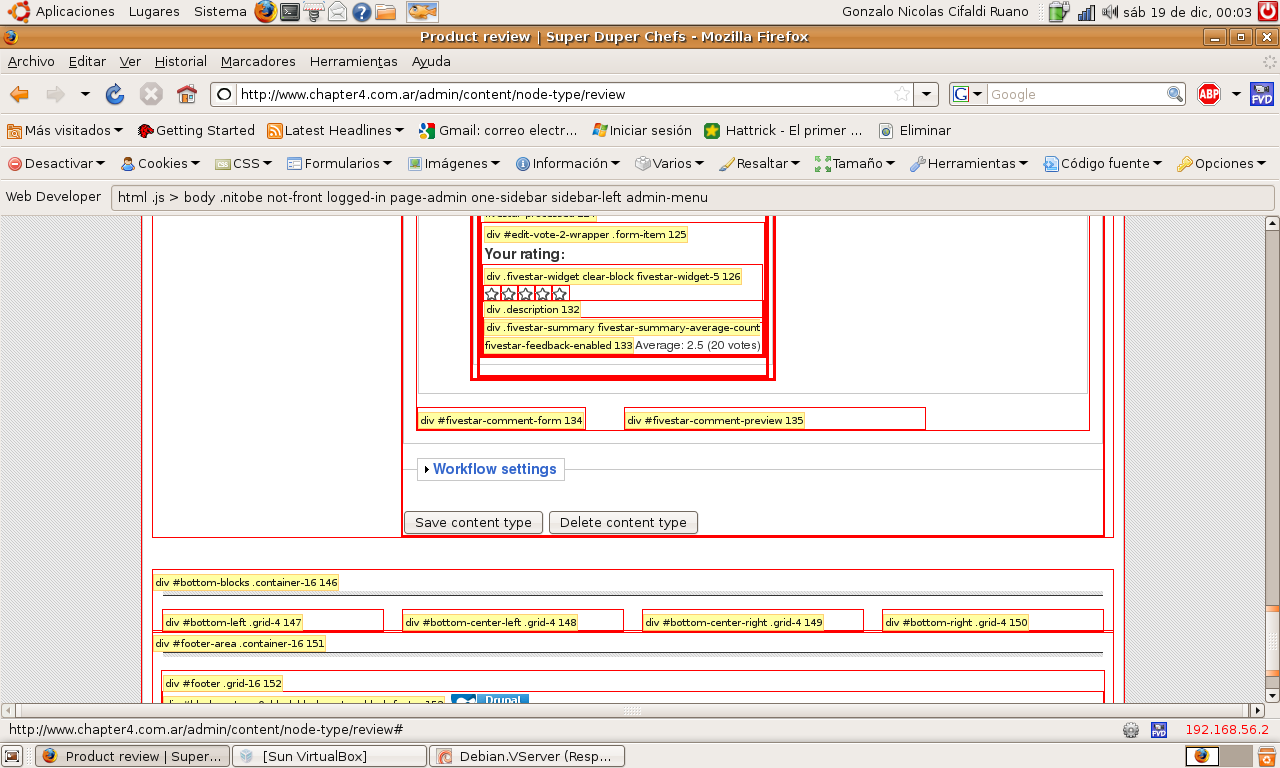
This is my first discovery (what you see in the picture). The tags Div from fivestar-comment-form 134 and fivestar-comment-preview 135, are in there, so the question is why the comment widget settings is not showing up?
I'm in zero again, well I will continue digging into the rabbit hole.
Greetings,
Gonzalo.
Update:
For what i was seeing in the code of fivestar.module, this part:
if (module_exists('fivestar_comment')) {
$comment = '';
$comment .= '
$comment .= drupal_render($form['comment']['fivestar_comment']);
$comment .= '
';
$comment .= '
$comment .= drupal_render($form['comment']['fivestar_comment_preview']);
$comment .= '
';
$form['comment']['#children'] = $comment;
$output .= drupal_render($form['comment']);
}
creates the comment form only if fivestar comment module exist. So, if the tags DIV are in there, then the module could see that comment exist, so why is not showing up?
Can be that the drupal_render is not working?
Something on my drupal installation is not working?
Comment #16
ezra-g commentedI'm not able to reproduce this problem. Can someone offer instructions on how to reproduce this problem on a fresh install?
Comment #17
Anonymous (not verified) commentedYes, i can:
Do: mkdir /var/www/drupal
Do: chown -R www-data:www-data /var/www/drupal
Download the drupal 6.15 code, untar and put it on the /var/www/drupal directory.
Create the /etc/apache2/sites-available/site.conf file with the next configuration:
NameVirtualHost *
ServerName www.site.com.ar
ServerAlias site.com.ar
DocumentRoot /var/www/drupal
LogLevel warn
ErrorLog /var/log/apache2/error.log
CustomLog /var/log/apache2/access.log combined
ServerSignature On
DirectoryIndex index.php index.html home.shtml index.cgi
Options +Indexes
allow from all
AllowOverride All
"
Do: a2ensite site.conf
Append to the /etc/hosts file the line: 127.0.0.1 www.site.com.ar
Do: su postgres
Create a database and user for drupal on Postgresql
$ createuser -D -A -P drupaluser
$ createdb -O drupaluser drupaldb
Modify the pg_hba.conf file of the postgresql DBMS
$ sudo nano /etc/postgresql/8.1/main/pg_hba.conf
comment out this line after # "local" is for Unix domain socket connections only
# local all all ident sameuser
Add the following lines
# TYPE DATABASE USER IP-ADDRESS IP-MASK METHOD
host drupaldb drupaluser 127.0.0.1 255.255.255.255 password
Save the file (Ctrl + x, y) Restart the postgresql database server engine
$ sudo /etc/init.d/postgresql* restart
Check your database connection:
$ psql -h 127.0.0.1 -p 5432 -U drupaluser -W drupaldb
Enter the password for user drupaluser:
Create the directory of your site.
Do: mkdir /var/www/drupal/sites/site.com.ar
Do: mkdir /var/www/drupal/sites/site.com.ar/files
Do: chown -R www-data:www-data /var/www/drupal/sites/site.com.ar/files
Do: cp /var/www/drupal/sites/default/default.settings.php /var/www/drupal/sites/site.com.ar/settings.php
Modify the line in /var/www/drupal/sites/site.com.ar/settings.php that say $db_url = 'mysql://username:password@localhost/databasename'; to look like $db_url = 'pgsql://drupaluser:drupaluserpass@localhost/drupaldb';
Modify the line in /etc/php5/apache2/php.ini that say:
; Resource Limits ;
memory_limit = 16M
to look like:
; Resource Limits ;
memory_limit = 160M
Now go to your Favorite Browser and write the address "http://www.site.com.ar/install.php"
If you have many profiles choose: the Drupal profile.
Next, if you have many language installed, choose: English (built-in)
Now the installation is made, so wait until Configure site appear.
When that happen complete all the necesary to configure the site.
Once complete the installation, a link to your new site will appear, click on him.
Your fresh installation will appear, and you will be logged on.
Now download from drupal.org the last version of the 6.x branch of the Fivestar module and the Vote API module, untar and put it on the /var/www/drupal/sites/all/modules directory.
If that directory don't exist then do: mkdir /var/www/drupal/sites/all/modules
Then just go to you browser again and click on Administer menu, next, click on the Modules submenu.
Right to the end, a group named Voting appear, inside, 3 checkboxes, once checked, will enable the use of the Fivestar module, Voting API module, and the Fivestar Comment module.
Check all, and click on Save Configuration.
Once the message, The configuration options have been saved, appears, do click on Administer menu, and next, click on the Content management submenu.
Do click on Content types link, and click on the Add Content type tab.
The first error that appear is:
warning: Division by zero in /var/www/drupal/sites/all/modules/fivestar/fivestar.module on line 1584.
warning: Division by zero in /var/www/drupal/sites/all/modules/fivestar/fivestar.module on line 1585.
Then complete the Name, Type, that are required.
Go now to the Fivestar Ratings group and click on Enable Fivestar rating.
Then if you go down, you realize that something is missing, the Comment Widget is not showing up.
For this post, was made the step by step process of a fresh install.
I realize that the permissions for the module was not set up, but still I was logged on like a Admin, so that is not necesary, at least to see the comment Widget.
Comment #18
Anonymous (not verified) commentedUpdate:
Have Installed a Debian Lenny 2.6.26-2-686 server, with PHP 5.2.6-1+lenny4, Apache 2.2.9, PostgreSQL 8.3.8 (I upgrade this), Drupal 6.15, Administration Menu 6.x-1.5, Amazon Module 6.x-1.0-rc3 (I upgrade this), Content Construction Kit (CCK) 6.x-2.6, Fivestar 6.x-1.19, Voting API 6.x-2.3, Nitobe 6.x-4.1. I'm Up to date.
Nothing change about the Comment Widget, is still missing.
But, I try the solution to division by zero that acidrob write:
$this_value = ($element['#stars'] < 1) ? 0 : ceil($i * 100/$element['#stars']);
$next_value = ($element['#stars'] < 1) ? 0 : ceil(($i+1) * 100/$element['#stars'])
And work (I think, the message is not showing anymore), again, the comment widget is not showing, but the division by zero warning is not showing too.
Thanks acidrob, and ositoblanco. One problem solved, one missing.
Greetings,
Gonzalo.
Note: This are the modules activated on the fresh install:
THEME
Garland
MODULES
Core (Optional)
Color
Comment
Database Logging
Help
Menu
Taxonomy
Update Status
Voting
Fivestar
Fivestar Comments
Voting API
Comment #19
Anonymous (not verified) commentedHi, anyone know how use Drupal for Firebug?
Because, I used, or I tried to use it, to show this two $forms:
$form['comment']['fivestar_comment']
$form['comment']['fivestar_comment_preview']
in this way:
if (module_exists('fivestar_comment')) {
$comment = '';
$comment .= '';
$comment .= drupal_render($form['comment']['fivestar_comment']);
firep($form['comment']['fivestar_comment'], 'MESSAGE 1');
$comment .= '';
$comment .= '';
$comment .= drupal_render($form['comment']['fivestar_comment_preview']);
firep($form['comment']['fivestar_comment_preview'], 'MESSAGE 1');
$comment .= '';
$form['comment']['#children'] = $comment;
$output .= drupal_render($form['comment']);
}
And the result was:
Only shows the messages , so what i was thinking was right, the error is near this section, the comment preview is not showing, because the $form is empty.
As a test I wrote this line:
if (module_exists('fivestar_comment')) {
$comment = '';
$comment .= '';
$comment .= drupal_render($form['comment']['fivestar_comment']);
firep($form['comment']['fivestar_comment'], 'MESSAGE 1');
$comment .= '';
$comment .= 'I hope this show on';
$comment .= '';
$comment .= drupal_render($form['comment']['fivestar_comment_preview']);
firep($form['comment']['fivestar_comment_preview'], 'MESSAGE 1');
$comment .= '';
$form['comment']['#children'] = $comment;
$output .= drupal_render($form['comment']);
}
And that message show on, so I really believe the problem is in:
$form['comment']['fivestar_comment']
$form['comment']['fivestar_comment_preview']
I will continue trying, i need some rest now.
Greetings,
Gonzalo.
Comment #20
Anonymous (not verified) commentedHello, I was wrong about using Drupal For Firebug and Firebug, but I learn fast, so this was what happened:
Edit the file to show with Firebug firestar.module variables $ comment and $ output as follows:
Firepad ($ variable, 'message to display');
Then change the lines in the module were as follows:
if (module_exists ( 'fivestar_comment')) (
$ comment ='';
$ comment .='';
$ comment .= drupal_render ($ form [ 'comment'] [ 'fivestar_comment']);
Firepad ($ comment, 'This render');
$ comment .='';
$ comment .='';
$ comment .= drupal_render ($ form [ 'comment'] [ 'fivestar_comment_preview']);
Firepad ($ comment, 'cake');
$ comment .='';
$ comment .= 'Does this show up?';
Firepad ($ comment, 'data dump is');
$ form [ 'comment']['# children'] = $ comment;
drupal_render $ output .= ($ form [ 'comment']);
Firepad ($ output, 'Output');
And this is what Firebug showed me:
This render?:
cake!:
Does the data dump is?:
Does this appear?
Output:
Enable Fivestar rating
Number of stars:
Star Labels
These star labels appear as the link title when javascript is enabled as well as the select list options when javascript is disabled.
Display labels on mouse over
When enabled, the star labels will dynamically appear underneath the stars as the user hovers over each star to Provide a more descriptive qualitative meaning for each star value.
Cancel label:
Star 1 label:
Star 2 label:
Star 3 label:
Star 4 label:
Star 5 label:
Star 6 label:
Star 7 label:
Star 8 label:
Star 9 label:
Star 10 label:
Direct rating widget
These settings allow you to display a rating widget to your users while they are viewing content of this type. Rating will immediately register to vote for that piece of content.
Star display style:
Text display style:
Show widget title
Allow users to undo their votes
Enable feedback during saving and deletion vote
Teaser display:
Full node display:
Direct rating widget preview:
Your rating:
Give it 5 / 5
Average: 2.5 (20 votes)
Does this appear?
As you can read in the amendment "RENDER THIS?" only shows the title, none of the variable $ comment appears. In the amendment "CAKE!" is the same. But the amendment "APPEARS dumping data?" I shows the value that I pass the variable $ comment: "This appears?"
And later when he showed the variable $ output, Firebug showed me all of Fivestar least share of comments.
If everything was set, and I really believe I did everything and still not showing, and what I gather $ form [ 'comment'] [ 'fivestar_comment'] and $ form [ 'comment'] [ 'fivestar_comment_preview'] is not are bringing anything, What could be the reason for this is happening?
Anyone with an idea? Any place where you can force the activation of the module?
Thanks, Regards, Gonzalo.
Sorry for my awful English. I'm tired, I did that google translate me.
Would not it be great to link the google translator to drupal.org. I'm very lazy.
Comment #21
JamieR commentedHello. Having the same issues as stated here. Haven't read all the comments above, but the issues seem to occur on PostgreSQL databases. For some reason the fivestar_comment module is altering the form before fivestar is. And since fivestar is reseting the 'fivestar' array we loose the form.
I've attached a patch that changes the way the 'fivestar' array is created so as to not clear out any extension modules form alter data.
It basically takes this:
and changes it to this:
This should have no negative effects on the current module and play nice with extension modules.
:)
Hope this helps. It's patched against 6.x-1.x-dev since I thought you'd like that better.
Cheers!
Jamie.
Comment #22
Anonymous (not verified) commentedHi, JamieR thanks for the Patch, I can´t test it right now, but i do in the afternoon, and then i will give the Feedback. I'm using 6.x-1.9 so I will patch manually the code.
Again, Thanks!
Cheers!!
Pd: I think like you, the issues seem to occur on PostgreSQL databases, but i don´t see how this change of code are related with PostgreSQL. But that is because i don't know too much about the code of drupal, still :D
Comment #23
Anonymous (not verified) commentedHi Jamie, I made the changes to fivestar.module I found in the patch that you uploaded, but I had to get a line in the version of Fivestar 6.x-1.19 was not:
+ $ Form [ 'Fivestar']['# group'] = 'additional_settings';
That line not included in the amendment.
Now the comment widget appears, but no comment preview widget.
I'll try to make a change similar to yours, but in subsections following code, and added to the next message, if it works, so tell me who you think. ;)
Greetings,
Gonzalo.
Comment #24
Anonymous (not verified) commentedSorry for the previous message, was so connected with my work that directly I thought it was just not working and had not enabled the comment preview.
The changes proposed ositoblanco and acidrob for division by zero work perfectly. The changes you have proposed, Jamie, are as well.
So this is a patch that solves the two problems for the version 6.x-1.19.
Thank you very much to all who contributed: D
Greetings!
Gonzalo.
Comment #25
acidrob commentedGreat work - the patch works fine for me :)
The fivestar widget shows nicely in the post a comment section for new comments -
However - the individual users ratings are not showing up in the comments previously posted by users - thought this was how it was supposed to work? Maybe I'm missing something .. ?
Edit: New ratings are showing up in the comment section, but previous comments don't - perhaps theres a way to link them up in the DB?
Comment #26
acidrob commentedThe following SQL should link up the comments/ratings that happened before the patch got the comment widget up and running
INSERT INTO fivestar_comment( cid, vote_id, value )
SELECT C.cid, 0, V.value
FROM votingapi_vote V
INNER JOIN comments C ON V.content_id = nid
AND V.uid = C.uid
LEFT JOIN fivestar_comment F ON F.cid = C.cid
WHERE F.cid IS NULL
Comment #27
debplatt commentedI am just learning Drupal this summer. I had a test site running Drupal 6.17 with a PostgreSQL backend. I was having both of the problems described here: division by zero and the fivestar widget was absent from comments. I upgraded my test site to Drupal 6.19 and applied the patch that was supplied in comment 24. Since this was my first effort to apply a patch, I ran a diff GUI (meld) to verify that the problematic code pinpointed above had been replaced by the suggested, new code. All was as suggested except following the patch, this code was missing:
$form['fivestar']['#group'] = 'additional_settings';Afterwards the division by zero problem seemed to go away (yes!!! thank you!). However there was still no fivestar widget appearing in the comments. Since it is a test site, I didn't care if anything showed up for old comments, but I'd like it to work for new ones. So I created a new blog posting and added a new comment to it. There's still no fivestar widget appearing in the comment. Just in case setting
$form['fivestar']['#group']was vital to the solution, I added that into the module, ran update.php, and created another new comment. Still no fivestar widget.Comment #28
whiteph commentedWe can no longer support the Drupal 6 version of Fivestar. It is in security maintenance mode only. When the Drupal 8 version of Fivestar is released, the Drupal 6 version will be officially deprecated.
Comment #29
whiteph commentedSee Help testing Drupal 6 patches.