

 The 2026 Drupal Business Survey is open. Your response will help shape the future of the Drupal business ecosystem.
Hi All,
How are you? I have 2 questions:
1. I have migrated to Drupal 6 recently, however, after the migration, one of the feature I that I always use in Drupal 5 has stopped working. (Please see the attached picture for the error). Any suggestion?
2. In the Mysql database, when I was using Drupal 5, whenever I create a new Content Taxonomy Fields, using select list widget, it will create a new table for this particular field. However, in drupal 6, it is add a new field in the content type. Anything wrong with what I did?
Please advice.
Regards,
Vincent Liew
| Comment | File | Size | Author |
|---|---|---|---|
| #2 | content_taxonomy.jpg | 392.22 KB | vincent-liew |
| content_taxonomy_error.jpg | 230.45 KB | vincent-liew |


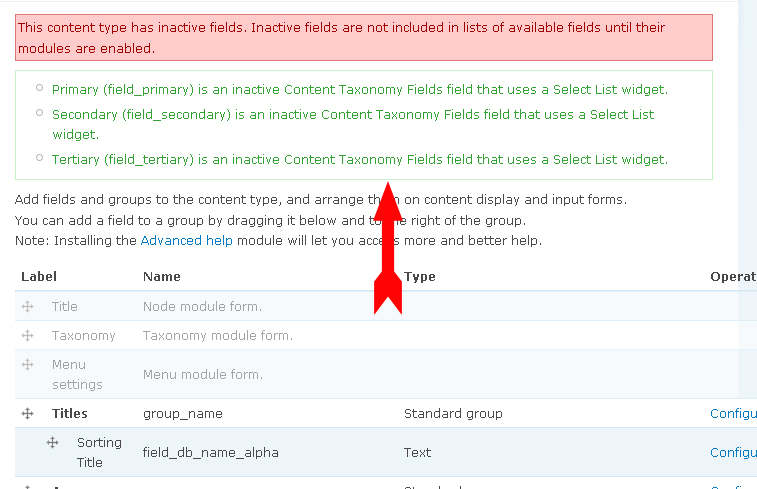
Comments
Comment #1
pieterdcDid you enable the Content Taxonomy Options submodule?
Comment #2
vincent-liew commentedHi PeterDC,
Yes, it was enabled, please see attached pic for a small section of my module page. You can see Content Taxonomy Options was enabled.
Comment #3
m4rt1n commentedhi,
i have the same problem. are there any news about this?
edit: after a second upgrade attempt it worked for me. this time i activated each module one by one
Comment #4
hillaryneaf commentedI have the same issue with content taxonomy selection list... has anyone solved this problem without a second upgrade attempt?
Comment #5
VSZ commentedDisabling and then enabling Content Taxonomy Options helped me to restore access to the fields.
Comment #6
hillaryneaf commentedThis helped me too, I had to disable the module, uninstall it and then re-enable it.
Comment #7
hillaryneaf commentedI have a new issue after I do the above fix.
When I go in to edit any of the articles, the selected taxonomy values are deselected in the edit form. If I create a new article and then go to edit it, the selected taxonomy values stay selected. The issue is only with previous articles.
I tried just disabling and re-enabling the module (without uninstalling it) but it produces the same results above.
Did anyone else come across this issue?
Comment #8
mh86 commentedI think I found the problem causing the inactive fields.
In the upgrade function I was calling
but actually it should be 'content_taxonomy_autocomplete' and 'content_taxonomy_options'. The function content_associate_fields is responsible for activating the fields.
The fix is committed.
Comment #10
s13 commented@ PieterDC, many thanks i was having the same problem and your valuable suggestion saved me a lot of hours.
again many thanks. :)
Comment #11
pieterdcYou're welcome
Comment #12
jgoge commentedThanks for your post, it works for me.
The problem was: " field requires the Select list widget provided by options module"
I solved it just desactivating and activating taxonomy module.
Comment #13
markchitty commentedI'm seeing this same issue as you describe (http://drupal.org/node/593340#comment-2517870), did you ever find a fix for it?
actually, ignore this post, I'll post against the other issue...
Comment #14
vincent-liew commented