Splitting this off from: #544360: D7UX dashboard module
We need a mechanism to restrict blocks available to the dashboard, so far the following have been proposed. I'm trying to summarize the proposals and the objections to them, feel free to correct.
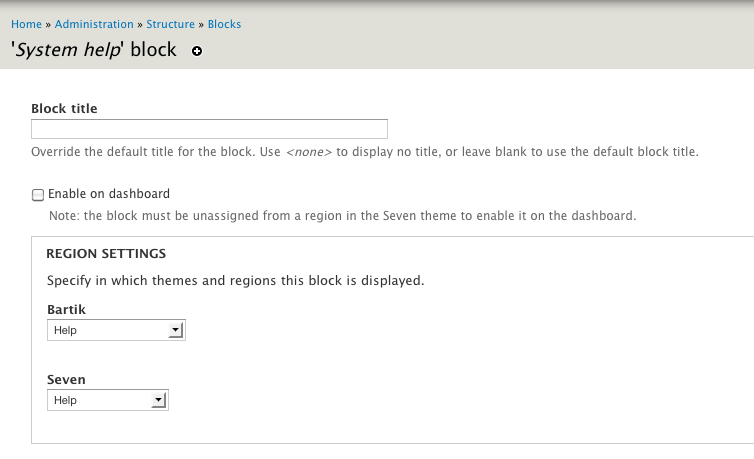
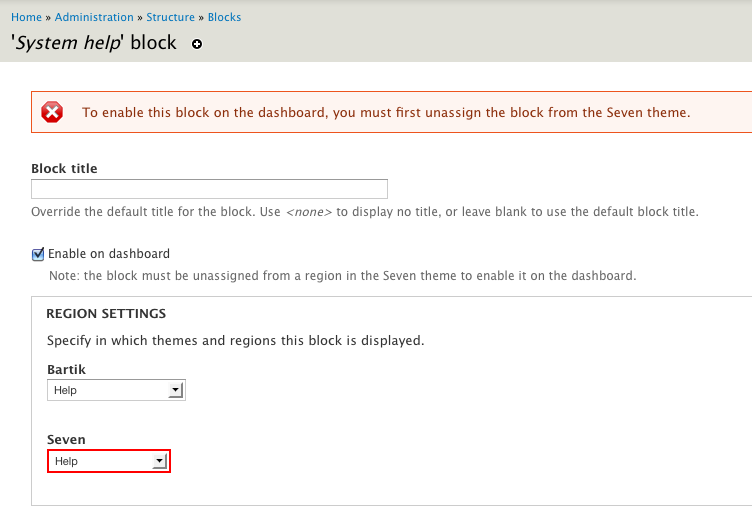
#1. Add a checkbox to individual block configuration forms: "enable in dashboard".
Drawback: when the block is used in another region, this checkbox would be meaningless.
#2. Add a 'allow in dashboard' region for the block admin page.
Drawback: adds a second 'disabled but not really' region on the blocks page.
#3. Add a 'dashboard' key to hook_block_info().
Drawback: dashboard specific.
Looking at these and reading Bojhan's #154 on that issue, I've thought of another approach, which was part of the reason for splitting this off.
While we don't want to categorise blocks in the dashboard palette - because we'll end up with another modules page, we could still add categories for other purposes.
hook_block_info() gets a 'category' or 'type' key. These would be things like
'content'
'user'
'system'
'branding'
'navigation'
Core's blocks add themselves to these. If we want, we can let category be an array (so you can define content + administration).
Then, somewhere in dashboard settings, we have a list of checkboxes referring to the categories - which restricts the available blocks to blocks from those categories.
So to remove all menu blocks, and the 'powered by drupal' block from the dashboard, we just exclude 'menu' and 'navigation' by default. If I don't want any user blocks on my dashboard (single user site or whatever), then I can disable that group by unticking a single checkbox. If contrib modules go wild and define 20 different dashboard categories, the only thing that gets bloated is that list of checkboxes because we don't use the categories for drilling down block choices themselves, only for limiting which ones are available.
The category key is optional (but it makes sense for core to define sensible defaults for its blocks - something like panels might want to use the categories in a different way), if you don't define a category, for your block, no dashboard for it.


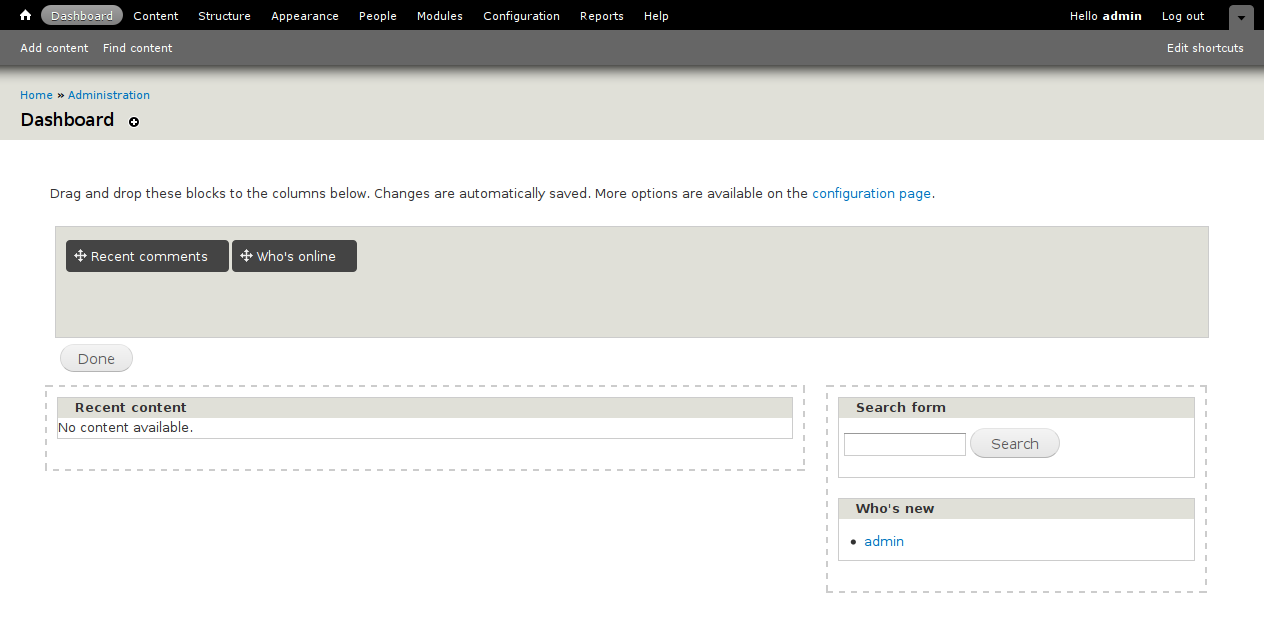
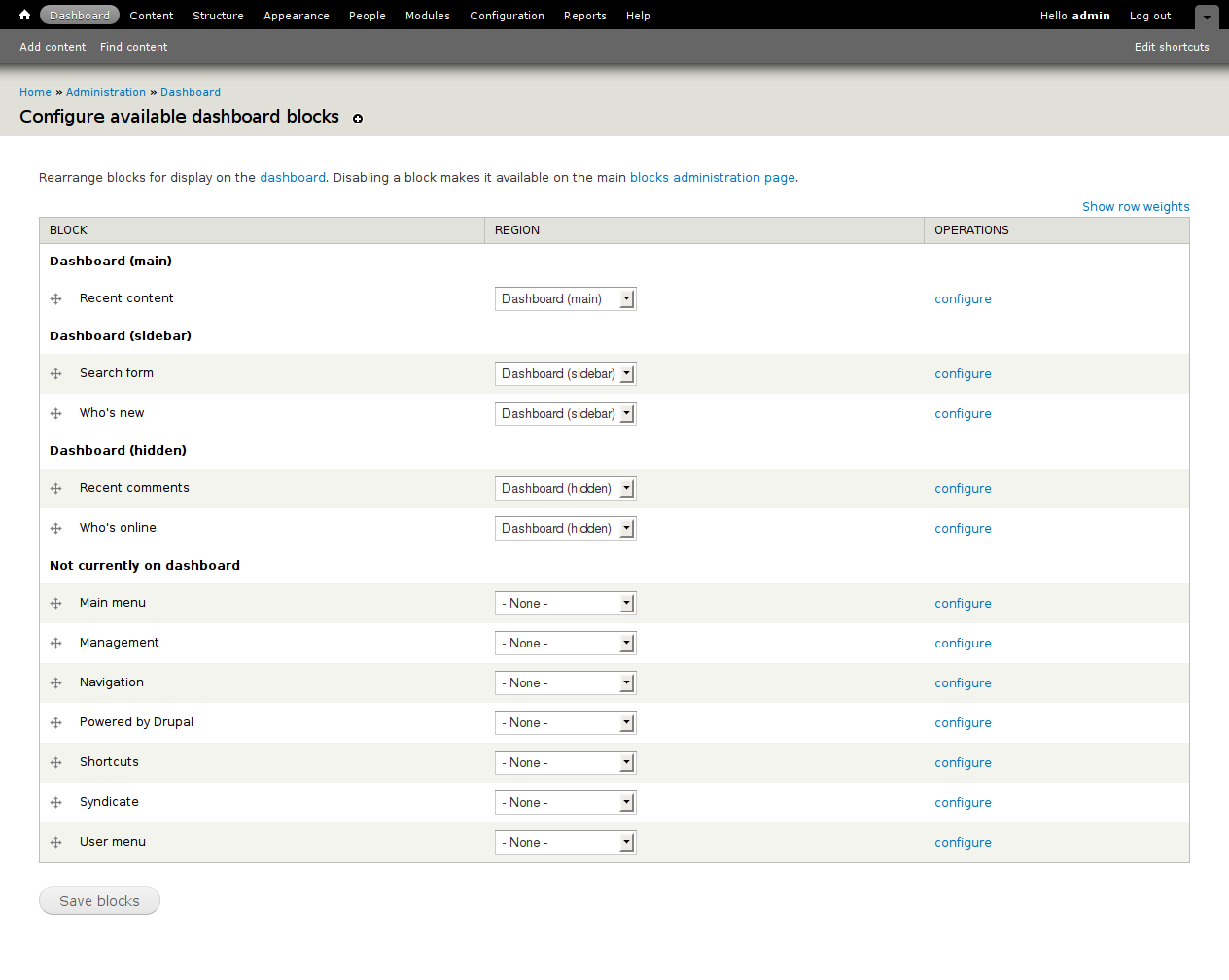
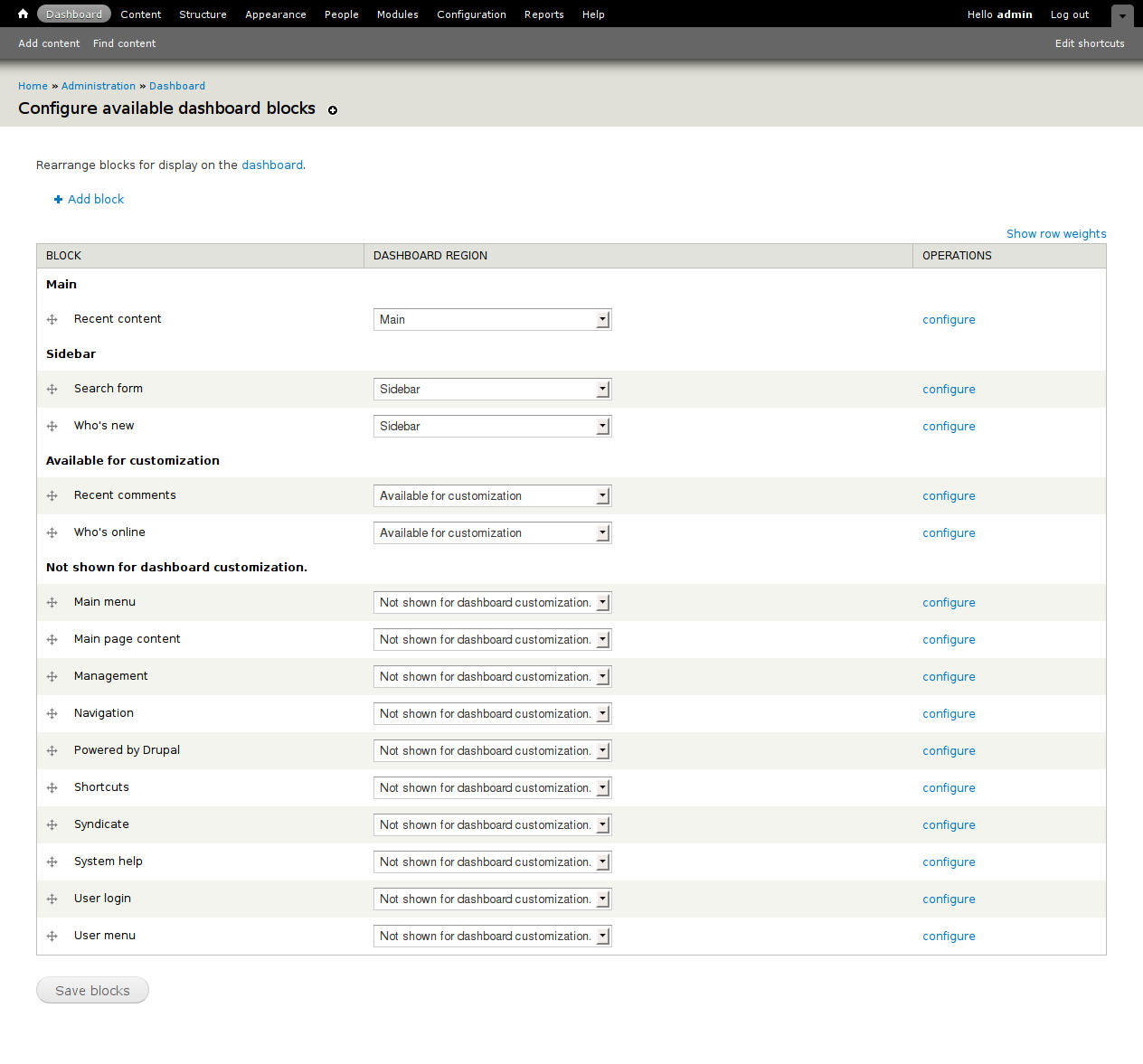


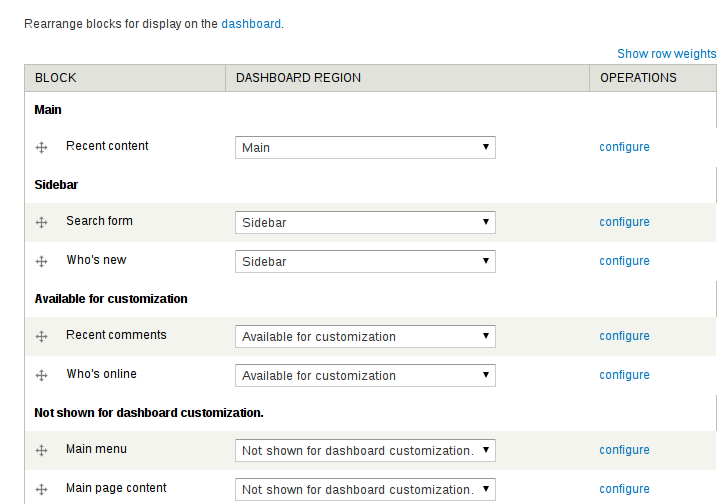





Comments
Comment #1
David_Rothstein commentedSubscribing. I think I like your last suggestion - however, how would it work with custom blocks? It sounds like when adding a custom block, there would either have to be a dropdown to select its category, or we'd have to enforce that all user-created blocks are in the same category (which would mean either all of them show up as available on the dashboard, or none of them do, but no in-between).
Some slight clarification: #3 wasn't really a solution on its own, but rather the back-end that either #1 or #2 would require in order to work. And @webchick's suggestion was that rather than having a "dashboard" key, it would actually be more something like
'admin task' => TRUE. So her idea is actually a bit like your category idea, only we'd be limiting the number of categories to two (basically, administrative blocks and non-administrative blocks).Comment #2
catchFor custom blocks - I think in core we'd want to make them a 'custom' category - so they'd bee all on or all off in the dashboard. Nothing stops someone from writing a block category alter module in contrib which lets you move things around.
And yes, my idea is just a variation on
'admin task' => TRUEhowever I think that immediately runs into issues with who's new, who's online - which on different sites might be admin-only or site-facing blocks or both. We can work around this by duplicating lots of blocks, which I think makes sense for some (a recent comments block with edit and delete links on it), but is unlikely to work for everything.Comment #3
seutje commentedsubscribe
Comment #4
gábor hojtsy@catch: I think the idea with an "admin task" marker is not to exclude any blocks from the public site UI but to whitelist blocks for the dashboard. So it would not have effects on the available blocks for the site, but would limit the blocks available for the dashboard.
Also, do I understand this right, that the results of this discussion would be folded back to #544360: D7UX dashboard module, since a resolution of this problem was set as a pre-requisite to committing code there.
Comment #5
catch@Gabor - yeah that's how I see it working either with 'admin task' or more categories.
As to folding it back - depends whether a resolution means we have an agreed architecture and pending patch, or whether it has to actually be rolled into the initial commit. Not my decision either way.
Comment #6
gábor hojtsyComment #7
yoroy commentedSo, I'm of course only able to follow the gist of this… but would like to see this coming alive again. Couple of points that may or may not already be considered in the discussion above:
- For any block, the default should be 'do not make available for dashboard'. For core install profiles we want to explicitly mark only a couple of them as available for dashboard.
- I understand that making a block available for dashboard excludes it from being used in the site front end. Straight duplication seems the only real option but will clutter the blocks page even more. We'll see…
- Could/should the categories idea match the categories on the configuration page?
- Initially it seems like the categories are to rough a grouping but maybe it is acceptable to have 5 blocks show up on the dashboard to be able to pick just the one you need.
Since #544360: D7UX dashboard module is committed and closed we can work on this in here.
What can I wireframe/sketch here to further this discussion?
Comment #8
yoroy commentedLiberally quoting catch, discussing this in IRC:
Comment #9
bleen commentedsuperscribe
Comment #10
David_Rothstein commentedNot totally. That's the case if you're using the same theme for your whole site. But if you're using a separate admin theme, then putting a block on the dashboard does not prevent it from being used on the main site.
Comment #11
webchickComment #12
webchickTagging this as something to focus on before UX freeze. I consider this a critical bug to Dashboard making any kind of sense.
Comment #13
webchickchx, yoroy, and I discussed this in IRC. We came up with something that I think will work great, doesn't change APIs, and doesn't pollute the hook_block() API-space with Dashboard module-specific properties. Winnity win dot win!
What Dashboard module will do is hook_form_alter() the Block administration page to add checkboxes next to each block to mark them as available to the Dashboard. These values will get tossed into an array and stored in a variable like "dashboard_enabled_blocks". This should default to something that makes sense (whatever the blocks are that are in the dashboard currently, perhaps a few others). Then, the dashboard gets changed to only display available blocks that are found in that variable.
I estimate this at a medium-level task, so not tagging as novice. This should hopefully be pretty straight-forward, but may require some futzing in form theme functions and/or JS, due to the draggable table rows.
Comment #14
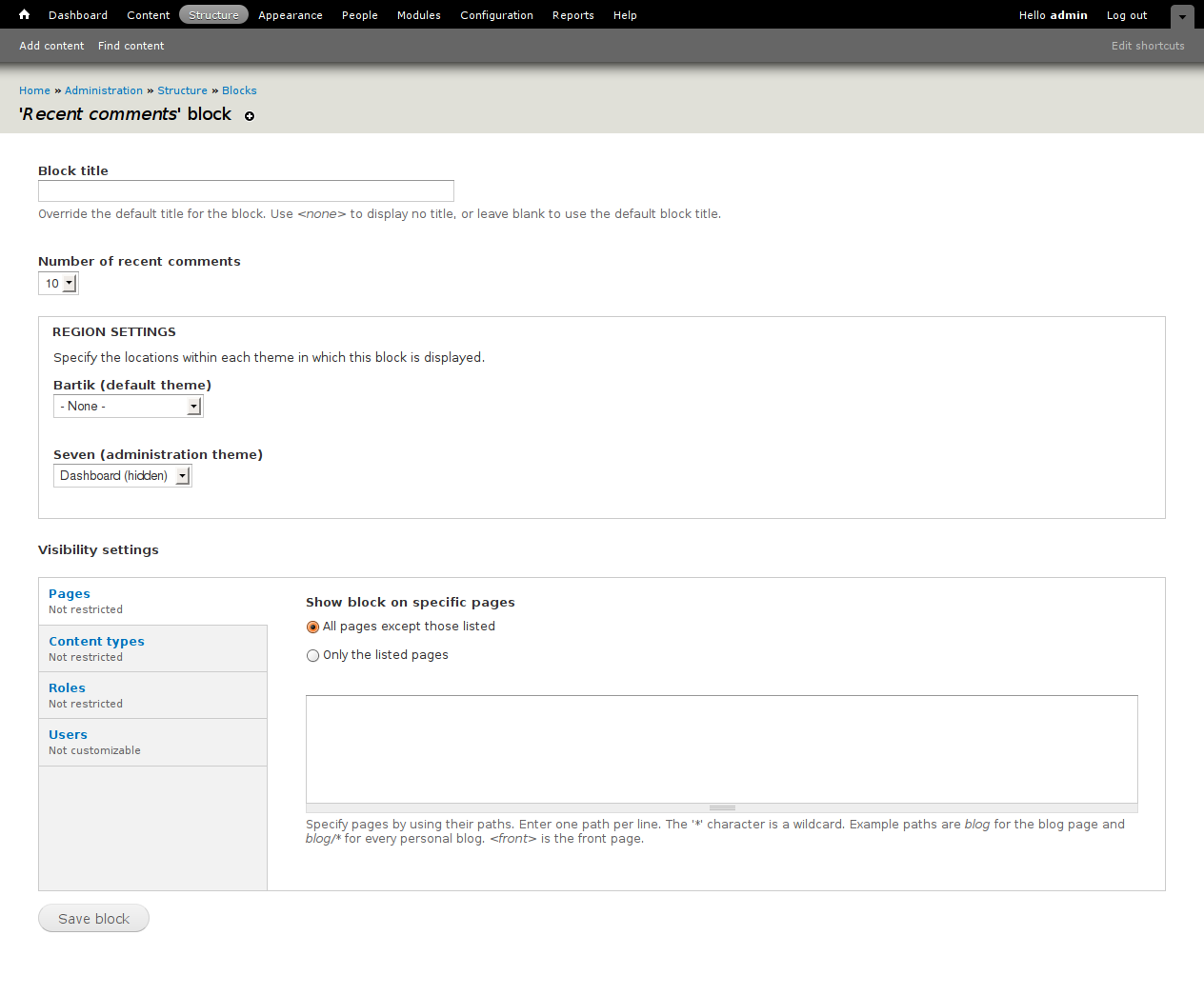
yoroy commentedThis is only a sketch to find out how this could work, not a proposal yet.
Comment #15
David_Rothstein commentedA column of checkboxes does not really work here, because the only blocks that can be available for the dashboard are those that are disabled. (If it's in the left sidebar already, it can't be on the dashboard too, at least not for that theme...)
What about contrib modules? I guess we would need some special new functions that they could call to add their blocks to the 'dashboard_enabled_blocks' variable by default? Doesn't sound very pretty...
***
If we're not willing to make the API changes that @catch's proposal would require, but we are willing to mess with adding more "dashboard" stuff to the block administration page, why wouldn't we just go back to the simple proposal from a couple months ago?
The code would be simple, the effect on the blocks administration page would be minimal, modules would be able to use already-established methods to make their blocks appear in that region by default (at least according to the API docs of http://api.drupal.org/api/function/hook_block_info/7 - although in my quick testing that functionality didn't seem to work correctly anymore), etc....
All we need to do is come up with a good, clear name for the 'region'... "Dashboard (disabled)" was my suggestion, but I'm sure we could do better.
Also if it's a region, we can afford to have the name be more than a single word :)
Comment #16
catchYeah I'm not keen on the variable either.
All I wanted was an extra key in hook_block_info() - which wouldn't need to be stored in the database at all, which could then be used to filter out blocks on the dashboard page. Whether that's a boolean or a category doesn't matter to me too much, but I don't see how adding dozens of checkboxes is simpler than an extra array key.
Comment #17
webchickMy concern with a 'category' key is that we get into yet another one of those module .info file package hell-holes where someone puts their block under "ui" another one uses "user-interface", etc. I would really rather not introduce yet another one of these here.
Comment #18
catchWell the idea isn't that we display these categories on the dashboard page, it's that we have a set of checkboxes somewhere where you choose which categories show up, so if that did happen, it'd only affect the users administering the settings of the dashboard (and potentially those using the theoretical modules making use of this), not those using it day-to-day. Whereas putting a checkbox on every block affects every person who ever clicks edit on a block. Not to mention that checkbox is going to be inaccurate half the time if the block is used somewhere else in the same theme (and aren't block settings per-theme?).
However to skip categories we could also do:
With no category, which is probably what the default would be anyway in terms of what gets displayed. Then allow hook_block_info_alter() if that exists to toggle it on/off for advanced use-cases.
Comment #19
webchickWell those are all definitely good points.
I'm not opposed to 'admin' => TRUE, though it does feel pretty limited. Can we think of a use case outside of Dashboard for this flag? Categories is nice in that it's a generic thing that could be re-used in Panels or whatever, but I just forsee this being a huge headache given our previous demonstrated problems with human-thought-of category names...
Comment #20
David_Rothstein commentedAnother option might just be
'category' => 'administrative'- then we open up the possibility for contrib to define additional categories and use them in various (potentially-horrendous) ways, but we don't actually encourage it because the Dashboard module would by default only care about blocks in the 'administrative' category.Regarding the UI, which is (almost) an entirely separate issue, I think a separate page with per-category checkboxes would work but perhaps be a bit nonintuitive to use? I'd like to hear why or if a separate region is a bad idea, because it really seems like the simplest and most intuitive to me. Note that of course we don't have to make it look like a totally separate region - presumably with some extra form_alter() magic in the dashboard module the blocks administration page could be arranged something like this?
Left sidebar
Right sidebar
Disabled
(Available on dashboard)
(Not available on dashboard)
So that although technically they would be stored as separate "regions", the user would never have to think about them that way - they would just think of them as two separate categories in which disabled blocks can be put into.
Comment #21
Bojhan commentedsubscribing
Comment #22
yoroy commentedCurrently, you can specifically target each region in the dashboard. I wonder if we should do that. And maybe not what this issue's about anymore. But a single 'administrative' category seems to align well with this.
I realise that representing the whole of dashboard as just 1 region on the blocks page kind of breaks expectations there. But right now we are shortcutting the dashboard configuration page by using blocks page as the main dashboard layout manager.
In #20, would you even need 'Not available on dashboard' then? The standard 'disabled' should be sufficient then, no?
Anyway, just some thoughts to get this going again. Ask me about what I'm trying to say here :)
Comment #23
seutje commented1 little thing there, currently, the only way to customize the dashboard without using JS is by doing it in the blocks & regions page, so if the 2 dashboard regions aren't available there, how would a non-JS user go about customizing the dashboard?
Comment #24
David_Rothstein commentedYeah, I think there is a lot to like in #22, but not sure how to handle the non-JS fallback (or situations like moving a block out of and then into the "for dashboard" region again - in that case it still has to be smart enough to retain the specific dashboard region it was in, even if it is not revealed in the UI)?
Slightly simpler, perhaps, it might be possible to combine #20 and #22, so that you still have one main dashboard region, but with all dashboard-related subcategories underneath it. I think that would at least be better than #20. In other words:
Dashboard
Main
Sidebar
Disabled
Left sidebar
Right sidebar
Disabled
Comment #25
sun.core commentedComment #26
Bojhan commentedOhh, jeez - tha_sun. Can you stop moving issues, your not involved with?
Comment #27
Bojhan commentedI am not very keen on introducing categories for this, it seems very hard to get these categories right - given the limited time it also seems to be a bit overkill? Since we need to solve this issue soon, I propose that we pursue option #1.
#1. Add a checkbox to individual block configuration forms: "enable in dashboard".
Drawback: when the block is used in another region, this checkbox would be meaningless.
Blocks will be created by views/other modules, its likely to primarly be used in such a workflow.
Comment #28
yoroy commentedFrom the original thread: .
.
Looking back at this, it seems this checkbox approach was left because it probably doesn't scale that well (not easy to do bulk updates this way). But how scalable does this need to be (by default)? The subset of blocks for use on dashboard will always be smaller (probably a lot smaller) than the total amount of available blocks, since dashboard is a very specific use case.
Another advantage of this option is that it doesn't add clutter to the already strained blocks page. The solution that uses a region for dashboard blocks kind of pollutes the concept of what a region is because this specific region only applies to the specific dashboard page instead of 'everywhere'. We want to avoid introducing that UX WTF.
Comment #29
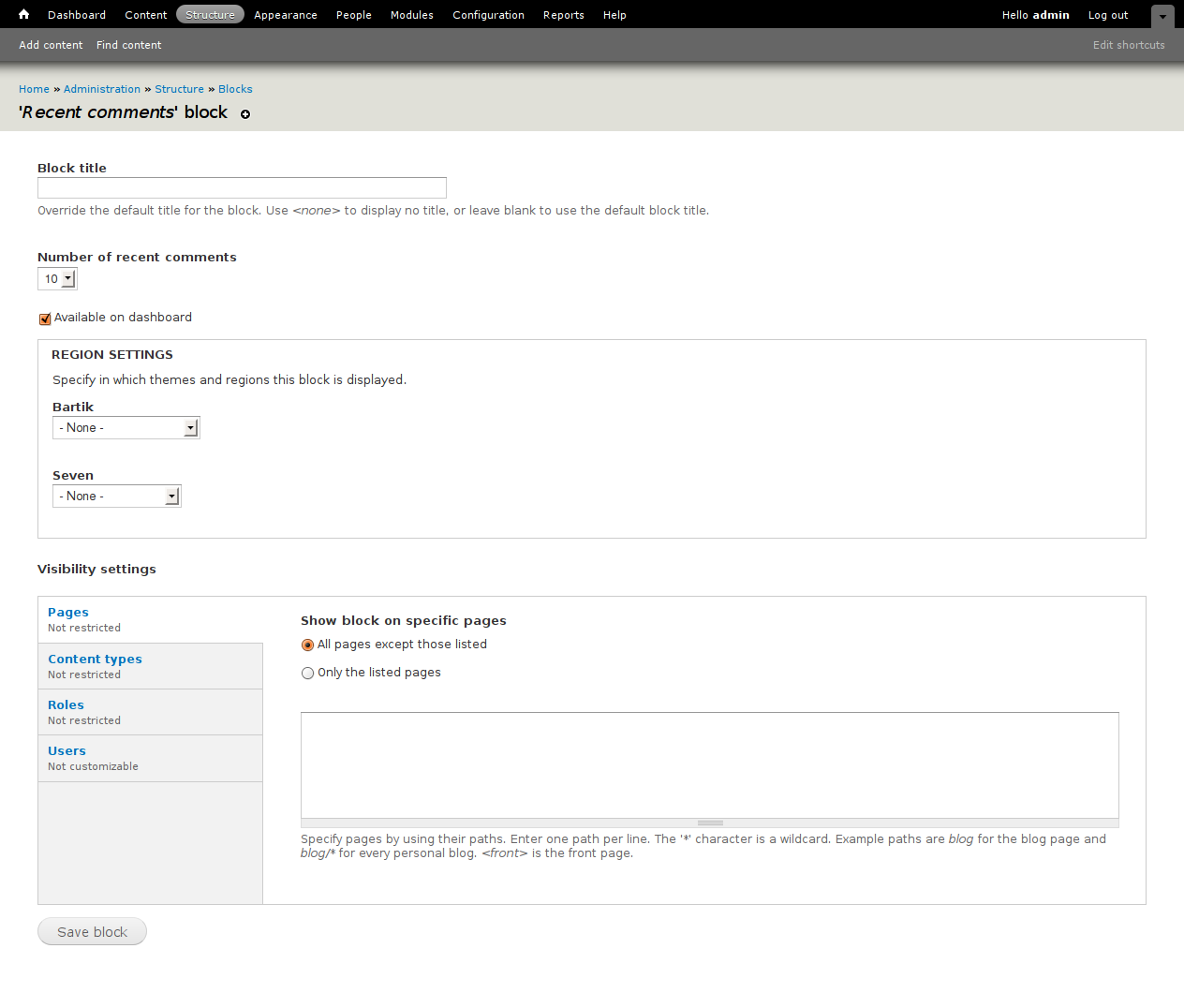
Bojhan commentedTo make it more clear, this is basically what we want.
Comment #30
bleen commentedIf we go with the checkbox approach (#29) shouldn't we add a description that says something like "Makes this block available to be placed on the dashboard if it is not assigned to another region in the administrative theme."
I can easily see people becoming confused when they check that box and still don't see the block on the dashboard page...
Comment #31
amc commentedsubscribing
Comment #32
sunI agree with catch in #18.
All we need is a 'admin' => TRUE separation. If you want categorization and all that really pluggable stuff, go http://drupal.org/project/ctools
Comment #33
webchickAgreed. Simple is better. We can always expand this property in D8.
Comment #34
David_Rothstein commentedI don't think there's any difference in terms of the implementation between 'admin' and 'categories' - they are just array keys after all :)
But that's not the main thing to worry about here. The big issue here is what is the UI going to look like, and whether it requires custom database storage for this new block property or not. As per several above comments, the UI still isn't clear - if going with a checkbox on the individual block configuration form, what happens for the large number of cases where this checkbox wouldn't have an effect because the block is already in use somewhere else? Should the checkbox be disabled, or should a description be added to it as @bleen18 described in #30, or...? Overall, it still feels like in most cases this checkbox will just get in the way.
I can understand why putting this as a region on the overall block configuration page would be considered bad if we didn't already have the dashboard regions there, but we already have two dashboard regions on that page (and no plan that I know of to get rid of them, since this is supposed to be the accessible fallback for people who can't use drag-and-drop on the dashboard screen), so is adding a third really that bad? This really does have the advantage that it puts all the dashboard stuff in one place, and the UI would naturally prevent someone from trying to make a block "available" for the dashboard that is already being used somewhere else.
Comment #35
catchI don't see why it needs to be so complicated.
#admin => TRUE should be in hook_block_info()
no checkbox.
On /dashboard/configure or wherever it is that available blocks are shown, filter out / unset those with 'admin' => TRUE in block info. Admin page only, no storage required for that.
Custom blocks, either show them all there, or none of them, again no UI for this.
Comment #36
EvanDonovan commentedTracking to come back to later.
Comment #37
David_Rothstein commentedRe #35, I don't think custom blocks should be all one way or the other. Plus, if there is no UI at all, that gets you in the bizarre situation where a non-admin block (as labeled by a module author) can be taken off the dashboard via the dashboard UI, but not put back on; you could only put it back on from the blocks page. That's pretty messed up if different blocks behave in different ways like that (with no indication to the user of why).
Anyway, we really need a starter patch on this issue. Here's a very simple one that implements the block region idea. All we do is add a third dashboard region to the two that are already on that screen. Mostly works fine. I went with
'tags' => array('administrative')rather than'admin' => TRUEsince it doesn't make the code any more complicated (plus allows contrib modules to do something like @catch's original idea in this issue) and I'm not that big a fan of hardcoding the API just for our own particular use case. But whatever, either works.Unfortunately, for this patch to work the way it's actually intended gets caught up in #732082: hook_block_info_alter does not alter hook_block_info. And in fact, probably any patch that comes out of this issue will get caught up with that in some way, since we are expecting here that contrib modules should be able to alter the 'administrative' status of each others' blocks, but hook_block_info_alter() isn't up to that job at the moment.
Comment #38
David_Rothstein commentedI also created this issue which is somewhat relevant:
#761434: Dashboard blocks shouldn't appear on the blocks administration page for a theme that does not display the dashboard
Comment #39
Bojhan commented@David I am totally unsure from your description whether you went with a checkbox or a region, as far as I can understand its a region. Honestly I do not feel much for it, and also tried to convince you of this earlier.
I do not really see it a regression that you can not put it back on from the dashboard page, we are really over compensating for edge cases here. Either way the idea of the blocks page, was and totally should be about regions that can live "everywhere". The idea of introducing block regions specifically for Dashboard on the blocks page already pollutes this idea (I was against that particular implementation - I do not wish to be unheard in this issue too) but even if its there, I do not feel adding another layer of abstraction would really help the user.
Also could you please post screenshots? It is a curtsey to do in an usability issue. Back to needs work, because without a screenshot this is not reviewable.
Comment #40
David_Rothstein commentedBojhan, yes, I went with a region - and this is a starter patch to try out and discuss, not meant to necessarily be final. The main value here is to try out the patch and actually use it, but anyone who wants to post screenshots is welcome to.
You are not being unheard in this issue. Rather, the proposal you have made is still incomplete, and since it's likely to be a complicated implementation, I don't think anyone will rush to do it without it being complete. I understand how a checkbox would work in exactly one case: for blocks that the site is currently not using at all (i.e., those that are disabled in all themes). For any block that is currently being used somewhere on the site, you would need to explain what you think the checkbox should look like and what exactly it should do, when the site administrator visits the block configuration screen for that block. This certainly isn't an edge case.
The issue I brought up with @catch's proposal is a bit more of an edge case, but still not really. Unless you think that every module author is going to perfectly identify their blocks as administrative or not (in a way that all sites are going to be happy with) it will be common for people to want to put other blocks on the dashboard, and they are not going to understand the magical differences between the two types of blocks if there is no UI for it at all.
Finally, I agree with you that having the dashboard regions on the block administration screen is not ideal, but I still do not understand why this extra region is any worse than the two that are there (after all, when the user goes to customize their dashboard, this "disabled blocks region" appears on the screen in the same way that the others do, so why should it be treated any differently than the others?). If you want to get these regions off the blocks administration page and moved onto a dedicated page, create a separate issue for it - the more I think about it, the more I wonder if it's possible after all (e.g. via the dashboard module using hook_form_alter in a clever way to remove them, and then providing its own copy of the form somewhere else which uses hook_form_alter to remove the others?).
Comment #41
Bojhan commented@David The whole idea behind screenshots, is that we have a lot of people who struggle with applying patches - myself included. And thus the community should be making it easier for them to review too, saying this patch is meant to be played with - too me means, create a demo site :)
Also my proposal is incomplete, because I am not a technical writer neither a programmer - so bare with me as I use you and the rest of the community to fill in the blanks needed to get to a good UX and a good code solution.
I believe my screenshot in #29 is clear on how it should look. However on how it should behave is obviously open to discussion. I see two cases :
1. We drop the interaction, where you mange your dashboard blocks on the Blocks region page. Because either way we choose, we are going to adapt our interaction to a broken model. Where checking the box, would mean "make this block show up on the Customize dashboard interaction".
2. Whenever that box is checked, it creates a duplicate block in the Dashboard region(s). Merely conceptually?
I highly favour the first, obviously - but the second to me seems the only way to handle the regions on the block page without causing too much confusion. The problem is not so much about creating another region, its about creating another level of abstraction conceptually on the blocks page where - a single block could have different state between being administrative and not administrative + others? Possibly having modules add a whole extra bunch of choices - I see that getting out of hand fairly quickly, and I don't see why its a solution that necessary in any way. I am not saying its an edge case, but its most definitely is the most cognitive impacting one of the choices we have.
Comment #42
David_Rothstein commentedOK, well there seems to be general agreement that getting the dashboard blocks off of the Blocks administration page entirely would be a good thing - and it turns out that's not incredibly hard to do. I just created an issue with a patch (and screenshots) at #761956: Dashboard blocks and regions should not appear on the main blocks configuration page... Getting that done might make it a lot easier to figure out what do here, so I recommend taking a look at that.
Demo sites per patch are unfortunately not so easy to set up ... but I think we all will be eagerly awaiting http://drupal.org/project/pifr_demo for that :)
Comment #43
Georg commentedWhile I had nothing else productiv to do, I read through this issue.
One question, that boggles my mind, after reading: Why is it only possible to have a not used Block on the dashboard. I don't know the technical problem that arises, if a block was loaded in the theme somewhere and a second time for the dashboard.
I look from the perspective of someone who doesn't know the architecture behind it very well, but rather uses Drupal on an occasional basis. From all the UI proposals, the one in #29 (screenshot) made the most sense for me. This solution seems to be one of the easier ones to accomplish. I'd modify it a bit though.
Either:
1) Put an explanation below the check-box, e.g. "Blocks, which are used on the dashboard, will not be usable in the administrator-theme. Thus it cannot be in a region", and on activating the check-box, disable the drop-down list in region settings and set the value to Disabled. (per Java-Script, but if no JS is enabled, there will be still the explanation why I won't show elsewhere than dashboard.) This would mean, that enabling this option will result in moving this block to Disabled (not only per JS, but also in the Backend per PHP. Or throw an error/notice on notice).
Or:
2) Move the check-box below the region settings and disable it, if an other region than Disabled is chosen. With a text below the check-box like: "To be able to display a block on the dashboard, it cannot be used elsewhere. Please select for a region Disabled.". (Again the dynamic change can happen per JS.) The logic is reversed to 1). Now if a region is selected, the checkbox cannot be. PHP will not allow saving the enabled checkbox, if region isnot Disabled.
I personally think, that 2) has more logic to it. If a block is already used somewhere, you don't need it in the dashboard. Someone who sees this feature could break things with 1), but not with 2). (expecting trial-and-error usage, with little careful reading). In the case, that someone wants a block in dashboard badly, they would first have to disable it from somewhere else actively and thus not breaking things by accident. (only if it isn't possible to display a block twice, see initial question).
Comment #44
catchThe dashboard uses regions, you can only use a block in one region in one theme, this is a limitation of the core block module. IMO the core block module should've been fixed before we added a dashboard depending on it, since it was very obvious we were going to run into these problems, but the dashboard got in, and block system refactoring stalled, so this is where we are.
Comment #45
zmove commentedI subscribe to that issue.
I'm creating a theme for drupal 7 and I don't know how to move a dashboard block to another location than the content region.
I think this is a good exemple of the problem of dashboard module ATM. The core block system is extremely powerful and flexible, why adding that kind of limitations.
The dashboard module should be available with all drupal block, with an option to that block to check or not if it appear on the dashboard page.
Comment #46
Bojhan commented@zmove Sorry, you dont know how - but as far as I know you can just move a dashboard block to a sidebar region. Should be no problem, we are not adding any limitation on that front - which you can't enable/disable.
Comment #47
yesct commentedIn preparation for the new "major" issue priority, I'm tagging this (not actually critical, but still important) issue as priority-major.
See: http://drupal.org/node/669048#comment-3019824 (#669048: We should have four priorities not three (introduce a new 'major' priority)) for more information about the coming major issue priority.
Comment #48
aspilicious commented** ignore this ***
Comment #49
zmove commented@Bojhan : I'm not sure I can, the dashboard regions are included into the content region.
In the themes, you don't have some render($page['dashboard_sidebar']) call, they are rendered under $page['content']
That's why I say that, I played a lot with regions, and for dashboard, this is not managed as usual.
Comment #50
David_Rothstein commented@zmove, I am not sure what this discussion has to do with the current issue? Perhaps you want to look at #720544: Dashboard markup and theme functions need work instead (although I believe some of the suggestions there are the opposite of yours, since they advocate making the dashboard more like normal page content rather than the other way around).
Also, I don't understand what the problem actually is. The dashboard is part of the main page content because that's what the user normally would expect to see it as; however, nothing stops a theme from rendering it differently. As far as I know, you can access each dashboard region via e.g.
$page['content']['dashboard']['dashboard_sidebar']and render it in a page template wherever you want, just like anything else. It is only a little bit more typing than normal page regions :)Comment #51
David_Rothstein commentedAnyway, as for this issue, where are we?
The patch at #761956: Dashboard blocks and regions should not appear on the main blocks configuration page should be very close - though it needs some more reviews and I think we need to update the patch to tweak the text a bit. Assuming that gets in, dashboard blocks will no longer appear on the main blocks administration page at all, so does that remove the objections to treating the "disabled dashboard blocks" as a region on that new dashboard administration page? Fundamentally that is what it is, and it would be more or less analogous behavior as on the main blocks administration page (where "Disabled" blocks appear as their own 'region' in the list).
Otherwise, #732082: hook_block_info_alter does not alter hook_block_info has been fixed in the meantime, so that ought to make it possible for the patch here to be rerolled in a way that it works as intended. But I think we should look at getting #761956: Dashboard blocks and regions should not appear on the main blocks configuration page in first so we can more beneficially talk about the options here.
Comment #52
yoroy commentedBumped #761956: Dashboard blocks and regions should not appear on the main blocks configuration page to critical since we want that fixed before we can move forward here. So postponing this one for a bit.
Comment #53
catchComment #54
philbar commentedtag
Comment #55
oriol_e9gmajor tag removed
Comment #56
yoroy commentedNeed to set the correct priority then :)
Comment #57
EvanDonovan commentedIf this is still a beta blocker, wouldn't it be critical, not simply major?
After #761956: Dashboard blocks and regions should not appear on the main blocks configuration page gets in, what actually remains to be done here? Seems like that patch, from the description and screenshots, lets you switch whether blocks show on the dashboard configuration screen or the main blocks screen.
Comment #58
webchickThis isn't a beta blocker, but we should figure it out.
Comment #59
webchickwtf?!?
Comment #60
David_Rothstein commented#761956: Dashboard blocks and regions should not appear on the main blocks configuration page was marked critical because it's a blocker for this one, so something must be wrong somewhere. I don't see how that issue can have a higher priority than this does :)
Moving back to critical for now.
Not sure if this is a beta blocker but it is an API change (or, at least, a "we recommend that all contrib modules create some administrative blocks and label them according to the system introduced here") and the longer we go without this the less likely that will happen, so it seems important to figure this out so that the dashboard can be actually used cleanly with contrib modules.
Comment #61
Bojhan commentedI mean I wouldn't call it a beta blocker, but you can't release Drupal 7 with its primary block system messed up.
Eitherway I really hope we find a solution for #761956: Dashboard blocks and regions should not appear on the main blocks configuration page
Comment #62
David_Rothstein commentedReopening because #761956: Dashboard blocks and regions should not appear on the main blocks configuration page has been committed.
Comment #63
bleen commentedsadly, I just had to reopen #761956: Dashboard blocks and regions should not appear on the main blocks configuration page ... may want to re-postpone this
Comment #64
bleen commented#761956: Dashboard blocks and regions should not appear on the main blocks configuration page has been fixed ... again
Comment #65
drifter commented@Evan - #761956 does not limit the blocks available on the drag-and-drop dashboard page. It merely unclutters the blocks page, moving the dashboard regions to a seperate admin screen.
Can someone summarize where we are on this, and is there any consensus? As far as I can read, there are three approaches:
1. add an "Available to dashboard" checkbox to the block configuration page
2. add a "Dashboard page (disabled)" region - blocks moved there will be available to Dashboard but not yet shown
3. no UI at all, modules would decide if they are an 'admin block', custom blocks would either all be available or none be available
I think that now that the dashboard regions have their own page, the second approach (dashboard disabled region) makes the most sense. It's easier to manage (just drag and drop).
Comment #66
Bojhan commented1. Is the approach we want, as I emphasized about 10 times :P
We don't want a new region on the blocks page thats exactly what #761956: Dashboard blocks and regions should not appear on the main blocks configuration page didn't do.
Comment #67
yoroy commentedSee comment #28 and #29 in here for what we want the UI to look like
Comment #68
EvanDonovan commented@yoroy, @Bojhan:
Thanks for the clarification. To be able to set whether blocks are available to dashboard on the configuration for an individual block makes sense. Then the dashboard configuration page can handle where they should be placed on the actual dashboard.
Will there also be a default setting for blocks as to whether they are available? And will that be in code? My apologies if it is already; it's been a while since I was testing D7, but I'd like to get back into it more.
Comment #69
ksenzeeI'm not convinced the checkbox approach will work in practice, but I'll put together a patch that implements it in hopes of proving myself wrong.
Comment #70
SeanBannister commentedsub
Comment #71
Bojhan commentedLets unassign this, no activity for 10 days.
Comment #72
ksenzeeSorry. I really still am on it. I've just been trying to work on beta blockers first. If someone wants to pick it up, feel free to assign it to yourself. If nobody does, I should have time next week to finish and post my patch.
Comment #73
EvanDonovan commented@ksenzee: No apologies necessary. Awesome work on the beta blockers!
Comment #74
carlos8f commentedI'm new to this issue, but I'll give the checkbox idea a try.
Comment #75
carlos8f commentedA draft implementation of the checkbox approach. It works fine in practice! :)
The details to work out would be:
- whether to make API functions for getting/setting the available blocks (I'm simply using variable_set/get at the moment, I wanted to err on less API change).
- whether to store the setting as a variable_set or another method.
- whether to create a hook so contrib modules could easily export blocks for the dashboard, without the user having to check the box.
- tweak #description, other wording and docs
Comment #76
David_Rothstein commentedThanks. Having the patch to try out, we can now demonstrate that the problems predicted above actually do occur :)
The checkbox works mostly OK for already-disabled blocks, but fails to work otherwise. In all other cases, checking the box does not make the block available on the dashboard, nor does unchecking the box make it disappear from the dashboard.
We've been discussing those problems for a while above, and I don't think anyone has come up with an actual solution. The only thing that seems possibly usable would be to add some JavaScript (plus form validation) that enforces a certain relationship between the state of the checkbox and the state of the region dropdown for Seven (more specifically, for the current active dashboard theme) at all times. I think that would be a mess, but it might be made to work.
It's still the case that the "separate region" solution would be way way simpler, and with #761956: Dashboard blocks and regions should not appear on the main blocks configuration page now committed, it really should be way more palatable now. If people still don't feel that it is, they need to explain why in more detail, and also need to provide details on a workable alternative (i.e., design the details of the checkbox interaction).
By the way, the variable_set() approach is interesting - it might be OK (and modules which wanted to designate certain blocks of theirs for the dashboard could add them to the variable in hook_install), but I don't think we should necessarily shy away from an API addition (as opposed to an API change) as part of this issue. And it's certainly the case that declaring it somehow in hook_block_info() would lead to easier, more readable code. The reason I don't think we should shy away from an API addition is that the entire point of this issue is that once it is committed, we want module developers to take notice of it and start using the concept in their contrib modules. The D7 dashboard won't succeed unless contrib module developers start writing some blocks that are supposed to go on it.
Comment #77
Bojhan commented@David Can you say that in non-programmer language? I don't know what you are arguing for.
Comment #78
EvanDonovan commented@David_Rothstein: I thought the whole point of this issue was to have an API addition, like adding something to the block definition array in hook_block(). Otherwise, as an ordinary developer, it would be confusing for me to know how to make my block available for use in the dashboard.
The patch in #75 is making the blocks available for dashboard use in the install profile, which doesn't seem to me to be scalable. Defining in the module itself would seem logical to me.
How would the separate region approach work in terms of the interface, though? How would the user transition blocks from being in the main blocks list on the blocks page to being in the dashboard list? My apologies if this was stated above; this issue is a bit hard to follow.
Comment #79
David_Rothstein commentedHere's a patch for the alternative (region-based approach). The patch is based on #37 but now actually works due to the changes that have been committed in the meantime :)
I'm also reuploading Carlos's patch so the testbot can test both at the same time.
***
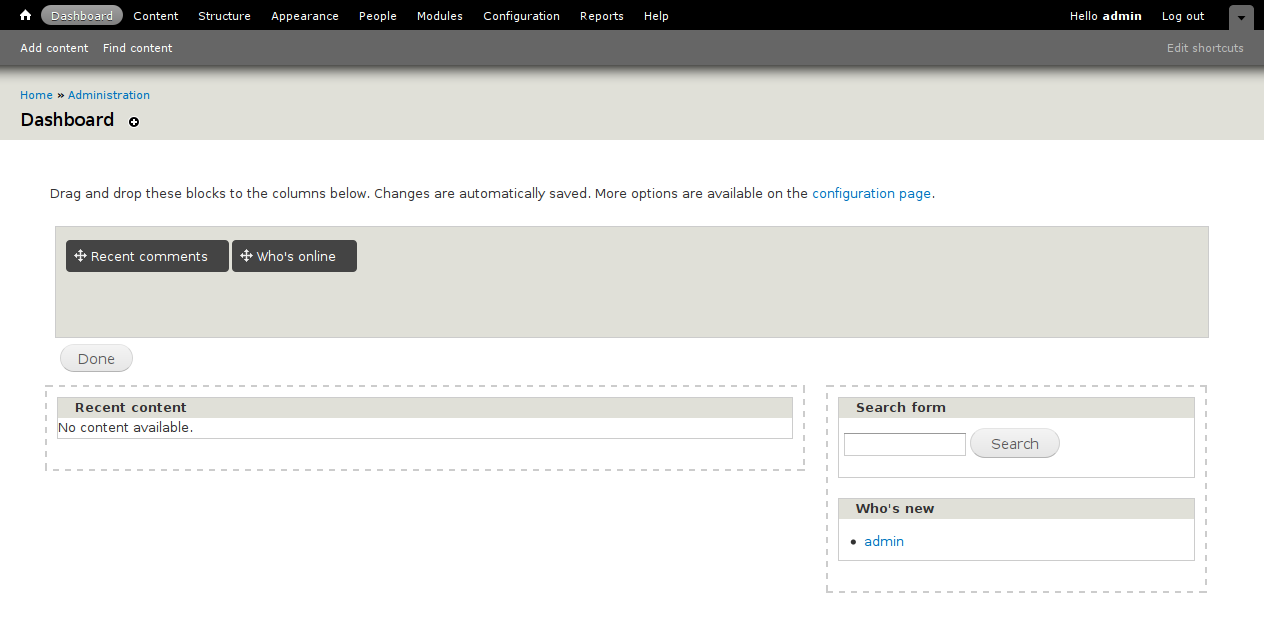
The first screenshot show the drag-and-drop dashboard configuration with my patch applied (showing that only the limited set of blocks appears there).
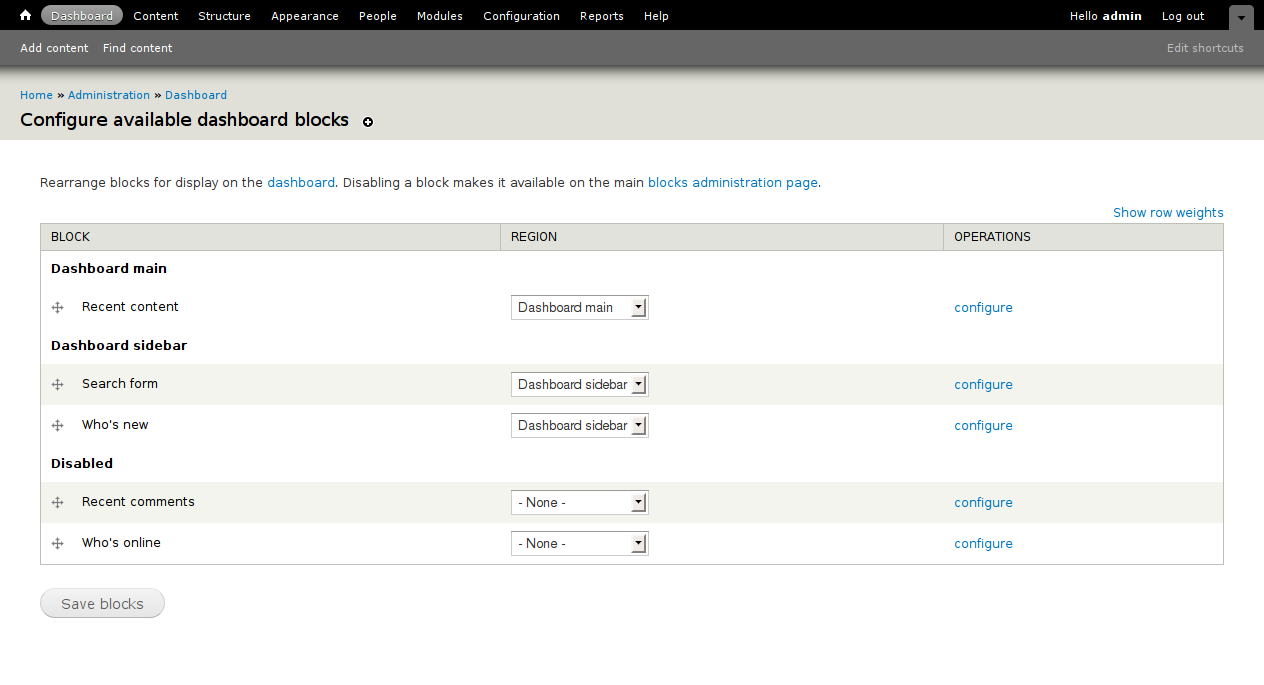
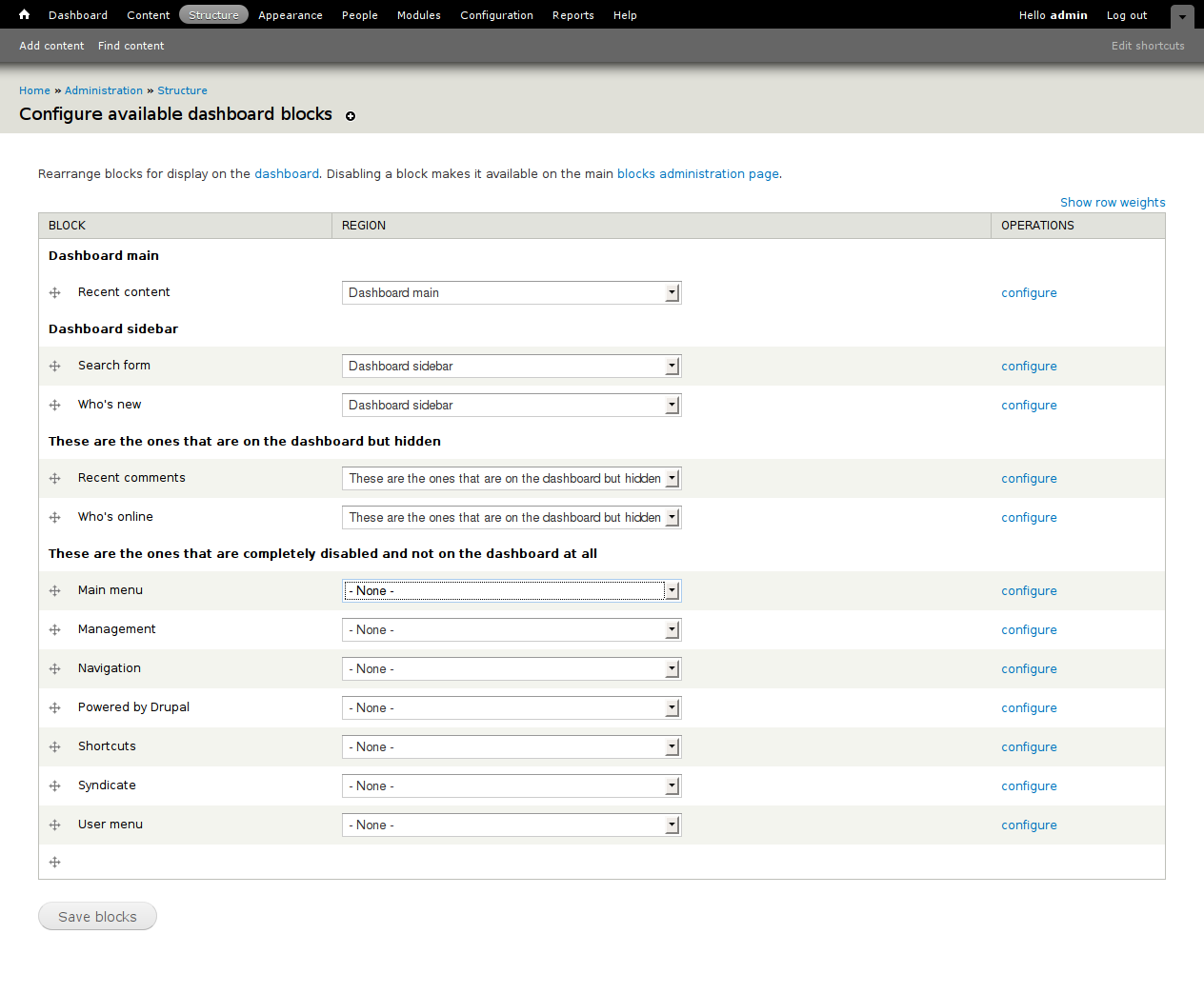
The second screenshot shows the admin/structure/dashboard page with the new region on it; the "Disabled" section is now replaced with two new sections, which I've deliberately given silly names for now, just to get the point across:
The main block configuration page (admin/structure/block/list/seven) is unchanged by the patch.
@EvanDonovan: To move a block that is already placed somewhere in the Seven theme to the dashboard, you'd currently need to either (a) click the "configure" link next to the block and then use the 'region settings' dropdown (in which case you could move it directly), or (b) move it to "Disabled" at admin/structure/block/list/seven, and then go to admin/structure/dashboard and enable it for the dashboard. We could probably make (b) a lot simpler if we showed the "These are the ones that are on the dashboard but hidden" region on the main block configuration page for Seven also; then it would just be a single drag-and-drop action like the other operations. Whether or not that is a good idea probably would depend on what kind of final name we came up with for the region.
Comment #80
carlos8f commentedIt might be wrong to assume that checking/unchecking the box should actually hide/show the block on the dashboard. Maybe we just need to word it nicely so it's clear that the option merely categorizes it as a dashboard block, and to actually add it to the dashboard, [link] go here. If we create a hook or other behind-the-UI way of setting this flag, it's likely people won't need to change this setting anyway. However the UI remains useful so folks can add their own UI-created blocks to the dashboard.
I think one argument against a "disabled in dashboard" region is that it would be a very silly region that never gets rendered! Although it might result in less lines of code, it sounds hackish and IMO regions are meant to be rendered, not meant for categorization only.
Creating API functions for this setting is certainly fine, I started out with that in my patch but then simplified it so we can discuss first. I agree that this would be a pretty important part of the module, where contrib modules hook in, so we'd want to emphasize that.
A side note that a contrib module might be better off using variable_set() without an API wrapper in a hook_install() or enable(), since the dashboard module might not be a hard dependency. Maybe a more structured compromise would be designing a hook, where module/delta's returned are not excluded by default from the available blocks. Then instead of depending on a complex variable_set() array structure or a module that might not be installed yet, we can deal with it at runtime.
Comment #81
carlos8f commentedcross-posted
Comment #82
carlos8f commentedBy the way, let's give this issue some love: #218066: Prevent cross posting from reverting metadata fields
Comment #83
David_Rothstein commentedRight, that might be an option too. I think it might be hard to explain that to people succinctly, though.
Well, as my first screenshot shows, they are actually rendered on the dashboard itself (albeit only when you go to customize it), and they look an awful lot like a region of the page in that scenario...
***
I also just realized that my patch has a stupid mistake - in dashboard_block_info_alter(), I'm modifying the blocks for all themes, but actually need to do it for the 'dashboard theme' (Seven) only, or otherwise it messes with some of Bartik's blocks too.
But that should be easy to fix if we go down this road, and the patch is still good enough for now to be able to compare the approaches and try to come to some final decisions here :)
Comment #84
carlos8f commentedHmmmmm, interesting. I think $block['properties']['administrative'] might be a little over-obsfucated. It seems like we're doing that to make it seem like this is not dashboard-specific, but it kind of is dashboard-specific. If our point is to emphasize the API for contrib modules, maybe we want a $block->dashboard = TRUE or to emphasize it even more, hook_dashboard() { return array('delta_1', 'delta_2') }. The hook method is probably my preference, and provides a really clear way to mark blocks as dashboard-friendly.
Now that I see the region method in action, the way hook_block_info_alter() works to pick up the hard-coded flag and transfer that to the region, it looks pretty clean. Now that we have working versions of both solutions, let's try to get a consensus on one before polishing either off.
Comment #85
Bojhan commented@David I am very confused by your arguments, why is having two "disabled" states a very favorable interaction. Please instead of jumping into technical arguments explain to me why this is favorable from a user perspective (a region based approach, means nothing to me).
To me its very clear that we need one way to allow blocks to be used on the Dashboard, hence our arguing for a checkbox (no one explains to me why this is not a good approach). The whole reason of this issue, is not polluting the Dashboard page and not polluting the Blocks page. This patch just moves the pollution from the Dashboard quick select to the listing page.
Comment #86
carlos8f commented@Bojhan, as stated in the original post, each method has drawbacks. The checkbox has the drawback of 1) not having any effect if the block is already enabled in a non-dashboard region, and 2) not having an immediate effect on the dashboard, i.e. it might not be obvious that you then have to go and add the block to the dashboard in a different UI.
On the other hand, the region approach has a similar disadvantage that the user needs to click on "customize dashboard", then "configuration page" which then leads them to the top-secret dashboard block UI and then they need to drag the disabled block into another "disabled but this time dashboard-enabled" region. Both methods have UI-flow issues, I think. At this point though, let's just pick the lesser of the evils so we can get D7 a release candidate :)
Comment #87
Bojhan commented1) Should not have that drawback, its not like you can't enable Who's Online in Garland when its up on Bartik.
2) Yes. That is a trade off.
@carlos8f Don't worry, I am all for releasing D7 (we are choosing the lesser evils, because Dashboard sucked going into Drupal 7 - and still does). But the biggest drawback of the checkbox approach is 1) and to me, that should be fixed rather than introducing two disabled states.
Comment #88
carlos8f commentedOK, to address 1) how about we add a validate handler for block configure. If the user checks the 'Enable in dashboard' box and the block is already in a non-dashboard region, we trigger an error. Optionally we can also have the submit handler actually place the block in the dashboard_main region, eliminating 2). How does that sound?
Comment #89
carlos8f commentedClarifying:
1) is only an issue if the block in question is already enabled for a non-dashboard region of the "admin theme". If Who's online is in the sidebar of Bartik, there should be no problem as long Bartik isn't your admin theme, and you haven't assigned the block for your admin theme. So the validate handler would really only focus on $theme_key/variable_get('admin_theme') in checking for assignment.
And 2), if we require the block to be unassigned for the "admin theme" before checking the box, we can then auto-assign it to dashboard_main. Adding a block to the dashboard becomes a one-step process and we avoid UI flow issues.
Comment #90
carlos8f commentedI'm writing a patch that incorporates a new hook_dashboard_blocks(), hook_block_info_alter(), a validate handler, and some other stuff.
Comment #91
David_Rothstein commented@Bojhan:
It's not. However, it's infinitely better than the current situation. And so far, no one has come up with an alternative that works. (Although @carlos8f is certainly trying to propose a variety of ideas to make it work!)
If the problems with the checkbox interaction can be solved, I'll happily withdraw my objection. But I'm worried this will drag on forever and that there might not be a very clean, usable solution in the end anyway.
I don't fully understand why you consider the Dashboard listing page to be "polluted" (given the fact that it would be very well-organized, as shown in the second screenshot in #79).
Also, I don't understand why you consider "pollution" of the Dashboard listing page to be a major concern. We don't really expect (or want) most people to use the Dashboard listing page on a regular basis anyway. (In fact, I think we should really consider not even showing a link to that page at Admin > Structure, since we would rather drive all traffic to it through the dashboard itself and there is already a link there. Anyway, that's a separate issue.)
I could just as easily say that adding a checkbox to each individual block configuration page "pollutes" those pages, which seems to me to be a significantly bigger concern, since we do expect a lot of traffic to those pages (e.g., we have contextual links that take you to them). Why should everyone who ever configures a block have to see a dashboard-related checkbox which is totally unrelated to the other settings on that page?
It is a bit frustrating when you keep saying things like "the bug should be fixed" but don't provide any ideas on how to fix it. It doesn't help move the issue forward.
To reiterate, the constraint is that within a single theme, a block cannot appear in more than one place. Given that constraint, here are the scenarios and the questions that need to be answered:
Question: Should they be allowed to check the "Available on dashboard" box and successfully submit the form? If not, how do we explain that? If so, what should happen to the block?
Should they be allowed to uncheck the "Available on dashboard" box and successfully submit the form? If not, how do we explain that? If so, what should happen to the block?
Should they be allowed to do that? If not, how do we prevent it? If so, what should happen when they submit the form?
Comment #92
David_Rothstein commented@carlos8f:
My first thought is that I am not a big fan of this separate hook because I think it will be an "outside thing" that module developers have to think about and are more likely to ignore.
When you go to create a block for your module, you already have to know and deal with hook_block_info(), read its API docs, etc. I'd much rather have this "is the block for administrators" choice be front and center as part of that rather than off to the side.
Also, I don't think an 'administrative = TRUE' flag (which we have been discussing throughout most of this issue) is too generalized at all. In my mind, it's exactly what we want the module developer to think about. We don't need them to think about dashboards at all. The main message we want going through their head really is "I am building some blocks for my module, and I am supposed to make some blocks whose functionality is aimed specifically at people who are administering my module." The Dashboard module will use that information one way, but other modules might use it differently.
Actually, I think there is a bit of a parallel to hook_admin_paths() and the overlay. I was iffy on that at first, but now I'm glad we're doing it that way. Instead of module developers tailoring stuff to the overlay and having to think about a specific UI element when they write their hook, we're just asking them to categorize their module's pages as administrative or not, and that's that.
Comment #93
carlos8f commentedHere's a beefed-up "checkbox" patch:
How do we think of this approach?
Comment #94
carlos8f commentedAhh, I didn't see #91 or #92 yet before posting #93. Let me see...
Comment #95
yoroy commentedQuickie idea (haven't read the last bit of discussion thoroughly yet but…) inspired by the error message screen in #92:
Make checking the dashboard box automagically reset/disable the region select list for the admin theme
Edit: forgot to change the input format to show the mockup
Comment #96
Bojhan commentedI clearly do not fully understand the issues at hand. Please hop by IRC or Skype, as from a UX perspective its really hard to give any sound answers on this one.
@David In terms of pollution, the main argument is that it remains usable with 20 blocks extra from modules. The Dashboard page (I agree with your statement of hiding it better) should not house any block that is not appropriate for use on the Dashboard. The Blocks page will, but hopefully most of them will be in the disabled section.
I agree that having a checkbox on the blocks configuration, for many cases won't be appropriate. But in terms of modularity and mental model, to me it makes sense for the user to allow it to be used on the Dashboard at the context (the block).
1) Yes, its not bound to using the region configuration right?
2) Yes, the block would be removed from the Dashboard
3) I always thought this means, its also available on the dashboard. Just how we kind of replicate the Search form block now.
Comment #97
EvanDonovan commented@carlos8f: The UX of #93 seems to be making more intuitive sense to me than David Rothstein's most recent patch did, but I haven't tested it yet, just read your description and reviewed the images of both. I think the region approach could make sense, but am not understanding the need for two disabled regions rather than one. If there were only one disabled region, I think that David's approach would be fine.
I think that David Rothstein is correct about $blocks[$delta]['properties']['administrative'] being more intuitive than a new hook, though. Better not to special-case the dashboard, when we're really adding a new property of blocks that in theory could be used in other ways (alternative implementations of the dashboard module from contrib, for example).
David, you raise some good questions in #91. Sounds like the validation handlers for a checkbox might get too convoluted.
Also, carlos8f, I think "The block must be removed from a region on the [administrative theme name] theme to enable it on the dashboard." would be a better wording for the checkbox help text. "Unassign" seems unnecessarily technical. Just for a note for anyone who doesn't review the code of the patch, but only the screenshots, but the word "Seven" is actually a variable substitution - it's not hard-coded.
Comment #98
EvanDonovan commentedI'll be out all day today, but I'd like to get around to actually testing this approaches tomorrow.
Comment #99
catch@Bojhan, a block can't be available to the dashboard, and also used elsewhere with the same theme, due to #79571 - and there's no way to fix that without rewriting either block module or dashboard module almost from the ground up, neither of which can be done for D7.
Comment #100
carlos8f commentedSeems like we're slowly building some consensus. I'm the only one that wants a hook, so I'll drop that idea. Most folks are confused by having two "disabled" block states, so that is not boding well for the region-based approach. I'll continue with the checkbox approach and iron things out.
RE: #91, I hadn't read that before I wrote #93, but let's see how my patch deals with this:
The patch prevents the user from doing this via validation error and a note in the #description. #95 suggests, to smooth out the UX, maybe we could "grey out" the region with javascript when they check the box, indicating that the region will be overridden by the change.
The patch allows them to do this, and the block is removed from the dashboard, which is what might be expected. (Edit: the patch renamed the checkbox to "Enable on dashboard", to reflect this change in behavior)
If the user checks the "Available on dashboard" checkbox but also uses the dropdown to put the block in a non-dashboard region, they get the validation error. If we do #95 (javascript), the region control would be disabled to avoid this type of confusion.
1 and 3 are really the same, just that in 1 the non-dashboard region was pre-exisiting (#default_value), and in 3 it was selected on the fly.
Here's my todo list:
- use $block['properties']['administrative'] = TRUE instead of hook_dashboard_blocks()
- tweak validation wording (from #97)
- learn/implement javascript magic (from #95)
- write tests
Comment #101
carlos8f commentedBefore I throw out the hook_dashboard_blocks() code, there might be something to salvage: it enables differentiation between blocks that should show up by default on the dashboard, and blocks that should be available but not show up by default. I feel like that differentiation is somewhat critical if contrib is to properly plug in. How do we express that in generic fashion via ['properties']['administrative'] ? Looking at the existing constants in block.module, is it possible that we can do ['administrative'] = BLOCK_REGION_NONE to signify an "available" block, or is that getting to complex with it?
Comment #102
carlos8f commentedTook #93 and removed hook_dashboard_blocks(), now using $block['properties']['administrative'] = TRUE / BLOCK_REGION_NONE (see #101). I kept the new tests in place, modifying dashboard_test.module to use the 'administrative' syntax. @EvanDonovan, I made your wording change (#97), too.
Comment #103
David_Rothstein commentedHaven't had a chance to look closely at @carlos8f's latest patch here, but on a quick glance it seems like it might be pretty reasonable. Regarding this:
That's an interesting question. Is that something we want to encourage module developers to do (place a block automatically on the dashboard for you)? Anyone have thoughts on that? (I could see it working well, but also see it being abused and leading to dashboard clutter.)
Also, if we do want to support that, could it not be done using existing methods (by setting
'region' => 'dashboard_main'in hook_block_info)?*****
Side note. Above I wrote this:
Bojhan indicated he agreed, so I wrote a patch for that here: #930670: Table-based dashboard admin page should be linked to from the dashboard only (not from the rest of the admin UI)
Comment #104
Bojhan commentedI wouldn't recommend anything that forces itself onto the Dashboard, that should really be by choice.
Comment #105
carlos8f commentedI've removed the functionality of administrative = TRUE making the block show up on the dashboard automatically. The flag currently only controls whether the block shows up in the drawer of available blocks in the AJAX UI, and in the list of disabled blocks in the traditional UI. I also expanded the tests and removed some remnants of hook_dashboard_blocks().
Comment #106
carlos8f commentedWhoops, forgot to include the new test module.
Comment #108
carlos8f commented#106: 601932-106-dashboard-block-availability-CHECKBOX.patch queued for re-testing.
Comment #109
catchApproach looks good to me,
+ * - 'properties': (optional) @todo: Document me!needs fixing up. The form validation stuff is ooky but yet another incentive to kill block module in D8, and I don't see any other way to do it here.Comment #110
yoroy commentedPatch in #106 applies. What I see happening:
- went to blocks page, picked an unused block (syndicate), checked its dashboard box, saved.
- go to dashboard, see it show up in the left column on the dashboard. Nice.
- from dashboard, click the blocks 'configure' contextual link and unchecked the dashboard box, saved
- the block is not shown in the dashboard anymore. Checked on the blocks admin page and yes, there it was again in the list of disabled blocks. Nice.
Another try, with the 'management' block:
- On its block config page, setting only the region select list to a dashboard region (leaving the dashboard box unchecked), then save: the region setting is not saved, block stays in the 'disabled' list on the blocks admin page. That's very confusing. Seems we kinda need the admin theme's region select list and the checkbox to be dependent on each other, each updating the other's value. But maybe that is the part that involves rewriting blocks or dashboard module?
Anyway, only a partial review. I get the feeling the checkbox idea generally works. I like that checking the box automatically enables a block on the dashboard too ( instead of only making it available on the drawer in 'customize dashboard').
Comment #111
carlos8f commented@yoroy: if we implemented your javascript idea in #95 we could disable the region select when the checkbox is on, which would hopefully avoid that confusion.
I don't eat javascript for breakfast *cough* like *cough* ksenzee so perhaps someone else can contribute that code? Maybe we can even leave that to a non-critical follow-up.
Also, to those who came up with the 'properties' thing, please document that :) I don't know enough about the use cases to write much about it. Maybe that could also go in a non-critical follow-up.
Comment #112
ksenzeeI played around with this a bit and it's still kind of confusing, but it's fixable. Here are a couple of interactions I thought were weird:
1. went to main block admin page
2. configured Syndicate block and checked its dashboard box
3. went to dashboard and saw the syndicate block there
4. dragged the syndicate block out of the dashboard
5. went to the dashboard config page and... no syndicate block. I was expecting to see it in the "disabled" section.
Another oddity:
1. went to the dashboard config page
2. went to the search block's configure page, so I could make it unavailable to dashboard
3. went to uncheck its dashboard checkbox and... it was already unchecked. There's no way to make an administrative block unavailable to dashboard.
Both those problems seem at first glance to be because we're relying on the administrative block property more than on the admin's stated preferences, so they might have the same fix.
Also yes, I agree we could use some JS to sync up the region dropdown and the checkbox. I'll try to find time for that.
Comment #113
carlos8f commentedksenzee and I discussed in IRC and decided to make some changes that i'll put into a patch hopefully tonight.
Comment #114
carlos8f commentedThe checkbox has undergone some changes in behavior to address #112 and #110:
Basically, it mainly controls availability, is pre-populated with the value of "administrative", and has an added bonus of immediately enabling/disabling the block on the dashboard when it is changed.
I removed the dashboard_test.module and now tests just use normal core blocks.
TODO:
Comment #115
ksenzeeI tested out #114 and it does just what I would expect it to do. Hopefully my expectations are in line with yoroy and Bojhan's. :)
The only difference between this and #114 is the added JS. It keeps the dropdown in sync with the checkbox, and disables dropdown options that aren't relevant. For example, if the dashboard box is checked, only dashboard regions are available. If it's unchecked, only regular regions are available. It also remembers which region you last had selected, and updates as appropriate when you check or uncheck the box. (It's harder to explain than it is to just try it out.)
I didn't add tests or documentation - we still need those.
Comment #116
yoroy commentedI'm hopeful about it too :) I'll hopefully test this next evening. Big thanks so far!
Comment #117
kiphaas7 commentedI took a quick peek at the js code, and noticed the following construct 3 times:
Not caching the $options.length can be a small performance hit in older browsers. From quickly looking over the code it looks to be safe to cache the $options.length.
However, even a bit faster would be the reverse while loop (if order while looping is not important).
Sources:
http://ajaxian.com/archives/fast-loops-in-js
http://blogs.sun.com/greimer/entry/best_way_to_code_a
Micro optimization, but since it is one of the first pages an admin looks at, it would be nice to have the fastest possible code there. I for one hate the sluggish, javascript overloaded wordpress admin page.
By the way, awesome patch, thumbs up!
Comment #118
ksenzeeThis isn't on the dashboard itself - it's on the block configure page, and there's only one instance of the object per page (and therefore one instance of each event handler). So I don't think it's performance-critical enough to use a reverse while loop. We could certainly cache the length though.
Comment #119
kiphaas7 commentedI'm all for it, IE7 on the machine I'm currently working has a much lower rendering time using the cached loop:
for (var i=0, len=arr.length; i<len; i++) {}from the test suite.Reverse while is a bit more obfuscated code, so yea, probably not worth the tiny performance improvement for this case :).
Comment #120
carlos8f commentedHey, great work @ksenzee! Test drove #115 and the interaction is very smooth. Found one bug though (line 39):
Should be "$checkbox.is(':checked')". val() always returns "1" and the non-dashboard regions are always disabled on page load.
Other than that, looks like we just need more tests and docs. Nice.
Powered by Dreditor.
Comment #121
carlos8f commentedAlso, it would be nice if we can use a variable for this value, like $select.find('option:first').val() or a Drupal.setting, instead of hard-coding "-1". The actual value should be considered hidden behind the BLOCK_REGION_NONE constant, I think.
Powered by Dreditor.
Comment #122
carlos8f commentedRevised patch which:
We should now have a full patch, with tests, which solves the original issue. Pending further reviews, of course :)
Comment #123
aspilicious commentedOk, first time ever I review this issue...
REVIEW
-------
1) finally a nice and clean dashboard
2) checkboxes are rather hard to find, found them because I was actually looking for them (almost never click on the configure button, should do that more often)
3) ==> 2 is not a bad thing as you can choose the region in the same screen and it doesn't destroy the UI of the general block structure page. So after some thinking (and using) this must be the best place.
4) you can *choose* what you want on your dashboard
5) I'm not an expert but I guess this allows module makers to come up with a set of blocks specially made for the dashboard/admin. (with the administrative == true property)
6) lots of tests :)
7) conclusion: major thumbs up
CODE REVIEW
-------------
1) Is it possible to add a comment to: "Drupal.behaviors.dashboardAdmin.attach = function (context, settings) {" or don't we add docblocks to javascript attach functions
Sidenote: if we rly want to make the dashboard useful we have to fix those ugly drag and drop layout issues
Comment #124
David_Rothstein commentedI have been playing with this patch for a bit, and it still just seems wrong to me. Here are the issues:
It sounds to me like we are working around another problem, which is that the "region settings" dropdown has usability issues. Instead of working around it, why don't we just try to solve it?
Specifically, the problem is that someone who wants to place a block on the dashboard (or anywhere else on any administration page, for that matter) is not going to know to look under a dropdown labeled "Seven" to do that. This assumes way too much knowledge about Drupal, as does the other dropdown labeled "Bartik". What if instead we named the dropdowns more like this?
(Note that we have done something similar in Drupal Gardens already, replacing Seven with "Administration theme".)
I believe this would solve the underlying problem rather than working around it. Then, creating a new block simply becomes a question of "what do I want its title to be, and where do I want to put it", and there is no extra checkbox or special-casing of the dashboard to get in the way.
Scenario: You install a module which provides "Super amazing block" and you want that block on your dashboard, but the module developer did not happen to initialize it to be available there. You go to customize the Dashboard (as you've been trained to do), looking for it. You don't see the block there, so you click on the "More options are available on the configuration page" link. Still no block there. The only way you can get it there is to make your way to the main blocks administration page, and click the "configure" link next to the block on that page. To me, that makes no sense. Making people go to the blocks administration page to do things for the dashboard is exactly what we've taken great pains to avoid.
This issue is about making the dashboard 'drawer' less crowded, and everyone agrees with that goal. I don't understand why it also became about making the advanced dashboard page (admin/structure/dashboard) have fewer options on it as well - especially given that the link you click on to get to it says "More options are available on the configuration page" :) It was surmised above that having two 'disabled' regions on that page would confuse people, but I don't understand how we could possibly know that if we didn't even come up with names for them. For example, if the regions were named something like:
Then I don't understand why people would find the difference between the last two difficult to understand.
I think what we ideally need here is some actual A/B testing. Posting screenshots is pointless; we need actual users (preferably people who haven't used Drupal 7) to try out the alternatives. I am willing to set up a test server with two Drupal installations (one with the patch from #122 and one based off the other approach from #79 with above modifications), for this purpose - if there are other people willing to do some testing.
Let's try to make a real decision here. If there is evidence to back up the checkbox approach, then great! But otherwise I'm opposed to adding so much code and making a large (and dashboard-specific) UI change to all block configuration pages this late in the game, just because some people said in the issue queue that they thought it was a good idea.
Comment #125
Bojhan commented@David Sorry, but I don't get your point you are basically arguing again for introducing regions on the dashboard page? I understand you don't get the argument that having two disabled regions on one page is not good, but I am not sure what other reasoning to lay out - even with good labels you still have two disabled regions on one page - it is not common within Drupal to do this, why should Dashboard be the exception? The region selector is really not the problem, because the Dashboard is not considered as a region its considered as a "place" first, "region" second. .
I am not sold any solution we come up with here, will not be trade off both UX and DX - thats a simple result of this module going in marking very important details as "polish" work and now not allowing (major) API changes.
I am finding it somewhat useless to say we need A/B testing or usability testing here, quite frank we need that with a lot of Drupal 7 ideas that have been pushed in. But realistically it won't happen, I have asked many but no one has truly stepped up to do usability testing. So lets get realistic here again and figure this out on reasoning, I really wish you would come by IRC so we can propperly discuss this going back and forth in the issue queue will not solve this issue.
Comment #126
carlos8f commentedpoint 1) in #124:
Actually, the checkbox and select don't do the same thing. The difference is subtle, but the *main* purpose of the checkbox isn't to control the region, it's to allow the block to show up in the dashboard UI as an available block. The checkbox *also* affects the region when it is checked/unchecked. But if the region is changed through a different UI, the checkbox will not change to reflect that. So the checkbox really reflects a user preference, which is why it's still necessary to have.
point 2), as far as A/B testing, let's be realistic :) @David feel free to dust off #79 and post side-by-side again, and when folks review they can try both out.
I feel like #122 is a mature patch for the checkbox approach. Hopefully we don't bikeshed the hell out of this... we're very close to putting another critical away, and if you look at the OP, you'll see it was EXACTLY ONE YEAR AGO :)
Comment #127
David_Rothstein commentedWe don't need formal usability testing here; we just need actual user testing. Set up a task, watch someone do it, take notes. Finished. It can be done in around 20 minutes per person once you have a setup and a willing participant (which is a miniscule amount compared to the time that has already been spent on this issue), and there is no excuse for not doing it. Now that we are in beta and have a mostly-complete piece of software, this is actually the perfect time to start that, both for this as well as other features (including those that have already been committed).
I am going to start either tonight or tomorrow night by testing these patches out on my wife :) But first I want to update the earlier patch to get it up to speed.
I'm working on a suggested script for user testing, something like the following:
Still need to work on that a little more, but the idea is to hit one of each type of block (dashboard-intended and non-dashboard-intended) and then watch the person try to put each of those blocks in both places.
Comment #128
webchickOk, I just spoke with ksenzee for a few minutes to try and wrap my head around what the hell happened to this poor issue in the past 100 or so replies, because this initially seemed like one of the easiest criticals to put away back in the day. :\ It sounds like it's basically an EPIC Thunderdome-style battle to the death between the UX team and David (ok, I might be paraphrasing a touch ;)) about the optimal way to address this issue.
Could we get an issue summary, particularly highlighting the point(s) of contention, with some screenshots of both approaches to help in the evaluation and to make movement this stalemate? I really want to get this sucker closed out before the next beta.
Comment #129
catchI don't like the checkbox either, but I like it more than the extra regions approach, and think it should go in pretty much as is. For the same reason I think dashboard should never have been committed in the first place before #79571: Allow blocks to appear in multiple regions or #257032: Split block $ops into separate functions was resolved, instead they were more or less left to rot and here we are. There is no good solution to this issue that isn't firmly D8 territory and carlos84's patch solves this in the least worst way possible.
Comment #130
carlos8f commented@David, in the script, I'd recommend against basing it around the term "widget". Call it "block" at least, explain what that is if necessary, then they won't be totally lost :)
Let's also keep in mind that this is (I think) an obscure and fairly advanced task: to add a "non-dashboard-intended" block to the dashboard. We might not want to expect someone that barely knows what a block is (I remember that took about a week to sink in for me) to be on the level to do that. I'm all for user testing, but maybe we should aim it at people that can at least find their way around the block module in D6.
@webchick, "EPIC Thunderdome-style battle to the death" is a more-than-adequate issue summary in my opinion ;) But I agree we could use some screenshots or arrows pointing this way and that. Maybe with some colors. Or dragons.
Comment #131
David_Rothstein commentedHappy birthday, issue #601932!!!
I rerolled the 'region' patch, fixing some of the issues discussed above and one or two others, and am attaching it here. I am also attaching the 'checkbox' patch. For user testing, both of these patches also have #930670: Table-based dashboard admin page should be linked to from the dashboard only (not from the rest of the admin UI) applied (for testing purposes I it really makes sense to combine them).
I won't have time to do my user test tonight, but just as well since the "script" probably needs a little more thought.
***
Screenshots:
There are some in #79 (for the region approach) and #29 (for the checkbox approach), although they might not be completely up to date. I can try to post some new ones, but honestly, you really need to actually experience the patches.
***
Summary:
The region approach has been around forever (I don't even remember who suggested it originally, it was before this issue even started) and there was working code for it months ago. The main objection to that was that adding (even more) dashboard-related regions to the blocks administration page was not good UI. So we did #761956: Dashboard blocks and regions should not appear on the main blocks configuration page, which moved all dashboard-related regions off the blocks administration page. Given that, I no longer fully understand what the objections to it are - and I mostly stopped caring, because I want to resolve this with user testing anyway :)
The checkbox approach has also been discussed for a while. It was realized early on that that approach would involve a lot of edge case interactions that would need to be dealt with, and therefore would be complicated to code. After a lot of impressive work, there is now a patch with a lot of code that deals with those edge cases. It is complex, but seems to behave itself (i.e., no known bugs). My remaining concerns are described in #124.
Comment #132
David_Rothstein commentedHere are new screenshots for each patch, showing:
(1) the dashboard page in customization mode,
(2) the page you get to when you click through for "more options", and
(3) the configuration page for a block that is available for the dashboard (but not in use)
I think the first screenshot is exactly the same for both patches, but I'm including it for completeness. All other pages in the admin UI are the same, as far as I know.
These screenshots are not enough by themselves - anyone who wants to understand and help with this issue really needs to try out the patches. As mentioned above, I'm willing to set up a temporary testing server for this purpose, if there is interest.
Comment #133
David_Rothstein commentedI worked on the user testing script a bit more.
The reason I wanted to say "widget" was to not prejudice someone to think of going to the Blocks page in order to put something on the dashboard - let them discover the terminology on their own. However, since we have a big "Dashboard" link in the toolbar, that is probably where they are going to go anyway, and it's true we are mainly trying to test the dashboard itself here (not blocks in general) so it's better if they don't get confused :)
I also revised the proposed script to change the order around a bit (moving from common to "advanced" tasks in each case, more or less). However, I'm really not sure that any of this is truly advanced. The 'not-intended-for-the-dashboard' designation is only an initial designation recommended by the module author, and I think we have to assume that a lot of sites will want to do something different with particular blocks. Some blocks fit neatly into one category or the other, but many do not.
Comment #134
David_Rothstein commentedAdding one more possible step. I realized that step #4 will very likely be done with contextual links (which is good), but in that case, we ought to also test putting a "non-dashboard-block" on the dashboard only, since that's a case where you need to go to either the dashboard or block admin page itself (can't be done with contextual links).
So, I added a new step after that one.
Comment #136
carlos8f commentedI think the checkbox patch in #131 fails because it is was merged with #930670: Table-based dashboard admin page should be linked to from the dashboard only (not from the rest of the admin UI). I'm not familiar with that issue yet so I don't know what the exact conflict is.
NOTE! Patches in #131 are for USER TESTING only, since they have the above issue merged in. For a clean checkbox patch, look to #122.
Comment #137
David_Rothstein commentedSorry about that test failure. (Silly issue that just came from combining the patch with the one from the other issue without thinking about it properly.)
I'm reuploading both patches with a small fix - I think these will keep the testbot happy.
Comment #138
webchickI'll try and test both of these patches this weekend, but based on the screenshots alone I like the checkbox approach better. A "Dashboard (hidden)" region, while I think I understand what that means (these are blocks available to the dashboard but not assigned to any region), is a very odd construct and inconsistent with what the blocks page does.
In other words, http://drupal.org/files/issues/CHECKBOX_dashboard_advanced_configuration... makes a lot more sense to me than http://drupal.org/files/issues/REGION_dashboard_advanced_configuration_p....
But http://drupal.org/files/issues/CHECKBOX_configure_recent_comments_block.png feels like it needs a bit of work. It's hard to find the checkbox in that screen. Unless that's by design. :P
Comment #139
kiphaas7 commented#119 slipped through, albeit being minor?
Comment #140
Bojhan commented@David Yes, testing is easy and could be done in only 15 minutes. Hopefully you don't have to tell me that, I do it on a daily basis :) Now onto the script, avoid being to ambitious its fine setting them with only 2/3 tasks at max.
Suggestions :
- Use "widget" people are wrong in assuming we need to use the block terminology (it guides the user to much, we can now see if they find blocks in Structure).
- Start with moving a widget to the frontpage first.
- Go by pointing things out, rather then setting tasks like "place this block in the sidebar of the dashboard" , say for example; I want this block(pointing to the currently online block on the frontpage) to here (pointing to the Dashboards right sidebar).
- How will you a/b test? With 1 user thats impossible, as you will create bias by using either checkbox or region approach
- Record if you can :) But either way, make it a short session.
Comment #141
David_Rothstein commentedThanks, Bojhan. I revised the script based on that feedback and performed the test tonight. Here's the script:
She did not want to be recorded, sorry, but I took very careful notes instead. I won't have time to type them up until tomorrow, but they are pretty fascinating... probably around 80% of things that came up during the test weren't related to this specific issue (but very valuable nonetheless), and the other 20% might be a surprise to all of us in some ways :)
***
Regarding this comment:
Well, hopefully the idea is that other people besides me will run a test or two also.
For mine, I just flipped a coin to see which I would run, and the "region" approach was the winner so that's what I tested. (After I was done, I tested the "checkbox" approach too because I was curious, but yes, we probably won't want to believe those second results as much.) By the way, I was very careful not to reveal which approach I favored, and in the end I confirmed with her that she did not know which one it was :)
So the next person who wants to run a test should make sure to lead off with the "checkbox"...
(More tomorrow.)
Comment #142
David_Rothstein commentedOh, by the way, although 2-3 tasks might be better, I kept all the tasks on the list because I felt they were ordered relatively well (roughly in terms of most common to least common, etc), so it's OK to not finish them all.
We did not wind up getting to task #6.
Task #5 is probably the one that has the most differentiation between the region vs checkbox approaches, though.
Comment #143
David_Rothstein commentedHere's the writeup of the user test.
My wife isn't experienced with Drupal at all - she's played with it a couple times with me (mostly for stuff like this) but has never used Drupal to build a site, so she is basically a novice for this test.
"Region" patch:
"Drupal has a widget that lets you see your site's active forum topics. Find this widget and make it appear here, on the right sidebar of your main site."
After reading that, I pointed to some of the blocks in the left sidebar as examples of widgets. A lot of the feedback in this section is very interesting but not that much is relevant for the specifics of the current issue:
"Drupal has a widget that lets you see which users of your site are currently online. Make this widget appear on the right sidebar of your administrative dashboard."
This one went quite well. She had already discovered the dashboard in the toolbar, so she went straight there. Clicked "Customize dashboard", saw the block in the drawer, dragged it to the right place. Nice!
"Now make the same widget appear on the right sidebar of your main site."
She went to Structure => Blocks, scrolled down to the disabled region, found the block. Used the region dropdown to put it where she wanted it. My notes are a little unclear here, but I believe what she did next is hit the "configure" link. (In other words, because of the AJAX-y update, she did not realize she needed to hit "Save" on the form in order to save it.) So, when she got to the configure page, she saw the dropdown still said "None" and was surprised that what she had done on the previous page didn't work. At that point, she used the Bartik dropdown to put it in "Sidebar second" and saved the form. Finished.
"Now go back and make the active forum topics widget appear on the right sidebar of your administrative dashboard."
Considering that she had managed to achieve the exact goal of this task accidentally somewhere in the course of the adventure of #1, there was nothing left to do here, so I skipped it :)
"Drupal has a widget that lets you see your site's recent blog posts. Make this widget appear on the right sidebar of your administrative dashboard."
"Checkbox" patch:
Take this with a grain of salt because she had already experienced the first, but we tried it with the checkbox patch too (only doing step #5 from above).
As before, she went to Dashboard => Configure Dashboard => "More options are available on the configuration page". Saw that the block wasn't there. Clicked on the link to the block configuration page. Found the block there. Clicked "configure".
Tried to use the Seven region dropdown to put it in one of the dashboard regions, and was very unhappy to find that the choice she wanted to make was grayed out (not allowed). She scrolled around a bit and eventually scrolled back up and saw the "Available on dashboard" checkbox, clicked on it and realized that it unlocked the other one, and then used the region dropdown to put it where she wanted. Done.
I asked her which interface she liked better, and she said that she definitely preferred the region approach (the first one):
(1) She did not like the checkbox interaction.
(2) She said that if she hadn't already been around the interface just before that, she did not think she would have known what to do when she wound up on the "More options are available on the configuration page" and didn't see the block there. (However, the reality was that having been around the interface, she did figure out what to do pretty fast.)
My overall impressions
Comment #144
Bojhan commentedAwesome sum up! I will try to test the checkbox patch with someone else following your script. I think a lot of issues where found that are known usability issues not solvable at this point in the cycle. Its interesting the labeling is such a hot issue, although it let her astray the more intresting find is that she used region selectors to get everything on the Dashboard.
Let me see if I can get some test up soon.
Comment #145
moshe weitzman commentedEr, that awesome writeup scared everyone away. Can we get some consensus and closure here?
Comment #146
carlos8f commentedAwesome writeup, agreed! :) The "region" patch was randomly selected there, so the next test needs to use the "checkbox" patch. I'll try to get a test in this weekend.
@Bojhan, shall we decide after getting one test for each patch, or 2, or how many? I would assume the sample size should be at least 2 for each patch :)
Comment #147
Bojhan commentedThe patches don't apply cleanly anymore, I did 1 test and wanted to do one more today but can't because of the patch being outdated.
Comment #148
catch#137: 601932-dashboard-CHECKBOX.patch queued for re-testing.
Comment #149
carlos8f commentedRerolled both patches, removing stuff from #930670: Table-based dashboard admin page should be linked to from the dashboard only (not from the rest of the admin UI), which is now in HEAD.
I did two adjustments to the checkbox patch:
Specify in which themes and regions this block is displayed.Specify where this block is displayed.Comment #150
David_Rothstein commentedGreat! I like the simplified "Specify where this block is displayed" language, so am porting it to the region patch as well :)
I'm also making the other change discussed above to the region patch: Using "Not currently on dashboard" rather than "Not available on dashboard", since it seems like that small wording change would have a big effect.
I'm re-uploading both patches for clarity, but I only made changes to the region one.
Comment #151
EvanDonovan commentedI spent the last hour testing both patches, and, after that, have concluded both are non-intuitive, but carlos8f's makes the best of a bad situation (the blocks system's limiting a block to be in one region at a time in a theme).
I think it is significantly better to have a checkbox to control whether or not blocks are available for dashboard placement than for there to be an additional region. Neither "Dashboard (hidden)" nor "Not currently on dashboard" are clear in their meaning - the hidden blocks are not on the dashboard either, at least not in the layman's meaning of the word.
It's not immediately clear using either patch how to get blocks from the dashboard to the main blocks configuration or vice versa, but I think that, with carlos8f's patch, people will ultimately get to "Configure block" and understand the meaning of the checkbox. I like that the checkbox will automatically select a region in the dashboard, as well.
I would recommend that carlos8f's patch be committed, although I think "default theme" is not the best wording since the administration theme is also a default - maybe "site theme" or "front-end theme" would be better.
I'm not marking RTBC though, since I think it was decided that usability testing with people who were new to Drupal would be needed.
Comment #152
carlos8f commented@EvanDonovan, thanks for the review. We should use "default theme" and "administration theme" though, as we currently do on admin/appearance. Those terms are already widespread and there's no reason to change that now.
Tagging "string freeze", meaning that the patch affects user-facing text and must be in before RC1. Granted, it's also critical so it will need to go in before RC1 anyway :)
Comment #153
carlos8f commentedtagging
Comment #154
EvanDonovan commented@carlos8f: I am fine with that, if it is on admin/appearance as well.
I think we should commit carlos8f's patch, but not mark RTBC since more testing was requested.
Comment #157
carlos8f commentedI think chx's idea is interesting. It seemingly gets around the 'one region per block per theme' limitation. I'm concerned though that then we would have 3 interfaces for essentially the same thing: moving a block to/from the dashboard (drag-and-drop, non-drag-and-drop, and now dashboard-specific region select on block configure).
Perhaps we could merge the checkbox and duplicate block approaches, i.e. when a block is defined as 'administrative' OR when the checkbox is enabled, a duplicate block is created, which can be moved to a region using the existing UI, and that will not affect block placement elsewhere, since we're only using a duplicate.
Edit: chx has retracted his comment and, while it remains interesting, I will leave the checkbox patch as-is for now.
Comment #158
carlos8f commentedStatus/assigned change was a crosspost, but the existing patches still need review.
Comment #159
chx commentedThe definition of critical is
the issue is part major, part Drupal 8. No API changes. It's over, we past two betas. You D7UX guys had years to fix this.
Edit: yes, I had some ideas which I simply deleted from the issue once I was made to realize that I would restart the debate and delay the release. No way.
Comment #160
ksenzeeThere is an API change here.
Comment #161
chx commentedWhich is the Drupal 8 part of the issue. We are not changing APIs. If we want UX fixes, that's the major part.
Comment #162
carlos8f commentedThis is technically an API addition, it doesn't break anything. Let's defer to @webchick's judgement on whether this should be demoted or not. (Since in her previous comments there was no mention of doubt regarding the priority)
Comment #163
chx commentedJust be over with this. The whole issue is on the wrong track but it's too late to debate more on, read #129 and commit the checkboxes patch from #150 and pray to god that someone cares enough that in contrib this gets a proper fix (prediction: noone will). Yay D7UX!
Edit: if you want more usability tests, then only commit the API change and punt to contrib or we will never release.
Comment #164
carlos8f commentedThis hasn't been "reviewed and tested by the community", sorry. Let's get 2-3 usability tests and then decide which (region or checkbox) to RTBC. Simple :)
Comment #165
chx commentedOh sure and magic pixies are going to deliver that. Almost everyone agrees that the checkbox is the lesser evil (it's broken but the module is broken too so what gives) and noone delivered "usability tests".
Edit: anyone arguing further: you are late. We need a fix now. We have some sort of a fix. Anything better we can do in minor releases. Just get the API in, get some UI fix, and let's release! It's been almost three years.
Comment #166
carlos8f commented@chx if you really want to move this issue forward, get a friend and have them take the usability test for the checkbox patch (described in #141). It doesn't take "magic pixies", anyone can do this.
We are asking for 2-3 usability tests, this is not too much. Get someone on IRC to do it too, report the findings, and then bam, we can close this. We've just started beta 2 so it's not too late.
Comment #167
David_Rothstein commentedI'm curious: When using the region patch, what situation did you encounter where it would be necessary to do that?
(The way I understood it, one of the ideas behind that approach was that such switching would almost never be needed, because all disabled blocks are ultimately already available to you in both places.)
Although it's only one person, the results of my user testing seemed to suggest that wasn't an issue. I think the reason probably is that in order to even get to the page where you see those terms, you have to click through the "Customize dashboard" step, where the drawer of hidden blocks is rendered as a region exactly like the others are (only, it is a hidden region that you only see after clicking that button).
I am curious what the idea in the deleted comments was. In any case, we may need to fix that limitation anyway in order to solve other (major) bugs, and it may or may not even be hard to do so. See #950878: Disabling the dashboard module permanently removes all blocks from the dashboard.
If that could be made to work, I guess it would affect this issue in some ways too - because what you would get "for free" from that issue is Dashboard having its very own region dropdown on the block configuration page (next to Bartik and Seven and completely separate from them).
I performed a usability test above, and others have said they might too. It did not take long to do (and future tests could be made a whole lot shorter by mostly skipping or helping the user through the 1st step - although the feedback in that section was very interesting, it wasn't directly related to the issue here since it doesn't involve the dashboard).
We had functionally working patches in this issue many months ago, as far as I remember. So while I agree that we want to get something committed and released ASAP, the fact that people held it up for so long to try to perfect the UI suggests the UI here is considered very important. If it's important enough to have held this issue up for so long already, that means it's important enough to test with actual users.
Comment #168
EvanDonovan commented@David: I'm not going to comment more on this issue until/if I can get a usability test, since it seems like, absent webchick or Dries saying otherwise, that is what is required.
I will say the following by way of clarification, though:
1) I guess maybe all the blocks were available in block places on the region patch. It was very confusing to me how it worked - I think the names of the regions threw me off more than anything. I'm not going to test again though, since I don't think it would be worth my time. I'll only test if I can find someone else I can observe; I posted a tweet so maybe I will get a response.
2) This is what confused me about the region patch - that the names seemed unintuitive on that second page. Isn't that the patch that all non-JS users will see? Thus, isn't it necessary for accessibility reasons for the region names to make sense without the ability for people to have first seen the JS interface for this configuration.
Comment #169
Bojhan commentedSo its 3.42 AM here, somewhat expectingly chx got upset and changed statuses - I can understand, however as carlos pointed out a usability test would have helped more. I have been somewhat sick past week, sorry for not getting conclusive on this one. I just finalized the last test with the patch above, results are somewhat inconclusive but I am going to study the recording a little bit more tomorrow morning and finalize my results. I think we can chose a direction tomorrow.
However for future notice, please step in and help rather than point to things being D8 or useless discussion. Apart from David, no one stepped up to do testing - which means it comes down on the UX-Team. Which quite frankly means that when both me and yoroy are busy, spending time on semantics rather than spending time on doing research/design just sucks. I wish we had more UX people involved, but we simply don't - and somehow stopped recruiting.
Comment #170
chx commentedHere is my version because the previous versions made me bang my head against the wall. Why are we mixing block and dashboard UIs? Just because we (ab)used the block system to implement dashboard? Why would the user care. I have created a video for you guys at http://drupal4hu.com/dashboard_ui.ogv which shows how dashboard is configured after my patch and I have attached a screenshot of the modified, important configuration screen too.
Implementation wise, the patch creates a copy of every block to simplify matters somewhat and solve the problem of what happens if the block is already visible on the page. It also introduces an 'available' region which is the drawer and displays BLOCK_REGION_NONE as "Not shown for dashboard customization".
Comment #172
chx commentedOh, adding custom blocks. Not a real challenge.
Comment #173
chx commentedI wrote the previous patch before the bot finished and the menu test case still fails. It's not too hard to fix -- it requires a minor schema change alas, bumping delta to 96 to allow for the module name.
Comment #174
chx commentedNote that I filed the remove the dasboard issue under #950956: Remove Dashboard from core . That's the real fix. This is a pile of hacks. This wont be more this release. So judge my patch based on what's already there, not on the usual Drupal quality standards. As long as one of the issue is committed in October, I do not care either way.
Comment #175
EvanDonovan commented@Bojhan: I understand your frustration. However, bear in mind that this issue has been over a year in discussion, and the call for usability testing with people who haven't done used D7 before has only been after over a month of deadlock between the two competing approaches. I tested both patches myself, but I figured that wouldn't count based on what you wanted; hence, no RTBC. I issued a call on Twitter for people to help test - we'll see whether I can find someone willing to do it this week.
Would someone who is familiar with Drupal 6 be OK for testing, or does it have to be someone not familiar with Drupal at all? If someone not familiar with Drupal at all, then can they be familiar with other CMS's?
If I can get the time and the people who are willing to test, I would help with usability testing for Drupal 8, but can't do too much right now.
@chx: I did a brief review of the patch; looks like it will be good, and will fix #950878: Disabling the dashboard module permanently removes all blocks from the dashboard also. For anyone who doesn't have a lot of time, the key parts seem to be dashboard_block_info_alter(), dashboard_form_block_admin_configure_alter(), dashboard_dashboard_regions().
I will do a functional test of chx's patch this week, if it helps anything. But I'm not sure at this point...
Comment #176
sunPosted as separate issue, since I wasn't sure whether it has been discussed somewhere else before, and whether it resolves all remaining issues here:
#951212: Dashboard blocks should be configured completely independently from the default/admin theme blocks
Comment #177
Bojhan commentedOke, here it goes my review from doing two usability tests one which has checkbox enabled by default and one the region patch. I followed David's test script, had to way a bit when my participant on the checkbox got creative and jumped to creating a block himself. I have video's, but its in dutch - so let me try to transcribe a bit.
Both participants where experienced CMS users of Joomla, Wordpress and Plone but not Drupal.
Checkbox - Participant 1
1. Enable the forums block on your site on the right...
- Went straight to Structure, due to the description (yay!)
- Saw blocks, went there and was confused by the zebra stripping for a bit
- Found the forums block, and moved it to the sidebar (using the region selector, note this is very important)
- Was looking for going to the homepage, found the home icon (yay!)
2. Enable the who's online dashboard on your dashboard
- Goes to dashboard
- Notices that you can drag this in customize, likes this.
3. skipped
4. Enable forum block on Dashboard
- Went straight to Dashboard, confused couldn't put it up there
- Thought it might be a Dashboard configuration thing, so went to Configuration admin section
- Couldn't find Dashboard there.
- Went to Blocks page, couldn't find Dashboard configuration.
(I suggested looking again on Dashboard customize)
- Found configuration link there
- Was confused there where two configuration modes, the little one and big one
- Clicked around a bit, went back to Structure and Blocks and notified he didn't know what to do
(I asked him to look at the block its configuration)
- Went there, and noticed the "Available to Dashboard" and said "Ohh, thats handy"
- Noticed "administration theme" looked up region selector, and put it on the dashboard.
Region - Participant 2
1. Drupal has a widget that lets you see your site's active forum topics. Find this widget and make it appear here, on the right sidebar of your main site.
- Clicked around a bit, dashboard, content, structure.
- Landing on structure, read the description of Blocks.
- Went to blocks and looked for forums... found it and used the region selector to put in the right sidebar.
- Didn't see how to return, noticed the "X".
- He didn't see it - then noted he might have forgot to "Save" (he did forget)
- Went back using region selector, and now saved.
2. Drupal has a widget that lets you see which users of your site are currently online. Make this widget appear on the right sidebar of your administrative dashboard.
- Went straight to Dashboard
- Saw the contextual links
- Went to customize, noticed the block and moved it (noted that was as expectingly)
3. Now make the same widget appear on the right sidebar of your main site.
- Went straight to Blocks page
- Moved the block, Saved and exited the page
4. Now go back and make the active forum topics widget appear on the right sidebar of your administrative dashboard.
- Went to Dashboard, customize
- Was confused, the block isn't there.
- Went to Structure > Blocks - couldn't see where to put it in the Dashboard.
- Confused, looked around a bit in Structure blocks and Configuration - then asked for help
(I noted he should look at an individual block its configuration)
- Went there, looked around then notices "Administrative theme"
- Placed it in the sidebar.
5, 6 - Skipped due to his time running out.
Overall impression
The problem is more extensive, found a bunch of issues not necessarily related to this issue. But most prominently is confusion over the fact that there are two configuration pages. People don't even expect needing to go to an individual block its configuration to put on the Dashboard.
It seems the whole direction we chosen, using two configuration pages and asking the user to go to the individual block page to enable it for customize is confusing. Given that we can't change that anymore, the best solution seemed to be the Region patch. Both users started by using the region selector on the blocks page (instead of drag-drop), both Dashboard check box and Administrative theme then on perform similar - however the last one gets users to put it where they want to straight away. It seems the "administrative theme" label on it triggers the idea it has something to do with Dashboard.
There has been some activity since then, but basically I favor the region patch for commit. It seems that the region patch performs better - this due to the "administrative theme" label. But there are more fundamental usability problems, for example having two configuration pages and needing to go to the individual block that greatly affect this issue, however at this stage those don't seem to be fixable anymore.
chx notified me that his patch moves the configuration away from the individual block, I think that would partly solve the problem - it would create another problem of polluting the not available for dashboard category with all blocks. However it solves one major problem:
A) scattering the interaction of dashboard enabling
It seems the direction we chosen by placing it on the individual block is bad all together, good we did user testing :) Please not if we want to continue with chx's patch (I think we do), we need to add the research and copy writing David did on the labels (probably small variation, here and there because of the changed model?).
Comment #178
carlos8f commentedI only skimmed Bojhan's results but it seems like we are on the same track with my results. The checkbox patch is testing poorly and we'll dump it. I haven't tried chx's patch yet but let's develop from there and incorporate aspects of David's region patch as needed.
--- results of my testing: ---
Last night I did a usability test with a coworker of mine. She's in her mid 20's and designs Drupal sites in Photoshop, but has never actually used Drupal before. We tested the checkbox patch.
Although David's test involved the region patch, the results between our tests were very similar, in regards to what a user expects when they see an interface for the first time. Most of the notes I took showed that she struggled with navigating other parts of core, but by contrast, the dashboard itself was pretty easy to use.
Test notes
(I amended this to say left sidebar, since in Bartik standard profile the right sidebar is hidden)
She immediately clicked on "Forums" in the sidebar (navigation block). Then the link next to it, "Add content". She saw the overlay showing the content types. She clicked on "Forum topic", and saw the node form. She started searching that page for some type of widget. (doh!)
At this point I had to intervene a bit and started her out on admin/structure, re-reading the task from the script. She went to "Blocks" (good), noticed "Sidebar first" and "Sidebar second", and started scrolling. Then she seemed to ignore what was at the bottom of the page, instead focusing on the sidebar region dropdowns (so she didn't see the "Active forum topics" block at all). She also couldn't parse the meaning of "Sidebar first" and "Sidebar second", i.e. which one is the left one.
After a while of looking at the sidebar dropdowns, she left the Blocks page, and went back to "Add content". I had to tell her to go back, and had to clue her in that she needed to scroll to see "Active forum topics". Then she said, "I feel like there should be something that says 'Add widget' unless I'm totally overlooking it." It became clear that the script was at fault, and she was searching for the word "widget". She was almost going to search for "widget" in the search block. I had to tell her that we really meant Block. :-/
So then, she tried setting "Active forum topics" to "Sidebar second" (she later explained that she thought the right sidebar would be called "second", and the left "first"). The block apparently then jumped off the page, and she didn't know where it went. Again, scrolling was necessary but she didn't realize that. I also had to tell her to click "Done", since it looked like she was going to miss that too.
She got to the front page easily by clicking the site title, and the block was in the right sidebar. I told her that was good enough, and we could move on.
Intuitiveness: 0/5
This was by far the easiest task. She immediately clicked "Dashboard" on the toolbar (it was the first time she clicked on the toolbar), clicked the "customize" link, and dropped it from the drawer into the right of the dashboard. I was pretty much speechless, as this all happened in about 10 seconds :) Yay for drag-and-drop!
Intuitiveness: 5/5
This was rather difficult to start out. She clicked around for a while, starting with "admin" (username on the who's online block on the dashboard), and flipped between "Add content", "Structure", "Blocks", etc. Once she got back to the dashboard, she used the contextual link (yay) to go to "configure", saw the "Available on dashboard" box checked, and then, the dreaded region dropdowns. She said "I don't know what Bartik and Seven mean" (even though I had labeled theme "default theme" and "administrative theme" in my patch). It seemed like she guessed, but she picked "Sidebar second" under Bartik, hit "Save", and saw the block was in the right place.
Intuitiveness: 2/5
This task is where the checkbox should come in, and it did. She used the contextual link on the block, "configure", hit the checkbox right away, went to the dashboard, and saw it was in the main region (not the sidebar). Curiously she didn't click "customize" and drag-and-drop. She went back through the contextual link, selected dashboard_sidebar with the region dropdown, and did it that way.
Intuitiveness: 4/5
This was where the checkbox approach failed. She clicked "customize dashboard", didn't see it in the drawer, clicked to the table-based dashboard config, didn't see it, and then tried the search box! She was very confused that "more options" on the dashboard configuration did not show the "Recent blog posts" block.
Intervening, I navigated her to the Blocks page. She found the block and clicked "configure", hit the checkbox, and then we were OK.
Intuitiveness: 1/5
6. We skipped since we had taken over an hour already.
-----
In short:
General findings:
Comment #179
EvanDonovan commentedThanks for actually doing the testing, Bojhan and carlos8f! Very interesting.
I think the checkbox was probably more intuitive to me because I have worked with Drupal blocks before, but I agree that the overall block concept and UI (and the word "Structure", apparently) needs reworking in D8.
So is the consensus now that we will go with chx's patch (the "pseudo-regions"), since it has the potential to fix other architectural issues with Dashboard, or will we just go with David's patch?
Comment #180
Bojhan commentedNo, I dont think David's patch will be enough. The scattering of options is the biggest problem, more so than the trade off of having loads of blocks in the disabled section. I think its clear we need to continue with chx's patch and fix the labeling.
Comment #181
David_Rothstein commentedVery interesting results... yeah, user testing is a good thing :)
Trying to summarize the most important trends and where we can go from here (in particular, small changes we could still make that have a big impact), I think we learned:
Based on that, I think we could double the success rate just by making that link more visible and/or rewording it? What we have now is this:
"Drag and drop these blocks to the columns below. Changes are automatically saved. More options are available on the configuration page."
And this screenshot:
http://drupal.org/files/issues/admin-dashboard-customization-mode.png
If that's not prominent or obvious enough, could we make it more so? I believe that as part of #761956: Dashboard blocks and regions should not appear on the main blocks configuration page where this text was added, Bojhan and yoroy already had some ideas for how to do that - we could discuss those more? It sounds like a small change along those lines would have helped all four people be successful with tasks #4 and #5.
****
Regarding @chx's patch, I have played around with it a bit and basically get what it is doing (not 100% fully functional yet, I think? - but mostly there).
So to clarify, from a UI perspective it doesn't change anything discussed above. Except for small wording differences, the admin/dashboard/configure page is very similar for the region patch as @chx's patch (and actually, the checkbox patch could be changed to work like this too; it's independent of the checkbox UI itself).
Specifically, admin/dashboard/configure with the region patch looks like this:
http://drupal.org/files/issues/REGION-PATCH-admin-dashboard-configure-pa...
And admin/dashboard/configure with @chx's patch looks like this:
http://drupal.org/files/issues/CHX-PATCH-admin-dashboard-configure-page.png
(In @chx's patch I really like the "Add block" link, by the way - that seems like a good idea.)
The main UI difference is instead in the individual block configuration pages. For dashboard blocks only, @chx's patch removes the region selector altogether:
Regular block configuration page with @chx's patch (works the same as in current HEAD, and basically the same as the region patch):
http://drupal.org/files/issues/CHX-PATCH-recent-content-regular-block-co...
Dashboard block configuration page with @chx's patch:
http://drupal.org/files/issues/CHX-PATCH-recent-content-dashboard-block-...
I think removing that UI completely would need more thought. The above tests definitely show we don't want it to be the primary UI for configuring an individual block for the dashboard (because it's hard to find), but that's not the same as saying it shouldn't be there at all, right?
****
My thought would be to commit some version of the region patch, in order to get this critical issue fixed and the API change in place. (Especially since @chx's patch builds off the region approach anyway, and thus isn't hurt by having that one committed first.)
Also, the other (functional) effect of @chx's patch is to make the dashboard get its own completely independent set of blocks, but that must be compared to #951212: Dashboard blocks should be configured completely independently from the default/admin theme blocks which has the same effect but via a different method (in theory a simpler method). The patch currently posted at that issue produces the following UI automatically - http://drupal.org/files/issues/block-configure-dashboard-separate-theme.png - which may be good or bad (and could be changed); I mentioned above but now we can see it in an actual screenshot.
Comment #182
David_Rothstein commented@Bojhan:
I cross-posted with you it seems, but wonder what your reaction is to the comment I posted above...
@carlos8f:
You know, I have to admit I had the same thought - whether marking this issue "won't fix" would in fact be better :)
However, I guess we also have to take into account that the blocks which module authors make available for the dashboard are in theory more likely for end users to actually want to place on the dashboard. Plus, we are only testing with Drupal core here - once you have 50 contrib modules enabled on your site and all the blocks they provide, I assume that having all those blocks appear in the drawer would make it a lot harder to use.
Comment #183
chx commentedMy patch is from ground up, it might show similarities to the region patch but it does not have much to do with it. The reason Bojhan greenlighted mine and not the region patch is that mine solves the 'scattering' problem. We can commit mine and clean up with #951212: Dashboard blocks should be configured completely independently from the default/admin theme blocks if that becomes a working patch (mine already works).
Comment #184
David_Rothstein commentedOK, well my question is that after reading through all four test results, I don't yet understand which part of them suggests that removing the ability to select the region from the block configuration screen is a good idea, and I see at least one result (@carlos8f's from task #4) that suggests the opposite.
Now that we have so many detailed tests, we should be able to justify most remaining decisions based on specific things that were observed during them.
Comment #185
EvanDonovan commentedI missed that quote - I actually am in agreement with that, as I think back on my experience with the patches. But we shouldn't just "won't fix" this issue, since chx's patch solves other architectural issues with the dashboard module.
Comment #186
Bojhan commentedSo analysis is obviously one of the hardest parts of doing usability testing - creating an understanding of what mental model people make of the system is difficult. Eitherway concider rethinking it from the user data we got, not from the patches that are available.
Looking at both mine and carlos/David's test it seems that vital for them was finding the "Configure individual block" before getting to performing complicated Dashboard tasks. In my test they clearly didn't which was ruling for the following results. I think the main discussion here is whether people make the connection between the Dashboard and the need to configure an individual block or not - in my test they didn't, in yours they did. Which is expected with such a little test group, now we need to look at really small nuances to inform our decisions.
Looking specifcly at two diffrent entry points towards doing this interaction :
To me A) is really performing well, which can even be further improved (tha_sun moving it to a seperate region selector) - and is up for commit already. However B) performing really bad, we need to rethink how to make that work - allowing people to move any block into Dashboard regions (from the Dashboard configuration page) to me seems the best option here (which is done by David's patch). Its quite fine to have two entry points for a interaction like this, we kind of do the same for blocks already.
@Evan_Donovan It seems you missed the most important part of that quote? That it doesn't work with many contrib modules exposing blocks.
Comment #187
David_Rothstein commentedBojhan and I discussed this earlier today and decided that we agreed on the following plan. Hopefully others will agree with this too, and we can get this done soon :)
Comment #188
carlos8f commentedSounds great, I can port the docs and tests from my patch.
Here are the core blocks I think should be marked as administrative (default region for standard profile in parenthesis):
comment module:
- Recent comments
forum module:
- New forum topics
node module:
- Recent content (dashboard_main)
poll module:
- Most recent poll
search module:
- Search form (dashboard_sidebar)
user module:
- Who's new (dashboard_sidebar)
- Who's online
Comment #189
carlos8f commentedI've been porting the tests. One oddity I ran into was that, with the region patch, if a block is defined as 'administrative' it's apparently impossible to move it to the 'Not currently on dashboard' region from admin/dashboard/configure. After moving it and clicking save, it appears back in 'Dashboard (hidden)'. To deal with that, a 'user preference' variable might need to be introduced... similar to how it's implemented in the checkbox patch. That way the block can default to 'Dashboard (hidden)' if defined as "administrative", and be overridden by the user.
Comment #190
carlos8f commentedLater reading my own comment #189, I wasn't sure (without looking at a screenshot) whether I meant to say the 'Not currently on dashboard' region or the 'Dashboard (hidden)' region... which made me realize that the labels seem to be semantically equivalent.
If a block is set to 'Dashboard (hidden)', it is also "not currently on dashboard", by virtue of being hidden. Perhaps we should label the list at the bottom something like Other blocks. I think the "other" terminology people are used to seeing on "advanced configuration" tabs in general, so it should make sense.
And reiterating #189, there is a slight annoyance with the current region patch that you can't move a block out of the Dashboard (...) regions, if it is defined as 'administrative'. Moving it to 'Not currently on dashboard' and clicking 'Save blocks' has no effect. Is that worth addressing?
Comment #191
David_Rothstein commentedI like the idea of saying "Other blocks".
To solve the first bug, I think you are right that it may be necessary to store the preference in a variable :( I was going to say that with #951212: Dashboard blocks should be configured completely independently from the default/admin theme blocks we could fix this much more easily, since we could then only move the block to the hidden region the first time it is read from the code (before it's in the database at all) and afterwards leave it wherever the user put it. But then it would be the case that if the module author ever updated the block's 'administrative' property later on, that update would never take effect on existing sites.
I think we should reword this and/or leave it out of the patch. I just realized that it doesn't work well grammatically, given that "-None-" is the name of the option in the dropdown.
"Q: Specify where this block is displayed? A: None." Not so good... :)
Comment #192
carlos8f commentedA: " - Nowhere! -" :)
This patch: extends David's region patch from #150,
- I've added some tests.
- Included the doc of 'properties' / 'administrative' from #122.
- Changed "Not available on dashboard" region label to "Other blocks", like we discussed #190-191.
- Removed the "Specify where this block is displayed" change.
- Expanded the list of 'administrative' blocks a bit to mirror #188, with the extra addition of 'Active forum topics'.
That should do it for now. @chx and I discussed in IRC and decided to address remaining bugs/quirks in follow-ups. That includes the bug I found in #189, chx's block-copy improvements, and #951212: Dashboard blocks should be configured completely independently from the default/admin theme blocks if that pans out.
Comment #193
David_Rothstein commentedI reviewed, although about half of it is reviewing my own code :)
Only saw small things - besides that, I think this is basically working (except for the known issues discussed above which we can do in followups).
Should be variable_get('theme_default', 'bartik').
Should be "help an administrator".
Seeing it on the screen made me wonder if it shouldn't be "Other available blocks" instead? (Especially because not every single block is listed there.)
This text (from hook_help) isn't quite right anymore. The second sentence could be changed to "Removing a block from the dashboard makes it available on..."
Comment #194
Everett Zufelt commentedHaven't reviewed the patch. Just wanted to give a friendly reminder that if form elements are used anywhere in the patch that each element have a #title specified.
Comment #195
carlos8f commentedRerolled with all the changes in #193. As for #194, I don't see any new elements in this patch.
Comment #196
David_Rothstein commentedI think this is RTBC, and am marking it as such. If someone who has not written parts of the patch wants to review and confirm that, that would be awesome, though :)
Comment #197
Bojhan commentedGogo commit!
Comment #198
EvanDonovan commentedDid a quick read-through of the code; looks good to me.
Comment #199
andypostCode style could be fixed with followup patch.
Lists should be formatted without quotes http://drupal.org/node/1354#lists
Comment #200
carlos8f commented@andypost Good to know. Looks like all the list keys in that docblock need fixing, I was merely following the trend already set there.
Comment #201
yoroy commentedYay for informed design decisions. This has been a frustrating issue but in the end we should be proud that we actually tested multiple solutions to the problem. The engineering here might be ehm, sub-optimal, the site builder experience still shaky probably, but it's worth it. One basic design rule for interfaces is to offer customisation and shortcuts for individual workflows. Dashboard is one of the ways in which we apply this rule and give content creators and site admins a place to see what's new in the system and find related actions to respond to those changes.
Anyway. I hadn't checked out the latest patches until now. I played around with it and I'm happy with what we have here. Great job david, carlos8f, bojhan & all.
Comment #202
webchickIf you, like me, haven't been able to keep up with the last ~70 replies to know what actually got implemented here, here's a summary. :P
First, we introduced a new index into hook_block_info(): 'properties'. Right now, the only valid property recognized by core is 'administrative', indicating this is an "administrative" type block that will show up on the dashboard (or, presumbly, in an "administrative" group in something like Panels). This "properties" index can likely be enhanced and expanded on in contrib.
The initial result of this patch then is that you see a lot fewer blocks under the dashboard by default because this is now an "opt-in" process on behalf of a module developer. This is a good thing. It means you no longer see e.g. "Powered by Drupal" as a block available to customize your administrator's dashboard experience:
Clicking the "configuration page" link takes you to admin/dashboard/configure, which is a page that looks like this:
This divides blocks up into four possible placements:
- Dashboard (main): The bigger dashboard region
- Dashboard (sidebar): The smaller dashboard region
- Dashboard (hidden): Blocks that are available for placement in Dashboard but aren't shown in either active region
- Other available blocks: All the rest of the blocks in the system that are not already assigned to standard "block" regions. These will not appear in the Dashboard interface for placement in the Dashboard, but which you can also select from to move them into one of the other 3 regions.
A couple of comments on this:
1. Why isn't "Configure" either a tab off the Dashboard interface, or at worst an extra "action link" at the top? In other places, e.g. Appearance, People, Updates Report, etc. the "configure this thing" association is much more prominent. I don't see any other way I could get to this page without clicking on a link buried in help text which itself is buried beneath the "Customize dashboard" action link on the dashboard page, and this isn't so in other places.
2. Did "hidden" and "other" actually test well? I would say "hidden" is more "inactive" or "selectable", and "other" is more like "disabled". I don't, however, want to get us jaunting off into another 3 weeks of testing, so if you can point me to the reply where this was discussed as non-confusing, that's fine. It's confusing to me, however, because in the Blocks interface we call "Not showing up anywhere" as "Disabled", and it looks like great pains have been taken to make Dashboard and Block interfaces as similar as possible.
Next, I decided to see what happened if you chose the same front end and back end theme, e.g. Garland, which is what a lot of our D6 -> D7 sites will be.
There seems to be some very funky behaviour with regards to Garland and the Overlay (Appearance shows up in Overlay, the other links do not) which is probably unrelated to this patch. The "Done" link is also unstyled, which again I believe is unrelated to this patch. We should make sure follow-up issues exist for these though if they don't already.
Here's what Garland looks like:
"Recent Comments" is not in the list (on my site) because that's already been stuck in the left sidebar. Otherwise, it seems to function much the same.
When you configure the dashboard, any blocks that are already found in the front-end part of the theme are not listed/available here:
3. The help text here says:
"Rearrange blocks for display on the dashboard. Removing a block from the dashboard makes it available on the main blocks administration page."
I don't believe that this is sufficient to explain the WTF that's going on here. For one, we should explain that the only blocks available are those not already assigned to block regions in the [link to block page] blocks configuration page. For another, we need to use the same language in both the help text and below (e.g. if we stay with the current patch's text, that would be "Moving a block to the "Other available blocks" region makes it available on the main blocks administrative page".
4. Then finally, here's the help page for the Dashboard module:
This mentions absolutely nothing about moving blocks between regions and whatnot and needs to be expanded a bit to reflect this patch. It also needs to at least list the configuration page as a link somewhere.
Comment #203
Bojhan commented1. Making this link more prominent, basically demotes the whole idea of decreasing the importance of this. Its likely and even favorable that people never get to the configure page. In the testing we saw its likely they don't and configure the region right away on the individual block its configuration. Making it more prominent might align more with current practices, but even the customize is way to prominent already, for a page where customization is probably only a task you do once in a long-while giving such prominence to configuration to me is a bad choice.
2. We did change it according to testing, David has more on that. Disabled sounds like a good consistency step we could make.
3. We can explain it, probably will remain a WTF though - because this is simply unusable to begin with.
4. Agreed.
Comment #204
webchick#203.1. Hm. I'm not sure. With this change, the Dashboard module now seems completely useless and even broken if you don't know that you are able to customize it to provide more available blocks. For most D6 => D7 upgrades, core is going to expose a maximum of 4 blocks (and often, only the 2 new blocks) that you can choose from, and that's it. I think a "Configure" tab is needed to highlight this a bit, or if nothing else, than for consistency with other "top-level" screens in the admin panel. If a tab is too "loud", then at the very least, it should show up in the menu hierarchy somewhere (for example, admin/config/user-interface/dashboard), because it doesn't even show at admin/index atm.
#203.3: Not disagreeing about the WTF, but we need to set peoples' expectations in advance. I don't think we need to get too elaborate here; just a sentence or two would do.
Comment #205
Bojhan commentedWe can place it in User interface, actually 1 of my participants thought it would live there - since its configuration. It is somewhat of a broken experience still, since that doesn't prone the "you need to configure it to provide more blocks". But I guess thats acceptable?
Comment #206
carlos8f commented1. In my test with a complete Drupal newbie, the test subject found that link without trouble. Since it is only used for working with "non-administratively-defined" blocks, which is kind of edge-case, I think it's fine (and desirable) not to make it overly prominent.
2. In our usability tests the list at the bottom was called "Not currently on dashboard", that didn't test well at all (implies that you can't do anything with those, Edit: also implies the same thing as "Dashboard(hidden)"), so we came up with "Other dashboard blocks". The difficulty is that we also have a region called "Dashboard (hidden)", so we need to distinguish those two and not be too cryptic about it.
2 (recent comments block). Can be fixed by @chx's initiative to make the dashboard use synthetic blocks so not to conflict with your site's blocks. We've agreed to tackle that in another issue.
3. and 4. -- What Bojhan said :)
Comment #207
David_Rothstein commentedThe part of point 3 that is relevant is this:
I think that makes sense. For core I doubt it matters much; all dashboard-related regions are named like "Dashboard (XYZ)", so I think it is pretty clear as is. But contrib modules can add other regions or rename the existing ones, so being explicit is safer.
Also looking at the current module help text, it mentions the "Recent blog posts" block as one of the examples. The current patch does not label that block as administrative, though - we should either do that, or use a different block as an example in the help text.
Comment #208
carlos8f commentedI agree w/ David that we should add "Recent blog posts" to the list. Including that, here is the current list of "administrative" blocks:
blog module:
- Recent blog posts
comment module:
- Recent comments
forum module:
- New forum topics
- Active forum topics
node module:
- Recent content (dashboard_main)
poll module:
- Most recent poll
search module:
- Search form (dashboard_sidebar)
user module:
- Who's new (dashboard_sidebar)
- Who's online
Any input on this?
Comment #209
webchickI'm really nervous to make much of anything of this issue a follow-up because it sat in the queue for over a year and was not until it was one of the final issues holding up D7 that it finally got a flurry of activity around it. So my confidence level that we'll have some nice lovely follow-up issues that fix remaining things left-over from this patch approaches negative numbers, to be quite frank. That said, I do hugely appreciate the effort that went into this since then, and I think we're very close. So I'd like to just give it that last little bit of oomph so we can be done done with it. Obviously, if it feels like this is going to drag things out another 50 replies though, we can kick some of this to follow-up issues.
On 1. I still think this introduces a totally bizarre and inconsistent regression where Dashboard, as opposed to every other admin page, forces you to read help text to access further configuration settings (and forces you to read the help text of that page in order to get back to the graphical dashboard). We worked very hard this release to eliminate places where links to settings pages were buried in help text, because we have lots of real, actual data from UMN testing showing people don't read any of that crap unless they get really desperate. What they do first is go back to the index looking for what they want, and again they'll fail because this link doesn't show up there either, nor does it in the module's help page, which might be the another logical place they'd check. Remember that this missing configuration page thing doesn't just affect people using the Minimal profile; every single person upgrading from D6 to D7 will also have this issue.
I read #930670: Table-based dashboard admin page should be linked to from the dashboard only (not from the rest of the admin UI) and think that totally justifies not having the Dashboard settings page as a main page off Structure—since, among other reasons, it has absolutely nothing to do with "Structure" at all—but I don't understand how that justifies not making it a sub-tab off of "Dashboard", or at least a configuration page buried in admin/config where someone could at least conceivably find it, as the visual hierarchy of importance between the two would be quite clear.
2. "Disabled" for "Don't show it anywhere" is what's there in HEAD, and I haven't heard of any reports of it being confusing, and people also seem to understand this in the Blocks interface. So I'm not really sure what the motivation was to re-label it to something else. If you could direct me to where that discussion happened that'd be useful information. But without data, I'd prefer to leave that label alone, again to reduce inconsistencies in these UIs.
3. I do understand that the WTF is pre-existing, but since we have to change the text here anyway to account for the new labeling, we might as well fix the string at the same time. It'd cause a collision with any other patch trying to do the same, and everyone who cares about Dashboard module (or is being paid to care about Dashboard module ;)) is here, so let's do kill two birds with one stone.
4. Yep, something along those lines would be fine. We just need to make reference to the fact that this exists.
Comment #210
webchickBtw, that list at #208 sounds good to me.
Comment #211
Everett Zufelt commentedAgreed that this needs to be easily discoverable. Some users cannot use the drag and drop interaction and need to be able to easily discover this alternative. I'm not arguing for any particular placement, just that it needs to be easily discoverable.
Comment #212
EvanDonovan commentedIf the advanced configuration needs to show up more prominently (which I thought was probably the case also, but perhaps didn't state clearly enough), then I think a sub-tab of Dashboard is the best solution.
Of course, webchick, I think that the real answer to the WTF is #950956: Remove Dashboard from core , but somehow I doubt that will get accepted :)
Comment #213
carlos8f commentedI think I'm done here. Someone else please roll the patches.
Comment #214
EvanDonovan commentedThanks, @carlos8f, for your effort. @David_Rothstein, if you re-roll the patch with the dashboard advanced configuration as a tab, and with revised help text, I will test it as long as @webchick confirms that will be sufficient to lay this issue to rest.
I might not have time to test it until tomorrow, however.
Comment #215
Bojhan commentedOk, so I think placing it on admin/config/user-interface is better than a tab (this configuration page, is not the preferred way of using this, modules with dashboard specific blocks should already place it in Hidden - largely eliminating the need for this page). Adding this as an extra tab would create an prominent entry point. Also we worked hard to remove all tabs from the Dashbard, now we are placing it back?
Sorry, but this whole issue is a whole load of hacking for a poorly designed module. Mark's designs had a proper customize link, I don't feel the configuration link not being prominent is a true big issue - at least from the testing done so far.
Comment #216
EvanDonovan commented@Bojhan: The reason I said tab was that I wasn't familiar with the previous discussion. Putting it on admin/config/user-interface takes it out of the context of working with the dashboard, and I don't think people would make the connection. I think webchick is concerned about what Everett mentioned also - the fact that screen reader users wouldn't be able to use the standard JS means of configuring dashboard blocks.
I agree about the whole issue being hacks though :)
Comment #217
webchickI honestly don't understand everyone's concerns here about "hacks" in this patch? There's nothing hackish about this patch at all; in fact, it introduces quite a clever mechanism for expanding on block metadata that goes beyond what's merely needed for Dashboard.
And the annoying behaviour of blocks not being able to show up in two places in the same theme is a Block module limitation that pre-dates the Dashboard entirely.
We just need 4 minor touch-ups and then this is good to go. Apparently I have been unclear about what these touch-ups are, so let me try again:
1. We need to put the settings page at admin/config/[whatever]/dashboard so that it shows up on the admin index like every single other module's configuration page(s). I'm comfortable with the folks who worked on this issue deciding on what [whatever] is.
2. Unless there was evidence showing "Disabled" was a confusing label for "Not showing up anywhere" (I looked and did not find it, but might've missed it), we should revert that change, because it introduces inconsistency with the Blocks interface which this is otherwise almost identical to.
2b. I also happen to think (hidden) is the wrong word for what we mean here which is more like "inactive" or "selectable", but if it tested well then feel free to ignore me.
3. The help text above the table needs to be adjusted for the new UI here.
4. The module help page needs to be adjusted to mention that this functionality exists.
That's it.
Comment #218
Bojhan commented@Evan The link will still be displayed for screenreaders. We won't remove the configuration link as existing now, just add another on /configurat/user-interface
Comment #219
Everett Zufelt commented@Bojhan
Can you please describe where the link is now (how does a user get to it)? Is this link always visible, or are we doing the visible on focus thing here?
Comment #220
Bojhan commented@Everett When you enter on Customize dashboard it should be accessible (don't know if its hidden or not semantically). Otherwise, that accessibility fix we made a long time isn't working. If that is the case open a separate issue, please. This issue should however expose a link thats always accessible, in the configuration/user-interface
Comment #221
EvanDonovan commented@Bojhan: My apologies then for misunderstanding. I shouldn't speak up when I don't know the (long) history.... :)
@webchick: Thanks for the clear list of directions. I think that your earlier post was more confusing because it had the screenshots also.
I actually had argued for 2 & 2b a while back, but it seemed the tests were showing the other wording was OK. I'll let David explain more if necessary.
Comment #222
effulgentsia commentedI discussed this with David, and we question #217.1. Here's why:
In HEAD, admin/dashboard/configure has two purposes:
1) It's a more accessible version of admin/dashboard for people without JS or without the ability to drag and drop.
2) It gives you access to the "configure" and "delete" links of each block.
For people who have the Contextual module enabled, #2 has less value, because they also have a "Configure block" link from the admin/dashboard page. And one could argue that deleting a block from the system entirely really shouldn't be done as part of the dashboard interface at all, and should be done exclusively from admin/structure/block. But, of course, people might not have the Contextual module enabled, so let's keep both #1 and #2 in mind.
Meanwhile, usability testing has shown that for most users, admin/dashboard is a significantly better interface than admin/dashboard/configure for arranging which blocks appear in which dashboard region and in what order. So, while we want people to have access to admin/dashboard/configure when they know that's what they want, we want to avoid people getting to admin/dashboard/configure by mistake if admin/dashboard would serve their needs better. That was the reasoning behind #930670: Table-based dashboard admin page should be linked to from the dashboard only (not from the rest of the admin UI) making it so that admin/dashboard/configure is only linked to from admin/dashboard.
This patch complicates the picture by making admin/dashboard/configure now have new functionality that admin/dashboard doesn't have. With this patch, admin/dashboard/configure is the only place you can go to make blocks not already identified as "administrative" available for use in the dashboard. This seems like a distinct "configuration" function that warrants a link on admin/config, so I appreciate the argument for #217.1.
However, the problem with making it a link on admin/config, is it makes it much more likely that someone will get there unintentionally. Suppose we have a "Dashboard blocks" item within the "User interface" box on admin/config. Someone might think, "Alrighty. I want to configure my dashboard. That's what I want to click on." And then they end up on the table-based UI, perhaps without realizing there's a better UI available on admin/dashboard. We could potentially mitigate this by adding 2 links to admin/config: something like "Dashboard" and "Advanced Dashboard Configuration", but that comes with its own (possibly solvable) UI repercussions.
So instead, how about we stick to keeping this away from admin/config, and instead add an action link to the admin/dashboard page for getting to the admin/dashboard/configure page? So, make it more prominent than buried in the help text (the greater prominence justified by the change this patch introduces in providing a new reason for wanting to go that page), but still make it so someone doesn't get there without first seeing if the "better UI" page gives them what they want. One challenge with this is picking the text for that action link. David and I came up with "Add other blocks". Any other ideas?
Even if we add the "Add other blocks" action link, I think we should still have the help text. That way, we don't need the action link to convey all the different reasons one may want to go to admin/dashboard/configure. We wouldn't want an action link that says "Add other blocks or configure the ones you have or delete some or click here if you aren't able to drag-and-drop.".
Unrelated to any changes introduced by this issue, #218-#220 discuss some accessibility concerns. Currently, we have two messages, depending on whether JS is enabled or not, on the admin/dashboard page letting people know about admin/dashboard/configure:
Neither of the above anchor tags make use of "element-invisible" or "element-focusable": they are simply there. The first message has "display:none" if JS is enabled. The second message has "display:none" if JS is disabled. The second message is vague, saying nothing about the "more options" including the ability to use the interface without having to drag and drop.
I don't know if we want to consider accessibility improvements to these messages as part of the scope of this issue. As we're more than 200 comments in on this issue already, I suggest to break that out into a separate issue. I mention it here to provide context in evaluating the question of adding a prominent action link and/or a link from the admin/config page.
Setting this issue to "needs review", because I think we need to make decisions about this before rolling the next patch.
Comment #223
effulgentsia commentedOk, for real, this time.
Comment #224
Bojhan commentedSorry, but no you cannot abuse action links for this. I agree that webchicks notion of promoting its importance is somewhat defeating the purpose of this otherwise largely unused page. But we can't break an interaction pattern like action links. It either belongs in configuration IA, or no where to my opinion.
Comment #225
EvanDonovan commentedBojhan, what is your reasoning for this? I'm not sure myself what to do here (clearly putting it in a tab, as I had proposed, is against consensus), but I'd like to know more why action links can't be used, rather than a simple no.
Comment #226
effulgentsia commentedIf action link is not ok, how about in the help text, but on its own line? Or, just above and right-aligned with the top box of available dashboard blocks? As in, matching one of these: http://skitch.com/effulgentsia/d6mdd/blocks-localhost.
Sorry if both ideas are stupid. I'm not that clear on what the UI meaning of each placement is, so thanks for bearing with me. I think we all want to make a good and informed decision.
Comment #227
Everett Zufelt commentedI am still having some difficulty following the discussion to figure out where we are proposing the link to access this UI be placed. Is there currently a link in Core? If so, where is it located? It definitely is not acceptable to have the only link to this UI on the Help page, but if this is only a secondary link, because there is currently a link in a more prevalent place then it doesn't really concern me too much.
Comment #228
Bojhan commented@Evan As mentioned before this should be placed on configuration/user-interface/dashboard. Action links are supposed to be used for "actions" doing configuration, is not an action. We can semantically argue that its "adding additional blocks" but that would be skewing the actual useage to favor a given design direction. Tabs would be the most logical next choice, but as suggested it gives to much prominence to the option.
@Everett There is a link on Customize dashboard (go to the Dashboard, and it should then be the action link - this takes you to the description which holds the link), which should be accessible. Effulgentsia commented on that, which if not accessible should be a new separate issue.
Comment #229
catchI agree with Bojhan, if this has to go anywhere other than embedded in that help text, this should go on admin/configuration/user-interface/dashboard, and we shouldn't break the action link pattern for this one case or add a tab. I could live with effulgentsia's suggestion of putting it in it's own line in the help text but frankly I don't think it's worth holding the patch up over the link placement, nothing is ideal.
Moving back to CNR but adding Needs committer feedback here, so people know when there's actually a new patch.
Comment #230
David_Rothstein commentedCan someone who wants to put it on admin/config/user-interface please respond to the specific points in @effulgentsia's excellent writeup?
We literally have usability testing in this issue that proves that exposing this on admin/config/user-interface or anywhere else would be a bad idea, so I don't understand why it is on the table - especially as part of this issue. We should be talking here about taking the existing "customize dashboard" UI (which exists in HEAD and is not modified by this patch) and modifying it slightly to make the existing link more visible (i.e. not embedded in the help text and/or more appropriately worded for the new functionality). We should not be redesigning the dashboard module's workflow here.
Comment #231
Everett Zufelt commented+1 to David's comment in #230
Comment #232
Bojhan commented@David Sorry, but then his suggestion to me is unclear (I really read it as add an action link, possibly upon customize?) - could one of you provide a screenshot/mockup/drawing? For future reference, since this is primarily a visual discussion - rough drawings/mockups are very welcome since they communicate meaning far easier than an detailed explanation.
Comment #233
catch@Bojhan, I think eff's non-action-link suggestion was simply to add a line break to the help text to make the link very slightly more prominent. This works for me, the whole point of this issue is to move complexity from the dashboard to this nearly hidden page, anything which makes it more prominent doesn't really help that aim (although again, if it's down to a choice between action link and config, I'd choose config).
Comment #234
Bojhan commentedI am definitly oke, with adding a line break.
Comment #235
David_Rothstein commentedRight, just in case anyone missed it, this isn't quite a 'real mockup' but here is the screenshot he already posted above:
http://skitch.com/effulgentsia/d6mdd/blocks-localhost
So basically, the latest idea is to use one of those two patterns that are already used elsewhere in core: Either put the link on its own line underneath the help text (like the "Demonstrate block regions" link is on the block admin page), or put it aligned right on top of the dashboard drawer (like the "Show row weights" link on tables with draggable rows).
Comment #236
yoroy commentedre: #234 Of those 2, the link on its own line in the help is the better choice. The right-aligned one impacts the actual UI on the same screen (I'd like to see the 'hide descriptions' on configuration page move there too for example). Whereas with the link-in-help we have a similar situation with the blocks demonstration link, which, as with this link, goes to another screen.
Comment #237
EvanDonovan commentedI think that the link on its own line in help would be best.
Comment #238
KeithH commentedI've tested most of the accessibility related bugs on the chriticle issues list.
The overlay patch seems to work okay now.
Now all we need to do is to work on this dashboard module and the impersonating https issue.
I wonder how quickly we can resolve these bugs and move to an RC release? I'd like to see Drupal Seven released ASAP. That way you folks can begin improving things.
I don't have the resources at the moment to actually fix the bugs.
The only thing I can do is test accessibility related bugs as they deal with screen reading programs specifically in Druapl7.
Other bugs outside of this are outside of my testing area.
So what I'm wondering now is how long will it be until we have zero issues left? :)
Have fun!
Comment #239
David_Rothstein commentedTo keep things moving, here is a patch that tries addressing points #1 and #4. Still not totally sure what to do about #2 and #3, so leaving those alone for now.
I'll post screenshots in a second.
Comment #240
David_Rothstein commentedHere are two screenshots. In both cases all I've added was an "Add other blocks" link on its own line.
The first screenshot is exactly what we discussed above (placed immediately underneath the help text):
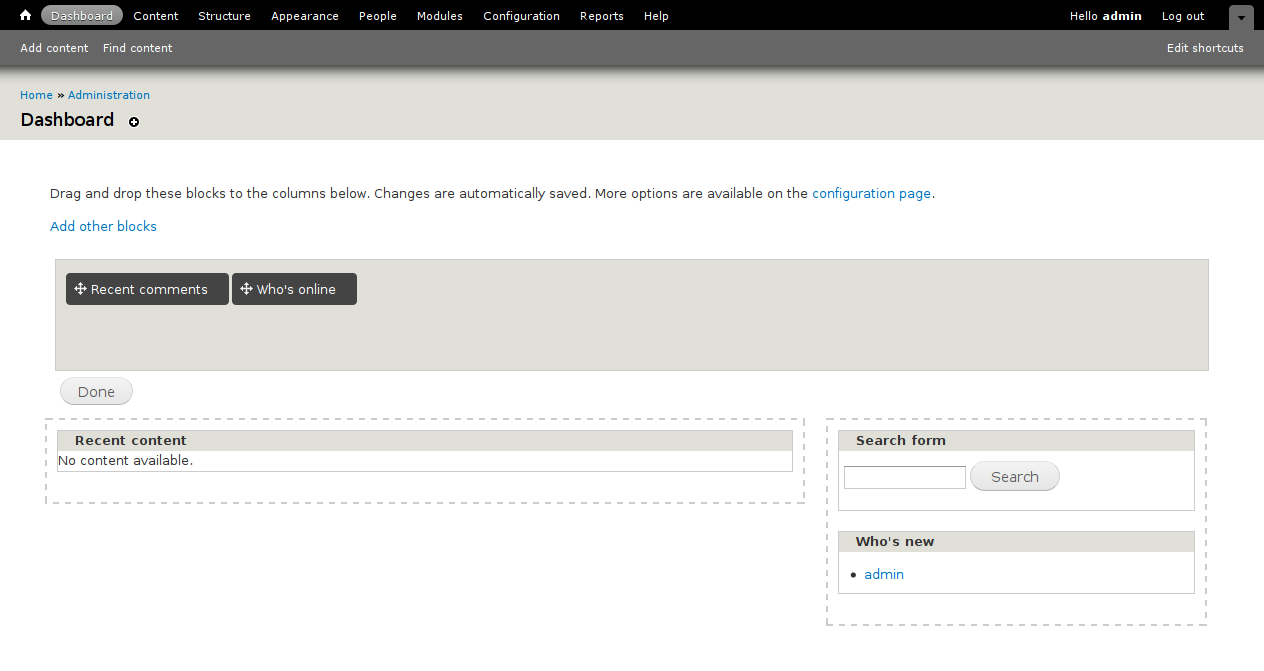
The second is a bit different, and puts it right underneath the disabled blocks themselves (that's the one implemented in the patch attached above, since the implementation of the first is trivial):
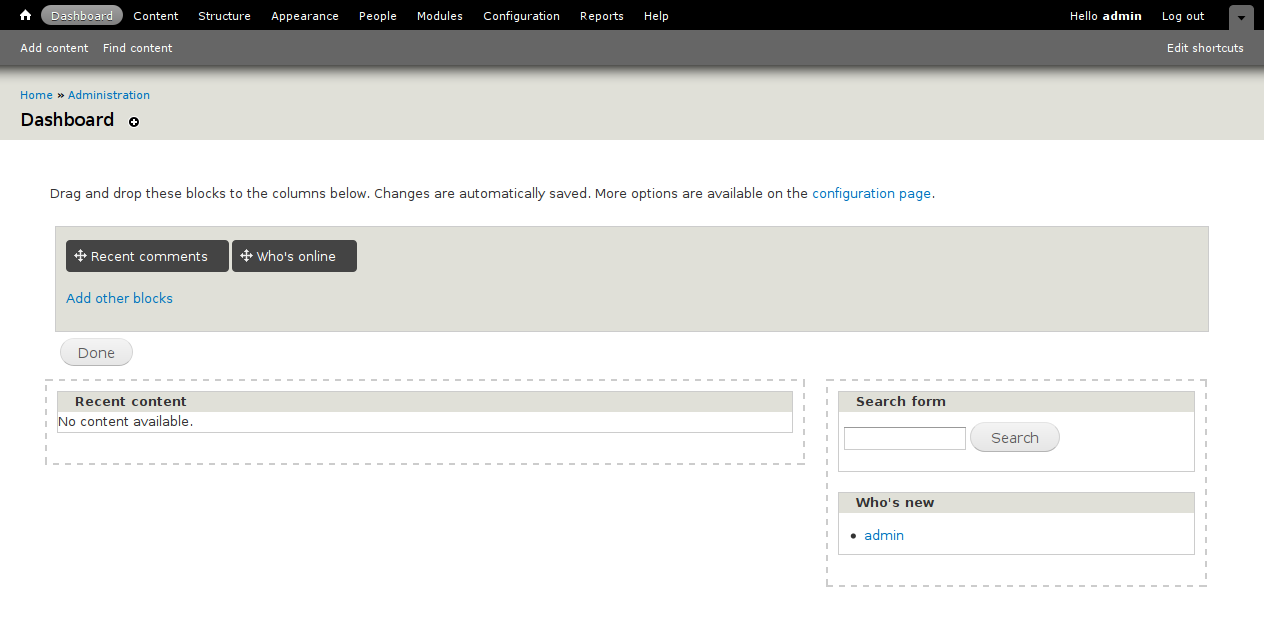
Thoughts? The second one seems a lot more naturally placed to me (but also might visually distract from the drag and drop, I'm not sure).
Comment #241
Bojhan commentedThe second one looks better to me to, I am a bit confused why it adds so much vertical spacing though? Anyway, I will let yoroy chime in - to me the last is the best and only needs some decrease in vertical space for it to be good
Comment #242
erdembey commented@David_Rothstein, i think the second one is better.
Comment #243
james.elliott commentedI don't like how the placement of the second implies that I would be adding blocks to the grey box instead of going to a separate config page where I can add block to any region on the dashboard.
Comment #244
EvanDonovan commentedI would prefer the second one, since it makes "Add other blocks" less prominent. James, I think it actually is good that it suggests adding blocks to the grey box, since that is the only real reason a non-keyboard or screen reader user would have to go to that page.
I think the vertical spacing on the top is fine; just a little bit less on the bottom.
Comment #245
yoroy commentedSecond option is nice! Brings the link in the context of what it operates on, which is A Good Thing. I would look into right-aligning it (most config-y links are in the top right corner of their container, see contextual links, Edit shortcuts link…). I'll gladly do that myself once there's a working patch again though, and have a closer look at the wording we use ( #2 & #3 in webchick's comment at #217).
Setting to needs work as an invite to get up another patch :-)
Comment #246
effulgentsia commentedI'm fine with "Add other blocks" in the second placement of #240. Though I can see the point in #243. The challenge is there are three separate reasons to go to that page:
So, we can either go with #240.2, and consider the first two reasons as not being changed by this issue, and therefore, not for this issue to worry about. Or, we can try to solve all three in one shot. If we want to try to solve all three in one shot, how about:
Ok, which still doesn't really help people know that "More options" includes a non-mouse-centric interface.
Thoughts?
Also, any thoughts on #217.2 and #217.2b? On the table-based page, we identify the drawer region as "Dashboard (hidden)", and a block not being available to the regular dashboard interface at all as "Other available blocks" (see 2nd to last screenshot in #202). Webchick asked for the latter to be changed to "Disabled" for consistency with admin/structure/block. And she doesn't like the word "hidden" used in this way. Would "Dashboard (available)", "Dashboard (inactive)", "Dashboard (selectable)", "Dashboard (drawer)" be any better? Or any other ideas? Note: I don't like that last one, since we don't currently refer to it as a "drawer" in any user-facing text, only in code, but including it here anyway in case it helps with brainstorming.
Comment #247
effulgentsia commentedSorry. x-posted with yoroy. Seems like there's good support for #240.2, so don't let #246 derail that, though if anyone has further thoughts based on it, please share.
Comment #248
yoroy commentedI'm personally not able to do good suggestions without playing with the actual functionality ;-) But! I was thinking about the suggestion to revert to Dashboard (disabled), and wondered how we can then choose wording for the bottom list of blocks that expresses they are kinda even more disabled-er than the disabled ones. Pretty hard to do I think. My suggestion:
Dashboard (inactive) (yes, it's inconsistent with blocks page labelling, but the context is different here because we have yet another list below this. I'd say context trumps consistency here)
&
Other available blocks
Comment #249
StuartJNCC commented"Other available blocks" would seem to be the problem here. If I am understanding this issue correctly, it seems to me to be a completely counter-intuitive label.
The first two concepts are absolutely clear - the blocks currently shown in the two dashboard regions.
Dashboard (disabled) seems OK to me. Blocks that are available to be placed on your dashboard, but are not currently shown. They are dashboard blocks, but not currently enabled = disabled. It makes sense! That it is consistent with the block config page is an added bonus.
But, the fourth category is blocks that are not available for placement on the dashboard. Calling these "available" seems completely cock-eyed! Something like "Not available for placement on dashboard" would seem more descriptive.
Comment #250
David_Rothstein commented@StuartJNCC: In #143 I tested a version that used "Not available on dashboard" and it directly resulted in disaster, so we abandoned it.
By the time the user is on the page where they see that label, the blocks in that section are just as "available" as anything else, so I think it's perfectly accurate in that sense.
Comment #251
carlos8f commentedCorrection: they are available, but not in the drag-and-drop drawer. If they were strictly not available, we would be hiding those ones.
My original suggestion was "Other blocks". I think "available" is implied, because a user wouldn't expect something to be shown but unavailable.
Comment #252
effulgentsia commentedI'm no UI pro, but FWIW, I like "Dashboard (inactive)" (#248) and "Other blocks" (#251). I especially like "Other blocks" if we're going with #240.2, which has a link that says "Add other blocks".
Comment #253
Bojhan commentedOk, patch please :) I think those labels are oke.
Comment #254
effulgentsia commentedThis is a continuation of #239 which already implemented the suggestion in #240.2 that we nearly all agreed on.
It reduces the vertical spacing of the "Add other blocks" link, as per #241.
It does not implement right-aligning as requested in #245, as that did not receive additional votes. @yoroy: if you want to post a patch that does this, go for it, but I also think it's a minor thing that can be defered to a follow-up.
This compares to what was asked for in #217 as follows:
initial text of the Dashboard page[Correction: Dashboard module's help page.]Any other feedback?
Comment #255
David_Rothstein commentedPatch looks great to me. (I reviewed the code, but did not test it.) Count me in favor of @yoroy's suggestion of right-aligning the "Add other blocks" link, by the way. I think that would make it slightly less prominent, which is good.
Someday (very likely D8) that link could evolve into an AJAX-y thing that makes the disabled blocks appear right on that page; James and I were discussing that possibility the other day. Too bad we didn't think of it earlier.
Comment #256
carlos8f commented@David, you may be on to something here, with the ajaxy thing.
It would be great if we could have the 'other blocks' link pop up a dialog/modal, where you could see a listing of all blocks with checkboxes, check the ones you want, click ok, and they are available in the drawer. Our testing shows that drag-and-drop wins hands down for intuitiveness. A modal would require something like http://drupal.org/project/dialog, but for D8, I would highly recommend something like that in core for these types of quick side-interactions.
Comment #257
Everett Zufelt commentedIs "which still doesn't really help people know that "More options" includes a non-mouse-centric interface.
" #246 addressed in this patch, should it be a separate issue? I don't have time to test right now, but I question whether there is any clear indicator that there is a non-mouse method of administering dashboard blocks. If this should be a separate issue I'll open one, but I think this is something that needs to be addressed for D7 release whether here or in another issue.
Comment #258
EvanDonovan commentedI think an ajax-y thing would be great, but probably too late for D7. Didn't have a chance to review patch yet. I don't think the modal dialog with checkboxes would be as intuitive as simply having the other blocks appear below the ones that are already in the drawer.
Am I correct in re: #257 that that help text already shows up for people that don't have JS enabled, or that there are other accessibility fixes that were committed earlier? I think that is what Bojhan indicated in #220.
Comment #259
effulgentsia commentedI agree that it would be a UI improvement if the new "Add other blocks" link triggered AJAX behavior for adding a non-administrative block rather than taking you to a totally different page with its own UI, but that this is out of scope for this issue, and for D7 core at this point. It can easily be done in D7 contrib and then considered for D8 core.
@Everett Zufelt: Re #257: You can read the last third of #222 for context, but copying the two text messages again here, in case that's helpful. When someone first gets to the admin/dashboard page, if JS is disabled, they see this text:
And if JS is enabled, they see this text:
That is the current HEAD behavior, unchanged by this patch. I do not believe it's at all friendly to people who have JS enabled, but who cannot use a mouse, and I think that warrants an issue. Please open one, and link to it from here.
This issue is specifically about changing the dashboard drawer UI from having all available blocks to only having the ones we think most people will want on their dashboard, so that clutter is reduced, improving the usability for the majority of users. That change necessitates giving people who are able to use the dashboard drawer UI a clear way of getting to the place where they can add the other blocks, should they want to. And I think we've reached consensus on the "Add other blocks" link achieving that goal. While I did suggest in #246 that we consider text that would also solve the accessibility problem, that suggestion didn't receive support, and I'm okay with that. It was hard enough getting this far, so I think it's reasonable to keep the scope of this issue contained, and deal with the unrelated accessibility problem on its own.
Comment #260
effulgentsia commentedWhat else is needed for this to be RTBC?
Comment #261
catchSomeone to mark it as such.
Comment #262
EvanDonovan commented@effulgentsia: Fully agreed that we need to contain the scope of this issue. Circumstances have become such that I don't think I can look at it further for a while, but I think this patch will answer webchick's concerns, based on your description of it.
Code looks solid on a quick read-through, but I did not test.
Comment #263
carlos8f commentedInterdiff showing @effulgentsia's changes. Looks like there is nothing weird sneaking in here :) One CSS tweak, changing the new region name from dashboard_hidden to dashboard_inactive, and some text stuff.
Maybe we should have one last round of screenshots to make @webchick happy.
Comment #264
Everett Zufelt commentedOpened #963598: Users who cannot drag and drop require clear anchor text to find Dashboard Administration page
Comment #265
effulgentsia commentedDries: in case you look at this before webchick, the issue summary is on #202, followed by a distillation of feedback from webchick on #217, and our answer to that in #254.
Comment #267
webchickAwesome. Great work, folks!
Summary in screenshot form, as contrasted to #202:
Before, the link to get to the dashboard config page was buried in the help text, which we have demonstrable evidence people don't read, and didn't show up in the admin index either, making it questionably findable. Now, it's more visible to those who might be looking for it, but not so visible that people might end up here in lieu of the drag-and-drop Dashboard interface which 99% of people will want to use (this explains the rationale for its not showing up in the admin index).
All complaints I had about the admin interface have been addressed, apart from "Disabled" on that final region, but I think the arguments in favour of using "Other blocks" instead here work fine:
And the help page has been adjusted to include reference to this mechanism for adding additional blocks.
Committed to HEAD! Awesome, awesome work all. Thank you so much for rallying on this sucker. :)
Marking down to "needs work" to document this new block property for module developers.
Comment #268
carlos8f commentedNice! Good work, all.
For the documentation, the patch contained a block.api.php hunk as a start.
Comment #269
carlos8f commentedTagging.
Comment #270
carlos8f commentedMoving to documentation queue.
Comment #271
EvanDonovan commentedRemoving additional tags since the change has been committed.
Comment #272
jhodgdonTagging for sprint as an issue that needs to be documented in the 6/7 module update guide. See summaries above in #202 and #267.
Comment #273
jhodgdonchanging tags
Comment #274
David_Rothstein commentedThere are probably a number of followup issues still needed here, but here a couple for things @webchick mentioned in her review in #202:
It turns out both of them did exist already, though I just now went and refocused the second issue a bit more towards the "Done"-styling bug than it had been previously:
#903814: Some admin pages not displaying in the Overlay in Garland
#744488: Dashboard styles are specific to Seven
Comment #275
jhodgdonI just read through the summaries in #202 and #267, to see what might need to be documented in the 6/7 module update guide.
In #202, the only API change I am seeing is that hook_block_info() has a 'properties' element for each block, which if you set it to 'administrative', for practical purposes, means that the block will be visible as an option to add to the Dashboard. And there's nothing else as far as API changes in #267 either.
I'm not really sure we even need to document this in the module update guide, since the Dashboard didn't exist in D6, and not using this property will not break any existing functionality in D6, but I went ahead and did it anyway just to get it done.
http://drupal.org/update/modules/6/7#block_properties