Folks,
On my RSS news feeds page, I have an HS filtering mechanism. While everything seems to work just fine, I am getting this message:
"You don't have Javascript enabled. " and when I hover over it it says:
"You don't have Javascript enabled. But don't worry: you can still use this web site! You have two options:
enable Javascript in your browser and then refresh this page, for a much enhanced experience.
click the Update button every time you want to update the selection, or when you've checked some checkboxes for entries in the dropbox you'd like to remove."
Not only is Javascript enabled but it drives my whole YouTube searching page, which is also working just fine. Any ideas?
Thanks.


Comments
Comment #1
wim leersCould you please make a screencast of the problem being reproduced. That makes it easier for me to understand the problem. Thanks!
P.S.: don't have any screencast software yet? On Windows and Mac OS X, you can use the free Jing.
Comment #2
tesliana commentedHi Wim,
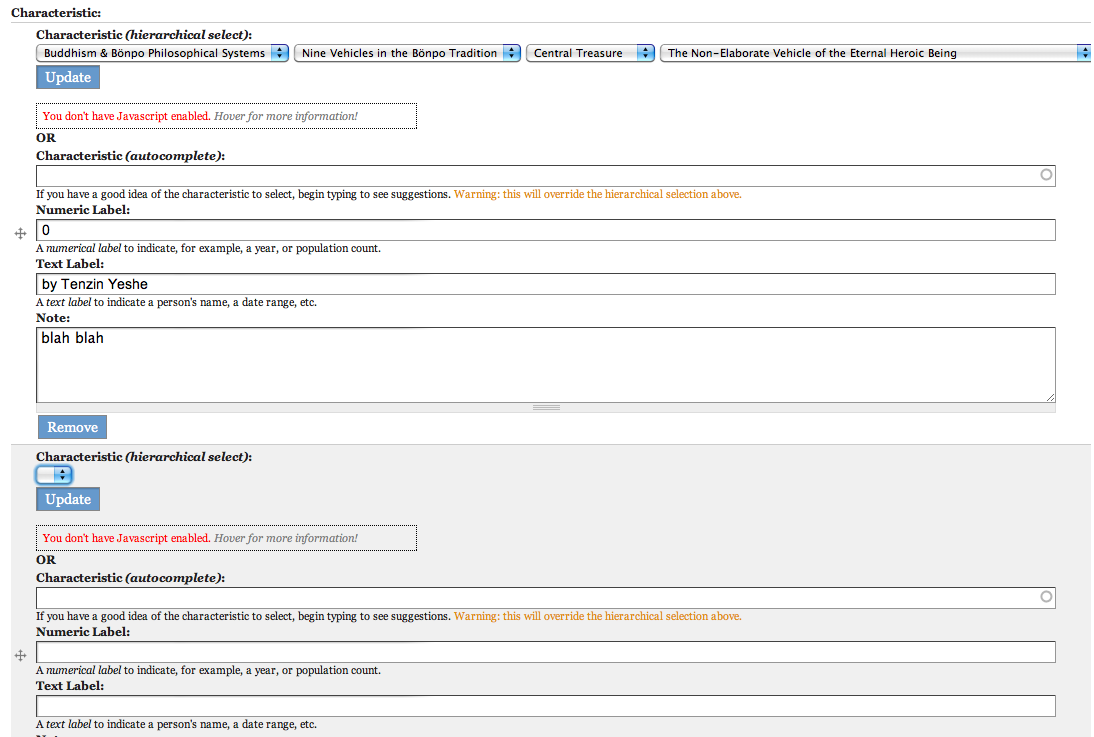
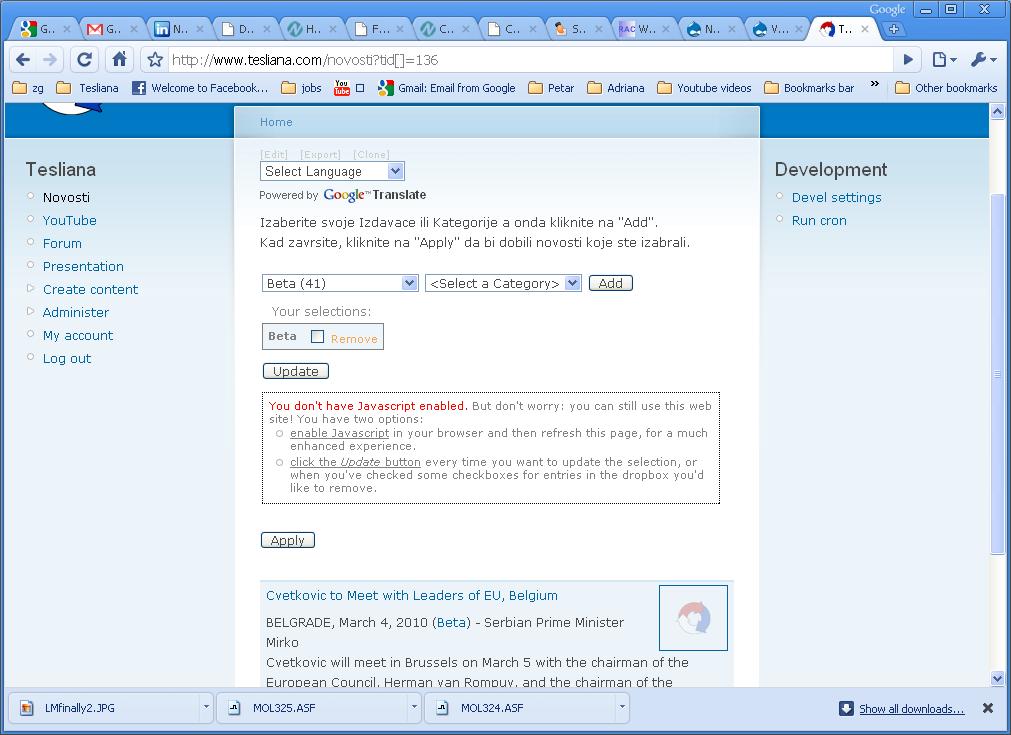
Here is a screen shot. The message comes up most of the time and it has instructions to hover over for the expanded version with explanations that are in the shot.
HTH.
EDIT: Or go there and play around until it stops flashing the message and starts showing it permanently.
Comment #3
wim leersWell, it does not work dynamically like it does at http://wimleers.com/demo/hierarchical-select/taxonomy, I suppose?
Comment #4
tesliana commentedAs I suggested previously, if you take a look at the above image, you can read the URL (so that I am not having to post it publicly) and try the page yourself.
The message is intermittent and then it persists. In any case, HS seems to work perfectly fine "dynamically" in that only categories with records are showing, including record counts in brackets. Sub categories reload, based on the chosen parent category, etc.
Is this what you were asking.
In any case please take a look at the live page that is displayed in that above image.
Thanks again.
Comment #5
c4antonio commentedhi,
i have this problem only on firefox, opera and safari, with iexplorer is ok (very incredible....)
Now i work on this site http://www.cruciatacarene.com/it and the famous message "You don't have Javascript enabled." appears on random event without a logic. Can you suggest something?
Tony C4
Comment #6
wim leers@cquattro: if you search your HTML source for ".js", there is no match. Hence no JS is loaded whatsoever. Hence it can't work. Some crappy module must be causing that. Your case definitely has nothing to do with HS.
Comment #7
c4antonio commentedthanks for the reply, but i don't know what crappy module to search, the development of the site has just begun, but do not understand why IE always works
I repeat the installation and then you'll know
Tony C4
Comment #8
c4antonio commentedSTOP!!!!
now i disabled on "site performance settings" the BLOCK CACHE and the PAGE COMPRESSION and it work!!!!
i hope is the end of the trouble....
Comment #9
erik seifert commentedAlright Guys,
I got the same problem. And found a solution ( for my problem ). I had included jquery.ui twice a time ( hs + another modul ). Please check this.
Comment #10
wim leersWhat other module? HS only includes jQuery UI of its own when the jQuery UI module is not installed.
Comment #11
erik seifert commentedjquery.ui was included by theme. I have now no problems with preview of dropbox. But in Content Edititing no "dropbox" is shown.
Comment #12
wim leersjQuery libs in the theme … EVIL! :)
You must enable the dropbox for the corresponding vocabulary's HS config. Go to admin/settings/hierarchical_select and then click the "Configs" tab, and then the corresponding config. You'll see that it works just fine!
Comment #13
erik seifert commentedHm, it doesnt. Cleaning Theme .... Menu Selection work like expected. But Taxonomy Selector do not work. "Dropbox" is enabled and Use HS for Taxonomy is enabled.
No JS Error. No Conflict. No Entry in watchdog.
Do you have another tipp for me ;- )
Comment #14
erik seifert commentedOk ,
I find out , that no taxonomy form elements are not signed for "HS" JavaScript. It should have a ID like "hierarchical-select-' + hsid + '-wrapper". But it do not. I will now check if a module make an conflict
Comment #15
erik seifert commentedGot it ;- )
It was module weight in system db table. "hs_taxonomy" was before "hierarchical_select" . After adjust weight anything work like expected. Hope it helped for the others.
Comment #17
scottrouse commentedI'm still struggling with this issue. The "You don't have Javascript enabled." issue appears now in almost every browser every time the page loads. JS is enabled and all JS scripts seem to be loading properly. All aggregation/compression settings are disabled at /admin/settings/performance. Caching is also disabled. Strangely enough, however, when I click "Clear cached data" on the /admin/settings/performance page, the next load of the affected page (in any browser) works perfectly. Then, once I return to the page, it's broken again.
Also, on times when the error occurs, once I select the top select option and click continue, the remaining layers of selection work.
I've currently hid the "You don't have js enabled" div via css to prevent user confusion (as this is a live site).
I've tried applying the patch at http://drupal.org/node/336517 as suggested in http://drupal.org/node/392520#comment-1325534, but the problem was not resolved. I also adjusted module weight as suggested in http://drupal.org/node/734178#comment-2740920. No luck.
Does anyone have any other suggestions?
Thanks,
Scott
Comment #18
zeezhao commentedsubscribing. Also seen this recently. Using dev version. But no identified pattern as to what triggers it yet.
Comment #19
MikeVonZ commentedI get the same javascript error when I reload a page but the message flashes for a 2/10ths of a second before it is overwritten by a block occupying the space under the HS boxes.
The error seems to come from when the list is prepared. I have 670 taxonomy terms divided in 2 levels.
Comment #20
lhernon commentedsubscribing
Comment #21
heatherann commentedIf I enable 'Show tooltips on categories' for the Guided Search block, all javascript dies a horrible death wherever the Guided Search block is enabled. If I turn this option off, everything's happy again.
Comment #22
sifaan commentedI don't have even as many (about 50) but I still see the warning for a while... :(
Comment #23
zeezhao commentedAlso noticed that this tends to happen to me when I have validations on fields for a form. If the validations fail, then I get the javascript error when the form is redisplayed with the validation errors.
So it is happening when a hook_nodeapi is called e.g.
edit1:
The only other thing about my own case is that the screen has 4 different hierarchical_select widgets, all named differently but all driven off the same taxonomy. This is necessary for user to make 4 different selections if necessary.
Please I'd appreciate any ideas on how to resolve this. I have checked all the potential issues that others say can cause it, and my installation does not have those issues i.e.
- duplicate jquery.ui
- weight of "hs_taxonomy" before "hierarchical_select" in system table
- disable caching, aggregation, compression via admin/settings/performance
- disable caching via admin/settings/hierarchical_select
Right now, i can only think its due to validation of hs fields in my installation?
I am running drupal 6.16, with hierarchical_select 6.x-3.x-dev of 2010-04-21. I tried the latest hs but same issue.
edit2:
Forgot to mention that:
- I also disabled modules, to see if any ones being used had impact. But still same issue.
- The problem is consistent across IE8 & Firefox 3.6.3 browsers.
- Also applied this patch http://drupal.org/node/336517 i.e. bug in misc\teaser.js
Comment #24
scottrouse commentedIn case it helps anyone else, let me explain how my problem was eventually resolved. As I mentioned in my above comment (#17), I had basically given up on fixing it and had hidden the "You don't have JS enabled" message via CSS. (Lame, I know.) I had caching turned off everywhere I could think of (admin/settings/performance) but the issue was still resolved with the first refresh immediately after clearing the cache. That should have led me to the obvious solution.
While troubleshooting an unrelated issue, I noticed that I had, at some point in time, turned on time-based caching for the specific View which was using HS as an exposed filter. That was it. Disabling caching for that View cleared up the issue I had described.
I'm sure this won't be the case with everyone, as there seems to be a number of assorted symptoms in this issue, but hopefully it'll help.
Best,
Scott
Comment #25
zeezhao commentedA continuation of my posting in #23. I have found what is causing the issue for me.
The HS fields are within a node edit form. However, because of permissions required for the system, some fields are hidden on this form, depending on type of user logged in. This is done with a hook_form_FORM_ID_alter() or hook_form_alter().
Now when ever an HS field is hidden in this hook function using e.g.:
the field gets hidden, but subsequently the javascript stops working for any other HS fields being shown in the same form.
So it looks like the javascript is conflicting with cck attribute for hiding, or the hook, or HS does not like being hidden.
Not sure how to fix it, as I tried forcing reload of js and that did not work. So this is one for the experts...
Wim - please do you have any ideas?
Comment #26
bls20 commentedI had this error too - solved (in my case at last)
The problem for me started when i updated my 'jQuery Update' module to the latest version.
This was then causing a syntax error for any variables with the @ symbol preceding it, i removed all occurrences from my various Jquery scripts, and problems solved, Hope this helps someone else.
Comment #27
dxhuong commentedI have the same problem. I disabled module "Application toolbar" and the error disapear. The error only for "Application tool bar 6.x-2.0-alpha1". Still don't know why :).
Hope this help.
Comment #28
wackadoodle commentedHi, need to chime in. Have/had same issue with Firefox latest build. Using HS to manage taxonomy and got the same js error under Content Taxonomy fields built for my node. I went to the HS UI and under the menu tab disabled Resizable and poof - JS errors gone on my create content pages.
Comment #29
wim leers#24: that's probably due to the way that I have to hack around to make HS exposed filters work: the Views 2 exposed filters form requires the View object to exist *before* the form gets built. So in AJAX/AHAH callbacks, I have to restore the View object before I can build the form. That's probably around where the issue exists. And there's nothing I can do about it in D6: FAPI has forced HS into shitty code and Views 2 pushed me even further along those lines.
Thank you very much for the extensive report though!
#25: trying to reproduce, so far I'm failing.
#26: There aren't any variables with the @ symbol preceding it in hierarchical_select.js?
#27: report that in the "Application toolbar" issue queue. Its JS is borked. Most likely it isn't using Drupal behaviors correctly.
#28: fixed in #633442: Vertical size of HS not maintained.
Comment #30
geerlingguy commentedAnother confirmation of the problem when Appbar is enabled (as with #27). I've filed an issue in the appbar queue: #819584: Don't change the context variable in jQuery
Comment #31
travismccauley commentedI'm seeing this same issue but in a new context.
I have a custom implementation of hierarchical select configured as one form field in a compound cck field. It is working beautifully except in one case. In admin/content/types, the field is set to allow multiple values. So when the form is rednered there is an "Add More" button appended. When you click "Add another item" an ahah call goes to the server, the form is rebuilt and a portion of it sent back to the page.
When the hierarchical select fields come back via ahah, they all display the "You don't have Javascript enabled" error. Here's a screen shot.
For now, I jam working around this issue in a form_alter by unsetting the #ahah array in the field_name_add_more button so it just does a full page reload instead of ajax/ahah but eventually I need to fix this because I want to add more ahah elements.
Any tips on how to begin troubleshooting?
-Travis
Comment #32
wim leersPlease create a new issue instead. Please revert this issue back to its original state, travismccauley. Thanks!
Comment #33
travismccauley commentedOops. Sorry about that. Didn't realize I was changing the whole issue.
Comment #34
joya commentedsubscribing
Comment #35
wim leersComment #36
freestone commentedThe only way I ever suppressed this was to hack the hierarchical_select.module . I know this is not good but none of the other options here worked for me. I would have preferred to at least us the CSS display:none hack but could not figure out how to make it work. Seems like .nojs {display:none;} should have worked.
If someone can tell me this syntax I will restore the original code and suppress the display that way.
The screen still does a bit of an odd flash but at least it does not flash something that cant be read on the page.
I ended up commenting out these lines at 670 (HS 3.7)
$element['nojs']['update_button'] = array(
'#type' => 'button',
'#value' => t('Update'),
'#attributes' => array('class' => 'update-button'),
);
$element['nojs']['update_button_help_text'] = array(
'#value' => _hierarchical_select_nojs_helptext($config['dropbox']['status']),
'#prefix' => '
'#suffix' => '
',
);
And these lines at 1470
// The options that will be used in the unordered list.
$items = array(
t('enable Javascript in your browser and then refresh this page, for a much enhanced experience.'),
t('click the Update button every time you want to update the selection'),
);
$items[1] .= (!$dropbox_is_enabled) ? '.' : t(", or when you've checked some checkboxes for entries in the dropbox you'd like to remove.");
$output .= '';
$output .= t("You don't have Javascript enabled.");
$output .= ' ';
$output .= '';
$output .= t('Hover for more information!');
$output .= ' ';
$output .= t("But don't worry: you can still use this web site! You have two options:");
$output .= theme('item_list', $items, NULL, 'ul', array('class' => 'solutions'));
Comment #37
codeitwisely commentedthe display:none property hide the message for me !But when i want to select a subleblevel ,sometimes i have a javascript alert like ("no answer from server")...
Any ideas ?
Comment #38
garciac1212 commentedHi all!
In regards to
"#24: that's probably due to the way that I have to hack around to make HS exposed filters work: the Views 2 exposed filters form requires the View object to exist *before* the form gets built. So in AJAX/AHAH callbacks, I have to restore the View object before I can build the form. That's probably around where the issue exists. And there's nothing I can do about it in D6: FAPI has forced HS into shitty code and Views 2 pushed me even further along those lines.
Thank you very much for the extensive report though!"
Well if there isn't anything that can be done to remove that annoying "You don't have javascript... blah blah" message, I guees we ae forced to hide it through CSS right?
On that note, because I only get this message popup for a split second, how can I see the div classes that this message is under so I can hid it. I used firebug to inspect but don't see it...?
Any help with hiding this through css will be greatly appreciated.
Thanks!
Comment #39
garciac1212 commentedGot it!
Add this to your theme and those annoying "you don't have java blah blah..." popups disappear:
Comment #40
chinita7 commentedI tried everything described above here but nothing workd for me so hiding it by CSS was the only way for me.
I made like this in hierachical_select.css file and now the message is gone.
.hierarchical-select-wrapper .nojs .update-button {
display: none;
}
.hierarchical-select-wrapper .nojs .help-text {
display: none;
}
.hierarchical-select-wrapper .nojs .help-text:hover {
display: none;
}
.hierarchical-select-wrapper .nojs .help-text .ask-to-hover {
display: none;
}
.hierarchical-select-wrapper .nojs .help-text:hover .ask-to-hover {
display: none;
}
.hierarchical-select-wrapper .nojs .help-text .highlight {
display: none;
}
.hierarchical-select-wrapper .nojs .help-text .warning {
display: none;
}
.hierarchical-select-wrapper .nojs .help-text .solutions {
display: none;
}
Comment #41
lightsurge commentedJust to note swfupload was causing this as an intermittent issue for me... Probably this issue can be caused by any number of modules that intermittently aggravate browser javascript interpreters.
Comment #42
lightsurge commentedAck no it wasn't, I'm still getting these errors occasionally
Comment #43
caspercash commentedsame here! The message only displays in a second or more. None of the workaround mentioned above works for me except hiding it with css. But if this is done, wouldn't it be useless to put this code? How would the user know if their browsers javascript has been disabled if this message is hidden using {display:none}? Hmm.. not sure what to do about this.. Right now, I think hiding the message is the best option than just letting this message appear and not doing anything about it.
Comment #44
wim leersPossibly you're experiencing JS errors?
Comment #45
lightsurge commented@Wim Leers
I thought that too in #41 I was getting swfupload js errors.
However the problem persisted, for some reason the script occasionally fails to load and instead we get the fallback. No errors. Don't know what's interrupting it.
Comment #46
chupamyth commentedAny new ideas? Im getting the same problem after updating localization module.
Comment #47
papasse commentedI had the same problem (or kinda) on a view using ajax pager, with two exposed filters using hierarchical select.
On the first load of the view, no problem, both are working.
When using the pager (ajax reload of the view), the first hierarchical select is not working anymore and displaying this "You don't have Javascript enabled" message, while the second one is working fine and not displaying the message.
After intensive debug, I finally found out that the code in _hierarchical_select_add_js_settings() was erasing the settings of the first hierarchical select with the second one, instead of keeping both. I changed it for :
Not sure this is correct in all situations, but fixed the problem for me.
Using hierarchical_select 6-3.8.