

Active
Project:
Wysiwyg
Version:
6.x-2.1
Component:
Editor - CKEditor
Priority:
Normal
Category:
Support request
Assigned:
Unassigned
Reporter:
Created:
16 Jun 2010 at 15:57 UTC
Updated:
7 Mar 2018 at 19:19 UTC
Jump to comment: Most recent, Most recent file

Comments
Comment #1
Amarjit commentedYes you can use CKEDITOR without the Wyswyg module. There are more options to manipulate when using standalone CKEDITOR.
Comment #2
iantresman commentedSure, but can I use the WYSIWYG image upload with the CKeditor, without the Wysiwyg module, and if so, any pointers on how to do so? I'm not sure how to add the button to the button bar.
Comment #3
Amarjit commentedI don't think you could, as WYSIWYG is the central point I believe. But I have used IMCE, which works with CKEditor.
Comment #4
eugenmayer commentedThe WYSIWYG imageupload module does centraly build on WYSIWYG and i will not support the CKEditor module (even if patches are provided).
There is absolutely not a single point in support the CKEeditor module at all, and i have no clue why people spend time on fixing issues there.
You can fix the button bar bug very easy using some CSS. Iam using the CKeditor in a big env. and its very stable using it with WYSIWYG. Be sure you use the wysiwyg settings hook to alter the CKeditor settings and you will get a nice looking editor:
http://www.ubuntu-pics.de/bild/85074/screenshot_238_p9YK0F.png
Thats how my editor looks like
Comment #5
iantresman commented>the wysiwyg settings hook?
Is this by using the Wysiwyg option to specify a new CSS? Can you post the required CSS fix? I've selected all the CKeditor buttons, which just makes the button bar too wide, and it looks like three row superimpose into two rows.
Comment #6
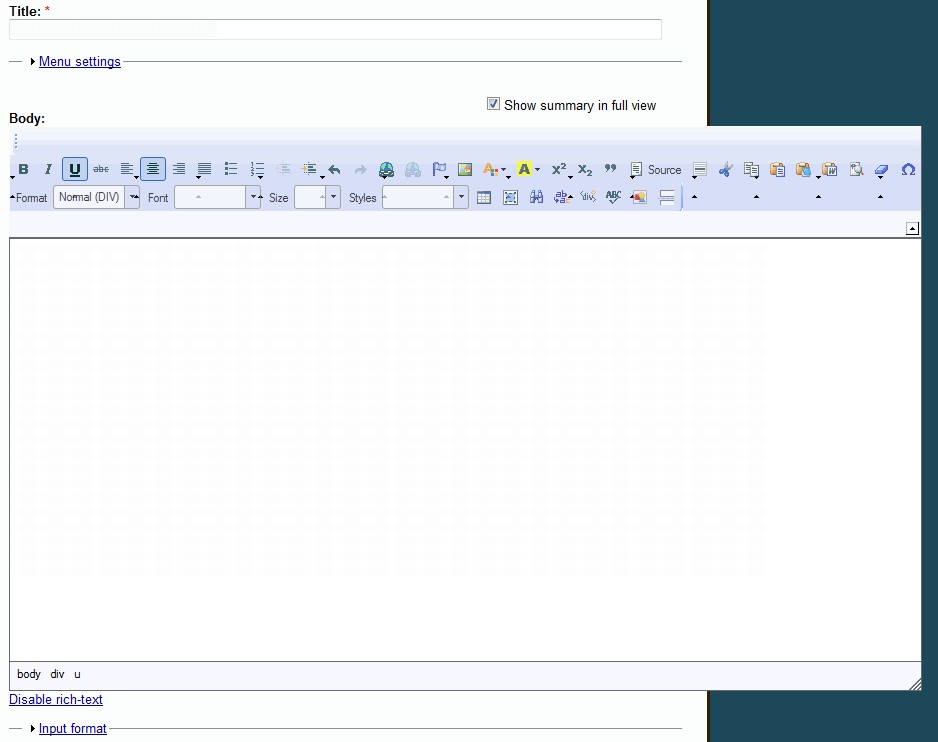
iantresman commentedThis is how my screen looks, with the CKeditor overspilling the page area.
http://drupal.org/files/ckscreen.jpg
I've also tried selecting (a) the Editor default CSS (b) Theme CSS (c) Custom CSS.
Comment #7
eugenmayer commentedMoving this to the WYSIWYG queue, as its not related to wyswiyg_imageupload anymore.
Settings hook: please check the documentation of WYSIWYG ( hook_wysiwyg_editor_settings_alter(&$settings,&$context) )
CSS Problems: It look like you have a seriuos problem with your theme. You have a fixed width but having a gazillion CKeditor plugins activated ( be sure you REALLY want this. Because half of them will make your site go 'boom' ). If you stay with all those buttongs, use the settings hook to regroup the buttons an place them on 2 or even 3 lines
Currently the most anoying issue people told me in using CKeditor in favour of WYSIWYG+CKEditor was this toolbar bug, maybe WYSIWYG should implement better defaults for the settings here.
Comment #8
twodThis CKEditor toolbar issue will be completely fixed when #277954: Allow to sort editor buttons is fixed. Given the complexity of that issue I'll leave this open if anyone has time to work on it.
Comment #9
iantresman commentedI know you've said elsewhere that Wysiwyg is not able to group buttons. But is it not possible to specify a specific number of buttons per row, or add a "breaks" to array($settings['toolbar']). At least that will get the editor to display properly, even of the buttons are not grouped logically.
Comment #10
eugenmayer commentedit IS possible to define which / how many buttons are shown in a row.
It is possible to make linebreaks.
Comment #11
iantresman commentedIdeally then, there should be an option at admin/settings/wysiwyg/
"Buttons and plugins" to specify "Buttons per row".
Comment #12
twodThat's where #313497: Allow configuration of advanced editor settings comes in, without that, we have no good way of customizing the profile GUI for each editor's needs.
Comment #13
iantresman commentedJust so that I can get a workable editor and further test Wysiwyg, can I hack the code directly for now? I'm guessing I can tweak
wysiwyg\editors\ckeditor.incwherefunction wysiwyg_ckeditor_plugins($editor)defines the buttons at'buttons' => array(...Is there an array entry I can add to force a button row break?
Or I note some code noting
// For now, all buttons are placed into one row. Can I hack this so that the buttons appear over three or four rows?Comment #14
eugenmayer commented@TwoD: Yes we have, simply using the CKeditor configuration in the hook. Plain and very simple.
A short look at the CKeditor API reveals: http://docs.cksource.com/ckeditor_api/symbols/CKEDITOR.config.html#.tool...
So just use
Very easy - very effectiv. If you want to now which plugins / buttons are possible, debug "toolbar_full" in the javascript console.
Comment #15
twodEugen, that does not change what the GUI looks like. In fact, it overrides the settings generated by the GUI. ;)
Comment #16
eugenmayer commentedWhat is the "GUI" for you? The way the buttons look like? Or the borders?
Thats what the CKeditor theme are. Just create your them ( i have also done that ) :)
Comment #17
iantresman commented@EugenMayer, you mentioned in #7 above to "use the settings hook to regroup the buttons an place them on 2 or even 3 lines" by redefining $settings['toolbar']. I'm not sure how to go about doing this. Do I add it to my theme's template.php file, in which case, do I not have to replace the entire function
function wysiwyg_ckeditor_settings($editor, $config, $theme)in wysiwyg\editors\ckeditor.inc? Or do I just hack the block of code (in the same file):Is there a neat php function that will split array($settings['toolbar'] into X separate arrays, one for each row?
Comment #18
eugenmayer commentedWait, your getting this wrong. settings['toolbar'] will most probably be empty, as the settings are NOT prepopulated by drupal ( the default settings of CKEditor ). So you have to set it on your own
try this, i guess with this example you should get a clue. '/' is the line break!! Just read the documentation actually ;-)
Comment #19
iantresman commentedI thought the following might do the trick (but it doesn't) in wysiwyg\editors\ckeditor.inc, changing:
to:
and also:
Comment #20
iantresman commented>Just read the documentation actually ;-)
Thanks for the suggested code and advice. The tricky part for novices is knowing which documentation to read, and where!
>the settings are NOT prepopulated by drupal
I thought that the Buttons and plugins configuration in Wysiwyg is populating the buttons? I had them all checked, because I wanted to add the WYSIWYG image upload button.
But I guess your method by-passes Wysiwyg's settings altogether. I'll keep playing around.
Comment #21
iantresman commentedOK, this hack seems to work, splitting the toolbar into three rows. In wysiwyg\editors\ckeditor.inc, change:
to:
Oddly, it actually creates four rows, which I also get if I change the "3" into a "4", but at least it wraps OK, and I can use the button bar. If I change the "3" to a "5", then I get three rows!
Comment #22
twodRe #16. The profile GUI I was referring to in #12/#15 is the one at admin/settings/wysiwyg/profile/1/edit. In this case, the "Buttons and Plugins" section is the relevant part. Simply implementing hook_wysiwyg_editor_settings_alter and overriding the toolbar settings will make that section useless. A better approach may be to filter the "layout" you place in
$settings['toolbar']with regards to what's already in$settings['toolbar']. (Maybe with the exception of when it's completely empty, as you noted in #18.) That way, enabling and disabling buttons via "Buttons and Plugins" still works.Comment #23
eugenmayer commentedTwod: sounds good. We have to prepopulate it then i guess, then we can combine it. Or just say, you can use on of those approaches.
Comment #24
tevih commentediantresman - THANKS! That worked for me. It appears that the number you define (3 or 5, in your example) doesn't define the number of rows, but rather the number of items to place in 1 group. In my situation, I set it to 19, which made 3 rows of icons.
Comment #25
hedley commentedDidn't find that hack to work for me, I created a small custom module which seemed to work (I also changed the skin to 'kama')
wysiwyg_custom.module
Comment #26
jerry commentedsubscribing
Comment #27
twod@geenee, you have a typo in that snippet. The comparison should use "==" not "=", and I'm not sure why you'd need the OR-expression.
I'd suggest using this as a template for your hook implementation:
Comment #28
imclean commentediantresman #21 and tevih #24, the proposed workaround only groups buttons for me, it doesn't have a line break. To add a line beak ( / ) at the end of each group, I used the following code:
Comment #29
sunComment #30
bleen commentedre #22 ... how about we prepopulate the settings['toolbar'] variable with those buttons selected in GUI instead. This way those admin options still work and you can just alter them in the hook?
Comment #31
scarvajal commentedWith this code you preserve the UI setting for buttons, and can group them in groups that make sense.
Comment #32
bleen commentedRE #31: I havent had a chance to test this yet, but as I recall $settings['toolbar'] is empty in hook_wysiwyg_editor_settings_alter ... so I do not believe this actually preserves the settings from the GUI. Hmmm ... Ill have to play
Edit: yes, see comment #18 above. The $settings['toolbar'] is empty
... also, on a slightly related note, while it doesn't "fix" anything, this patch #973444: Add message to profile configuration if module implements hook_wysiwyg_editor_settings_alter will help remove a bit of the WTF aspect of customizing the buttons in hook_wysiwyg_editor_settings_alter()
Comment #33
scarvajal commentedIt's not empty. I have verified that code on #31 works as intended on my install.
$settings['toolbar'][0] is the array that contains all the buttons.
Comment #34
eugenmayer commentedIn the current WYSIWYG stable release all settings are empty, they are not prefilled at all. the only reasons settings can be not empty are, that other hooks of the same type have set anything there
Comment #35
scarvajal commentedMaybe are empty if you have no button selected in UI settings of WYSIWYG profiles. (yes.... its explained in #22)
Once you have checked buttons on each profile (/admin/settings/wysiwyg/profile/%/edit) this code groups the selected buttons using the array of the example.
So its needed to check is the array is empty:
Comment #36
bleen commentedscarvajal: can you post exactly what version of WYSIWYG you are using ... and also
Comment #37
scarvajal commentedOUTPUT:
Array ( [0] => ckeditor_custom )
(This is the module containing the shown code)
6.x-2.1
This is not working for you guys?
If I find some time I will try this with a new Drupal install and reports results here.
Comment #38
bleen commentedOK ... I'm pretty sure I'm losing my mind here. I just outputted $settings['toolbar'][0] and sure enough the buttons were listed just as scarvajal said. I would swear on my copy of Pro Drupal Development that this var was empty last week...
I dont understand
Comment #39
scarvajal commentedI just try this code on a fresh drupal install with wysiwyg and CKEditor 3.4.2 and I confirm it works.
One minor fix to the previous code, array_merge is needed to remove blank spaces in the array. And I edited the arrays to look as the default buttons configuration of CKEditor.
So the complete hook is this:
Comment #40
brian.flaherty commentedHi, thanks for this, it works great! I'd like to add a line break on some of these tool groups. Is there a way to do that here? Nothing I've tried works.
Comment #41
bleen commentedline breaks can be added like this:
Comment #42
iantresman commentedNow we just need a drag and drop custom button bar creator, and it would be perfect!
Comment #43
scarvajal commentedNote that there is a typo in Justifycenter in my last post. It should be JustifyCenter.
Comment #44
scarvajal commented@bleen18 take into account that you will lose your line break when array_intersect is executed if you not add code to not run that when "/" is the item to check.
Comment #45
ericbroder commentedI added this to my custom module. It breaks down the toolbar buttons into smaller groups so the layout is more flexible:
Comment #46
SchwebDesign commentedI also found a great solution for this here: http://drupal.org/node/751196#comment-3689150 It's a simple additional module install.
Comment #47
twodHere's some code I recently used on a site.
It's tailored for CKEditor and so assumes all buttons in the original toolbar definition (created by Wysiwyg) are placed in one group on one row. They will then be reordered and grouped according to the layout in the $toolbar variable.
Comment #48
boftx commentedsubscribe
Comment #49
lpalgarvio commented+1
Comment #50
krisis commented@TwoD. Since I ran into a little error with the grouping in the CKEditor I had setup I did some debugging. It was truly puzzling until I resorted to the foreach reference on the php.net website. Short conclusion: by using the $group variable twice, the last foreach will not index $row properly. Here is the new code.
Furthermore, this code was used and debugged in a new Drupal 7 installation.
Comment #51
ailgm commentedWhat file / folder should that code be put in?
Comment #52
twodCreate sites/default/modules/MYMODULE/MYMODULE.info: (I use sites/default/modules or sites/sitename/modules for all custom modules that are specific to a certain site, but sites/all/modules works just as well.)
Then create sites/default/modules/MYMODULE/MYMODULE.module:
Replace MYMODULE with a custom name, enable it and... bingo! ;)
Comment #53
ailgm commentedBrilliant. Thank you very much. That fixed it for me.
Comment #54
Renegadez commentedok after I upload
Folder > wysiwyg_tool_tweak with wysiwyg_tool_tweak.module file inside of it
File Path
/sites/all/modules/wysiwyg_tool_tweak/wysiwyg_tool_tweak.module
Do I have to enable this some how its not in my modules list is it read automatically?
Thanks
Comment #55
twod@Renegadez, you also need /sites/all/modules/wysiwyg_tool_tweak/wysiwyg_tool_tweak.info for Drupal to recognize it as a module.
Comment #56
Renegadez commentedThank You!!
Ok this fixed the issue in large view areas such as blog entry but not in wysiwyg smaller areas like a private message reply
Comment #57
bryancasler commentedIs this workaround compatible with D7?
Comment #58
twodYes, the same hook and settings array are available in both D6 and D7. Just remember to change the .info file so
core = 6.xreadscore = 7.xinstead or Drupal will say the module is not compatible.For really small textareas one might have to re-arrange the buttons in the
$toolbararray at the top.Comment #59
Renegadez commentedHow might I rearrange the buttons? Again thanks for all your help it looks so much cleaner with the buttons corrected!
Comment #60
fabianx commentedA fully made workaround module for D6 and D7 doing essentially the same as the one from TwoD can be found here:
http://drupal.org/node/751196#comment-3091682
Cleaned up D6 + D7 modules:
http://drupal.org/node/751196#comment-3689150
Best Wishes,
Fabian
Comment #61
twod@Renegadez, if you're using the code from #47 or #50, you can rearrange the toolbar by moving around the button names in the first
$toolbarvariable. The variable is an array of toolbar rows, each row being represented by an array of button groups on that row, and each group is in turn an array of button names. I think there can be any number of rows and groups, or number of buttons in a group, at least in CKEditor.Comment #62
Renegadez commented@TwoD Thank You!
@Fabianx also thanks ill give a look!
Comment #63
kenorb commentedRelated:
#1003850: 6.x-2.2 has no toolbar buttons by default
#1006072: Provide some kind of default toolbar that is similar to each editor's default
Comment #64
euchrid9 commentedFor anyone still getting stuck with this, I posted a css solution for a similar problem that worked for me here:
http://drupal.org/node/751196#comment-4538018
Comment #65
CFW commented@krisis
Does your code, from # 50 work with drupal 7.4 and CKeditor 3.6.1?
Edit:
Yes, it works perfect!
Comment #66
CFW commentedI would like two rows of buttons. Can I modify the code as follows:
Comment #67
krisis commentedIt should and it did :D thx for trying out.
Comment #68
krisis commented@#66
Did this work as well? I guess it should, since one array represents one row.
Comment #69
CFW commented@#68
Yes, it does.
Comment #70
fabianx commentedWYSIWYG CkEditor Nice:
Now also as sandbox release:
http://drupal.org/sandbox/Fabianx/1273794
Comment #71
charlesjc commentedHi,
What is the status of this issue?
I am a fairly clueless outsider, so may misunderstand the situation. It seems that this issue is well understood but nothing is happening to integrate and release?
regards,
Charles
Comment #72
charlesjc commentedHi,
I just worked out that I had a totally different issue, now resolved.
regards,
Charles
Comment #73
twodPlease note that this issue is not a feature request or bug report, and it's not intended to be either of them, so it's likely no code posted here will go into the module.
This issue is here to present a non-invasive alternative to patching every release of Wysiwyg until we can do this from the Wysiwyg GUI.
The actual work to bring proper toolbar group/row/sorting support into Wysiwyg [for all editors] happens in #277954: Allow to sort editor buttons.
We're a bit short on time and resources to keep these big patches moving forward without the help of the community at this point.
If you're interested in helping out with testing/reviewing/patching toolbar-related code, please join that issue.
Comment #74
pstonier commentedWhy can't you do it the first way?
Comment #75
twod@pstonier, I'm not sure which "first way" you are referring to.
I recently synced the sort_buttons branch used for #277954: Allow to sort editor buttons so it's now much closer to the current state of the 7.x-2.x branch and I've committed some pretty big changes to it as well.
I need people to test those changes (there's a patch for 7.x-2.x if you don't want to check out the sort_buttons branch from git) and provide feedback so we can finally roll the new toolbar designer into the dev snapshots.
Comment #76
kenorb commentedComment #77
twodThe feature request for sorting buttons is #277954: Allow to sort editor buttons.
This issue is about a non-invasive temporary (or completely custom) solution without having to hack the module and it'll be closed once the other issue is tested, reviewed, committed and finally marked fixed.
Comment #78
jbova commentedIn your ckeditor skin's css file, editor.css, you can always just specify
white-space:normal;.For example:
This takes care of the hidden buttons that have overflowed beyond the boundaries of ckeditor.
Comment #78.0
jbova commentedUpdated issue summary, pointing to http://drupal.org/node/277954.
Comment #79
sri@re commentedwithout wysiwyg module how to alter the ckeditor settings alter ?is there any hook available to modify ckeditor settings without wysiwyg module ?.please clarify.
Comment #80
twod@sri@re, unless you are using another module which integrates the CKEditor library for you, no. This would be the wrong issue queue to discuss that anyway.