

This project is not covered by Drupal’s security advisory policy.
The Database Scripts project is a series of command line scripts which will dump, erase, restore and merge databases. They are specifically set up to work the best when developing within a version control environment. The primary goals are to:
- keep the database in sync with code
- preserve ability to use the web GUI
- enable a rapid development workflow
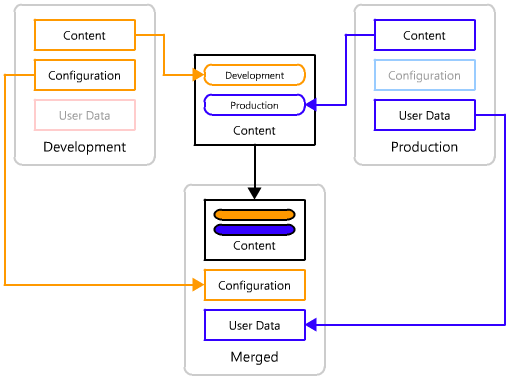
- Merge development and production databases
Guess what? There is documentation!
Use Cases
- Reverting your database to the last known good state. Ideal for testing and general development
- Syncing your changes with the changes made by your fellow developers
- Keeping track of changes to the database enabling the ability to remove commits from your history
- Merging the development version with a production version that had content added during development
DBScripts is a series of supporter scripts to help manage the database along side a Drupal installation; it is not an actual module to install within Drupal. Conversion to a module will be part of the process to add it as an extension of drush.
The scripts are run entirely from the command line. The dump, restore and erase scripts can be run with minimal training, but the merge script would most likely require someone more comfortable with the command line and their version control system, and the ability to peruse diffs of the database. The use case for these scripts are non-programmer developers and a deployment manager who performs the merge and deploys the changes to production.
An overview of features:
- Configurable ability to ignore some data for development, while preserving it in production
- Dump and restore to any arbitrary path, allowing you to "cheaply branch" the database when developing
- OPTIONAL ability to change all the AUTO_INCREMENT values (nid, uid, vid, tid, etc), and any tables using it as a foreign key, including related system paths (6.x-2.x) during merge
- Find all tables that are possibly related to a given table (6.x-2.x)
- Minimize conflicts with the users table due to the timestamps constantly changing, by resetting them to the last-merge value (6.x-2.x)
The Current State of Drupal Exportables
The exportables movement has been making great progress, especially with the wide adoption of ctools in contributed modules. Even if you are using dbscripts, you should be using any and all exportable systems that are available in the contributed modules you are using.
The following modules are known to support exporting their configuration values to code:
- Views
- Panels
- Flag
- Context - Block positioning and visibility
- Strongarm - Any and all data that is stored in the variables table
- Features - Content Types and their fields, roles and permissions, and input formats
In addition, the Features module has support for bundling exports from views, panels, context and strongarm into "packages" (ie: a Feature module), including easily re-exporting those values with updated configuration through both a web interface and a drush command.
Once the exportables system has completely matured with wide adoption, DBScripts will become obsolete.
The following are other deployment systems: Patterns, CoCKTaiL, Deploy, Exportables.
Updates
December 22, 2009 (hefox) - 6.x-2.x should be more stable now, but may have some quirks related to my epic struggle between good (git) and evil (cvs) using only a twig (my skills in cvs/git) -fox
December 22, 2009 (hefox) - 6.x-2.x is undergoing many changes, so will be unstable. I should have made a release before the changes, but live and learn.
November 24, 2009 (ceardach) - I have granted CVS access to an additional maintainer: hefox. Fox is an avid user of dbscripts and understands what's going on the best out of anyone I've met. Fox will continue committing fixes and will keep up with the issue queue more. As for my own involvement, unfortunately, my current employment cannot utilize dbscripts for deployment management so maintenance on my end will be reduced to being a side-project.
May 30, 2009 (ceardach) - I have continued to test this on a large website, as well as it being used by the rest of the developers within my company. It's working well. Merging for large complicated sites requires some manual tedium which I will try to automate.
April 8, 2009 (ceardach) - I have been heavily testing dbscripts on a semi-large/complicated website in a development and deploy environment where the client is actively adding in content that must be preserved. Its been working beautifully. I have fixed many edge-case bugs and added in a few features. The current HEAD is in the git repository (provided below) because I've been too busy to fiddle with CVS.
Alternate Repo
My preferred version control system is git, so everything I do goes there first. I also do not have a wonderful git-to-cvs workflow, so the commits in cvs are not as finely granular as my commits in git, and there is quite a delay between my development and committing to CVS. If you want to a) view full commit log, b) use dbscripts using git instead of cvs, or c) get the latest greatest version, you may access it through github.
- clone url: git://github.com/ceardach/dbscripts.git
- 6.x-2.x page: http://github.com/ceardach/dbscripts/tree/6.x-2.x
- 6.x-2.x commit history: http://github.com/ceardach/dbscripts/commits/6.x-2.x
The only difference between the cvs and git versions is that the config.inc and config.references.inc exist. Master is pointed at the 7.x-2.x branch, so you must switch to the 6.x-2.x branch. There are currently no tags.
git clone git://github.com/ceardach/dbscripts.git
cd dbscripts
git branch --track 6.x-2.x origin/6.x-2.x
git checkout 6.x-2.x
Note:
The user ceardach is no longer available. Please contact hefox if you need assistance.
Project information
 Seeking new maintainer
The current maintainers are looking for new people to take ownership. No further development
No longer developed by its maintainers.- Project categories: Developer tools
- Created by ceardach on , updated
 This project is not covered by the security advisory policy.
Use at your own risk! It may have publicly disclosed vulnerabilities.


