

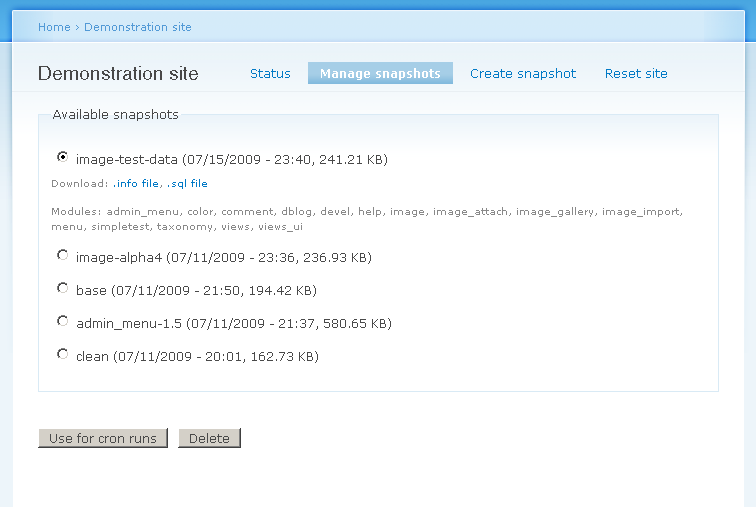
This module allows you to take snapshots of your site. It turns a Drupal installation into a sandbox that you can use to:
- Try out and test new modules, configuration, etc.
- Set up a public demonstration site for a contributed module or theme.
- Develop and test update and upgrade paths.
Whenever you need to reset your site to the state of a saved snapshot a click of your mouse will do so.
With cron enabled, a site can be automatically reset to a chosen snapshot in a definable interval.
Installation
- See README.txt contained in the download.
Public demo sites
- The bundled, optional Demo Reset module allows to setup a public demo site.
- Foreigners can play in your sandbox.
- Setup cron to automatically reset the site periodically.
- D6 only: If your web host does not support a real crontab, you may use Poormanscron. (D7 has this built-in.)
Integration
- Use Demonstration Site Install Profile to use snapshots to setup a Drupal site.
Backdrop Port
Outlook
- Backup/archive of uploaded files and restore upon reset. To allow sandboxes for file related modules.
- Journal module integration to show recent changes in snapshots.
- Demo Reset security improvements to allow to demonstrate administrative functionalities more easily.
Authors
This project has been sponsored by
- unleashed mind
Specialized in consulting and development of Drupal powered sites, our services include installation, development, theming, customization, and hosting to get you started. Visit http://www.unleashedmind.com for more information.
Supporting organizations:
Project information
- Project categories: Developer tools, Import and export
 1,864 sites report using this module
- Created by sun on , updated
 Stable releases for this project are covered by the security advisory policy.
There are currently no supported stable releases.


