

🇺🇦 |
This module is maintained by Ukrainian developers. Please consider supporting Ukraine in a fight for their freedom and safety of Europe. |
Allows site administrators to add classes to the outer HTML wrapper for any field display, so that CSS and Javascript can target them.
It's particulary useful for adding classes required by various jQuery plugins and CSS grid systems.
Instructions
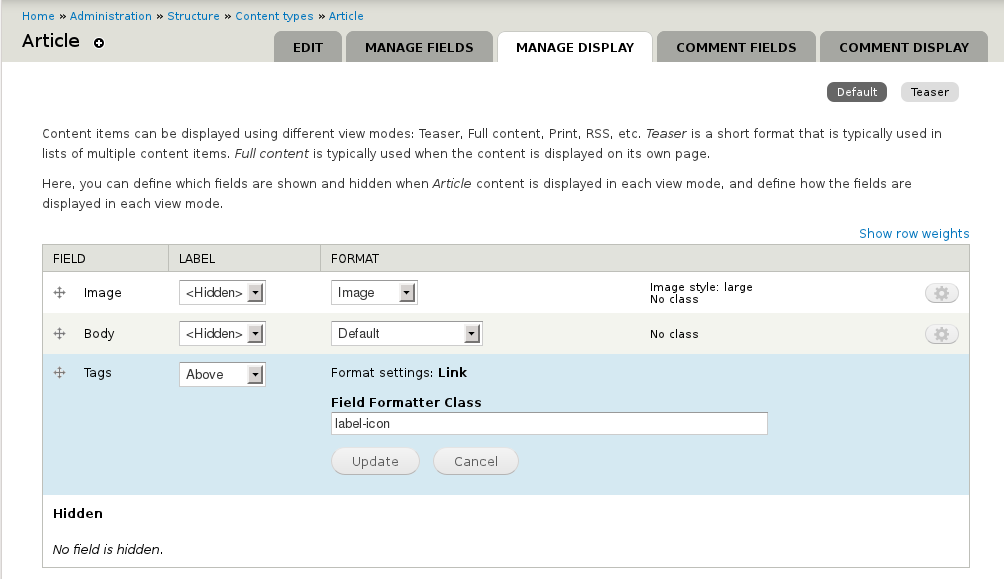
The Field Formatter Class settings are found in the Manage display tab for content types, users, and other entities. A text box is available for each field, revealed by using the formatter settings edit button (gear wheel icon) for that field.
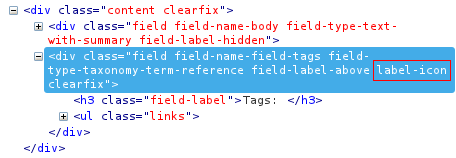
The class is added to the outer <div> container for the field. The default Drupal field classes (e.g. "field-type-taxonomy-term-reference") remain available - this module does not remove any classes.
The accompanying screenshot images show the settings form and some example HTML output.
This module works well in tandem with Field Group. Note that this module only adds classes to field formatters; to add classes to field groups, use the settings provided by the Field Group module.
Tutorials
- Daily Dose of Drupal - Episode 82.
In this short screencast Shane Thomas demonstrates the basic features of the module for Drupal 7.
Known Issues
There is a compatibility problem when using this module in combination with the extra fields provided by Display Suite. The issue potentially affects all modules which implement Field formatter settings API, and a solution is being explored in the Display suite project.
See #1616426: Compatibility with Display Suite
Project information
 Maintenance fixes only
Considered feature-complete by its maintainers.- Project categories: Content display, Site structure
 19,888 sites report using this module
- Created by mfer on , updated
 Stable releases for this project are covered by the security advisory policy.
Look for the shield icon below.
Releases
released 26 March 2026
Development version: 8.x-1.x-dev updated 26 Mar 2026 at 06:57 UTC


