

This project is not covered by Drupal’s security advisory policy.
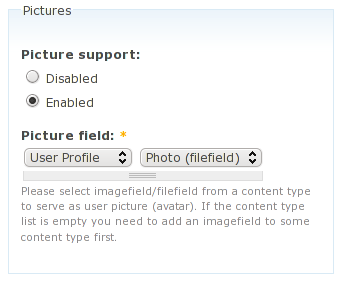
Select an imagefield/filefield from a content type to serve as user picture (avatar). On selected content type node update, such as when a user saves his content profile, user picture is being pointed to the first file in the filefield.
The module integrates into user picture settings form and hides irrelevant settings. All user picture properties such as file size and dimensions requirements, default image are managed by imagefield/filefield.
Inspired by #470004: User avatar via CCK imagefield.
General usecase
With Content Profile module and an imagefield/filefield attached to the content profile type first image in the field becomes the user avatar. If the field has multiple values you just need to instruct users to reorder images.
Installation
Install the module and it's requirements as usual. Attach an imagefield/filefield to a content type. Go to "admin/user/settings" and configure ImageField Avatar.
Please note
- ImageField Avatar works only on newly updated content: it won't replace old avatars automatically without user interaction (won't yet).
- User needs to have only one node of selected content type. Future versions may add multiple nodes support (e.g. a gallery with avatar node selection)
Requirements: ImageField, Hierarchical Select, Hierarchical Select Field Selector
Works with: Content Profile, ImageCache Profiles, Advanced Profile
Project information
 Seeking co-maintainer(s)
Maintainers are looking for help reviewing issues.- Maintenance fixes only
Considered feature-complete by its maintainers. - Project categories: Content display
 3 sites report using this module
- Created by crea on , updated
 This project is not covered by the security advisory policy.
Use at your own risk! It may have publicly disclosed vulnerabilities.

