

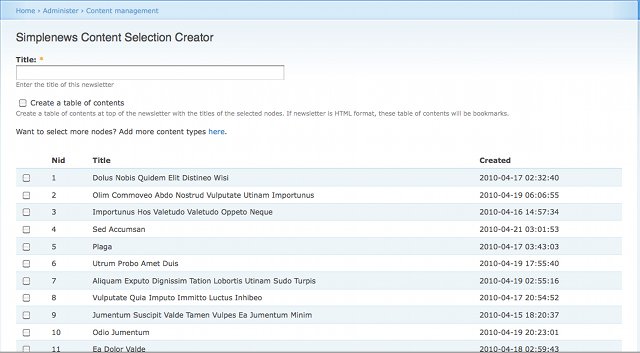
This module allows you to select content from your website and send a newsletter with the selected content.
Usage
- Select content at admin/content/scs_node_selection (only *.x-1.x branches)
- Select content at admin/content/node and choose Create newsletter as operation
- Views Integration
- This submodule depends on Views and Views Bulk Operations (VBO)
- Create a view with whatever filters/orders/display you want and choose the action Create newsletter with VBO
Maintenance
- Drupal 6 release has been created
- Drupal 7.x-1.x branch, straight port from D6, minimally maintained (bugfixes only)
- Drupal 7.x-2.x branch, fully harnessing the power of view modes, rewritten from scratch, fully maintained
Theming
*.x-1.x branches
Wherever you select nodes to create a newsletter. Each nodes goes true theme_scs_node_output. Override this in your theme and create a unique style for each node/node type.
Since version 6.x-1.6 theme_scs_node_output has to go in the FRONTEND theme of your Drupal installation
7.x-2.x branch
This branch uses the power of view modes to render nodes. This means that it goes through node preprocesses and can have its own template. For example you can do:
function yourtheme_preprocess_node(&$vars){
  // Remove submitted info
  $vars['display_submitted'] = FALSE;

  // Add template suggestions based on view modes
  $vars['theme_hook_suggestions'][] = 'node__' . $vars['view_mode'];
  $vars['theme_hook_suggestions'][] = 'node__' . $vars['view_mode'] . '__' . $vars['type'];
}
Important: Verify that you do these in the theme used to render the newsletter, that may be your admin theme!
Then you will be able to create templates named node--scs.tpl.php or node--scs--article.tpl.php
Don't forget to flush the cache.
How to display views content from block
SCS will only output fields of the node, so if your view is rendered as a block, it won't work.
Consider using the modules Entity Views Attachment (EVA) or Viewfield to provide your view as a field and then it will be output in newsletter. Then you can use Fieldblock module to display this field back as a block.
Sponsors
- Module created by Coworks.
- Drupal 7 versions by SebCorbin, sponsored by Makina Corpus.
Project information
 579 sites report using this module
- Created by dtrdewaele on , updated
 Stable releases for this project are covered by the security advisory policy.
There are currently no supported stable releases.


